What is a Network?
      0 A network consists of two or more computers that are
         linked together in order to share resources (such as
         printers), exchange files, or allow electronic
         communications.

      0 The computers on a network may be linked through
         cables, telephone lines, radio waves, satellites, or
         infrared light beams.


Doug Semple                                                     2
Local Area Network (LAN)
      0 Local Area Networks (LANs) are networks that are
        confined to a relatively small area. It is generally limited
        to an area such as a school, office or building.

      0 The computers in a LAN are linked together by cable or
        wireless connections.


Doug Semple                                                        3
Local Area Network (LAN)
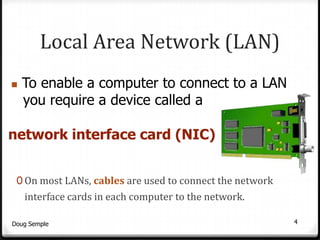
To enable a computer to connect to a LAN
myou require a device called a

network interface card (NIC)


 0 On most LANs, cables are used to connect the network
    interface cards in each computer to the network.

Doug Semple                                               4
Local Area Network (LAN)
      0 A Network Interface Card (NIC) is fitted to each device
        connected to the network.
      0 An NIC stores data being transferred to and from a
        computer (workstation) and the network.
      0 If required the NIC converts the data being transferred to
        make sure that it follows the communications rules that
        run on the network.


Doug Semple                                                     5
Local Area Network (LAN)
        Client/Server Network
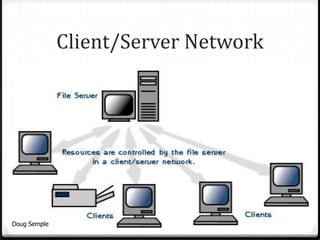
        0 In most LANs a powerful computer is used as the
          server.
        0 The server stores all of the software that controls the
          network, as well as the software and files that can be
          shared by the computers connected to the network.


Doug Semple                                                         6
Client/Server Network


Doug Semple                           7
Local Area Network (LAN)
         Client/Server Network
         0 Most LANs will have more than one server. For
              example:
              0 a printer server;
              0 a web server;
              0 an applications server.
         0 Computers connected to the server on a network are
              called workstations. These workstations are the
              clients.

Doug Semple                                                     8
Local Area Network (LAN)
     Client/Server Network Advantages:
     0 Centralised - resources and data security are
       controlled through the server;
     0 Resource Sharing – expensive peripheral
           devices such as laser printers and scanners can
           be shared by users
        0 Reliability – ability to continue operating when
           problems occur;
        0 Scalability - elements can be added or replaced
Doug Sempleas needs increase;                            9
Local Area Network (LAN)
         Client/Server Network
         Advantages Continued:

         0 Flexibility - new technology can be easily
           integrated into the system;
         0 Interoperability - all components should work
           together;
         0 Accessibility - resources can be accessed
              remotely.

Doug Semple                                             10
Local Area Network (LAN)
        Client/Server Network Disadvantages:

        0 Expensive – requires initial investment in network
          hardware;
        0 Maintenance – large networks will need staff to ensure
          efficient operation for example, a network
          manager, network technicians;


Doug Semple                                                    11
Local Area Network (LAN)
         Client/Server Network
         Disadvantages continued:
         0 Dependence – when a server goes down, operations
           will cease across the network.
         0 Interoperability - all components may not work
           together;
         0 Security/Privacy – as data is shared there is a greater
           need for security


Doug Semple                                                    12
Wide Area Network
                      (WAN)
   0 Wide Area Networks (WANs) connect computers across large
      distances, such as Scotland, Europe, or the world.

   0 Telecommunications links are used to connect this type of
      network.
         For example: connections (links) via telephone lines and
         satellites.
   0 A computer must have a modem to             enable connection.


Doug Semple                                                         13
Transmission Media
      0 Networks use different types of media to transmit data.

      0 The main types of media used are:
         0Copper cabling
         0Fibre-optic cabling
         0Wireless


Doug Semple                                                   14
Transmission Media
Copper cabling
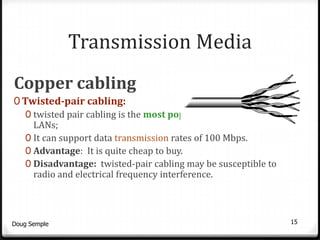
0 Twisted-pair cabling:
   0 twisted pair cabling is the most popular media used in
     LANs;
   0 It can support data transmission rates of 100 Mbps.
   0 Advantage: It is quite cheap to buy.
   0 Disadvantage: twisted-pair cabling may be susceptible to
     radio and electrical frequency interference.


Doug Semple                                                     15
Transmission Media
        Copper cabling
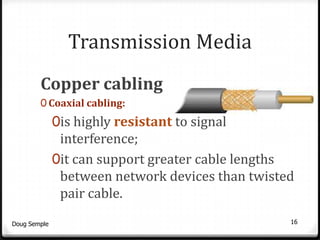
        0 Coaxial cabling:
              0is highly resistant to signal
               interference;
              0it can support greater cable lengths
               between network devices than twisted
               pair cable.
Doug Semple                                       16
Transmission Media
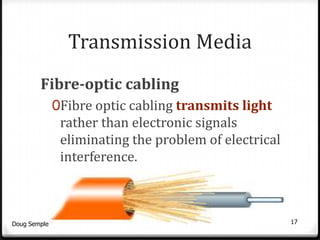
        Fibre-optic cabling
              0Fibre optic cabling transmits light
               rather than electronic signals
               eliminating the problem of electrical
               interference.


Doug Semple                                            17
Transmission Media
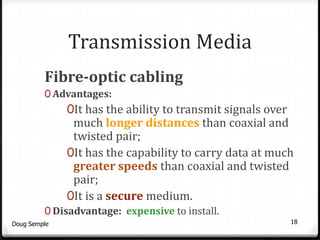
         Fibre-optic cabling
         0 Advantages:
              0It has the ability to transmit signals over
               much longer distances than coaxial and
               twisted pair;
              0It has the capability to carry data at much
               greater speeds than coaxial and twisted
               pair;
              0It is a secure medium.
         0 Disadvantage: expensive to install.
Doug Semple                                                  18
Transmission Media
          Wireless networking
          0 Not all networks are connected by cabling; some
            networks are wireless.
          0 Wireless LANs use high frequency radio
            signals, infrared light beams, or lasers to
            communicate between workstations and the
            server(s).


Doug Semple                                                   19
Transmission Media
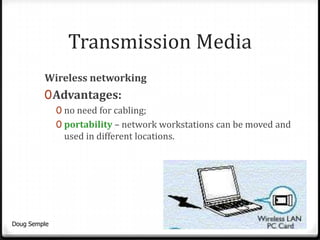
         Wireless networking
         0 Advantages:
              0 no need for cabling;
              0 portability – network workstations can be moved and
               used in different locations.


Doug Semple                                                       20
Transmission Media
        Wireless networking
        0 Disadvantages:
              0 provide poor security;
              0 slower than LANs using cabling;
              0 limited range (approximately 100m)
              0 signals absorbed by walls;
              0 susceptible to interference from lights and electronic devices;
              0 performance decreases as more computers used.


Doug Semple                                                            21
Multi Access
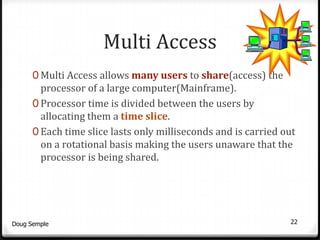
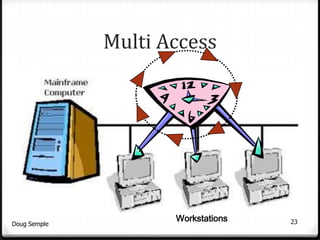
      0 Multi Access allows many users to share(access) the
        processor of a large computer(Mainframe).
      0 Processor time is divided between the users by
        allocating them a time slice.
      0 Each time slice lasts only milliseconds and is carried out
        on a rotational basis making the users unaware that the
        processor is being shared.


Doug Semple                                                     22
Multi Access


                     Workstations   23
Doug Semple
Security Measures

      0Files stored on the network
        must be protected against
        loss, corruption, hacking and
        viruses.


Doug Semple                             24
Security Measures
      0 Ways of securing this are to use:
         0 user IDs and Passwords to gain access to the network;
         0 different access rights for different users;
         0 data encryption – data is changed into a code. To read the
           data a user must have the key to the code;
         0 advanced ID measures – the use of smart cards to store
           fingerprint or voiceprint information


Doug Semple                                                         25
Security Measures
                      continued
     Physical Security measures:
     0 To prevent unauthorised access:
        0 Lock the door of the computer room(s);
        0 Put lockable covers over power switches, etc…
      and give only authorised users the key or door code.
     0 Disable floppy disc drives to prevent:
        0 files being saved to floppy disc and taken away;
        0 possible loading of viruses from floppy discs.


Doug Semple                                                  26
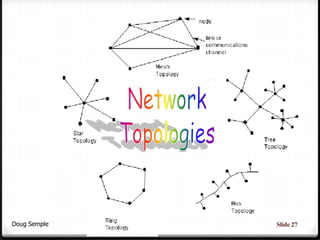
Doug Semple   Slide 27
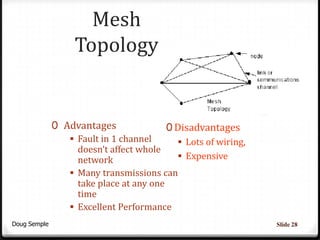
Mesh
                   Topology


              0 Advantages               0 Disadvantages
                  Fault in 1 channel       Lots of wiring,
                   doesn’t affect whole
                   network                  Expensive
                  Many transmissions can
                   take place at any one
                   time
                  Excellent Performance
Doug Semple                                                    Slide 28
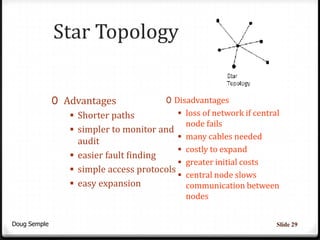
Star Topology


              0 Advantages              0 Disadvantages
                  Shorter paths            loss of network if central
                                             node fails
                  simpler to monitor and
                                            many cables needed
                   audit
                                            costly to expand
                  easier fault finding
                                            greater initial costs
                  simple access protocols
                                            central node slows
                  easy expansion            communication between
                                               nodes


Doug Semple                                                           Slide 29
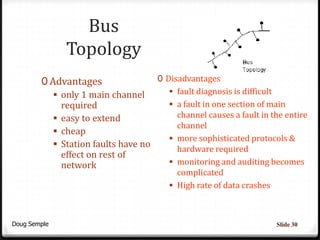
Bus
              Topology
        0 Advantages                0 Disadvantages
            only 1 main channel        fault diagnosis is difficult
             required                   a fault in one section of main
            easy to extend              channel causes a fault in the entire
                                         channel
            cheap
                                        more sophisticated protocols &
            Station faults have no
                                         hardware required
             effect on rest of
             network                    monitoring and auditing becomes
                                           complicated
                                          High rate of data crashes


Doug Semple                                                            Slide 30
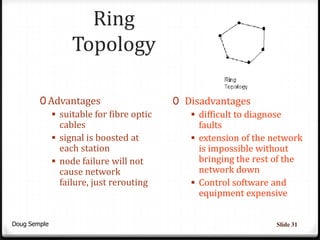
Ring
                Topology

        0 Advantages                    0 Disadvantages
            suitable for fibre optic       difficult to diagnose
             cables                          faults
            signal is boosted at           extension of the network
             each station                    is impossible without
            node failure will not           bringing the rest of the
             cause network                   network down
             failure, just rerouting        Control software and
                                             equipment expensive


Doug Semple                                                    Slide 31
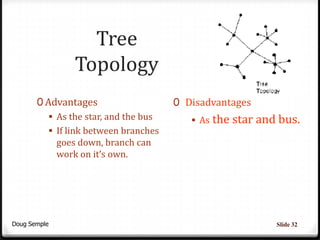
Tree
                Topology
       0 Advantages                    0 Disadvantages
           As the star, and the bus       As the star and bus.
           If link between branches
            goes down, branch can
            work on it’s own.


Doug Semple                                                Slide 32

iGCSE networks

  • 2.
    What is aNetwork? 0 A network consists of two or more computers that are linked together in order to share resources (such as printers), exchange files, or allow electronic communications. 0 The computers on a network may be linked through cables, telephone lines, radio waves, satellites, or infrared light beams. Doug Semple 2
  • 3.
    Local Area Network(LAN) 0 Local Area Networks (LANs) are networks that are confined to a relatively small area. It is generally limited to an area such as a school, office or building. 0 The computers in a LAN are linked together by cable or wireless connections. Doug Semple 3
  • 4.
    Local Area Network(LAN) To enable a computer to connect to a LAN myou require a device called a network interface card (NIC) 0 On most LANs, cables are used to connect the network interface cards in each computer to the network. Doug Semple 4
  • 5.
    Local Area Network(LAN) 0 A Network Interface Card (NIC) is fitted to each device connected to the network. 0 An NIC stores data being transferred to and from a computer (workstation) and the network. 0 If required the NIC converts the data being transferred to make sure that it follows the communications rules that run on the network. Doug Semple 5
  • 6.
    Local Area Network(LAN) Client/Server Network 0 In most LANs a powerful computer is used as the server. 0 The server stores all of the software that controls the network, as well as the software and files that can be shared by the computers connected to the network. Doug Semple 6
  • 7.
  • 8.
    Local Area Network(LAN) Client/Server Network 0 Most LANs will have more than one server. For example: 0 a printer server; 0 a web server; 0 an applications server. 0 Computers connected to the server on a network are called workstations. These workstations are the clients. Doug Semple 8
  • 9.
    Local Area Network(LAN) Client/Server Network Advantages: 0 Centralised - resources and data security are controlled through the server; 0 Resource Sharing – expensive peripheral devices such as laser printers and scanners can be shared by users 0 Reliability – ability to continue operating when problems occur; 0 Scalability - elements can be added or replaced Doug Sempleas needs increase; 9
  • 10.
    Local Area Network(LAN) Client/Server Network Advantages Continued: 0 Flexibility - new technology can be easily integrated into the system; 0 Interoperability - all components should work together; 0 Accessibility - resources can be accessed remotely. Doug Semple 10
  • 11.
    Local Area Network(LAN) Client/Server Network Disadvantages: 0 Expensive – requires initial investment in network hardware; 0 Maintenance – large networks will need staff to ensure efficient operation for example, a network manager, network technicians; Doug Semple 11
  • 12.
    Local Area Network(LAN) Client/Server Network Disadvantages continued: 0 Dependence – when a server goes down, operations will cease across the network. 0 Interoperability - all components may not work together; 0 Security/Privacy – as data is shared there is a greater need for security Doug Semple 12
  • 13.
    Wide Area Network (WAN) 0 Wide Area Networks (WANs) connect computers across large distances, such as Scotland, Europe, or the world. 0 Telecommunications links are used to connect this type of network. For example: connections (links) via telephone lines and satellites. 0 A computer must have a modem to enable connection. Doug Semple 13
  • 14.
    Transmission Media 0 Networks use different types of media to transmit data. 0 The main types of media used are: 0Copper cabling 0Fibre-optic cabling 0Wireless Doug Semple 14
  • 15.
    Transmission Media Copper cabling 0Twisted-pair cabling: 0 twisted pair cabling is the most popular media used in LANs; 0 It can support data transmission rates of 100 Mbps. 0 Advantage: It is quite cheap to buy. 0 Disadvantage: twisted-pair cabling may be susceptible to radio and electrical frequency interference. Doug Semple 15
  • 16.
    Transmission Media Copper cabling 0 Coaxial cabling: 0is highly resistant to signal interference; 0it can support greater cable lengths between network devices than twisted pair cable. Doug Semple 16
  • 17.
    Transmission Media Fibre-optic cabling 0Fibre optic cabling transmits light rather than electronic signals eliminating the problem of electrical interference. Doug Semple 17
  • 18.
    Transmission Media Fibre-optic cabling 0 Advantages: 0It has the ability to transmit signals over much longer distances than coaxial and twisted pair; 0It has the capability to carry data at much greater speeds than coaxial and twisted pair; 0It is a secure medium. 0 Disadvantage: expensive to install. Doug Semple 18
  • 19.
    Transmission Media Wireless networking 0 Not all networks are connected by cabling; some networks are wireless. 0 Wireless LANs use high frequency radio signals, infrared light beams, or lasers to communicate between workstations and the server(s). Doug Semple 19
  • 20.
    Transmission Media Wireless networking 0 Advantages: 0 no need for cabling; 0 portability – network workstations can be moved and used in different locations. Doug Semple 20
  • 21.
    Transmission Media Wireless networking 0 Disadvantages: 0 provide poor security; 0 slower than LANs using cabling; 0 limited range (approximately 100m) 0 signals absorbed by walls; 0 susceptible to interference from lights and electronic devices; 0 performance decreases as more computers used. Doug Semple 21
  • 22.
    Multi Access 0 Multi Access allows many users to share(access) the processor of a large computer(Mainframe). 0 Processor time is divided between the users by allocating them a time slice. 0 Each time slice lasts only milliseconds and is carried out on a rotational basis making the users unaware that the processor is being shared. Doug Semple 22
  • 23.
    Multi Access Workstations 23 Doug Semple
  • 24.
    Security Measures 0Files stored on the network must be protected against loss, corruption, hacking and viruses. Doug Semple 24
  • 25.
    Security Measures 0 Ways of securing this are to use: 0 user IDs and Passwords to gain access to the network; 0 different access rights for different users; 0 data encryption – data is changed into a code. To read the data a user must have the key to the code; 0 advanced ID measures – the use of smart cards to store fingerprint or voiceprint information Doug Semple 25
  • 26.
    Security Measures continued Physical Security measures: 0 To prevent unauthorised access: 0 Lock the door of the computer room(s); 0 Put lockable covers over power switches, etc… and give only authorised users the key or door code. 0 Disable floppy disc drives to prevent: 0 files being saved to floppy disc and taken away; 0 possible loading of viruses from floppy discs. Doug Semple 26
  • 27.
    Doug Semple Slide 27
  • 28.
    Mesh Topology 0 Advantages 0 Disadvantages  Fault in 1 channel  Lots of wiring, doesn’t affect whole network  Expensive  Many transmissions can take place at any one time  Excellent Performance Doug Semple Slide 28
  • 29.
    Star Topology 0 Advantages 0 Disadvantages  Shorter paths  loss of network if central node fails  simpler to monitor and  many cables needed audit  costly to expand  easier fault finding  greater initial costs  simple access protocols  central node slows  easy expansion communication between nodes Doug Semple Slide 29
  • 30.
    Bus Topology 0 Advantages 0 Disadvantages  only 1 main channel  fault diagnosis is difficult required  a fault in one section of main  easy to extend channel causes a fault in the entire channel  cheap  more sophisticated protocols &  Station faults have no hardware required effect on rest of network  monitoring and auditing becomes complicated  High rate of data crashes Doug Semple Slide 30
  • 31.
    Ring Topology 0 Advantages 0 Disadvantages  suitable for fibre optic  difficult to diagnose cables faults  signal is boosted at  extension of the network each station is impossible without  node failure will not bringing the rest of the cause network network down failure, just rerouting  Control software and equipment expensive Doug Semple Slide 31
  • 32.
    Tree Topology 0 Advantages 0 Disadvantages  As the star, and the bus  As the star and bus.  If link between branches goes down, branch can work on it’s own. Doug Semple Slide 32