By: Momina
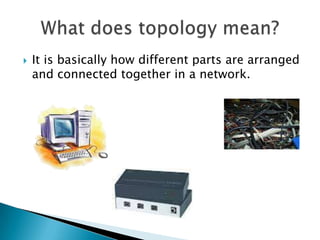
   It is basically how different parts are arranged
    and connected together in a network.
Bus Network    Star Network


                  Hybrid
Ring Network
                 Network
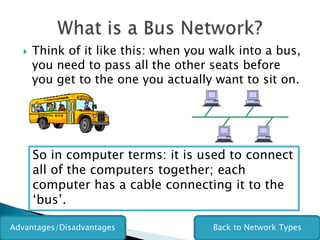
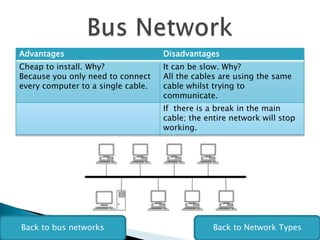
   Think of it like this: when you walk into a bus,
      you need to pass all the other seats before
      you get to the one you actually want to sit on.


      So in computer terms: it is used to connect
      all of the computers together; each
      computer has a cable connecting it to the
      ‘bus’.

Advantages/Disadvantages              Back to Network Types
Advantages                          Disadvantages
Cheap to install. Why?              It can be slow. Why?
Because you only need to connect    All the cables are using the same
every computer to a single cable.   cable whilst trying to
                                    communicate.
                                    If there is a break in the main
                                    cable; the entire network will stop
                                    working.


Back to bus networks                             Back to Network Types
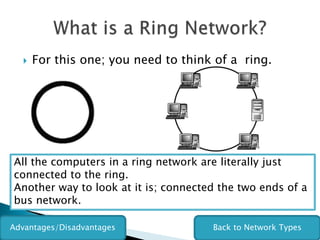
   For this one; you need to think of a ring.


All the computers in a ring network are literally just
connected to the ring.
Another way to look at it is; connected the two ends of a
bus network.

Advantages/Disadvantages              Back to Network Types
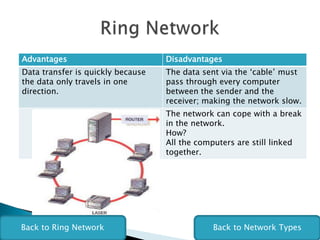
Advantages                         Disadvantages
Data transfer is quickly because   The data sent via the ‘cable’ must
the data only travels in one       pass through every computer
direction.                         between the sender and the
                                   receiver; making the network slow.
                                   The network can cope with a break
                                   in the network.
                                   How?
                                   All the computers are still linked
                                   together.


Back to Ring Network                          Back to Network Types
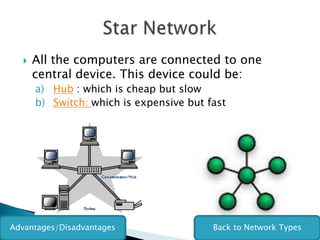
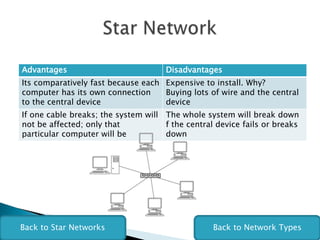
   All the computers are connected to one
      central device. This device could be:
      a) Hub : which is cheap but slow
      b) Switch: which is expensive but fast


Advantages/Disadvantages                 Back to Network Types
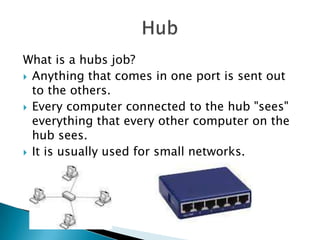
What is a hubs job?
 Anything that comes in one port is sent out
  to the others.
 Every computer connected to the hub "sees"
  everything that every other computer on the
  hub sees.
 It is usually used for small networks.
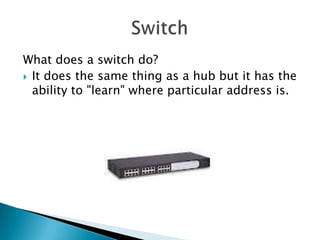
What does a switch do?
 It does the same thing as a hub but it has the
  ability to "learn" where particular address is.
Advantages                           Disadvantages
Its comparatively fast because each Expensive to install. Why?
computer has its own connection     Buying lots of wire and the central
to the central device               device
If one cable breaks; the system will The whole system will break down
not be affected; only that           f the central device fails or breaks
particular computer will be          down


Back to Star Networks                             Back to Network Types
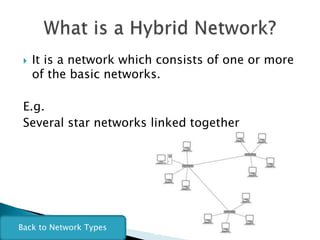
   It is a network which consists of one or more
     of the basic networks.

 E.g.
 Several star networks linked together


Back to Network Types

Igcse networks

  • 1.
  • 2.
    It is basically how different parts are arranged and connected together in a network.
  • 3.
    Bus Network Star Network Hybrid Ring Network Network
  • 4.
    Think of it like this: when you walk into a bus, you need to pass all the other seats before you get to the one you actually want to sit on. So in computer terms: it is used to connect all of the computers together; each computer has a cable connecting it to the ‘bus’. Advantages/Disadvantages Back to Network Types
  • 5.
    Advantages Disadvantages Cheap to install. Why? It can be slow. Why? Because you only need to connect All the cables are using the same every computer to a single cable. cable whilst trying to communicate. If there is a break in the main cable; the entire network will stop working. Back to bus networks Back to Network Types
  • 6.
    For this one; you need to think of a ring. All the computers in a ring network are literally just connected to the ring. Another way to look at it is; connected the two ends of a bus network. Advantages/Disadvantages Back to Network Types
  • 7.
    Advantages Disadvantages Data transfer is quickly because The data sent via the ‘cable’ must the data only travels in one pass through every computer direction. between the sender and the receiver; making the network slow. The network can cope with a break in the network. How? All the computers are still linked together. Back to Ring Network Back to Network Types
  • 8.
    All the computers are connected to one central device. This device could be: a) Hub : which is cheap but slow b) Switch: which is expensive but fast Advantages/Disadvantages Back to Network Types
  • 9.
    What is ahubs job?  Anything that comes in one port is sent out to the others.  Every computer connected to the hub "sees" everything that every other computer on the hub sees.  It is usually used for small networks.
  • 10.
    What does aswitch do?  It does the same thing as a hub but it has the ability to "learn" where particular address is.
  • 11.
    Advantages Disadvantages Its comparatively fast because each Expensive to install. Why? computer has its own connection Buying lots of wire and the central to the central device device If one cable breaks; the system will The whole system will break down not be affected; only that f the central device fails or breaks particular computer will be down Back to Star Networks Back to Network Types
  • 12.
    It is a network which consists of one or more of the basic networks. E.g. Several star networks linked together Back to Network Types

Editor's Notes