Damian Gordon
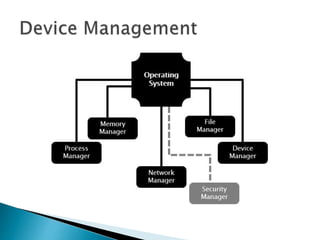
 The main functions of the device manager
are:
1. Monitor the status of all devices, including storage
drives, printers and other peripherals
2. Enforce pre-set policies on which process gets
which device for how long
3. Deal with the allocation of devices to processes
4. Deal with the de-allocation of devices to
processes, both at a temporary basis (e.g. when
the process is interrupted) and on a permanent
basis (e.g. when the process is completed).
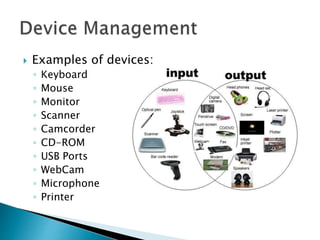
 Examples of devices:
◦ Keyboard
◦ Mouse
◦ Monitor
◦ Scanner
◦ Camcorder
◦ CD-ROM
◦ USB Ports
◦ WebCam
◦ Microphone
◦ Printer
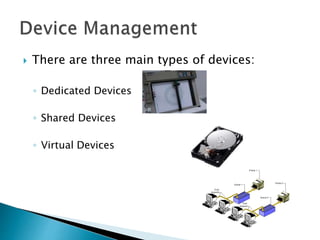
 There are three main types of devices:
◦ Dedicated Devices
◦ Shared Devices
◦ Virtual Devices
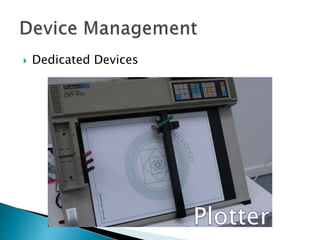
 Dedicated Devices
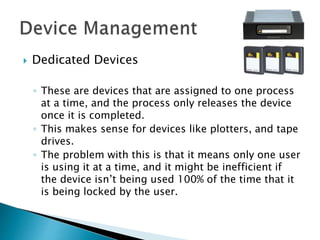
 Dedicated Devices
◦ These are devices that are assigned to one process
at a time, and the process only releases the device
once it is completed.
◦ This makes sense for devices like plotters, and tape
drives.
◦ The problem with this is that it means only one user
is using it at a time, and it might be inefficient if
the device isn’t being used 100% of the time that it
is being locked by the user.
 Shared Devices
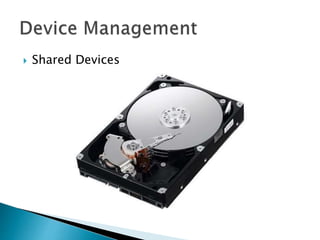
 Shared Devices
◦ These are devices that can be shared between
several processes.
◦ Considering an example like a hard disk, it is
shared, but interleaving between different
processes’ requests.
◦ All conflicts for device need to be resolved but pre-
determined policies to decide which request is
handled first.
 Virtual Devices
Spool 1
Spool 2
 Virtual Devices
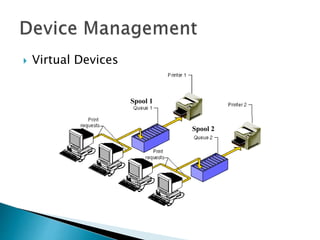
◦ These are devices are a combination of Dedicated
and Shared Devices.
◦ So a printer is a dedicated device, but using the
spooling (queues) means it can be shared.
◦ A print job isn’t sent straight to the printer, instead
it goes to the disk (spool) until it is fully prepared
with all the necessary printer sequences and
formatting, then it goes to the printer, ensuring
that the printers (and all I/O devices) are used
efficiently.
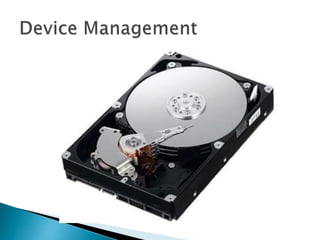
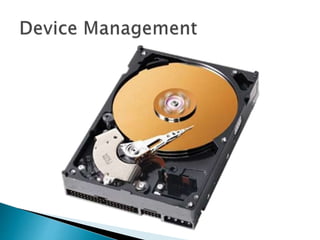
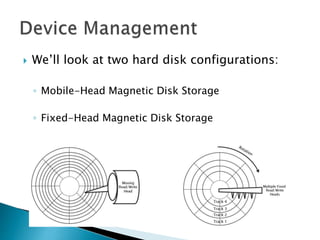
 We’ll look at two hard disk configurations:
◦ Mobile-Head Magnetic Disk Storage
◦ Fixed-Head Magnetic Disk Storage
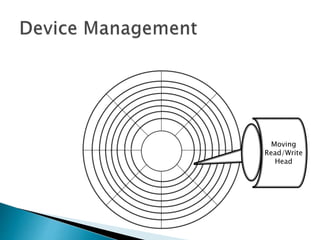
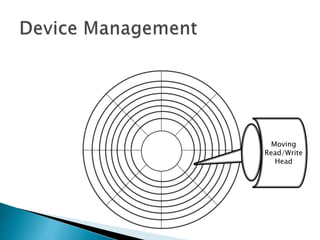
 Mobile-Head Magnetic Disk Storage
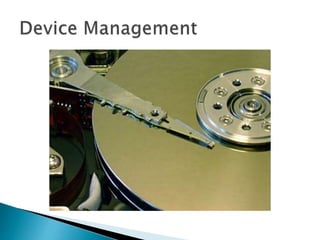
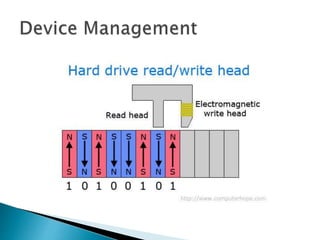
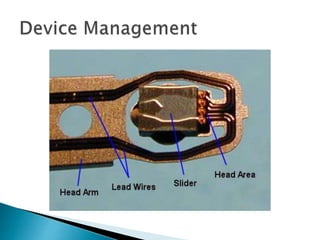
◦ Both the reading(/writing) head moves and the disk
spins.
◦ Usually formatted on both sides.
◦ Data is recorded on tracks.
Moving
Read/Write
Head
Moving
Read/Write
Head
 Mobile-Head Magnetic Disk Storage
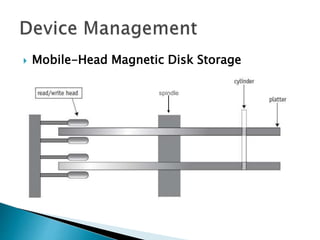
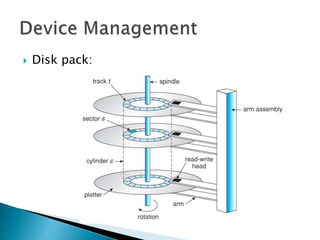
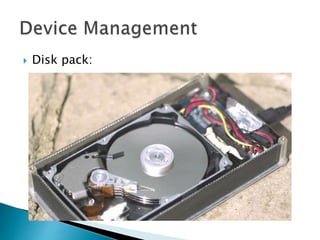
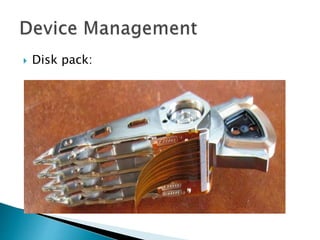
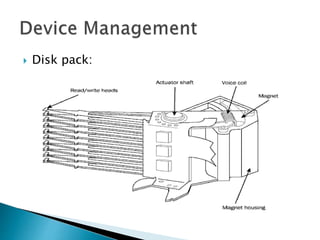
 Typically there is more than one disk (platter),
and they are arranged in a stack (we also call
this as being part of a disk pack).
 The disks are stacked on a common spindle,
and have Read/Write heads on both sides.
 All of the Read/Write heads are move in
unison.
 Mobile-Head Magnetic Disk Storage
spindle
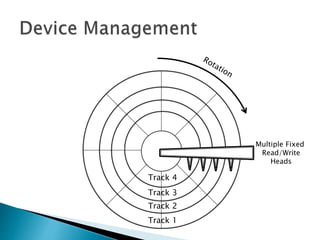
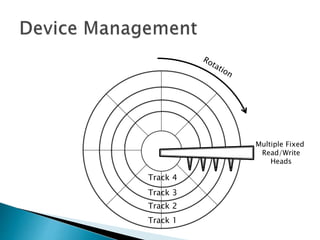
 Fixed-Head Magnetic Disk Storage
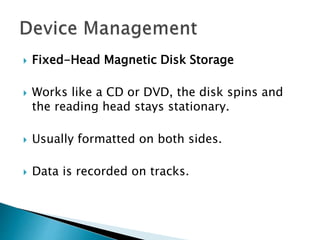
 Works like a CD or DVD, the disk spins and
the reading head stays stationary.
 Usually formatted on both sides.
 Data is recorded on tracks.
Track 1
Track 2
Track 3
Track 4
Multiple Fixed
Read/Write
Heads
Track 1
Track 2
Track 3
Track 4
Multiple Fixed
Read/Write
Heads
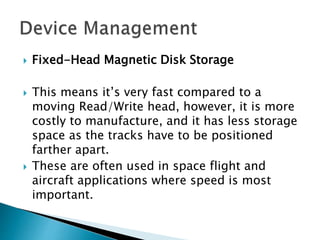
 Fixed-Head Magnetic Disk Storage
 This means it’s very fast compared to a
moving Read/Write head, however, it is more
costly to manufacture, and it has less storage
space as the tracks have to be positioned
farther apart.
 These are often used in space flight and
aircraft applications where speed is most
important.
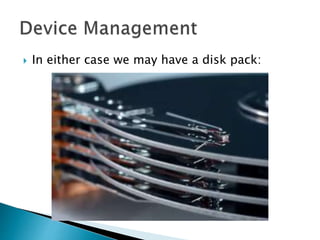
 In either case we may have a disk pack:
 Disk pack:
 Disk pack:
 Disk pack:
 Disk pack:
 Disk pack:
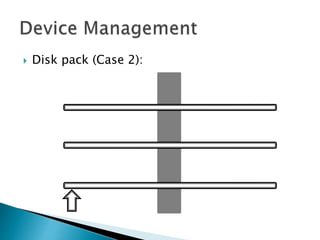
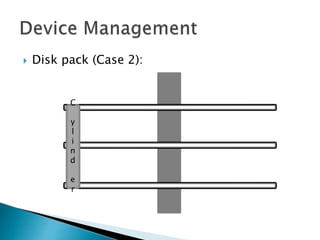
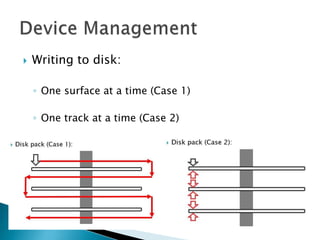
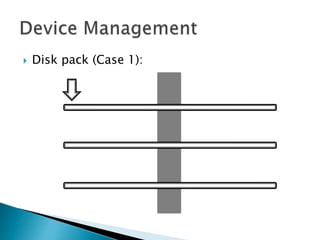
◦ An interesting question occurs about disk packs, is
it more efficient to write a series of records on one
surface of a disk and then the opposite surface of
that disk, followed by the next disk, and the next
one, and so on? Or is better to do fill the other
surface of each surface of each disk, then the next
track, then the next?
 Disk pack (Case 1):
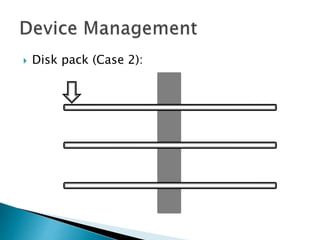
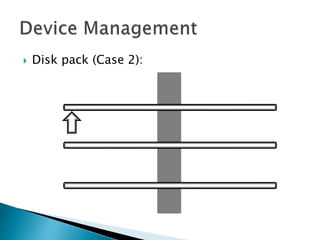
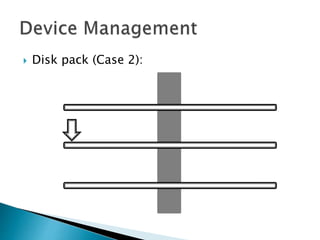
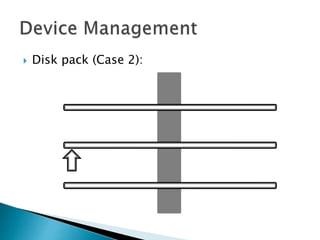
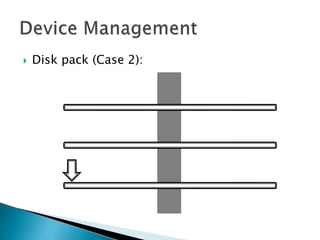
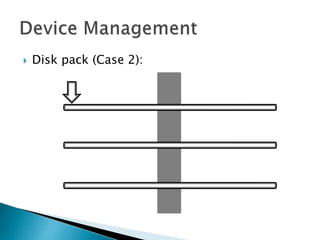
 Disk pack (Case 2):
C
y
l
i
n
d
e
r
 Disk pack:
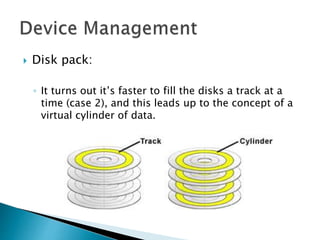
◦ It turns out it’s faster to fill the disks a track at a
time (case 2), and this leads up to the concept of a
virtual cylinder of data.
 Disk pack:
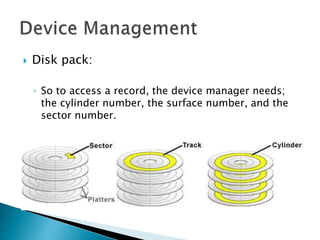
◦ So to access a record, the device manager needs;
the cylinder number, the surface number, and the
sector number.
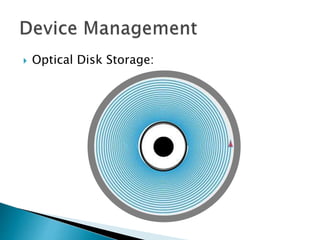
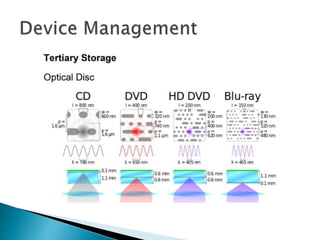
 Optical Disk Storage:
◦ Because of advances in laser technology it is
possible to store data optically rather than
magnetically, and CDs and DVDs are examples of
optical storage.
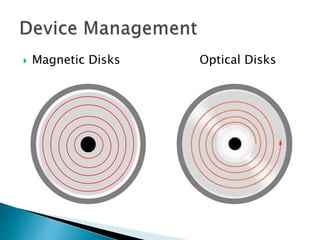
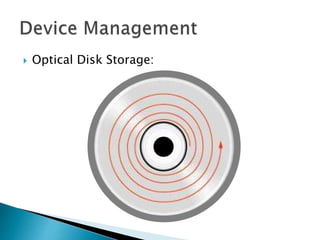
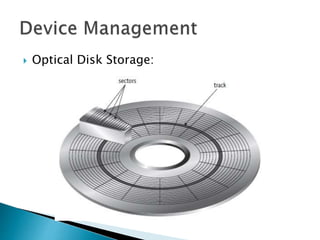
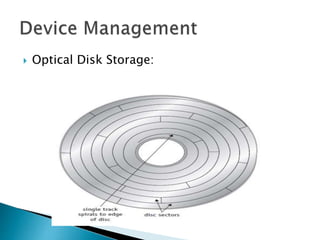
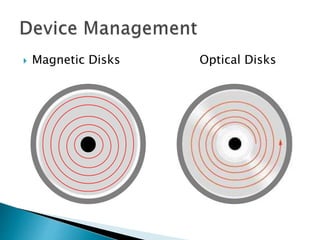
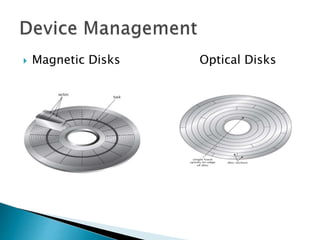
◦ Unlike magnetic disks, which typically consist of
tracks as a series of concentric circles, optical disks
are usually a single continuous spiral track.
 Magnetic Disks Optical Disks
 Optical Disk Storage:
◦ Another significant difference between magnetic
and optical disks is that magnetic disks spin at a
constant speed, so the tracks on other outer rings
of magnetic disks have to have larger sectors, and
those tracks nearer the centre have small tracks.
◦ Optical disks can change the speed to reading, so
the sector size is the same in the outside or inside.
 Optical Disk Storage:
◦ Another significant difference between magnetic
and optical disks is that magnetic disks spin at a
constant speed, so the tracks on other outer rings
of magnetic disks have to have larger sectors, and
those tracks nearer the centre have small tracks.
◦ Optical disks can change the speed to reading, so
the sector size is the same in the outside or inside.
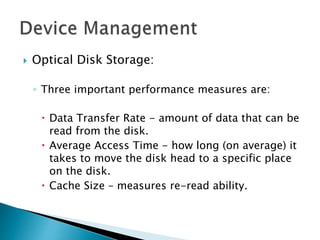
 Optical Disk Storage:
◦ Three important performance measures are:
 Data Transfer Rate
 Average Access Time
 Cache Size
 Data Transfer Rate
◦ This measures the amount of data that can be
read from the disk.
◦ It is typically measured in megabytes per
second (MB/s).
 Average Access Time
◦ This measures how long (on average) it takes
to move the disk head to a specific place on
the disk.
◦ It is typically measured in milliseconds (ms).
 Cache Size
◦ When reading and writing to disk, sometimes
the user will wish to re-read data they have
just read, if so, having it in the cache saves
reading it again.
◦ It is typically measured in kilobytes (KB).
 Optical Disk Storage:
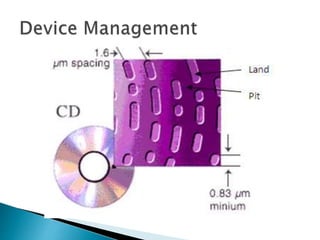
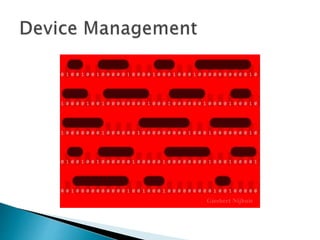
◦ To write to an optical disk, a high intensity laser
beam burns indentations in the disk called pits.
The pits represent zeros (0s).
◦ The unburned flat areas are called lands, and
represent ones (1s).
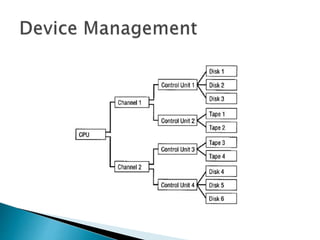
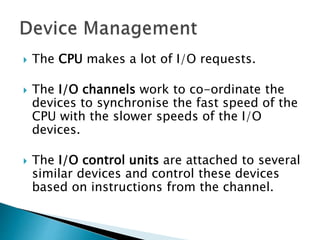
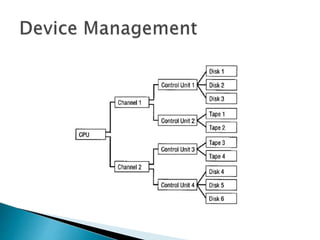
 The CPU makes a lot of I/O requests.
 The I/O channels work to co-ordinate the
devices to synchronise the fast speed of the
CPU with the slower speeds of the I/O
devices.
 The I/O control units are attached to several
similar devices and control these devices
based on instructions from the channel.
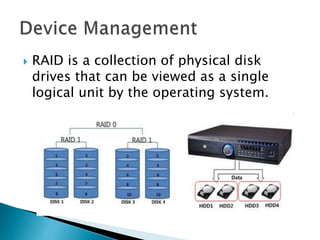
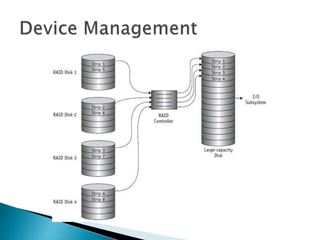
 RAID is a collection of physical disk
drives that can be viewed as a single
logical unit by the operating system.
 RAID works on the basis that several
small-capacity disk drives are more
efficient than a few large-capacity disk
drives.
 This is because by distributing the data
among several smaller disks, the system
can simultaneously access the requested
data from the multiple drives, resulting
in improved I/O performance.
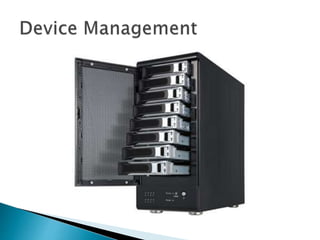
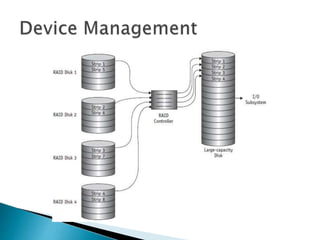
 A RAID configuration could have five disk
drives connected to a specialized controller.
 The controller houses the software that
coordinates the transfer of data from the
disks in the array to a large-capacity disk
connected to the I/O subsystem.
 This configuration is viewed by the
operating system as a single large capacity
disk, so that no software changes are
needed.
 A RAID configuration could have five disk
drives connected to a specialized controller.
 The controller houses the software that
coordinates the transfer of data from the
disks in the array to a large-capacity disk
connected to the I/O subsystem.
 This configuration is viewed by the
operating system as a single large capacity
disk, so that no software changes are
needed.
 Data is divided into segments called strips,
which are distributed across the disks in
 the array.
 A set of consecutive strips across disks is
called a stripe and the whole process is called
striping.
 The previous figure shows how data strips are
distributed in an array of four disks
Damian Gordon
 There are three main types of devices:
◦ Dedicated Devices
◦ Shared Devices
◦ Virtual Devices
 We’ll look at two hard disk configurations:
◦ Mobile-Head Magnetic Disk Storage
◦ Fixed-Head Magnetic Disk Storage
 Writing to disk:
◦ One surface at a time (Case 1)
◦ One track at a time (Case 2)
 Magnetic Disks Optical Disks
 Optical Disk Storage:
◦ Three important performance measures are:
 Data Transfer Rate - amount of data that can be
read from the disk.
 Average Access Time - how long (on average) it
takes to move the disk head to a specific place
on the disk.
 Cache Size – measures re-read ability.
Operating Systems: Device Management

Operating Systems: Device Management

  • 1.
  • 3.
     The mainfunctions of the device manager are: 1. Monitor the status of all devices, including storage drives, printers and other peripherals 2. Enforce pre-set policies on which process gets which device for how long 3. Deal with the allocation of devices to processes 4. Deal with the de-allocation of devices to processes, both at a temporary basis (e.g. when the process is interrupted) and on a permanent basis (e.g. when the process is completed).
  • 4.
     Examples ofdevices: ◦ Keyboard ◦ Mouse ◦ Monitor ◦ Scanner ◦ Camcorder ◦ CD-ROM ◦ USB Ports ◦ WebCam ◦ Microphone ◦ Printer
  • 5.
     There arethree main types of devices: ◦ Dedicated Devices ◦ Shared Devices ◦ Virtual Devices
  • 6.
  • 7.
     Dedicated Devices ◦These are devices that are assigned to one process at a time, and the process only releases the device once it is completed. ◦ This makes sense for devices like plotters, and tape drives. ◦ The problem with this is that it means only one user is using it at a time, and it might be inefficient if the device isn’t being used 100% of the time that it is being locked by the user.
  • 8.
  • 9.
     Shared Devices ◦These are devices that can be shared between several processes. ◦ Considering an example like a hard disk, it is shared, but interleaving between different processes’ requests. ◦ All conflicts for device need to be resolved but pre- determined policies to decide which request is handled first.
  • 10.
  • 11.
     Virtual Devices ◦These are devices are a combination of Dedicated and Shared Devices. ◦ So a printer is a dedicated device, but using the spooling (queues) means it can be shared. ◦ A print job isn’t sent straight to the printer, instead it goes to the disk (spool) until it is fully prepared with all the necessary printer sequences and formatting, then it goes to the printer, ensuring that the printers (and all I/O devices) are used efficiently.
  • 21.
     We’ll lookat two hard disk configurations: ◦ Mobile-Head Magnetic Disk Storage ◦ Fixed-Head Magnetic Disk Storage
  • 22.
     Mobile-Head MagneticDisk Storage ◦ Both the reading(/writing) head moves and the disk spins. ◦ Usually formatted on both sides. ◦ Data is recorded on tracks.
  • 23.
  • 24.
  • 26.
     Mobile-Head MagneticDisk Storage  Typically there is more than one disk (platter), and they are arranged in a stack (we also call this as being part of a disk pack).  The disks are stacked on a common spindle, and have Read/Write heads on both sides.  All of the Read/Write heads are move in unison.
  • 27.
     Mobile-Head MagneticDisk Storage spindle
  • 28.
     Fixed-Head MagneticDisk Storage  Works like a CD or DVD, the disk spins and the reading head stays stationary.  Usually formatted on both sides.  Data is recorded on tracks.
  • 29.
    Track 1 Track 2 Track3 Track 4 Multiple Fixed Read/Write Heads
  • 30.
    Track 1 Track 2 Track3 Track 4 Multiple Fixed Read/Write Heads
  • 31.
     Fixed-Head MagneticDisk Storage  This means it’s very fast compared to a moving Read/Write head, however, it is more costly to manufacture, and it has less storage space as the tracks have to be positioned farther apart.  These are often used in space flight and aircraft applications where speed is most important.
  • 32.
     In eithercase we may have a disk pack:
  • 33.
  • 34.
  • 35.
  • 36.
  • 37.
     Disk pack: ◦An interesting question occurs about disk packs, is it more efficient to write a series of records on one surface of a disk and then the opposite surface of that disk, followed by the next disk, and the next one, and so on? Or is better to do fill the other surface of each surface of each disk, then the next track, then the next?
  • 38.
     Disk pack(Case 1):
  • 39.
     Disk pack(Case 2):
  • 40.
     Disk pack(Case 2):
  • 41.
     Disk pack(Case 2):
  • 42.
     Disk pack(Case 2):
  • 43.
     Disk pack(Case 2):
  • 44.
     Disk pack(Case 2):
  • 45.
     Disk pack(Case 2):
  • 46.
     Disk pack(Case 2): C y l i n d e r
  • 47.
     Disk pack: ◦It turns out it’s faster to fill the disks a track at a time (case 2), and this leads up to the concept of a virtual cylinder of data.
  • 48.
     Disk pack: ◦So to access a record, the device manager needs; the cylinder number, the surface number, and the sector number.
  • 50.
     Optical DiskStorage: ◦ Because of advances in laser technology it is possible to store data optically rather than magnetically, and CDs and DVDs are examples of optical storage. ◦ Unlike magnetic disks, which typically consist of tracks as a series of concentric circles, optical disks are usually a single continuous spiral track.
  • 51.
     Magnetic DisksOptical Disks
  • 52.
  • 53.
  • 54.
     Optical DiskStorage: ◦ Another significant difference between magnetic and optical disks is that magnetic disks spin at a constant speed, so the tracks on other outer rings of magnetic disks have to have larger sectors, and those tracks nearer the centre have small tracks. ◦ Optical disks can change the speed to reading, so the sector size is the same in the outside or inside.
  • 55.
  • 56.
  • 57.
     Optical DiskStorage: ◦ Another significant difference between magnetic and optical disks is that magnetic disks spin at a constant speed, so the tracks on other outer rings of magnetic disks have to have larger sectors, and those tracks nearer the centre have small tracks. ◦ Optical disks can change the speed to reading, so the sector size is the same in the outside or inside.
  • 58.
     Optical DiskStorage: ◦ Three important performance measures are:  Data Transfer Rate  Average Access Time  Cache Size
  • 59.
     Data TransferRate ◦ This measures the amount of data that can be read from the disk. ◦ It is typically measured in megabytes per second (MB/s).
  • 60.
     Average AccessTime ◦ This measures how long (on average) it takes to move the disk head to a specific place on the disk. ◦ It is typically measured in milliseconds (ms).
  • 61.
     Cache Size ◦When reading and writing to disk, sometimes the user will wish to re-read data they have just read, if so, having it in the cache saves reading it again. ◦ It is typically measured in kilobytes (KB).
  • 62.
     Optical DiskStorage: ◦ To write to an optical disk, a high intensity laser beam burns indentations in the disk called pits. The pits represent zeros (0s). ◦ The unburned flat areas are called lands, and represent ones (1s).
  • 68.
     The CPUmakes a lot of I/O requests.  The I/O channels work to co-ordinate the devices to synchronise the fast speed of the CPU with the slower speeds of the I/O devices.  The I/O control units are attached to several similar devices and control these devices based on instructions from the channel.
  • 70.
     RAID isa collection of physical disk drives that can be viewed as a single logical unit by the operating system.
  • 71.
     RAID workson the basis that several small-capacity disk drives are more efficient than a few large-capacity disk drives.  This is because by distributing the data among several smaller disks, the system can simultaneously access the requested data from the multiple drives, resulting in improved I/O performance.
  • 73.
     A RAIDconfiguration could have five disk drives connected to a specialized controller.  The controller houses the software that coordinates the transfer of data from the disks in the array to a large-capacity disk connected to the I/O subsystem.  This configuration is viewed by the operating system as a single large capacity disk, so that no software changes are needed.
  • 74.
     A RAIDconfiguration could have five disk drives connected to a specialized controller.  The controller houses the software that coordinates the transfer of data from the disks in the array to a large-capacity disk connected to the I/O subsystem.  This configuration is viewed by the operating system as a single large capacity disk, so that no software changes are needed.
  • 76.
     Data isdivided into segments called strips, which are distributed across the disks in  the array.  A set of consecutive strips across disks is called a stripe and the whole process is called striping.  The previous figure shows how data strips are distributed in an array of four disks
  • 77.
  • 78.
     There arethree main types of devices: ◦ Dedicated Devices ◦ Shared Devices ◦ Virtual Devices
  • 79.
     We’ll lookat two hard disk configurations: ◦ Mobile-Head Magnetic Disk Storage ◦ Fixed-Head Magnetic Disk Storage
  • 80.
     Writing todisk: ◦ One surface at a time (Case 1) ◦ One track at a time (Case 2)
  • 81.
     Magnetic DisksOptical Disks
  • 82.
     Magnetic DisksOptical Disks
  • 83.
     Optical DiskStorage: ◦ Three important performance measures are:  Data Transfer Rate - amount of data that can be read from the disk.  Average Access Time - how long (on average) it takes to move the disk head to a specific place on the disk.  Cache Size – measures re-read ability.