

Click to edit Master subtitle style Todd Lammle’s CompTIA Network+ Chapter 1:Introduction to Networks Instructor:Mike Qaissaunee e
Chapter 1: Introduction to Networks The Following CompTIA Network+ Exam Objectives Are Covered in This Chapter:  2.3 Identify common physical network topologies Star Mesh Bus Ring Point to point Point to multipoint Hybrid 2.7 Explain common logical network topologies and their characteristics Peer to peer Client/server VPN VLAN
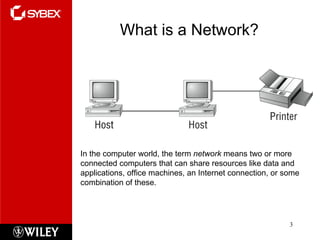
What is a Network? In the computer world, the term  network  means two or more connected computers that can share resources like data and applications, office machines, an Internet connection, or some combination of these.
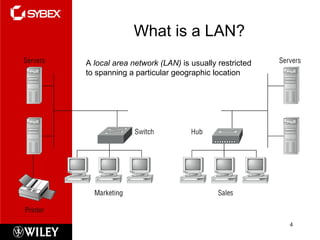
What is a LAN? A  local area network (LAN)  is usually restricted to spanning a particular geographic location
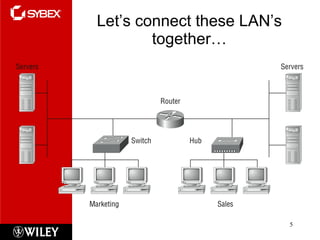
Let’s connect these LAN’s together…
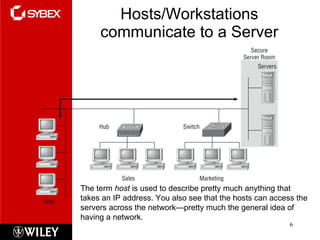
Hosts/Workstations communicate to a Server The term  host  is used to describe pretty much anything that takes an IP address. You also see that the hosts can access the servers across the network—pretty much the general idea of having a network.
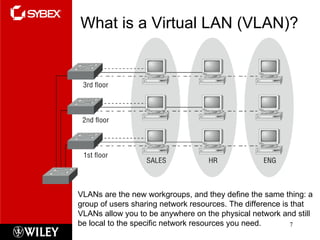
What is a Virtual LAN (VLAN)? VLANs are the new workgroups, and they define the same thing: a group of users sharing network resources. The difference is that VLANs allow you to be anywhere on the physical network and still be local to the specific network resources you need.
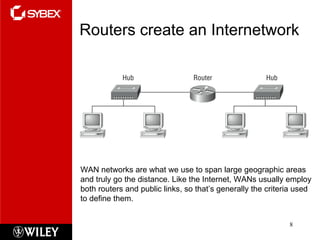
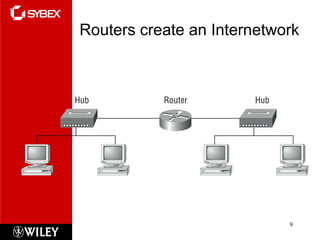
Routers create an Internetwork WAN networks are what we use to span large geographic areas and truly go the distance. Like the Internet, WANs usually employ both routers and public links, so that’s generally the criteria used to define them.
Routers create an Internetwork
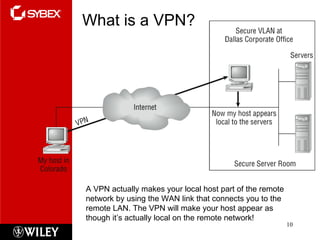
What is a VPN? A VPN actually makes your local host part of the remote network by using the WAN link that connects you to the remote LAN. The VPN will make your host appear as though it’s actually local on the remote network!
Why Use Networks? Network Group of computers and devices Connected by transmission media Stand-alone computer Not connected to other computers Uses local software and data Advantages of networks over standalone computers Device sharing by multiple users Saves money and time Central network management
Types of Networks Models vary according to: Computer positioning Control levels over shared resources Communication and resource sharing schemes Network models Peer-to-Peer Client/server
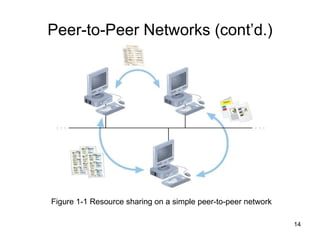
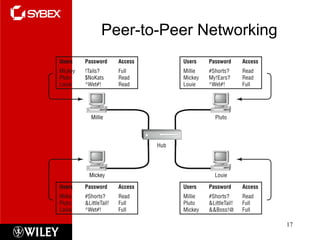
Peer-to-Peer Networks Direct computer communication Equal authority Individual resource sharing May share resources May prevent access to resources Traditional model Two or more general purpose computers Capable of sending and receiving information to and from every other computer
Peer-to-Peer Networks (cont’d.) Figure 1-1 Resource sharing on a simple peer-to-peer network
Peer-to-Peer Networks (cont’d.) Advantages Simple configuration Less expensive Compared to other network models Disadvantages Not flexible Not necessarily secure Not practical for large installations
Peer-to-Peer Networks (cont’d.) Resource sharing method Modify file sharing controls A user responsibility Not centrally controlled Potential variations and security issues Environments Small home or office Large networks using the Internet Gnutella, Freenet, original Napster BitTorrent software
Peer-to-Peer Networking
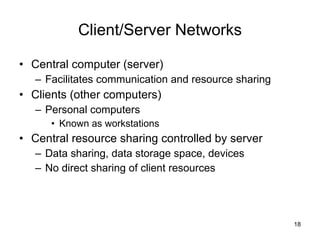
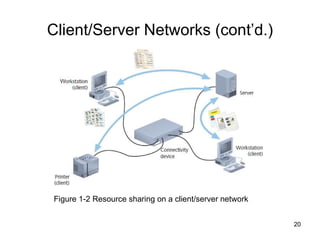
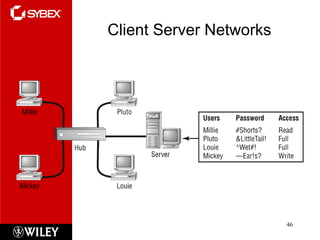
Client/Server Networks Central computer (server) Facilitates communication and resource sharing Clients (other computers) Personal computers Known as workstations Central resource sharing controlled by server Data sharing, data storage space, devices No direct sharing of client resources
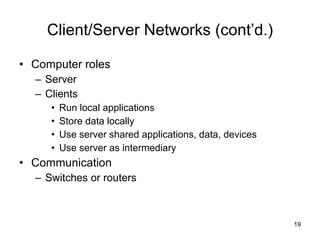
Client/Server Networks (cont’d.) Computer roles Server Clients Run local applications Store data locally Use server shared applications, data, devices Use server as intermediary Communication Switches or routers
Client/Server Networks (cont’d.) Figure 1-2 Resource sharing on a client/server network
Client/Server Networks (cont’d.) Server requirement Network operating system Manages client data, resources Ensures authorized user access Controls user file access Restricts user network access Dictates computer communication rules Supplies application to clients Server examples UNIX, Linux, Microsoft Server 2003 and 2008, MAC OS X Server
Client/Server Networks (cont’d.) Server features relative to clients More memory, processing, storage capacity Equipped with special hardware Provides network management functions Disadvantages relative to peer-to-peer networks Complex in design and maintenance
Client/Server Networks (cont’d.) Advantages relative to peer-to-peer networks User credential assigned from one place Multiple shared resource access centrally controlled Central problem monitoring, diagnostics, correction capabilities User response time optimization capabilities Efficient processing on large networks Scalability Popular in medium- and large-scale organizations
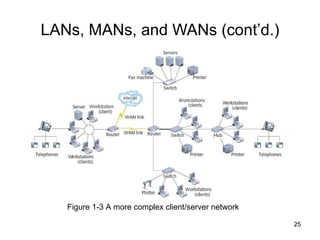
LANs, MANs, and WANs LAN (local area network) Network confined to a relatively small space 1980s LANs became popular as peer-to-peer based Today Larger and more complex client/server network MAN (metropolitan area network) Network extends beyond building boundaries Larger than LAN Connects clients and servers from multiple buildings
LANs, MANs, and WANs (cont’d.) Figure 1-3 A more complex client/server network
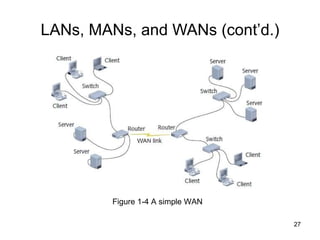
LANs, MANs, and WANs (cont’d.) WAN (wide area network) Connects two or more geographically distinct LANs or MANs Comparison to LANs Use slightly different transmission methods and media Use greater variety of technologies Network connection Separate offices in same organization Separate offices in different organizations
LANs, MANs, and WANs (cont’d.) Figure 1-4 A simple WAN
Elements Common to  Client/Server Networks Client Network computer requesting resources or services from another network computer Client workstation human user Client software installed on workstation Server Network computer managing shared resources Runs network operating system Workstation Personal computer May or may not be connected to network
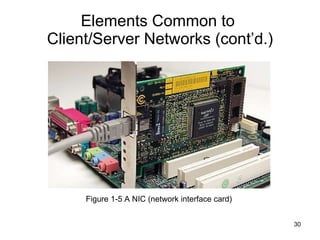
Elements Common to  Client/Server Networks (cont’d.) NIC (network interface card) Device inside computer Connects computer to network media Allows communication with other computers NOS (network operating system) Server software Enables server to manage data, users, groups, security, applications, and other networking functions
Elements Common to  Client/Server Networks (cont’d.) Figure 1-5 A NIC (network interface card)
Elements Common to  Client/Server Networks (cont’d.) Host Computer Enables network resource sharing by other computers  Node Client, server, or other device Communicates over a network Identified by unique number (network address) Connectivity device Allows multiple networks or multiple parts of one network to connect and exchange data
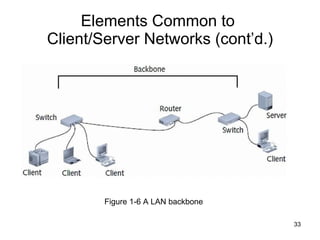
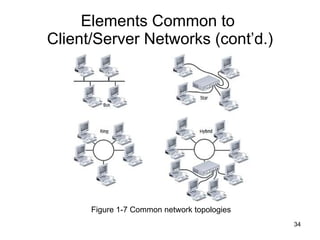
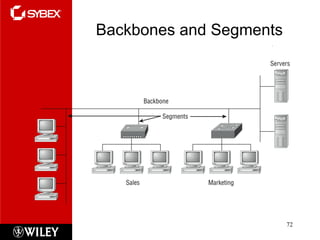
Elements Common to  Client/Server Networks (cont’d.) Segment Group of nodes Use same communications channel for traffic Backbone Connects segments and significant shared devices “ A network of networks” Topology Computer network physical layout Ring, bus, star or hybrid formation
Elements Common to  Client/Server Networks (cont’d.) Figure 1-6 A LAN backbone
Elements Common to  Client/Server Networks (cont’d.) Figure 1-7 Common network topologies
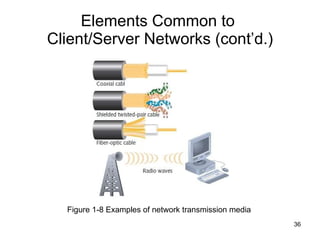
Elements Common to  Client/Server Networks (cont’d.) Protocol Standard method or format for communication between networked devices Data packets Distinct data units exchanged between nodes Addressing Scheme for assigning  unique identifying number to every node Transmission media Means through which data is transmitted and received
Elements Common to  Client/Server Networks (cont’d.) Figure 1-8 Examples of network transmission media
How Networks Are Used Network services Functions provided by a network Most visible E-mail Other vital services Printer sharing, file sharing, Internet access and Web site delivery, remote access capabilities, the provision of voice (telephone) and video services, network management
File and Print Services File services Capability of server to share data files, applications and disk storage space File server Provides file services File services provide foundation of networking Print services Share printers across network Saves time and money
Access Services Allow remote user network connection Allow network users to connect to machines outside the network Remote user Computer user on different network or in different geographical location from LAN’s server Network operating systems include built-in access services
Access Services (cont’d.) Provide LAN connectivity when WAN connection is not cost-effective External staff used to diagnose problems Allow external users to use network resources and devices  Same as if logged on to office workstation
Communications Services Convergence Phenomenon of offering multiple types of communications services on the same network Unified communications Multiple network-based communications centralized management E-mail Oldest and most frequently used Mail server Computer responsible for mail services Coordinates storage and transfer of e-mail
Communications Services (cont’d.) Additional tasks of mail servers Intercept spam Handle objectionable content Route messages according to rules Provide Web-based client Notify administrators or users if certain events occur Schedule e-mail transmission, retrieval, storage, maintenance functions Communicate with mail servers on other networks Mail server runs specialized mail server software
Internet Services Supplying Web pages Servers work together to bring Web pages to user’s desktop Web server Computer installed with appropriate software to supply Web pages to many different clients upon demand Other Internet services File transfer capabilities, Internet addressing schemes, security filters, means for directly logging on to other Internet computers
Management Services Small network management  Single network administrator Network operating system’s internal functions Today’s larger network management Centrally administered network management tasks
Management Services (cont’d.) Other important services Traffic monitoring and control Load balancing Hardware diagnosis and failure alert Asset management License tracking Security auditing Address management Backup and restoration of data
Client Server Networks
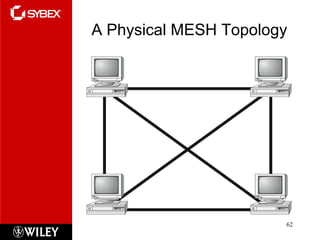
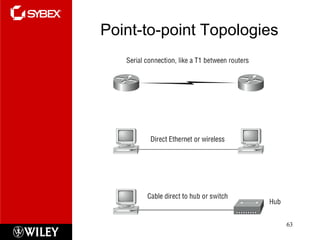
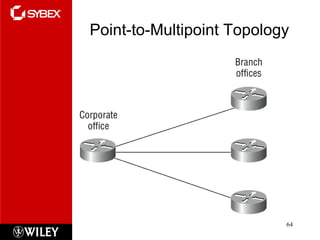
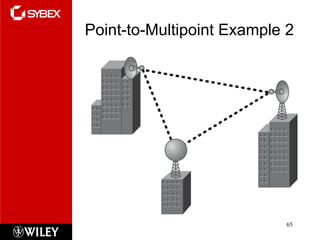
Physical Topologies Here is a list of the various topologies you’re most likely to run in to these days: Bus Star Ring Mesh Point-to-point Point-to-multipoint Hybrid
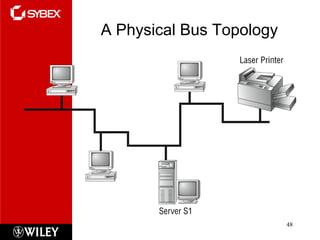
A Physical Bus Topology
Simple Physical Topologies Physical topology Physical network nodes layout Depicts broad scope Does not specify: Device types Connectivity methods Addressing schemes Fundamental shapes Bus, ring, star Hybrid
Bus Bus topology Bus  Single cable Connecting all network nodes No intervening connectivity devices One shared communication channel Physical medium Coaxial cable Passive topology Node listens for, accepts data Use broadcast to send
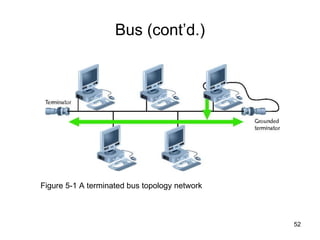
Bus (cont’d.) Bus topology (cont’d.) Broadcast domain Node communicates using broadcast transmission Terminators 50-ohm resistors Stops signal at end of wire Signal bounce Signal travel endlessly between two network ends One end grounded Removes static electricity
Bus (cont’d.) Figure 5-1 A terminated bus topology network
Bus (cont’d.) Advantages Relatively inexpensive Disadvantage Does not scale well Difficult to troubleshoot Not very fault tolerant
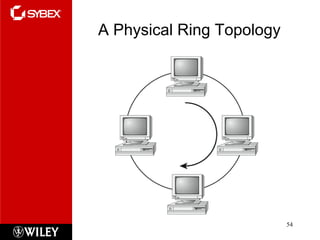
A Physical Ring Topology
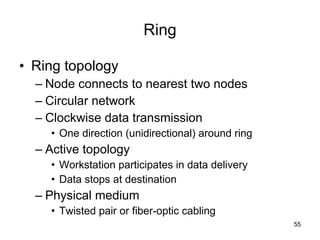
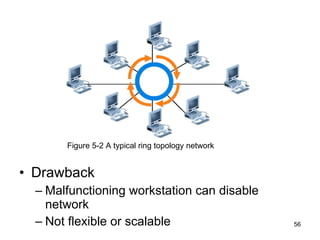
Ring Ring topology Node connects to nearest two nodes Circular network Clockwise data transmission One direction (unidirectional) around ring Active topology Workstation participates in data delivery Data stops at destination Physical medium Twisted pair or fiber-optic cabling
Drawback Malfunctioning workstation can disable network Not flexible or scalable Figure 5-2 A typical ring topology network
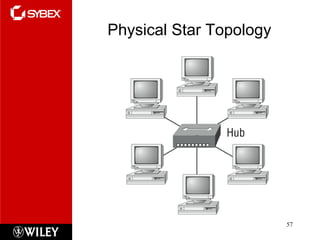
Physical Star Topology
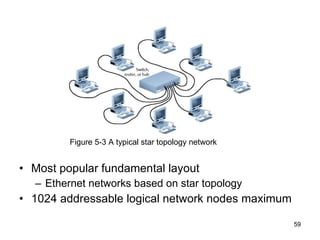
Star Star topology Node connects through central device Physical medium Twisted pair or fiber-optic cabling Single cable connects two devices Require more cabling, configuration Advantage Fault tolerance Centralized connection point affects LAN segment Scalable
Most popular fundamental layout Ethernet networks based on star topology 1024 addressable logical network nodes maximum Figure 5-3 A typical star topology network
Logical Topologies Describes data transmission between nodes Most common: bus, ring Bus logical topology Signals travel from one device to all other devices May or may not travel through intervening connectivity device Bus logical topology used by networks with: Physical bus topology Star, star-wired bus topology Ethernet
Logical Topologies (cont’d.) Ring logical topology Signals follow circular path  Ring logical topology used by networks with:  Pure ring topology Star-wired ring hybrid physical topology Token ring
A Physical MESH Topology
Point-to-point Topologies
Point-to-Multipoint Topology
Point-to-Multipoint Example 2
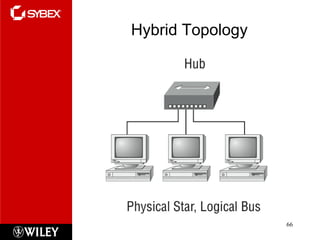
Hybrid Topology
Hybrid Physical Topologies Pure bus, ring, star topologies Rarely exist Too restrictive Hybrid topology More likely Complex combination of pure topologies Several options
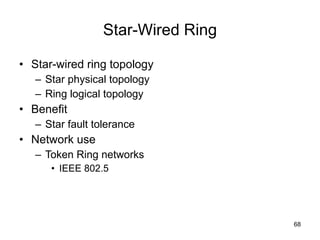
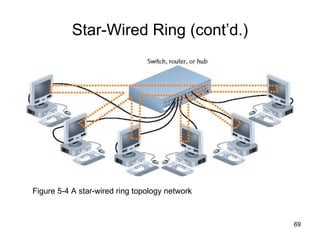
Star-Wired Ring Star-wired ring topology Star physical topology Ring logical topology Benefit Star fault tolerance Network use Token Ring networks IEEE 802.5
Star-Wired Ring (cont’d.) Figure 5-4 A star-wired ring topology network
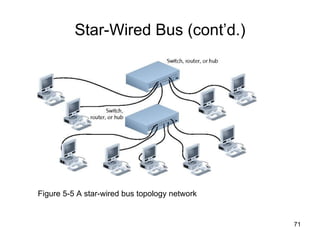
Star-Wired Bus Star-wired bus topology Workstation groups Star-connected devices Networked via single bus Advantage Cover longer distances Easily interconnect, isolate different segments Drawback Cabling, connectivity device expense Basis for modern Ethernet networks
Star-Wired Bus (cont’d.) Figure 5-5 A star-wired bus topology network
Backbones and Segments
Backbone Networks Cabling connecting hubs, switches, routers More throughput Large organizations Fiber-optic backbone Cat 5 or better for hubs, switches Enterprise-wide network backbones  Complex, difficult to plan Enterprise Entire organization Significant building block: backbone
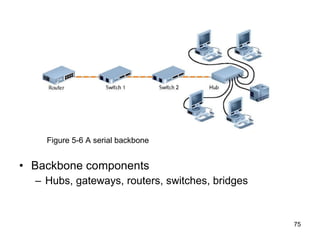
Serial Backbone Simplest backbone Two or more internetworking devices Connect using single daisy-chain cable Daisy-chain Linked series of devices Benefit Logical growth solution Modular additions Low-cost LAN infrastructure expansion Easily attach hubs
Backbone components Hubs, gateways, routers, switches, bridges Figure 5-6 A serial backbone
Serial Backbone (cont’d.) Serial connection of repeating devices Essential for distance communication Standards  Define number of hubs allowed Exceed standards Intermittent, unpredictable data transmission errors
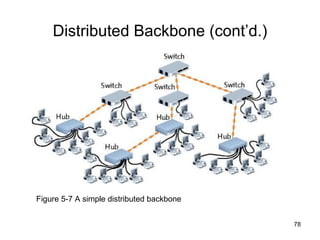
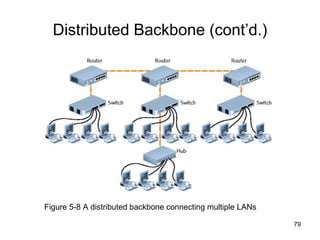
Distributed Backbone Connectivity devices Connected to hierarchy of central connectivity devices Benefit Simple expansion, limited capital outlay More complicated distributed backbone Connects multiple LANs, LAN segments Using routers
Distributed Backbone (cont’d.) Figure 5-7 A simple distributed backbone
Distributed Backbone (cont’d.) Figure 5-8 A distributed backbone connecting multiple LANs
Distributed Backbone (cont’d.) More benefits Workgroup segregation May include daisy-chain linked hubs Consider length Drawback Potential for single failure points
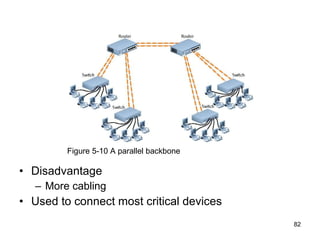
Parallel Backbone Most robust network backbone More than one central router, switch Connects to each network segment Requires duplicate connections between connectivity devices Advantage Redundant links Increased performance Better fault tolerance
Disadvantage More cabling Used to connect most critical devices Figure 5-10 A parallel backbone
Summary Summary Exam Essentials Section Written Labs Review Questions

Chapter 1

  • 1.
    Click to editMaster subtitle style Todd Lammle’s CompTIA Network+ Chapter 1:Introduction to Networks Instructor:Mike Qaissaunee e
  • 2.
    Chapter 1: Introductionto Networks The Following CompTIA Network+ Exam Objectives Are Covered in This Chapter: 2.3 Identify common physical network topologies Star Mesh Bus Ring Point to point Point to multipoint Hybrid 2.7 Explain common logical network topologies and their characteristics Peer to peer Client/server VPN VLAN
  • 3.
    What is aNetwork? In the computer world, the term network means two or more connected computers that can share resources like data and applications, office machines, an Internet connection, or some combination of these.
  • 4.
    What is aLAN? A local area network (LAN) is usually restricted to spanning a particular geographic location
  • 5.
    Let’s connect theseLAN’s together…
  • 6.
    Hosts/Workstations communicate toa Server The term host is used to describe pretty much anything that takes an IP address. You also see that the hosts can access the servers across the network—pretty much the general idea of having a network.
  • 7.
    What is aVirtual LAN (VLAN)? VLANs are the new workgroups, and they define the same thing: a group of users sharing network resources. The difference is that VLANs allow you to be anywhere on the physical network and still be local to the specific network resources you need.
  • 8.
    Routers create anInternetwork WAN networks are what we use to span large geographic areas and truly go the distance. Like the Internet, WANs usually employ both routers and public links, so that’s generally the criteria used to define them.
  • 9.
    Routers create anInternetwork
  • 10.
    What is aVPN? A VPN actually makes your local host part of the remote network by using the WAN link that connects you to the remote LAN. The VPN will make your host appear as though it’s actually local on the remote network!
  • 11.
    Why Use Networks?Network Group of computers and devices Connected by transmission media Stand-alone computer Not connected to other computers Uses local software and data Advantages of networks over standalone computers Device sharing by multiple users Saves money and time Central network management
  • 12.
    Types of NetworksModels vary according to: Computer positioning Control levels over shared resources Communication and resource sharing schemes Network models Peer-to-Peer Client/server
  • 13.
    Peer-to-Peer Networks Directcomputer communication Equal authority Individual resource sharing May share resources May prevent access to resources Traditional model Two or more general purpose computers Capable of sending and receiving information to and from every other computer
  • 14.
    Peer-to-Peer Networks (cont’d.)Figure 1-1 Resource sharing on a simple peer-to-peer network
  • 15.
    Peer-to-Peer Networks (cont’d.)Advantages Simple configuration Less expensive Compared to other network models Disadvantages Not flexible Not necessarily secure Not practical for large installations
  • 16.
    Peer-to-Peer Networks (cont’d.)Resource sharing method Modify file sharing controls A user responsibility Not centrally controlled Potential variations and security issues Environments Small home or office Large networks using the Internet Gnutella, Freenet, original Napster BitTorrent software
  • 17.
  • 18.
    Client/Server Networks Centralcomputer (server) Facilitates communication and resource sharing Clients (other computers) Personal computers Known as workstations Central resource sharing controlled by server Data sharing, data storage space, devices No direct sharing of client resources
  • 19.
    Client/Server Networks (cont’d.)Computer roles Server Clients Run local applications Store data locally Use server shared applications, data, devices Use server as intermediary Communication Switches or routers
  • 20.
    Client/Server Networks (cont’d.)Figure 1-2 Resource sharing on a client/server network
  • 21.
    Client/Server Networks (cont’d.)Server requirement Network operating system Manages client data, resources Ensures authorized user access Controls user file access Restricts user network access Dictates computer communication rules Supplies application to clients Server examples UNIX, Linux, Microsoft Server 2003 and 2008, MAC OS X Server
  • 22.
    Client/Server Networks (cont’d.)Server features relative to clients More memory, processing, storage capacity Equipped with special hardware Provides network management functions Disadvantages relative to peer-to-peer networks Complex in design and maintenance
  • 23.
    Client/Server Networks (cont’d.)Advantages relative to peer-to-peer networks User credential assigned from one place Multiple shared resource access centrally controlled Central problem monitoring, diagnostics, correction capabilities User response time optimization capabilities Efficient processing on large networks Scalability Popular in medium- and large-scale organizations
  • 24.
    LANs, MANs, andWANs LAN (local area network) Network confined to a relatively small space 1980s LANs became popular as peer-to-peer based Today Larger and more complex client/server network MAN (metropolitan area network) Network extends beyond building boundaries Larger than LAN Connects clients and servers from multiple buildings
  • 25.
    LANs, MANs, andWANs (cont’d.) Figure 1-3 A more complex client/server network
  • 26.
    LANs, MANs, andWANs (cont’d.) WAN (wide area network) Connects two or more geographically distinct LANs or MANs Comparison to LANs Use slightly different transmission methods and media Use greater variety of technologies Network connection Separate offices in same organization Separate offices in different organizations
  • 27.
    LANs, MANs, andWANs (cont’d.) Figure 1-4 A simple WAN
  • 28.
    Elements Common to Client/Server Networks Client Network computer requesting resources or services from another network computer Client workstation human user Client software installed on workstation Server Network computer managing shared resources Runs network operating system Workstation Personal computer May or may not be connected to network
  • 29.
    Elements Common to Client/Server Networks (cont’d.) NIC (network interface card) Device inside computer Connects computer to network media Allows communication with other computers NOS (network operating system) Server software Enables server to manage data, users, groups, security, applications, and other networking functions
  • 30.
    Elements Common to Client/Server Networks (cont’d.) Figure 1-5 A NIC (network interface card)
  • 31.
    Elements Common to Client/Server Networks (cont’d.) Host Computer Enables network resource sharing by other computers Node Client, server, or other device Communicates over a network Identified by unique number (network address) Connectivity device Allows multiple networks or multiple parts of one network to connect and exchange data
  • 32.
    Elements Common to Client/Server Networks (cont’d.) Segment Group of nodes Use same communications channel for traffic Backbone Connects segments and significant shared devices “ A network of networks” Topology Computer network physical layout Ring, bus, star or hybrid formation
  • 33.
    Elements Common to Client/Server Networks (cont’d.) Figure 1-6 A LAN backbone
  • 34.
    Elements Common to Client/Server Networks (cont’d.) Figure 1-7 Common network topologies
  • 35.
    Elements Common to Client/Server Networks (cont’d.) Protocol Standard method or format for communication between networked devices Data packets Distinct data units exchanged between nodes Addressing Scheme for assigning unique identifying number to every node Transmission media Means through which data is transmitted and received
  • 36.
    Elements Common to Client/Server Networks (cont’d.) Figure 1-8 Examples of network transmission media
  • 37.
    How Networks AreUsed Network services Functions provided by a network Most visible E-mail Other vital services Printer sharing, file sharing, Internet access and Web site delivery, remote access capabilities, the provision of voice (telephone) and video services, network management
  • 38.
    File and PrintServices File services Capability of server to share data files, applications and disk storage space File server Provides file services File services provide foundation of networking Print services Share printers across network Saves time and money
  • 39.
    Access Services Allowremote user network connection Allow network users to connect to machines outside the network Remote user Computer user on different network or in different geographical location from LAN’s server Network operating systems include built-in access services
  • 40.
    Access Services (cont’d.)Provide LAN connectivity when WAN connection is not cost-effective External staff used to diagnose problems Allow external users to use network resources and devices Same as if logged on to office workstation
  • 41.
    Communications Services ConvergencePhenomenon of offering multiple types of communications services on the same network Unified communications Multiple network-based communications centralized management E-mail Oldest and most frequently used Mail server Computer responsible for mail services Coordinates storage and transfer of e-mail
  • 42.
    Communications Services (cont’d.)Additional tasks of mail servers Intercept spam Handle objectionable content Route messages according to rules Provide Web-based client Notify administrators or users if certain events occur Schedule e-mail transmission, retrieval, storage, maintenance functions Communicate with mail servers on other networks Mail server runs specialized mail server software
  • 43.
    Internet Services SupplyingWeb pages Servers work together to bring Web pages to user’s desktop Web server Computer installed with appropriate software to supply Web pages to many different clients upon demand Other Internet services File transfer capabilities, Internet addressing schemes, security filters, means for directly logging on to other Internet computers
  • 44.
    Management Services Smallnetwork management Single network administrator Network operating system’s internal functions Today’s larger network management Centrally administered network management tasks
  • 45.
    Management Services (cont’d.)Other important services Traffic monitoring and control Load balancing Hardware diagnosis and failure alert Asset management License tracking Security auditing Address management Backup and restoration of data
  • 46.
  • 47.
    Physical Topologies Hereis a list of the various topologies you’re most likely to run in to these days: Bus Star Ring Mesh Point-to-point Point-to-multipoint Hybrid
  • 48.
  • 49.
    Simple Physical TopologiesPhysical topology Physical network nodes layout Depicts broad scope Does not specify: Device types Connectivity methods Addressing schemes Fundamental shapes Bus, ring, star Hybrid
  • 50.
    Bus Bus topologyBus Single cable Connecting all network nodes No intervening connectivity devices One shared communication channel Physical medium Coaxial cable Passive topology Node listens for, accepts data Use broadcast to send
  • 51.
    Bus (cont’d.) Bustopology (cont’d.) Broadcast domain Node communicates using broadcast transmission Terminators 50-ohm resistors Stops signal at end of wire Signal bounce Signal travel endlessly between two network ends One end grounded Removes static electricity
  • 52.
    Bus (cont’d.) Figure5-1 A terminated bus topology network
  • 53.
    Bus (cont’d.) AdvantagesRelatively inexpensive Disadvantage Does not scale well Difficult to troubleshoot Not very fault tolerant
  • 54.
  • 55.
    Ring Ring topologyNode connects to nearest two nodes Circular network Clockwise data transmission One direction (unidirectional) around ring Active topology Workstation participates in data delivery Data stops at destination Physical medium Twisted pair or fiber-optic cabling
  • 56.
    Drawback Malfunctioning workstationcan disable network Not flexible or scalable Figure 5-2 A typical ring topology network
  • 57.
  • 58.
    Star Star topologyNode connects through central device Physical medium Twisted pair or fiber-optic cabling Single cable connects two devices Require more cabling, configuration Advantage Fault tolerance Centralized connection point affects LAN segment Scalable
  • 59.
    Most popular fundamentallayout Ethernet networks based on star topology 1024 addressable logical network nodes maximum Figure 5-3 A typical star topology network
  • 60.
    Logical Topologies Describesdata transmission between nodes Most common: bus, ring Bus logical topology Signals travel from one device to all other devices May or may not travel through intervening connectivity device Bus logical topology used by networks with: Physical bus topology Star, star-wired bus topology Ethernet
  • 61.
    Logical Topologies (cont’d.)Ring logical topology Signals follow circular path Ring logical topology used by networks with: Pure ring topology Star-wired ring hybrid physical topology Token ring
  • 62.
  • 63.
  • 64.
  • 65.
  • 66.
  • 67.
    Hybrid Physical TopologiesPure bus, ring, star topologies Rarely exist Too restrictive Hybrid topology More likely Complex combination of pure topologies Several options
  • 68.
    Star-Wired Ring Star-wiredring topology Star physical topology Ring logical topology Benefit Star fault tolerance Network use Token Ring networks IEEE 802.5
  • 69.
    Star-Wired Ring (cont’d.)Figure 5-4 A star-wired ring topology network
  • 70.
    Star-Wired Bus Star-wiredbus topology Workstation groups Star-connected devices Networked via single bus Advantage Cover longer distances Easily interconnect, isolate different segments Drawback Cabling, connectivity device expense Basis for modern Ethernet networks
  • 71.
    Star-Wired Bus (cont’d.)Figure 5-5 A star-wired bus topology network
  • 72.
  • 73.
    Backbone Networks Cablingconnecting hubs, switches, routers More throughput Large organizations Fiber-optic backbone Cat 5 or better for hubs, switches Enterprise-wide network backbones Complex, difficult to plan Enterprise Entire organization Significant building block: backbone
  • 74.
    Serial Backbone Simplestbackbone Two or more internetworking devices Connect using single daisy-chain cable Daisy-chain Linked series of devices Benefit Logical growth solution Modular additions Low-cost LAN infrastructure expansion Easily attach hubs
  • 75.
    Backbone components Hubs,gateways, routers, switches, bridges Figure 5-6 A serial backbone
  • 76.
    Serial Backbone (cont’d.)Serial connection of repeating devices Essential for distance communication Standards Define number of hubs allowed Exceed standards Intermittent, unpredictable data transmission errors
  • 77.
    Distributed Backbone Connectivitydevices Connected to hierarchy of central connectivity devices Benefit Simple expansion, limited capital outlay More complicated distributed backbone Connects multiple LANs, LAN segments Using routers
  • 78.
    Distributed Backbone (cont’d.)Figure 5-7 A simple distributed backbone
  • 79.
    Distributed Backbone (cont’d.)Figure 5-8 A distributed backbone connecting multiple LANs
  • 80.
    Distributed Backbone (cont’d.)More benefits Workgroup segregation May include daisy-chain linked hubs Consider length Drawback Potential for single failure points
  • 81.
    Parallel Backbone Mostrobust network backbone More than one central router, switch Connects to each network segment Requires duplicate connections between connectivity devices Advantage Redundant links Increased performance Better fault tolerance
  • 82.
    Disadvantage More cablingUsed to connect most critical devices Figure 5-10 A parallel backbone
  • 83.
    Summary Summary ExamEssentials Section Written Labs Review Questions