2016 © Provided by Anthi Aristotelous
1
Chapter 1
Types and Components of Computer Systems
Pages 2 - 7
2017 © Provided by Anthi Aristotelous 2
What is a computer?
• Computers are machines which help us perform
tasks efficiently.
• Computers are involved in the manipulation of
data and the words ‘data’ and ‘information’ are
used interchangeably.
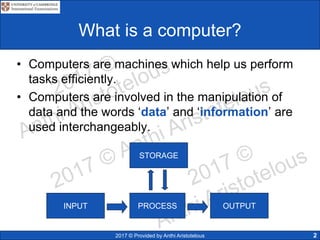
INPUT PROCESS OUTPUT
STORAGE
2017 © Provided by Anthi Aristotelous 3
What is Hardware?
• Hardware refers to the PHYSICAL components
of a computer system; i.e. those things which
can be touched.
• Hardware includes:
– Processor
– Video cards
– Motherboards
– Internal hard disk drives
– Read-only Memory (ROM)
– Random Access Memory (RAM)
2017 © Provided by Anthi Aristotelous 4
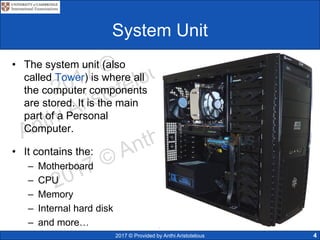
System Unit
• The system unit (also
called Tower) is where all
the computer components
are stored. It is the main
part of a Personal
Computer.
• It contains the:
– Motherboard
– CPU
– Memory
– Internal hard disk
– and more…
2017 © Provided by Anthi Aristotelous 5
The Motherboard
• It is the main circuit board of a
micro-computer.
• Connects all the different
components to each other thus
allowing them to communicate
with each other.
• Connects the:
– CPU
– RAM
– and all other devices…
2017 © Provided by Anthi Aristotelous 6
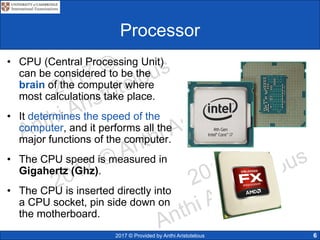
Processor
• CPU (Central Processing Unit)
can be considered to be the
brain of the computer where
most calculations take place.
• It determines the speed of the
computer, and it performs all the
major functions of the computer.
• The CPU speed is measured in
Gigahertz (Ghz).
• The CPU is inserted directly into
a CPU socket, pin side down on
the motherboard.
2017 © Provided by Anthi Aristotelous
Processor
• Consists of two components: CU and ALU
• The Control Unit (CU) is responsible to perform control
operations, where data is send/received within the computer.
7
• Arithmetic Logic
Unit (ALU) is
responsible to perform
mathematical
calculations among
numbers and make
logical decisions
(AND, OR, NOT).
2017 © Provided by Anthi Aristotelous 8
RAM (Random Access Memory)
• A type of computer memory, where
data is temporarily stored when
applications are running
• Data can be written to and read
from and it is often described as
‘read/write’ memory.
• It is VOLATILE (when the computer
is switched off ALL is lost).
• Stores the data, files or part of OS
currently in use.
2017 © Provided by Anthi Aristotelous 9
RAM – Random Access Memory
• When you want to use a program, you instruct the
system to load the program required. In a matter of
seconds, the computer reads the program from the disk
and loads (copies) it to the RAM.
• If the computer is switched off, the contents of the RAM
will be lost. For this reason RAM is called a volatile
memory. So any information which is in the RAM and
needs to be stored permanently must be stored in the
hard disk.
2017 © Provided by Anthi Aristotelous 10
ROM (Read Only Memory)
• Is a computer memory which data
can be pre-recorded (by
manufacturer)
• Once data has been written, it
cannot be altered or removed.
• Non-volatile, all data will remain
intact when computer is turned
off.
• Contains BIOS (basic input
output system) which is executed
when the computer is turned on.
2017 © Provided by Anthi Aristotelous 11
ROM – Read Only Memory
• ROM refers to chips that have a series of instructions
built into them by the manufacturer.
• The ROM chip retains important instructions in a
permanently accessible, non-volatile form and which
cannot be overwritten.
• When the computer is switched off, the contents of the
ROM are not lost.
2017 © Provided by Anthi Aristotelous
Video cards
• Also known as video adapter or
graphics card.
• Can be an expansion card (or in-
build) which allows the computer
to send graphic information to a
display device.
• Usually contains a cooling
mechanism, heat sink and
connections to a display unit.
12
VGA
DVI
2017 © Provided by Anthi Aristotelous
Sound cards
• Also known as an audio
card.
• Is an internal circuit board
which produces input and
output audio signals.
• Sound cards allow the user
to record, input sound via a
microphone. Manipulate
sounds stored on a disk for
multimedia applications.
13
speakers
microphone
2017 © Provided by Anthi Aristotelous
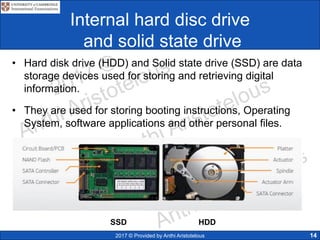
Internal hard disc drive
and solid state drive
• Hard disk drive (HDD) and Solid state drive (SSD) are data
storage devices used for storing and retrieving digital
information.
• They are used for storing booting instructions, Operating
System, software applications and other personal files.
14
HDDSSD
2017 © Provided by Anthi Aristotelous
Comparison between hard drives
15
2017 © Provided by Anthi Aristotelous
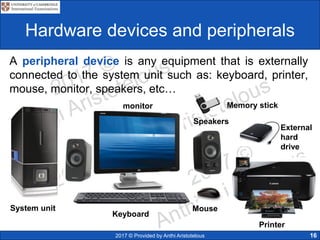
Hardware devices and peripherals
A peripheral device is any equipment that is externally
connected to the system unit such as: keyboard, printer,
mouse, monitor, speakers, etc…
16
System unit
Memory stick
External
hard
drive
Speakers
Keyboard
Mouse
monitor
Printer
2017 © Provided by Anthi Aristotelous
Input, Output and Storage Devices
INPUT
OUTPUT
STORAGE
17
Memory
stick
External
hard drive
Speakersmonitor Printer
Keyboard Mouse microphoneWeb camera scanner
Projector Headphones
Internal
hard drive
Flash memory
cards
CD, DVD,
blu-ray
2017 © Provided by Anthi Aristotelous
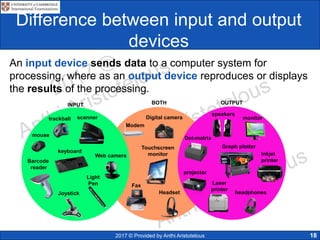
Difference between input and output
devices
An input device sends data to a computer system for
processing, where as an output device reproduces or displays
the results of the processing.
18
scanner
keyboard
mouse
Barcode
reader
Light
Pen
Joystick
trackball
INPUT OUTPUTBOTH
Graph plotter
speakers
Inkjet
printer
Touchscreen
monitor
Headset
Modem
Digital camera
Fax
Web camera
projector
Dot-matrix
Laser
printer
headphones
monitor
2017 © Provided by Anthi Aristotelous 19
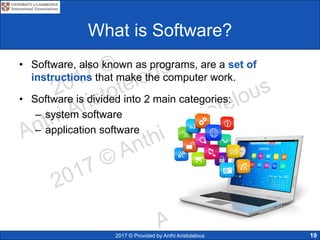
What is Software?
• Software, also known as programs, are a set of
instructions that make the computer work.
• Software is divided into 2 main categories:
– system software
– application software
2017 © Provided by Anthi Aristotelous 20
System Software
• System Software, is also known as Operating System. It
allows the user to control the operation of a computer
system.
• Without OS, computers would not be easily usable by
users.
2017 © Provided by Anthi Aristotelous 21
DOS
Disk Operating System is one of the earliest Operating
Systems. User who operated it had to remember commands!
MS-DOS dominated in 1980s.
2017 © Provided by Anthi Aristotelous
OS Features
• Provides a platform to run application software
• Allows communication between the user and the computer (use of
HCI)
• Allows to manage the security (user accounts, password protection)
• Enables hardware to communicate with OS
22
OS
User Interface
SecurityMulti-tasking
Peripheral
Management
Memory
Management
2017 © Provided by Anthi Aristotelous
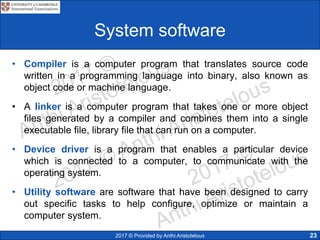
System software
• Compiler is a computer program that translates source code
written in a programming language into binary, also known as
object code or machine language.
• A linker is a computer program that takes one or more object
files generated by a compiler and combines them into a single
executable file, library file that can run on a computer.
• Device driver is a program that enables a particular device
which is connected to a computer, to communicate with the
operating system.
• Utility software are software that have been designed to carry
out specific tasks to help configure, optimize or maintain a
computer system.
23
2017 © Provided by Anthi Aristotelous
Application Software
• Application software are programs that allow the
user to perform specific tasks.
• Examples of application software are:
– Word processor
– Spreadsheet
– Database
– Control and measuring software
– Photo editing software
– Video editing software
– Graphics manipulation software
– Apps
24
2017 © Provided by Anthi Aristotelous 25
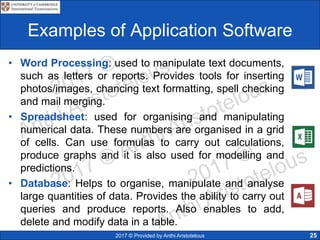
Examples of Application Software
• Word Processing: used to manipulate text documents,
such as letters or reports. Provides tools for inserting
photos/images, chancing text formatting, spell checking
and mail merging.
• Spreadsheet: used for organising and manipulating
numerical data. These numbers are organised in a grid
of cells. Can use formulas to carry out calculations,
produce graphs and it is also used for modelling and
predictions.
• Database: Helps to organise, manipulate and analyse
large quantities of data. Provides the ability to carry out
queries and produce reports. Also enables to add,
delete and modify data in a table.
2017 © Provided by Anthi Aristotelous
Examples of Application Software
• Presentation: Used for displaying information if the
form of slide show. Enables to manipulate text,
inserting graphics or audio. Include animations and
slide transitions to keep audience attention.
• Desktop Publisher (DTP): Used for designing flyers,
invitations, posters, reports, magazines and books.
Includes in-build themes/layout structures, that are
editable.
• Control and measuring software: are designed to
allow a computer or microprocessor control devices to
measure physical variables in the real world and
control applications.
26
2017 © Provided by Anthi Aristotelous
Examples of Application Software
• Photo editing software: Allows to manipulate digital
photographs stored on a computer or any other
external device. Can change brightness, contrast,
saturation and can also combine photos.
• Video editing software: Can manipulate videos to
produce an edited video, by adding titles, altering
sounds of frames. Also can colour correct and include
transitions between clips.
• Graphics manipulation software: Allows bitmap and
vector images to be manipulated.
• Apps, also known as applications, normally refers to
the applications running on mobile devices, such as
phones or tablets.
27
2017 © Provided by Anthi Aristotelous
1.2 Quiz Time!!!
28




2016 © Provided by Anthi Aristotelous
29
1.3 Operating Systems
Pages 8 - 9
2017 © Provided by Anthi Aristotelous
User Interfaces
• The user interface (UI) is the industrial design which
enables a human to interact with a machine/computer using
a display screen, keyboard or mouse.
• There are two type of interfaces:
– Command Line Interface (CLI)
– Graphical user Interface (GUI)
30
2017 © Provided by Anthi Aristotelous
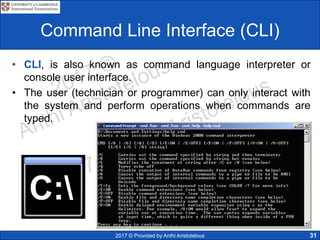
Command Line Interface (CLI)
• CLI, is also known as command language interpreter or
console user interface.
• The user (technician or programmer) can only interact with
the system and perform operations when commands are
typed.
31
2017 © Provided by Anthi Aristotelous 32
Graphical User Interface (GUI)
• Allows the end user to interact with the computer clicking on
icons, rather than typing commands.
• It uses WIMP technology
– windows
– icons
– menu
– pointer
2017 © Provided by Anthi Aristotelous
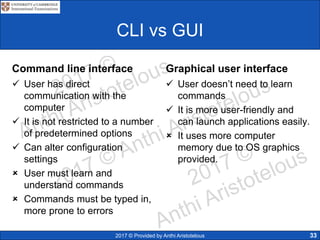
CLI vs GUI
Command line interface
 User has direct
communication with the
computer
 It is not restricted to a number
of predetermined options
 Can alter configuration
settings
 User must learn and
understand commands
 Commands must be typed in,
more prone to errors
Graphical user interface
 User doesn’t need to learn
commands
 It is more user-friendly and
can launch applications easily.
 It uses more computer
memory due to OS graphics
provided.
33
2016 © Provided by Anthi Aristotelous
34
1.4 Types of computers
Pages 9 - 14
2017 © Provided by Anthi Aristotelous 35
PC/ Desktop computer
• PC (personal computer) usually
refers to a general purpose computer
that is made of a separate monitor,
keyboard, mouse and processor.
 They are relatively inexpensive
computers designed for the individual
users.
 They tend to be better specification
for a given price, compared to
laptops.
 They are fixed to one location, so less
likely to loss internet connection.
2017 © Provided by Anthi Aristotelous 36
Types of Computers
• The Macintosh, also known
as Mac’s are a series of
personal computers designed
and developed by Apple Inc.
• They use a different
operating system called
Mac/OS.
• These computers are usually
used by graphic designers
and video editors are they
are advertised for their
distinguished graphics.
2017 © Provided by Anthi Aristotelous 37
Laptop computers
• Laptop computer refers to the type of computer where the
monitor, keyboard, pointing device and processor are all
together in a single unit.
• A portable computer, which is suitable for carrying around
while travelling. They are usually battery powered and small
size.
2017 © Provided by Anthi Aristotelous 38
Tablets
• Tablets are a recent device
produced to enable internet
activities on this portable handheld
device.
• They use touch-screen technology
(hence no keyboard is required) or
a stylus.
• They can access the internet using
WIFI or 4G/5G mobile connectivity.
• They are equipped with sensors,
front and rear cameras, Bluetooth
and some devices even support
flash memory
2017 © Provided by Anthi Aristotelous
Smartphones
• Smartphone is a mobile phone that performs many
functions of a computer and allows to make phone
calls. The difference with a typical mobile phones is
that it has an operating system.
• Allows to run a number of apps for different
purposes, such music and video streaming, instant
access to social networking, etc..
39
2017 © Provided by Anthi Aristotelous
Smartwatches
• Smartwatches give the ability to users to wear a
mini-computer on their wrists.
• They use touchscreen technology, and some also
have the ability to link using Bluetooth technology.
• They allow internet connectivity, phone calls, texts,
health monitoring and GPS.
40
2017 © Provided by Anthi Aristotelous 41
Mainframe computers
• Mainframe computer is a large and
powerful computer system capable of
great processing speeds and data
storage.
• Their purpose is to run commercial
applications, such as banking,
government and airline data.
• They that can support many users at
the same time.
• They have several CPUs, can support
multiple OS and have huge amount of
memory and storage capacity.
2017 © Provided by Anthi Aristotelous 42
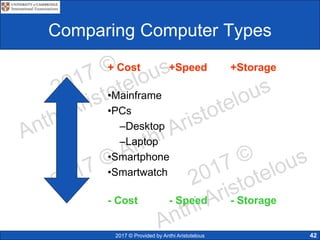
Comparing Computer Types
+ Cost +Speed +Storage
•Mainframe
•PCs
–Desktop
–Laptop
•Smartphone
•Smartwatch
- Cost - Speed - Storage
2017 © Provided by Anthi Aristotelous
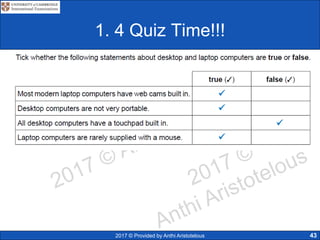
1. 4 Quiz Time!!!
43




2016 © Provided by Anthi Aristotelous
44
1.5 Impact of emerging
technologies
Pages 15 - 18
2017 © Provided by Anthi Aristotelous
Artificial Intelligence
• Artificial intelligence (AI)
biometrics is a system that uses
fingerprint identification or facial
recognition to verify a person.
• A person’s finger prints are
scanned using specialized
equipment and compared in a
database.
• AI technologies are being
developed and improved, so they
can be embedded in security
systems as they more reliable.
45
2017 © Provided by Anthi Aristotelous
Vision enhancement
• Low-vision enhancement (LVES) allows images to be
projected inside a headset using video technology
connected to a computer. Allows user to view and
examine objects closer.
46
2017 © Provided by Anthi Aristotelous
Vision enhancement
• Night vision enhancement (NVE) has the ability to
enhance and view an image in low light conditions, such
when there is darkness.
• Military use this technology for surveillance at night.
47
2017 © Provided by Anthi Aristotelous
Robotics
• Robotics is a field of mechanical/ electrical engineering
which deals with design, construction, operation and
application of robots.
• Used in car factories to weld car bodies, spray panels
and fit items. Another application is use for drones
which can be used for search and rescue. Also used for
complex surgical procedures to improve precision and
flexibility control.
48
2017 © Provided by Anthi Aristotelous
Quantum cryptography
• Cryptography is the practise and techniques for secure
communication between parties, where a message is
unreadable by unauthorised users (hackers). Also referred
as encryption.
• Quantum cryptography use photons and their physical
quantum properties produce a virtually unbreakable system.
Improves protection of security of data. Relies that the
photons oscillate in different directions and produce random
0s and 1s.
49
2017 © Provided by Anthi Aristotelous
Example of key distribution
2017 © Provided by Anthi Aristotelous
Computer-assisted
translation (CAT)
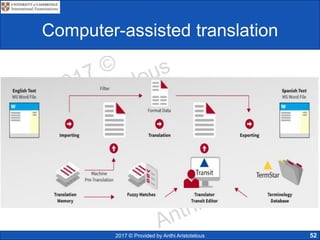
• Computer-assisted translation (CAT): is a type of
language translation where a human translator, uses a
computer software to help the translation process.
• They mainly use two tools:
• Terminology management software: are linguistic
databases that grow and ‘learn’ as translations are being
carried out
• Translation memory software: they automatically insert
from previously stored translations for specific words,
phrases or sentences.
51
2017 © Provided by Anthi Aristotelous
Computer-assisted translation
52
2017 © Provided by Anthi Aristotelous
3-D and holographic imaging
• Holography is the science of making holograms and
displaying a 3-D images. It is an encoding of the laser light,
as an interference pattern which diffracts into a reproduction
of the original.
53
2017 © Provided by Anthi Aristotelous
3-D
• Is the process of developing a mathematical representation
of any three dimensional surface of an object.
54
3D modelling 3D printer
2017 © Provided by Anthi Aristotelous
Virtual reality
• Virtual reality is a computer
generated of a three-dimensional
artificial environment that can be
interacted with in a seemingly real
or physical way by a person with
the use of electronic equipment.
• User uses equipment such as data
goggles, sensor suits, data gloves
or helmets.
• Used in military training,
education, games ect.
55

0417 IGCSE ICT Chapter 1

  • 1.
    2016 © Providedby Anthi Aristotelous 1 Chapter 1 Types and Components of Computer Systems Pages 2 - 7
  • 2.
    2017 © Providedby Anthi Aristotelous 2 What is a computer? • Computers are machines which help us perform tasks efficiently. • Computers are involved in the manipulation of data and the words ‘data’ and ‘information’ are used interchangeably. INPUT PROCESS OUTPUT STORAGE
  • 3.
    2017 © Providedby Anthi Aristotelous 3 What is Hardware? • Hardware refers to the PHYSICAL components of a computer system; i.e. those things which can be touched. • Hardware includes: – Processor – Video cards – Motherboards – Internal hard disk drives – Read-only Memory (ROM) – Random Access Memory (RAM)
  • 4.
    2017 © Providedby Anthi Aristotelous 4 System Unit • The system unit (also called Tower) is where all the computer components are stored. It is the main part of a Personal Computer. • It contains the: – Motherboard – CPU – Memory – Internal hard disk – and more…
  • 5.
    2017 © Providedby Anthi Aristotelous 5 The Motherboard • It is the main circuit board of a micro-computer. • Connects all the different components to each other thus allowing them to communicate with each other. • Connects the: – CPU – RAM – and all other devices…
  • 6.
    2017 © Providedby Anthi Aristotelous 6 Processor • CPU (Central Processing Unit) can be considered to be the brain of the computer where most calculations take place. • It determines the speed of the computer, and it performs all the major functions of the computer. • The CPU speed is measured in Gigahertz (Ghz). • The CPU is inserted directly into a CPU socket, pin side down on the motherboard.
  • 7.
    2017 © Providedby Anthi Aristotelous Processor • Consists of two components: CU and ALU • The Control Unit (CU) is responsible to perform control operations, where data is send/received within the computer. 7 • Arithmetic Logic Unit (ALU) is responsible to perform mathematical calculations among numbers and make logical decisions (AND, OR, NOT).
  • 8.
    2017 © Providedby Anthi Aristotelous 8 RAM (Random Access Memory) • A type of computer memory, where data is temporarily stored when applications are running • Data can be written to and read from and it is often described as ‘read/write’ memory. • It is VOLATILE (when the computer is switched off ALL is lost). • Stores the data, files or part of OS currently in use.
  • 9.
    2017 © Providedby Anthi Aristotelous 9 RAM – Random Access Memory • When you want to use a program, you instruct the system to load the program required. In a matter of seconds, the computer reads the program from the disk and loads (copies) it to the RAM. • If the computer is switched off, the contents of the RAM will be lost. For this reason RAM is called a volatile memory. So any information which is in the RAM and needs to be stored permanently must be stored in the hard disk.
  • 10.
    2017 © Providedby Anthi Aristotelous 10 ROM (Read Only Memory) • Is a computer memory which data can be pre-recorded (by manufacturer) • Once data has been written, it cannot be altered or removed. • Non-volatile, all data will remain intact when computer is turned off. • Contains BIOS (basic input output system) which is executed when the computer is turned on.
  • 11.
    2017 © Providedby Anthi Aristotelous 11 ROM – Read Only Memory • ROM refers to chips that have a series of instructions built into them by the manufacturer. • The ROM chip retains important instructions in a permanently accessible, non-volatile form and which cannot be overwritten. • When the computer is switched off, the contents of the ROM are not lost.
  • 12.
    2017 © Providedby Anthi Aristotelous Video cards • Also known as video adapter or graphics card. • Can be an expansion card (or in- build) which allows the computer to send graphic information to a display device. • Usually contains a cooling mechanism, heat sink and connections to a display unit. 12 VGA DVI
  • 13.
    2017 © Providedby Anthi Aristotelous Sound cards • Also known as an audio card. • Is an internal circuit board which produces input and output audio signals. • Sound cards allow the user to record, input sound via a microphone. Manipulate sounds stored on a disk for multimedia applications. 13 speakers microphone
  • 14.
    2017 © Providedby Anthi Aristotelous Internal hard disc drive and solid state drive • Hard disk drive (HDD) and Solid state drive (SSD) are data storage devices used for storing and retrieving digital information. • They are used for storing booting instructions, Operating System, software applications and other personal files. 14 HDDSSD
  • 15.
    2017 © Providedby Anthi Aristotelous Comparison between hard drives 15
  • 16.
    2017 © Providedby Anthi Aristotelous Hardware devices and peripherals A peripheral device is any equipment that is externally connected to the system unit such as: keyboard, printer, mouse, monitor, speakers, etc… 16 System unit Memory stick External hard drive Speakers Keyboard Mouse monitor Printer
  • 17.
    2017 © Providedby Anthi Aristotelous Input, Output and Storage Devices INPUT OUTPUT STORAGE 17 Memory stick External hard drive Speakersmonitor Printer Keyboard Mouse microphoneWeb camera scanner Projector Headphones Internal hard drive Flash memory cards CD, DVD, blu-ray
  • 18.
    2017 © Providedby Anthi Aristotelous Difference between input and output devices An input device sends data to a computer system for processing, where as an output device reproduces or displays the results of the processing. 18 scanner keyboard mouse Barcode reader Light Pen Joystick trackball INPUT OUTPUTBOTH Graph plotter speakers Inkjet printer Touchscreen monitor Headset Modem Digital camera Fax Web camera projector Dot-matrix Laser printer headphones monitor
  • 19.
    2017 © Providedby Anthi Aristotelous 19 What is Software? • Software, also known as programs, are a set of instructions that make the computer work. • Software is divided into 2 main categories: – system software – application software
  • 20.
    2017 © Providedby Anthi Aristotelous 20 System Software • System Software, is also known as Operating System. It allows the user to control the operation of a computer system. • Without OS, computers would not be easily usable by users.
  • 21.
    2017 © Providedby Anthi Aristotelous 21 DOS Disk Operating System is one of the earliest Operating Systems. User who operated it had to remember commands! MS-DOS dominated in 1980s.
  • 22.
    2017 © Providedby Anthi Aristotelous OS Features • Provides a platform to run application software • Allows communication between the user and the computer (use of HCI) • Allows to manage the security (user accounts, password protection) • Enables hardware to communicate with OS 22 OS User Interface SecurityMulti-tasking Peripheral Management Memory Management
  • 23.
    2017 © Providedby Anthi Aristotelous System software • Compiler is a computer program that translates source code written in a programming language into binary, also known as object code or machine language. • A linker is a computer program that takes one or more object files generated by a compiler and combines them into a single executable file, library file that can run on a computer. • Device driver is a program that enables a particular device which is connected to a computer, to communicate with the operating system. • Utility software are software that have been designed to carry out specific tasks to help configure, optimize or maintain a computer system. 23
  • 24.
    2017 © Providedby Anthi Aristotelous Application Software • Application software are programs that allow the user to perform specific tasks. • Examples of application software are: – Word processor – Spreadsheet – Database – Control and measuring software – Photo editing software – Video editing software – Graphics manipulation software – Apps 24
  • 25.
    2017 © Providedby Anthi Aristotelous 25 Examples of Application Software • Word Processing: used to manipulate text documents, such as letters or reports. Provides tools for inserting photos/images, chancing text formatting, spell checking and mail merging. • Spreadsheet: used for organising and manipulating numerical data. These numbers are organised in a grid of cells. Can use formulas to carry out calculations, produce graphs and it is also used for modelling and predictions. • Database: Helps to organise, manipulate and analyse large quantities of data. Provides the ability to carry out queries and produce reports. Also enables to add, delete and modify data in a table.
  • 26.
    2017 © Providedby Anthi Aristotelous Examples of Application Software • Presentation: Used for displaying information if the form of slide show. Enables to manipulate text, inserting graphics or audio. Include animations and slide transitions to keep audience attention. • Desktop Publisher (DTP): Used for designing flyers, invitations, posters, reports, magazines and books. Includes in-build themes/layout structures, that are editable. • Control and measuring software: are designed to allow a computer or microprocessor control devices to measure physical variables in the real world and control applications. 26
  • 27.
    2017 © Providedby Anthi Aristotelous Examples of Application Software • Photo editing software: Allows to manipulate digital photographs stored on a computer or any other external device. Can change brightness, contrast, saturation and can also combine photos. • Video editing software: Can manipulate videos to produce an edited video, by adding titles, altering sounds of frames. Also can colour correct and include transitions between clips. • Graphics manipulation software: Allows bitmap and vector images to be manipulated. • Apps, also known as applications, normally refers to the applications running on mobile devices, such as phones or tablets. 27
  • 28.
    2017 © Providedby Anthi Aristotelous 1.2 Quiz Time!!! 28    
  • 29.
    2016 © Providedby Anthi Aristotelous 29 1.3 Operating Systems Pages 8 - 9
  • 30.
    2017 © Providedby Anthi Aristotelous User Interfaces • The user interface (UI) is the industrial design which enables a human to interact with a machine/computer using a display screen, keyboard or mouse. • There are two type of interfaces: – Command Line Interface (CLI) – Graphical user Interface (GUI) 30
  • 31.
    2017 © Providedby Anthi Aristotelous Command Line Interface (CLI) • CLI, is also known as command language interpreter or console user interface. • The user (technician or programmer) can only interact with the system and perform operations when commands are typed. 31
  • 32.
    2017 © Providedby Anthi Aristotelous 32 Graphical User Interface (GUI) • Allows the end user to interact with the computer clicking on icons, rather than typing commands. • It uses WIMP technology – windows – icons – menu – pointer
  • 33.
    2017 © Providedby Anthi Aristotelous CLI vs GUI Command line interface  User has direct communication with the computer  It is not restricted to a number of predetermined options  Can alter configuration settings  User must learn and understand commands  Commands must be typed in, more prone to errors Graphical user interface  User doesn’t need to learn commands  It is more user-friendly and can launch applications easily.  It uses more computer memory due to OS graphics provided. 33
  • 34.
    2016 © Providedby Anthi Aristotelous 34 1.4 Types of computers Pages 9 - 14
  • 35.
    2017 © Providedby Anthi Aristotelous 35 PC/ Desktop computer • PC (personal computer) usually refers to a general purpose computer that is made of a separate monitor, keyboard, mouse and processor.  They are relatively inexpensive computers designed for the individual users.  They tend to be better specification for a given price, compared to laptops.  They are fixed to one location, so less likely to loss internet connection.
  • 36.
    2017 © Providedby Anthi Aristotelous 36 Types of Computers • The Macintosh, also known as Mac’s are a series of personal computers designed and developed by Apple Inc. • They use a different operating system called Mac/OS. • These computers are usually used by graphic designers and video editors are they are advertised for their distinguished graphics.
  • 37.
    2017 © Providedby Anthi Aristotelous 37 Laptop computers • Laptop computer refers to the type of computer where the monitor, keyboard, pointing device and processor are all together in a single unit. • A portable computer, which is suitable for carrying around while travelling. They are usually battery powered and small size.
  • 38.
    2017 © Providedby Anthi Aristotelous 38 Tablets • Tablets are a recent device produced to enable internet activities on this portable handheld device. • They use touch-screen technology (hence no keyboard is required) or a stylus. • They can access the internet using WIFI or 4G/5G mobile connectivity. • They are equipped with sensors, front and rear cameras, Bluetooth and some devices even support flash memory
  • 39.
    2017 © Providedby Anthi Aristotelous Smartphones • Smartphone is a mobile phone that performs many functions of a computer and allows to make phone calls. The difference with a typical mobile phones is that it has an operating system. • Allows to run a number of apps for different purposes, such music and video streaming, instant access to social networking, etc.. 39
  • 40.
    2017 © Providedby Anthi Aristotelous Smartwatches • Smartwatches give the ability to users to wear a mini-computer on their wrists. • They use touchscreen technology, and some also have the ability to link using Bluetooth technology. • They allow internet connectivity, phone calls, texts, health monitoring and GPS. 40
  • 41.
    2017 © Providedby Anthi Aristotelous 41 Mainframe computers • Mainframe computer is a large and powerful computer system capable of great processing speeds and data storage. • Their purpose is to run commercial applications, such as banking, government and airline data. • They that can support many users at the same time. • They have several CPUs, can support multiple OS and have huge amount of memory and storage capacity.
  • 42.
    2017 © Providedby Anthi Aristotelous 42 Comparing Computer Types + Cost +Speed +Storage •Mainframe •PCs –Desktop –Laptop •Smartphone •Smartwatch - Cost - Speed - Storage
  • 43.
    2017 © Providedby Anthi Aristotelous 1. 4 Quiz Time!!! 43    
  • 44.
    2016 © Providedby Anthi Aristotelous 44 1.5 Impact of emerging technologies Pages 15 - 18
  • 45.
    2017 © Providedby Anthi Aristotelous Artificial Intelligence • Artificial intelligence (AI) biometrics is a system that uses fingerprint identification or facial recognition to verify a person. • A person’s finger prints are scanned using specialized equipment and compared in a database. • AI technologies are being developed and improved, so they can be embedded in security systems as they more reliable. 45
  • 46.
    2017 © Providedby Anthi Aristotelous Vision enhancement • Low-vision enhancement (LVES) allows images to be projected inside a headset using video technology connected to a computer. Allows user to view and examine objects closer. 46
  • 47.
    2017 © Providedby Anthi Aristotelous Vision enhancement • Night vision enhancement (NVE) has the ability to enhance and view an image in low light conditions, such when there is darkness. • Military use this technology for surveillance at night. 47
  • 48.
    2017 © Providedby Anthi Aristotelous Robotics • Robotics is a field of mechanical/ electrical engineering which deals with design, construction, operation and application of robots. • Used in car factories to weld car bodies, spray panels and fit items. Another application is use for drones which can be used for search and rescue. Also used for complex surgical procedures to improve precision and flexibility control. 48
  • 49.
    2017 © Providedby Anthi Aristotelous Quantum cryptography • Cryptography is the practise and techniques for secure communication between parties, where a message is unreadable by unauthorised users (hackers). Also referred as encryption. • Quantum cryptography use photons and their physical quantum properties produce a virtually unbreakable system. Improves protection of security of data. Relies that the photons oscillate in different directions and produce random 0s and 1s. 49
  • 50.
    2017 © Providedby Anthi Aristotelous Example of key distribution
  • 51.
    2017 © Providedby Anthi Aristotelous Computer-assisted translation (CAT) • Computer-assisted translation (CAT): is a type of language translation where a human translator, uses a computer software to help the translation process. • They mainly use two tools: • Terminology management software: are linguistic databases that grow and ‘learn’ as translations are being carried out • Translation memory software: they automatically insert from previously stored translations for specific words, phrases or sentences. 51
  • 52.
    2017 © Providedby Anthi Aristotelous Computer-assisted translation 52
  • 53.
    2017 © Providedby Anthi Aristotelous 3-D and holographic imaging • Holography is the science of making holograms and displaying a 3-D images. It is an encoding of the laser light, as an interference pattern which diffracts into a reproduction of the original. 53
  • 54.
    2017 © Providedby Anthi Aristotelous 3-D • Is the process of developing a mathematical representation of any three dimensional surface of an object. 54 3D modelling 3D printer
  • 55.
    2017 © Providedby Anthi Aristotelous Virtual reality • Virtual reality is a computer generated of a three-dimensional artificial environment that can be interacted with in a seemingly real or physical way by a person with the use of electronic equipment. • User uses equipment such as data goggles, sensor suits, data gloves or helmets. • Used in military training, education, games ect. 55