NETWORKING


             Made By:
             Prashant Anand
             Ayush Gupta
             Shaswat Jain
             Shubham Goel     1
What is a Network?


A network consists of 2 or more computers
connected together, and they can communicate and
share resources (e.g. information)


                                               2
Why Networking?

Sharing information — i.e. data communication

• Do you prefer these?


• Or this?


                                                3
• Sharing hardware or software
• E.g. print document


• Centralize administration and support
• E.g. Internet-based, so everyone can access the same
  administrative or support application from their PCs


                                                         4
How many kinds of Networks?
• Depending on one’s perspective, we can classify
  networks in different ways
• Based on transmission media: Wired (UTP, coaxial
  cables, fiber-optic cables) and Wireless
• Based on network size: LAN and WAN (and MAN)
• Based on management method: Peer-to-peer and
  Client/Server
• Based on topology (connectivity): Bus, Star, Ring,Mesh


                                                           5
Transmission Media

 Two main categories:
   Guided ― wires, cables
   Unguided ― wireless transmission, e.g. radio,
    microwave, infrared, sound, sonar
 We will concentrate on guided media here:
   Twisted-Pair cables:
     Unshielded Twisted-Pair (UTP) cables
     Shielded Twisted-Pair (STP) cables
   Coaxial cables
   Fiber-optic cables

                                                    6
Twisted-Pair Cables
 If the pair of wires are not twisted, electromagnetic
  noises from, e.g., motors, will affect the closer wire
  more than the further one, thereby causing errors


                                                           7
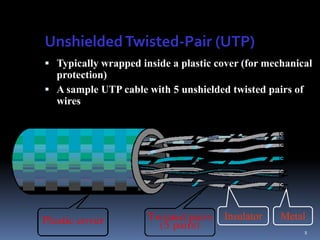
Unshielded Twisted-Pair (UTP)
 Typically wrapped inside a plastic cover (for mechanical
  protection)
 A sample UTP cable with 5 unshielded twisted pairs of
  wires


                                      Insulator    Metal
                                                          8
Shielded Twisted-Pair (STP)
 STP cables are similar to UTP cables, except there is a
  metal foil or braided-metal-mesh cover that encases
  each pair of insulated wires


                                                            9
Fiber-Optic Cables
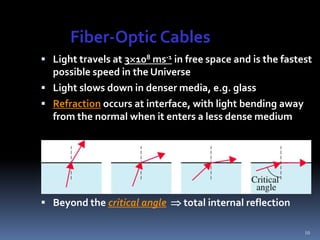
 Light travels at 3108 ms-1 in free space and is the fastest
  possible speed in the Universe
 Light slows down in denser media, e.g. glass
 Refraction occurs at interface, with light bending away
  from the normal when it enters a less dense medium


 Beyond the critical angle  total internal reflection

                                                            10
Advantages and Disadvantages
 Noise resistance ― external light is blocked by outer
  jacket
 Less signal attenuation ― a signal can run for miles
  without regeneration (currently, the lowest measured loss
  is about ~4% or 0.16dB per km)
 Higher bandwidth ― currently, limits on data rates come
  from the signal generation/reception technology, not the
  fiber itself
 Cost ― Optical fibers are expensive
 Installation/maintenance ― any crack in the core will
  degrade the signal, and all connections must be perfectly
  aligned

                                                          11
LAN and WAN
• Local Area Network (LAN)
  • Small network, short distance
     • A room, a floor, a building
     • Limited by no. of computers and distance covered
     • Usually one kind of technology throughout the
       LAN
     • Serve a department within an organization
  • Examples:
     • Network inside the Student Computer Room
     • Network inside CF502
     • Network inside your home
                                                      12
Wide Area Network (WAN)
• A network that uses long-range telecommunication links
  to connect 2 or more LANs/computers housed in
  different places far apart.
   • Towns, states, countries
• Examples:
   • Network of our Campus             Your home
   • Internet


                         WAN            USA

Student
Computer
Centre                                                13
Peer-to-Peer Networks

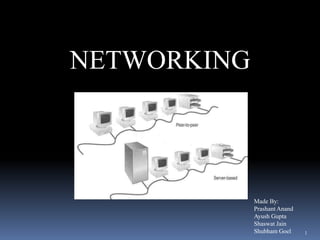
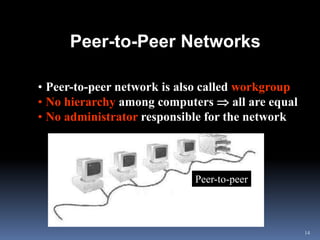
• Peer-to-peer network is also called workgroup
• No hierarchy among computers  all are equal
• No administrator responsible for the network


                            Peer-to-peer


                                                  14
• Advantages of peer-to-peer networks:
      • Low cost
      • Simple to configure
      • User has full accessibility of the computer

• Disadvantages of peer-to-peer networks:
  • May have duplication in resources
  • Difficult to uphold security policy
  • Difficult to handle uneven loading
• Where peer-to-peer network is appropriate:
  •   10 or less users
  •   No specialized services required
  •   Security is not an issue
  •   Only limited growth in the foreseeable future
                                                      15
Clients and Servers
• Network Clients (Workstation)
  • Computers that request network resources or services
• Network Servers
  • Computers that manage and provide network
    resources and services to clients
      • Usually have more processing power, memory and
        hard disk space than clients
      • Run Network Operating System that can manage
        not only data, but also users, groups, security, and
        applications on the network
      • Servers often have a more stringent requirement
        on its performance and reliability
                                                          16
• Advantages of client/server networks
   • Facilitate resource sharing – centrally administrate
     and control
   • Facilitate system backup and improve fault tolerance
   • Enhance security – only administrator can have access
     to Server
   • Support more users – difficult to achieve with peer-to-
     peer networks

• Disadvantages of client/server networks
   • High cost for Servers
   • Need expert to configure the network
   • Introduce a single point of failure to the system

                                                          17
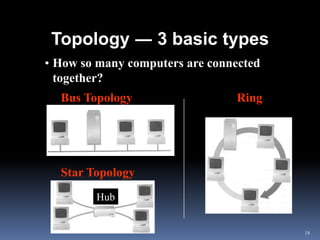
Topology ― 3 basic types
• How so many computers are connected
  together?
  Bus Topology                  Ring
   Topology


  Star Topology
        Hub


                                        18
• Bus Topology
  •   Simple and low-cost
  •   A single cable called a trunk (backbone, segment)
  •   Only one computer can send messages at a time
  •   Passive topology - computer only listen for, not
      regenerate data

• Star Topology
  • Each computer has a cable connected to a single
    point
  • More cabling, hence higher cost
  • All signals transmission through the hub; if down,
    entire network down
  • Depending on the intelligence of hub, two or more
    computers may send message at the same time
                                                          19
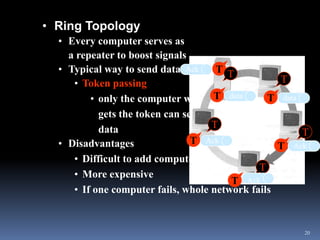
• Ring Topology
  • Every computer serves as
    a repeater to boost signals
  • Typical way to send data: Ack    T T
     • Token passing                              T
         • only the computer who T data         T data
           gets the token can send
           data                     T
                                                       T
  • Disadvantages               T Ack             T data
                                                     Ack
     • Difficult to add computers
                                              T
     • More expensive
                                        T Ack
     • If one computer fails, whole network fails


                                                       20
What is VOIP ????
VoIP (Voice over Internet Protocol) is a quite recent
 advancement in telephony systems. It uses a packet
 switched network, like the internet, to pass digitized
 voice data from one point to another. This allows
 telecommunications companies to squeeze more
 conversations in the same amount of bandwidth.
 Even home users can use VoIP handsets, or through
 computers via software, to call other people who are
 online for free.
 Other terms commonly associated with VoIP are IP
 telephony, Internet telephony, voice over
 broadband (VoBB), broadband telephony,
 IP communications, and broadband phone.


                                                     21
Internet telephony refers to communications services —
voice, fax, SMS, and/or voice-messaging applications—
that are transported via the Internet, rather than
the public switched telephone network (PSTN).

The steps involved in originating a VoIP telephone call
are signaling and media channel setup, digitization of
the analog voice signal, encoding, packetization, and
transmission as Internet Protocol (IP) packets over
a packet-switched network. On the receiving side,
similar steps (usually in the reverse order) such as
reception of the IP packets, decoding of the packets and
digital-to-analog conversion reproduce the original
voice stream

                                                           22
Even though IP Telephony and VoIP are terms that
are used interchangeably, they are actually different;
IP telephony has to do with digital telephony systems
that use IP protocols for voice communication, while
VoIP is actually a subset of IP Telephony. VoIP is a
technology used by IP telephony as a means of
transporting phone calls.


                                                         23
PBX (Public Branch Exchange) is a miniature telephone
network that is set to work within a company while
providing several lines to an external phone company
where calls can go in or out. Companies utilize a PBX in
order to minimize cost. Instead of having a single telephone
line for every office or department which are only used for
a fraction of the time, the company can reduce this to a few
lines with the use of PBX while still having a telephone unit
in each office. All internal calls are routed internally while
calls to the outside take any of the available outside lines.

Most PBX systems are not equipped to handle VoIP calls
because they were created and perfected before the advent
of VoIP. But the advantages of implementing VoIP services
in a PBX system has motivated companies and
manufacturers to develop IP PBX systems.
                                                             24
Advantages of

Because of the bandwidth efficiency and low costs
that VoIP technology can provide, businesses are
migrating from traditional copper-wire telephone
systems to VoIP systems to reduce their monthly
phone costs.

Routing phone calls over existing data networks to
avoid the need for separate voice and data networks.

The ability to transmit more than one telephone call
over a single broadband connection.

                                                        25
Secure calls using standardized protocols . Most of
the difficulties of creating a secure
telephone connection over traditional phone lines,
such as digitizing and digital transmission, are
already in place with VoIP. It is only necessary
to encrypt and authenticate the existing data stream.


                                                        26
Li-Fi

It is the term some have used to label the fast and cheap wireless-communication
system, which is the optical version of Wi-Fi. Li-Fi has the advantage of being able to
be used in sensitive areas such as in aircraft without causing interference.          27
The Session Initiation Protocol (SIP)

It is an signaling protocol widely used for controlling communication sessions such as voice and
video calls over Internet Protocol (IP). The protocol can be used for creating, modifying and
terminating two-party (unicast) or multiparty (multicast) sessions. Sessions may consist of one or
several media streams. Other SIP applications include video conferencing, streaming multimedia
distribution, instant messaging, presence information, file transfer and online games.         28
Wimax (Worldwide Interoperability for Microwave Access)
Wireless metropolitan networks (MAN) such as WiMAX provide high-speed Internet access
at much greater distances than wireless LANs can. A MAN requires a transmitting tower and
a receiver and is typically operated by a government entity. It is a wireless communications
standard designed to provide 30 to 40 megabit-per-second data rates, with the 2011 update
providing up to 1 Gbit/s for fixed stations. WiMAX can be descriped as "a standards-based
technology enabling the delivery of last mile wireless broadband access as an alternative to 29
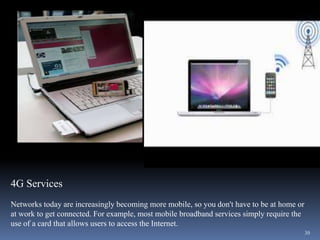
4G Services
Networks today are increasingly becoming more mobile, so you don't have to be at home or
at work to get connected. For example, most mobile broadband services simply require the
use of a card that allows users to access the Internet.
                                                                                           30
Virtual Network Computing (VNC)
It stands for Virtual Network Computing. It is, in essence, a remote display system which allows
you to view a computing 'desktop' environment not only on the machine where it is running, but
from anywhere on the Internet and from a wide variety of machine architectures.

                                                                                             31
It is the use of computing resources (hardware and software) that are delivered as a
service over a network (typically the Internet). The name comes from the use of a
cloud-shaped symbol as an abstraction for the complex infrastructure it contains in
system diagrams. Cloud computing entrusts remote services with a user's data, software
                                                                                     32
and computation.
33

Networking

  • 1.
    NETWORKING Made By: Prashant Anand Ayush Gupta Shaswat Jain Shubham Goel 1
  • 2.
    What is aNetwork? A network consists of 2 or more computers connected together, and they can communicate and share resources (e.g. information) 2
  • 3.
    Why Networking? Sharing information— i.e. data communication • Do you prefer these? • Or this? 3
  • 4.
    • Sharing hardwareor software • E.g. print document • Centralize administration and support • E.g. Internet-based, so everyone can access the same administrative or support application from their PCs 4
  • 5.
    How many kindsof Networks? • Depending on one’s perspective, we can classify networks in different ways • Based on transmission media: Wired (UTP, coaxial cables, fiber-optic cables) and Wireless • Based on network size: LAN and WAN (and MAN) • Based on management method: Peer-to-peer and Client/Server • Based on topology (connectivity): Bus, Star, Ring,Mesh 5
  • 6.
    Transmission Media  Twomain categories:  Guided ― wires, cables  Unguided ― wireless transmission, e.g. radio, microwave, infrared, sound, sonar  We will concentrate on guided media here:  Twisted-Pair cables: Unshielded Twisted-Pair (UTP) cables Shielded Twisted-Pair (STP) cables  Coaxial cables  Fiber-optic cables 6
  • 7.
    Twisted-Pair Cables  Ifthe pair of wires are not twisted, electromagnetic noises from, e.g., motors, will affect the closer wire more than the further one, thereby causing errors 7
  • 8.
    Unshielded Twisted-Pair (UTP) Typically wrapped inside a plastic cover (for mechanical protection)  A sample UTP cable with 5 unshielded twisted pairs of wires Insulator Metal 8
  • 9.
    Shielded Twisted-Pair (STP) STP cables are similar to UTP cables, except there is a metal foil or braided-metal-mesh cover that encases each pair of insulated wires 9
  • 10.
    Fiber-Optic Cables  Lighttravels at 3108 ms-1 in free space and is the fastest possible speed in the Universe  Light slows down in denser media, e.g. glass  Refraction occurs at interface, with light bending away from the normal when it enters a less dense medium  Beyond the critical angle  total internal reflection 10
  • 11.
    Advantages and Disadvantages Noise resistance ― external light is blocked by outer jacket  Less signal attenuation ― a signal can run for miles without regeneration (currently, the lowest measured loss is about ~4% or 0.16dB per km)  Higher bandwidth ― currently, limits on data rates come from the signal generation/reception technology, not the fiber itself  Cost ― Optical fibers are expensive  Installation/maintenance ― any crack in the core will degrade the signal, and all connections must be perfectly aligned 11
  • 12.
    LAN and WAN •Local Area Network (LAN) • Small network, short distance • A room, a floor, a building • Limited by no. of computers and distance covered • Usually one kind of technology throughout the LAN • Serve a department within an organization • Examples: • Network inside the Student Computer Room • Network inside CF502 • Network inside your home 12
  • 13.
    Wide Area Network(WAN) • A network that uses long-range telecommunication links to connect 2 or more LANs/computers housed in different places far apart. • Towns, states, countries • Examples: • Network of our Campus Your home • Internet WAN USA Student Computer Centre 13
  • 14.
    Peer-to-Peer Networks • Peer-to-peernetwork is also called workgroup • No hierarchy among computers  all are equal • No administrator responsible for the network Peer-to-peer 14
  • 15.
    • Advantages ofpeer-to-peer networks: • Low cost • Simple to configure • User has full accessibility of the computer • Disadvantages of peer-to-peer networks: • May have duplication in resources • Difficult to uphold security policy • Difficult to handle uneven loading • Where peer-to-peer network is appropriate: • 10 or less users • No specialized services required • Security is not an issue • Only limited growth in the foreseeable future 15
  • 16.
    Clients and Servers •Network Clients (Workstation) • Computers that request network resources or services • Network Servers • Computers that manage and provide network resources and services to clients • Usually have more processing power, memory and hard disk space than clients • Run Network Operating System that can manage not only data, but also users, groups, security, and applications on the network • Servers often have a more stringent requirement on its performance and reliability 16
  • 17.
    • Advantages ofclient/server networks • Facilitate resource sharing – centrally administrate and control • Facilitate system backup and improve fault tolerance • Enhance security – only administrator can have access to Server • Support more users – difficult to achieve with peer-to- peer networks • Disadvantages of client/server networks • High cost for Servers • Need expert to configure the network • Introduce a single point of failure to the system 17
  • 18.
    Topology ― 3basic types • How so many computers are connected together? Bus Topology Ring Topology Star Topology Hub 18
  • 19.
    • Bus Topology • Simple and low-cost • A single cable called a trunk (backbone, segment) • Only one computer can send messages at a time • Passive topology - computer only listen for, not regenerate data • Star Topology • Each computer has a cable connected to a single point • More cabling, hence higher cost • All signals transmission through the hub; if down, entire network down • Depending on the intelligence of hub, two or more computers may send message at the same time 19
  • 20.
    • Ring Topology • Every computer serves as a repeater to boost signals • Typical way to send data: Ack T T • Token passing T • only the computer who T data T data gets the token can send data T T • Disadvantages T Ack T data Ack • Difficult to add computers T • More expensive T Ack • If one computer fails, whole network fails 20
  • 21.
    What is VOIP???? VoIP (Voice over Internet Protocol) is a quite recent advancement in telephony systems. It uses a packet switched network, like the internet, to pass digitized voice data from one point to another. This allows telecommunications companies to squeeze more conversations in the same amount of bandwidth. Even home users can use VoIP handsets, or through computers via software, to call other people who are online for free. Other terms commonly associated with VoIP are IP telephony, Internet telephony, voice over broadband (VoBB), broadband telephony, IP communications, and broadband phone. 21
  • 22.
    Internet telephony refersto communications services — voice, fax, SMS, and/or voice-messaging applications— that are transported via the Internet, rather than the public switched telephone network (PSTN). The steps involved in originating a VoIP telephone call are signaling and media channel setup, digitization of the analog voice signal, encoding, packetization, and transmission as Internet Protocol (IP) packets over a packet-switched network. On the receiving side, similar steps (usually in the reverse order) such as reception of the IP packets, decoding of the packets and digital-to-analog conversion reproduce the original voice stream 22
  • 23.
    Even though IPTelephony and VoIP are terms that are used interchangeably, they are actually different; IP telephony has to do with digital telephony systems that use IP protocols for voice communication, while VoIP is actually a subset of IP Telephony. VoIP is a technology used by IP telephony as a means of transporting phone calls. 23
  • 24.
    PBX (Public BranchExchange) is a miniature telephone network that is set to work within a company while providing several lines to an external phone company where calls can go in or out. Companies utilize a PBX in order to minimize cost. Instead of having a single telephone line for every office or department which are only used for a fraction of the time, the company can reduce this to a few lines with the use of PBX while still having a telephone unit in each office. All internal calls are routed internally while calls to the outside take any of the available outside lines. Most PBX systems are not equipped to handle VoIP calls because they were created and perfected before the advent of VoIP. But the advantages of implementing VoIP services in a PBX system has motivated companies and manufacturers to develop IP PBX systems. 24
  • 25.
    Advantages of Because ofthe bandwidth efficiency and low costs that VoIP technology can provide, businesses are migrating from traditional copper-wire telephone systems to VoIP systems to reduce their monthly phone costs. Routing phone calls over existing data networks to avoid the need for separate voice and data networks. The ability to transmit more than one telephone call over a single broadband connection. 25
  • 26.
    Secure calls usingstandardized protocols . Most of the difficulties of creating a secure telephone connection over traditional phone lines, such as digitizing and digital transmission, are already in place with VoIP. It is only necessary to encrypt and authenticate the existing data stream. 26
  • 27.
    Li-Fi It is theterm some have used to label the fast and cheap wireless-communication system, which is the optical version of Wi-Fi. Li-Fi has the advantage of being able to be used in sensitive areas such as in aircraft without causing interference. 27
  • 28.
    The Session InitiationProtocol (SIP) It is an signaling protocol widely used for controlling communication sessions such as voice and video calls over Internet Protocol (IP). The protocol can be used for creating, modifying and terminating two-party (unicast) or multiparty (multicast) sessions. Sessions may consist of one or several media streams. Other SIP applications include video conferencing, streaming multimedia distribution, instant messaging, presence information, file transfer and online games. 28
  • 29.
    Wimax (Worldwide Interoperabilityfor Microwave Access) Wireless metropolitan networks (MAN) such as WiMAX provide high-speed Internet access at much greater distances than wireless LANs can. A MAN requires a transmitting tower and a receiver and is typically operated by a government entity. It is a wireless communications standard designed to provide 30 to 40 megabit-per-second data rates, with the 2011 update providing up to 1 Gbit/s for fixed stations. WiMAX can be descriped as "a standards-based technology enabling the delivery of last mile wireless broadband access as an alternative to 29
  • 30.
    4G Services Networks todayare increasingly becoming more mobile, so you don't have to be at home or at work to get connected. For example, most mobile broadband services simply require the use of a card that allows users to access the Internet. 30
  • 31.
    Virtual Network Computing(VNC) It stands for Virtual Network Computing. It is, in essence, a remote display system which allows you to view a computing 'desktop' environment not only on the machine where it is running, but from anywhere on the Internet and from a wide variety of machine architectures. 31
  • 32.
    It is theuse of computing resources (hardware and software) that are delivered as a service over a network (typically the Internet). The name comes from the use of a cloud-shaped symbol as an abstraction for the complex infrastructure it contains in system diagrams. Cloud computing entrusts remote services with a user's data, software 32 and computation.
  • 33.