MOBILE HCI
UNIT IV
ARULKUMAR V Ap/CSE SECE
MOBILE ECOSYSTEM
• The Internet is actually a complex ecosystem
made up of many parts that must all work
together seamlessly.
• Mobile is an entirely unique ecosystem and,
like the Internet, it is made up of many different
parts that must all work seamlessly together.
ARULKUMAR V Ap/CSE
SECE
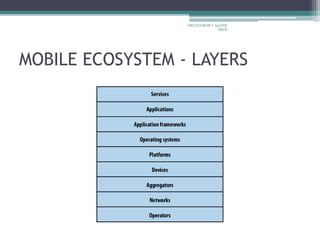
MOBILE ECOSYSTEM - LAYERS
ARULKUMAR V Ap/CSE
SECE
MOBILE ECOSYSTEM - LAYERS
• Operators
▫ The base layer in the mobile ecosystem is the
operator.
▫ Operators can be referred to as Mobile Network
Operators (MNOs); mobile service providers,
wireless carriers, or simply carriers; mobile phone
operators; or cellular companies
▫ Operators are what essentially make the entire
mobile ecosystem work. They are the gatekeepers
to the kingdom
ARULKUMAR V Ap/CSE
SECE
MOBILE ECOSYSTEM - LAYERS
▫ They install cellular towers, operate the cellular
network, make services (such as the Internet)
available for mobile subscribers, and they often
maintain relationships with the subscribers,
handling billing and support, and offering
subsidized device sales and a network of retail
stores.
▫ The operator’s role in the ecosystem is to create
and maintain a specific set of wireless services
over a reliable cellular network
ARULKUMAR V Ap/CSE
SECE
MOBILE ECOSYSTEM - LAYERS
• Networks
▫ Operators operate wireless networks. Remember
that cellular technology is just a radio that receives
a signal from an antenna. The type of radio and
antenna determines the capability of the network
and the services you can enable on it.
ARULKUMAR V Ap/CSE
SECE
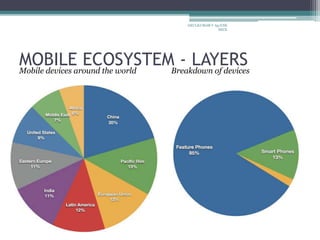
MOBILE ECOSYSTEM - LAYERSMobile devices around the world Breakdown of devices
ARULKUMAR V Ap/CSE
SECE
Platforms
• A mobile platform’s primary duty is to provide
access to the devices
• To run software and services on each of these
devices, you need a platform, or a core
programming language in which all of your
software is written.
• Like all software platforms, these are split into
three categories: licensed, proprietary, and open
source
ARULKUMAR V Ap/CSE
SECE
Platforms - Licensed
• Licensed platforms are sold to device makers for
nonexclusive distribution on devices.
• The goal is to create a common platform of
development Application Programming Interfaces
(APIs)
• Following are the licensed platforms:
▫ Java Micro Edition (Java ME)
▫ Binary Runtime Environment for Wireless (BREW)
▫ Windows Mobile
▫ LiMo
ARULKUMAR V Ap/CSE
SECE
Platforms - Proprietary
• Proprietary platforms are designed and developed
by device makers for use on their devices
• They are not available for use by competing device
makers
• They include
▫ Palm
▫ BlackBerry
▫ iPhone
.
ARULKUMAR V Ap/CSE
SECE
Platforms - Open Source
• Open source platforms are mobile platforms that
are freely available for users to download, alter,
and edit.
• Open source mobile platforms are newer and
slightly controversial, but they are increasingly
gaining traction with device makers and
developers
• Android is one of these platforms. It is
developed by the Open Handset Alliance, which
is spearheaded by Google
ARULKUMAR V Ap/CSE
SECE
Application Frameworks
• Application frameworks often run on top of
operating systems, sharing core services such as
communications, messaging, graphics, location,
security, authentication, and many others.
• They are
▫ Java, S60, BREW, Flash Lite, Windows Mobile,
▫ Cocoa Touch, Android SDK, Web Runtimes
(WRTs), WebKit, The Web
ARULKUMAR V Ap/CSE
SECE
Application Frameworks
• Application frameworks are used to create
applications, such as a game, a web browser, a
camera, or media player.
• Although the frameworks are well standardized.
• The largest challenge of deploying applications is
knowing the specific device attributes and
capabilities.
ARULKUMAR V Ap/CSE
SECE
Application Frameworks
• A common alternative these days is creating
applications for only one platform, such as the
iPhone or Android
• By minimizing the number of platforms the
developer has to support and utilizing modern
application frameworks.
• The time and cost of creation go down
significantly
ARULKUMAR V Ap/CSE
SECE
Types of Mobile Applications
• Mobile Application Medium Types
▫ SMS
▫ Mobile Websites
▫ Mobile Web Widgets
▫ Mobile Web Applications
▫ Native Applications
▫ Games
▫ Mobile Application Media Matrix
▫ Application Context
▫ Utility Context
▫ Locale Context
▫ Informative Applications
▫ Productivity Application Context
▫ Immersive Full-Screen Applications
▫ Application Context Matrix
ARULKUMAR V Ap/CSE
SECE
MOBILEWEB WIDGETS
Mobile Web Widgets
▫ Largely in response to the poor experience
provided by the mobile web over the years, there
has been a growing movement to establish mobile
widget frameworks and platforms.
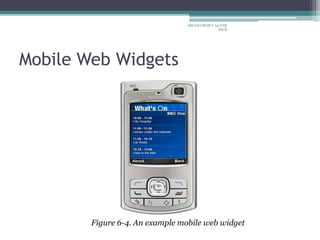
▫ A mobile web widget is a standalone chunk of
HTML-based code that is executed by the end user
in a particular way.
ARULKUMAR V Ap/CSE
SECE
Mobile Web Widgets
Figure 6-4. An example mobile web widget
ARULKUMAR V Ap/CSE
SECE
Mobile Web Widgets
▫ Basically, mobile web widgets are small web
applications that can’t run by themselves;
▫ They need to be executed on top of something else
▫ Opera Widgets, Nokia Web RunTime (WRT),
Yahoo! Blueprint, and Adobe Flash Lite are all
examples of widget platforms that work on a
number of mobile handsets
ARULKUMAR V Ap/CSE
SECE
Mobile Web Widgets
• Pros
▫ The pros of mobile web widgets are:
▫ They are easy to create, using basic HTML, CSS, and
JavaScript knowledge.
▫ They can be simple to deploy across multiple handsets.
▫ They offer an improved user experience and a richer design,
tapping into device features and offline use.
• Cons
▫ The cons of mobile web widgets are:
▫ They typically require a compatible widget platform to be
installed on the device.
▫ They cannot run in any mobile web browser.
▫ They require learning additional proprietary, non-web-
standard technique
ARULKUMAR V Ap/CSE
SECE
Games
• The final mobile medium is games, the most
popular of all media available to mobile devices.
• Technically games are really just native
applications that use the similar platform SDKs
to create immersive experiences
• The reason games are relatively easy to port
(“relatively” being the key word), is that the bulk
of the gaming experience is in the graphics and
actually uses very little of the device APIs.
ARULKUMAR V Ap/CSE
SECE
Games
• Pros
▫ The pros of game applications are:
▫ They provide a simple and easy way to create an
immersive experience.
▫ They can be ported to multiple devices relatively
easily.
• Cons
▫ The cons of game applications are:
▫ They can be costly to develop as an original game title.
▫ They cannot easily be ported to the mobile web
ARULKUMAR V Ap/CSE
SECE
Mobile Information Architecture
• What Is Information Architecture?
▫ The structural design of shared information
environments
▫ The combination of organizations, labeling, search,
and navigation systems within websites and intranets
▫ The art and science of shaping information products
and experiences to support usability and findability
▫ An emerging discipline and community of practice
focused on bringing principles of design and
architecture to the digital landscape
ARULKUMAR V Ap/CSE
SECE
Mobile Information Architecture
• Facets of information architecture
▫ Information architecture
▫ Interaction design
▫ Information design
▫ Navigation design
▫ Interface design
ARULKUMAR V Ap/CSE
SECE
Mobile Information Architecture
• Characteristics of Mobile Information
Architecture
▫ Keeping It Simple
▫ Site Maps
▫ Clickstreams
▫ Wireframes
▫ Prototyping
▫ Different Information Architecture for Different
Devices
ARULKUMAR V Ap/CSE
SECE
Mobile 2.0
• Mobile 2.0,” borrowing from many of the same
principles behind Web 2.0.
• Each of these principles serves to transform the
Web into a more agile and user-centered
medium for delivering information to the
masses.
• Mobile development, under the bottlenecks of
device fragmentation and operator control, is
sorely in need of a little reinvention as well.
ARULKUMAR V Ap/CSE
SECE
Mobile 2.0
• Following is a recap of the original seven
principles of Web 2.0:
▫ The Web as a platform
▫ Harnessing collective intelligence
▫ Data is the next Intel inside
▫ End of the software release cycle
▫ Lightweight programming models
▫ Software above the level of a single device
▫ Rich user experiences
ARULKUMAR V Ap/CSE
SECE
Mobile 2.0
• Characteristics of Mobile 2.0
▫ The Convergence of the Web and Mobile
▫ The Mobile Web Browser As the Next Killer App
▫ Mobile Web Applications Are the Future
▫ JavaScript Is the Next Frontier
▫ The Mobile User Experience Is Awful
▫ Mobile Widgets Are the Next Big Thing
▫ Carrier Is the New “C” Word
▫ Mobile Needs to Check Its Ego
▫ We Are Creators, Not Consumers
ARULKUMAR V Ap/CSE
SECE
Mobile Design: Elements of Mobile Design, Tools
• Interpreting Design
▫ The Mobile Design Tent-Pole
▫ Designing for the Best Possible Experience
ARULKUMAR V Ap/CSE
SECE
The Elements of Mobile Design
• Context
• Message
• Look and Feel
• Layout
• Color
• Typography
• Graphics
ARULKUMAR V Ap/CSE
SECE
Mobile Design Tools
• Mobile design requires understanding the design
elements and specific tools
• The closest thing to a common design tool is
Adobe Photoshop, though each framework has a
different method of implementing the design
into the application.
• Some frameworks provide a complete interface
toolkit, allowing designers or developers to
simply piece together the interface
ARULKUMAR V Ap/CSE
SECE
Mobile Design Tools
• Designing for the Right Device
▫ Now is the time to ask
▫ What device suits this design best?
▫ What market niche would appreciate it most?
▫ What devices are the most popular within that
niche?
ARULKUMAR V Ap/CSE
SECE
Mobile Design Tools
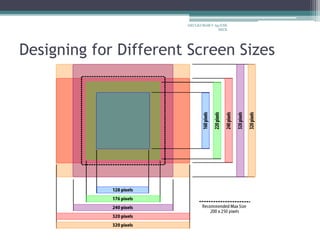
• Designing for Different Screen Sizes
▫ Mobile devices come in all shapes and sizes
▫ It can be incredibly difficult to create that best
possible experience for a plethora of different
screen sizes.
▫ How you design each screen of content depends
on the scope of devices you look to support
▫ The good news is that the vast majority of mobile
device screens share the same vertical or Portrait
orientation
ARULKUMAR V Ap/CSE
SECE
Designing for Different Screen Sizes
ARULKUMAR V Ap/CSE
SECE
Any Queries
ARULKUMAR V Ap/CSE
SECE

Mobile hci

  • 1.
  • 2.
    MOBILE ECOSYSTEM • TheInternet is actually a complex ecosystem made up of many parts that must all work together seamlessly. • Mobile is an entirely unique ecosystem and, like the Internet, it is made up of many different parts that must all work seamlessly together. ARULKUMAR V Ap/CSE SECE
  • 3.
    MOBILE ECOSYSTEM -LAYERS ARULKUMAR V Ap/CSE SECE
  • 4.
    MOBILE ECOSYSTEM -LAYERS • Operators ▫ The base layer in the mobile ecosystem is the operator. ▫ Operators can be referred to as Mobile Network Operators (MNOs); mobile service providers, wireless carriers, or simply carriers; mobile phone operators; or cellular companies ▫ Operators are what essentially make the entire mobile ecosystem work. They are the gatekeepers to the kingdom ARULKUMAR V Ap/CSE SECE
  • 5.
    MOBILE ECOSYSTEM -LAYERS ▫ They install cellular towers, operate the cellular network, make services (such as the Internet) available for mobile subscribers, and they often maintain relationships with the subscribers, handling billing and support, and offering subsidized device sales and a network of retail stores. ▫ The operator’s role in the ecosystem is to create and maintain a specific set of wireless services over a reliable cellular network ARULKUMAR V Ap/CSE SECE
  • 6.
    MOBILE ECOSYSTEM -LAYERS • Networks ▫ Operators operate wireless networks. Remember that cellular technology is just a radio that receives a signal from an antenna. The type of radio and antenna determines the capability of the network and the services you can enable on it. ARULKUMAR V Ap/CSE SECE
  • 7.
    MOBILE ECOSYSTEM -LAYERSMobile devices around the world Breakdown of devices ARULKUMAR V Ap/CSE SECE
  • 8.
    Platforms • A mobileplatform’s primary duty is to provide access to the devices • To run software and services on each of these devices, you need a platform, or a core programming language in which all of your software is written. • Like all software platforms, these are split into three categories: licensed, proprietary, and open source ARULKUMAR V Ap/CSE SECE
  • 9.
    Platforms - Licensed •Licensed platforms are sold to device makers for nonexclusive distribution on devices. • The goal is to create a common platform of development Application Programming Interfaces (APIs) • Following are the licensed platforms: ▫ Java Micro Edition (Java ME) ▫ Binary Runtime Environment for Wireless (BREW) ▫ Windows Mobile ▫ LiMo ARULKUMAR V Ap/CSE SECE
  • 10.
    Platforms - Proprietary •Proprietary platforms are designed and developed by device makers for use on their devices • They are not available for use by competing device makers • They include ▫ Palm ▫ BlackBerry ▫ iPhone . ARULKUMAR V Ap/CSE SECE
  • 11.
    Platforms - OpenSource • Open source platforms are mobile platforms that are freely available for users to download, alter, and edit. • Open source mobile platforms are newer and slightly controversial, but they are increasingly gaining traction with device makers and developers • Android is one of these platforms. It is developed by the Open Handset Alliance, which is spearheaded by Google ARULKUMAR V Ap/CSE SECE
  • 12.
    Application Frameworks • Applicationframeworks often run on top of operating systems, sharing core services such as communications, messaging, graphics, location, security, authentication, and many others. • They are ▫ Java, S60, BREW, Flash Lite, Windows Mobile, ▫ Cocoa Touch, Android SDK, Web Runtimes (WRTs), WebKit, The Web ARULKUMAR V Ap/CSE SECE
  • 13.
    Application Frameworks • Applicationframeworks are used to create applications, such as a game, a web browser, a camera, or media player. • Although the frameworks are well standardized. • The largest challenge of deploying applications is knowing the specific device attributes and capabilities. ARULKUMAR V Ap/CSE SECE
  • 14.
    Application Frameworks • Acommon alternative these days is creating applications for only one platform, such as the iPhone or Android • By minimizing the number of platforms the developer has to support and utilizing modern application frameworks. • The time and cost of creation go down significantly ARULKUMAR V Ap/CSE SECE
  • 15.
    Types of MobileApplications • Mobile Application Medium Types ▫ SMS ▫ Mobile Websites ▫ Mobile Web Widgets ▫ Mobile Web Applications ▫ Native Applications ▫ Games ▫ Mobile Application Media Matrix ▫ Application Context ▫ Utility Context ▫ Locale Context ▫ Informative Applications ▫ Productivity Application Context ▫ Immersive Full-Screen Applications ▫ Application Context Matrix ARULKUMAR V Ap/CSE SECE
  • 16.
    MOBILEWEB WIDGETS Mobile WebWidgets ▫ Largely in response to the poor experience provided by the mobile web over the years, there has been a growing movement to establish mobile widget frameworks and platforms. ▫ A mobile web widget is a standalone chunk of HTML-based code that is executed by the end user in a particular way. ARULKUMAR V Ap/CSE SECE
  • 17.
    Mobile Web Widgets Figure6-4. An example mobile web widget ARULKUMAR V Ap/CSE SECE
  • 18.
    Mobile Web Widgets ▫Basically, mobile web widgets are small web applications that can’t run by themselves; ▫ They need to be executed on top of something else ▫ Opera Widgets, Nokia Web RunTime (WRT), Yahoo! Blueprint, and Adobe Flash Lite are all examples of widget platforms that work on a number of mobile handsets ARULKUMAR V Ap/CSE SECE
  • 19.
    Mobile Web Widgets •Pros ▫ The pros of mobile web widgets are: ▫ They are easy to create, using basic HTML, CSS, and JavaScript knowledge. ▫ They can be simple to deploy across multiple handsets. ▫ They offer an improved user experience and a richer design, tapping into device features and offline use. • Cons ▫ The cons of mobile web widgets are: ▫ They typically require a compatible widget platform to be installed on the device. ▫ They cannot run in any mobile web browser. ▫ They require learning additional proprietary, non-web- standard technique ARULKUMAR V Ap/CSE SECE
  • 20.
    Games • The finalmobile medium is games, the most popular of all media available to mobile devices. • Technically games are really just native applications that use the similar platform SDKs to create immersive experiences • The reason games are relatively easy to port (“relatively” being the key word), is that the bulk of the gaming experience is in the graphics and actually uses very little of the device APIs. ARULKUMAR V Ap/CSE SECE
  • 21.
    Games • Pros ▫ Thepros of game applications are: ▫ They provide a simple and easy way to create an immersive experience. ▫ They can be ported to multiple devices relatively easily. • Cons ▫ The cons of game applications are: ▫ They can be costly to develop as an original game title. ▫ They cannot easily be ported to the mobile web ARULKUMAR V Ap/CSE SECE
  • 22.
    Mobile Information Architecture •What Is Information Architecture? ▫ The structural design of shared information environments ▫ The combination of organizations, labeling, search, and navigation systems within websites and intranets ▫ The art and science of shaping information products and experiences to support usability and findability ▫ An emerging discipline and community of practice focused on bringing principles of design and architecture to the digital landscape ARULKUMAR V Ap/CSE SECE
  • 23.
    Mobile Information Architecture •Facets of information architecture ▫ Information architecture ▫ Interaction design ▫ Information design ▫ Navigation design ▫ Interface design ARULKUMAR V Ap/CSE SECE
  • 24.
    Mobile Information Architecture •Characteristics of Mobile Information Architecture ▫ Keeping It Simple ▫ Site Maps ▫ Clickstreams ▫ Wireframes ▫ Prototyping ▫ Different Information Architecture for Different Devices ARULKUMAR V Ap/CSE SECE
  • 25.
    Mobile 2.0 • Mobile2.0,” borrowing from many of the same principles behind Web 2.0. • Each of these principles serves to transform the Web into a more agile and user-centered medium for delivering information to the masses. • Mobile development, under the bottlenecks of device fragmentation and operator control, is sorely in need of a little reinvention as well. ARULKUMAR V Ap/CSE SECE
  • 26.
    Mobile 2.0 • Followingis a recap of the original seven principles of Web 2.0: ▫ The Web as a platform ▫ Harnessing collective intelligence ▫ Data is the next Intel inside ▫ End of the software release cycle ▫ Lightweight programming models ▫ Software above the level of a single device ▫ Rich user experiences ARULKUMAR V Ap/CSE SECE
  • 27.
    Mobile 2.0 • Characteristicsof Mobile 2.0 ▫ The Convergence of the Web and Mobile ▫ The Mobile Web Browser As the Next Killer App ▫ Mobile Web Applications Are the Future ▫ JavaScript Is the Next Frontier ▫ The Mobile User Experience Is Awful ▫ Mobile Widgets Are the Next Big Thing ▫ Carrier Is the New “C” Word ▫ Mobile Needs to Check Its Ego ▫ We Are Creators, Not Consumers ARULKUMAR V Ap/CSE SECE
  • 28.
    Mobile Design: Elementsof Mobile Design, Tools • Interpreting Design ▫ The Mobile Design Tent-Pole ▫ Designing for the Best Possible Experience ARULKUMAR V Ap/CSE SECE
  • 29.
    The Elements ofMobile Design • Context • Message • Look and Feel • Layout • Color • Typography • Graphics ARULKUMAR V Ap/CSE SECE
  • 30.
    Mobile Design Tools •Mobile design requires understanding the design elements and specific tools • The closest thing to a common design tool is Adobe Photoshop, though each framework has a different method of implementing the design into the application. • Some frameworks provide a complete interface toolkit, allowing designers or developers to simply piece together the interface ARULKUMAR V Ap/CSE SECE
  • 31.
    Mobile Design Tools •Designing for the Right Device ▫ Now is the time to ask ▫ What device suits this design best? ▫ What market niche would appreciate it most? ▫ What devices are the most popular within that niche? ARULKUMAR V Ap/CSE SECE
  • 32.
    Mobile Design Tools •Designing for Different Screen Sizes ▫ Mobile devices come in all shapes and sizes ▫ It can be incredibly difficult to create that best possible experience for a plethora of different screen sizes. ▫ How you design each screen of content depends on the scope of devices you look to support ▫ The good news is that the vast majority of mobile device screens share the same vertical or Portrait orientation ARULKUMAR V Ap/CSE SECE
  • 33.
    Designing for DifferentScreen Sizes ARULKUMAR V Ap/CSE SECE
  • 34.