Information and CommunicationInformation and Communication
TechnologyTechnology
Chapter 8
The Internet
9/12/2015
Dr. J. VijiPriya, Assistant Professor,
Hawassa University, Ethiopia 1
What is Internet?What is Internet?
 a network of networks
 huge collection of computer networks , freely exchange
information
 To ensure the delivery of the data to the right computer, each
computer on the Internet is given an address(Domain Name
System or IP address)
9/12/2015
Dr. J. VijiPriya, Assistant Professor,
Hawassa University, Ethiopia 2
How does the Internet work?How does the Internet work?
In order to make the Internet work, it requires:
1. a physical connection between the computers
2. a Transmission Control Protocol/Internet Protocol (TCP/IP)
◦ all kinds of computers with different operating systems run on the Internet
◦ All computers to communicate over the Internet
9/12/2015
Dr. J. VijiPriya, Assistant Professor,
Hawassa University, Ethiopia 3
Getting connected to InternetGetting connected to Internet
Two basic ways:
1. dial-up internet connection
2. broad band or leased line internet connection
Dial-up internet connection
 dialing into an Internet service provider's (ISP) computer
9/12/2015
Dr. J. VijiPriya, Assistant Professor,
Hawassa University, Ethiopia 4
Getting connected to InternetGetting connected to Internet
con…con…
To establish a dial-up connection to the Internet, requires
following:
◦ An account with an ISP (a company that provides the Internet access)
◦ A telephone connection
◦ Modem (external/internal): used to connect the telephone line to the computer
◦ Communication software: e internet browsers such as internet explorer,
Mozila, Firebox, Chrome, Netscape Navigator, Opera, Safari
Advantages of dial-up connection:
◦ flexible: use it anywhere if you have an account, telephone line and computer
◦ Less monthly payment: it charges based on the amount of time usage 
Disadvantages of dial-up connection:
◦ Not faster: it is very slow because its the public service
9/12/2015
Dr. J. VijiPriya, Assistant Professor,
Hawassa University, Ethiopia 5
Getting connected to InternetGetting connected to Internet
con…con…
Broad band internet connection
◦ direct connection to an ISP if you have a fixed cable or a dedicated phone
line to the ISP
Advantages of broad band connection:
◦ Faster: because use a free telephone line is dedicated for this internet service o
Disadvantages of broad band connection:
◦ the fixed amount of money must be paid monthly regardless of usage
◦ Not flexible: have a fixed telephone line and use it on that area only
9/12/2015
Dr. J. VijiPriya, Assistant Professor,
Hawassa University, Ethiopia 6
ProtocolsProtocols
 the formal rules governing the exchange of information between computers
 provide reliable and efficient transfer of information
 define the format in which data and messages are to be sent
 Why Protocols?
◦ Most computers are not similar, and they have to share the same language to
understand each other
 Example : TCP/IP
9/12/2015
Dr. J. VijiPriya, Assistant Professor,
Hawassa University, Ethiopia 7
Protocols Con…Protocols Con…
9/12/2015
Dr. J. VijiPriya, Assistant Professor,
Hawassa University, Ethiopia 8
Protocols con…Protocols con…
To send a message across the Internet to another user:
In Sender side
◦ TCP divides the data into manageable units called packets
◦ attaches the information necessary to each packet for reassemble the
data and check for errors
◦ IP labels all the packets with a header containing the address of the
destination and sends them on their way
In Receiver side 
◦ Once the packets reach their destination, the receiver removes the IP
header
◦ The receiver uses the data that TCP attached to each packet to make sure
none of the packets have been lost or damaged
◦ The packets are reassembled into the original message
◦ If the receiver discovers a damaged packet, it sends a message to the sender
asking it to resend the packet.
9/12/2015
Dr. J. VijiPriya, Assistant Professor,
Hawassa University, Ethiopia 9
Protocols con…Protocols con…
Website
 refers to a collection of one or more web pages on the web
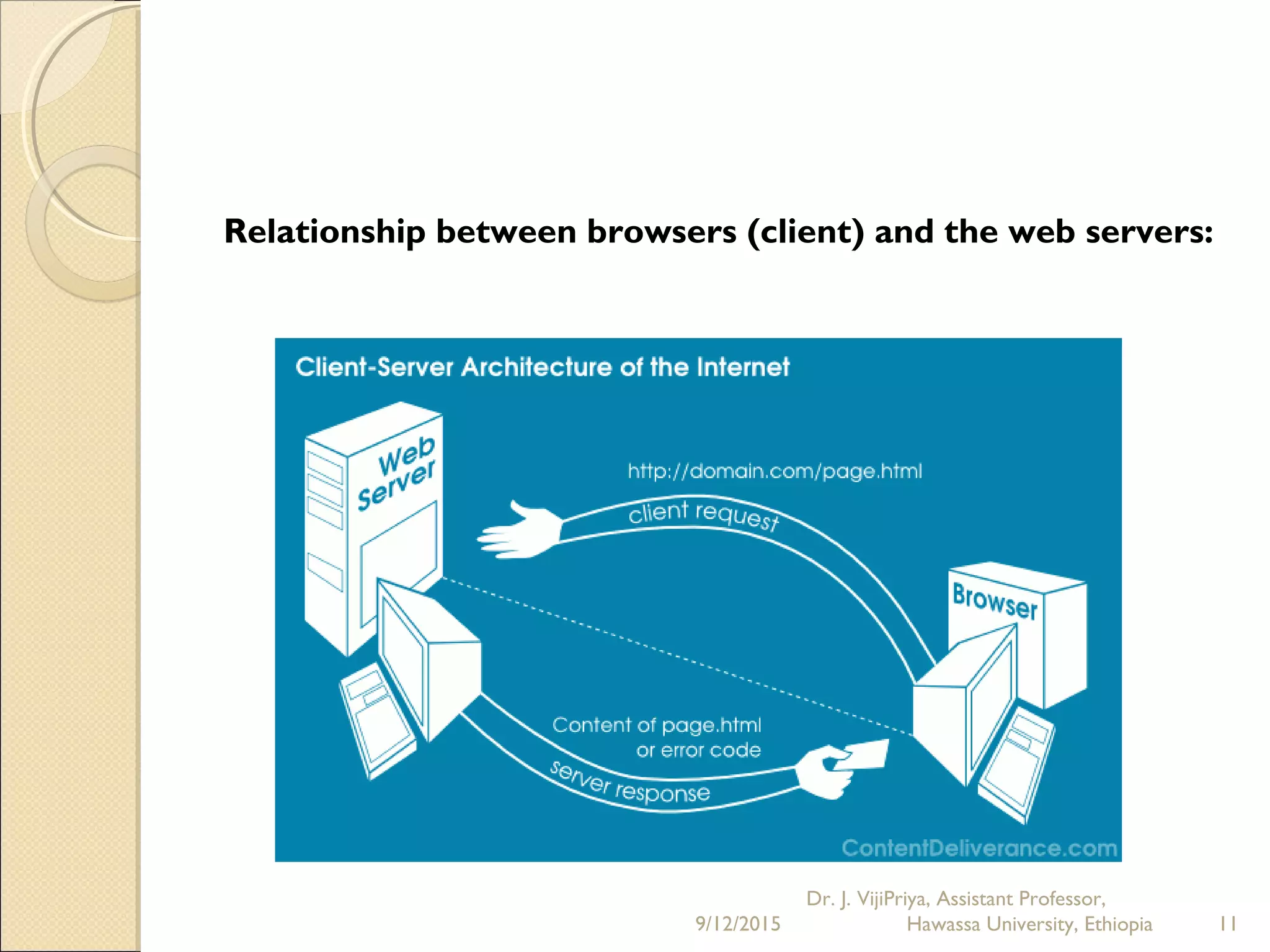
Relationship between browsers (client) and the web servers:
 Is a client/server relationship
 The web client (browser) requests information from the web server (containing the
requested information)
 The server delivers it
To access pages on web servers by using a browser:
 tell your browser what web page you want to view,
 It goes to the web server that holds the page and retrieves it
  The links contained in web pages can point to areas within the same page, to other
pages residing on the same web server
9/12/2015
Dr. J. VijiPriya, Assistant Professor,
Hawassa University, Ethiopia 10
Relationship between browsers (client) and the web servers:
9/12/2015
Dr. J. VijiPriya, Assistant Professor,
Hawassa University, Ethiopia 11
Social Network ServiceSocial Network Service
 focuses on building online communities of people who share interests and/or
activities
 provide a variety of ways for users to interact, such as e-mail and instant messaging
services
 encouraged new ways to communicate and share information
 used regularly by millions of people
 types of social networking services
◦ Facebook widely used worldwide
◦ MySpace, Twitter and LinkedIn in North America
◦ Nexopia in Canada
◦ Bebo, Hi5, MySpace, dol2day in Germany
◦ Tagged, XING;and Skyrock in Europe
◦ Orkut and Hi5 in South America and Central America
◦ Friendster, Multiply, Orkut, Xiaonei and Cyworld in Asia and Pacific
Islands
9/12/2015
Dr. J. VijiPriya, Assistant Professor,
Hawassa University, Ethiopia 12
Social Network Service Con…Social Network Service Con…
9/12/2015
Dr. J. VijiPriya, Assistant Professor,
Hawassa University, Ethiopia 13
History of Social Network ServiceHistory of Social Network Service
 Early social networks via computer-mediated communication supported by Usenet,
ARPANET, LISTSERV, bulletin board services (BBS) and EIES: Electronic Information
Exchange Service
 Early social networking websites started in the form of online communities
◦ The WELL (1985)
◦ Theglobe.com (1994),
◦ Geocities (1994)
◦ Tripod (1995)
◦ Classmates.com (1995)
◦ SixDegrees.com (1997)
◦ Friendster, MySpace, Bebo(2003)
◦ Facebook (2004),
◦ MySpace, Yahoo, ITV (2005)
◦ Twitter(2009)
9/12/2015
Dr. J. VijiPriya, Assistant Professor,
Hawassa University, Ethiopia 14
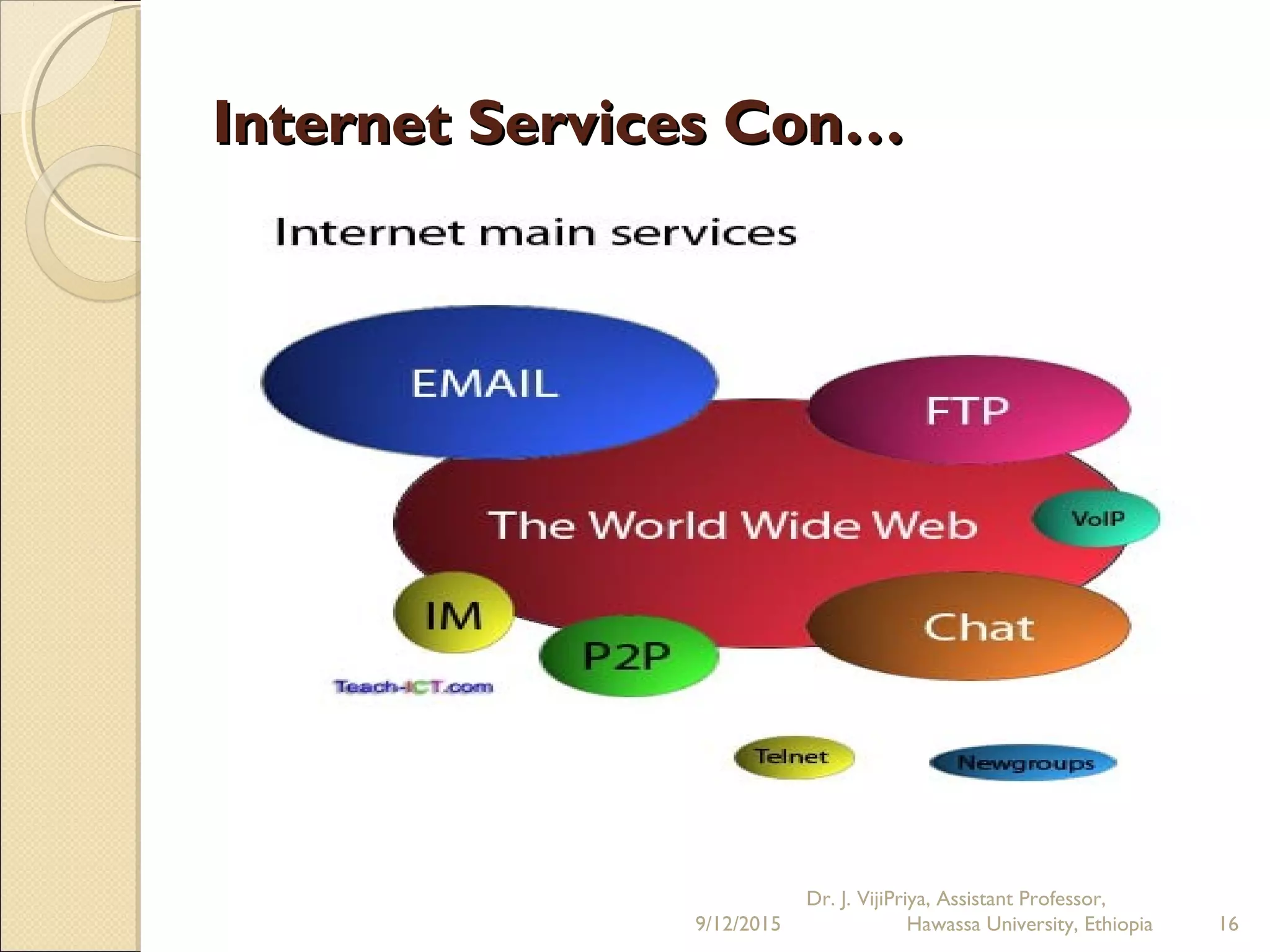
Internet Applications or ServicesInternet Applications or Services
Types of Internet Services
1. World wide web
2. Electronic mail
3. File Transfer Protocol (FTP)
4. Telnet
5. Internet Relay Chat (IRC)
6. Internet Telephony
7. Video conferencing
9/12/2015
Dr. J. VijiPriya, Assistant Professor,
Hawassa University, Ethiopia 15
Internet Services Con…Internet Services Con…
9/12/2015
Dr. J. VijiPriya, Assistant Professor,
Hawassa University, Ethiopia 16
Internet Applications or ServicesInternet Applications or Services
con…con…
World Wide Web (WWW)
   a vast collection of documents stored on Internet computers
 The web documents contain links that lead to other web pages
  uses Hypertext Mark-up language (HTML) to design a web document
  user can click on any of the links and jump to the related document (non
linear)
 The web includes text, voice, video, pictures, graphics, sound etc (rich media
system)
 A web user can fill in forms on-line, run programs, select options
( interactive )
Basic Internet Terms:
  Web Server
◦ a program and a computer clubbed into one entity which responds to the
requests from web browsers for Internet resources
  Home Page
◦ the first hypertext document to be shown when a user follows a link to the
web server.
9/12/2015
Dr. J. VijiPriya, Assistant Professor,
Hawassa University, Ethiopia 17
Internet Applications or ServicesInternet Applications or Services
con…con…
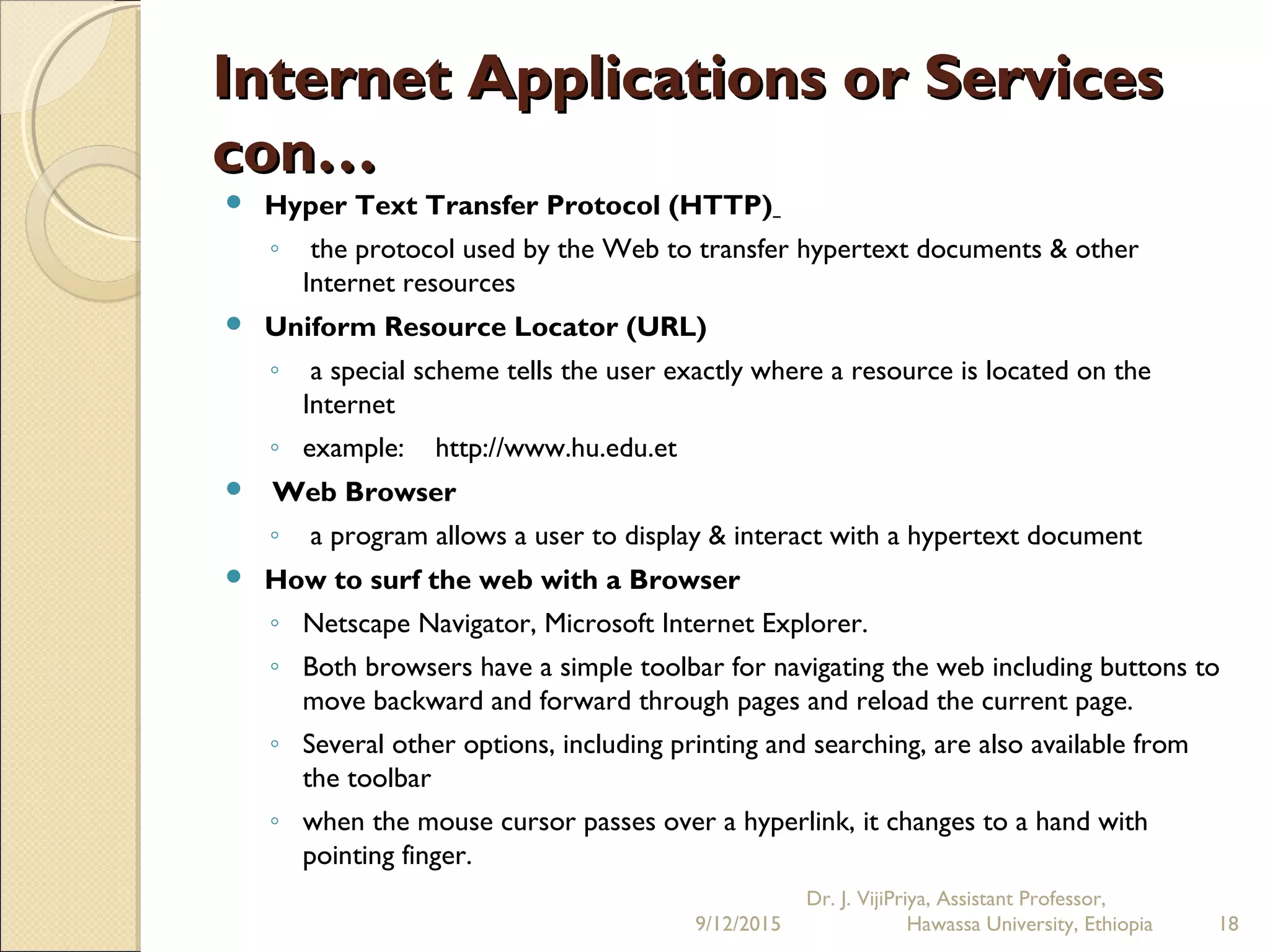
 Hyper Text Transfer Protocol (HTTP)
◦ the protocol used by the Web to transfer hypertext documents & other
Internet resources
 Uniform Resource Locator (URL)
◦ a special scheme tells the user exactly where a resource is located on the
Internet
◦ example: http://www.hu.edu.et
  Web Browser
◦ a program allows a user to display & interact with a hypertext document
 How to surf the web with a Browser
◦ Netscape Navigator, Microsoft Internet Explorer.
◦ Both browsers have a simple toolbar for navigating the web including buttons to
move backward and forward through pages and reload the current page.
◦ Several other options, including printing and searching, are also available from
the toolbar
◦ when the mouse cursor passes over a hyperlink, it changes to a hand with
pointing finger.
9/12/2015
Dr. J. VijiPriya, Assistant Professor,
Hawassa University, Ethiopia 18
Internet Applications or ServicesInternet Applications or Services
con…con…
E-mail
 a user can send and receive mail through computers to and from any Internet
user
 transmit text, messages, audio and video clips to just one user or a group of
users while Large documents can be attached
 Users can read, print, forward, answer or delete a message
 cheaper and faster in comparison to other communication services
 assigned a unique address, used by the e-mail network to deliver the
message
9/12/2015
Dr. J. VijiPriya, Assistant Professor,
Hawassa University, Ethiopia 19
Internet Applications or ServicesInternet Applications or Services
con…con…
FTP (File Transfer Protocol)
 allows a user to transfer data between computers on the Internet
 allow users to manage and download files from computers connected to the
Internet
Telnet
 allows one computer to connect to another computer, anywhere in the world
 allows user to log into computers on the Internet where user commands as
text will be executed
 To Telnet to a computer, user must know its address, consist of domain name
(locis.loc.gov) or IP address (140.147.254.3)
9/12/2015
Dr. J. VijiPriya, Assistant Professor,
Hawassa University, Ethiopia 20
Internet Applications or ServicesInternet Applications or Services
con…con…
Usenet News
 global electronic bulletin board system in which millions of computer users
exchange information from academic to recreational topics
 Usenet messages are stored on central computers, users must connect to these
computers to read or download the messages posted to these groups
 But email messages arrive in the electronic mailboxes of each list member
 not as popular nowadays , instead Blogs and RSS (Rich Site Summary) feeds are
newer modes of communication
9/12/2015
Dr. J. VijiPriya, Assistant Professor,
Hawassa University, Ethiopia 21
Internet Applications or ServicesInternet Applications or Services
con…con…
Chat
 allow users on the Internet to communicate with each other by typing in real
time.
Internet Relay Chat (IRC)
 allows participants to communicate to each other on hundreds of channels
( based on specific topics)
 To access IRC, user must use an IRC software program
Instant messaging
 allows a user on the Web to contact another user currently logged in and type
a conversation
9/12/2015
Dr. J. VijiPriya, Assistant Professor,
Hawassa University, Ethiopia 22
Internet Applications or ServicesInternet Applications or Services
con…con…
Search Engine
 computer software that compiles lists of documents
 respond to a user entry, or query, by searching the lists and displaying a list of
documents (text or URL of website) that match the search query
 Examples: Google, Mama, Yahoo etc..
9/12/2015
Dr. J. VijiPriya, Assistant Professor,
Hawassa University, Ethiopia 23
Social Network Services :-Social Network Services :-
Typical structureTypical structure
1. Basics Features
2. Normal Features
3. Additional Features
Basics Features
Two categories
1. Internal Social Networking (ISN)
◦ closed/private community that consists of a group of people within a
company, association, society, education provider and organization
II. External Social Networking (ESN) Sites
◦ open/public and available to all web users to communicate and are
designed to attract advertisers
◦ smaller specialized communities (i.e. linked by a single common interest e.g.
TheSocialGolfer, ACountryLife.Com, Great Cooks Community)
◦ large generic social networking sites (Eg:-MySpace, Facebook , Twitter and
Bebo etc),
9/12/2015
Dr. J. VijiPriya, Assistant Professor,
Hawassa University, Ethiopia 24
Social Network Services :-Social Network Services :-
Typical structure Con…Typical structure Con…
Basics Features Con…
In Social Network, Users can:
 create a profile for themselves
 Upload a picture of themselves,
 Often be "friends" with other users.
 Both users must confirm that they are friends before they are linked. For example,
if Alice lists Bob as a friend, then Bob would have to approve Alice's friend request
before they are listed as friends.
 Some social networking sites have a "favorites" feature that does not need
approval from the other user
 Social networks usually have privacy controls that allows the user to choose who
can view their profile or contact them, etc…
9/12/2015
Dr. J. VijiPriya, Assistant Professor,
Hawassa University, Ethiopia 25
Social Network Services :-Social Network Services :-
Typical structure Con…Typical structure Con…
Normal Features
A set of features are considered essential to qualify as a social networking service,
namely:
 The ability to set up and customize a personal 'profile'
 An ability for members to comment
 Fine granular control of who sees what (privacy settings)
 Ability to block an unwanted member
 Have own page of personal (blog like) entries or notes and individual picture
albums
 Ability to own, form or be member of a Group or Community within the network
 Ability to include "Social Apps" or "Gadgets“ can create online contact and spread
of information
9/12/2015
Dr. J. VijiPriya, Assistant Professor,
Hawassa University, Ethiopia 26
Social Network Services :-Social Network Services :-
Typical structure Con…Typical structure Con…
Additional features
 Ability to create groups share common interests or affiliations, upload or
stream live videos, and hold discussions in forums
 Lately, mobile social networking has become popular
 Mobile phone users can create their own profiles, make friends, participate in
chat rooms, create chat rooms, hold private conversations, share photos and
videos, and share blogs by using their mobile phone
9/12/2015
Dr. J. VijiPriya, Assistant Professor,
Hawassa University, Ethiopia 27
Emerging Trends in Social NetworksEmerging Trends in Social Networks
 use of Social Networks in the Science communities. Researchers sharing
information and knowledge with one another
 Social Network use by college students to network with professionals for
internship and job opportunities
 One popular use for this new technology is social networking between businesses.
 Companies found that social networking sites such as Facebook, MySpace and
twitter are great ways to build their brand image
 five major uses for businesses and social media. They are:
i. to create Brand Awareness, online reputation management tool, recruiting,
ii. learn about new technologies and competitors and to intercept potential
prospects
iii. companies are able to drive traffic to their own online sites
iv. encouraging their consumers and clients to have discussions on how to improve
or change products or services
v. Social networks operate under an autonomous business model via online
advertisement, in which a social network's members serve dual roles as both the
suppliers and the consumers of content
9/12/2015
Dr. J. VijiPriya, Assistant Professor,
Hawassa University, Ethiopia 28
Issues in Social Network Services
1. Privacy
 Users giving out too much personal information and increasingly the threat of
sexual predators
 Users of these services need to be aware of data theft or viruses
 Medical and scientific research data are public, republishing it in a research
paper might be considered invasion of privacy
2. Notifications on websites
 social networking sites to send out only 'positive' notifications to users if a user
is moved to the top of another user's friends list.
 but no notification is sent if they are moved down the list or they are
removed totally from a person's friends list
3. Potential for misuse
 The relative freedom afforded by social networking services has caused concern
regarding the potential of its misuse by users
 Eg: Craete Fake profile
9/12/2015
Dr. J. VijiPriya, Assistant Professor,
Hawassa University, Ethiopia 29
Issues in Social Network ServicesIssues in Social Network Services
con…con…
Risk for child safety
 misuse by child and teenagers of social network services, particularly in relation to
online sexual predators
9/12/2015
Dr. J. VijiPriya, Assistant Professor,
Hawassa University, Ethiopia 30
Social Network Services inSocial Network Services in
InvestigationsInvestigations
Social network services are increasingly being used in legal and
criminal investigations
 MySpace and Facebook used by police, probation, and university officials to
prosecute users of said sites, evidence in court
 Facebook is increasingly being used by school administrations and law
enforcement agencies as a source of evidence against student users
 Facebook to help their crack down on knife and gun crime
9/12/2015
Dr. J. VijiPriya, Assistant Professor,
Hawassa University, Ethiopia 31
Application domainsApplication domains
1. Business applications
 Social networks connect people at low cost; this can be beneficial for
entrepreneurs and small businesses looking to expand their contact/customer
base
 Interactive technology makes it possible for people to network with their peers
from anywhere, at anytime in an online environment by creating informative and
interactive meeting places
2. Medical applications
 Social networks adopted by healthcare professionals as a means to manage
institutional knowledge, disseminate peer to peer knowledge and to
highlight individual physicians and institutions
 For people suffering from life altering diseases, PatientsLikeMe offers its
members the chance to connect with others dealing with similar issues
 SoberCircle for alcoholics and addicts to communicate with one another and
strengthen their recovery through the encouragement of others who can relate
to their situation.
 Daily strength support groups for a wide array of topics
 SparkPeople for peer support during weight loss
9/12/2015
Dr. J. VijiPriya, Assistant Professor,
Hawassa University, Ethiopia 32
What is Malware?What is Malware?
 Malicious software designed to infiltrate or damage a computer system without
the owner's informed consent
 Malware includes computer viruses, worms, trojan horses, spyware, dishonest
adware, and other malicious and unwanted software, defective software
contains harmful bugs
Most Malware have the following phases while affecting your computer
system:
1. Dormancy phase - create a sense of trust in the user
2. Propagation phase - duplicates itself without making damage
3. Triggering phase -triggered by some occurrence such as date or a particular
number of replications, sequence of keystroke
4. Damage phase- formatting the hard disk thereby destroying all the data in it,
reserving space on disk so that files cannot be stored on it etc…
 Types of malware: viruses, worms, trojan horses, spyware 
9/12/2015
Dr. J. VijiPriya, Assistant Professor,
Hawassa University, Ethiopia 33
Malware Con…Malware Con…
Viruses
A computer virus attaches itself to a program or file enabling it to spread from one
computer to another
1. Macro Viruses
 A macro virus, often scripted into common application programs such as Word or
Excel, is spread by infecting documents.
 When the application is running, this allows the macro virus to spread amongst the
operating systems
 Examples : Melissa A and Bablas pc
2. Network Viruses
 Network viruses rapidly spread through a Local Network Area (LAN), and
sometimes throughout the internet.
 Example: Nimda and SQLSlammer.
3. Logic bomb virus
 piece of code that is inputted into a software system
 clicking on an internet browser or opening a particular file, the logic bomb virus is
set off
9/12/2015
Dr. J. VijiPriya, Assistant Professor,
Hawassa University, Ethiopia 34
Malware Con…Malware Con…
Viruses Con…
4. Companion Viruses
 Companion viruses take advantage of MS-DOS. This virus creates a new file with he
.COM extensions, .EXD extension, .EXE extension
 is rare among Windows XP computers does not use the MS-DOS
5. Boot Sector Viruses
 Boot sector viruses generally hide in the boot sector, either in the bootable disk or
the hard drive.
 Unlike most viruses, this virus does not harm the files in the hard disk, but harm the
hard disk itself.
 spread rapidly by floppy disks and not on CD-ROMs
6. Multipartite Viruses
 spread through infected media and usually hide in the memory Gradually
moves to the boot sector of the hard drive and infects executable files on the hard
drive and later across the computer system
9/12/2015
Dr. J. VijiPriya, Assistant Professor,
Hawassa University, Ethiopia 35
Malware Con…Malware Con…
Worm
 similar to a virus by design and is considered to be a sub-class of a virus
 capability to travel without any human action
 Due to the copying nature of a worm and its capability to travel across networks
the end result is the worm consumes too much system memory (or network
bandwidth), causing Web servers, network servers and individual computers to
stop responding
 allow malicious users to control your computer remotely
Trojan horse
 at first glance will appear to be useful software but will actually do damage once
installed or run on your computer
 designed to be more annoying than malicious (like changing your desktop, adding
silly active desktop icons)
 cause serious damage by deleting files and destroying information on your system
 create a backdoor for that gives malicious users access to your system, possibly
allowing confidential or personal information
 No self-replication unlike other viruses
9/12/2015
Dr. J. VijiPriya, Assistant Professor,
Hawassa University, Ethiopia 36
Malware Con…Malware Con…
Combating Viruses, Worms and Trojan Horses
few primary indicators that your system might be infected:
 Runs consistently slower than normal
 Stops responding or locks up often
 Crashes and restarts every few minutes
 Restarts on its own and then fails to run normally
 Applications don't work properly
 Disks or disk drives are inaccessible
 Printing doesn't work correctly
 You see unusual error messages
 You see distorted menus and dialog boxes
9/12/2015
Dr. J. VijiPriya, Assistant Professor,
Hawassa University, Ethiopia 37
Adware and SpywareAdware and Spyware
Adware
 Advertising Supported Software is bundled within software a computer owner
purchases
 collect data on which sites the user visits, send this data back to the company and
deliver advertising based on the information
 using a free software product that includes adware, so a user may opt to purchase a
registered or licensed version without adware to remove the ads
9/12/2015
Dr. J. VijiPriya, Assistant Professor,
Hawassa University, Ethiopia 38
Adware and SpywareAdware and Spyware
Spyware
 type of malware that is considered by many to be privacy-invasive. Spyware can
steal a user’s information or corrupt the user’s system files
Antivirus software today detects and removes both adware
and spyware
9/12/2015
Dr. J. VijiPriya, Assistant Professor,
Hawassa University, Ethiopia 39
How to protect your computerHow to protect your computer
against virusesagainst viruses
 Protect your computer current with the latest updates.
 Use an Internet firewall (Note: Windows XP with SP2 has a firewall already built-in
and active).
 A firewall is a system that prevents unauthorized use and access to your computer
A firewall can be either hardware or software.
 Subscribe to industry standard antivirus software and keep it current.
 Never open an e-mail attachment from someone you don't know
 Avoid opening an e-mail attachment from someone you know, unless you know
exactly what the attachment is because the sender may be unaware that it contains
a virus.
 If you use Microsoft Office applications, it's a good idea to keep them updated too
 
9/12/2015
Dr. J. VijiPriya, Assistant Professor,
Hawassa University, Ethiopia 40

Dr. J. VijiPriya - Information and Communication Technology Chapter 8 The Internet

  • 1.
    Information and CommunicationInformationand Communication TechnologyTechnology Chapter 8 The Internet 9/12/2015 Dr. J. VijiPriya, Assistant Professor, Hawassa University, Ethiopia 1
  • 2.
    What is Internet?Whatis Internet?  a network of networks  huge collection of computer networks , freely exchange information  To ensure the delivery of the data to the right computer, each computer on the Internet is given an address(Domain Name System or IP address) 9/12/2015 Dr. J. VijiPriya, Assistant Professor, Hawassa University, Ethiopia 2
  • 3.
    How does theInternet work?How does the Internet work? In order to make the Internet work, it requires: 1. a physical connection between the computers 2. a Transmission Control Protocol/Internet Protocol (TCP/IP) ◦ all kinds of computers with different operating systems run on the Internet ◦ All computers to communicate over the Internet 9/12/2015 Dr. J. VijiPriya, Assistant Professor, Hawassa University, Ethiopia 3
  • 4.
    Getting connected toInternetGetting connected to Internet Two basic ways: 1. dial-up internet connection 2. broad band or leased line internet connection Dial-up internet connection  dialing into an Internet service provider's (ISP) computer 9/12/2015 Dr. J. VijiPriya, Assistant Professor, Hawassa University, Ethiopia 4
  • 5.
    Getting connected toInternetGetting connected to Internet con…con… To establish a dial-up connection to the Internet, requires following: ◦ An account with an ISP (a company that provides the Internet access) ◦ A telephone connection ◦ Modem (external/internal): used to connect the telephone line to the computer ◦ Communication software: e internet browsers such as internet explorer, Mozila, Firebox, Chrome, Netscape Navigator, Opera, Safari Advantages of dial-up connection: ◦ flexible: use it anywhere if you have an account, telephone line and computer ◦ Less monthly payment: it charges based on the amount of time usage  Disadvantages of dial-up connection: ◦ Not faster: it is very slow because its the public service 9/12/2015 Dr. J. VijiPriya, Assistant Professor, Hawassa University, Ethiopia 5
  • 6.
    Getting connected toInternetGetting connected to Internet con…con… Broad band internet connection ◦ direct connection to an ISP if you have a fixed cable or a dedicated phone line to the ISP Advantages of broad band connection: ◦ Faster: because use a free telephone line is dedicated for this internet service o Disadvantages of broad band connection: ◦ the fixed amount of money must be paid monthly regardless of usage ◦ Not flexible: have a fixed telephone line and use it on that area only 9/12/2015 Dr. J. VijiPriya, Assistant Professor, Hawassa University, Ethiopia 6
  • 7.
    ProtocolsProtocols  the formalrules governing the exchange of information between computers  provide reliable and efficient transfer of information  define the format in which data and messages are to be sent  Why Protocols? ◦ Most computers are not similar, and they have to share the same language to understand each other  Example : TCP/IP 9/12/2015 Dr. J. VijiPriya, Assistant Professor, Hawassa University, Ethiopia 7
  • 8.
    Protocols Con…Protocols Con… 9/12/2015 Dr.J. VijiPriya, Assistant Professor, Hawassa University, Ethiopia 8
  • 9.
    Protocols con…Protocols con… Tosend a message across the Internet to another user: In Sender side ◦ TCP divides the data into manageable units called packets ◦ attaches the information necessary to each packet for reassemble the data and check for errors ◦ IP labels all the packets with a header containing the address of the destination and sends them on their way In Receiver side  ◦ Once the packets reach their destination, the receiver removes the IP header ◦ The receiver uses the data that TCP attached to each packet to make sure none of the packets have been lost or damaged ◦ The packets are reassembled into the original message ◦ If the receiver discovers a damaged packet, it sends a message to the sender asking it to resend the packet. 9/12/2015 Dr. J. VijiPriya, Assistant Professor, Hawassa University, Ethiopia 9
  • 10.
    Protocols con…Protocols con… Website refers to a collection of one or more web pages on the web Relationship between browsers (client) and the web servers:  Is a client/server relationship  The web client (browser) requests information from the web server (containing the requested information)  The server delivers it To access pages on web servers by using a browser:  tell your browser what web page you want to view,  It goes to the web server that holds the page and retrieves it   The links contained in web pages can point to areas within the same page, to other pages residing on the same web server 9/12/2015 Dr. J. VijiPriya, Assistant Professor, Hawassa University, Ethiopia 10
  • 11.
    Relationship between browsers(client) and the web servers: 9/12/2015 Dr. J. VijiPriya, Assistant Professor, Hawassa University, Ethiopia 11
  • 12.
    Social Network ServiceSocialNetwork Service  focuses on building online communities of people who share interests and/or activities  provide a variety of ways for users to interact, such as e-mail and instant messaging services  encouraged new ways to communicate and share information  used regularly by millions of people  types of social networking services ◦ Facebook widely used worldwide ◦ MySpace, Twitter and LinkedIn in North America ◦ Nexopia in Canada ◦ Bebo, Hi5, MySpace, dol2day in Germany ◦ Tagged, XING;and Skyrock in Europe ◦ Orkut and Hi5 in South America and Central America ◦ Friendster, Multiply, Orkut, Xiaonei and Cyworld in Asia and Pacific Islands 9/12/2015 Dr. J. VijiPriya, Assistant Professor, Hawassa University, Ethiopia 12
  • 13.
    Social Network ServiceCon…Social Network Service Con… 9/12/2015 Dr. J. VijiPriya, Assistant Professor, Hawassa University, Ethiopia 13
  • 14.
    History of SocialNetwork ServiceHistory of Social Network Service  Early social networks via computer-mediated communication supported by Usenet, ARPANET, LISTSERV, bulletin board services (BBS) and EIES: Electronic Information Exchange Service  Early social networking websites started in the form of online communities ◦ The WELL (1985) ◦ Theglobe.com (1994), ◦ Geocities (1994) ◦ Tripod (1995) ◦ Classmates.com (1995) ◦ SixDegrees.com (1997) ◦ Friendster, MySpace, Bebo(2003) ◦ Facebook (2004), ◦ MySpace, Yahoo, ITV (2005) ◦ Twitter(2009) 9/12/2015 Dr. J. VijiPriya, Assistant Professor, Hawassa University, Ethiopia 14
  • 15.
    Internet Applications orServicesInternet Applications or Services Types of Internet Services 1. World wide web 2. Electronic mail 3. File Transfer Protocol (FTP) 4. Telnet 5. Internet Relay Chat (IRC) 6. Internet Telephony 7. Video conferencing 9/12/2015 Dr. J. VijiPriya, Assistant Professor, Hawassa University, Ethiopia 15
  • 16.
    Internet Services Con…InternetServices Con… 9/12/2015 Dr. J. VijiPriya, Assistant Professor, Hawassa University, Ethiopia 16
  • 17.
    Internet Applications orServicesInternet Applications or Services con…con… World Wide Web (WWW)    a vast collection of documents stored on Internet computers  The web documents contain links that lead to other web pages   uses Hypertext Mark-up language (HTML) to design a web document   user can click on any of the links and jump to the related document (non linear)  The web includes text, voice, video, pictures, graphics, sound etc (rich media system)  A web user can fill in forms on-line, run programs, select options ( interactive ) Basic Internet Terms:   Web Server ◦ a program and a computer clubbed into one entity which responds to the requests from web browsers for Internet resources   Home Page ◦ the first hypertext document to be shown when a user follows a link to the web server. 9/12/2015 Dr. J. VijiPriya, Assistant Professor, Hawassa University, Ethiopia 17
  • 18.
    Internet Applications orServicesInternet Applications or Services con…con…  Hyper Text Transfer Protocol (HTTP) ◦ the protocol used by the Web to transfer hypertext documents & other Internet resources  Uniform Resource Locator (URL) ◦ a special scheme tells the user exactly where a resource is located on the Internet ◦ example: http://www.hu.edu.et   Web Browser ◦ a program allows a user to display & interact with a hypertext document  How to surf the web with a Browser ◦ Netscape Navigator, Microsoft Internet Explorer. ◦ Both browsers have a simple toolbar for navigating the web including buttons to move backward and forward through pages and reload the current page. ◦ Several other options, including printing and searching, are also available from the toolbar ◦ when the mouse cursor passes over a hyperlink, it changes to a hand with pointing finger. 9/12/2015 Dr. J. VijiPriya, Assistant Professor, Hawassa University, Ethiopia 18
  • 19.
    Internet Applications orServicesInternet Applications or Services con…con… E-mail  a user can send and receive mail through computers to and from any Internet user  transmit text, messages, audio and video clips to just one user or a group of users while Large documents can be attached  Users can read, print, forward, answer or delete a message  cheaper and faster in comparison to other communication services  assigned a unique address, used by the e-mail network to deliver the message 9/12/2015 Dr. J. VijiPriya, Assistant Professor, Hawassa University, Ethiopia 19
  • 20.
    Internet Applications orServicesInternet Applications or Services con…con… FTP (File Transfer Protocol)  allows a user to transfer data between computers on the Internet  allow users to manage and download files from computers connected to the Internet Telnet  allows one computer to connect to another computer, anywhere in the world  allows user to log into computers on the Internet where user commands as text will be executed  To Telnet to a computer, user must know its address, consist of domain name (locis.loc.gov) or IP address (140.147.254.3) 9/12/2015 Dr. J. VijiPriya, Assistant Professor, Hawassa University, Ethiopia 20
  • 21.
    Internet Applications orServicesInternet Applications or Services con…con… Usenet News  global electronic bulletin board system in which millions of computer users exchange information from academic to recreational topics  Usenet messages are stored on central computers, users must connect to these computers to read or download the messages posted to these groups  But email messages arrive in the electronic mailboxes of each list member  not as popular nowadays , instead Blogs and RSS (Rich Site Summary) feeds are newer modes of communication 9/12/2015 Dr. J. VijiPriya, Assistant Professor, Hawassa University, Ethiopia 21
  • 22.
    Internet Applications orServicesInternet Applications or Services con…con… Chat  allow users on the Internet to communicate with each other by typing in real time. Internet Relay Chat (IRC)  allows participants to communicate to each other on hundreds of channels ( based on specific topics)  To access IRC, user must use an IRC software program Instant messaging  allows a user on the Web to contact another user currently logged in and type a conversation 9/12/2015 Dr. J. VijiPriya, Assistant Professor, Hawassa University, Ethiopia 22
  • 23.
    Internet Applications orServicesInternet Applications or Services con…con… Search Engine  computer software that compiles lists of documents  respond to a user entry, or query, by searching the lists and displaying a list of documents (text or URL of website) that match the search query  Examples: Google, Mama, Yahoo etc.. 9/12/2015 Dr. J. VijiPriya, Assistant Professor, Hawassa University, Ethiopia 23
  • 24.
    Social Network Services:-Social Network Services :- Typical structureTypical structure 1. Basics Features 2. Normal Features 3. Additional Features Basics Features Two categories 1. Internal Social Networking (ISN) ◦ closed/private community that consists of a group of people within a company, association, society, education provider and organization II. External Social Networking (ESN) Sites ◦ open/public and available to all web users to communicate and are designed to attract advertisers ◦ smaller specialized communities (i.e. linked by a single common interest e.g. TheSocialGolfer, ACountryLife.Com, Great Cooks Community) ◦ large generic social networking sites (Eg:-MySpace, Facebook , Twitter and Bebo etc), 9/12/2015 Dr. J. VijiPriya, Assistant Professor, Hawassa University, Ethiopia 24
  • 25.
    Social Network Services:-Social Network Services :- Typical structure Con…Typical structure Con… Basics Features Con… In Social Network, Users can:  create a profile for themselves  Upload a picture of themselves,  Often be "friends" with other users.  Both users must confirm that they are friends before they are linked. For example, if Alice lists Bob as a friend, then Bob would have to approve Alice's friend request before they are listed as friends.  Some social networking sites have a "favorites" feature that does not need approval from the other user  Social networks usually have privacy controls that allows the user to choose who can view their profile or contact them, etc… 9/12/2015 Dr. J. VijiPriya, Assistant Professor, Hawassa University, Ethiopia 25
  • 26.
    Social Network Services:-Social Network Services :- Typical structure Con…Typical structure Con… Normal Features A set of features are considered essential to qualify as a social networking service, namely:  The ability to set up and customize a personal 'profile'  An ability for members to comment  Fine granular control of who sees what (privacy settings)  Ability to block an unwanted member  Have own page of personal (blog like) entries or notes and individual picture albums  Ability to own, form or be member of a Group or Community within the network  Ability to include "Social Apps" or "Gadgets“ can create online contact and spread of information 9/12/2015 Dr. J. VijiPriya, Assistant Professor, Hawassa University, Ethiopia 26
  • 27.
    Social Network Services:-Social Network Services :- Typical structure Con…Typical structure Con… Additional features  Ability to create groups share common interests or affiliations, upload or stream live videos, and hold discussions in forums  Lately, mobile social networking has become popular  Mobile phone users can create their own profiles, make friends, participate in chat rooms, create chat rooms, hold private conversations, share photos and videos, and share blogs by using their mobile phone 9/12/2015 Dr. J. VijiPriya, Assistant Professor, Hawassa University, Ethiopia 27
  • 28.
    Emerging Trends inSocial NetworksEmerging Trends in Social Networks  use of Social Networks in the Science communities. Researchers sharing information and knowledge with one another  Social Network use by college students to network with professionals for internship and job opportunities  One popular use for this new technology is social networking between businesses.  Companies found that social networking sites such as Facebook, MySpace and twitter are great ways to build their brand image  five major uses for businesses and social media. They are: i. to create Brand Awareness, online reputation management tool, recruiting, ii. learn about new technologies and competitors and to intercept potential prospects iii. companies are able to drive traffic to their own online sites iv. encouraging their consumers and clients to have discussions on how to improve or change products or services v. Social networks operate under an autonomous business model via online advertisement, in which a social network's members serve dual roles as both the suppliers and the consumers of content 9/12/2015 Dr. J. VijiPriya, Assistant Professor, Hawassa University, Ethiopia 28
  • 29.
    Issues in SocialNetwork Services 1. Privacy  Users giving out too much personal information and increasingly the threat of sexual predators  Users of these services need to be aware of data theft or viruses  Medical and scientific research data are public, republishing it in a research paper might be considered invasion of privacy 2. Notifications on websites  social networking sites to send out only 'positive' notifications to users if a user is moved to the top of another user's friends list.  but no notification is sent if they are moved down the list or they are removed totally from a person's friends list 3. Potential for misuse  The relative freedom afforded by social networking services has caused concern regarding the potential of its misuse by users  Eg: Craete Fake profile 9/12/2015 Dr. J. VijiPriya, Assistant Professor, Hawassa University, Ethiopia 29
  • 30.
    Issues in SocialNetwork ServicesIssues in Social Network Services con…con… Risk for child safety  misuse by child and teenagers of social network services, particularly in relation to online sexual predators 9/12/2015 Dr. J. VijiPriya, Assistant Professor, Hawassa University, Ethiopia 30
  • 31.
    Social Network ServicesinSocial Network Services in InvestigationsInvestigations Social network services are increasingly being used in legal and criminal investigations  MySpace and Facebook used by police, probation, and university officials to prosecute users of said sites, evidence in court  Facebook is increasingly being used by school administrations and law enforcement agencies as a source of evidence against student users  Facebook to help their crack down on knife and gun crime 9/12/2015 Dr. J. VijiPriya, Assistant Professor, Hawassa University, Ethiopia 31
  • 32.
    Application domainsApplication domains 1.Business applications  Social networks connect people at low cost; this can be beneficial for entrepreneurs and small businesses looking to expand their contact/customer base  Interactive technology makes it possible for people to network with their peers from anywhere, at anytime in an online environment by creating informative and interactive meeting places 2. Medical applications  Social networks adopted by healthcare professionals as a means to manage institutional knowledge, disseminate peer to peer knowledge and to highlight individual physicians and institutions  For people suffering from life altering diseases, PatientsLikeMe offers its members the chance to connect with others dealing with similar issues  SoberCircle for alcoholics and addicts to communicate with one another and strengthen their recovery through the encouragement of others who can relate to their situation.  Daily strength support groups for a wide array of topics  SparkPeople for peer support during weight loss 9/12/2015 Dr. J. VijiPriya, Assistant Professor, Hawassa University, Ethiopia 32
  • 33.
    What is Malware?Whatis Malware?  Malicious software designed to infiltrate or damage a computer system without the owner's informed consent  Malware includes computer viruses, worms, trojan horses, spyware, dishonest adware, and other malicious and unwanted software, defective software contains harmful bugs Most Malware have the following phases while affecting your computer system: 1. Dormancy phase - create a sense of trust in the user 2. Propagation phase - duplicates itself without making damage 3. Triggering phase -triggered by some occurrence such as date or a particular number of replications, sequence of keystroke 4. Damage phase- formatting the hard disk thereby destroying all the data in it, reserving space on disk so that files cannot be stored on it etc…  Types of malware: viruses, worms, trojan horses, spyware  9/12/2015 Dr. J. VijiPriya, Assistant Professor, Hawassa University, Ethiopia 33
  • 34.
    Malware Con…Malware Con… Viruses Acomputer virus attaches itself to a program or file enabling it to spread from one computer to another 1. Macro Viruses  A macro virus, often scripted into common application programs such as Word or Excel, is spread by infecting documents.  When the application is running, this allows the macro virus to spread amongst the operating systems  Examples : Melissa A and Bablas pc 2. Network Viruses  Network viruses rapidly spread through a Local Network Area (LAN), and sometimes throughout the internet.  Example: Nimda and SQLSlammer. 3. Logic bomb virus  piece of code that is inputted into a software system  clicking on an internet browser or opening a particular file, the logic bomb virus is set off 9/12/2015 Dr. J. VijiPriya, Assistant Professor, Hawassa University, Ethiopia 34
  • 35.
    Malware Con…Malware Con… VirusesCon… 4. Companion Viruses  Companion viruses take advantage of MS-DOS. This virus creates a new file with he .COM extensions, .EXD extension, .EXE extension  is rare among Windows XP computers does not use the MS-DOS 5. Boot Sector Viruses  Boot sector viruses generally hide in the boot sector, either in the bootable disk or the hard drive.  Unlike most viruses, this virus does not harm the files in the hard disk, but harm the hard disk itself.  spread rapidly by floppy disks and not on CD-ROMs 6. Multipartite Viruses  spread through infected media and usually hide in the memory Gradually moves to the boot sector of the hard drive and infects executable files on the hard drive and later across the computer system 9/12/2015 Dr. J. VijiPriya, Assistant Professor, Hawassa University, Ethiopia 35
  • 36.
    Malware Con…Malware Con… Worm similar to a virus by design and is considered to be a sub-class of a virus  capability to travel without any human action  Due to the copying nature of a worm and its capability to travel across networks the end result is the worm consumes too much system memory (or network bandwidth), causing Web servers, network servers and individual computers to stop responding  allow malicious users to control your computer remotely Trojan horse  at first glance will appear to be useful software but will actually do damage once installed or run on your computer  designed to be more annoying than malicious (like changing your desktop, adding silly active desktop icons)  cause serious damage by deleting files and destroying information on your system  create a backdoor for that gives malicious users access to your system, possibly allowing confidential or personal information  No self-replication unlike other viruses 9/12/2015 Dr. J. VijiPriya, Assistant Professor, Hawassa University, Ethiopia 36
  • 37.
    Malware Con…Malware Con… CombatingViruses, Worms and Trojan Horses few primary indicators that your system might be infected:  Runs consistently slower than normal  Stops responding or locks up often  Crashes and restarts every few minutes  Restarts on its own and then fails to run normally  Applications don't work properly  Disks or disk drives are inaccessible  Printing doesn't work correctly  You see unusual error messages  You see distorted menus and dialog boxes 9/12/2015 Dr. J. VijiPriya, Assistant Professor, Hawassa University, Ethiopia 37
  • 38.
    Adware and SpywareAdwareand Spyware Adware  Advertising Supported Software is bundled within software a computer owner purchases  collect data on which sites the user visits, send this data back to the company and deliver advertising based on the information  using a free software product that includes adware, so a user may opt to purchase a registered or licensed version without adware to remove the ads 9/12/2015 Dr. J. VijiPriya, Assistant Professor, Hawassa University, Ethiopia 38
  • 39.
    Adware and SpywareAdwareand Spyware Spyware  type of malware that is considered by many to be privacy-invasive. Spyware can steal a user’s information or corrupt the user’s system files Antivirus software today detects and removes both adware and spyware 9/12/2015 Dr. J. VijiPriya, Assistant Professor, Hawassa University, Ethiopia 39
  • 40.
    How to protectyour computerHow to protect your computer against virusesagainst viruses  Protect your computer current with the latest updates.  Use an Internet firewall (Note: Windows XP with SP2 has a firewall already built-in and active).  A firewall is a system that prevents unauthorized use and access to your computer A firewall can be either hardware or software.  Subscribe to industry standard antivirus software and keep it current.  Never open an e-mail attachment from someone you don't know  Avoid opening an e-mail attachment from someone you know, unless you know exactly what the attachment is because the sender may be unaware that it contains a virus.  If you use Microsoft Office applications, it's a good idea to keep them updated too   9/12/2015 Dr. J. VijiPriya, Assistant Professor, Hawassa University, Ethiopia 40