Information and CommunicationInformation and Communication
TechnologyTechnology
Chapter 1- Introduction to Computer
Chapter 2- Data Representation
Chapter 3-Computer System
9/12/2015 1
Presented by Dr.J.VijiPriya, Assistant
Professor, Hawassa University,Ethiopia
Introduction to ComputerIntroduction to Computer
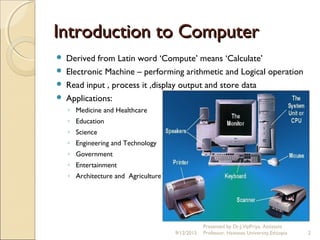
 Derived from Latin word ‘Compute’ means ‘Calculate’
 Electronic Machine – performing arithmetic and Logical operation
 Read input , process it ,display output and store data
 Applications:
◦ Medicine and Healthcare
◦ Education
◦ Science
◦ Engineering and Technology
◦ Government
◦ Entertainment
◦ Architecture and Agriculture
9/12/2015 2
Presented by Dr.J.VijiPriya, Assistant
Professor, Hawassa University,Ethiopia
Information and CommunicationInformation and Communication
TechnologyTechnology
 Technology merging computing with communication links carrying
data in the form of text, audio and video
 Derived from combination of computers and communication
9/12/2015 3
Presented by Dr.J.VijiPriya, Assistant
Professor, Hawassa University,Ethiopia
Characteristics of ComputersCharacteristics of Computers
 Automatic
 Speed
 Accuracy
 Diligence
 Versatility
 Power of Remembering
 No I.Q.
 No Feeling
9/12/2015
Presented by Dr.J.VijiPriya, Assistant
Professor, Hawassa University,Ethiopia 4
Characteristics of ComputersCharacteristics of Computers
Con…Con…
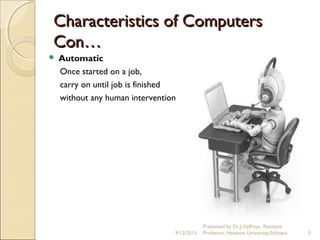
 Automatic
Once started on a job,
carry on until job is finished
without any human intervention
9/12/2015
Presented by Dr.J.VijiPriya, Assistant
Professor, Hawassa University,Ethiopia 5
Characteristics of ComputersCharacteristics of Computers
Con…Con…
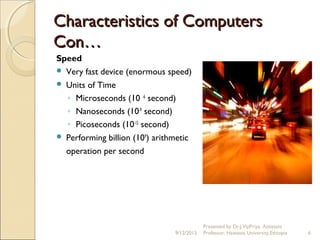
Speed
 Very fast device (enormous speed)
 Units of Time
◦ Microseconds (10 -6
second)
◦ Nanoseconds (10-9
second)
◦ Picoseconds (10-12
second)
 Performing billion (109
) arithmetic
operation per second
9/12/2015
Presented by Dr.J.VijiPriya, Assistant
Professor, Hawassa University,Ethiopia 6
Characteristics of ComputersCharacteristics of Computers
Con…Con…
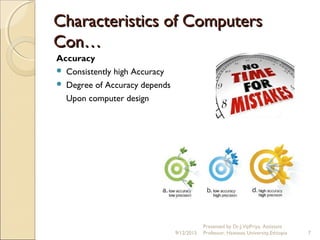
Accuracy
 Consistently high Accuracy
 Degree of Accuracy depends
Upon computer design
9/12/2015
Presented by Dr.J.VijiPriya, Assistant
Professor, Hawassa University,Ethiopia 7
Characteristics of ComputersCharacteristics of Computers
Con…Con…
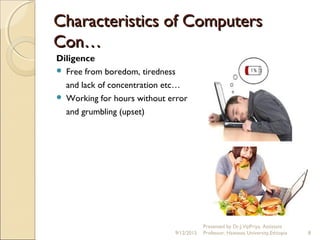
Diligence
 Free from boredom, tiredness
and lack of concentration etc…
 Working for hours without error
and grumbling (upset)
9/12/2015
Presented by Dr.J.VijiPriya, Assistant
Professor, Hawassa University,Ethiopia 8
Characteristics of ComputersCharacteristics of Computers
Con…Con…
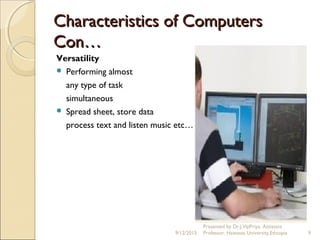
Versatility
 Performing almost
any type of task
simultaneous
 Spread sheet, store data
process text and listen music etc…
9/12/2015
Presented by Dr.J.VijiPriya, Assistant
Professor, Hawassa University,Ethiopia 9
Characteristics of ComputersCharacteristics of Computers
Con…Con…
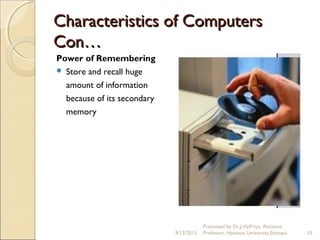
Power of Remembering
 Store and recall huge
amount of information
because of its secondary
memory
9/12/2015
Presented by Dr.J.VijiPriya, Assistant
Professor, Hawassa University,Ethiopia 10
Characteristics of ComputersCharacteristics of Computers
Con…Con…
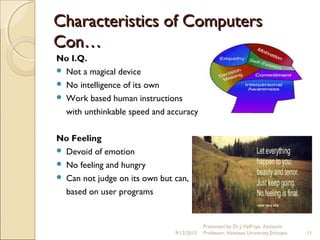
No I.Q.
 Not a magical device
 No intelligence of its own
 Work based human instructions
with unthinkable speed and accuracy
No Feeling
 Devoid of emotion
 No feeling and hungry
 Can not judge on its own but can,
based on user programs
9/12/2015
Presented by Dr.J.VijiPriya, Assistant
Professor, Hawassa University,Ethiopia 11
Classification of ComputersClassification of Computers
9/12/2015
Presented by Dr.J.VijiPriya, Assistant
Professor, Hawassa University,Ethiopia 12
Classification of ComputersClassification of Computers
Con…Con…
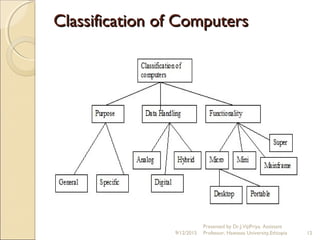
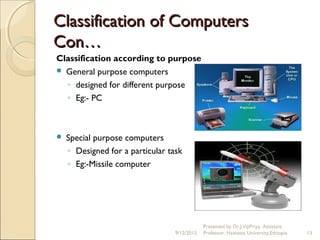
Classification according to purpose
 General purpose computers
◦ designed for different purpose
◦ Eg:- PC
 Special purpose computers
◦ Designed for a particular task
◦ Eg:-Missile computer
9/12/2015
Presented by Dr.J.VijiPriya, Assistant
Professor, Hawassa University,Ethiopia 13
Classification of Computers Con…Classification of Computers Con…
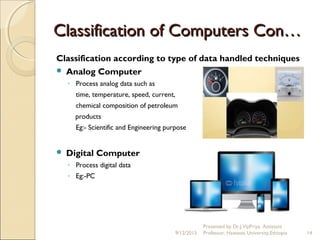
Classification according to type of data handled techniques
 Analog Computer
◦ Process analog data such as
time, temperature, speed, current,
chemical composition of petroleum
products
Eg:- Scientific and Engineering purpose
 Digital Computer
◦ Process digital data
◦ Eg:-PC
9/12/2015
Presented by Dr.J.VijiPriya, Assistant
Professor, Hawassa University,Ethiopia 14
Classification of ComputersClassification of Computers
Con…Con…
9/12/2015
Presented by Dr.J.VijiPriya, Assistant
Professor, Hawassa University,Ethiopia 15
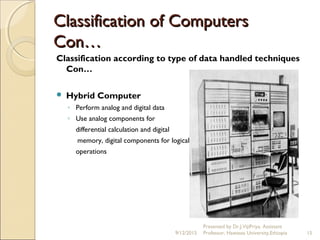
Classification according to type of data handled techniques
Con…
 Hybrid Computer
◦ Perform analog and digital data
◦ Use analog components for
differential calculation and digital
memory, digital components for logical
operations
Classification of ComputersClassification of Computers
Con…Con…
Classification according to Functionality
 Super Computers
 Mainframe Computers
 Microcomputers
 Minicomputers
 Workstations
9/12/2015
Presented by Dr.J.VijiPriya, Assistant
Professor, Hawassa University,Ethiopia 16
Classification of ComputersClassification of Computers
Con…Con…
Classification according to Functionality con…
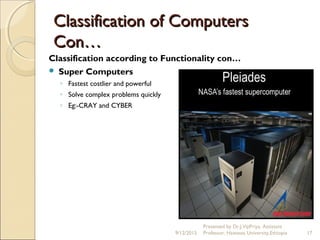
 Super Computers
◦ Fastest costlier and powerful
◦ Solve complex problems quickly
◦ Eg:-CRAY and CYBER
9/12/2015
Presented by Dr.J.VijiPriya, Assistant
Professor, Hawassa University,Ethiopia 17
Classification of ComputersClassification of Computers
Con…Con…
Classification according to Functionality con…
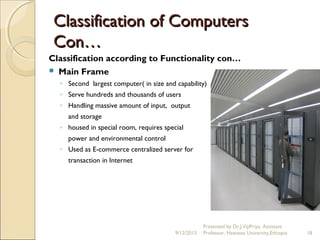
 Main Frame
◦ Second largest computer( in size and capability)
◦ Serve hundreds and thousands of users
◦ Handling massive amount of input, output
and storage
◦ housed in special room, requires special
power and environmental control
◦ Used as E-commerce centralized server for
transaction in Internet
9/12/2015
Presented by Dr.J.VijiPriya, Assistant
Professor, Hawassa University,Ethiopia 18
Classification of ComputersClassification of Computers
Con…Con…
Classification according to Functionality con…
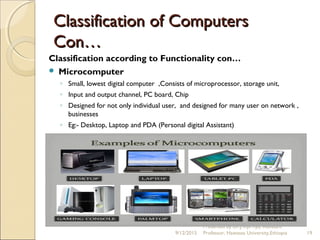
 Microcomputer
◦ Small, lowest digital computer ,Consists of microprocessor, storage unit,
◦ Input and output channel, PC board, Chip
◦ Designed for not only individual user, and designed for many user on network ,
businesses
◦ Eg:- Desktop, Laptop and PDA (Personal digital Assistant)
9/12/2015
Presented by Dr.J.VijiPriya, Assistant
Professor, Hawassa University,Ethiopia 19
Classification of ComputersClassification of Computers
Con…Con…
Classification according to Functionality con…
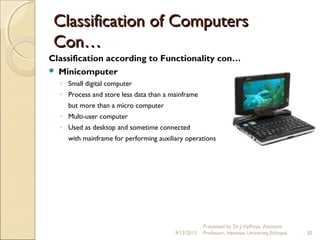
 Minicomputer
◦ Small digital computer
◦ Process and store less data than a mainframe
but more than a micro computer
◦ Multi-user computer
◦ Used as desktop and sometime connected
with mainframe for performing auxiliary operations
9/12/2015
Presented by Dr.J.VijiPriya, Assistant
Professor, Hawassa University,Ethiopia 20
Classification of ComputersClassification of Computers
Con…Con…
Classification according to Functionality con…
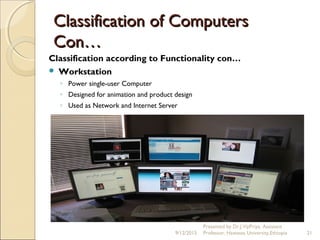
 Workstation
◦ Power single-user Computer
◦ Designed for animation and product design
◦ Used as Network and Internet Server
9/12/2015
Presented by Dr.J.VijiPriya, Assistant
Professor, Hawassa University,Ethiopia 21
Information and CommunicationInformation and Communication
TechnologyTechnology
Chapter -2 Data Representation
9/12/2015
Presented by Dr.J.VijiPriya, Assistant
Professor, Hawassa University,Ethiopia 22
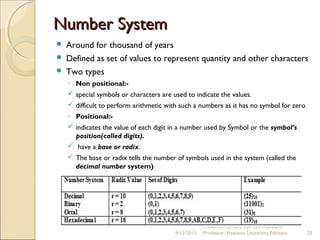
Number SystemNumber System
 Around for thousand of years
 Defined as set of values to represent quantity and other characters
 Two types
◦ Non positional:-
 special symbols or characters are used to indicate the values.
 difficult to perform arithmetic with such a numbers as it has no symbol for zero
◦ Positional:-
 indicates the value of each digit in a number used by Symbol or the symbol’s
position(called digits).
 have a base or radix.
 The base or radix tells the number of symbols used in the system (called the
decimal number system)
9/12/2015
Presented by Dr.J.VijiPriya, Assistant
Professor, Hawassa University,Ethiopia 23
Conversion between NumberConversion between Number
SystemsSystems
 Internally computers use binary numbers for data
representation whereas externally it uses decimal numbers.
 However, any number in one number system can be represented
in any other number system.
   Conversion of Decimal to Binary
 Conversion of Binary to decimal
9/12/2015
Presented by Dr.J.VijiPriya, Assistant
Professor, Hawassa University,Ethiopia 24
Conversion between NumberConversion between Number
SystemsSystems
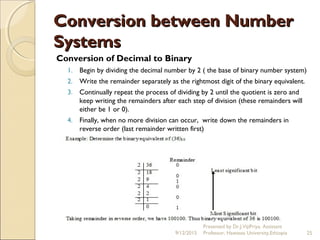
Conversion of Decimal to Binary
1. Begin by dividing the decimal number by 2 ( the base of binary number system)
2. Write the remainder separately as the rightmost digit of the binary equivalent.
3. Continually repeat the process of dividing by 2 until the quotient is zero and
keep writing the remainders after each step of division (these remainders will
either be 1 or 0).
4. Finally, when no more division can occur, write down the remainders in
reverse order (last remainder written first)
9/12/2015
Presented by Dr.J.VijiPriya, Assistant
Professor, Hawassa University,Ethiopia 25
Conversion between NumberConversion between Number
SystemsSystems
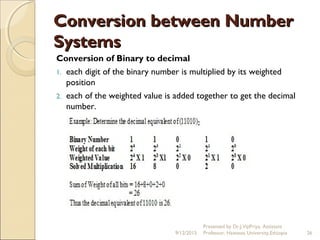
Conversion of Binary to decimal
1. each digit of the binary number is multiplied by its weighted
position
2. each of the weighted value is added together to get the decimal
number.
9/12/2015
Presented by Dr.J.VijiPriya, Assistant
Professor, Hawassa University,Ethiopia 26
Unit of RepresentationUnit of Representation
 When data is stored, processed, or communicated within the computer system, it is
“packed” in units.
 Units are called bits, bytes, and words
 based on the binary number system where large numbers can be conveyed using
only two digits, 0 and 1.
Bits
◦ Smallest unit
◦ Each binary digit (bit) is represented by an on (1) or off (0) state of a switch.
 
9/12/2015
Presented by Dr.J.VijiPriya, Assistant
Professor, Hawassa University,Ethiopia 27
Unit of RepresentationUnit of Representation
Bytes
◦ Largest unit, contains 8 bits
◦ The total amount of information that can be conveyed is 28
or
256 possible combinations.
◦ Combinations can represent letters, numbers, and symbols
such as +,-,? etc…
◦ Computer’s memory processing, storage, and communication
use the byte as a unit of measurement.
◦ indicate the size of memory like 128,000 bytes or 128K bytes
◦ The K indicate a magnitude of 1000.
◦ M (for Megabyte) -magnitude of 1,000,000.
 Gigabyte, or 1 billion bytes. 1000,000,000
9/12/2015
Presented by Dr.J.VijiPriya, Assistant
Professor, Hawassa University,Ethiopia 28
Unit of RepresentationUnit of Representation
Words
 refers to the number of bits that a computer processes at once
 conveyed even faster by sending more than one byte at a
time, two bytes, or four bytes.
 Generally, word length is given in bits, (8 bits, 16 bits, or 32
bits).
 The larger word length a computer has, the more powerful it is.
9/12/2015
Presented by Dr.J.VijiPriya, Assistant
Professor, Hawassa University,Ethiopia 29
Binary CodingBinary Coding
commonly used coding standards:
 Binary Coded Decimal (BCD)
 American Standard Code for Information Interchange (ASCII)
 Extended Binary Coded Decimal Interchange Code (EBCDIC)
 Unicode
9/12/2015
Presented by Dr.J.VijiPriya, Assistant
Professor, Hawassa University,Ethiopia 30
Binary Coding Con…Binary Coding Con…
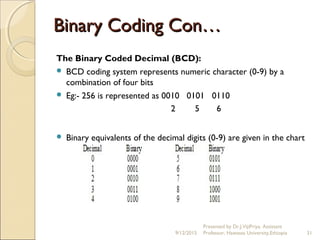
The Binary Coded Decimal (BCD):
 BCD coding system represents numeric character (0-9) by a
combination of four bits
 Eg:- 256 is represented as 0010 0101 0110
2 5 6
 Binary equivalents of the decimal digits (0-9) are given in the chart
below.
9/12/2015
Presented by Dr.J.VijiPriya, Assistant
Professor, Hawassa University,Ethiopia 31
Binary Coding Con…Binary Coding Con…
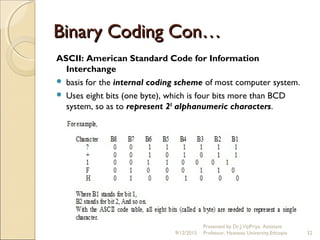
ASCII: American Standard Code for Information
Interchange
 basis for the internal coding scheme of most computer system.
 Uses eight bits (one byte), which is four bits more than BCD
system, so as to represent 28
alphanumeric characters.
9/12/2015
Presented by Dr.J.VijiPriya, Assistant
Professor, Hawassa University,Ethiopia 32
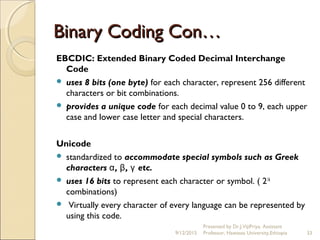
EBCDIC: Extended Binary Coded Decimal Interchange
Code
 uses 8 bits (one byte) for each character, represent 256 different
characters or bit combinations.
 provides a unique code for each decimal value 0 to 9, each upper
case and lower case letter and special characters.
 
Unicode
 standardized to accommodate special symbols such as Greek
characters , , etc.α β γ
 uses 16 bits to represent each character or symbol. ( 216
combinations)
 Virtually every character of every language can be represented by
using this code.
9/12/2015
Presented by Dr.J.VijiPriya, Assistant
Professor, Hawassa University,Ethiopia 33
Binary Coding Con…Binary Coding Con…
Information and CommunicationInformation and Communication
TechnologyTechnology
Chapter 3
Computer System
9/12/2015
Presented by Dr.J.VijiPriya, Assistant
Professor, Hawassa University,Ethiopia 34
Computer SystemComputer System
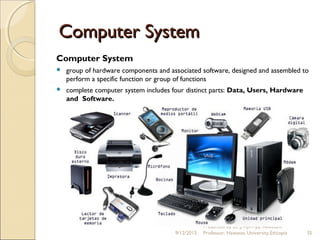
Computer System
 group of hardware components and associated software, designed and assembled to
perform a specific function or group of functions
 complete computer system includes four distinct parts: Data, Users, Hardware
and Software.
9/12/2015
Presented by Dr.J.VijiPriya, Assistant
Professor, Hawassa University,Ethiopia 35
Computer SystemComputer System
Data
 Are raw facts which the computer can manipulate and process into information
that is useful to people
 Used for simple (mathematical) operations and complex (drawing, picture)
operations.
 The instructions that make up the program define what data is to be processed,
in what form and at what time.
 The computer reads and stores all data as numbers
 After processing semi-information (data) and generates complete information
used by human
User
 Are the people operating the computers
9/12/2015
Presented by Dr.J.VijiPriya, Assistant
Professor, Hawassa University,Ethiopia 36
Computer System Con…Computer System Con…
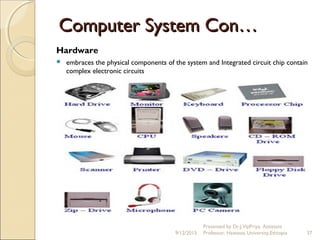
Hardware
 embraces the physical components of the system and Integrated circuit chip contain
complex electronic circuits
9/12/2015
Presented by Dr.J.VijiPriya, Assistant
Professor, Hawassa University,Ethiopia 37
Computer System Con…Computer System Con…
Hardware con…
 The box which contains the printed circuit boards, power supply, display screen,
keyboard and mouse for user interaction, peripheral devices such as disks and
printers.
 The internal electronic circuits of modern computers are made up from a number
of integrated circuit chips and other components.
 The heart of the modern computer is the microprocessor , integrated circuit chip
containing the central processing unit of a small computer system
 However, before the computer hardware can perform a task (for example add
numbers or read a character from a keyboard), it requires a program to tell it what
to do.
9/12/2015
Presented by Dr.J.VijiPriya, Assistant
Professor, Hawassa University,Ethiopia 38
Computer System Con…Computer System Con…
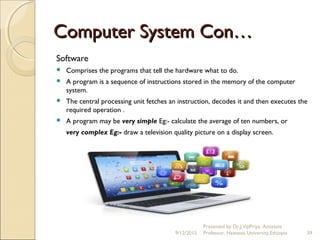
Software
 Comprises the programs that tell the hardware what to do.
 A program is a sequence of instructions stored in the memory of the computer
system.
 The central processing unit fetches an instruction, decodes it and then executes the
required operation .
 A program may be very simple Eg:- calculate the average of ten numbers, or
very complex Eg:- draw a television quality picture on a display screen.
9/12/2015
Presented by Dr.J.VijiPriya, Assistant
Professor, Hawassa University,Ethiopia 39

Information and Communication Technology Chapter 1,2 ,3 - Dr.J.VijiPriya

  • 1.
    Information and CommunicationInformationand Communication TechnologyTechnology Chapter 1- Introduction to Computer Chapter 2- Data Representation Chapter 3-Computer System 9/12/2015 1 Presented by Dr.J.VijiPriya, Assistant Professor, Hawassa University,Ethiopia
  • 2.
    Introduction to ComputerIntroductionto Computer  Derived from Latin word ‘Compute’ means ‘Calculate’  Electronic Machine – performing arithmetic and Logical operation  Read input , process it ,display output and store data  Applications: ◦ Medicine and Healthcare ◦ Education ◦ Science ◦ Engineering and Technology ◦ Government ◦ Entertainment ◦ Architecture and Agriculture 9/12/2015 2 Presented by Dr.J.VijiPriya, Assistant Professor, Hawassa University,Ethiopia
  • 3.
    Information and CommunicationInformationand Communication TechnologyTechnology  Technology merging computing with communication links carrying data in the form of text, audio and video  Derived from combination of computers and communication 9/12/2015 3 Presented by Dr.J.VijiPriya, Assistant Professor, Hawassa University,Ethiopia
  • 4.
    Characteristics of ComputersCharacteristicsof Computers  Automatic  Speed  Accuracy  Diligence  Versatility  Power of Remembering  No I.Q.  No Feeling 9/12/2015 Presented by Dr.J.VijiPriya, Assistant Professor, Hawassa University,Ethiopia 4
  • 5.
    Characteristics of ComputersCharacteristicsof Computers Con…Con…  Automatic Once started on a job, carry on until job is finished without any human intervention 9/12/2015 Presented by Dr.J.VijiPriya, Assistant Professor, Hawassa University,Ethiopia 5
  • 6.
    Characteristics of ComputersCharacteristicsof Computers Con…Con… Speed  Very fast device (enormous speed)  Units of Time ◦ Microseconds (10 -6 second) ◦ Nanoseconds (10-9 second) ◦ Picoseconds (10-12 second)  Performing billion (109 ) arithmetic operation per second 9/12/2015 Presented by Dr.J.VijiPriya, Assistant Professor, Hawassa University,Ethiopia 6
  • 7.
    Characteristics of ComputersCharacteristicsof Computers Con…Con… Accuracy  Consistently high Accuracy  Degree of Accuracy depends Upon computer design 9/12/2015 Presented by Dr.J.VijiPriya, Assistant Professor, Hawassa University,Ethiopia 7
  • 8.
    Characteristics of ComputersCharacteristicsof Computers Con…Con… Diligence  Free from boredom, tiredness and lack of concentration etc…  Working for hours without error and grumbling (upset) 9/12/2015 Presented by Dr.J.VijiPriya, Assistant Professor, Hawassa University,Ethiopia 8
  • 9.
    Characteristics of ComputersCharacteristicsof Computers Con…Con… Versatility  Performing almost any type of task simultaneous  Spread sheet, store data process text and listen music etc… 9/12/2015 Presented by Dr.J.VijiPriya, Assistant Professor, Hawassa University,Ethiopia 9
  • 10.
    Characteristics of ComputersCharacteristicsof Computers Con…Con… Power of Remembering  Store and recall huge amount of information because of its secondary memory 9/12/2015 Presented by Dr.J.VijiPriya, Assistant Professor, Hawassa University,Ethiopia 10
  • 11.
    Characteristics of ComputersCharacteristicsof Computers Con…Con… No I.Q.  Not a magical device  No intelligence of its own  Work based human instructions with unthinkable speed and accuracy No Feeling  Devoid of emotion  No feeling and hungry  Can not judge on its own but can, based on user programs 9/12/2015 Presented by Dr.J.VijiPriya, Assistant Professor, Hawassa University,Ethiopia 11
  • 12.
    Classification of ComputersClassificationof Computers 9/12/2015 Presented by Dr.J.VijiPriya, Assistant Professor, Hawassa University,Ethiopia 12
  • 13.
    Classification of ComputersClassificationof Computers Con…Con… Classification according to purpose  General purpose computers ◦ designed for different purpose ◦ Eg:- PC  Special purpose computers ◦ Designed for a particular task ◦ Eg:-Missile computer 9/12/2015 Presented by Dr.J.VijiPriya, Assistant Professor, Hawassa University,Ethiopia 13
  • 14.
    Classification of ComputersCon…Classification of Computers Con… Classification according to type of data handled techniques  Analog Computer ◦ Process analog data such as time, temperature, speed, current, chemical composition of petroleum products Eg:- Scientific and Engineering purpose  Digital Computer ◦ Process digital data ◦ Eg:-PC 9/12/2015 Presented by Dr.J.VijiPriya, Assistant Professor, Hawassa University,Ethiopia 14
  • 15.
    Classification of ComputersClassificationof Computers Con…Con… 9/12/2015 Presented by Dr.J.VijiPriya, Assistant Professor, Hawassa University,Ethiopia 15 Classification according to type of data handled techniques Con…  Hybrid Computer ◦ Perform analog and digital data ◦ Use analog components for differential calculation and digital memory, digital components for logical operations
  • 16.
    Classification of ComputersClassificationof Computers Con…Con… Classification according to Functionality  Super Computers  Mainframe Computers  Microcomputers  Minicomputers  Workstations 9/12/2015 Presented by Dr.J.VijiPriya, Assistant Professor, Hawassa University,Ethiopia 16
  • 17.
    Classification of ComputersClassificationof Computers Con…Con… Classification according to Functionality con…  Super Computers ◦ Fastest costlier and powerful ◦ Solve complex problems quickly ◦ Eg:-CRAY and CYBER 9/12/2015 Presented by Dr.J.VijiPriya, Assistant Professor, Hawassa University,Ethiopia 17
  • 18.
    Classification of ComputersClassificationof Computers Con…Con… Classification according to Functionality con…  Main Frame ◦ Second largest computer( in size and capability) ◦ Serve hundreds and thousands of users ◦ Handling massive amount of input, output and storage ◦ housed in special room, requires special power and environmental control ◦ Used as E-commerce centralized server for transaction in Internet 9/12/2015 Presented by Dr.J.VijiPriya, Assistant Professor, Hawassa University,Ethiopia 18
  • 19.
    Classification of ComputersClassificationof Computers Con…Con… Classification according to Functionality con…  Microcomputer ◦ Small, lowest digital computer ,Consists of microprocessor, storage unit, ◦ Input and output channel, PC board, Chip ◦ Designed for not only individual user, and designed for many user on network , businesses ◦ Eg:- Desktop, Laptop and PDA (Personal digital Assistant) 9/12/2015 Presented by Dr.J.VijiPriya, Assistant Professor, Hawassa University,Ethiopia 19
  • 20.
    Classification of ComputersClassificationof Computers Con…Con… Classification according to Functionality con…  Minicomputer ◦ Small digital computer ◦ Process and store less data than a mainframe but more than a micro computer ◦ Multi-user computer ◦ Used as desktop and sometime connected with mainframe for performing auxiliary operations 9/12/2015 Presented by Dr.J.VijiPriya, Assistant Professor, Hawassa University,Ethiopia 20
  • 21.
    Classification of ComputersClassificationof Computers Con…Con… Classification according to Functionality con…  Workstation ◦ Power single-user Computer ◦ Designed for animation and product design ◦ Used as Network and Internet Server 9/12/2015 Presented by Dr.J.VijiPriya, Assistant Professor, Hawassa University,Ethiopia 21
  • 22.
    Information and CommunicationInformationand Communication TechnologyTechnology Chapter -2 Data Representation 9/12/2015 Presented by Dr.J.VijiPriya, Assistant Professor, Hawassa University,Ethiopia 22
  • 23.
    Number SystemNumber System Around for thousand of years  Defined as set of values to represent quantity and other characters  Two types ◦ Non positional:-  special symbols or characters are used to indicate the values.  difficult to perform arithmetic with such a numbers as it has no symbol for zero ◦ Positional:-  indicates the value of each digit in a number used by Symbol or the symbol’s position(called digits).  have a base or radix.  The base or radix tells the number of symbols used in the system (called the decimal number system) 9/12/2015 Presented by Dr.J.VijiPriya, Assistant Professor, Hawassa University,Ethiopia 23
  • 24.
    Conversion between NumberConversionbetween Number SystemsSystems  Internally computers use binary numbers for data representation whereas externally it uses decimal numbers.  However, any number in one number system can be represented in any other number system.    Conversion of Decimal to Binary  Conversion of Binary to decimal 9/12/2015 Presented by Dr.J.VijiPriya, Assistant Professor, Hawassa University,Ethiopia 24
  • 25.
    Conversion between NumberConversionbetween Number SystemsSystems Conversion of Decimal to Binary 1. Begin by dividing the decimal number by 2 ( the base of binary number system) 2. Write the remainder separately as the rightmost digit of the binary equivalent. 3. Continually repeat the process of dividing by 2 until the quotient is zero and keep writing the remainders after each step of division (these remainders will either be 1 or 0). 4. Finally, when no more division can occur, write down the remainders in reverse order (last remainder written first) 9/12/2015 Presented by Dr.J.VijiPriya, Assistant Professor, Hawassa University,Ethiopia 25
  • 26.
    Conversion between NumberConversionbetween Number SystemsSystems Conversion of Binary to decimal 1. each digit of the binary number is multiplied by its weighted position 2. each of the weighted value is added together to get the decimal number. 9/12/2015 Presented by Dr.J.VijiPriya, Assistant Professor, Hawassa University,Ethiopia 26
  • 27.
    Unit of RepresentationUnitof Representation  When data is stored, processed, or communicated within the computer system, it is “packed” in units.  Units are called bits, bytes, and words  based on the binary number system where large numbers can be conveyed using only two digits, 0 and 1. Bits ◦ Smallest unit ◦ Each binary digit (bit) is represented by an on (1) or off (0) state of a switch.   9/12/2015 Presented by Dr.J.VijiPriya, Assistant Professor, Hawassa University,Ethiopia 27
  • 28.
    Unit of RepresentationUnitof Representation Bytes ◦ Largest unit, contains 8 bits ◦ The total amount of information that can be conveyed is 28 or 256 possible combinations. ◦ Combinations can represent letters, numbers, and symbols such as +,-,? etc… ◦ Computer’s memory processing, storage, and communication use the byte as a unit of measurement. ◦ indicate the size of memory like 128,000 bytes or 128K bytes ◦ The K indicate a magnitude of 1000. ◦ M (for Megabyte) -magnitude of 1,000,000.  Gigabyte, or 1 billion bytes. 1000,000,000 9/12/2015 Presented by Dr.J.VijiPriya, Assistant Professor, Hawassa University,Ethiopia 28
  • 29.
    Unit of RepresentationUnitof Representation Words  refers to the number of bits that a computer processes at once  conveyed even faster by sending more than one byte at a time, two bytes, or four bytes.  Generally, word length is given in bits, (8 bits, 16 bits, or 32 bits).  The larger word length a computer has, the more powerful it is. 9/12/2015 Presented by Dr.J.VijiPriya, Assistant Professor, Hawassa University,Ethiopia 29
  • 30.
    Binary CodingBinary Coding commonlyused coding standards:  Binary Coded Decimal (BCD)  American Standard Code for Information Interchange (ASCII)  Extended Binary Coded Decimal Interchange Code (EBCDIC)  Unicode 9/12/2015 Presented by Dr.J.VijiPriya, Assistant Professor, Hawassa University,Ethiopia 30
  • 31.
    Binary Coding Con…BinaryCoding Con… The Binary Coded Decimal (BCD):  BCD coding system represents numeric character (0-9) by a combination of four bits  Eg:- 256 is represented as 0010 0101 0110 2 5 6  Binary equivalents of the decimal digits (0-9) are given in the chart below. 9/12/2015 Presented by Dr.J.VijiPriya, Assistant Professor, Hawassa University,Ethiopia 31
  • 32.
    Binary Coding Con…BinaryCoding Con… ASCII: American Standard Code for Information Interchange  basis for the internal coding scheme of most computer system.  Uses eight bits (one byte), which is four bits more than BCD system, so as to represent 28 alphanumeric characters. 9/12/2015 Presented by Dr.J.VijiPriya, Assistant Professor, Hawassa University,Ethiopia 32
  • 33.
    EBCDIC: Extended BinaryCoded Decimal Interchange Code  uses 8 bits (one byte) for each character, represent 256 different characters or bit combinations.  provides a unique code for each decimal value 0 to 9, each upper case and lower case letter and special characters.   Unicode  standardized to accommodate special symbols such as Greek characters , , etc.α β γ  uses 16 bits to represent each character or symbol. ( 216 combinations)  Virtually every character of every language can be represented by using this code. 9/12/2015 Presented by Dr.J.VijiPriya, Assistant Professor, Hawassa University,Ethiopia 33 Binary Coding Con…Binary Coding Con…
  • 34.
    Information and CommunicationInformationand Communication TechnologyTechnology Chapter 3 Computer System 9/12/2015 Presented by Dr.J.VijiPriya, Assistant Professor, Hawassa University,Ethiopia 34
  • 35.
    Computer SystemComputer System ComputerSystem  group of hardware components and associated software, designed and assembled to perform a specific function or group of functions  complete computer system includes four distinct parts: Data, Users, Hardware and Software. 9/12/2015 Presented by Dr.J.VijiPriya, Assistant Professor, Hawassa University,Ethiopia 35
  • 36.
    Computer SystemComputer System Data Are raw facts which the computer can manipulate and process into information that is useful to people  Used for simple (mathematical) operations and complex (drawing, picture) operations.  The instructions that make up the program define what data is to be processed, in what form and at what time.  The computer reads and stores all data as numbers  After processing semi-information (data) and generates complete information used by human User  Are the people operating the computers 9/12/2015 Presented by Dr.J.VijiPriya, Assistant Professor, Hawassa University,Ethiopia 36
  • 37.
    Computer System Con…ComputerSystem Con… Hardware  embraces the physical components of the system and Integrated circuit chip contain complex electronic circuits 9/12/2015 Presented by Dr.J.VijiPriya, Assistant Professor, Hawassa University,Ethiopia 37
  • 38.
    Computer System Con…ComputerSystem Con… Hardware con…  The box which contains the printed circuit boards, power supply, display screen, keyboard and mouse for user interaction, peripheral devices such as disks and printers.  The internal electronic circuits of modern computers are made up from a number of integrated circuit chips and other components.  The heart of the modern computer is the microprocessor , integrated circuit chip containing the central processing unit of a small computer system  However, before the computer hardware can perform a task (for example add numbers or read a character from a keyboard), it requires a program to tell it what to do. 9/12/2015 Presented by Dr.J.VijiPriya, Assistant Professor, Hawassa University,Ethiopia 38
  • 39.
    Computer System Con…ComputerSystem Con… Software  Comprises the programs that tell the hardware what to do.  A program is a sequence of instructions stored in the memory of the computer system.  The central processing unit fetches an instruction, decodes it and then executes the required operation .  A program may be very simple Eg:- calculate the average of ten numbers, or very complex Eg:- draw a television quality picture on a display screen. 9/12/2015 Presented by Dr.J.VijiPriya, Assistant Professor, Hawassa University,Ethiopia 39