TAUCHI – Tampere Unit for Computer-Human Interaction
1
Models of Interaction
What are They?
I. Scott MacKenzie
TAUCHI – Tampere Unit for Computer-Human Interaction
2
What is a Model?
• A model is…
– a simplification of reality
• A model is…
– useful only if it helps in designing, evaluating,
or otherwise providing a basis for understanding
the behaviour of a complex artifact such as a
computer system
• To be useful, a model must be…
– simpler than the behaviour it models (I.e.,
extremely complex models are of questionable
value)
TAUCHI – Tampere Unit for Computer-Human Interaction
3
Predictive Models
• Aka engineering models or performance models
• Useful because they…
– allow metrics of human performance to be determined
analytically without undertaking time-consuming and
resource-intensive experiments
• Useful because they…
– allow a design scenario to be explored hypothetically
without implementing a real system and gathering the
same performance metrics through direct observation on
real users
TAUCHI – Tampere Unit for Computer-Human Interaction
4
Guiard’s Model of Bimanual Skill
• Rationale
– Humans are not only two-handed, they use their
hands differently
– Studying the between-hand division of labour in
everyday tasks reveals that most tasks are
asymmetric (I.e., our hands have different roles
and perform distinctly different tasks)
• Guiard’s model…
– identifies the roles and actions of the non-
preferred (non-dominant) and preferred
(dominant) hands (next slide)
TAUCHI – Tampere Unit for Computer-Human Interaction
5
Guiard’s Model of Bimanual Skill (2)
A pretty picture might help (next slide)
TAUCHI – Tampere Unit for Computer-Human Interaction
6
Guiard’s Model of Bimanual Skill (3)
Non-preferred hand
•leads the preferred
hand
•sets the spatial frame
of reference for the
preferred hand
•performs coarse
movements
Preferred hand
•follows the non-
preferred hand
•works within
established frame of
reference set by the
non-preferred hand
•performs fine
movements
TAUCHI – Tampere Unit for Computer-Human Interaction
7
Insights
• Is Guiard’s model of bimanual skill useful?
• Yes. For one, it suggests that one of the
most common interaction tasks in graphical
user interfaces is poorly implemented
• The task is scrolling (next slide)
TAUCHI – Tampere Unit for Computer-Human Interaction
8
Scrolling Deconstructed
• Insight:
– Scrolling should be performed by the non-preferred hand
– But typically, scrolling is by the preferred hand, namely…
• By keys (Page Up, Page Down, Home, End, arrows)
• By the mouse
• By the wheel in a mouse
TAUCHI – Tampere Unit for Computer-Human Interaction
9
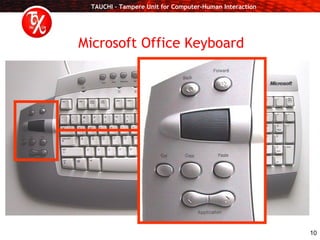
Scrolling Using the Non-Preferred Hand
Thank you Microsoft (next slide)
TAUCHI – Tampere Unit for Computer-Human Interaction
10
Microsoft Office Keyboard
TAUCHI – Tampere Unit for Computer-Human Interaction
11
Key-Action Model (KAM)
• Keyboard keys can be categorized as…
– Symbol keys
• Deliver graphic symbols — typically, letters, numbers, or
punctuation symbols — to an application such as an editor
– Executive keys
• Invoke actions in the application or at the system-level or
meta-level. Examples include ENTER, F1, or ESC
– Modifier keys
• Do not generate symbols or invoke actions. Rather, they set
up a condition necessary to modify the effect of a
subsequently pressed key. Examples include SHIFT or ALT.
Model
Name of
the model
OR
TAUCHI – Tampere Unit for Computer-Human Interaction
12
KAM Critique
• Simple. Has a name. Identifies three categories of
keys, providing for each a name, a definition, and
examples.
• What do you think of this model?
– Is it correct?
– Is it flawed?
– Do all keyboard keys fit the model?
– Can you think of additional categories or sub-categories
to improve the model or to make it more accurate or
more comprehensive?
– Do some keys have features of more than one category?
– Can you think of a graphical illustration of the model to
improve its expressive power?
– Is the model useful? Let’s see (Next slide)
TAUCHI – Tampere Unit for Computer-Human Interaction
13
KAM Implementation
• Here it is…
• Is this useful?
• Hmm… there appears to be a right-side bias of
executive and modifier keys, or “power keys”
• In fact, this is great for left-handed users (next
slide)
Unique
power
keys
TAUCHI – Tampere Unit for Computer-Human Interaction
14
The Left-Handed GUI
The desktop interface is biased for left-handed users!
TAUCHI – Tampere Unit for Computer-Human Interaction
15
Redesigning the Right-Handed GUI
• Right-handed users manipulate the mouse
with their right (preferred) hand
• There is a need to empower the left hand;
e.g., scrolling and access to power keys
• The solution? (next slide)
TAUCHI – Tampere Unit for Computer-Human Interaction
16
Microsoft Office Keyboard
TAUCHI – Tampere Unit for Computer-Human Interaction
17
Thank You
References
1. MacKenzie, I. S. (in press). Motor behaviour models for human-computer
interaction. In J. M. Carroll (Ed.) Toward a multidisciplinary science of
human-computer interaction. San Francisco: Morgan Kaufmann.
2. MacKenzie, I. S., & Guiard, Y. (2001). The two-handed desktop interface:
Are we there yet? Extended Abstracts of the ACM Conference on Human
Factors in Computing Systems – CHI 2001, pp. 351-352. New York: ACM.

Models of Interaction

  • 1.
    TAUCHI – TampereUnit for Computer-Human Interaction 1 Models of Interaction What are They? I. Scott MacKenzie
  • 2.
    TAUCHI – TampereUnit for Computer-Human Interaction 2 What is a Model? • A model is… – a simplification of reality • A model is… – useful only if it helps in designing, evaluating, or otherwise providing a basis for understanding the behaviour of a complex artifact such as a computer system • To be useful, a model must be… – simpler than the behaviour it models (I.e., extremely complex models are of questionable value)
  • 3.
    TAUCHI – TampereUnit for Computer-Human Interaction 3 Predictive Models • Aka engineering models or performance models • Useful because they… – allow metrics of human performance to be determined analytically without undertaking time-consuming and resource-intensive experiments • Useful because they… – allow a design scenario to be explored hypothetically without implementing a real system and gathering the same performance metrics through direct observation on real users
  • 4.
    TAUCHI – TampereUnit for Computer-Human Interaction 4 Guiard’s Model of Bimanual Skill • Rationale – Humans are not only two-handed, they use their hands differently – Studying the between-hand division of labour in everyday tasks reveals that most tasks are asymmetric (I.e., our hands have different roles and perform distinctly different tasks) • Guiard’s model… – identifies the roles and actions of the non- preferred (non-dominant) and preferred (dominant) hands (next slide)
  • 5.
    TAUCHI – TampereUnit for Computer-Human Interaction 5 Guiard’s Model of Bimanual Skill (2) A pretty picture might help (next slide)
  • 6.
    TAUCHI – TampereUnit for Computer-Human Interaction 6 Guiard’s Model of Bimanual Skill (3) Non-preferred hand •leads the preferred hand •sets the spatial frame of reference for the preferred hand •performs coarse movements Preferred hand •follows the non- preferred hand •works within established frame of reference set by the non-preferred hand •performs fine movements
  • 7.
    TAUCHI – TampereUnit for Computer-Human Interaction 7 Insights • Is Guiard’s model of bimanual skill useful? • Yes. For one, it suggests that one of the most common interaction tasks in graphical user interfaces is poorly implemented • The task is scrolling (next slide)
  • 8.
    TAUCHI – TampereUnit for Computer-Human Interaction 8 Scrolling Deconstructed • Insight: – Scrolling should be performed by the non-preferred hand – But typically, scrolling is by the preferred hand, namely… • By keys (Page Up, Page Down, Home, End, arrows) • By the mouse • By the wheel in a mouse
  • 9.
    TAUCHI – TampereUnit for Computer-Human Interaction 9 Scrolling Using the Non-Preferred Hand Thank you Microsoft (next slide)
  • 10.
    TAUCHI – TampereUnit for Computer-Human Interaction 10 Microsoft Office Keyboard
  • 11.
    TAUCHI – TampereUnit for Computer-Human Interaction 11 Key-Action Model (KAM) • Keyboard keys can be categorized as… – Symbol keys • Deliver graphic symbols — typically, letters, numbers, or punctuation symbols — to an application such as an editor – Executive keys • Invoke actions in the application or at the system-level or meta-level. Examples include ENTER, F1, or ESC – Modifier keys • Do not generate symbols or invoke actions. Rather, they set up a condition necessary to modify the effect of a subsequently pressed key. Examples include SHIFT or ALT. Model Name of the model OR
  • 12.
    TAUCHI – TampereUnit for Computer-Human Interaction 12 KAM Critique • Simple. Has a name. Identifies three categories of keys, providing for each a name, a definition, and examples. • What do you think of this model? – Is it correct? – Is it flawed? – Do all keyboard keys fit the model? – Can you think of additional categories or sub-categories to improve the model or to make it more accurate or more comprehensive? – Do some keys have features of more than one category? – Can you think of a graphical illustration of the model to improve its expressive power? – Is the model useful? Let’s see (Next slide)
  • 13.
    TAUCHI – TampereUnit for Computer-Human Interaction 13 KAM Implementation • Here it is… • Is this useful? • Hmm… there appears to be a right-side bias of executive and modifier keys, or “power keys” • In fact, this is great for left-handed users (next slide) Unique power keys
  • 14.
    TAUCHI – TampereUnit for Computer-Human Interaction 14 The Left-Handed GUI The desktop interface is biased for left-handed users!
  • 15.
    TAUCHI – TampereUnit for Computer-Human Interaction 15 Redesigning the Right-Handed GUI • Right-handed users manipulate the mouse with their right (preferred) hand • There is a need to empower the left hand; e.g., scrolling and access to power keys • The solution? (next slide)
  • 16.
    TAUCHI – TampereUnit for Computer-Human Interaction 16 Microsoft Office Keyboard
  • 17.
    TAUCHI – TampereUnit for Computer-Human Interaction 17 Thank You References 1. MacKenzie, I. S. (in press). Motor behaviour models for human-computer interaction. In J. M. Carroll (Ed.) Toward a multidisciplinary science of human-computer interaction. San Francisco: Morgan Kaufmann. 2. MacKenzie, I. S., & Guiard, Y. (2001). The two-handed desktop interface: Are we there yet? Extended Abstracts of the ACM Conference on Human Factors in Computing Systems – CHI 2001, pp. 351-352. New York: ACM.