Human Computer Interaction
Interaction Design
Miss. Vrushali Dhanokar
M.Tech CSE
dhanokarvrushali@gmail.com
Human Computer Interaction(HCI)
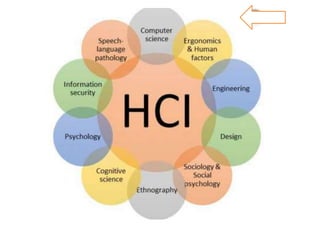
• HCI researches the design and use of computer technology and focused on
interface between people and computer.
• HCI is study and practice of usability.
• It is about understanding and creating software and other technologies that
people want to use, will be able to use and will find effective when used.
• Principles of HCI is ‘People should come first’.
• It makes the interaction between people and technology more effective and more
enjoyable.
Interaction Design
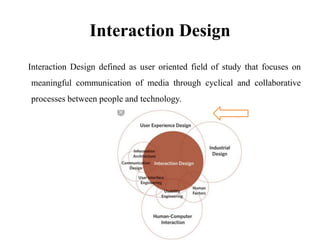
Interaction Design defined as user oriented field of study that focuses on
meaningful communication of media through cyclical and collaborative
processes between people and technology.
Dimensions of Interaction Design
1. Words-
They should communicate information to the user but not too much information. E.g. Taglines,
Slogans etc.
2. Visual representation-
It includes all graphical elements like images, emojis, icons etc.
3. Physical objects or space-
It includes portability and flexibility of the applications.
4. Time-
It refers media that changes with time. For e.g. Animation, Sound, Videos etc.
5. Behavior-
It includes How do user perform actions on websites? How do users operate the product? It
includes reactions and feedbacks of the user.
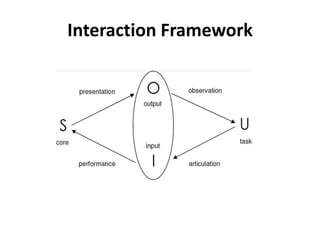
Interaction Framework
1. Core-
The system language is known as core language which understand by system
or its machine language.
2. Task-
The users language referred as user task language understand by the user.
3. Articulation-
Users produced some input to the system in various forms.
4. Performance-
System performs actions on those input.
5. Presentation-
System present the output to the user.
6. Observation-
User observe those output and perform action on them.
Ergonomics
• Ergonomics is study of people in there working environment.
• Ergonomics is study of psychology and system constraints which is concern in
HCI.
• There are four cases like-
1. In case of arrangement of controls and display:
It is the set of frequently used controls which arrange logically, so user get easily
read it.
2. In case of physical environment of interaction:
It is focus on standing, moving and sitting position we used app.
3. In case of health issues:
It includes physical postures, poor arrangement of devices, Back pain and eye
strain etc.
4. In case of colors:
Every color has there own culture and identity.
Ergonomics
Interaction Styles
1. Command Line Interface
2. Menus
3. Natural Language
4. Questions/ Answers and Query Dialogues
5. Form fills and Spreadsheets
6. WIMP Interface
7. Point and Click
8. Three Dimensional Interface
WIMP Interface
1. Window:
1. Single Document Interface (SDI)
e.g. Single document open at a time. Only MS-Word etc.
2. Multiple Document Interface(MDI)
e.g. Multiple documents or apps open at a time. MS-Word, Browser,
MS-Excel etc.
3. Tabbed Document Interface(TDI)
e.g. Multiple tabs are open at a time. Google, Yahoo, FB etc
2. Icons:
Graphical representation describing some actions. For e.g. Warning,
Error, Battery status, Speaker, Wi-Fi, Image file, PDF file, Text file
etc.
WIMP Interface
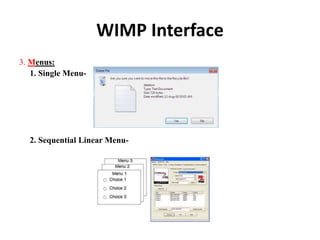
3. Menus:
1. Single Menu-
2. Sequential Linear Menu-
WIMP Interface
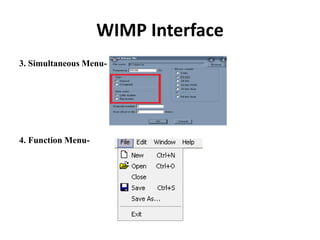
3. Simultaneous Menu-
4. Function Menu-
WIMP Interface
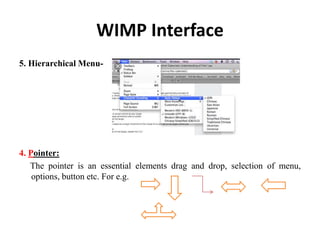
5. Hierarchical Menu-
4. Pointer:
The pointer is an essential elements drag and drop, selection of menu,
options, button etc. For e.g.
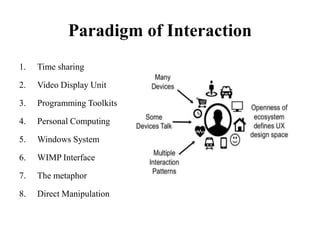
Paradigm of Interaction
1. Time sharing
2. Video Display Unit
3. Programming Toolkits
4. Personal Computing
5. Windows System
6. WIMP Interface
7. The metaphor
8. Direct Manipulation
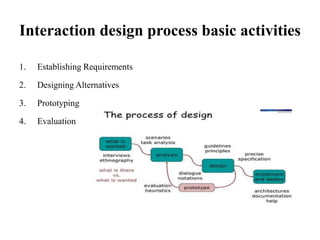
Interaction design process basic activities
1. Establishing Requirements
2. Designing Alternatives
3. Prototyping
4. Evaluation
Thank You….!!

Human Computer Interaction - Interaction Design

  • 1.
    Human Computer Interaction InteractionDesign Miss. Vrushali Dhanokar M.Tech CSE dhanokarvrushali@gmail.com
  • 2.
    Human Computer Interaction(HCI) •HCI researches the design and use of computer technology and focused on interface between people and computer. • HCI is study and practice of usability. • It is about understanding and creating software and other technologies that people want to use, will be able to use and will find effective when used. • Principles of HCI is ‘People should come first’. • It makes the interaction between people and technology more effective and more enjoyable.
  • 4.
    Interaction Design Interaction Designdefined as user oriented field of study that focuses on meaningful communication of media through cyclical and collaborative processes between people and technology.
  • 5.
    Dimensions of InteractionDesign 1. Words- They should communicate information to the user but not too much information. E.g. Taglines, Slogans etc. 2. Visual representation- It includes all graphical elements like images, emojis, icons etc. 3. Physical objects or space- It includes portability and flexibility of the applications. 4. Time- It refers media that changes with time. For e.g. Animation, Sound, Videos etc. 5. Behavior- It includes How do user perform actions on websites? How do users operate the product? It includes reactions and feedbacks of the user.
  • 6.
  • 7.
    Interaction Framework 1. Core- Thesystem language is known as core language which understand by system or its machine language. 2. Task- The users language referred as user task language understand by the user. 3. Articulation- Users produced some input to the system in various forms. 4. Performance- System performs actions on those input. 5. Presentation- System present the output to the user. 6. Observation- User observe those output and perform action on them.
  • 8.
    Ergonomics • Ergonomics isstudy of people in there working environment. • Ergonomics is study of psychology and system constraints which is concern in HCI. • There are four cases like- 1. In case of arrangement of controls and display: It is the set of frequently used controls which arrange logically, so user get easily read it. 2. In case of physical environment of interaction: It is focus on standing, moving and sitting position we used app. 3. In case of health issues: It includes physical postures, poor arrangement of devices, Back pain and eye strain etc. 4. In case of colors: Every color has there own culture and identity.
  • 9.
  • 10.
    Interaction Styles 1. CommandLine Interface 2. Menus 3. Natural Language 4. Questions/ Answers and Query Dialogues 5. Form fills and Spreadsheets 6. WIMP Interface 7. Point and Click 8. Three Dimensional Interface
  • 11.
    WIMP Interface 1. Window: 1.Single Document Interface (SDI) e.g. Single document open at a time. Only MS-Word etc. 2. Multiple Document Interface(MDI) e.g. Multiple documents or apps open at a time. MS-Word, Browser, MS-Excel etc. 3. Tabbed Document Interface(TDI) e.g. Multiple tabs are open at a time. Google, Yahoo, FB etc 2. Icons: Graphical representation describing some actions. For e.g. Warning, Error, Battery status, Speaker, Wi-Fi, Image file, PDF file, Text file etc.
  • 12.
    WIMP Interface 3. Menus: 1.Single Menu- 2. Sequential Linear Menu-
  • 13.
    WIMP Interface 3. SimultaneousMenu- 4. Function Menu-
  • 14.
    WIMP Interface 5. HierarchicalMenu- 4. Pointer: The pointer is an essential elements drag and drop, selection of menu, options, button etc. For e.g.
  • 15.
    Paradigm of Interaction 1.Time sharing 2. Video Display Unit 3. Programming Toolkits 4. Personal Computing 5. Windows System 6. WIMP Interface 7. The metaphor 8. Direct Manipulation
  • 16.
    Interaction design processbasic activities 1. Establishing Requirements 2. Designing Alternatives 3. Prototyping 4. Evaluation
  • 17.