 Introduction
 History Of Haptics
 Haptic Information
 Creation Of Virtual Environment
 Types Of Haptic Devices
 Applications
 Limitations
 Conclusion
 Haptics , is the technology of adding the sensation of
touch and feeling
to computers.
 When virtual objects are touched, they seem real and
tangible.
 Haptic senses links to the the brain's sensing position
and movement of the body by means of sensory nerves
within the muscles and joints.
HAPTICS…???
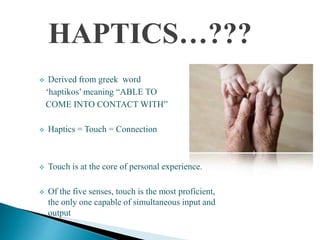
 Derived from greek word
‘haptikos’ meaning “ABLE TO
COME INTO CONTACT WITH”
 Haptics = Touch = Connection
 Touch is at the core of personal experience.
 Of the five senses, touch is the most proficient,
the only one capable of simultaneous input and
output
 Scientists used term haptics to label the subfield of their
studies that addressed human touch-based perception and
manipulation
 By 70’s and 80’s research efforts in a completely different
field, robotics also began to focus on manipulation and
perception by touch building a dexterous robotic hand
 In the early 1990s a new usage of the word haptics began to
emerge
 The confluence of several emerging technologies made
virtualized haptics, or computer haptics possible
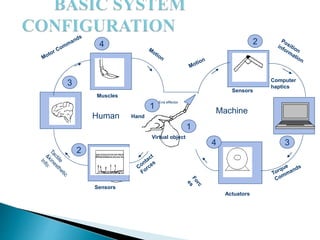
4
3
2
4 3
2
1
1
End effector
Hand
Actuators
Muscles
Sensors
Virtual object
Machine
Human
Computer
haptics
Sensors
Combination Of :
 Tactile Information
 Refers to the information acquired by the sensors
connected to the body
 Kinesthetic Information
 Refers to the information acquired by the sensors in
the joints
CREATION OF VIRTUAL
ENVIRONMENT
Virtual Reality
 allows user to interact with a computer-simulated
environment
Users interact with a VR either through input devices
or through multimodal devices
Simulated environment can be either similar or different
from reality
Very difficult to create a high fidelity VR experience due
to technical limitations
Used to describe a wide variety of applications
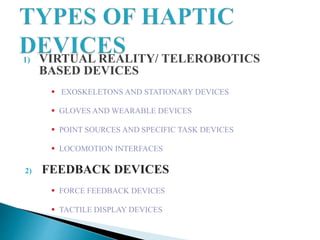
1) VIRTUAL REALITY/ TELEROBOTICS
BASED DEVICES
 EXOSKELETONS AND STATIONARY DEVICES
 GLOVES AND WEARABLE DEVICES
 POINT SOURCES AND SPECIFIC TASK DEVICES
 LOCOMOTION INTERFACES
2) FEEDBACK DEVICES
 FORCE FEEDBACK DEVICES
 TACTILE DISPLAY DEVICES
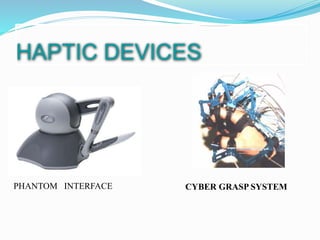
CYBER GRASP SYSTEM
HAPTIC DEVICES
PHANTOM INTERFACE
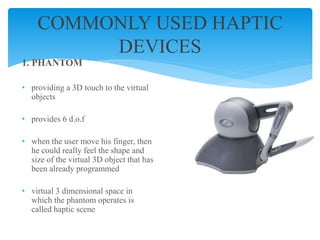
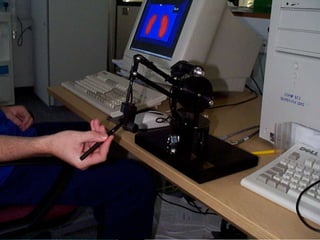
1. PHANTOM
• providing a 3D touch to the virtual
objects
• provides 6 d.o.f
• when the user move his finger, then
he could really feel the shape and
size of the virtual 3D object that has
been already programmed
• virtual 3 dimensional space in
which the phantom operates is
called haptic scene
COMMONLY USED HAPTIC
DEVICES
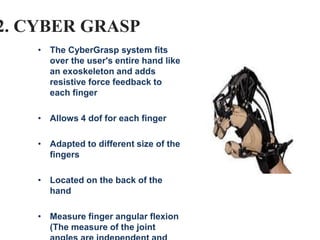
2. CYBER GRASP
• The CyberGrasp system fits
over the user's entire hand like
an exoskeleton and adds
resistive force feedback to
each finger
• Allows 4 dof for each finger
• Adapted to different size of the
fingers
• Located on the back of the
hand
• Measure finger angular flexion
(The measure of the joint
• sense of touch is crucial for medical training
• various haptic interfaces for medical simulation may prove
especially useful for training
MILITARY APPLICATIONS
 For certain applications, for example where terrain or texture
information needs to be conveyed, haptics may be the most
efficient communication channel.
◦ feel maps that are displayed on the internet and also learn
mathematics by tracing touchable mathematical course
◦ most haptic systems still rely heavily on a combined visual/haptic
interface
 MUSEUM DISPLAY
o for 3D digitization of priceless artifacts and objects from their sculpture and
decorative arts collections, making the images available via CD-ROM
 ASSISTIVE TECHNOLOGY FOR THE BLIND AND
VISUALLY IMPAIRED
 ENTERTAINMENT
o Haptics is used to enhance gaming experience
o software also allows you to program force feedback sensations to your game
controller button press
o "Submarines" is a PHANTOM variant of the well known battleship game
 HOLOGRAPHIC INTERACTION
 The feedback allows the user to interact with a hologram and receive tactile
response as if the holographic object were real
 Ultrasound waves to create a phenomenon called acoustic radiation pressure
which provides tactile feedback as users interact with the holographic object.
 High cost involved
 Large weight and size of haptic devices (especially wearable
ones)
 Haptic interfaces can only exert forces with limited magnitude
and not equally well in all directions
 haptic-rendering algorithms operate in discrete time whereas
users operate in continuous time
 Continued implementation of tactile devices to aid people with
disabilities will advance further
 Currently limited to consumers
 Future generations of mobile devices and game console
accessories will implement more haptic feedback
 Perhaps also in desktop computers and laptops
 Still embroyonic when compared to full fledged VR
simulations
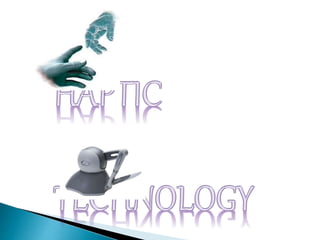
Haptic tech

Haptic tech

  • 2.
     Introduction  HistoryOf Haptics  Haptic Information  Creation Of Virtual Environment  Types Of Haptic Devices  Applications  Limitations  Conclusion
  • 3.
     Haptics ,is the technology of adding the sensation of touch and feeling to computers.  When virtual objects are touched, they seem real and tangible.  Haptic senses links to the the brain's sensing position and movement of the body by means of sensory nerves within the muscles and joints.
  • 4.
    HAPTICS…???  Derived fromgreek word ‘haptikos’ meaning “ABLE TO COME INTO CONTACT WITH”  Haptics = Touch = Connection  Touch is at the core of personal experience.  Of the five senses, touch is the most proficient, the only one capable of simultaneous input and output
  • 5.
     Scientists usedterm haptics to label the subfield of their studies that addressed human touch-based perception and manipulation  By 70’s and 80’s research efforts in a completely different field, robotics also began to focus on manipulation and perception by touch building a dexterous robotic hand  In the early 1990s a new usage of the word haptics began to emerge  The confluence of several emerging technologies made virtualized haptics, or computer haptics possible
  • 6.
    4 3 2 4 3 2 1 1 End effector Hand Actuators Muscles Sensors Virtualobject Machine Human Computer haptics Sensors
  • 7.
    Combination Of : Tactile Information  Refers to the information acquired by the sensors connected to the body  Kinesthetic Information  Refers to the information acquired by the sensors in the joints
  • 8.
    CREATION OF VIRTUAL ENVIRONMENT VirtualReality  allows user to interact with a computer-simulated environment Users interact with a VR either through input devices or through multimodal devices Simulated environment can be either similar or different from reality Very difficult to create a high fidelity VR experience due to technical limitations Used to describe a wide variety of applications
  • 9.
    1) VIRTUAL REALITY/TELEROBOTICS BASED DEVICES  EXOSKELETONS AND STATIONARY DEVICES  GLOVES AND WEARABLE DEVICES  POINT SOURCES AND SPECIFIC TASK DEVICES  LOCOMOTION INTERFACES 2) FEEDBACK DEVICES  FORCE FEEDBACK DEVICES  TACTILE DISPLAY DEVICES
  • 10.
    CYBER GRASP SYSTEM HAPTICDEVICES PHANTOM INTERFACE
  • 11.
    1. PHANTOM • providinga 3D touch to the virtual objects • provides 6 d.o.f • when the user move his finger, then he could really feel the shape and size of the virtual 3D object that has been already programmed • virtual 3 dimensional space in which the phantom operates is called haptic scene COMMONLY USED HAPTIC DEVICES
  • 13.
    2. CYBER GRASP •The CyberGrasp system fits over the user's entire hand like an exoskeleton and adds resistive force feedback to each finger • Allows 4 dof for each finger • Adapted to different size of the fingers • Located on the back of the hand • Measure finger angular flexion (The measure of the joint
  • 15.
    • sense oftouch is crucial for medical training • various haptic interfaces for medical simulation may prove especially useful for training MILITARY APPLICATIONS  For certain applications, for example where terrain or texture information needs to be conveyed, haptics may be the most efficient communication channel.
  • 16.
    ◦ feel mapsthat are displayed on the internet and also learn mathematics by tracing touchable mathematical course ◦ most haptic systems still rely heavily on a combined visual/haptic interface  MUSEUM DISPLAY o for 3D digitization of priceless artifacts and objects from their sculpture and decorative arts collections, making the images available via CD-ROM  ASSISTIVE TECHNOLOGY FOR THE BLIND AND VISUALLY IMPAIRED
  • 17.
     ENTERTAINMENT o Hapticsis used to enhance gaming experience o software also allows you to program force feedback sensations to your game controller button press o "Submarines" is a PHANTOM variant of the well known battleship game  HOLOGRAPHIC INTERACTION  The feedback allows the user to interact with a hologram and receive tactile response as if the holographic object were real  Ultrasound waves to create a phenomenon called acoustic radiation pressure which provides tactile feedback as users interact with the holographic object.
  • 18.
     High costinvolved  Large weight and size of haptic devices (especially wearable ones)  Haptic interfaces can only exert forces with limited magnitude and not equally well in all directions  haptic-rendering algorithms operate in discrete time whereas users operate in continuous time
  • 19.
     Continued implementationof tactile devices to aid people with disabilities will advance further  Currently limited to consumers  Future generations of mobile devices and game console accessories will implement more haptic feedback  Perhaps also in desktop computers and laptops  Still embroyonic when compared to full fledged VR simulations