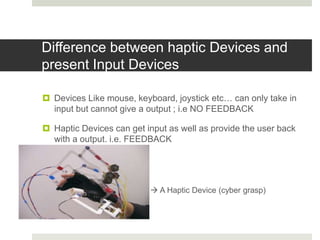
Haptic technology allows users to touch and feel virtual objects. It involves sensors that detect touch and actuators that provide haptic or touch-based feedback. Some key applications of haptics include medical simulation, video games, and assistive technology for visually impaired users. While haptics has advanced significantly, limitations remain around cost, size, and magnitude of force feedback that can be provided. Continued development is needed to address these challenges and make haptic technology more widely available.






![Applications
Wide Range of Applications, almost in every field.
1. Computer Games
2. Mobile Phones [ Virtually U can touch and speak with people
!!!! Interesting Right!!! ]
3. Assistive Technology [Visually Impaired]](https://image.slidesharecdn.com/haptictechnology-161202170445/85/Haptic-Technology-15-320.jpg)

![Future of Haptic Technology
Holographic Interaction
Textile Industry
E-Commerce
Medical Field [Doctors can perform surgery from a very distant
location to a patient in emergency]](https://image.slidesharecdn.com/haptictechnology-161202170445/85/Haptic-Technology-17-320.jpg)