CONTENTS
 INTRODUCTION
 WHAT IS AN EYE PHONE
 WHAT IS HPI
 EVALUATION OF HPI
 DESIGN OF EYEPHONE
 APPLICATIONS
 CONCLUSION
INTRODUCTION
 Hand-free Interfacing System.
 Used only by users Eye movement.
 Camera mounted on front.
 Track the eye and infer its position.
 Nokia N810 presents it.
 Human Computer Interface(HCI) has introduce
Touchscreen.
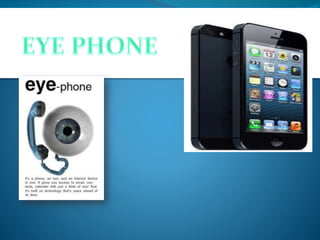
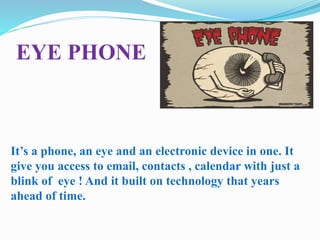
EYE PHONE
It’s a phone, an eye and an electronic device in one. It
give you access to email, contacts , calendar with just a
blink of eye ! And it built on technology that years
ahead of time.
HCI
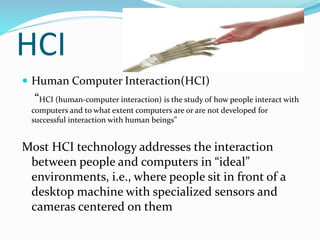
 Human Computer Interaction(HCI)
“HCI (human-computer interaction) is the study of how people interact with
computers and to what extent computers are or are not developed for
successful interaction with human beings”
Most HCI technology addresses the interaction
between people and computers in “ideal”
environments, i.e., where people sit in front of a
desktop machine with specialized sensors and
cameras centered on them
HPI
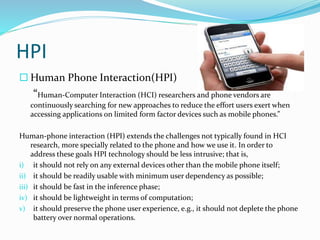
 Human Phone Interaction(HPI)
“Human-Computer Interaction (HCI) researchers and phone vendors are
continuously searching for new approaches to reduce the effort users exert when
accessing applications on limited form factor devices such as mobile phones.”
Human-phone interaction (HPI) extends the challenges not typically found in HCI
research, more specially related to the phone and how we use it. In order to
address these goals HPI technology should be less intrusive; that is,
i) it should not rely on any external devices other than the mobile phone itself;
ii) it should be readily usable with minimum user dependency as possible;
iii) it should be fast in the inference phase;
iv) it should be lightweight in terms of computation;
v) it should preserve the phone user experience, e.g., it should not deplete the phone
battery over normal operations.
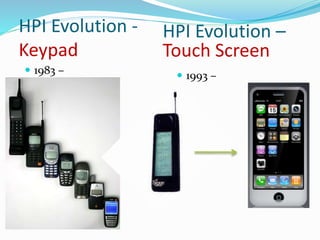
HPI Evolution -
Keypad
 1983 –
HPI Evolution –
Touch Screen
 1993 –
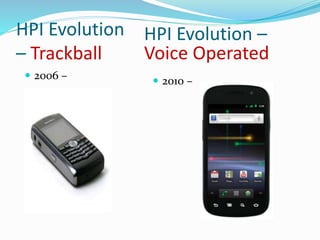
HPI Evolution
– Trackball
 2006 –
HPI Evolution –
Voice Operated
 2010 –
HPI Evolution – What Next ?
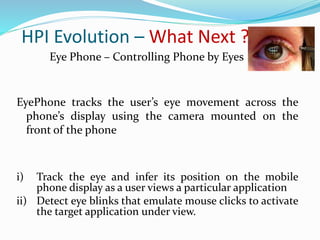
Eye Phone – Controlling Phone by Eyes
EyePhone tracks the user’s eye movement across the
phone’s display using the camera mounted on the
front of the phone
i) Track the eye and infer its position on the mobile
phone display as a user views a particular application
ii) Detect eye blinks that emulate mouse clicks to activate
the target application under view.
EyePhone Design
1) An eye detection phase
2) An open eye template creation phase
3) An eye tracking phase
4) A blink detection phase
Eye detection phase
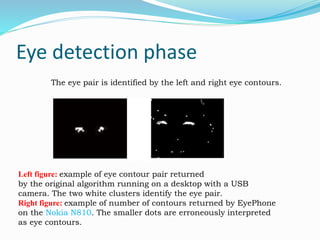
The eye pair is identified by the left and right eye contours.
Left figure: example of eye contour pair returned
by the original algorithm running on a desktop with a USB
camera. The two white clusters identify the eye pair.
Right figure: example of number of contours returned by EyePhone
on the Nokia N810. The smaller dots are erroneously interpreted
as eye contours.
Open eye template creation
• It extract the template every time the eye pair is lost. It rely
different strategies.
• It creates the template of user open eye once at the
beginning.
• Template is saved in the persistent memory and fetched
when EyePhone is invoked.
• Lighting conditions might not be perfectly suitable for other
Environment.
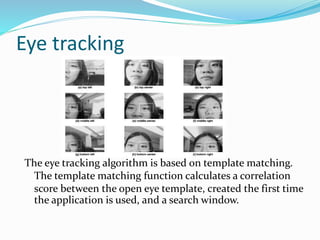
Eye tracking
The eye tracking algorithm is based on template matching.
The template matching function calculates a correlation
score between the open eye template, created the first time
the application is used, and a search window.
Blink Detection:
• Thresholding technique is applied.
• There are two situation to deal:
1. Quality of camera is not good as USB.
2.Closer to persons face using desktop and USB
camera.
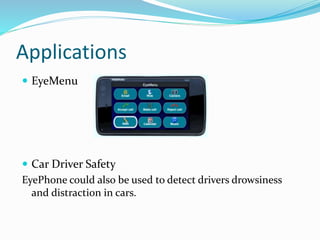
Applications
 EyeMenu
 Car Driver Safety
EyePhone could also be used to detect drivers drowsiness
and distraction in cars.
CONCLUSION
• The EyePhone relies on eye tracking
and blink detection to drive a mobile
phone.
• EyePhone is a promising approach to
drive mobile appplication as hand free
manner
THANK YOU

eye phone technology

  • 2.
    CONTENTS  INTRODUCTION  WHATIS AN EYE PHONE  WHAT IS HPI  EVALUATION OF HPI  DESIGN OF EYEPHONE  APPLICATIONS  CONCLUSION
  • 3.
    INTRODUCTION  Hand-free InterfacingSystem.  Used only by users Eye movement.  Camera mounted on front.  Track the eye and infer its position.  Nokia N810 presents it.  Human Computer Interface(HCI) has introduce Touchscreen.
  • 4.
    EYE PHONE It’s aphone, an eye and an electronic device in one. It give you access to email, contacts , calendar with just a blink of eye ! And it built on technology that years ahead of time.
  • 5.
    HCI  Human ComputerInteraction(HCI) “HCI (human-computer interaction) is the study of how people interact with computers and to what extent computers are or are not developed for successful interaction with human beings” Most HCI technology addresses the interaction between people and computers in “ideal” environments, i.e., where people sit in front of a desktop machine with specialized sensors and cameras centered on them
  • 6.
    HPI  Human PhoneInteraction(HPI) “Human-Computer Interaction (HCI) researchers and phone vendors are continuously searching for new approaches to reduce the effort users exert when accessing applications on limited form factor devices such as mobile phones.” Human-phone interaction (HPI) extends the challenges not typically found in HCI research, more specially related to the phone and how we use it. In order to address these goals HPI technology should be less intrusive; that is, i) it should not rely on any external devices other than the mobile phone itself; ii) it should be readily usable with minimum user dependency as possible; iii) it should be fast in the inference phase; iv) it should be lightweight in terms of computation; v) it should preserve the phone user experience, e.g., it should not deplete the phone battery over normal operations.
  • 7.
    HPI Evolution - Keypad 1983 – HPI Evolution – Touch Screen  1993 –
  • 8.
    HPI Evolution – Trackball 2006 – HPI Evolution – Voice Operated  2010 –
  • 9.
    HPI Evolution –What Next ? Eye Phone – Controlling Phone by Eyes EyePhone tracks the user’s eye movement across the phone’s display using the camera mounted on the front of the phone i) Track the eye and infer its position on the mobile phone display as a user views a particular application ii) Detect eye blinks that emulate mouse clicks to activate the target application under view.
  • 10.
    EyePhone Design 1) Aneye detection phase 2) An open eye template creation phase 3) An eye tracking phase 4) A blink detection phase
  • 11.
    Eye detection phase Theeye pair is identified by the left and right eye contours. Left figure: example of eye contour pair returned by the original algorithm running on a desktop with a USB camera. The two white clusters identify the eye pair. Right figure: example of number of contours returned by EyePhone on the Nokia N810. The smaller dots are erroneously interpreted as eye contours.
  • 12.
    Open eye templatecreation • It extract the template every time the eye pair is lost. It rely different strategies. • It creates the template of user open eye once at the beginning. • Template is saved in the persistent memory and fetched when EyePhone is invoked. • Lighting conditions might not be perfectly suitable for other Environment.
  • 13.
    Eye tracking The eyetracking algorithm is based on template matching. The template matching function calculates a correlation score between the open eye template, created the first time the application is used, and a search window.
  • 14.
    Blink Detection: • Thresholdingtechnique is applied. • There are two situation to deal: 1. Quality of camera is not good as USB. 2.Closer to persons face using desktop and USB camera.
  • 15.
    Applications  EyeMenu  CarDriver Safety EyePhone could also be used to detect drivers drowsiness and distraction in cars.
  • 16.
    CONCLUSION • The EyePhonerelies on eye tracking and blink detection to drive a mobile phone. • EyePhone is a promising approach to drive mobile appplication as hand free manner
  • 17.