Engaging
The Sense Of
Touch
Presented By
SHAIBIN KB
1. INTRODUCTION
2. WHAT IS HAPTICS?
3. HAPTIC FEEDBACK
4. WORKING PRINCIPLE
5. HAPTIC DEVICES
6. ULTRA HAPTICS
7. ADVANTAGES
8. DISADVANTAGES
9. FUTURE VISION
10.APPLICATIONS
11.CONCLUTION
 Haptics is a technology of adding the
sensation of touch and feelings to the
computer.
 Touch is very powerful sense but it has so
far neglected in computing, the state of art
haptic devices allows users to feel and
touch virtual objects with a high degree of
realism.
 When virtual objects are touched, they
seem real & tangible.
 It senses links to the brain’s sensing
position and movement of the body by the
means of sensory nerves within the
muscles and joints
HAPTICS=INTERACTIONBETWEENHUMANS AND
COMPUTERSORVIRTUALWORLD
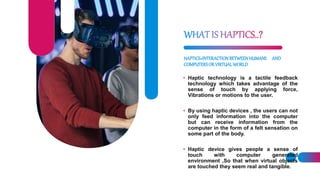
• Haptic technology is a tactile feedback
technology which takes advantage of the
sense of touch by applying force,
Vibrations or motions to the user.
• By using haptic devices , the users can not
only feed information into the computer
but can receive information from the
computer in the form of a felt sensation on
some part of the body.
• Haptic device gives people a sense of
touch with computer generated
environment ,So that when virtual objects
are touched they seem real and tangible.
User should be able to touch the virtual object and
feel a response from it.
In order to complete the limitation of the real
world one should be able to interact with
environment and get a feedback.
This feed back is called haptic feedback
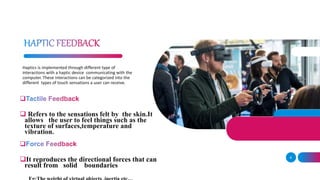
Haptics is implemented through different type of
interactions with a haptic device communicating with the
computer. These interactions can be categorized into the
different types of touch sensations a user can receive.

 Refers to the sensations felt by the skin.It
allows the user to feel things such as the
texture of surfaces,temperature and
vibration.

It reproduces the directional forces that can
result from solid boundaries
6
7
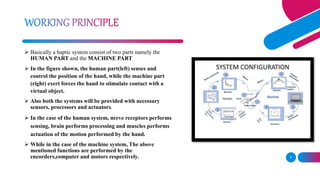
 Basically a haptic system consist of two parts namely the
HUMAN PART and the MACHINE PART
 In the figure shown, the human part(left) senses and
control the position of the hand, while the machine part
(right) exert forces the hand to stimulate contact with a
virtual object.
 Also both the systems will be provided with necessary
sensors, processors and actuators.
 In the case of the human system, nerve receptors performs
sensing, brain performs processing and muscles performs
actuation of the motion performed by the hand.
 While in the case of the machine system, The above
mentioned functions are performed by the
encorders,computer and motors respectively.
ADD A FOOTER 8
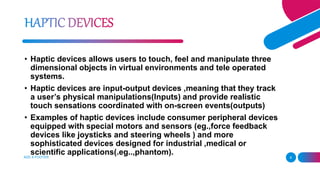
• Haptic devices allows users to touch, feel and manipulate three
dimensional objects in virtual environments and tele operated
systems.
• Haptic devices are input-output devices ,meaning that they track
a user’s physical manipulations(Inputs) and provide realistic
touch sensations coordinated with on-screen events(outputs)
• Examples of haptic devices include consumer peripheral devices
equipped with special motors and sensors (eg.,force feedback
devices like joysticks and steering wheels ) and more
sophisticated devices designed for industrial ,medical or
scientific applications(.eg..,phantom).
 Providing 3 D touch to virtual objects .
 Provides 6 d.o.f
 When the user move his finger then he could really feel
the shape and size of the virtual 3D object that has been
already programed.
 Virtual 3 dimensional space in which the phantom
operates is called haptic sense.
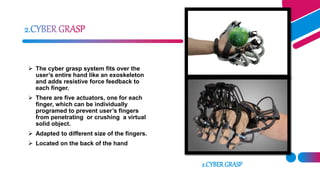
 The cyber grasp system fits over the
user’s entire hand like an exoskeleton
and adds resistive force feedback to
each finger.
 There are five actuators, one for each
finger, which can be individually
programed to prevent user’s fingers
from penetrating or crushing a virtual
solid object.
 Adapted to different size of the fingers.
 Located on the back of the hand
2.CYBERGRASP
11
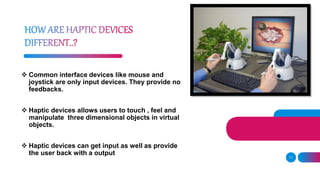
 Common interface devices like mouse and
joystick are only input devices. They provide no
feedbacks.
 Haptic devices allows users to touch , feel and
manipulate three dimensional objects in virtual
objects.
 Haptic devices can get input as well as provide
the user back with a output
12
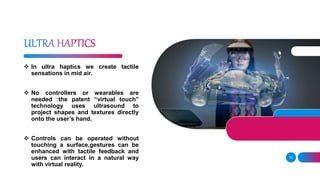
 In ultra haptics we create tactile
sensations in mid air.
 No controllers or wearables are
needed :the patent “virtual touch”
technology uses ultrasound to
project shapes and textures directly
onto the user’s hand.
 Controls can be operated without
touching a surface,gestures can be
enhanced with tactile feedback and
users can interact in a natural way
with virtual reality.
13
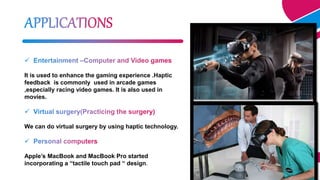
It is used to enhance the gaming experience .Haptic
feedback is commonly used in arcade games
,especially racing video games. It is also used in
movies.
We can do virtual surgery by using haptic technology.
Apple’s MacBook and MacBook Pro started
incorporating a “tactile touch pad “ design.
The feedback allows the user to interact with a hologram and actually receive
tactile responses using acoustic radiation pressure.
Use of a central workstation from which surgeons would perform operations in
various locations ,with machine setup and patient preparation performed by local
nursing staff.
User could study and feel the texture and quality of material during the sale of
cloth through internet.
15
Working time is reduced.
Communication is centered through touch and the digital world can behave like
the real world.
Increase confidence in medical field.
With haptic hardware and software designer can feel the result as if he were
handling the physical object.
 Higher cost.
 Large weight and size(especially for wearable ones).
 From point of algorithm ,output is not saturate.
 The precision of touch require a lots of advance design.
 Haptic interfaces can only exert forces with limited magnitude
and not equally well in all directions.
 Haptic Technology is the only solution which provides high range of
interaction that cannot be provided by virtual reality.
 Continued implementation of tactile devices to aid people with disabilities will
advance further.
 Todays ,commercial success of haptic has been in the areas of entertainment
,medical simulation, and design ,although new devices and applications are
regularly appearing.
 Haptic technology will make the future world as a sensible one.
HAPTIC TECHNOLOGY .pptx

HAPTIC TECHNOLOGY .pptx

  • 1.
  • 2.
    1. INTRODUCTION 2. WHATIS HAPTICS? 3. HAPTIC FEEDBACK 4. WORKING PRINCIPLE 5. HAPTIC DEVICES 6. ULTRA HAPTICS 7. ADVANTAGES 8. DISADVANTAGES 9. FUTURE VISION 10.APPLICATIONS 11.CONCLUTION
  • 3.
     Haptics isa technology of adding the sensation of touch and feelings to the computer.  Touch is very powerful sense but it has so far neglected in computing, the state of art haptic devices allows users to feel and touch virtual objects with a high degree of realism.  When virtual objects are touched, they seem real & tangible.  It senses links to the brain’s sensing position and movement of the body by the means of sensory nerves within the muscles and joints
  • 4.
    HAPTICS=INTERACTIONBETWEENHUMANS AND COMPUTERSORVIRTUALWORLD • Haptictechnology is a tactile feedback technology which takes advantage of the sense of touch by applying force, Vibrations or motions to the user. • By using haptic devices , the users can not only feed information into the computer but can receive information from the computer in the form of a felt sensation on some part of the body. • Haptic device gives people a sense of touch with computer generated environment ,So that when virtual objects are touched they seem real and tangible.
  • 5.
    User should beable to touch the virtual object and feel a response from it. In order to complete the limitation of the real world one should be able to interact with environment and get a feedback. This feed back is called haptic feedback
  • 6.
    Haptics is implementedthrough different type of interactions with a haptic device communicating with the computer. These interactions can be categorized into the different types of touch sensations a user can receive.   Refers to the sensations felt by the skin.It allows the user to feel things such as the texture of surfaces,temperature and vibration.  It reproduces the directional forces that can result from solid boundaries 6
  • 7.
    7  Basically ahaptic system consist of two parts namely the HUMAN PART and the MACHINE PART  In the figure shown, the human part(left) senses and control the position of the hand, while the machine part (right) exert forces the hand to stimulate contact with a virtual object.  Also both the systems will be provided with necessary sensors, processors and actuators.  In the case of the human system, nerve receptors performs sensing, brain performs processing and muscles performs actuation of the motion performed by the hand.  While in the case of the machine system, The above mentioned functions are performed by the encorders,computer and motors respectively.
  • 8.
    ADD A FOOTER8 • Haptic devices allows users to touch, feel and manipulate three dimensional objects in virtual environments and tele operated systems. • Haptic devices are input-output devices ,meaning that they track a user’s physical manipulations(Inputs) and provide realistic touch sensations coordinated with on-screen events(outputs) • Examples of haptic devices include consumer peripheral devices equipped with special motors and sensors (eg.,force feedback devices like joysticks and steering wheels ) and more sophisticated devices designed for industrial ,medical or scientific applications(.eg..,phantom).
  • 9.
     Providing 3D touch to virtual objects .  Provides 6 d.o.f  When the user move his finger then he could really feel the shape and size of the virtual 3D object that has been already programed.  Virtual 3 dimensional space in which the phantom operates is called haptic sense.
  • 10.
     The cybergrasp system fits over the user’s entire hand like an exoskeleton and adds resistive force feedback to each finger.  There are five actuators, one for each finger, which can be individually programed to prevent user’s fingers from penetrating or crushing a virtual solid object.  Adapted to different size of the fingers.  Located on the back of the hand 2.CYBERGRASP
  • 11.
    11  Common interfacedevices like mouse and joystick are only input devices. They provide no feedbacks.  Haptic devices allows users to touch , feel and manipulate three dimensional objects in virtual objects.  Haptic devices can get input as well as provide the user back with a output
  • 12.
    12  In ultrahaptics we create tactile sensations in mid air.  No controllers or wearables are needed :the patent “virtual touch” technology uses ultrasound to project shapes and textures directly onto the user’s hand.  Controls can be operated without touching a surface,gestures can be enhanced with tactile feedback and users can interact in a natural way with virtual reality.
  • 13.
    13 It is usedto enhance the gaming experience .Haptic feedback is commonly used in arcade games ,especially racing video games. It is also used in movies. We can do virtual surgery by using haptic technology. Apple’s MacBook and MacBook Pro started incorporating a “tactile touch pad “ design.
  • 14.
    The feedback allowsthe user to interact with a hologram and actually receive tactile responses using acoustic radiation pressure. Use of a central workstation from which surgeons would perform operations in various locations ,with machine setup and patient preparation performed by local nursing staff. User could study and feel the texture and quality of material during the sale of cloth through internet.
  • 15.
    15 Working time isreduced. Communication is centered through touch and the digital world can behave like the real world. Increase confidence in medical field. With haptic hardware and software designer can feel the result as if he were handling the physical object.
  • 16.
     Higher cost. Large weight and size(especially for wearable ones).  From point of algorithm ,output is not saturate.  The precision of touch require a lots of advance design.  Haptic interfaces can only exert forces with limited magnitude and not equally well in all directions.
  • 17.
     Haptic Technologyis the only solution which provides high range of interaction that cannot be provided by virtual reality.  Continued implementation of tactile devices to aid people with disabilities will advance further.  Todays ,commercial success of haptic has been in the areas of entertainment ,medical simulation, and design ,although new devices and applications are regularly appearing.  Haptic technology will make the future world as a sensible one.