CHAPTR FIVE: SPATIAL DATAANALYSIS
5.1 Concepts of Spatial Data Analysis
 Geographic analysis allows us to study and understand the real world
processes by developing and applying manipulation, analysis criteria
and models and to carryout integrated modeling.
 Spatial analysis is the vital part of GIS.
 It can be done in two ways.
 vector-based
 raster-based analysis.
 Spatial analysis in GIS involves three types of operations:
 Attribute Query also known as non-spatial query,
 Spatial Query and
 Generation of new data sets from the original database
 The scope of spatial analysis ranges from a simple query about the
spatial phenomenon to complicated combinations of attribute
queries, spatial queries, and alterations of original data.
 Spatial Queries require the processing of spatial information
extraction from the database.
 There are two major types of queries in GIS- attribute and spatial.
I. Attribute Queries
 Attribute queries require the processing of attribute data exclusive of
spatial information.
 One can also select features by stating selection conditions on the
features’ attributes.
 Attribute query in ArcGIS use SQL (structured query language a
language used to query database) to define your selection.
 SQL is a language that allows you to query a database
 the SQL query window helps you to express your request correctly.
II. Spatial Data Query or Selection by Location:
 This procedure retrieves data from a map by working with map
features.
 Features can be selected with a cursor or graphic.
 This type of query aims to select features based on their location
relative to the locations of other features.
 To perform this type of query you need at least 2 layers:
 a target layer - the layer in which features will be selected, and
 a source layer - the layer that is used to determine the selection
based on its topological relationship to the target.
5.2 Geo processing
 Geo-processing is a set of software functions used to manipulate and
transform spatial data (single layers or multiple sets of layers), to create
new information.
 Manipulation of features classes and attributes tables to extract new
information.
 The fundamental purposes of geo processing are to allow you to automate
your GIS tasks and perform spatial analysis and modeling.
 A typical geo processing tool performs an operation on an ArcGIS dataset
(such as a feature class, raster, or table) and produces a new dataset as the
result of the tool.
 Merging
 The merge geo-processing tool combines data sets that are the same
data type (points, lines or polygons).
 Merge combines selected features of the same layer into one
feature. This operation is joining the features of two or more themes
in to single theme.
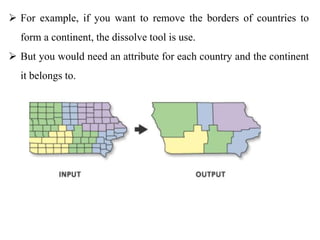
 Dissolving
 The Dissolve Tool unifies boundaries based on common attribute
values. In other words,
 dissolve merges neighboring boundaries if the neighbors have the
same attributes.
 For example, if you want to remove the borders of countries to
form a continent, the dissolve tool is use.
 But you would need an attribute for each country and the continent
it belongs to.
 Union
 Union is an operation to create a new feature or set of features by
combining all the areas from two input layer.
 The union overlay option is useful if you wish to combine multiple
data layers into a single layer.
 E.g. combine features of an input polygon 1 with the overlay
polygon 2 to produce a new output polygon 3 that contains the
attributes and full extent of both polygon1 and polygon 2.
 Intersect
 Intersect merges only the parts that shares common space (where the
two themes overlap).
 Intersect is an operation to overlay two spatial data layers and find
the areas common to both while discarding unique to either.
 We use intersect when we want to overlay a layer with the polygons
in another layer so that the resulting output layer has the combined
attribute data of the features from the two inputs, and only contains
features that fall within the spatial extent of the overlay polygons.
 Clip
 The clip tool is an overlay function that cuts out an input layer with
the extent of a defined feature boundary.
 The result of this tool is a new clipped output layer.
 It removes portions of features that lie outside of features of another
layer.
 The clipping layer must always be a polygon file, but clipped layers
may be points, lines, or polygons.
 Only the outside boundary is used for clipping; internal boundaries
have no effect on the output layer.
 Buffer zone generation:
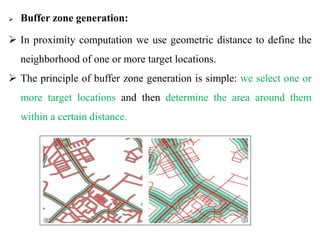
 In proximity computation we use geometric distance to define the
neighborhood of one or more target locations.
 The principle of buffer zone generation is simple: we select one or
more target locations and then determine the area around them
within a certain distance.

GIS Ppt 5.pptx: SPACIAL DATA ANALSYSISIS

  • 1.
    CHAPTR FIVE: SPATIALDATAANALYSIS 5.1 Concepts of Spatial Data Analysis  Geographic analysis allows us to study and understand the real world processes by developing and applying manipulation, analysis criteria and models and to carryout integrated modeling.  Spatial analysis is the vital part of GIS.  It can be done in two ways.  vector-based  raster-based analysis.
  • 2.
     Spatial analysisin GIS involves three types of operations:  Attribute Query also known as non-spatial query,  Spatial Query and  Generation of new data sets from the original database  The scope of spatial analysis ranges from a simple query about the spatial phenomenon to complicated combinations of attribute queries, spatial queries, and alterations of original data.  Spatial Queries require the processing of spatial information extraction from the database.  There are two major types of queries in GIS- attribute and spatial.
  • 3.
    I. Attribute Queries Attribute queries require the processing of attribute data exclusive of spatial information.  One can also select features by stating selection conditions on the features’ attributes.  Attribute query in ArcGIS use SQL (structured query language a language used to query database) to define your selection.  SQL is a language that allows you to query a database  the SQL query window helps you to express your request correctly.
  • 4.
    II. Spatial DataQuery or Selection by Location:  This procedure retrieves data from a map by working with map features.  Features can be selected with a cursor or graphic.  This type of query aims to select features based on their location relative to the locations of other features.  To perform this type of query you need at least 2 layers:  a target layer - the layer in which features will be selected, and  a source layer - the layer that is used to determine the selection based on its topological relationship to the target.
  • 5.
    5.2 Geo processing Geo-processing is a set of software functions used to manipulate and transform spatial data (single layers or multiple sets of layers), to create new information.  Manipulation of features classes and attributes tables to extract new information.  The fundamental purposes of geo processing are to allow you to automate your GIS tasks and perform spatial analysis and modeling.  A typical geo processing tool performs an operation on an ArcGIS dataset (such as a feature class, raster, or table) and produces a new dataset as the result of the tool.
  • 6.
     Merging  Themerge geo-processing tool combines data sets that are the same data type (points, lines or polygons).  Merge combines selected features of the same layer into one feature. This operation is joining the features of two or more themes in to single theme.  Dissolving  The Dissolve Tool unifies boundaries based on common attribute values. In other words,  dissolve merges neighboring boundaries if the neighbors have the same attributes.
  • 7.
     For example,if you want to remove the borders of countries to form a continent, the dissolve tool is use.  But you would need an attribute for each country and the continent it belongs to.
  • 8.
     Union  Unionis an operation to create a new feature or set of features by combining all the areas from two input layer.  The union overlay option is useful if you wish to combine multiple data layers into a single layer.  E.g. combine features of an input polygon 1 with the overlay polygon 2 to produce a new output polygon 3 that contains the attributes and full extent of both polygon1 and polygon 2.
  • 9.
     Intersect  Intersectmerges only the parts that shares common space (where the two themes overlap).  Intersect is an operation to overlay two spatial data layers and find the areas common to both while discarding unique to either.  We use intersect when we want to overlay a layer with the polygons in another layer so that the resulting output layer has the combined attribute data of the features from the two inputs, and only contains features that fall within the spatial extent of the overlay polygons.
  • 10.
     Clip  Theclip tool is an overlay function that cuts out an input layer with the extent of a defined feature boundary.  The result of this tool is a new clipped output layer.  It removes portions of features that lie outside of features of another layer.  The clipping layer must always be a polygon file, but clipped layers may be points, lines, or polygons.  Only the outside boundary is used for clipping; internal boundaries have no effect on the output layer.
  • 11.
     Buffer zonegeneration:  In proximity computation we use geometric distance to define the neighborhood of one or more target locations.  The principle of buffer zone generation is simple: we select one or more target locations and then determine the area around them within a certain distance.