Data Storage and ProcessingGIS Topics and Applications
GIS Models Over TimeSimple RepresentationCAD modelData AnalysisRaster modelData CollectionVector modelRelational and RulesObject model
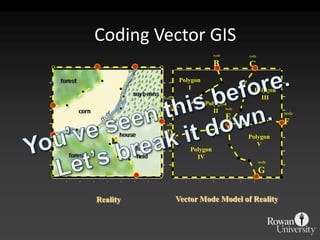
nodeBnodeCPolygonIPolygonIIInodeAPolygonIInodeEnodeFnodeDPolygonVPolygonIVnodeGCoding Vector GISYou’ve seen this before.Let’s break it down.Vector Mode Model of RealityReality
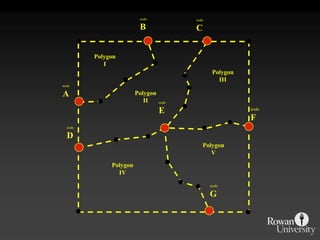
nodeBnodeCPolygonIPolygonIIInodeAPolygonIInodeEnodeFnodeDPolygonVPolygonIVnodeG
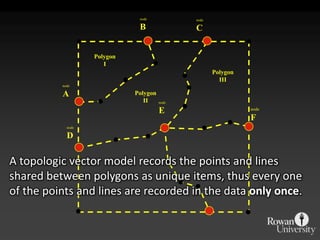
nodeBnodeCPolygonIPolygonIIInodeAPolygonIInodeEnodeFnodeDA topologic vector model records the points and linesshared between polygons as unique items, thus every oneof the points and lines are recorded in the data only once.
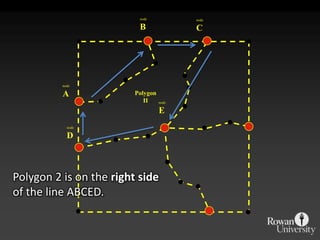
nodeBnodeCnodeAPolygonIInodeEnodeDPolygon 2 is on the right sideof the line ABCED.
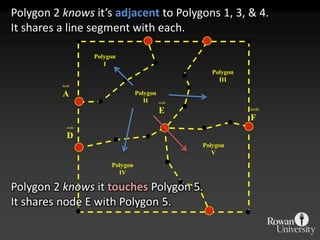
PolygonIPolygonIIInodeAPolygonIInodeEnodeFnodeDPolygonVPolygonIVPolygon 2 knows it’s adjacentto Polygons 1, 3, & 4.It shares a line segment with each. Polygon 2 knows it touchesPolygon 5.It shares node E with Polygon 5.
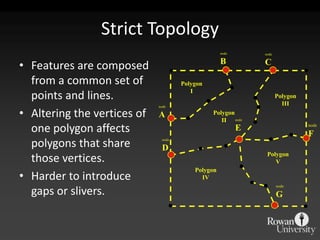
nodeBnodeCPolygonIPolygonIIInodeAPolygonIInodeEnodeFnodeDPolygonVPolygonIVnodeGStrict TopologyFeatures are composed from a common set of points and lines.Altering the vertices of one polygon affects polygons that share those vertices. Harder to introduce gaps or slivers.
ObjectsGIS Features as Objects is a recent method of representing aspects of the real-world in GISExample of the shift from specialty data to DBMS that are spatially-awareNon-planar, temporally shifting, topologically linked, rule-based actionsStill important to check for topology to ensure as a quality control step
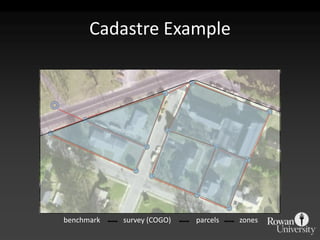
Vector Geometry as ObjectsParcelsPlanar geometries with attribute informationParcels as objects in a Cadastral “carpet”Objects with topology rules (“don’t overlap, unless”)Members of “regional” features (zoning, municipality)Composed of surveyed parts (COGO, benchmarks)Keys that link to attribute tables (owner(s), assessments, plans, etc)
Cadastre Examplesurvey (COGO)parcelszonesbenchmark
Attributes as ObjectsNot only can multiple sets of geospatial features interact with rules, the attributes can be linked with one another, with their own set of rules and actionsOwnership record linked to GIS parcelSearch on multiple owners, recordsRemoval of parcel warns about “orphan” ownerFunctions that can be performed by GIS analyst can be embedded in the actual database
Manipulating Vector Mode Databases
Common OperationsSelection by Attributes or LocationDissolveAppendClipIntersectUnion
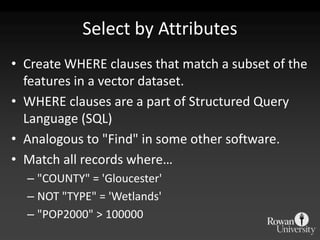
Select by AttributesCreate WHERE clauses that match a subset of the features in a vector dataset. WHERE clauses are a part of Structured Query Language (SQL)Analogous to "Find" in some other software.Match all records where…"COUNTY" = 'Gloucester'NOT "TYPE" = 'Wetlands'"POP2000" > 100000
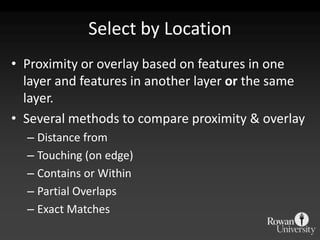
Select by LocationProximity or overlay based on features in one layer and features in another layer or the same layer.Several methods to compare proximity & overlayDistance fromTouching (on edge)Contains or WithinPartial OverlapsExact Matches
Dissolve
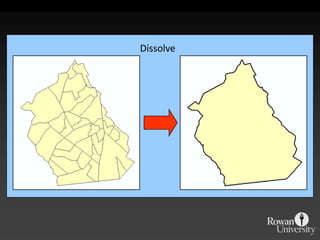
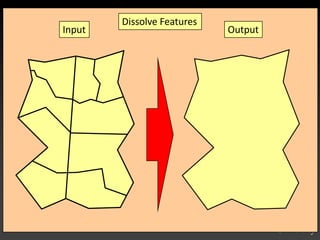
Dissolve FeaturesInputOutput
Append
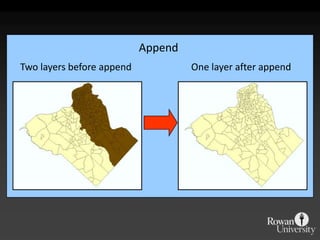
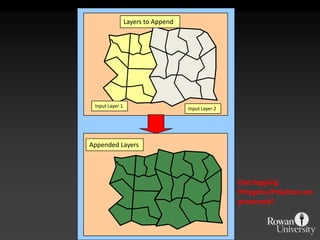
Layers to Append Input Layer 1Input Layer 2Appended LayersOverlapping Polygons/Polylines are preserved!
Clip
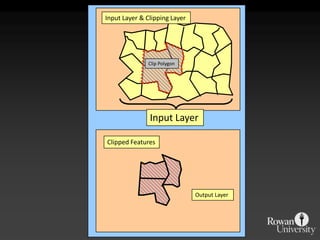
Input Layer & Clipping LayerClip PolygonInput LayerClipped FeaturesOutput Layer
Intersect
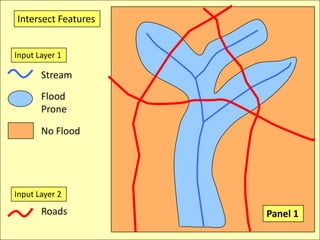
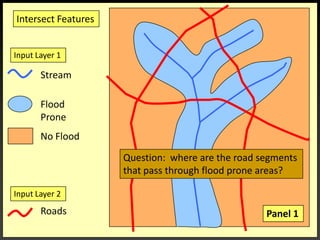
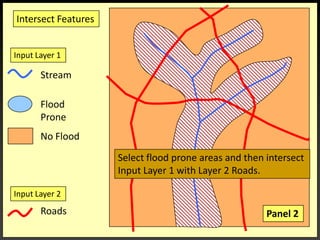
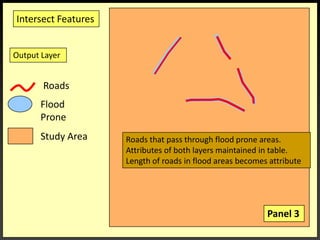
IntersectionWhere are the Road segments that are in flood prone areas.Select flood prone from Input Layer 1Intersect roads and flood prone [Layer 2].
Input Layer 2RoadsIntersect FeaturesInput Layer 1StreamFloodProneNo FloodPanel 1
Intersect FeaturesInput Layer 1StreamFloodProneQuestion:  where are the road segments that pass through flood prone areas?No FloodInput Layer 2RoadsPanel 1
Intersect FeaturesInput Layer 1StreamFloodProneNo FloodSelect flood prone areas and then intersect Input Layer 1 with Layer 2 Roads.Input Layer 2RoadsPanel 2
Intersect FeaturesOutput Layer RoadsFloodProneStudy AreaRoads that pass through flood prone areas. Attributes of both layers maintained in table.Length of roads in flood areas becomes attributePanel 3
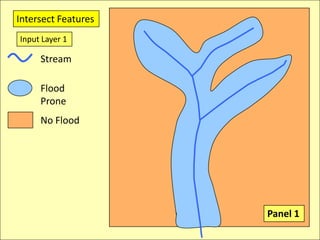
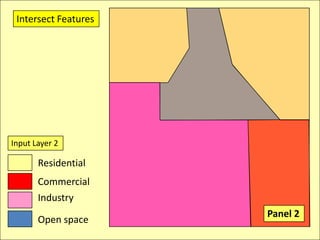
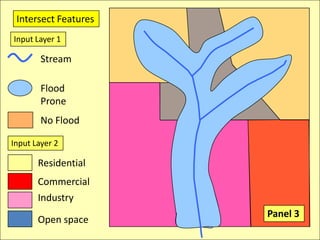
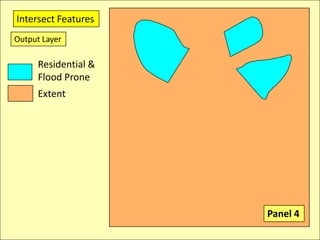
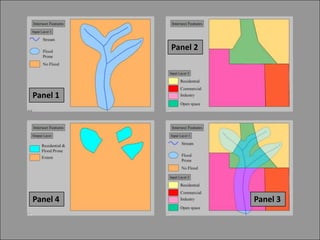
IntersectionWhere are the places that are residential and flood prone?Select flood prone from Input Layer 1Select residential from Input Layer 2Intersect
Intersect FeaturesInput Layer 1StreamFloodProneNo FloodPanel 1
Intersect FeaturesInput Layer 2ResidentialCommercialIndustryPanel 2Open space
Intersect FeaturesInput Layer 1StreamFloodProneNo FloodInput Layer 2ResidentialCommercialIndustryPanel 3Open space
Intersect FeaturesOutput LayerResidential &Flood ProneExtentPanel 4
Panel 2Panel 1Panel 3Panel 4
Union
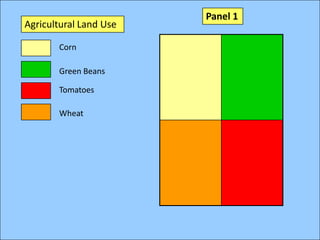
Panel 1Agricultural Land UseCornGreen BeansTomatoesWheat
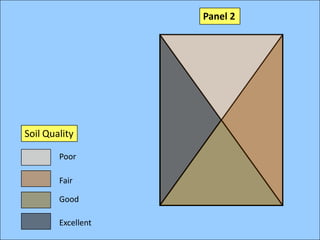
Panel 2Soil QualityPoorFairGoodExcellent
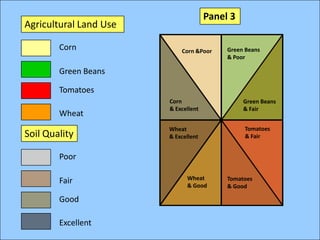
Panel 3Agricultural Land UseCornGreen Beans & PoorCorn &PoorGreen BeansTomatoesCorn & ExcellentGreen Beans & FairWheatTomatoes & FairWheat & ExcellentSoil QualityPoorWheat & GoodFairTomatoes & GoodGoodExcellent
Let’s See How It Works
Dissolve
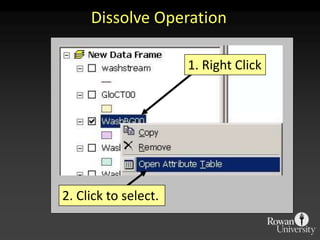
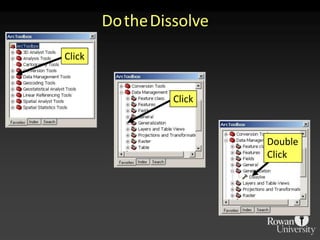
1. Right Click2. Click to select.Dissolve Operation
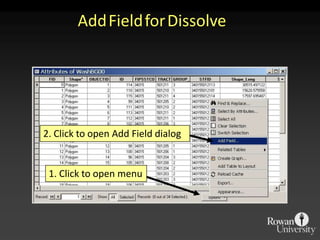
2. Click to open Add Field dialog1. Click to open menuAddFieldforDissolve
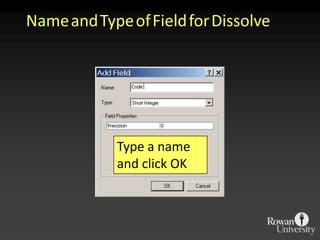
Type a name and click OKNameandTypeofFieldforDissolve
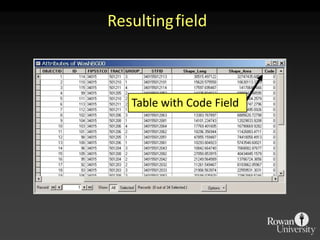
Table with Code FieldResultingfield
DoubleClickClickClickDotheDissolve
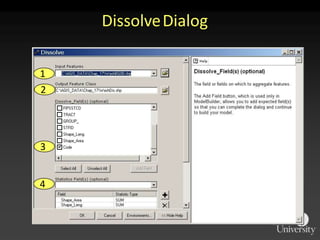
1234DissolveDialog
Dissolve
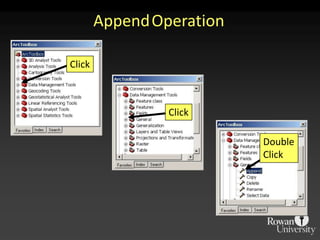
ClickDoubleClickClickAppendOperation
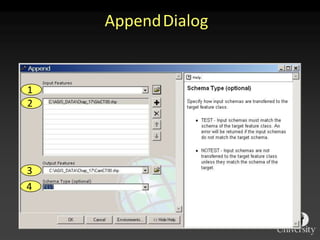
1234AppendDialog
AppendTwo layers before appendOne layer after append
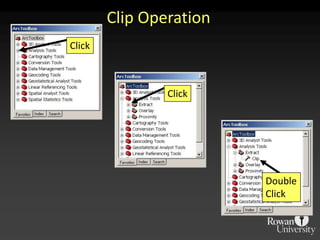
ClickClickDoubleClickClipOperation
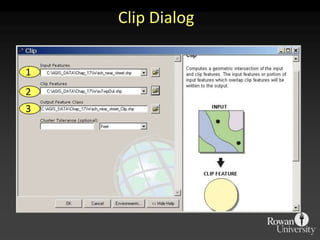
123ClipDialog
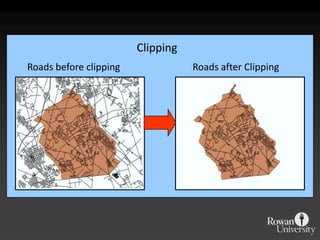
ClippingRoads before clippingRoads after Clipping
Intersection
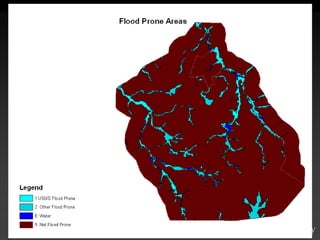
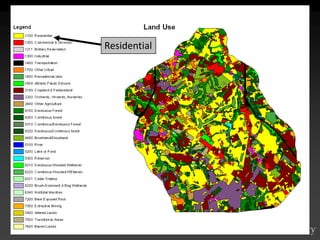
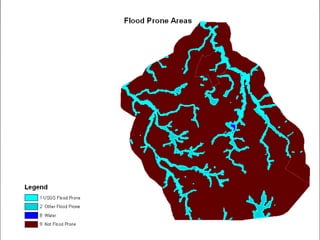
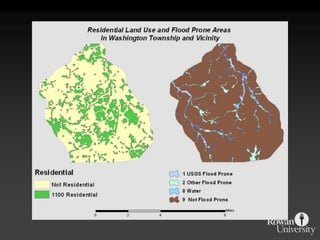
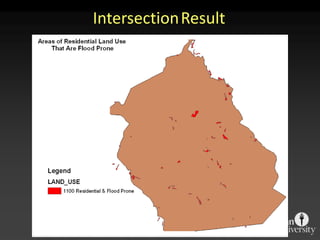
Intersection ProcedureWhere are the areas that are residential in land use and flood prone?Select flood prone areas from flood prone layerSelect residential areas from land use layerDo intersection
Intersect
Residential
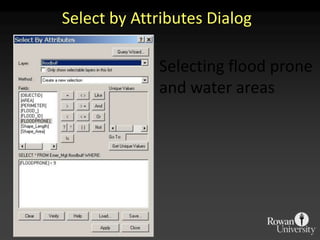
SelectbyAttributesDialogSelecting flood prone and water areas
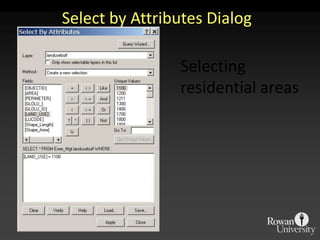
SelectbyAttributesDialogSelecting residential areas
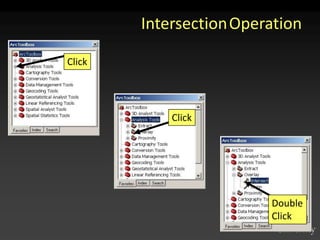
ClickClickDoubleClickIntersectionOperation
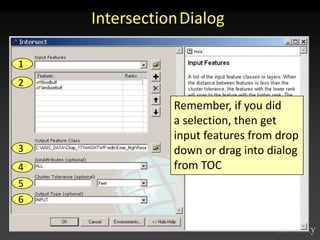
123456IntersectionDialogRemember, if you did a selection, then get input features from drop down or drag into dialog from TOC
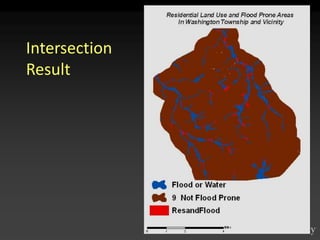
IntersectionResult
IntersectionResult
Union
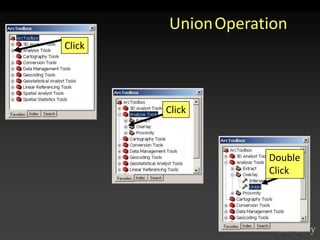
ClickClickDoubleClickUnionOperation
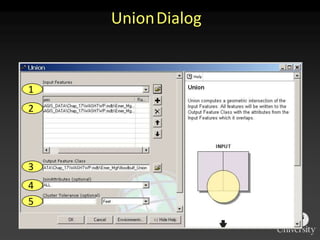
12345UnionDialog
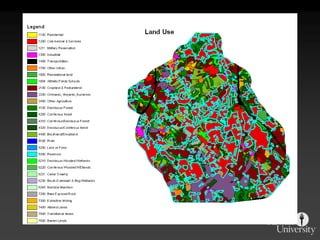
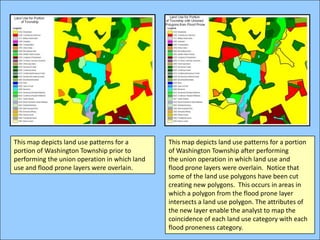
This map depicts land use patterns for a portion of Washington Township prior to performing the union operation in which land use and flood prone layers were overlain.This map depicts land use patterns for a portion of Washington Township after performing the union operation in which land use and flood prone layers were overlain.  Notice that some of the land use polygons have been cut creating new polygons.  This occurs in areas in which a polygon from the flood prone layer intersects a land use polygon. The attributes of the new layer enable the analyst to map the coincidence of each land use category with each flood proneness category.

Data Storage and Processing