Enterprises
Resource planning
What is an ERP System
Simplistic Definition
ERP - Enterprise Resource Planning
Detailed Definition
“a business strategy and set of industry-domain-
specific applications that build customer and
shareholder communities value network system by
enabling and optimising enterprise and inter-
enterprise collaborative operational and financial
processes”
Objective of The             Software
  Facilitates Company-wide integrated Information
     Systems Covering all functional Areas.
    Performs core Corporate activities and increases
     customer service augmenting Corporate Image.
    Organizes & Optimizes the data input
     methodologies systematically.
    To have a fully harmonised online system, which
     can integrate with Back Office
    To introduce proper systems and processes which
     will not be man dependent
Key characteristics
   Integration is key to ERP
   ERP packages
   Best practices
   Evolving
   Some assembly required
Advantages
   Improved access to Data for operational decision
    making
   Elimination of costly , inflexible legacy system
   Upgrade of Technology infrastructure
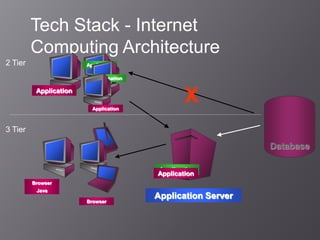
Tech Stack - Internet
         Computing Architecture
2 Tier                  Application

                           Application

          Application

                          Application
                                                X
3 Tier

                                                              Database

                                         Application
                                         Application
         Browser
          Java
                                         Application Server
                        Browser
Production and supply chain
management
Sales and operational level
Demand management
Detailed scheduling
Material requirement planning
Purchasing
Production
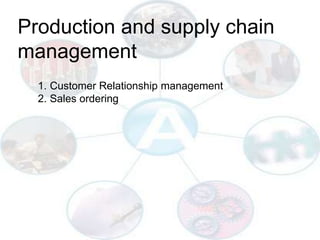
Production and supply chain
management
  1. Customer Relationship management
  2. Sales ordering
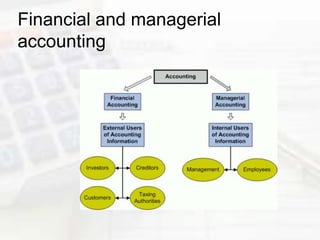
Financial and managerial
accounting
Why implement an ERP
System?
    To support business goals
     Integrated, on-line, secure, self-service
        processes for business
     Eliminate costly mainframe/fragmented
        technologies
    Improved Integration of Systems and Processes
    Lower Costs
    Empower Employees
    Enable Partners, Customers and Suppliers
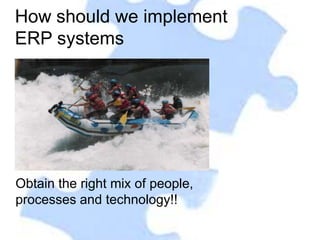
How should we implement
ERP systems


Obtain the right mix of people,
processes and technology!!
Different phases of ERP
   Pre evaluation Screening
   Evaluation Package
   Project Planning
   GAP analysis
   Reengineering
   Team training
   Testing
   Post implementation
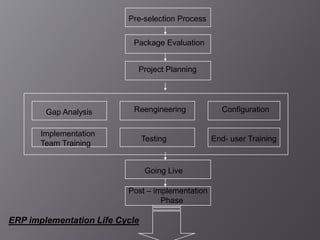
Pre-selection Process


                           Package Evaluation


                            Project Planning


        Gap Analysis       Reengineering            Configuration


       Implementation
                                Testing           End- user Training
       Team Training


                                Going Live

                          Post – implementation
                                   Phase

ERP implementation Life Cycle
Competition In the Market!


     Manufacturing Challenges.
     Manufacturing Globally.
     Distribution network spread.
     New Product introduction.
     Lower manufacturing lead time.
     Focus on industry markets.
     Satisfying the needs of customers.
     Develop specific business methods and
      processes.
     Integration with third party products.
Demands on the Industry

   Better products at lower costs
   Tough competition
   Need to analyze costs / revenues on a product
    or customer basis
   Flexibility to respond to changing business
    requirements
   More informed management decision making
What is that ERP enables ?


   Systematic Look into your Systems & procedures
   Optimizing the processes
   Enables you to adapt yourself to new technologies
   Discipline across the functions
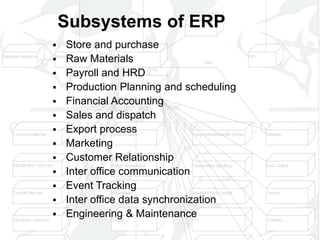
Subsystems of ERP
 Store and purchase
 Raw Materials
 Payroll and HRD
 Production Planning and scheduling
 Financial Accounting
 Sales and dispatch
 Export process
 Marketing
 Customer Relationship
 Inter office communication
 Event Tracking
 Inter office data synchronization
 Engineering & Maintenance
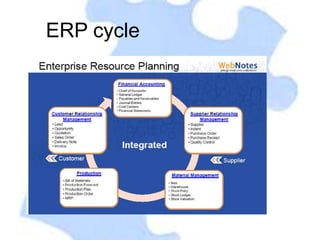
ERP cycle
Advantages of an ERP
     Package?
1.   Highly Graphics based User Interface.
2.   Readymade solutions for most of the Problems.
3.   Integration of all functions ensured.
4.   Easy enterprise wide information sharing.
5.   Suppliers and Customers can be on-line
     communication.
6.   Knowledge transfer between industries guarantees
     innovation.
Advantages continue
8.    Automatic adaptation to new technology.
9.    Sales and distribution
10.   Purchases
11.   Manufacturing
12.   Improved access to Data for operational decision
      making
13.   Elimination of costly , inflexible legacy system
14.   Upgrade of Technology infrastructure
Disadvantages
   Expensive and time consuming in implementation
   Difficulty implementing change
   Difficult integrating with other system
   Risk of implementation Failures
Authorization and Security
 User / Password level authentication
 User wise activity permission
 Tracking of changes made by users
 Facility of authorization/approval of
  transaction
 Restriction in modifying the transaction
  after approval is done
Management Information

   Online follow ups and status information for various
    activities
   Consumption mismatch
   Budgeting and control
Special Features
   Remote authorization/approval
     Online remote connection

     Through e-mail

     Through file transfer
Web Notes ERP
 Web based ERP which is offered by Web Notes
  Pvt. Ltd.
Advantages
•   General
• 100% Web based
• SMS Integration
• Email, print, excel export
• Role based permissions
• Report Builder
• To Do List
• Reminders
• Calendar
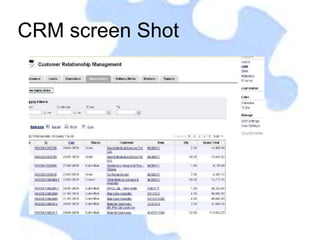
CRM screen Shot
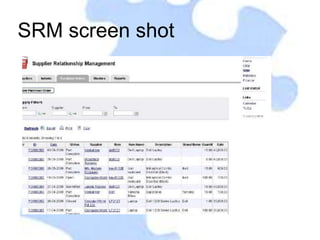
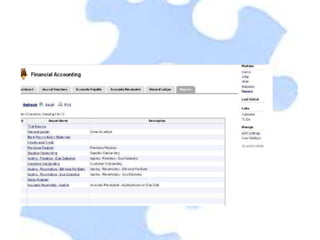
SRM screen shot
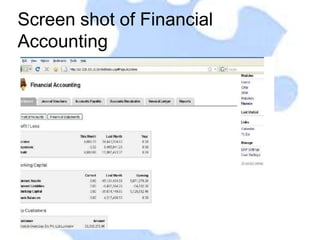
Screen shot of Financial
Accounting
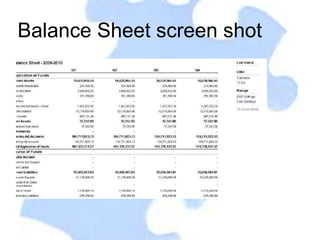
Balance Sheet screen shot
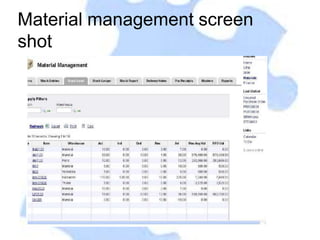
Material management screen
shot
Summary

   Optimum utilization of resources
   Customer satisfaction
   Seamless integration between Functions
   Reduced overheads & inventory
   Timely responsiveness
   Market share & image enhancement
   Faster design to manufacturability
   Keep up with technology changes
Enterprises resource planning

Enterprises resource planning

  • 2.
  • 3.
    What is anERP System Simplistic Definition ERP - Enterprise Resource Planning Detailed Definition “a business strategy and set of industry-domain- specific applications that build customer and shareholder communities value network system by enabling and optimising enterprise and inter- enterprise collaborative operational and financial processes”
  • 4.
    Objective of The Software  Facilitates Company-wide integrated Information Systems Covering all functional Areas.  Performs core Corporate activities and increases customer service augmenting Corporate Image.  Organizes & Optimizes the data input methodologies systematically.  To have a fully harmonised online system, which can integrate with Back Office  To introduce proper systems and processes which will not be man dependent
  • 5.
    Key characteristics  Integration is key to ERP  ERP packages  Best practices  Evolving  Some assembly required
  • 6.
    Advantages  Improved access to Data for operational decision making  Elimination of costly , inflexible legacy system  Upgrade of Technology infrastructure
  • 7.
    Tech Stack -Internet Computing Architecture 2 Tier Application Application Application Application X 3 Tier Database Application Application Browser Java Application Server Browser
  • 8.
    Production and supplychain management Sales and operational level Demand management Detailed scheduling Material requirement planning Purchasing Production
  • 9.
    Production and supplychain management 1. Customer Relationship management 2. Sales ordering
  • 10.
  • 11.
    Why implement anERP System?  To support business goals  Integrated, on-line, secure, self-service processes for business  Eliminate costly mainframe/fragmented technologies  Improved Integration of Systems and Processes  Lower Costs  Empower Employees  Enable Partners, Customers and Suppliers
  • 12.
    How should weimplement ERP systems Obtain the right mix of people, processes and technology!!
  • 13.
    Different phases ofERP  Pre evaluation Screening  Evaluation Package  Project Planning  GAP analysis  Reengineering  Team training  Testing  Post implementation
  • 14.
    Pre-selection Process Package Evaluation Project Planning Gap Analysis Reengineering Configuration Implementation Testing End- user Training Team Training Going Live Post – implementation Phase ERP implementation Life Cycle
  • 15.
    Competition In theMarket!  Manufacturing Challenges.  Manufacturing Globally.  Distribution network spread.  New Product introduction.  Lower manufacturing lead time.  Focus on industry markets.  Satisfying the needs of customers.  Develop specific business methods and processes.  Integration with third party products.
  • 16.
    Demands on theIndustry  Better products at lower costs  Tough competition  Need to analyze costs / revenues on a product or customer basis  Flexibility to respond to changing business requirements  More informed management decision making
  • 17.
    What is thatERP enables ?  Systematic Look into your Systems & procedures  Optimizing the processes  Enables you to adapt yourself to new technologies  Discipline across the functions
  • 18.
    Subsystems of ERP Store and purchase  Raw Materials  Payroll and HRD  Production Planning and scheduling  Financial Accounting  Sales and dispatch  Export process  Marketing  Customer Relationship  Inter office communication  Event Tracking  Inter office data synchronization  Engineering & Maintenance
  • 19.
  • 20.
    Advantages of anERP Package? 1. Highly Graphics based User Interface. 2. Readymade solutions for most of the Problems. 3. Integration of all functions ensured. 4. Easy enterprise wide information sharing. 5. Suppliers and Customers can be on-line communication. 6. Knowledge transfer between industries guarantees innovation.
  • 21.
    Advantages continue 8. Automatic adaptation to new technology. 9. Sales and distribution 10. Purchases 11. Manufacturing 12. Improved access to Data for operational decision making 13. Elimination of costly , inflexible legacy system 14. Upgrade of Technology infrastructure
  • 22.
    Disadvantages  Expensive and time consuming in implementation  Difficulty implementing change  Difficult integrating with other system  Risk of implementation Failures
  • 23.
    Authorization and Security User / Password level authentication  User wise activity permission  Tracking of changes made by users  Facility of authorization/approval of transaction  Restriction in modifying the transaction after approval is done
  • 24.
    Management Information  Online follow ups and status information for various activities  Consumption mismatch  Budgeting and control
  • 25.
    Special Features  Remote authorization/approval  Online remote connection  Through e-mail  Through file transfer
  • 26.
    Web Notes ERP Web based ERP which is offered by Web Notes Pvt. Ltd.
  • 27.
    Advantages • General • 100% Web based • SMS Integration • Email, print, excel export • Role based permissions • Report Builder • To Do List • Reminders • Calendar
  • 28.
  • 29.
  • 30.
    Screen shot ofFinancial Accounting
  • 32.
  • 33.
  • 34.
    Summary  Optimum utilization of resources  Customer satisfaction  Seamless integration between Functions  Reduced overheads & inventory  Timely responsiveness  Market share & image enhancement  Faster design to manufacturability  Keep up with technology changes