eLEARNING: the BIG PICTURE eLearning: the BIG Picture
Progression…… Distance learning (print based; ‘by correspondence’) Online learning E learning M (mobile) learning E+M = U (ubiquitous) learning (Janet Fraser, Monash Uni)  (http://infotech.monash.edu/promotion/coolcampus/workshop/3rdworkshop/walkaboutlearning.pdf)
Progression…… Distance learning (print based; ‘by correspondence’) Online learning E learning M (mobile) learning E+M = U (ubiquitous) learning (Janet Fraser, Monash Uni)  (http://infotech.monash.edu/promotion/coolcampus/workshop/3rdworkshop/walkaboutlearning.pdf) Flexible Learning
BLENDED LEARNING The predominant model Elearning + face to face (f2f) instruction (in any proportion) Can be as simple as email + f2f, or Email, plus websites, + f2f The most common: Learning Management System (LMS) + f2f
Learning Management Systems – LMS  (or Course Management Systems – CMS, or Platforms) Blackboard (now incorporates WebCT) Janison, Moodle They comprise: Learning materials (content) Communication tools (mail, chat, Instant Messaging, Forum/discussions, blogs) The Back End: Tracking tools – student profiles, grades, attendance patterns
Proprietary v Open Source Proprietary Expensive Locked in to fixed product for extended periods Open Source Free or very cheap Host can modify product as often as desired
Next/Back Learning Content for whole course prepared and loaded upfront (expensive) Minimal input from instructors; essentially unfacilitated Self-paced; individualised Suitable for compliance or product training, or for highly motivated students
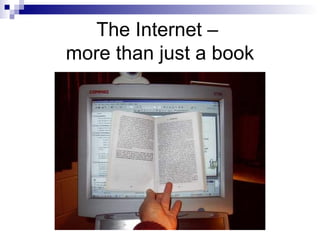
The Internet –  more than just a book
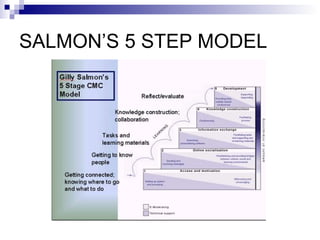
SALMON’S 5 STEP MODEL
Facilitated Learning Involves processing of content PLUS Communication activities (discussion) with fellow students and facilitator Strong social and/or collaborative component
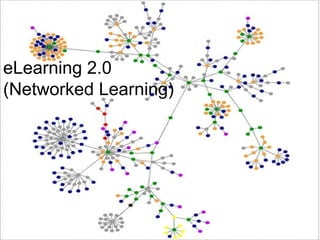
eLearning 2.0 (Networked Learning)
eLearning 2.0/Web 2.0 (Stephen Downes) eLearning 1.0  was static packaged content developed by content developers such as CD-ROMs and courseware. It had little true interactivity and learner input and very little (if any) contact with a tutor. Best represented by Learner Management Systems. (eg WebCT)  Some packaged content and some provided by the teacher. There is more interaction with a teacher and some with peers (through forums and chat). eLearning 2.0  will follow a student-centred model and will be centred around the Personal Learning Environment using social software. Students generate and share content. They interact not only with teachers and their peers, but with anyone in the world they can learn from.
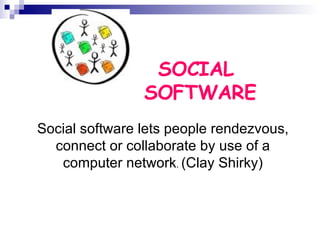
SOCIAL  SOFTWARE Social software lets people rendezvous, connect or collaborate by use of a computer network .  (Clay Shirky)
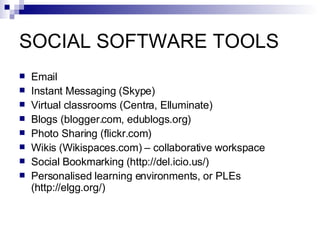
SOCIAL SOFTWARE TOOLS Email Instant Messaging (Skype) Virtual classrooms (Centra, Elluminate) Blogs (blogger.com, edublogs.org) Photo Sharing  (flickr.com) Wikis   (Wikispaces.com) – collaborative workspace Social Bookmarking  ( http://del.icio.us/ ) Personalised learning environments, or PLEs  ( http://elgg.org/)
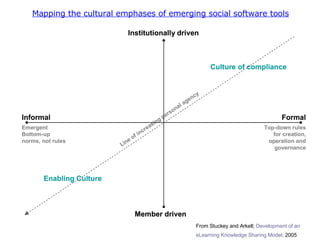
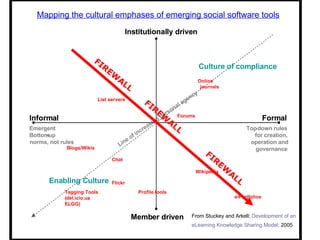
Mapping the cultural emphases of emerging social software tools From Stuckey and Arkell;  Development of an  eLearning Knowledge Sharing Model;  2005
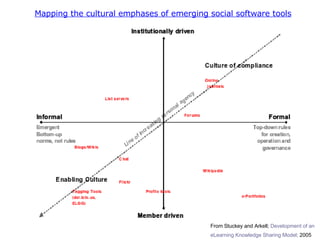
Line of increasing personal agency Institutionally driven Member driven Formal Informal Top - down rules  for creation,  operation and  governance Emergent Bottom - up  norms, not rules Enabling Culture Culture of compliance Institutionally driven Member driven Formal Informal Top - down rules  for creation,  operation and  governance Emergent Bottom  - norms, not rules Mapping the cultural emphases of emerging social software tools Wikipedia e - Portfolios Profile tools Blogs/Wikis Flickr Chat Tagging Tools  ( del.icio.us ,  ELGG) List servers Forums Online journals FIREWALL FIREWALL FIREWALL From Stuckey and Arkell;  Development of an  eLearning Knowledge Sharing Model;  2005
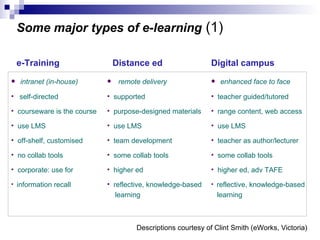
Some major types of e-learning  (1) intranet (in-house) self-directed   courseware is the course use LMS off-shelf, customised no collab tools corporate: use for information recall e-Training remote delivery supported purpose-designed materials use LMS team development some collab tools higher ed reflective, knowledge-based   learning Distance ed enhanced face to face   teacher guided/tutored range content, web access use LMS teacher as author/lecturer some collab tools higher ed, adv TAFE reflective, knowledge-based   learning Digital campus Descriptions courtesy of Clint Smith (eWorks, Victoria)
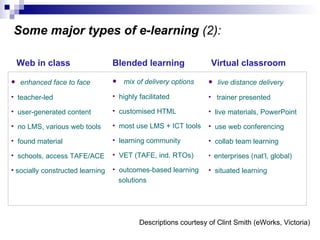
Some major types of e-learning  (2): Web in class mix of delivery options highly facilitated customised HTML most   use LMS + ICT tools learning community VET (TAFE, ind. RTOs) outcomes-based learning   solutions Blended learning enhanced face to face   teacher-led user-generated content no LMS, various web tools found material schools, access TAFE/ACE  socially constructed learning Virtual classroom live distance delivery trainer presented live materials, PowerPoint use web conferencing collab team learning enterprises (nat’l, global) situated learning Descriptions courtesy of Clint Smith (eWorks, Victoria)
Resources Designing eLearning - http://designing.flexiblelearning.net.au/ Practical Guide to eLearning for Industry -  http://industry.flexiblelearning.net.au/Guide/default.htm
Michael Coghlan [email_address]

eLearning - The BIG Picture

  • 1.
    eLEARNING: the BIGPICTURE eLearning: the BIG Picture
  • 2.
    Progression…… Distance learning(print based; ‘by correspondence’) Online learning E learning M (mobile) learning E+M = U (ubiquitous) learning (Janet Fraser, Monash Uni) (http://infotech.monash.edu/promotion/coolcampus/workshop/3rdworkshop/walkaboutlearning.pdf)
  • 3.
    Progression…… Distance learning(print based; ‘by correspondence’) Online learning E learning M (mobile) learning E+M = U (ubiquitous) learning (Janet Fraser, Monash Uni) (http://infotech.monash.edu/promotion/coolcampus/workshop/3rdworkshop/walkaboutlearning.pdf) Flexible Learning
  • 4.
    BLENDED LEARNING Thepredominant model Elearning + face to face (f2f) instruction (in any proportion) Can be as simple as email + f2f, or Email, plus websites, + f2f The most common: Learning Management System (LMS) + f2f
  • 5.
    Learning Management Systems– LMS (or Course Management Systems – CMS, or Platforms) Blackboard (now incorporates WebCT) Janison, Moodle They comprise: Learning materials (content) Communication tools (mail, chat, Instant Messaging, Forum/discussions, blogs) The Back End: Tracking tools – student profiles, grades, attendance patterns
  • 6.
    Proprietary v OpenSource Proprietary Expensive Locked in to fixed product for extended periods Open Source Free or very cheap Host can modify product as often as desired
  • 7.
    Next/Back Learning Contentfor whole course prepared and loaded upfront (expensive) Minimal input from instructors; essentially unfacilitated Self-paced; individualised Suitable for compliance or product training, or for highly motivated students
  • 8.
    The Internet – more than just a book
  • 9.
  • 10.
    Facilitated Learning Involvesprocessing of content PLUS Communication activities (discussion) with fellow students and facilitator Strong social and/or collaborative component
  • 11.
  • 12.
    eLearning 2.0/Web 2.0(Stephen Downes) eLearning 1.0 was static packaged content developed by content developers such as CD-ROMs and courseware. It had little true interactivity and learner input and very little (if any) contact with a tutor. Best represented by Learner Management Systems. (eg WebCT) Some packaged content and some provided by the teacher. There is more interaction with a teacher and some with peers (through forums and chat). eLearning 2.0 will follow a student-centred model and will be centred around the Personal Learning Environment using social software. Students generate and share content. They interact not only with teachers and their peers, but with anyone in the world they can learn from.
  • 13.
    SOCIAL SOFTWARESocial software lets people rendezvous, connect or collaborate by use of a computer network . (Clay Shirky)
  • 14.
    SOCIAL SOFTWARE TOOLSEmail Instant Messaging (Skype) Virtual classrooms (Centra, Elluminate) Blogs (blogger.com, edublogs.org) Photo Sharing (flickr.com) Wikis (Wikispaces.com) – collaborative workspace Social Bookmarking ( http://del.icio.us/ ) Personalised learning environments, or PLEs ( http://elgg.org/)
  • 15.
    Mapping the culturalemphases of emerging social software tools From Stuckey and Arkell; Development of an eLearning Knowledge Sharing Model; 2005
  • 16.
    Mapping the culturalemphases of emerging social software tools From Stuckey and Arkell; Development of an eLearning Knowledge Sharing Model; 2005
  • 17.
    Line of increasingpersonal agency Institutionally driven Member driven Formal Informal Top - down rules for creation, operation and governance Emergent Bottom - up norms, not rules Enabling Culture Culture of compliance Institutionally driven Member driven Formal Informal Top - down rules for creation, operation and governance Emergent Bottom - norms, not rules Mapping the cultural emphases of emerging social software tools Wikipedia e - Portfolios Profile tools Blogs/Wikis Flickr Chat Tagging Tools ( del.icio.us , ELGG) List servers Forums Online journals FIREWALL FIREWALL FIREWALL From Stuckey and Arkell; Development of an eLearning Knowledge Sharing Model; 2005
  • 18.
    Some major typesof e-learning (1) intranet (in-house) self-directed courseware is the course use LMS off-shelf, customised no collab tools corporate: use for information recall e-Training remote delivery supported purpose-designed materials use LMS team development some collab tools higher ed reflective, knowledge-based learning Distance ed enhanced face to face teacher guided/tutored range content, web access use LMS teacher as author/lecturer some collab tools higher ed, adv TAFE reflective, knowledge-based learning Digital campus Descriptions courtesy of Clint Smith (eWorks, Victoria)
  • 19.
    Some major typesof e-learning (2): Web in class mix of delivery options highly facilitated customised HTML most use LMS + ICT tools learning community VET (TAFE, ind. RTOs) outcomes-based learning solutions Blended learning enhanced face to face teacher-led user-generated content no LMS, various web tools found material schools, access TAFE/ACE socially constructed learning Virtual classroom live distance delivery trainer presented live materials, PowerPoint use web conferencing collab team learning enterprises (nat’l, global) situated learning Descriptions courtesy of Clint Smith (eWorks, Victoria)
  • 20.
    Resources Designing eLearning- http://designing.flexiblelearning.net.au/ Practical Guide to eLearning for Industry - http://industry.flexiblelearning.net.au/Guide/default.htm
  • 21.