Finding the Good Fit:  Faculty Members, Instruction, Evidence, and Technology Patricia A. McGee, PhD [email_address] Associate Professor/2003 NLII Fellow Instructional Technology Department of Educational Psychology University of Texas at San Antonio Veronica M. Diaz, PhD [email_address]   Instructional Technology Manager Maricopa Center for Learning and Instruction  Maricopa Community Colleges Adjunct Professor, Northern Arizona University
Welcome Introductions  Materials  Binder CD Presentation materials available at  http://elearning-design.pbwiki.com/
Seminar Overview Web 2.0: Diffusion, Instructional Development and Support Understanding Faculty Members and Learners and Web 2.0 Content, Pedagogy, Assessment, and Tools
Part I Web 2.0: Diffusion, Instructional Development and Support
Web 2.0 (Twitter) and the  World Simulation http://www.youtube.com/watch?v=JgbfMY-6giY
WEB 2.0 Model of Diffusion and Other Considerations
 
 
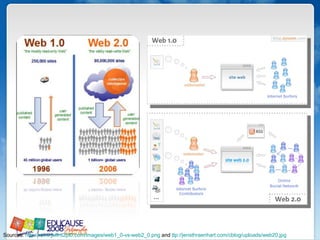
Sources:  http://www.jeffro2pt0.com/images/web1_0-vs-web2_0.png  and  ttp://jensthraenhart.com/cblog/uploads/web20.jpg
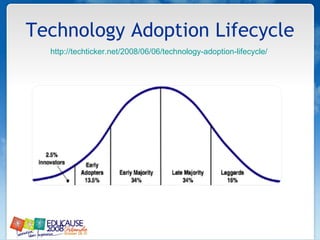
Technology Adoption Lifecycle http://techticker.net/2008/06/06/technology-adoption-lifecycle/
Web 2.0 Tools and Distributed Learning Models
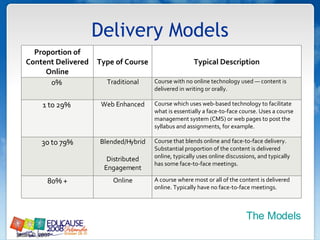
Delivery Models Sloan-C, 2007 The Models Proportion of Content Delivered Online Type of Course Typical Description 0%  Traditional Course with no online technology used — content is delivered in writing or orally. 1 to 29%  Web Enhanced Course which uses web-based technology to facilitate what is essentially a face-to-face course. Uses a course management system (CMS) or web pages to post the syllabus and assignments, for example. 30 to 79% Blended/Hybrid Distributed Engagement Course that blends online and face-to-face delivery. Substantial proportion of the content is delivered online, typically uses online discussions, and typically has some face-to-face meetings. 80% + Online A course where most or all of the content is delivered online. Typically have no face-to-face meetings.
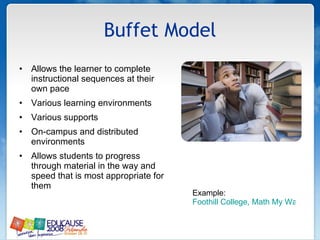
Buffet Model Allows the learner to complete instructional sequences at their own pace Various learning environments  Various supports On-campus and distributed environments Allows students to progress through material in the way and speed that is most appropriate for them Example:  Foothill College, Math My Way
Blended/Hybrid (Replacement) Blended learning courses combine online and classroom learning activities and resources in an optimal way to improve student learning outcomes and to address important institutional issues Classroom attendance (“seat time”) is reduced Example:  Estrella Mountain Community College, Learning College
100% Online All course activities, resources, interactions, and communications occur online, typically through an institutional learning/course management system Example:  Rio Salado College Online
Models and Web 2.0 The containers Redesign approach Pedagogy Discipline
What models are you  most active in? Web enhanced (F2F) Buffet Blended/Hybrid Online
INSTRUCTIONAL DEVELOPMENT  MODELS AND SUPPORT
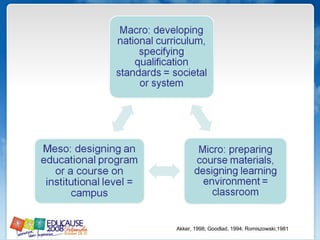
Akker, 1998; Goodlad, 1994; Romiszowski,1981
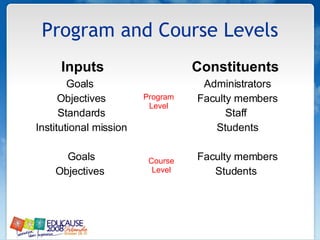
Program and Course Levels Inputs Goals  Objectives Standards Institutional mission Goals Objectives  Constituents  Administrators Faculty members Staff  Students Faculty members Students  Program Level Course Level
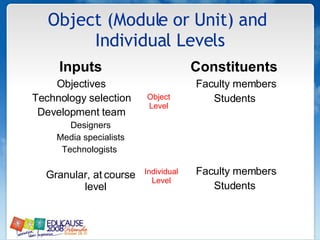
Object (Module or Unit) and  Individual Levels Inputs  Objectives  Technology selection  Development team  Designers Media specialists Technologists  Granular, at course level Constituents  Faculty members Students  Faculty members Students  Object Level Individual Level
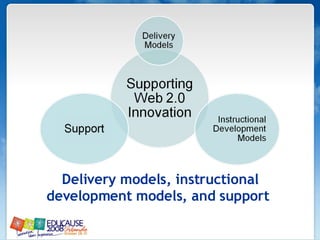
Delivery models, instructional development models, and support
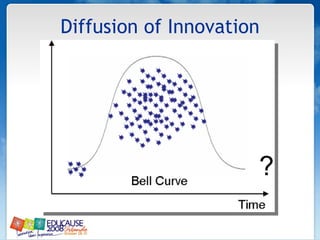
Diffusion of Innovation ?
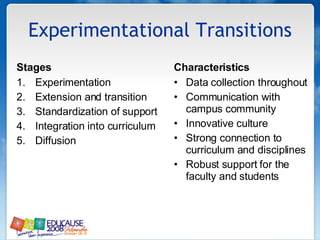
Experimentational Transitions Stages Experimentation Extension and transition Standardization of support  Integration into curriculum Diffusion  Characteristics  Data collection throughout Communication with campus community  Innovative culture  Strong connection to curriculum and disciplines  Robust support for the faculty and students
Support Models & Innovation Relationship to development models  Relationship to innovation and diffusion Centralized  Experimental/pilot Decentralized None
WEB 2.0 AND INSTITUTIONAL ISSUES/CONSIDERATIONS
Quality Assurance and Web 2.0
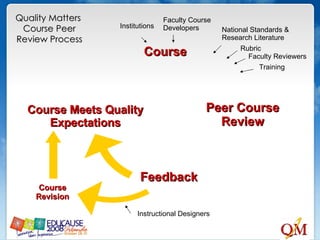
Peer Course Review Feedback Course Instructional Designers Institutions Faculty Course Developers National Standards & Research Literature Rubric Faculty Reviewers Training Quality Matters  Course Peer Review Process Course Meets Quality Expectations Course Revision
QM Certified Peer Reviewers Peer Reviewers receive full-day training to learn How to interpret the standards (with examples and annotations) How to evaluate a course (hands-on with sample course) Reviews are conducted by teams of three peer reviewers Chair  Peer reviewer (external) Peer reviewer (SME)
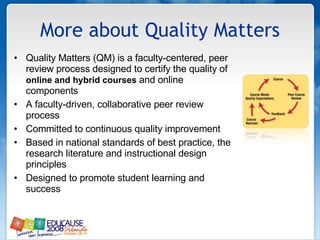
More about Quality Matters Quality Matters (QM) is a faculty-centered, peer review process designed to certify the quality of  online and hybrid courses  and online components A faculty-driven, collaborative peer review process Committed to continuous quality improvement Based in national standards of best practice, the research literature and instructional design principles Designed to promote student learning and success
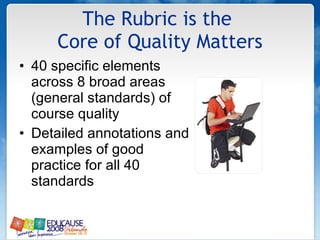
The Rubric is the  Core of Quality Matters 40 specific elements across 8 broad areas (general standards) of course quality  Detailed annotations and examples of good practice for all 40 standards
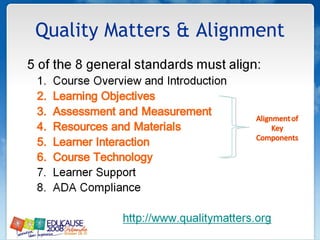
Quality Matters & Alignment
Essential Standards that  Relate to Alignment A statement introduces the student to the course and learning  Navigational instructions Learning activities foster interaction: Instructor-student Content-student Student-student Clear standards are set for instructor response and availability  Assessment strategies provide feedback Grading policy is transparent and easy to understand Implemented tools and media support learning objectives and integrate with texts and lesson assignments The course acknowledges the importance of ADA compliance
Other QM Uses College quality assurance review processes Guidelines for online/hybrid  course development Faculty development/training programs Checklist for improvement of existing online courses An element in regional and professional accreditation
Intellectual Property & Web 2.0 How broad or inclusive? What tools or learning environments should be addressed?  How is maintenance of instructional products and systems addressed?  Employees or units involved in the production process, work time/course of employment issues, resources expended, or units involved?  Innovation within or outside established, controlled university-owned systems?
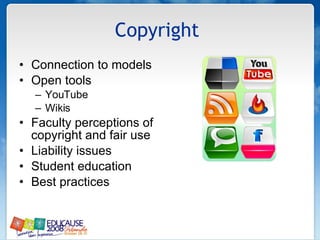
Copyright  Connection to models Open tools YouTube Wikis  Faculty perceptions of copyright and fair use  Liability issues  Student education Best practices
Three Questions Describe existing instructional delivery and development models for integrating technology into instruction. What are your teaching and learning goals for Web 2.0 tools? What are the support issues that will need to be addressed to achieve your Web 2.0 goals?
Part 2:Understanding Faculty Members and Learners and Web 2.0 Drs. Patricia McGee & Veronica Diaz
Asking the right question
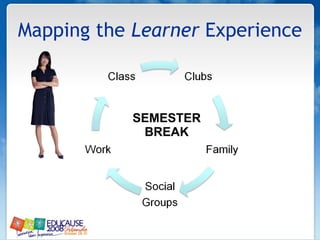
Mapping the  Learner  Experience SEMESTER BREAK
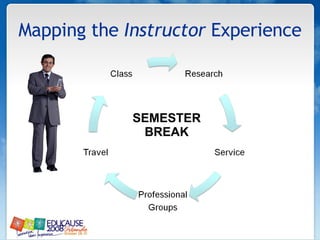
Mapping the  Instructor  Experience SEMESTER BREAK
People - Data - Things (P-D-T) Over the past 10 years, teachers and students have increasingly relied on technology to communicate. At the same time there is a perception that teacher’s time on campus has declined. There is an administrative concern that student needs outside of class are not being met, and that lack of campus presence is an indication of teacher apathy. What people should be included? What data should be analyzed? What things are involved?
Learners… Are intergenerational. May have expectations from prior experience, personal style/needs, disciplinary perspective. Have a range of technical abilities. Require just-in-need supports.
Informal and “non-traditional” A part of ubiquitous networks   Not so enamored of technology but believe tech skills may be an advantage (younger over older) learners are also …
Poll We regularly survey students about technology use:  Yes No
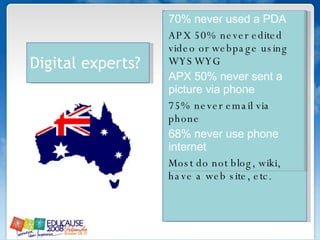
70% never used a PDA APX 50% never edited video or webpage using WYSWYG APX 50% never sent a picture via phone 75% never email via phone 68% never use phone internet Most do not blog, wiki, have a web site, etc. Digital experts?
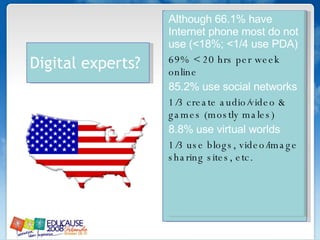
Alt hough 66.1% have Internet phone most do not use (<18%; <1/4 use PDA) 69% < 20 hrs per week online 85.2% use social networks 1/3 create audio/video & games (mostly males) 8.8% use virtual worlds 1/3 use blogs, video/image sharing sites, etc. Digital experts?
Information Literacy? Determine the  extent  of information needed Access  the needed information effectively and efficiently Evaluate  information and its sources critically Incorporate selected information into one’s knowledge base Use information  effectively to accomplish a specific purpose Understand  the economic, legal, and social  issues  surrounding the use of information, and access and use information ethically and legally
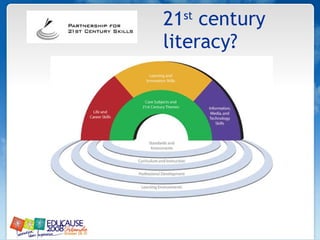
21 st  century literacy?
Poll My institution has literacy standards that all students must attain:  Yes No Only some departments
Learners as novice Focus on discrete details Capture empirical information Focus on the use of formulas and previously learned strategies Operate at lower levels of thinking Caveat:  Learners are not novices at  everything
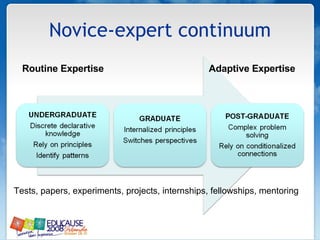
Novice-expert continuum Routine Expertise   Adaptive Expertise Tests, papers, experiments, projects, internships, fellowships, mentoring
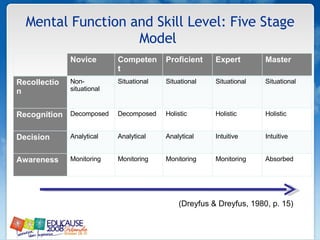
Mental Function and Skill Level: Five Stage Model  (Dreyfus & Dreyfus, 1980, p. 15)  Novice Competent Proficient Expert Master Recollection Non-situational Situational Situational Situational Situational Recognition Decomposed Decomposed Holistic Holistic Holistic Decision Analytical Analytical Analytical Intuitive Intuitive Awareness Monitoring Monitoring Monitoring Monitoring Absorbed
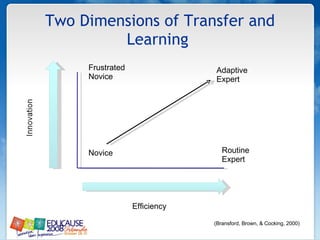
Two Dimensions of Transfer and Learning  Routine Expert Adaptive  Expert Novice Efficiency Frustrated Novice (Bransford, Brown, & Cocking, 2000)
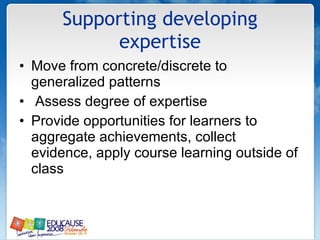
Supporting developing expertise Move from concrete/discrete to generalized patterns Assess degree of expertise Provide opportunities for learners to aggregate achievements, collect evidence, apply course learning outside of class
Disciplinary Foci Hard Natural Sciences Hard Applied Sciences Natural: Logical reasoning. Testing of ideas in linear form of argumentation. Reliance on facts, principles, and concepts. Applied: Problem-solving and practical skills  Emphasis on integration and application of existing knowledge (White & Liccardi, 2006)
Learner Preference Hard Natural Sciences Hard Applied Sciences Online tutorials Reference materials Objective tests (also VLEs) Support the mastery of facts, principles and concepts.  Quantitative, closed assessments (White & Liccardi, 2006)
IMPLICATIONS FOR ASSESSMENT?
Learners: Disciplinary Foci Soft Pure Soft Applied Pure Broad command of intellectual ideas. Emphasis on creativity in thinking and fluency of expression. Applied: Emphasis on personal growth and intellectual breadth. Development of reflective practice and lifelong learning. (White & Liccardi, 2006)
Learner Preference Soft Pure Soft Applied Synchronous discussions Role play and games Access to open web Access to online journals  Support the development of argumentation skills and critical thinking Qualitative, Open  (White & Liccardi, 2006)
What best supports novices?
Learning Readiness Are learners ready for: Online learning? Technology mediated interaction? Self-regulation? New course designs? Independent learning? Self-assessment
Learner Supports & Assessment Technical Access to online ICT services  (Internet, email, server, CMS, etc.) Production  (assignments, presentations, projects, etc.) Access to online academic resources  (library, helpdesk, identifications) Learning technologies  (study skills, time management, etc.)
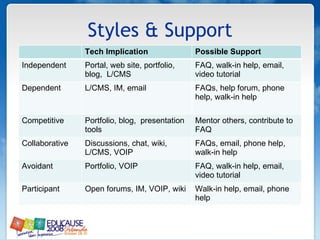
Styles & Support Tech Implication Possible Support Independent Portal, web site, portfolio, blog,  L/CMS  FAQ, walk-in help, email, video tutorial  Dependent L/CMS, IM, email  FAQs, help forum, phone help, walk-in help  Competitive Portfolio, blog,  presentation tools  Mentor others, contribute to FAQ  Collaborative Discussions, chat, wiki,  L/CMS, VOIP  FAQs, email, phone help, walk-in help  Avoidant Portfolio, VOIP  FAQ, walk-in help, email, video tutorial  Participant Open forums, IM, VOIP, wiki  Walk-in help, email, phone help
BREAK
EMERGING TECHNOLOGIES AND FACULTY DEVELOPMENT
No Yes
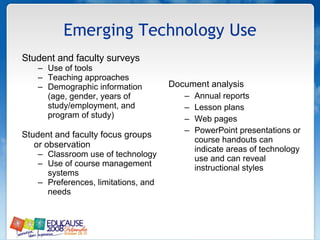
Emerging Technology Use Student and faculty surveys Use of tools Teaching approaches Demographic information (age, gender, years of study/employment, and program of study) Student and faculty focus groups or observation Classroom use of technology Use of course management systems Preferences, limitations, and needs Document analysis Annual reports Lesson plans Web pages PowerPoint presentations or course handouts can indicate areas of technology use and can reveal instructional styles
Web 2.0 and Affordances with Students Students are more comfortable with and have a tolerance for “figuring” out the technology  Students can deal with trial and error approach to use and change in general  Students have a broad exposure to a variety of different tools
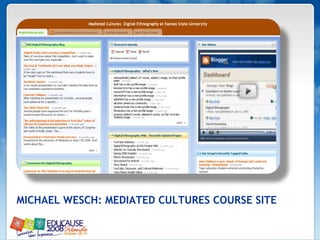
MICHAEL WESCH: MEDIATED CULTURES COURSE SITE
No Yes
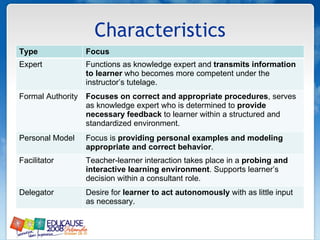
Characteristics Type Focus Expert Functions as knowledge expert and  transmits information to learner  who becomes more competent under the instructor’s tutelage.  Formal Authority Focuses on correct and appropriate procedures , serves as knowledge expert who is determined to  provide necessary feedback  to learner within a structured and standardized environment.  Personal Model Focus is  providing personal examples and modeling appropriate and correct behavior .  Facilitator Teacher-learner interaction takes place in a  probing and interactive learning environment . Supports learner’s decision within a consultant role.  Delegator Desire for  learner to act autonomously  with as little input as necessary.
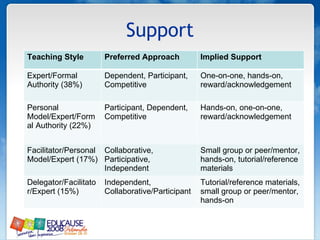
Support Teaching Style Preferred Approach Implied Support Expert/Formal Authority (38%)  Dependent, Participant, Competitive  One-on-one, hands-on, reward/acknowledgement  Personal Model/Expert/Formal Authority (22%)  Participant, Dependent, Competitive  Hands-on, one-on-one, reward/acknowledgement  Facilitator/Personal Model/Expert (17%)  Collaborative, Participative, Independent  Small group or peer/mentor, hands-on, tutorial/reference materials  Delegator/Facilitator/Expert (15%)  Independent, Collaborative/Participant  Tutorial/reference materials, small group or peer/mentor, hands-on
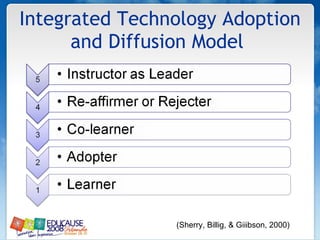
Integrated Technology Adoption and Diffusion Model  (Sherry, Billig, & Giiibson, 2000)
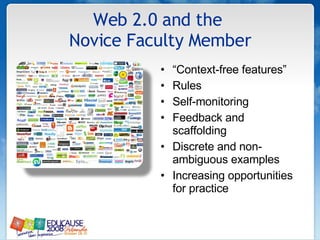
Web 2.0 and the  Novice Faculty Member “ Context-free features” Rules Self-monitoring Feedback and scaffolding Discrete and non-ambiguous examples Increasing opportunities for practice
 
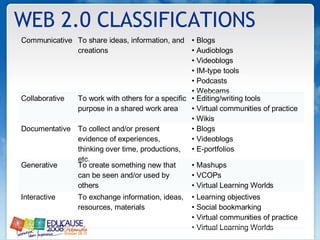
WEB 2.0 CLASSIFICATIONS Communicative To share ideas, information, and creations •  Blogs •  Audioblogs •  Videoblogs •  IM-type tools •  Podcasts •  Webcams Collaborative To work with others for a specific purpose in a shared work area •  Editing/writing tools •  Virtual communities of practice  •  Wikis Documentative To collect and/or present evidence of experiences, thinking over time, productions, etc. •  Blogs •  Videoblogs •  E-portfolios Generative To create something new that can be seen and/or used by others •  Mashups •  VCOPs •  Virtual Learning Worlds Interactive To exchange information, ideas, resources, materials •  Learning objectives •  Social bookmarking •  Virtual communities of practice  •  Virtual Learning Worlds
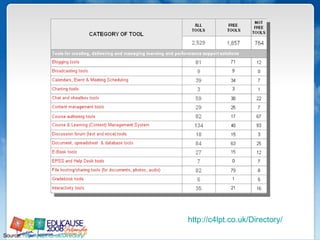
Source:  http://c4lpt.co.uk/Directory/   http://c4lpt.co.uk/Directory/
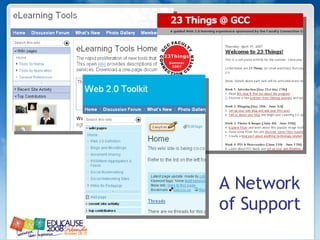
A Network of Support
 
 
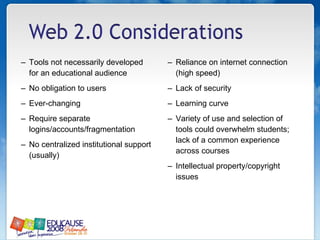
Tools not necessarily developed for an educational audience No obligation to users  Ever-changing  Require separate logins/accounts/fragmentation No centralized institutional support (usually) Reliance on internet connection (high speed) Lack of security  Learning curve Variety of use and selection of tools could overwhelm students; lack of a common experience across courses Intellectual property/copyright issues
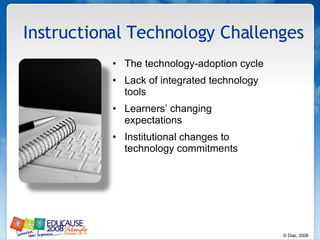
Instructional Technology Challenges  The technology-adoption cycle Lack of integrated technology tools  Learners’ changing expectations  Institutional changes to technology commitments
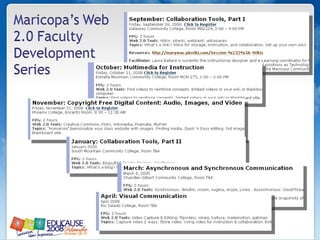
Activity: Data, Data, Data  Part I Given examples of students and faculty members, how can you best support their utilization and integration of Web 2.0 technologies?  Part II Given your responses, what kinds of services are needed At institutional level? At departmental level?
Part 3: Content, Pedagogy, Assessment, and Tools   Drs. Patricia McGee & Veronica Diaz
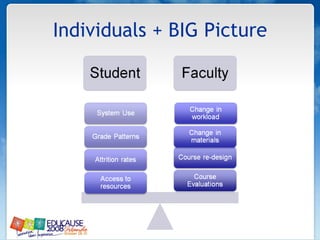
Individuals + BIG Picture
 
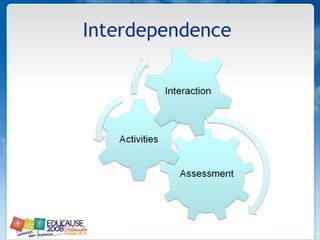
Interdependence
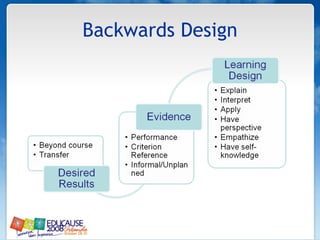
Backwards Design
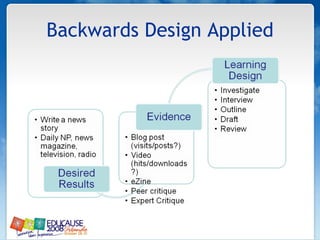
Backwards Design Applied
EVIDENCE AS ASSESSMENT LEARNING PRINCIPLES
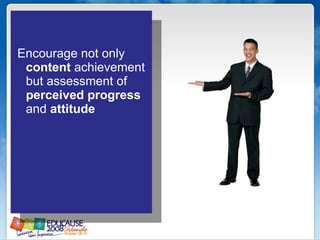
Encourage not only  content  achievement but assessment of  perceived progress  and  attitude
 
Track factors  that may impede achievement
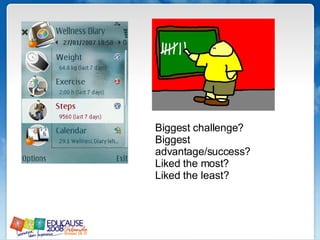
Biggest challenge? Biggest advantage/success? Liked the most? Liked the least?
√  Incorporate  meta-cognitive  assessments √  Provide a strategy for  self-assessment  and progress
 
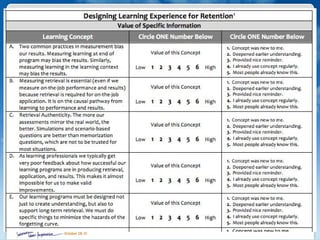
Package objectives with assignments, activities, and products
When appropriate, use  rubrics  for consistent and aggregated indicators over time
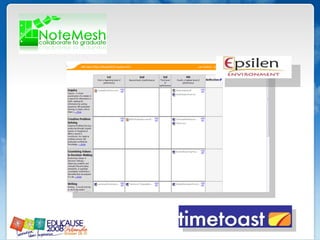
Include learners  in performance/ assessment measures
R M R L I P I X E A R N
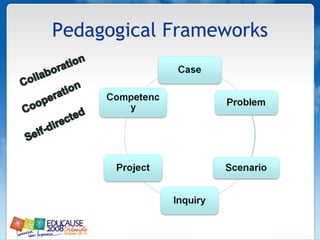
Pedagogical Frameworks
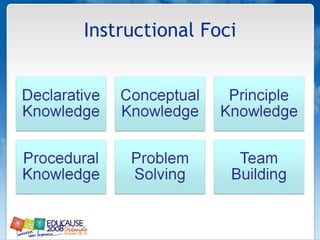
Instructional Foci
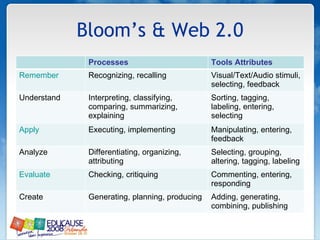
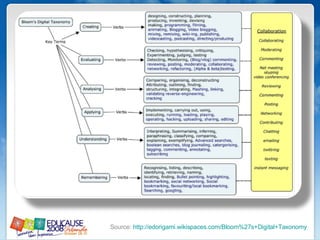
Bloom’s & Web 2.0 Processes Tools Attributes Remember Recognizing, recalling Visual/Text/Audio stimuli, selecting, feedback Understand Interpreting, classifying, comparing, summarizing, explaining Sorting, tagging, labeling, entering, selecting Apply Executing, implementing Manipulating, entering, feedback Analyze Differentiating, organizing, attributing Selecting, grouping, altering, tagging, labeling Evaluate Checking, critiquing Commenting, entering, responding Create Generating, planning, producing Adding, generating, combining, publishing
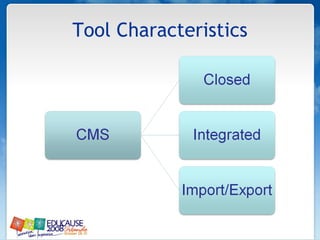
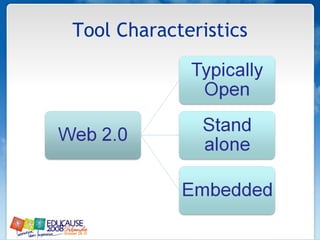
Tool Characteristics
ACTIVITY Visit  http://elearningtools.wetpaint.com Become familiar with the site and prepare to complete an activity. Web 2.0 Tools Affordances
Source:  http://edorigami.wikispaces.com/Bloom%27s+Digital+Taxonomy
Strategies for Online Assessment Group projects  Students as audience and peer review  Participation  Rubrics  Pre- and/or post testing  Objective assessment  Subjective assessment  Self-assessment  Interactive assessments
ACTIVITY Using a syllabus, consider which tool or tools can be used to meet instructional needs Design an instructional experience with an assessment Post to  http://elearning-design.pbwiki.com Instruction + Assessment
Wrapping up & thank you! Patricia A. McGee, PhD [email_address] Associate Professor/2003 NLII Fellow Instructional Technology Department of Educational Psychology University of Texas at San Antonio Veronica M. Diaz, PhD [email_address]   Instructional Technology Manager Maricopa Center for Learning and Instruction  Maricopa Community Colleges Adjunct Professor, Northern Arizona University

EDUCAUSE 08

  • 1.
    Finding the GoodFit: Faculty Members, Instruction, Evidence, and Technology Patricia A. McGee, PhD [email_address] Associate Professor/2003 NLII Fellow Instructional Technology Department of Educational Psychology University of Texas at San Antonio Veronica M. Diaz, PhD [email_address] Instructional Technology Manager Maricopa Center for Learning and Instruction Maricopa Community Colleges Adjunct Professor, Northern Arizona University
  • 2.
    Welcome Introductions Materials Binder CD Presentation materials available at http://elearning-design.pbwiki.com/
  • 3.
    Seminar Overview Web2.0: Diffusion, Instructional Development and Support Understanding Faculty Members and Learners and Web 2.0 Content, Pedagogy, Assessment, and Tools
  • 4.
    Part I Web2.0: Diffusion, Instructional Development and Support
  • 5.
    Web 2.0 (Twitter)and the World Simulation http://www.youtube.com/watch?v=JgbfMY-6giY
  • 6.
    WEB 2.0 Modelof Diffusion and Other Considerations
  • 7.
  • 8.
  • 9.
    Sources: http://www.jeffro2pt0.com/images/web1_0-vs-web2_0.png and ttp://jensthraenhart.com/cblog/uploads/web20.jpg
  • 10.
    Technology Adoption Lifecyclehttp://techticker.net/2008/06/06/technology-adoption-lifecycle/
  • 11.
    Web 2.0 Toolsand Distributed Learning Models
  • 12.
    Delivery Models Sloan-C,2007 The Models Proportion of Content Delivered Online Type of Course Typical Description 0% Traditional Course with no online technology used — content is delivered in writing or orally. 1 to 29% Web Enhanced Course which uses web-based technology to facilitate what is essentially a face-to-face course. Uses a course management system (CMS) or web pages to post the syllabus and assignments, for example. 30 to 79% Blended/Hybrid Distributed Engagement Course that blends online and face-to-face delivery. Substantial proportion of the content is delivered online, typically uses online discussions, and typically has some face-to-face meetings. 80% + Online A course where most or all of the content is delivered online. Typically have no face-to-face meetings.
  • 13.
    Buffet Model Allowsthe learner to complete instructional sequences at their own pace Various learning environments Various supports On-campus and distributed environments Allows students to progress through material in the way and speed that is most appropriate for them Example: Foothill College, Math My Way
  • 14.
    Blended/Hybrid (Replacement) Blendedlearning courses combine online and classroom learning activities and resources in an optimal way to improve student learning outcomes and to address important institutional issues Classroom attendance (“seat time”) is reduced Example: Estrella Mountain Community College, Learning College
  • 15.
    100% Online Allcourse activities, resources, interactions, and communications occur online, typically through an institutional learning/course management system Example: Rio Salado College Online
  • 16.
    Models and Web2.0 The containers Redesign approach Pedagogy Discipline
  • 17.
    What models areyou most active in? Web enhanced (F2F) Buffet Blended/Hybrid Online
  • 18.
    INSTRUCTIONAL DEVELOPMENT MODELS AND SUPPORT
  • 19.
    Akker, 1998; Goodlad,1994; Romiszowski,1981
  • 20.
    Program and CourseLevels Inputs Goals Objectives Standards Institutional mission Goals Objectives Constituents Administrators Faculty members Staff Students Faculty members Students Program Level Course Level
  • 21.
    Object (Module orUnit) and Individual Levels Inputs Objectives Technology selection Development team Designers Media specialists Technologists Granular, at course level Constituents Faculty members Students Faculty members Students Object Level Individual Level
  • 22.
    Delivery models, instructionaldevelopment models, and support
  • 23.
  • 24.
    Experimentational Transitions StagesExperimentation Extension and transition Standardization of support Integration into curriculum Diffusion Characteristics Data collection throughout Communication with campus community Innovative culture Strong connection to curriculum and disciplines Robust support for the faculty and students
  • 25.
    Support Models &Innovation Relationship to development models Relationship to innovation and diffusion Centralized Experimental/pilot Decentralized None
  • 26.
    WEB 2.0 ANDINSTITUTIONAL ISSUES/CONSIDERATIONS
  • 27.
  • 28.
    Peer Course ReviewFeedback Course Instructional Designers Institutions Faculty Course Developers National Standards & Research Literature Rubric Faculty Reviewers Training Quality Matters Course Peer Review Process Course Meets Quality Expectations Course Revision
  • 29.
    QM Certified PeerReviewers Peer Reviewers receive full-day training to learn How to interpret the standards (with examples and annotations) How to evaluate a course (hands-on with sample course) Reviews are conducted by teams of three peer reviewers Chair Peer reviewer (external) Peer reviewer (SME)
  • 30.
    More about QualityMatters Quality Matters (QM) is a faculty-centered, peer review process designed to certify the quality of online and hybrid courses and online components A faculty-driven, collaborative peer review process Committed to continuous quality improvement Based in national standards of best practice, the research literature and instructional design principles Designed to promote student learning and success
  • 31.
    The Rubric isthe Core of Quality Matters 40 specific elements across 8 broad areas (general standards) of course quality Detailed annotations and examples of good practice for all 40 standards
  • 32.
  • 33.
    Essential Standards that Relate to Alignment A statement introduces the student to the course and learning Navigational instructions Learning activities foster interaction: Instructor-student Content-student Student-student Clear standards are set for instructor response and availability Assessment strategies provide feedback Grading policy is transparent and easy to understand Implemented tools and media support learning objectives and integrate with texts and lesson assignments The course acknowledges the importance of ADA compliance
  • 34.
    Other QM UsesCollege quality assurance review processes Guidelines for online/hybrid course development Faculty development/training programs Checklist for improvement of existing online courses An element in regional and professional accreditation
  • 35.
    Intellectual Property &Web 2.0 How broad or inclusive? What tools or learning environments should be addressed? How is maintenance of instructional products and systems addressed? Employees or units involved in the production process, work time/course of employment issues, resources expended, or units involved? Innovation within or outside established, controlled university-owned systems?
  • 36.
    Copyright Connectionto models Open tools YouTube Wikis Faculty perceptions of copyright and fair use Liability issues Student education Best practices
  • 37.
    Three Questions Describeexisting instructional delivery and development models for integrating technology into instruction. What are your teaching and learning goals for Web 2.0 tools? What are the support issues that will need to be addressed to achieve your Web 2.0 goals?
  • 38.
    Part 2:Understanding FacultyMembers and Learners and Web 2.0 Drs. Patricia McGee & Veronica Diaz
  • 39.
  • 40.
    Mapping the Learner Experience SEMESTER BREAK
  • 41.
    Mapping the Instructor Experience SEMESTER BREAK
  • 42.
    People - Data- Things (P-D-T) Over the past 10 years, teachers and students have increasingly relied on technology to communicate. At the same time there is a perception that teacher’s time on campus has declined. There is an administrative concern that student needs outside of class are not being met, and that lack of campus presence is an indication of teacher apathy. What people should be included? What data should be analyzed? What things are involved?
  • 43.
    Learners… Are intergenerational.May have expectations from prior experience, personal style/needs, disciplinary perspective. Have a range of technical abilities. Require just-in-need supports.
  • 44.
    Informal and “non-traditional”A part of ubiquitous networks Not so enamored of technology but believe tech skills may be an advantage (younger over older) learners are also …
  • 45.
    Poll We regularlysurvey students about technology use: Yes No
  • 46.
    70% never useda PDA APX 50% never edited video or webpage using WYSWYG APX 50% never sent a picture via phone 75% never email via phone 68% never use phone internet Most do not blog, wiki, have a web site, etc. Digital experts?
  • 47.
    Alt hough 66.1%have Internet phone most do not use (<18%; <1/4 use PDA) 69% < 20 hrs per week online 85.2% use social networks 1/3 create audio/video & games (mostly males) 8.8% use virtual worlds 1/3 use blogs, video/image sharing sites, etc. Digital experts?
  • 48.
    Information Literacy? Determinethe extent of information needed Access the needed information effectively and efficiently Evaluate information and its sources critically Incorporate selected information into one’s knowledge base Use information effectively to accomplish a specific purpose Understand the economic, legal, and social issues surrounding the use of information, and access and use information ethically and legally
  • 49.
    21 st century literacy?
  • 50.
    Poll My institutionhas literacy standards that all students must attain: Yes No Only some departments
  • 51.
    Learners as noviceFocus on discrete details Capture empirical information Focus on the use of formulas and previously learned strategies Operate at lower levels of thinking Caveat: Learners are not novices at everything
  • 52.
    Novice-expert continuum RoutineExpertise Adaptive Expertise Tests, papers, experiments, projects, internships, fellowships, mentoring
  • 53.
    Mental Function andSkill Level: Five Stage Model (Dreyfus & Dreyfus, 1980, p. 15) Novice Competent Proficient Expert Master Recollection Non-situational Situational Situational Situational Situational Recognition Decomposed Decomposed Holistic Holistic Holistic Decision Analytical Analytical Analytical Intuitive Intuitive Awareness Monitoring Monitoring Monitoring Monitoring Absorbed
  • 54.
    Two Dimensions ofTransfer and Learning Routine Expert Adaptive Expert Novice Efficiency Frustrated Novice (Bransford, Brown, & Cocking, 2000)
  • 55.
    Supporting developing expertiseMove from concrete/discrete to generalized patterns Assess degree of expertise Provide opportunities for learners to aggregate achievements, collect evidence, apply course learning outside of class
  • 56.
    Disciplinary Foci HardNatural Sciences Hard Applied Sciences Natural: Logical reasoning. Testing of ideas in linear form of argumentation. Reliance on facts, principles, and concepts. Applied: Problem-solving and practical skills Emphasis on integration and application of existing knowledge (White & Liccardi, 2006)
  • 57.
    Learner Preference HardNatural Sciences Hard Applied Sciences Online tutorials Reference materials Objective tests (also VLEs) Support the mastery of facts, principles and concepts. Quantitative, closed assessments (White & Liccardi, 2006)
  • 58.
  • 59.
    Learners: Disciplinary FociSoft Pure Soft Applied Pure Broad command of intellectual ideas. Emphasis on creativity in thinking and fluency of expression. Applied: Emphasis on personal growth and intellectual breadth. Development of reflective practice and lifelong learning. (White & Liccardi, 2006)
  • 60.
    Learner Preference SoftPure Soft Applied Synchronous discussions Role play and games Access to open web Access to online journals Support the development of argumentation skills and critical thinking Qualitative, Open (White & Liccardi, 2006)
  • 61.
  • 62.
    Learning Readiness Arelearners ready for: Online learning? Technology mediated interaction? Self-regulation? New course designs? Independent learning? Self-assessment
  • 63.
    Learner Supports &Assessment Technical Access to online ICT services (Internet, email, server, CMS, etc.) Production (assignments, presentations, projects, etc.) Access to online academic resources (library, helpdesk, identifications) Learning technologies (study skills, time management, etc.)
  • 64.
    Styles & SupportTech Implication Possible Support Independent Portal, web site, portfolio, blog, L/CMS FAQ, walk-in help, email, video tutorial Dependent L/CMS, IM, email FAQs, help forum, phone help, walk-in help Competitive Portfolio, blog, presentation tools Mentor others, contribute to FAQ Collaborative Discussions, chat, wiki, L/CMS, VOIP FAQs, email, phone help, walk-in help Avoidant Portfolio, VOIP FAQ, walk-in help, email, video tutorial Participant Open forums, IM, VOIP, wiki Walk-in help, email, phone help
  • 65.
  • 66.
    EMERGING TECHNOLOGIES ANDFACULTY DEVELOPMENT
  • 67.
  • 68.
    Emerging Technology UseStudent and faculty surveys Use of tools Teaching approaches Demographic information (age, gender, years of study/employment, and program of study) Student and faculty focus groups or observation Classroom use of technology Use of course management systems Preferences, limitations, and needs Document analysis Annual reports Lesson plans Web pages PowerPoint presentations or course handouts can indicate areas of technology use and can reveal instructional styles
  • 69.
    Web 2.0 andAffordances with Students Students are more comfortable with and have a tolerance for “figuring” out the technology Students can deal with trial and error approach to use and change in general Students have a broad exposure to a variety of different tools
  • 70.
    MICHAEL WESCH: MEDIATEDCULTURES COURSE SITE
  • 71.
  • 72.
    Characteristics Type FocusExpert Functions as knowledge expert and transmits information to learner who becomes more competent under the instructor’s tutelage. Formal Authority Focuses on correct and appropriate procedures , serves as knowledge expert who is determined to provide necessary feedback to learner within a structured and standardized environment. Personal Model Focus is providing personal examples and modeling appropriate and correct behavior . Facilitator Teacher-learner interaction takes place in a probing and interactive learning environment . Supports learner’s decision within a consultant role. Delegator Desire for learner to act autonomously with as little input as necessary.
  • 73.
    Support Teaching StylePreferred Approach Implied Support Expert/Formal Authority (38%) Dependent, Participant, Competitive One-on-one, hands-on, reward/acknowledgement Personal Model/Expert/Formal Authority (22%) Participant, Dependent, Competitive Hands-on, one-on-one, reward/acknowledgement Facilitator/Personal Model/Expert (17%) Collaborative, Participative, Independent Small group or peer/mentor, hands-on, tutorial/reference materials Delegator/Facilitator/Expert (15%) Independent, Collaborative/Participant Tutorial/reference materials, small group or peer/mentor, hands-on
  • 74.
    Integrated Technology Adoptionand Diffusion Model (Sherry, Billig, & Giiibson, 2000)
  • 75.
    Web 2.0 andthe Novice Faculty Member “ Context-free features” Rules Self-monitoring Feedback and scaffolding Discrete and non-ambiguous examples Increasing opportunities for practice
  • 76.
  • 77.
    WEB 2.0 CLASSIFICATIONSCommunicative To share ideas, information, and creations • Blogs • Audioblogs • Videoblogs • IM-type tools • Podcasts • Webcams Collaborative To work with others for a specific purpose in a shared work area • Editing/writing tools • Virtual communities of practice • Wikis Documentative To collect and/or present evidence of experiences, thinking over time, productions, etc. • Blogs • Videoblogs • E-portfolios Generative To create something new that can be seen and/or used by others • Mashups • VCOPs • Virtual Learning Worlds Interactive To exchange information, ideas, resources, materials • Learning objectives • Social bookmarking • Virtual communities of practice • Virtual Learning Worlds
  • 78.
    Source: http://c4lpt.co.uk/Directory/ http://c4lpt.co.uk/Directory/
  • 79.
    A Network ofSupport
  • 80.
  • 81.
  • 82.
    Tools not necessarilydeveloped for an educational audience No obligation to users Ever-changing Require separate logins/accounts/fragmentation No centralized institutional support (usually) Reliance on internet connection (high speed) Lack of security Learning curve Variety of use and selection of tools could overwhelm students; lack of a common experience across courses Intellectual property/copyright issues
  • 83.
    Instructional Technology Challenges The technology-adoption cycle Lack of integrated technology tools Learners’ changing expectations Institutional changes to technology commitments
  • 84.
    Activity: Data, Data,Data Part I Given examples of students and faculty members, how can you best support their utilization and integration of Web 2.0 technologies? Part II Given your responses, what kinds of services are needed At institutional level? At departmental level?
  • 85.
    Part 3: Content,Pedagogy, Assessment, and Tools Drs. Patricia McGee & Veronica Diaz
  • 86.
  • 87.
  • 88.
  • 89.
  • 90.
  • 91.
    EVIDENCE AS ASSESSMENTLEARNING PRINCIPLES
  • 92.
    Encourage not only content achievement but assessment of perceived progress and attitude
  • 93.
  • 94.
    Track factors that may impede achievement
  • 95.
    Biggest challenge? Biggestadvantage/success? Liked the most? Liked the least?
  • 96.
    √ Incorporate meta-cognitive assessments √ Provide a strategy for self-assessment and progress
  • 97.
  • 98.
    Package objectives withassignments, activities, and products
  • 99.
    When appropriate, use rubrics for consistent and aggregated indicators over time
  • 100.
    Include learners in performance/ assessment measures
  • 101.
    R M RL I P I X E A R N
  • 102.
  • 103.
  • 104.
    Bloom’s & Web2.0 Processes Tools Attributes Remember Recognizing, recalling Visual/Text/Audio stimuli, selecting, feedback Understand Interpreting, classifying, comparing, summarizing, explaining Sorting, tagging, labeling, entering, selecting Apply Executing, implementing Manipulating, entering, feedback Analyze Differentiating, organizing, attributing Selecting, grouping, altering, tagging, labeling Evaluate Checking, critiquing Commenting, entering, responding Create Generating, planning, producing Adding, generating, combining, publishing
  • 105.
  • 106.
  • 107.
    ACTIVITY Visit http://elearningtools.wetpaint.com Become familiar with the site and prepare to complete an activity. Web 2.0 Tools Affordances
  • 108.
  • 109.
    Strategies for OnlineAssessment Group projects Students as audience and peer review Participation Rubrics Pre- and/or post testing Objective assessment Subjective assessment Self-assessment Interactive assessments
  • 110.
    ACTIVITY Using asyllabus, consider which tool or tools can be used to meet instructional needs Design an instructional experience with an assessment Post to http://elearning-design.pbwiki.com Instruction + Assessment
  • 111.
    Wrapping up &thank you! Patricia A. McGee, PhD [email_address] Associate Professor/2003 NLII Fellow Instructional Technology Department of Educational Psychology University of Texas at San Antonio Veronica M. Diaz, PhD [email_address] Instructional Technology Manager Maricopa Center for Learning and Instruction Maricopa Community Colleges Adjunct Professor, Northern Arizona University