2011 Leadership ConferenceJune 23, 2011 : Boston, MAVeronica Diaz, PhDAssociate DirectorEDUCAUSE Learning Initiative
Download me!http://www.slideshare.net/drvdiaz/gmac2011
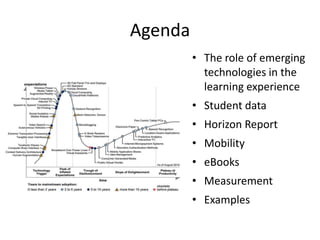
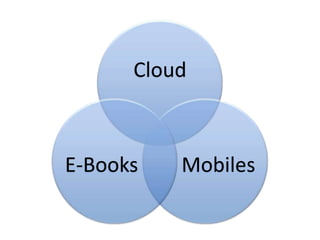
Agenda The role of emerging technologies in the learning experience Student dataHorizon ReportMobility eBooksMeasurement Examples
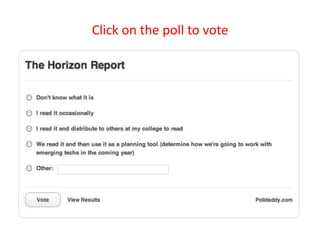
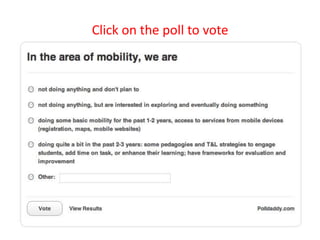
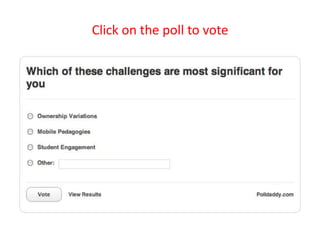
Click on the poll to vote
Trends= “why?”
The abundance of resources and relationships made easily accessible via the Internetis increasingly challenging us to revisit our roles as educators in sense-making, coaching, and credentialing.
People expect to be able to work, learn, and study whenever and wherever they want.
The world of work is increasingly collaborative, encouraging reflection about the way student projects are structured.
The technologies we use are increasingly cloud-based, and our notions of IT support are decentralized.
ECAR Data = other “why?”
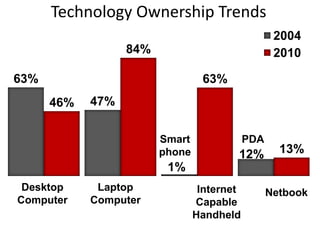
Technology Ownership Trends
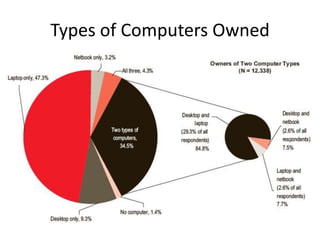
Types of Computers Owned
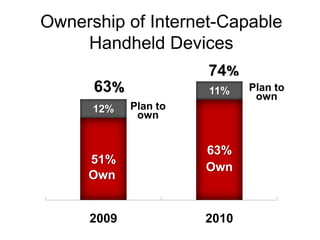
Ownership of Internet-Capable Handheld Devices
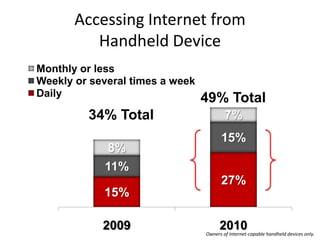
49% Total34% TotalOwners of Internet-capable handheld devices only.Accessing Internet from Handheld Device
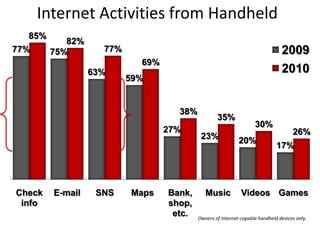
Internet Activities from HandheldOwners of Internet-capable handheld devices only.
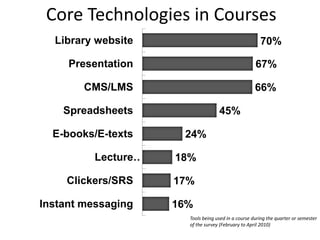
Core Technologies in CoursesTools being used in a course during the quarter or semesterof the survey (February to April 2010)
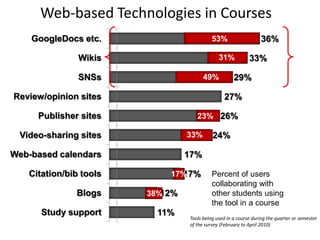
Web-based Technologies in Courses53%31%49%23%33%17%38%Tools being used in a course during the quarter or semesterof the survey (February to April 2010)
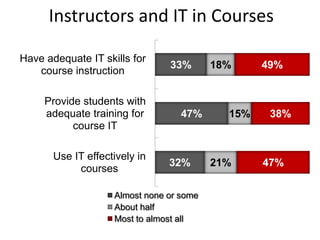
Instructors and IT in Courses
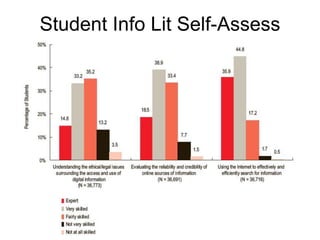
Student Info Lit Self-Assess
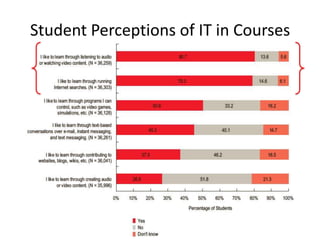
Student Perceptions of IT in Courses
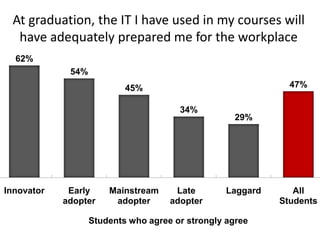
At graduation, the IT I have used in my courses will have adequately prepared me for the workplaceStudents who agree or strongly agree
What do you think?How are the trends manifesting themselves at your colleges?How does the ECAR data compare with what you’re seeing locally?
Mobility
Click on the poll to vote
ELI 2010 Online Spring Focus SessionMobile Learning 2.0: The Next Phase of Innovation in Mobility
Content Community Collaboration
Mobile technology is best suited for…
Tapping into the PLE
Content delivery is the low-hanging fruit
Rapid growth in mobile applications and their interoperability with other tools
The new tool in the toolkit
Challenge of ownership patterns
Click on the poll to vote
Mobility Examples
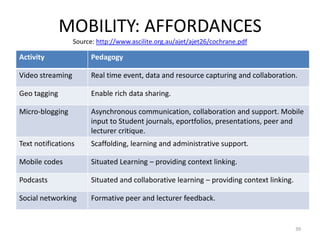
MOBILITY: AFFORDANCES Source: http://www.ascilite.org.au/ajet/ajet26/cochrane.pdf39
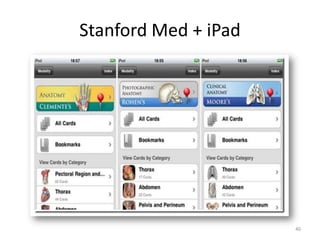
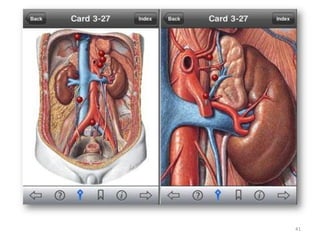
Stanford Med + iPad40
41
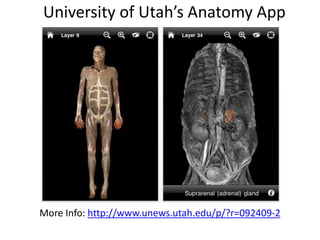
University of Utah’s Anatomy AppMore Info: http://www.unews.utah.edu/p/?r=092409-2
UC IrvineMedSource: http://www.imedicalapps.com/2010/08/uc-irvine-school-of-medicine-ipad/43
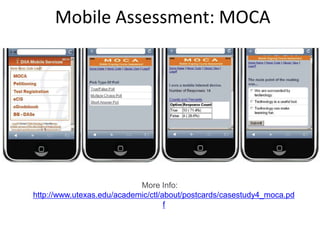
Mobile Assessment: MOCAMore Info: http://www.utexas.edu/academic/ctl/about/postcards/casestudy4_moca.pdf
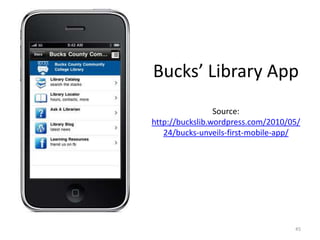
Bucks’ Library AppSource: http://buckslib.wordpress.com/2010/05/24/bucks-unveils-first-mobile-app/45
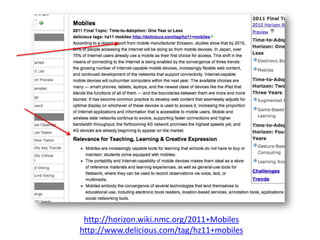
http://horizon.wiki.nmc.org/2011+Mobileshttp://www.delicious.com/tag/hz11+mobiles
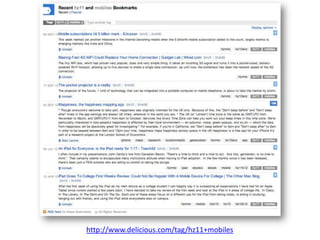
http://www.delicious.com/tag/hz11+mobiles
eBooks
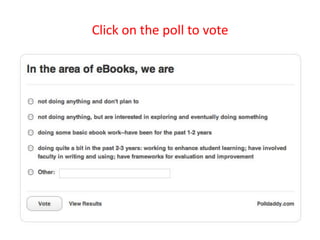
Click on the poll to vote
The book works really wellThe book is the ultimate “reader”Inexpensive – You get free reader hardware with each physical book purchasedNo batteries neededVery durableSo simple a 2-year old could use itNo other user interacts with the physical content more than studentsHighlightingNote takingBookmarkingFlippingMultiple books a once
Reasons for Purchasing eBooks14% of students have purchased a digital product as part of their studiesPrice is the primary factorOnly way to obtain the textbook [out of stock, preference by the professor, custom PDF type eBook that the professor created for sale].18% of students who purchased an eBook did so because they enjoy the features10% of students who purchased an eBook did so because they had never used one and were curious
Improved Performance or EfficiencyBeing able to search for a particular word or phrase in the textbook has improved my efficiency in studying.I use my laptop extensively and take notes on it, so having a copy of the book on my laptop at all times helped me work on my class work whenever I want without having to worry about whether or not I have the book with me.No 10-lb book to carry around = epic win.Top 5 Current Features, as rated by students:Reading Controls (paging, zoom…) Finding terms in a bookCreating Highlights and AnnotationsReviewing previously created Highlight and Annotations Managing your Digital Library
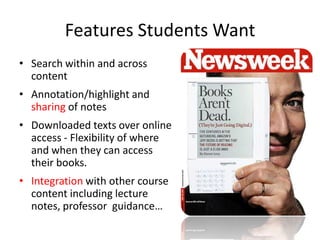
Features Students WantSearch within and across contentAnnotation/highlight and sharing of notesDownloaded texts over online access - Flexibility of where and when they can access their books.Integrationwith other course content including lecture  notes, professor  guidance…
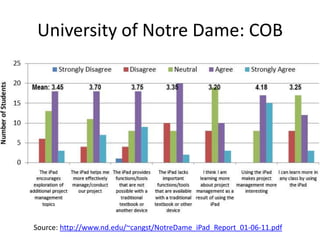
University of Notre Dame: COBSource: http://www.nd.edu/~cangst/NotreDame_iPad_Report_01-06-11.pdf
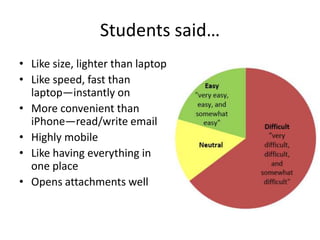
Students said…Like size, lighter than laptopLike speed, fast than laptop—instantly onMore convenient than iPhone—read/write emailHighly mobileLike having everything in one placeOpens attachments well
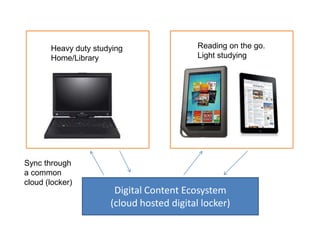
SReading on the go.Light studying Heavy duty studyingHome/LibrarySync through a common cloud (locker)Digital Content Ecosystem(cloud hosted digital locker)
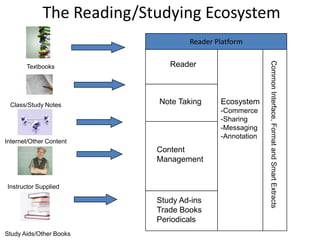
The Reading/Studying EcosystemReader PlatformReaderTextbooksNote TakingEcosystemCommerce
Sharing
Messaging
AnnotationClass/Study NotesInternet/Other ContentCommon Interface, Format and Smart ExtractsContent ManagementInstructor SuppliedStudy Ad-ins Trade BooksPeriodicalsStudy Aids/Other Books
Overall Research ConclusionsGiven the opportunity, students are willing to experiment with reading and studying digitally.When students do read and study digitally, results indicate that they find it as effective or more effective than studying with the physical book.When students do read and study digitally, their responses to usability of features shows that their expectations are high.Expect basic features to be as good as print experience (e.g., notes and annotations.)Also, expect that there are compelling features that go beyond what is feasible in the physical book experience (e.g., tags across notes, organizational capabilities.)
ConclusionsE-Reading in higher education is more about e-studying than e-reading. Evaluate solutions on the entire ecosystem Hardware , e-Reading/Study SoftwareAvailable Content Tablets and portable devices are currently satellites to a PC/Mac base; this will change over time. Constantly poll your students and faculty.Don’t over commit--this is going to be a longer transition than other digital media.
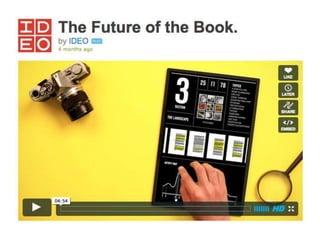
Future TrendsAs portable and tablet capabilities improve, so will their ability to support e-textbook content/platforms.Content trendsIncrease in smaller and specialized content Increase in multimedia contentNew distribution models including subscriptions, open source content, and institutionally-developed. There will be a blurring of lines between e-readers, LMS, and internet resources.
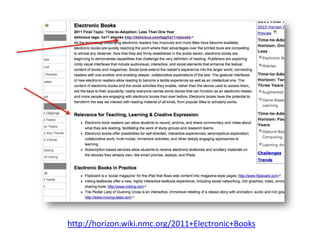
http://horizon.wiki.nmc.org/2011+Electronic+Books
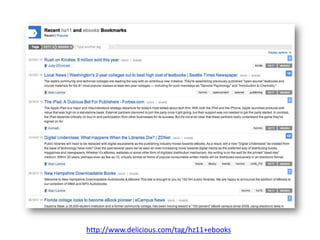
http://www.delicious.com/tag/hz11+ebooks
Measuring the Impacthttp://www.educause.edu/ELI/SEI
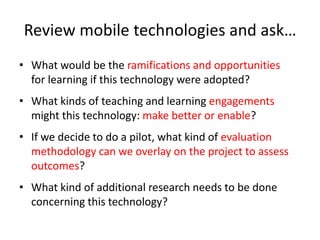
Review mobile technologies and ask…What would be the ramifications and opportunities for learning if this technology were adopted?What kinds of teaching and learning engagements might this technology: make better or enable?If we decide to do a pilot, what kind of evaluation methodology can we overlay on the project to assess outcomes?What kind of additional research needs to be done concerning this technology?
questionWhat are some items you’d like to measure in evaluating your mobile learning initiatives?
Mobile learning in a blended course: case study Source: http://www.docstoc.com/docs/38964563/Assessing-the-Effectiveness-of-Mobile-Learning-in-Large-HybridBlended
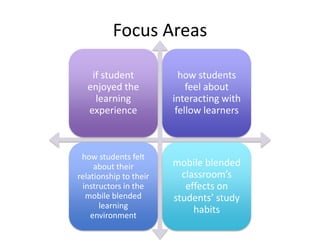
Focus Areas
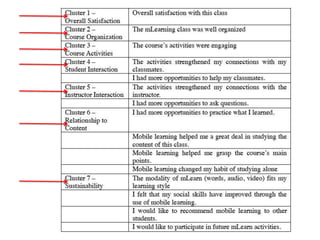
Overall SatisfactionCourse Organization
Course ActivitiesStudent Interaction
Instructor InteractionRelationship to Content
Sustainability
Mobile learning in a medical school: case studySource: http://www.biomedcentral.com/1472-6920/10/57
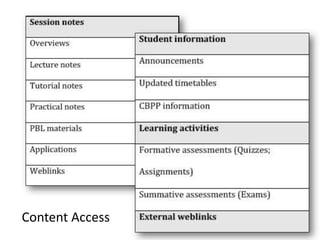
Context 57 students in cohort4-year Bachelor of Medicine Bachelor of Surgery2 online toolsBlackboard InterlearnStudents had access to InternetCustomized software Info repositoriesSharing info within and between cohorts2 Research QuestionsIn what ways does ML support learning?What areas need development?
Content Access
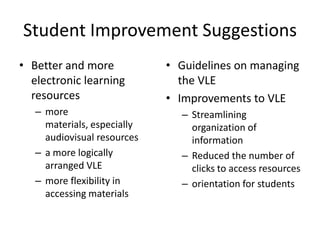
Student Improvement Suggestions Better and more electronic learning resources more materials, especially audiovisual resourcesa more logically arranged VLEmore flexibility in accessing materialsGuidelines on managing the VLEImprovements to VLEStreamlining organization of information Reduced the number of clicks to access resources orientation for students
Thematic frameworkSource: http://www.irrodl.org/index.php/irrodl/article/download/346/882
Proportionate
Appropriate to the specific learning technologies, to the learners, and to the ethos of the learning – ideally built in, not bolted on
Consistent with the teaching and learning philosophy
Alignment between learning goals and technology
Consistent
Quality mattersMore info: http://qminstitute.org/home/Public%20Library/About%20QM/RubricStandards2008-2010.pdf
Section 6: Course TechnologyThe tools and media support the learning objectives, and are appropriately chosen to deliver the content of the course.The tools and media support student engagement and guide the student to become an active learner. Navigationthroughout the online components of the course is logical, consistent, and efficient. Students have ready access to the technologies required in the course. The course components are compatible with current standards for delivery modes.Instructions on how to access resources at a distance are sufficient and easy to understand. The course design takes full advantage of available tools and media.
5 recommendationsCapture and analyze learning in context with consideration of learner privacyAssess the usability of the technology and how it affects the learning experience (PLE) Look beyond measurable cognitive gains into changes in the learning process and practiceConsider organizational issues in the adoption of mobile learning practice and its integration with existing practicesSpan the lifecycle of the mobile learning innovation that is evaluated, from conception to full deployment and beyond

gmac2011

  • 1.
    2011 Leadership ConferenceJune23, 2011 : Boston, MAVeronica Diaz, PhDAssociate DirectorEDUCAUSE Learning Initiative
  • 3.
  • 4.
    Agenda The roleof emerging technologies in the learning experience Student dataHorizon ReportMobility eBooksMeasurement Examples
  • 5.
    Click on thepoll to vote
  • 7.
  • 8.
    The abundance ofresources and relationships made easily accessible via the Internetis increasingly challenging us to revisit our roles as educators in sense-making, coaching, and credentialing.
  • 9.
    People expect tobe able to work, learn, and study whenever and wherever they want.
  • 10.
    The world ofwork is increasingly collaborative, encouraging reflection about the way student projects are structured.
  • 11.
    The technologies weuse are increasingly cloud-based, and our notions of IT support are decentralized.
  • 12.
    ECAR Data =other “why?”
  • 13.
  • 14.
  • 15.
  • 16.
    49% Total34% TotalOwnersof Internet-capable handheld devices only.Accessing Internet from Handheld Device
  • 17.
    Internet Activities fromHandheldOwners of Internet-capable handheld devices only.
  • 18.
    Core Technologies inCoursesTools being used in a course during the quarter or semesterof the survey (February to April 2010)
  • 19.
    Web-based Technologies inCourses53%31%49%23%33%17%38%Tools being used in a course during the quarter or semesterof the survey (February to April 2010)
  • 20.
  • 21.
    Student Info LitSelf-Assess
  • 22.
  • 23.
    At graduation, theIT I have used in my courses will have adequately prepared me for the workplaceStudents who agree or strongly agree
  • 24.
    What do youthink?How are the trends manifesting themselves at your colleges?How does the ECAR data compare with what you’re seeing locally?
  • 26.
  • 27.
    Click on thepoll to vote
  • 28.
    ELI 2010 OnlineSpring Focus SessionMobile Learning 2.0: The Next Phase of Innovation in Mobility
  • 29.
  • 30.
  • 31.
    Mobile technology isbest suited for…
  • 32.
  • 33.
    Content delivery isthe low-hanging fruit
  • 34.
    Rapid growth inmobile applications and their interoperability with other tools
  • 35.
    The new toolin the toolkit
  • 36.
  • 37.
    Click on thepoll to vote
  • 38.
  • 39.
    MOBILITY: AFFORDANCES Source:http://www.ascilite.org.au/ajet/ajet26/cochrane.pdf39
  • 40.
  • 41.
  • 42.
    University of Utah’sAnatomy AppMore Info: http://www.unews.utah.edu/p/?r=092409-2
  • 43.
  • 44.
    Mobile Assessment: MOCAMoreInfo: http://www.utexas.edu/academic/ctl/about/postcards/casestudy4_moca.pdf
  • 45.
    Bucks’ Library AppSource:http://buckslib.wordpress.com/2010/05/24/bucks-unveils-first-mobile-app/45
  • 46.
  • 47.
  • 48.
  • 49.
    Click on thepoll to vote
  • 52.
    The book worksreally wellThe book is the ultimate “reader”Inexpensive – You get free reader hardware with each physical book purchasedNo batteries neededVery durableSo simple a 2-year old could use itNo other user interacts with the physical content more than studentsHighlightingNote takingBookmarkingFlippingMultiple books a once
  • 54.
    Reasons for PurchasingeBooks14% of students have purchased a digital product as part of their studiesPrice is the primary factorOnly way to obtain the textbook [out of stock, preference by the professor, custom PDF type eBook that the professor created for sale].18% of students who purchased an eBook did so because they enjoy the features10% of students who purchased an eBook did so because they had never used one and were curious
  • 55.
    Improved Performance orEfficiencyBeing able to search for a particular word or phrase in the textbook has improved my efficiency in studying.I use my laptop extensively and take notes on it, so having a copy of the book on my laptop at all times helped me work on my class work whenever I want without having to worry about whether or not I have the book with me.No 10-lb book to carry around = epic win.Top 5 Current Features, as rated by students:Reading Controls (paging, zoom…) Finding terms in a bookCreating Highlights and AnnotationsReviewing previously created Highlight and Annotations Managing your Digital Library
  • 56.
    Features Students WantSearchwithin and across contentAnnotation/highlight and sharing of notesDownloaded texts over online access - Flexibility of where and when they can access their books.Integrationwith other course content including lecture notes, professor guidance…
  • 57.
    University of NotreDame: COBSource: http://www.nd.edu/~cangst/NotreDame_iPad_Report_01-06-11.pdf
  • 58.
    Students said…Like size,lighter than laptopLike speed, fast than laptop—instantly onMore convenient than iPhone—read/write emailHighly mobileLike having everything in one placeOpens attachments well
  • 59.
    SReading on thego.Light studying Heavy duty studyingHome/LibrarySync through a common cloud (locker)Digital Content Ecosystem(cloud hosted digital locker)
  • 60.
    The Reading/Studying EcosystemReaderPlatformReaderTextbooksNote TakingEcosystemCommerce
  • 61.
  • 62.
  • 63.
    AnnotationClass/Study NotesInternet/Other ContentCommonInterface, Format and Smart ExtractsContent ManagementInstructor SuppliedStudy Ad-ins Trade BooksPeriodicalsStudy Aids/Other Books
  • 64.
    Overall Research ConclusionsGiventhe opportunity, students are willing to experiment with reading and studying digitally.When students do read and study digitally, results indicate that they find it as effective or more effective than studying with the physical book.When students do read and study digitally, their responses to usability of features shows that their expectations are high.Expect basic features to be as good as print experience (e.g., notes and annotations.)Also, expect that there are compelling features that go beyond what is feasible in the physical book experience (e.g., tags across notes, organizational capabilities.)
  • 65.
    ConclusionsE-Reading in highereducation is more about e-studying than e-reading. Evaluate solutions on the entire ecosystem Hardware , e-Reading/Study SoftwareAvailable Content Tablets and portable devices are currently satellites to a PC/Mac base; this will change over time. Constantly poll your students and faculty.Don’t over commit--this is going to be a longer transition than other digital media.
  • 66.
    Future TrendsAs portableand tablet capabilities improve, so will their ability to support e-textbook content/platforms.Content trendsIncrease in smaller and specialized content Increase in multimedia contentNew distribution models including subscriptions, open source content, and institutionally-developed. There will be a blurring of lines between e-readers, LMS, and internet resources.
  • 67.
  • 68.
  • 70.
  • 71.
    Review mobile technologiesand ask…What would be the ramifications and opportunities for learning if this technology were adopted?What kinds of teaching and learning engagements might this technology: make better or enable?If we decide to do a pilot, what kind of evaluation methodology can we overlay on the project to assess outcomes?What kind of additional research needs to be done concerning this technology?
  • 72.
    questionWhat are someitems you’d like to measure in evaluating your mobile learning initiatives?
  • 73.
    Mobile learning ina blended course: case study Source: http://www.docstoc.com/docs/38964563/Assessing-the-Effectiveness-of-Mobile-Learning-in-Large-HybridBlended
  • 74.
  • 76.
  • 77.
  • 78.
  • 79.
  • 80.
    Mobile learning ina medical school: case studySource: http://www.biomedcentral.com/1472-6920/10/57
  • 81.
    Context 57 studentsin cohort4-year Bachelor of Medicine Bachelor of Surgery2 online toolsBlackboard InterlearnStudents had access to InternetCustomized software Info repositoriesSharing info within and between cohorts2 Research QuestionsIn what ways does ML support learning?What areas need development?
  • 82.
  • 83.
    Student Improvement SuggestionsBetter and more electronic learning resources more materials, especially audiovisual resourcesa more logically arranged VLEmore flexibility in accessing materialsGuidelines on managing the VLEImprovements to VLEStreamlining organization of information Reduced the number of clicks to access resources orientation for students
  • 84.
  • 85.
  • 86.
    Appropriate to thespecific learning technologies, to the learners, and to the ethos of the learning – ideally built in, not bolted on
  • 87.
    Consistent with theteaching and learning philosophy
  • 88.
    Alignment between learninggoals and technology
  • 89.
  • 90.
    Quality mattersMore info:http://qminstitute.org/home/Public%20Library/About%20QM/RubricStandards2008-2010.pdf
  • 91.
    Section 6: CourseTechnologyThe tools and media support the learning objectives, and are appropriately chosen to deliver the content of the course.The tools and media support student engagement and guide the student to become an active learner. Navigationthroughout the online components of the course is logical, consistent, and efficient. Students have ready access to the technologies required in the course. The course components are compatible with current standards for delivery modes.Instructions on how to access resources at a distance are sufficient and easy to understand. The course design takes full advantage of available tools and media.
  • 92.
    5 recommendationsCapture andanalyze learning in context with consideration of learner privacyAssess the usability of the technology and how it affects the learning experience (PLE) Look beyond measurable cognitive gains into changes in the learning process and practiceConsider organizational issues in the adoption of mobile learning practice and its integration with existing practicesSpan the lifecycle of the mobile learning innovation that is evaluated, from conception to full deployment and beyond