1
Dynamic Routing

Advantages of Dynamic over static :
• There is no need to know the destination networks.
•

Need to advertise the directly connected networks.

•

Updates the topology changes dynamically.

•

Administrative work is reduced

•

Used for large organizations.

2
Types of Dynamic Routing Protocols

• Distance Vector Protocol

• Link State Protocol

• Hybrid Protocol

3
Distance Vector Protocol

• Works with Bellman Ford algorithm
• Periodic updates
• Classful routing protocol
• Full Routing tables are exchanged
• Updates are through broadcast
• Also known as “Routing By Rumor”
• Example: RIP, IGRP

4
Link State Protocol

• Works with Dijkstra algorithm
• Link state updates
• Classless routing protocol
• Missing routes are exchanged
• Updates are through multicast
• Also known as “ Routing by Intelligence”
• Example : OSPF, IS-IS

5
Hybrid Protocol

• Works with DUAL algorithm
• Link state updates
• Classless routing protocol
• Missing routes are exchanged
• Updates are through multicast
• Also known as “ Routing by Intelligence”
• Example : EIGRP

6
Routing Information Protocol

• Open Standard Protocol
• Classful routing protocol
• Updates are broadcasted via 255.255.255.255
• Administrative distance is 120
• Metric : Hop count
Max Hop counts : 15

Max routers : 16

• Load Balancing of 4 equal paths
• Used for small organizations

7
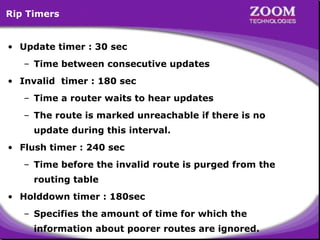
Rip Timers
• Update timer : 30 sec
– Time between consecutive updates
• Invalid timer : 180 sec
– Time a router waits to hear updates
– The route is marked unreachable if there is no
update during this interval.
• Flush timer : 240 sec
– Time before the invalid route is purged from the
routing table
• Holddown timer : 180sec
– Specifies the amount of time for which the

8
information about poorer routes are ignored.
RIP - Network Diagram

10.0.0.1/8
S0

HYD

11.0.0.1/8
S0

S1
10.0.0.2/8

E0
192.168.1.150/24

LAN - 192.168.1.0/24

CHE

S1
11.0.0.2/8

E0
192.168.2.150/24

LAN - 192.168.2.0/24

BAN

E0
192.168.3.150/2

LAN - 192.168.3.0/24

9
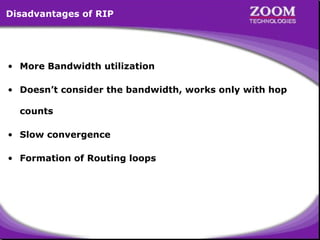
Disadvantages of RIP

• More Bandwidth utilization
• Doesn’t consider the bandwidth, works only with hop
counts
• Slow convergence
• Formation of Routing loops

10
11
Microsoft Windows 2000 [Version 5.00.2195]
(C) Copyright 1985-2000 Microsoft Corp.
C:> telnet 192.168.1.150
Connecting .....
================================
Welcome to Hyderabad Router
================================
User Access Verification
password : ****
Directly Connected Networks on
Hyderabad> enable
HYDERABAD Router
password : ****
HYDERABAD Router
Hyderabad# configure terminal
192.168.1.0
192.168.1.0
Enter configuration commands, one per line. End with CNTL/Z.
10.0.0.0
10.0.0.0
Hyderabad(config)# interface serial 0
Hyderabad(config-if)# ip address 10.0.0.1 255.0.0.0
Hyderabad(config-if)# no shut
Hyderabad(config-if)# clockrate 64000
Hyderabad(config-if)# encapsulation hdlc
Hyderabad(config-if)# exit
Hyderabad(config)#

12

Diagram
Hyderabad(config)# no ip routing
Hyderabad(config)# ip routing
Hyderabad(config)# router rip
Hyderabad(config-router)# network 192.168.1.0
Hyderabad(config-router)# network 10.0.0.0
Hyderabad(config-router)#
Configuring RIP
Configuring RIP
Router(config)# router rip
Router(config-router)# network <Network ID>

13

Diagram
Hyderabad(config)# no ip routing
Hyderabad(config)# ip routing
Hyderabad(config)# router rip
Hyderabad(config-router)# network 192.168.1.0
Hyderabad(config-router)# network 10.0.0.0
Hyderabad(config-router)# ^Z
Hyderabad# show ip route
Codes: C - connected, S - static, I - IGRP, R - RIP, M - mobile, B - BGP
D - EIGRP, EX - EIGRP external, O - OSPF, IA - OSPF inter area
N1 - OSPF NSSA external type 1, N2 - OSPF NSSA external type 2
E1 - OSPF external type 1, E2 - OSPF external type 2, E - EGP
i- IS-IS, L1-IS-IS level-1, L2-IS-IS level-2,*- candidate default
U - per-user static route, o - ODR

Gateway of last resort is not set
C
10.0.0.0/8 is directly connected, Serial0
R
11.0.0.0/8 [120/1] via 10.0.0.2, 00:00:25, Serial0
C
192.168.1.0/24 is directly connected, Ethernet0
R
192.168.2.0/24 [120/1]nothingbut
via of Rip
120 is Metric 10.0.0.2, 00:00:25, Serial0
Metricof Rip
120 isnothing but
R – for RIP routes
– for RIP routes
Administrative Distance 00:00:25, Serial0
R R 192.168.3.0/24 [120/2] Hop Count
via Distance
Administrative 10.0.0.2,
Hop Count
Hyderabad#
Diagram

14
Hyderabad# show ip protocols
Routing Protocol is "rip"
Sending updates every 30 seconds, next due in 13 seconds
Invalid after 180 seconds, hold down 180, flushed after 240
Outgoing update filter list for all interfaces is not set
Incoming update filter list for all interfaces is not set
Redistributing: rip
Default version control: send version 1, receive any version
Interface
Send Recv
Key-chain
Ethernet0
1
1 2
Serial0
1
1 2
Routing for Networks:
192.168.1.0
10.0.0.0
Routing Information Sources:
Gateway
Distance
Last Update
10.0.0.2
120
00:00:00
Distance: (default is 120)
Hyderabad#

15

Diagram
Microsoft Windows 2000 [Version 5.00.2195]
(C) Copyright 1985-2000 Microsoft Corp.
C:> telnet 192.168.2.150
Connecting .....
================================
Welcome to Chennai Router
================================
User Access Verification
password : ****
Directly Connected Networks on
Chennai> enable Directly Connected Networks on
CHENNAI Router
password : ****
CHENNAI Router
Chennai# configure terminal
192.168.2.0
192.168.2.0
Enter configuration commands, one per line. End with CNTL/Z.
10.0.0.0
10.0.0.0
Chennai(config)# interface serial 1
11.0.0.0
11.0.0.0
Chennai(config-if)# ip address 10.0.0.2 255.0.0.0
Chennai(config-if)# no shut
Chennai(config-if)# encapsulation hdlc
Chennai(config-if)# interface serial 0
Chennai(config-if)# ip address 11.0.0.1 255.0.0.0
Chennai(config-if)# no shut
Chennai(config-if)# encapsulation hdlc
Diagram

16
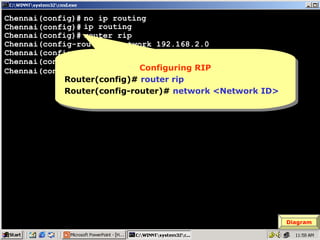
Chennai(config)# no ip routing
Chennai(config)# ip routing
Chennai(config)# router rip
Chennai(config-router)# network 192.168.2.0
Chennai(config-router)# network 10.0.0.0
Chennai(config-router)# network 11.0.0.0
Configuring RIP
Configuring RIP
Chennai(config-router)#
Router(config)# router rip
Router(config-router)# network <Network ID>

17

Diagram
Chennai(config)# no ip routing
Chennai(config)# ip routing
Chennai(config)# router rip
Chennai(config-router)# network 192.168.2.0
Chennai(config-router)# network 10.0.0.0
Chennai(config-router)# network 11.0.0.0
^
Chennai(config-router)# Z
Chennai# show ip route
Codes: C - connected, S - static, I - IGRP, R - RIP, M - mobile, B - BGP
D - EIGRP, EX - EIGRP external, O - OSPF, IA - OSPF inter area
N1 - OSPF NSSA external type 1, N2 - OSPF NSSA external type 2
E1 - OSPF external type 1, E2 - OSPF external type 2, E - EGP
i- IS-IS, L1-IS-IS level-1, L2-IS-IS level-2,*- candidate default
U - per-user static route, o - ODR

Gateway of last resort is not set
C
10.0.0.0/8 is directly connected, Serial1
C
11.0.0.0/8 is directly connected, Serial0
R
192.168.1.0/24 [120/1] via 10.0.0.1, 00:00:01, Serial1
C
192.168.2.0/24 is directly connected, Ethernet0
R
192.168.3.0/24 [120/1] viaMetricofbut 00:00:12, Serial0
11.0.0.2,
120 is Metric ofbut
120 isnothing Rip
nothing Rip
R – for RIP routes
Diagram
R – for
Chennai# RIP routes Administrative Count
Hop Count
AdministrativeDistance
Distance
18
Hop
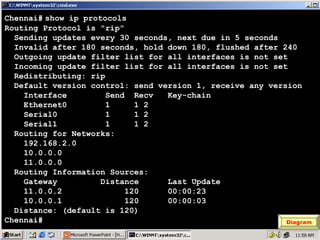
Chennai# show ip protocols
Routing Protocol is "rip"
Sending updates every 30 seconds, next due in 5 seconds
Invalid after 180 seconds, hold down 180, flushed after 240
Outgoing update filter list for all interfaces is not set
Incoming update filter list for all interfaces is not set
Redistributing: rip
Default version control: send version 1, receive any version
Interface
Send Recv
Key-chain
Ethernet0
1
1 2
Serial0
1
1 2
Serial1
1
1 2
Routing for Networks:
192.168.2.0
10.0.0.0
11.0.0.0
Routing Information Sources:
Gateway
Distance
Last Update
11.0.0.2
120
00:00:23
10.0.0.1
120
00:00:03
Distance: (default is 120)
Chennai#
Diagram

19
Microsoft Windows 2000 [Version 5.00.2195]
(C) Copyright 1985-2000 Microsoft Corp.
C:> telnet 192.168.3.150
Connecting .....
================================
Welcome to Banglore Router
================================
User Access Verification
password : ****
Directly Connected Networks on
Banglore> enableDirectly Connected Networks on
Banglore Router
password : ****
Banglore Router
Banglore# configure terminal
192.168.3.0
192.168.3.0
Enter configuration commands, one per line. End with CNTL/Z.
11.0.0.0
11.0.0.0
Banglore(config)# interface serial 1
Banglore(config-if)# ip address 11.0.0.2 255.0.0.0
Banglore(config-if)# no shut
Banglore(config-if)# clockrate 64000
Banglore(config-if)# encapsulation hdlc
Banglore(config-if)# exit
Banglore(config)#

20

Diagram
Banglore(config)# no ip routing
Banglore(config)# ip routing
Banglore(config)# router rip
Banglore(config-router)# network 192.168.3.0
Banglore(config-router)# network 11.0.0.0
Banglore(config-router)#
Configuring RIP
Configuring RIP
Router(config)# router rip
Router(config-router)# network <Network ID>

21

Diagram
Banglore(config)# no ip routing
Banglore(config)# ip routing
Banglore(config)# router rip
Banglore(config-router)# network 192.168.3.0
Banglore(config-router)# network 11.0.0.0
Banglore(config-router)# ^Z
Banglore# show ip route
Codes: C - connected, S - static, I - IGRP, R - RIP, M - mobile, B - BGP
D - EIGRP, EX - EIGRP external, O - OSPF, IA - OSPF inter area
N1 - OSPF NSSA external type 1, N2 - OSPF NSSA external type 2
E1 - OSPF external type 1, E2 - OSPF external type 2, E - EGP
i- IS-IS, L1-IS-IS level-1, L2-IS-IS level-2,*- candidate default
U - per-user static route, o - ODR

Gateway of last resort is not set
R
10.0.0.0/8 [120/1] via 11.0.0.1, 00:00:04, Serial1
C
11.0.0.0/8 is directly connected, Serial1
R
192.168.1.0/24 [120/2] via 11.0.0.1, 00:00:04, Serial1
120 is Metric ofbut
Metric of Rip
120 isnothing Rip
R – for RIP routes [120/1]nothing but
– for RIP routes
R R 192.168.2.0/24
via Distance
Administrative Count
Hop 11.0.0.1,
AdministrativeDistance 00:00:04, Serial1
Hop Count
C
192.168.3.0/24 is directly connected, Ethernet0
Banglore#

22

Diagram
Banglore# show ip protocols
Routing Protocol is "rip"
Sending updates every 30 seconds, next due in 15 seconds
Invalid after 180 seconds, hold down 180, flushed after 240
Outgoing update filter list for all interfaces is not set
Incoming update filter list for all interfaces is not set
Redistributing: rip
Default version control: send version 1, receive any version
Interface
Send Recv
Key-chain
Ethernet0
1
1 2
Serial1
1
1 2
Routing for Networks:
192.168.3.0
11.0.0.0
12.0.0.0
Routing Information Sources:
Gateway
Distance
Last Update
11.0.0.1
120
00:00:06
Distance: (default is 120)
Banglore#

23

Diagram
Hyderabad# ping 192.168.3.1
Type escape sequence to abort.
Sending 5, 100-byte ICMP Echos to 192.168.3.1, timeout is 2 seconds:

!!!!!

Success rate is 100 percent (5/5), round-trip min/avg/max = 40/43/44 ms

Hyderabad# ping 192.168.2.1
Type escape sequence to abort.
Sending 5, 100-byte ICMP Echos to 192.168.2.1, timeout is 2 seconds:

!!!!!

Success rate is 100 percent (5/5), round-trip min/avg/max = 40/43/44 ms

Hyderabad#

24

Diagram
Chennai# ping 192.168.1.1
Type escape sequence to abort.
Sending 5, 100-byte ICMP Echos to 192.168.1.1, timeout is 2 seconds:

!!!!!

Success rate is 100 percent (5/5), round-trip min/avg/max = 40/43/44 ms

Chennai# ping 192.168.3.1
Type escape sequence to abort.
Sending 5, 100-byte ICMP Echos to 192.168.3.1, timeout is 2 seconds:

!!!!!

Success rate is 100 percent (5/5), round-trip min/avg/max = 40/43/44 ms

Chennai#

25

Diagram
Banglore# ping 192.168.1.1
Type escape sequence to abort.
Sending 5, 100-byte ICMP Echos to 192.168.1.1, timeout is 2 seconds:

!!!!!

Success rate is 100 percent (5/5), round-trip min/avg/max = 40/43/44 ms

Banglore# ping 192.168.2.1
Type escape sequence to abort.
Sending 5, 100-byte ICMP Echos to 192.168.2.1, timeout is 2 seconds:

!!!!!

Success rate is 100 percent (5/5), round-trip min/avg/max = 40/43/44 ms

Banglore#

26

Diagram

Dynamic Routing RIP

  • 1.
  • 2.
    Dynamic Routing Advantages ofDynamic over static : • There is no need to know the destination networks. • Need to advertise the directly connected networks. • Updates the topology changes dynamically. • Administrative work is reduced • Used for large organizations. 2
  • 3.
    Types of DynamicRouting Protocols • Distance Vector Protocol • Link State Protocol • Hybrid Protocol 3
  • 4.
    Distance Vector Protocol •Works with Bellman Ford algorithm • Periodic updates • Classful routing protocol • Full Routing tables are exchanged • Updates are through broadcast • Also known as “Routing By Rumor” • Example: RIP, IGRP 4
  • 5.
    Link State Protocol •Works with Dijkstra algorithm • Link state updates • Classless routing protocol • Missing routes are exchanged • Updates are through multicast • Also known as “ Routing by Intelligence” • Example : OSPF, IS-IS 5
  • 6.
    Hybrid Protocol • Workswith DUAL algorithm • Link state updates • Classless routing protocol • Missing routes are exchanged • Updates are through multicast • Also known as “ Routing by Intelligence” • Example : EIGRP 6
  • 7.
    Routing Information Protocol •Open Standard Protocol • Classful routing protocol • Updates are broadcasted via 255.255.255.255 • Administrative distance is 120 • Metric : Hop count Max Hop counts : 15 Max routers : 16 • Load Balancing of 4 equal paths • Used for small organizations 7
  • 8.
    Rip Timers • Updatetimer : 30 sec – Time between consecutive updates • Invalid timer : 180 sec – Time a router waits to hear updates – The route is marked unreachable if there is no update during this interval. • Flush timer : 240 sec – Time before the invalid route is purged from the routing table • Holddown timer : 180sec – Specifies the amount of time for which the 8 information about poorer routes are ignored.
  • 9.
    RIP - NetworkDiagram 10.0.0.1/8 S0 HYD 11.0.0.1/8 S0 S1 10.0.0.2/8 E0 192.168.1.150/24 LAN - 192.168.1.0/24 CHE S1 11.0.0.2/8 E0 192.168.2.150/24 LAN - 192.168.2.0/24 BAN E0 192.168.3.150/2 LAN - 192.168.3.0/24 9
  • 10.
    Disadvantages of RIP •More Bandwidth utilization • Doesn’t consider the bandwidth, works only with hop counts • Slow convergence • Formation of Routing loops 10
  • 11.
  • 12.
    Microsoft Windows 2000[Version 5.00.2195] (C) Copyright 1985-2000 Microsoft Corp. C:> telnet 192.168.1.150 Connecting ..... ================================ Welcome to Hyderabad Router ================================ User Access Verification password : **** Directly Connected Networks on Directly Connected Networks on Hyderabad> enable HYDERABAD Router password : **** HYDERABAD Router Hyderabad# configure terminal 192.168.1.0 192.168.1.0 Enter configuration commands, one per line. End with CNTL/Z. 10.0.0.0 10.0.0.0 Hyderabad(config)# interface serial 0 Hyderabad(config-if)# ip address 10.0.0.1 255.0.0.0 Hyderabad(config-if)# no shut Hyderabad(config-if)# clockrate 64000 Hyderabad(config-if)# encapsulation hdlc Hyderabad(config-if)# exit Hyderabad(config)# 12 Diagram
  • 13.
    Hyderabad(config)# no iprouting Hyderabad(config)# ip routing Hyderabad(config)# router rip Hyderabad(config-router)# network 192.168.1.0 Hyderabad(config-router)# network 10.0.0.0 Hyderabad(config-router)# Configuring RIP Configuring RIP Router(config)# router rip Router(config)# router rip Router(config-router)# network <Network ID> Router(config-router)# network <Network ID> 13 Diagram
  • 14.
    Hyderabad(config)# no iprouting Hyderabad(config)# ip routing Hyderabad(config)# router rip Hyderabad(config-router)# network 192.168.1.0 Hyderabad(config-router)# network 10.0.0.0 Hyderabad(config-router)# ^Z Hyderabad# show ip route Codes: C - connected, S - static, I - IGRP, R - RIP, M - mobile, B - BGP D - EIGRP, EX - EIGRP external, O - OSPF, IA - OSPF inter area N1 - OSPF NSSA external type 1, N2 - OSPF NSSA external type 2 E1 - OSPF external type 1, E2 - OSPF external type 2, E - EGP i- IS-IS, L1-IS-IS level-1, L2-IS-IS level-2,*- candidate default U - per-user static route, o - ODR Gateway of last resort is not set C 10.0.0.0/8 is directly connected, Serial0 R 11.0.0.0/8 [120/1] via 10.0.0.2, 00:00:25, Serial0 C 192.168.1.0/24 is directly connected, Ethernet0 R 192.168.2.0/24 [120/1]nothingbut via of Rip 120 is Metric 10.0.0.2, 00:00:25, Serial0 Metricof Rip 120 isnothing but R – for RIP routes – for RIP routes Administrative Distance 00:00:25, Serial0 R R 192.168.3.0/24 [120/2] Hop Count via Distance Administrative 10.0.0.2, Hop Count Hyderabad# Diagram 14
  • 15.
    Hyderabad# show ipprotocols Routing Protocol is "rip" Sending updates every 30 seconds, next due in 13 seconds Invalid after 180 seconds, hold down 180, flushed after 240 Outgoing update filter list for all interfaces is not set Incoming update filter list for all interfaces is not set Redistributing: rip Default version control: send version 1, receive any version Interface Send Recv Key-chain Ethernet0 1 1 2 Serial0 1 1 2 Routing for Networks: 192.168.1.0 10.0.0.0 Routing Information Sources: Gateway Distance Last Update 10.0.0.2 120 00:00:00 Distance: (default is 120) Hyderabad# 15 Diagram
  • 16.
    Microsoft Windows 2000[Version 5.00.2195] (C) Copyright 1985-2000 Microsoft Corp. C:> telnet 192.168.2.150 Connecting ..... ================================ Welcome to Chennai Router ================================ User Access Verification password : **** Directly Connected Networks on Chennai> enable Directly Connected Networks on CHENNAI Router password : **** CHENNAI Router Chennai# configure terminal 192.168.2.0 192.168.2.0 Enter configuration commands, one per line. End with CNTL/Z. 10.0.0.0 10.0.0.0 Chennai(config)# interface serial 1 11.0.0.0 11.0.0.0 Chennai(config-if)# ip address 10.0.0.2 255.0.0.0 Chennai(config-if)# no shut Chennai(config-if)# encapsulation hdlc Chennai(config-if)# interface serial 0 Chennai(config-if)# ip address 11.0.0.1 255.0.0.0 Chennai(config-if)# no shut Chennai(config-if)# encapsulation hdlc Diagram 16
  • 17.
    Chennai(config)# no iprouting Chennai(config)# ip routing Chennai(config)# router rip Chennai(config-router)# network 192.168.2.0 Chennai(config-router)# network 10.0.0.0 Chennai(config-router)# network 11.0.0.0 Configuring RIP Configuring RIP Chennai(config-router)# Router(config)# router rip Router(config)# router rip Router(config-router)# network <Network ID> Router(config-router)# network <Network ID> 17 Diagram
  • 18.
    Chennai(config)# no iprouting Chennai(config)# ip routing Chennai(config)# router rip Chennai(config-router)# network 192.168.2.0 Chennai(config-router)# network 10.0.0.0 Chennai(config-router)# network 11.0.0.0 ^ Chennai(config-router)# Z Chennai# show ip route Codes: C - connected, S - static, I - IGRP, R - RIP, M - mobile, B - BGP D - EIGRP, EX - EIGRP external, O - OSPF, IA - OSPF inter area N1 - OSPF NSSA external type 1, N2 - OSPF NSSA external type 2 E1 - OSPF external type 1, E2 - OSPF external type 2, E - EGP i- IS-IS, L1-IS-IS level-1, L2-IS-IS level-2,*- candidate default U - per-user static route, o - ODR Gateway of last resort is not set C 10.0.0.0/8 is directly connected, Serial1 C 11.0.0.0/8 is directly connected, Serial0 R 192.168.1.0/24 [120/1] via 10.0.0.1, 00:00:01, Serial1 C 192.168.2.0/24 is directly connected, Ethernet0 R 192.168.3.0/24 [120/1] viaMetricofbut 00:00:12, Serial0 11.0.0.2, 120 is Metric ofbut 120 isnothing Rip nothing Rip R – for RIP routes Diagram R – for Chennai# RIP routes Administrative Count Hop Count AdministrativeDistance Distance 18 Hop
  • 19.
    Chennai# show ipprotocols Routing Protocol is "rip" Sending updates every 30 seconds, next due in 5 seconds Invalid after 180 seconds, hold down 180, flushed after 240 Outgoing update filter list for all interfaces is not set Incoming update filter list for all interfaces is not set Redistributing: rip Default version control: send version 1, receive any version Interface Send Recv Key-chain Ethernet0 1 1 2 Serial0 1 1 2 Serial1 1 1 2 Routing for Networks: 192.168.2.0 10.0.0.0 11.0.0.0 Routing Information Sources: Gateway Distance Last Update 11.0.0.2 120 00:00:23 10.0.0.1 120 00:00:03 Distance: (default is 120) Chennai# Diagram 19
  • 20.
    Microsoft Windows 2000[Version 5.00.2195] (C) Copyright 1985-2000 Microsoft Corp. C:> telnet 192.168.3.150 Connecting ..... ================================ Welcome to Banglore Router ================================ User Access Verification password : **** Directly Connected Networks on Banglore> enableDirectly Connected Networks on Banglore Router password : **** Banglore Router Banglore# configure terminal 192.168.3.0 192.168.3.0 Enter configuration commands, one per line. End with CNTL/Z. 11.0.0.0 11.0.0.0 Banglore(config)# interface serial 1 Banglore(config-if)# ip address 11.0.0.2 255.0.0.0 Banglore(config-if)# no shut Banglore(config-if)# clockrate 64000 Banglore(config-if)# encapsulation hdlc Banglore(config-if)# exit Banglore(config)# 20 Diagram
  • 21.
    Banglore(config)# no iprouting Banglore(config)# ip routing Banglore(config)# router rip Banglore(config-router)# network 192.168.3.0 Banglore(config-router)# network 11.0.0.0 Banglore(config-router)# Configuring RIP Configuring RIP Router(config)# router rip Router(config)# router rip Router(config-router)# network <Network ID> Router(config-router)# network <Network ID> 21 Diagram
  • 22.
    Banglore(config)# no iprouting Banglore(config)# ip routing Banglore(config)# router rip Banglore(config-router)# network 192.168.3.0 Banglore(config-router)# network 11.0.0.0 Banglore(config-router)# ^Z Banglore# show ip route Codes: C - connected, S - static, I - IGRP, R - RIP, M - mobile, B - BGP D - EIGRP, EX - EIGRP external, O - OSPF, IA - OSPF inter area N1 - OSPF NSSA external type 1, N2 - OSPF NSSA external type 2 E1 - OSPF external type 1, E2 - OSPF external type 2, E - EGP i- IS-IS, L1-IS-IS level-1, L2-IS-IS level-2,*- candidate default U - per-user static route, o - ODR Gateway of last resort is not set R 10.0.0.0/8 [120/1] via 11.0.0.1, 00:00:04, Serial1 C 11.0.0.0/8 is directly connected, Serial1 R 192.168.1.0/24 [120/2] via 11.0.0.1, 00:00:04, Serial1 120 is Metric ofbut Metric of Rip 120 isnothing Rip R – for RIP routes [120/1]nothing but – for RIP routes R R 192.168.2.0/24 via Distance Administrative Count Hop 11.0.0.1, AdministrativeDistance 00:00:04, Serial1 Hop Count C 192.168.3.0/24 is directly connected, Ethernet0 Banglore# 22 Diagram
  • 23.
    Banglore# show ipprotocols Routing Protocol is "rip" Sending updates every 30 seconds, next due in 15 seconds Invalid after 180 seconds, hold down 180, flushed after 240 Outgoing update filter list for all interfaces is not set Incoming update filter list for all interfaces is not set Redistributing: rip Default version control: send version 1, receive any version Interface Send Recv Key-chain Ethernet0 1 1 2 Serial1 1 1 2 Routing for Networks: 192.168.3.0 11.0.0.0 12.0.0.0 Routing Information Sources: Gateway Distance Last Update 11.0.0.1 120 00:00:06 Distance: (default is 120) Banglore# 23 Diagram
  • 24.
    Hyderabad# ping 192.168.3.1 Typeescape sequence to abort. Sending 5, 100-byte ICMP Echos to 192.168.3.1, timeout is 2 seconds: !!!!! Success rate is 100 percent (5/5), round-trip min/avg/max = 40/43/44 ms Hyderabad# ping 192.168.2.1 Type escape sequence to abort. Sending 5, 100-byte ICMP Echos to 192.168.2.1, timeout is 2 seconds: !!!!! Success rate is 100 percent (5/5), round-trip min/avg/max = 40/43/44 ms Hyderabad# 24 Diagram
  • 25.
    Chennai# ping 192.168.1.1 Typeescape sequence to abort. Sending 5, 100-byte ICMP Echos to 192.168.1.1, timeout is 2 seconds: !!!!! Success rate is 100 percent (5/5), round-trip min/avg/max = 40/43/44 ms Chennai# ping 192.168.3.1 Type escape sequence to abort. Sending 5, 100-byte ICMP Echos to 192.168.3.1, timeout is 2 seconds: !!!!! Success rate is 100 percent (5/5), round-trip min/avg/max = 40/43/44 ms Chennai# 25 Diagram
  • 26.
    Banglore# ping 192.168.1.1 Typeescape sequence to abort. Sending 5, 100-byte ICMP Echos to 192.168.1.1, timeout is 2 seconds: !!!!! Success rate is 100 percent (5/5), round-trip min/avg/max = 40/43/44 ms Banglore# ping 192.168.2.1 Type escape sequence to abort. Sending 5, 100-byte ICMP Echos to 192.168.2.1, timeout is 2 seconds: !!!!! Success rate is 100 percent (5/5), round-trip min/avg/max = 40/43/44 ms Banglore# 26 Diagram