1
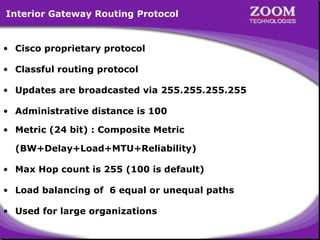
Interior Gateway Routing Protocol

• Cisco proprietary protocol
• Classful routing protocol
• Updates are broadcasted via 255.255.255.255
• Administrative distance is 100
• Metric (24 bit) : Composite Metric
(BW+Delay+Load+MTU+Reliability)
• Max Hop count is 255 (100 is default)
• Load balancing of 6 equal or unequal paths
• Used for large organizations

2
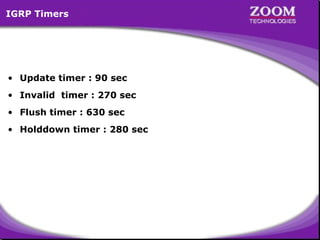
IGRP Timers

• Update timer : 90 sec
• Invalid timer : 270 sec
• Flush timer : 630 sec
• Holddown timer : 280 sec

3
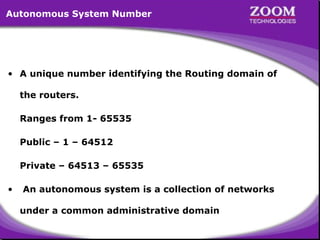
Autonomous System Number

• A unique number identifying the Routing domain of
the routers.
Ranges from 1- 65535
Public – 1 – 64512
Private – 64513 – 65535
•

An autonomous system is a collection of networks
under a common administrative domain

4
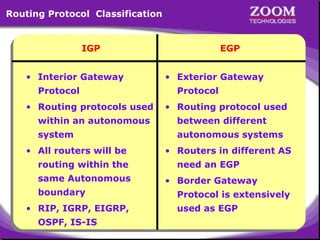
Routing Protocol Classification

IGP
• Interior Gateway
Protocol
• Routing protocols used

EGP
• Exterior Gateway
Protocol
• Routing protocol used

within an autonomous

between different

system

autonomous systems

• All routers will be
routing within the
same Autonomous
boundary
• RIP, IGRP, EIGRP,
OSPF, IS-IS

• Routers in different AS
need an EGP
• Border Gateway
Protocol is extensively
used as EGP

5
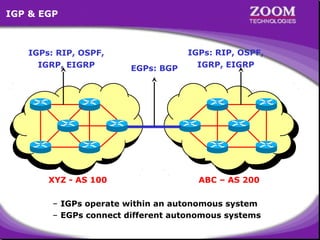
IGP & EGP

IGPs: RIP, OSPF,
IGRP, EIGRP

XYZ - AS 100

EGPs: BGP

IGPs: RIP, OSPF,
IGRP, EIGRP

ABC – AS 200

– IGPs operate within an autonomous system
– EGPs connect different autonomous systems

6
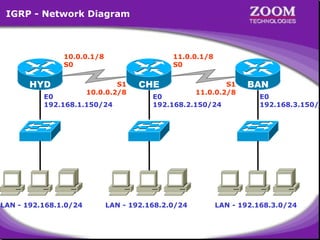
IGRP - Network Diagram

10.0.0.1/8
S0

HYD

11.0.0.1/8
S0

S1
10.0.0.2/8

E0
192.168.1.150/24

LAN - 192.168.1.0/24

CHE

S1
11.0.0.2/8

E0
192.168.2.150/24

LAN - 192.168.2.0/24

BAN

E0
192.168.3.150/2

LAN - 192.168.3.0/24

7
Disadvantages of IGRP

• Only works on Cisco Routers
• Slow convergence
• Formation of Routing loops

8
9
Microsoft Windows 2000 [Version 5.00.2195]
(C) Copyright 1985-2000 Microsoft Corp.
C:> telnet 192.168.1.150
Connecting .....
================================
Welcome to Hyderabad Router
================================
User Access Verification
password : ****
Directly Connected Networks on
Hyderabad> enable
HYDERABAD Router
password : ****
HYDERABAD Router
Hyderabad# configure terminal
192.168.1.0
192.168.1.0
Enter configuration commands, one per line. End with CNTL/Z.
10.0.0.0
10.0.0.0
Hyderabad(config)# interface serial 0
Hyderabad(config-if)# ip address 10.0.0.1 255.0.0.0
Hyderabad(config-if)# no shut
Hyderabad(config-if)# clockrate 64000
Hyderabad(config-if)# encapsulation hdlc
Hyderabad(config-if)# exit
Hyderabad(config)#

10
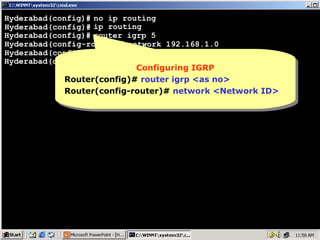
Hyderabad(config)# no ip routing
Hyderabad(config)# ip routing
Hyderabad(config)# router igrp 5
Hyderabad(config-router)# network 192.168.1.0
Hyderabad(config-router)# network 10.0.0.0
Hyderabad(config-router)#
Configuring IGRP
Configuring IGRP
Router(config)# router igrp <as no>
Router(config-router)# network <Network ID>

11
Hyderabad(config)# no ip routing
Hyderabad(config)# ip routing
Hyderabad(config)# router igrp 5
Hyderabad(config-router)# network 192.168.1.0
Hyderabad(config-router)# network 10.0.0.0
Hyderabad(config-router)# ^Z
Hyderabad# show ip route
Codes: C - connected, S - static, I - IGRP, R - RIP, M - mobile, B - BGP
D - EIGRP, EX - EIGRP external, O - OSPF, IA - OSPF inter area
N1 - OSPF NSSA external type 1, N2 - OSPF NSSA external type 2
E1 - OSPF external type 1, E2 - OSPF external type 2, E - EGP
i- IS-IS, L1-IS-IS level-1, L2-IS-IS level-2,*- candidate default
U - per-user static route, o - ODR

Gateway of last resort is not set
C
10.0.0.0/8 is directly connected, Serial0
I
11.0.0.0/8 [100/10476] via 10.0.0.2, 00:00:18, Serial0
C
192.168.1.0/24 is directly connected, Ethernet0
I
192.168.2.0/24 [100/8576] viaIGRP
Metric of but
100 isMetricof but
100 isnothing IGRP
nothing 10.0.0.2, 00:00:18, Serial0
I – for IGRP routes
Administrative via Metric
I I – for IGRP routes
192.168.3.0/24 [100/10576] Distance
Composite Metric
Administrative Distance
Composite 10.0.0.2, 00:00:18, Serial0
Hyderabad#

12
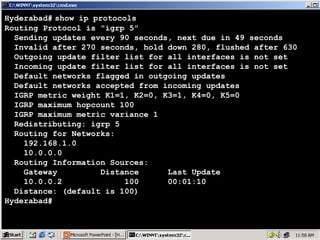
Hyderabad# show ip protocols
Routing Protocol is "igrp 5"
Sending updates every 90 seconds, next due in 49 seconds
Invalid after 270 seconds, hold down 280, flushed after 630
Outgoing update filter list for all interfaces is not set
Incoming update filter list for all interfaces is not set
Default networks flagged in outgoing updates
Default networks accepted from incoming updates
IGRP metric weight K1=1, K2=0, K3=1, K4=0, K5=0
IGRP maximum hopcount 100
IGRP maximum metric variance 1
Redistributing: igrp 5
Routing for Networks:
192.168.1.0
10.0.0.0
Routing Information Sources:
Gateway
Distance
Last Update
10.0.0.2
100
00:01:10
Distance: (default is 100)
Hyderabad#

13
Microsoft Windows 2000 [Version 5.00.2195]
(C) Copyright 1985-2000 Microsoft Corp.
C:> telnet 192.168.2.150
Connecting .....
================================
Welcome to Chennai Router
================================
User Access Verification
password : ****
Directly Connected Networks on
Chennai> enable Directly Connected Networks on
CHENNAI Router
password : ****
CHENNAI Router
Chennai# configure terminal
192.168.2.0
192.168.2.0
Enter configuration commands, one per line. End with CNTL/Z.
10.0.0.0
10.0.0.0
Chennai(config)# interface serial 1
11.0.0.0
11.0.0.0
Chennai(config-if)# ip address 10.0.0.2 255.0.0.0
Chennai(config-if)# no shut
Chennai(config-if)# encapsulation hdlc
Chennai(config-if)# interface serial 0
Chennai(config-if)# ip address 11.0.0.1 255.0.0.0
Chennai(config-if)# no shut
Chennai(config-if)# encapsulation hdlc

14
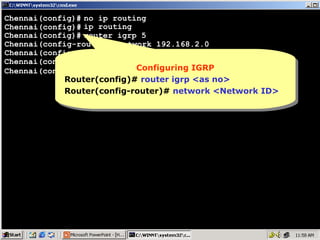
Chennai(config)# no ip routing
Chennai(config)# ip routing
Chennai(config)# router igrp 5
Chennai(config-router)# network 192.168.2.0
Chennai(config-router)# network 10.0.0.0
Chennai(config-router)# network 11.0.0.0
Configuring IGRP
Configuring IGRP
Chennai(config-router)#
Router(config)# router igrp <as no>
Router(config-router)# network <Network ID>

15
Chennai(config)# no ip routing
Chennai(config)# ip routing
Chennai(config)# router igrp 5
Chennai(config-router)# network 192.168.2.0
Chennai(config-router)# network 10.0.0.0
Chennai(config-router)# network 11.0.0.0
^
Chennai(config-router)# Z
Chennai# show ip route
Codes: C - connected, S - static, I - IGRP, R - RIP, M - mobile, B - BGP
D - EIGRP, EX - EIGRP external, O - OSPF, IA - OSPF inter area
N1 - OSPF NSSA external type 1, N2 - OSPF NSSA external type 2
E1 - OSPF external type 1, E2 - OSPF external type 2, E - EGP
i- IS-IS, L1-IS-IS level-1, L2-IS-IS level-2,*- candidate default
U - per-user static route, o - ODR

Gateway of last resort is not set
C
10.0.0.0/8 is directly connected, Serial1
C
11.0.0.0/8 is directly connected, Serial0
I
192.168.1.0/24 [100/8576] via 10.0.0.1, 00:00:28, Serial1
C
192.168.2.0/24 is directly connected, Ethernet0
I
192.168.3.0/24 [100/8576]Metricof IGRP 00:00:54, Serial0
Metric of IGRP
100 is nothing but
100 is via 11.0.0.2,
nothing but
I – for IGRP routes
I – for IGRP routes Administrative Distance
Chennai#
Composite Metric
Administrative Distance
Composite Metric 16
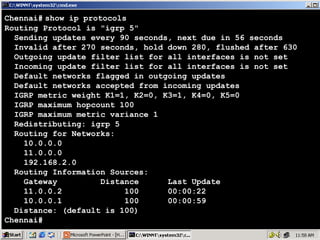
Chennai# show ip protocols
Routing Protocol is "igrp 5"
Sending updates every 90 seconds, next due in 56 seconds
Invalid after 270 seconds, hold down 280, flushed after 630
Outgoing update filter list for all interfaces is not set
Incoming update filter list for all interfaces is not set
Default networks flagged in outgoing updates
Default networks accepted from incoming updates
IGRP metric weight K1=1, K2=0, K3=1, K4=0, K5=0
IGRP maximum hopcount 100
IGRP maximum metric variance 1
Redistributing: igrp 5
Routing for Networks:
10.0.0.0
11.0.0.0
192.168.2.0
Routing Information Sources:
Gateway
Distance
Last Update
11.0.0.2
100
00:00:22
10.0.0.1
100
00:00:59
Distance: (default is 100)
Chennai#

17
Microsoft Windows 2000 [Version 5.00.2195]
(C) Copyright 1985-2000 Microsoft Corp.
C:> telnet 192.168.3.150
Connecting .....
================================
Welcome to Banglore Router
================================
User Access Verification
password : ****
Directly Connected Networks on
Banglore> enableDirectly Connected Networks on
Banglore Router
password : ****
Banglore Router
Banglore# configure terminal
192.168.3.0
192.168.3.0
Enter configuration commands, one per line. End with CNTL/Z.
11.0.0.0
11.0.0.0
Banglore(config)# interface serial 1
Banglore(config-if)# ip address 11.0.0.2 255.0.0.0
Banglore(config-if)# no shut
Banglore(config-if)# clockrate 64000
Banglore(config-if)# encapsulation hdlc
Banglore(config-if)# exit
Banglore(config)#

18
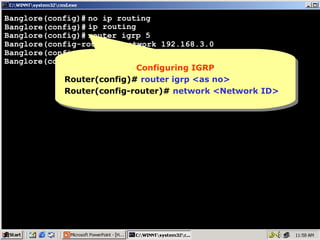
Banglore(config)# no ip routing
Banglore(config)# ip routing
Banglore(config)# router igrp 5
Banglore(config-router)# network 192.168.3.0
Banglore(config-router)# network 11.0.0.0
Banglore(config-router)#
Configuring IGRP
Configuring IGRP
Router(config)# router igrp <as no>
Router(config-router)# network <Network ID>

19
Banglore(config)# no ip routing
Banglore(config)# ip routing
Banglore(config)# router igrp 5
Banglore(config-router)# network 192.168.3.0
Banglore(config-router)# network 11.0.0.0
Banglore(config-router)# ^Z
Banglore# show ip route
Codes: C - connected, S - static, I - IGRP, R - RIP, M - mobile, B - BGP
D - EIGRP, EX - EIGRP external, O - OSPF, IA - OSPF inter area
N1 - OSPF NSSA external type 1, N2 - OSPF NSSA external type 2
E1 - OSPF external type 1, E2 - OSPF external type 2, E - EGP
i- IS-IS, L1-IS-IS level-1, L2-IS-IS level-2,*- candidate default
U - per-user static route, o - ODR

Gateway of last resort is not set
I
10.0.0.0/8 [100/10476] via 11.0.0.1, 00:00:01, Serial1
C
11.0.0.0/8 is directly connected, Serial1
I
192.168.1.0/24 [100/10576] of IGRP
11.0.0.1, 00:00:01, Serial1
Metric of IGRP
100 isMetric viabut
100 isnothing but
nothing
I –for IGRP routes
for IGRP routes
I I –192.168.2.0/24 [100/8576] via Metric
Administrative Distance
Composite 11.0.0.1, 00:00:01, Serial1
Administrative Distance
Composite Metric
C
192.168.3.0/24 is directly connected, Ethernet0
Banglore#

20
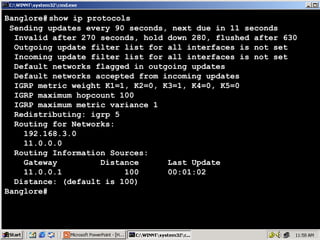
Banglore# show ip protocols
Sending updates every 90 seconds, next due in 11 seconds
Invalid after 270 seconds, hold down 280, flushed after 630
Outgoing update filter list for all interfaces is not set
Incoming update filter list for all interfaces is not set
Default networks flagged in outgoing updates
Default networks accepted from incoming updates
IGRP metric weight K1=1, K2=0, K3=1, K4=0, K5=0
IGRP maximum hopcount 100
IGRP maximum metric variance 1
Redistributing: igrp 5
Routing for Networks:
192.168.3.0
11.0.0.0
Routing Information Sources:
Gateway
Distance
Last Update
11.0.0.1
100
00:01:02
Distance: (default is 100)
Banglore#

21
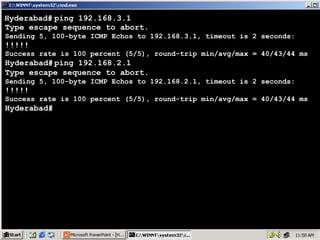
Hyderabad# ping 192.168.3.1
Type escape sequence to abort.
Sending 5, 100-byte ICMP Echos to 192.168.3.1, timeout is 2 seconds:

!!!!!

Success rate is 100 percent (5/5), round-trip min/avg/max = 40/43/44 ms

Hyderabad# ping 192.168.2.1
Type escape sequence to abort.
Sending 5, 100-byte ICMP Echos to 192.168.2.1, timeout is 2 seconds:

!!!!!

Success rate is 100 percent (5/5), round-trip min/avg/max = 40/43/44 ms

Hyderabad#

22
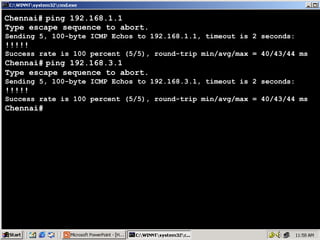
Chennai# ping 192.168.1.1
Type escape sequence to abort.
Sending 5, 100-byte ICMP Echos to 192.168.1.1, timeout is 2 seconds:

!!!!!

Success rate is 100 percent (5/5), round-trip min/avg/max = 40/43/44 ms

Chennai# ping 192.168.3.1
Type escape sequence to abort.
Sending 5, 100-byte ICMP Echos to 192.168.3.1, timeout is 2 seconds:

!!!!!

Success rate is 100 percent (5/5), round-trip min/avg/max = 40/43/44 ms

Chennai#

23
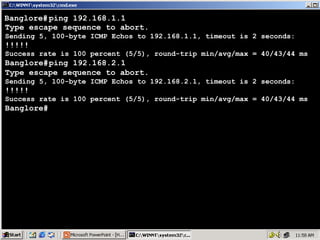
Banglore# ping 192.168.1.1
Type escape sequence to abort.
Sending 5, 100-byte ICMP Echos to 192.168.1.1, timeout is 2 seconds:

!!!!!

Success rate is 100 percent (5/5), round-trip min/avg/max = 40/43/44 ms

Banglore# ping 192.168.2.1
Type escape sequence to abort.
Sending 5, 100-byte ICMP Echos to 192.168.2.1, timeout is 2 seconds:

!!!!!

Success rate is 100 percent (5/5), round-trip min/avg/max = 40/43/44 ms

Banglore#

24

Dynamic Routing IGRP

  • 1.
  • 2.
    Interior Gateway RoutingProtocol • Cisco proprietary protocol • Classful routing protocol • Updates are broadcasted via 255.255.255.255 • Administrative distance is 100 • Metric (24 bit) : Composite Metric (BW+Delay+Load+MTU+Reliability) • Max Hop count is 255 (100 is default) • Load balancing of 6 equal or unequal paths • Used for large organizations 2
  • 3.
    IGRP Timers • Updatetimer : 90 sec • Invalid timer : 270 sec • Flush timer : 630 sec • Holddown timer : 280 sec 3
  • 4.
    Autonomous System Number •A unique number identifying the Routing domain of the routers. Ranges from 1- 65535 Public – 1 – 64512 Private – 64513 – 65535 • An autonomous system is a collection of networks under a common administrative domain 4
  • 5.
    Routing Protocol Classification IGP •Interior Gateway Protocol • Routing protocols used EGP • Exterior Gateway Protocol • Routing protocol used within an autonomous between different system autonomous systems • All routers will be routing within the same Autonomous boundary • RIP, IGRP, EIGRP, OSPF, IS-IS • Routers in different AS need an EGP • Border Gateway Protocol is extensively used as EGP 5
  • 6.
    IGP & EGP IGPs:RIP, OSPF, IGRP, EIGRP XYZ - AS 100 EGPs: BGP IGPs: RIP, OSPF, IGRP, EIGRP ABC – AS 200 – IGPs operate within an autonomous system – EGPs connect different autonomous systems 6
  • 7.
    IGRP - NetworkDiagram 10.0.0.1/8 S0 HYD 11.0.0.1/8 S0 S1 10.0.0.2/8 E0 192.168.1.150/24 LAN - 192.168.1.0/24 CHE S1 11.0.0.2/8 E0 192.168.2.150/24 LAN - 192.168.2.0/24 BAN E0 192.168.3.150/2 LAN - 192.168.3.0/24 7
  • 8.
    Disadvantages of IGRP •Only works on Cisco Routers • Slow convergence • Formation of Routing loops 8
  • 9.
  • 10.
    Microsoft Windows 2000[Version 5.00.2195] (C) Copyright 1985-2000 Microsoft Corp. C:> telnet 192.168.1.150 Connecting ..... ================================ Welcome to Hyderabad Router ================================ User Access Verification password : **** Directly Connected Networks on Directly Connected Networks on Hyderabad> enable HYDERABAD Router password : **** HYDERABAD Router Hyderabad# configure terminal 192.168.1.0 192.168.1.0 Enter configuration commands, one per line. End with CNTL/Z. 10.0.0.0 10.0.0.0 Hyderabad(config)# interface serial 0 Hyderabad(config-if)# ip address 10.0.0.1 255.0.0.0 Hyderabad(config-if)# no shut Hyderabad(config-if)# clockrate 64000 Hyderabad(config-if)# encapsulation hdlc Hyderabad(config-if)# exit Hyderabad(config)# 10
  • 11.
    Hyderabad(config)# no iprouting Hyderabad(config)# ip routing Hyderabad(config)# router igrp 5 Hyderabad(config-router)# network 192.168.1.0 Hyderabad(config-router)# network 10.0.0.0 Hyderabad(config-router)# Configuring IGRP Configuring IGRP Router(config)# router igrp <as no> Router(config)# router igrp <as no> Router(config-router)# network <Network ID> Router(config-router)# network <Network ID> 11
  • 12.
    Hyderabad(config)# no iprouting Hyderabad(config)# ip routing Hyderabad(config)# router igrp 5 Hyderabad(config-router)# network 192.168.1.0 Hyderabad(config-router)# network 10.0.0.0 Hyderabad(config-router)# ^Z Hyderabad# show ip route Codes: C - connected, S - static, I - IGRP, R - RIP, M - mobile, B - BGP D - EIGRP, EX - EIGRP external, O - OSPF, IA - OSPF inter area N1 - OSPF NSSA external type 1, N2 - OSPF NSSA external type 2 E1 - OSPF external type 1, E2 - OSPF external type 2, E - EGP i- IS-IS, L1-IS-IS level-1, L2-IS-IS level-2,*- candidate default U - per-user static route, o - ODR Gateway of last resort is not set C 10.0.0.0/8 is directly connected, Serial0 I 11.0.0.0/8 [100/10476] via 10.0.0.2, 00:00:18, Serial0 C 192.168.1.0/24 is directly connected, Ethernet0 I 192.168.2.0/24 [100/8576] viaIGRP Metric of but 100 isMetricof but 100 isnothing IGRP nothing 10.0.0.2, 00:00:18, Serial0 I – for IGRP routes Administrative via Metric I I – for IGRP routes 192.168.3.0/24 [100/10576] Distance Composite Metric Administrative Distance Composite 10.0.0.2, 00:00:18, Serial0 Hyderabad# 12
  • 13.
    Hyderabad# show ipprotocols Routing Protocol is "igrp 5" Sending updates every 90 seconds, next due in 49 seconds Invalid after 270 seconds, hold down 280, flushed after 630 Outgoing update filter list for all interfaces is not set Incoming update filter list for all interfaces is not set Default networks flagged in outgoing updates Default networks accepted from incoming updates IGRP metric weight K1=1, K2=0, K3=1, K4=0, K5=0 IGRP maximum hopcount 100 IGRP maximum metric variance 1 Redistributing: igrp 5 Routing for Networks: 192.168.1.0 10.0.0.0 Routing Information Sources: Gateway Distance Last Update 10.0.0.2 100 00:01:10 Distance: (default is 100) Hyderabad# 13
  • 14.
    Microsoft Windows 2000[Version 5.00.2195] (C) Copyright 1985-2000 Microsoft Corp. C:> telnet 192.168.2.150 Connecting ..... ================================ Welcome to Chennai Router ================================ User Access Verification password : **** Directly Connected Networks on Chennai> enable Directly Connected Networks on CHENNAI Router password : **** CHENNAI Router Chennai# configure terminal 192.168.2.0 192.168.2.0 Enter configuration commands, one per line. End with CNTL/Z. 10.0.0.0 10.0.0.0 Chennai(config)# interface serial 1 11.0.0.0 11.0.0.0 Chennai(config-if)# ip address 10.0.0.2 255.0.0.0 Chennai(config-if)# no shut Chennai(config-if)# encapsulation hdlc Chennai(config-if)# interface serial 0 Chennai(config-if)# ip address 11.0.0.1 255.0.0.0 Chennai(config-if)# no shut Chennai(config-if)# encapsulation hdlc 14
  • 15.
    Chennai(config)# no iprouting Chennai(config)# ip routing Chennai(config)# router igrp 5 Chennai(config-router)# network 192.168.2.0 Chennai(config-router)# network 10.0.0.0 Chennai(config-router)# network 11.0.0.0 Configuring IGRP Configuring IGRP Chennai(config-router)# Router(config)# router igrp <as no> Router(config)# router igrp <as no> Router(config-router)# network <Network ID> Router(config-router)# network <Network ID> 15
  • 16.
    Chennai(config)# no iprouting Chennai(config)# ip routing Chennai(config)# router igrp 5 Chennai(config-router)# network 192.168.2.0 Chennai(config-router)# network 10.0.0.0 Chennai(config-router)# network 11.0.0.0 ^ Chennai(config-router)# Z Chennai# show ip route Codes: C - connected, S - static, I - IGRP, R - RIP, M - mobile, B - BGP D - EIGRP, EX - EIGRP external, O - OSPF, IA - OSPF inter area N1 - OSPF NSSA external type 1, N2 - OSPF NSSA external type 2 E1 - OSPF external type 1, E2 - OSPF external type 2, E - EGP i- IS-IS, L1-IS-IS level-1, L2-IS-IS level-2,*- candidate default U - per-user static route, o - ODR Gateway of last resort is not set C 10.0.0.0/8 is directly connected, Serial1 C 11.0.0.0/8 is directly connected, Serial0 I 192.168.1.0/24 [100/8576] via 10.0.0.1, 00:00:28, Serial1 C 192.168.2.0/24 is directly connected, Ethernet0 I 192.168.3.0/24 [100/8576]Metricof IGRP 00:00:54, Serial0 Metric of IGRP 100 is nothing but 100 is via 11.0.0.2, nothing but I – for IGRP routes I – for IGRP routes Administrative Distance Chennai# Composite Metric Administrative Distance Composite Metric 16
  • 17.
    Chennai# show ipprotocols Routing Protocol is "igrp 5" Sending updates every 90 seconds, next due in 56 seconds Invalid after 270 seconds, hold down 280, flushed after 630 Outgoing update filter list for all interfaces is not set Incoming update filter list for all interfaces is not set Default networks flagged in outgoing updates Default networks accepted from incoming updates IGRP metric weight K1=1, K2=0, K3=1, K4=0, K5=0 IGRP maximum hopcount 100 IGRP maximum metric variance 1 Redistributing: igrp 5 Routing for Networks: 10.0.0.0 11.0.0.0 192.168.2.0 Routing Information Sources: Gateway Distance Last Update 11.0.0.2 100 00:00:22 10.0.0.1 100 00:00:59 Distance: (default is 100) Chennai# 17
  • 18.
    Microsoft Windows 2000[Version 5.00.2195] (C) Copyright 1985-2000 Microsoft Corp. C:> telnet 192.168.3.150 Connecting ..... ================================ Welcome to Banglore Router ================================ User Access Verification password : **** Directly Connected Networks on Banglore> enableDirectly Connected Networks on Banglore Router password : **** Banglore Router Banglore# configure terminal 192.168.3.0 192.168.3.0 Enter configuration commands, one per line. End with CNTL/Z. 11.0.0.0 11.0.0.0 Banglore(config)# interface serial 1 Banglore(config-if)# ip address 11.0.0.2 255.0.0.0 Banglore(config-if)# no shut Banglore(config-if)# clockrate 64000 Banglore(config-if)# encapsulation hdlc Banglore(config-if)# exit Banglore(config)# 18
  • 19.
    Banglore(config)# no iprouting Banglore(config)# ip routing Banglore(config)# router igrp 5 Banglore(config-router)# network 192.168.3.0 Banglore(config-router)# network 11.0.0.0 Banglore(config-router)# Configuring IGRP Configuring IGRP Router(config)# router igrp <as no> Router(config)# router igrp <as no> Router(config-router)# network <Network ID> Router(config-router)# network <Network ID> 19
  • 20.
    Banglore(config)# no iprouting Banglore(config)# ip routing Banglore(config)# router igrp 5 Banglore(config-router)# network 192.168.3.0 Banglore(config-router)# network 11.0.0.0 Banglore(config-router)# ^Z Banglore# show ip route Codes: C - connected, S - static, I - IGRP, R - RIP, M - mobile, B - BGP D - EIGRP, EX - EIGRP external, O - OSPF, IA - OSPF inter area N1 - OSPF NSSA external type 1, N2 - OSPF NSSA external type 2 E1 - OSPF external type 1, E2 - OSPF external type 2, E - EGP i- IS-IS, L1-IS-IS level-1, L2-IS-IS level-2,*- candidate default U - per-user static route, o - ODR Gateway of last resort is not set I 10.0.0.0/8 [100/10476] via 11.0.0.1, 00:00:01, Serial1 C 11.0.0.0/8 is directly connected, Serial1 I 192.168.1.0/24 [100/10576] of IGRP 11.0.0.1, 00:00:01, Serial1 Metric of IGRP 100 isMetric viabut 100 isnothing but nothing I –for IGRP routes for IGRP routes I I –192.168.2.0/24 [100/8576] via Metric Administrative Distance Composite 11.0.0.1, 00:00:01, Serial1 Administrative Distance Composite Metric C 192.168.3.0/24 is directly connected, Ethernet0 Banglore# 20
  • 21.
    Banglore# show ipprotocols Sending updates every 90 seconds, next due in 11 seconds Invalid after 270 seconds, hold down 280, flushed after 630 Outgoing update filter list for all interfaces is not set Incoming update filter list for all interfaces is not set Default networks flagged in outgoing updates Default networks accepted from incoming updates IGRP metric weight K1=1, K2=0, K3=1, K4=0, K5=0 IGRP maximum hopcount 100 IGRP maximum metric variance 1 Redistributing: igrp 5 Routing for Networks: 192.168.3.0 11.0.0.0 Routing Information Sources: Gateway Distance Last Update 11.0.0.1 100 00:01:02 Distance: (default is 100) Banglore# 21
  • 22.
    Hyderabad# ping 192.168.3.1 Typeescape sequence to abort. Sending 5, 100-byte ICMP Echos to 192.168.3.1, timeout is 2 seconds: !!!!! Success rate is 100 percent (5/5), round-trip min/avg/max = 40/43/44 ms Hyderabad# ping 192.168.2.1 Type escape sequence to abort. Sending 5, 100-byte ICMP Echos to 192.168.2.1, timeout is 2 seconds: !!!!! Success rate is 100 percent (5/5), round-trip min/avg/max = 40/43/44 ms Hyderabad# 22
  • 23.
    Chennai# ping 192.168.1.1 Typeescape sequence to abort. Sending 5, 100-byte ICMP Echos to 192.168.1.1, timeout is 2 seconds: !!!!! Success rate is 100 percent (5/5), round-trip min/avg/max = 40/43/44 ms Chennai# ping 192.168.3.1 Type escape sequence to abort. Sending 5, 100-byte ICMP Echos to 192.168.3.1, timeout is 2 seconds: !!!!! Success rate is 100 percent (5/5), round-trip min/avg/max = 40/43/44 ms Chennai# 23
  • 24.
    Banglore# ping 192.168.1.1 Typeescape sequence to abort. Sending 5, 100-byte ICMP Echos to 192.168.1.1, timeout is 2 seconds: !!!!! Success rate is 100 percent (5/5), round-trip min/avg/max = 40/43/44 ms Banglore# ping 192.168.2.1 Type escape sequence to abort. Sending 5, 100-byte ICMP Echos to 192.168.2.1, timeout is 2 seconds: !!!!! Success rate is 100 percent (5/5), round-trip min/avg/max = 40/43/44 ms Banglore# 24