1
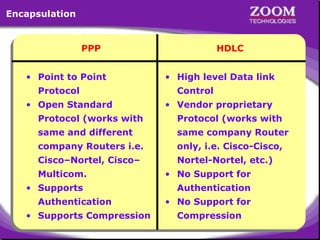
Encapsulation

PPP
• Point to Point
Protocol
• Open Standard

HDLC
• High level Data link
Control
• Vendor proprietary

Protocol (works with

Protocol (works with

same and different

same company Router

company Routers i.e.

only, i.e. Cisco-Cisco,

Cisco–Nortel, Cisco–

Nortel-Nortel, etc.)

Multicom.
• Supports
Authentication
• Supports Compression

• No Support for
Authentication
• No Support for
Compression

2
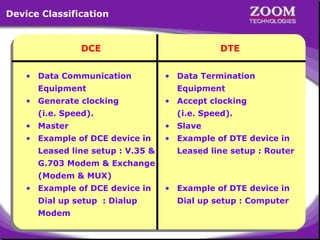
Device Classification

DCE
• Data Communication
Equipment
• Generate clocking
(i.e. Speed).

DTE
• Data Termination
Equipment
• Accept clocking
(i.e. Speed).

• Master

• Slave

• Example of DCE device in

• Example of DTE device in

Leased line setup : V.35 &

Leased line setup : Router

G.703 Modem & Exchange
(Modem & MUX)
• Example of DCE device in
Dial up setup : Dialup

• Example of DTE device in
Dial up setup : Computer

Modem

3
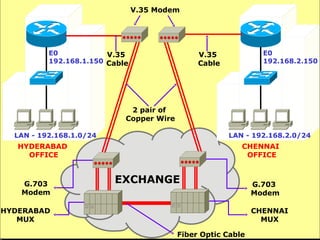
V.35 Modem

E0
V.35
192.168.1.150 Cable

E0
192.168.2.150

V.35
Cable

2 pair of
Copper Wire
LAN - 192.168.1.0/24

LAN - 192.168.2.0/24

HYDERABAD
OFFICE

G.703
Modem
HYDERABAD
MUX

CHENNAI
OFFICE

EXCHANGE

G.703
Modem

4

Fiber Optic Cable

CHENNAI
MUX
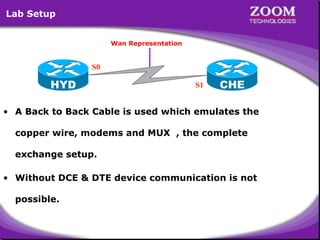
Lab Setup
Wan Representation

S0

HYD

S1

CHE

• A Back to Back Cable is used which emulates the
copper wire, modems and MUX , the complete
exchange setup.
• Without DCE & DTE device communication is not
possible.

5
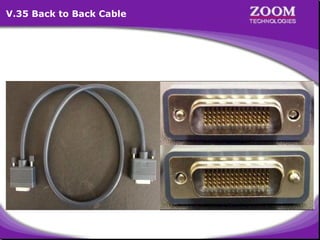
V.35 Back to Back Cable

6
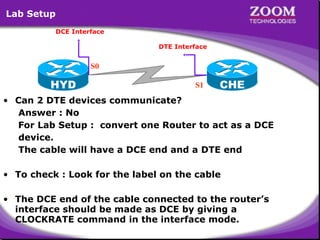
Lab Setup
DCE Interface
DTE Interface

S0

HYD

S1

CHE

• Can 2 DTE devices communicate?
Answer : No
For Lab Setup : convert one Router to act as a DCE
device.
The cable will have a DCE end and a DTE end
• To check : Look for the label on the cable
• The DCE end of the cable connected to the router’s
interface should be made as DCE by giving a
CLOCKRATE command in the interface mode.

7
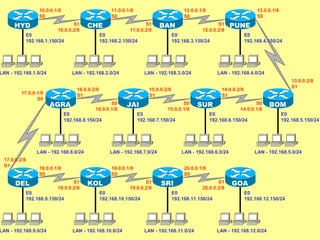
10.0.0.1/8
S0

HYD

11.0.0.1/8
S0

S1
10.0.0.2/8

CHE

E0
192.168.1.150/24

LAN - 192.168.1.0/24

17.0.0.1/8
S0

S1
11.0.0.2/8

LAN - 192.168.2.0/24

S0
16.0.0.1/8

JAI

E0
192.168.9.150/24

LAN - 192.168.9.0/24

LAN - 192.168.4.0/24

S0
15.0.0.1/8

LAN - 192.168.10.0/24

SUR

E0
192.168.7.150/24

13.0.0.2/8
S1

S0
14.0.0.1/8

E0
192.168.6.150/24

LAN - 192.168.6.0/24

BOM
E0
192.168.5.150/24

LAN - 192.168.5.0/24

20.0.0.1/8
S0

S1
19.0.0.2/8

E0
192.168.10.150/24

E0
192.168.4.150/24

14.0.0.2/8
S1

19.0.0.1/8
S0

KOL

PUNE

E0
192.168.3.150/24

LAN - 192.168.7.0/24

18.0.0.1/8
S0
S1
18.0.0.2/8

S1
12.0.0.2/8

15.0.0.2/8
S1

LAN - 192.168.8.0/24

DEL

13.0.0.1/8
S0

LAN - 192.168.3.0/24

16.0.0.2/8
S1

AGRA

BAN

E0
192.168.2.150/24

E0
192.168.8.150/24

17.0.0.2/8
S1

12.0.0.1/8
S0

SRI

S1
20.0.0.2/8

GOA

E0
192.168.11.150/24

LAN - 192.168.11.0/24

E0
192.168.12.150/24

8

LAN - 192.168.12.0/24
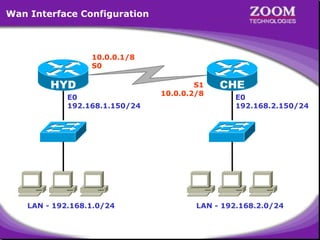
Wan Interface Configuration

10.0.0.1/8
S0

HYD
E0
192.168.1.150/24

LAN - 192.168.1.0/24

S1
10.0.0.2/8

CHE
E0
192.168.2.150/24

LAN - 192.168.2.0/24

9
10
11
Microsoft Windows 2000 [Version 5.00.2195]
(C) Copyright 1985-2000 Microsoft Corp.
C:> telnet 192.168.1.150
Connecting .....
================================
Welcome to Hyderabad Router
================================
User Access Verification
password : ****
Hyderabad> enable
password : ****
Hyderabad# show controllers S 0
HD unit 0, idb = 0xB7574, driver structure at 0xBC2F8
buffer size 1524 HD unit 0, V.35 DCE cable
cpb = 0x1, eda = 0x4940, cda = 0x4800
RX ring with 16 entries at 0x4014800
00 bd_ptr=0x4800 pak=0x0BE054 ds=0x401B6A8 status=80 pak_size=0
01 bd_ptr=0x4814 pak=0x0BED04 ds=0x401E5B0 status=80 pak_size=0
02 bd_ptr=0x4828 pak=0x0BE224 ds=0x401BD60 status=80 pak_size=0
03 bd_ptr=0x483C pak=0x0BEED4 ds=0x401EC68 status=80 pak_size=0
--More--

12
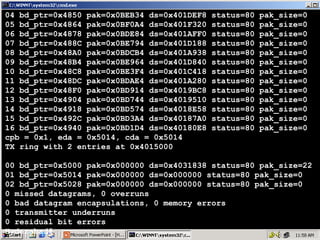
04 bd_ptr=0x4850 pak=0x0BEB34 ds=0x401DEF8
05 bd_ptr=0x4864 pak=0x0BF0A4 ds=0x401F320
06 bd_ptr=0x4878 pak=0x0BDE84 ds=0x401AFF0
07 bd_ptr=0x488C pak=0x0BE794 ds=0x401D188
08 bd_ptr=0x48A0 pak=0x0BDCB4 ds=0x401A938
09 bd_ptr=0x48B4 pak=0x0BE964 ds=0x401D840
10 bd_ptr=0x48C8 pak=0x0BE3F4 ds=0x401C418
11 bd_ptr=0x48DC pak=0x0BDAE4 ds=0x401A280
12 bd_ptr=0x48F0 pak=0x0BD914 ds=0x4019BC8
13 bd_ptr=0x4904 pak=0x0BD744 ds=0x4019510
14 bd_ptr=0x4918 pak=0x0BD574 ds=0x4018E58
15 bd_ptr=0x492C pak=0x0BD3A4 ds=0x40187A0
16 bd_ptr=0x4940 pak=0x0BD1D4 ds=0x40180E8
cpb = 0x1, eda = 0x5014, cda = 0x5014
TX ring with 2 entries at 0x4015000

status=80
status=80
status=80
status=80
status=80
status=80
status=80
status=80
status=80
status=80
status=80
status=80
status=80

pak_size=0
pak_size=0
pak_size=0
pak_size=0
pak_size=0
pak_size=0
pak_size=0
pak_size=0
pak_size=0
pak_size=0
pak_size=0
pak_size=0
pak_size=0

00 bd_ptr=0x5000 pak=0x000000 ds=0x4031838 status=80 pak_size=22
01 bd_ptr=0x5014 pak=0x000000 ds=0x000000 status=80 pak_size=0
02 bd_ptr=0x5028 pak=0x000000 ds=0x000000 status=80 pak_size=0
0 missed datagrams, 0 overruns
0 bad datagram encapsulations, 0 memory errors
0 transmitter underruns
0 residual bit errors
13
Hyderabad#
Microsoft Windows 2000 [Version 5.00.2195]
(C) Copyright 1985-2000 Microsoft Corp.
C:> telnet 192.168.2.150
Connecting .....
================================
Welcome to Chennai Router
================================
User Access Verification
password : ****
Chennai> enable
password : ****
Chennai# show controllers S 1
HD unit 0, idb = 0xB7574, driver structure at 0xBC2F8
buffer size 1524 HD unit 0, V.35 DTE cable
cpb = 0xE1, eda = 0x4814, cda = 0x4828
RX ring with 16 entries at 0xE14800
00 bd_ptr=0x4800 pak=0x0BEB34 ds=0xE1DEF8 status=80 pak_size=13
01 bd_ptr=0x4814 pak=0x0BF0A4 ds=0xE1F320 status=80 pak_size=13
02 bd_ptr=0x4828 pak=0x0BED04 ds=0xE1E5B0 status=80 pak_size=0
03 bd_ptr=0x483C pak=0x0BE964 ds=0xE1D840 status=80 pak_size=0
--More--

14
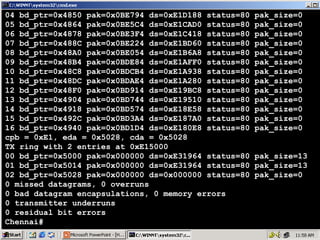
04 bd_ptr=0x4850 pak=0x0BE794 ds=0xE1D188 status=80
05 bd_ptr=0x4864 pak=0x0BE5C4 ds=0xE1CAD0 status=80
06 bd_ptr=0x4878 pak=0x0BE3F4 ds=0xE1C418 status=80
07 bd_ptr=0x488C pak=0x0BE224 ds=0xE1BD60 status=80
08 bd_ptr=0x48A0 pak=0x0BE054 ds=0xE1B6A8 status=80
09 bd_ptr=0x48B4 pak=0x0BDE84 ds=0xE1AFF0 status=80
10 bd_ptr=0x48C8 pak=0x0BDCB4 ds=0xE1A938 status=80
11 bd_ptr=0x48DC pak=0x0BDAE4 ds=0xE1A280 status=80
12 bd_ptr=0x48F0 pak=0x0BD914 ds=0xE19BC8 status=80
13 bd_ptr=0x4904 pak=0x0BD744 ds=0xE19510 status=80
14 bd_ptr=0x4918 pak=0x0BD574 ds=0xE18E58 status=80
15 bd_ptr=0x492C pak=0x0BD3A4 ds=0xE187A0 status=80
16 bd_ptr=0x4940 pak=0x0BD1D4 ds=0xE180E8 status=80
cpb = 0xE1, eda = 0x5028, cda = 0x5028
TX ring with 2 entries at 0xE15000
00 bd_ptr=0x5000 pak=0x000000 ds=0xE31964 status=80
01 bd_ptr=0x5014 pak=0x000000 ds=0xE31964 status=80
02 bd_ptr=0x5028 pak=0x000000 ds=0x000000 status=80
0 missed datagrams, 0 overruns
0 bad datagram encapsulations, 0 memory errors
0 transmitter underruns
0 residual bit errors
Chennai#

15

pak_size=0
pak_size=0
pak_size=0
pak_size=0
pak_size=0
pak_size=0
pak_size=0
pak_size=0
pak_size=0
pak_size=0
pak_size=0
pak_size=0
pak_size=0
pak_size=13
pak_size=13
pak_size=0
Microsoft Windows 2000 [Version 5.00.2195]
(C) Copyright 1985-2000 Microsoft Corp.
C:> telnet 192.168.1.150
Connecting .....
================================
Configuring Serial interface
Welcome to Hyderabad Router
Router(config)#interface serial <no>
================================
Router(config-if)#ip address <address> <mask>
User Access Verification
Router(config-if)#no shutdown
password : **** Router(config-if)#no shutdown
Router(config-if)#clockrate <clock rate>
Hyderabad> enable
Router(config-if)#clockrate <clock rate>
password : **** Router(config-if)#encapsulation {ppp|hdlc}
Router(config-if)#encapsulation {ppp|hdlc}
Hyderabad# configure terminal
Enter configuration commands, one per line. End with CNTL/Z.
Hyderabad(config)# interface serial 0
Hyderabad(config-if)# ip address 10.0.0.1 255.0.0.0
Hyderabad(config-if)# no shutdown
Hyderabad(config-if)# clockrate 64000
Hyderabad(config-if)# encapsulation hdlc
Hyderabad(config-if)# exit
Hyderabad(config)#

16
Microsoft Windows 2000 [Version 5.00.2195]
(C) Copyright 1985-2000 Microsoft Corp.
C:> telnet 192.168.2.150
Connecting .....
================================
Configuring Serial interface
Welcome to Chennai RouterConfiguring Serial interface
Router(config)#interface serial <no>
================================
Router(config-if)#ip address <address> <mask>
User Access Verification
Router(config-if)#no shutdown
password : **** Router(config-if)#no shutdown
Chennai> enable Router(config-if)#clockrate <clock rate>
Router(config-if)#clockrate <clock rate>
password : **** Router(config-if)#encapsulation {ppp|hdlc}
Router(config-if)#encapsulation {ppp|hdlc}
Chennai# configure terminal
Enter configuration commands, one per line. End with CNTL/Z.
Chennai(config)# interface serial 1
Chennai(config-if)# ip address 10.0.0.2 255.0.0.0
Chennai(config-if)# no shutdown
Chennai(config-if)# encapsulation hdlc
Chennai(config-if)# exit
Chennai(config)#

17
Microsoft Windows 2000 [Version 5.00.2195]
(C) Copyright 1985-2000 Microsoft Corp.
C:> telnet 192.168.1.150
Connecting .....
================================
Welcome to Hyderabad Router
================================
User Access Verification
password : ****
Hyderabad> enable
password : ****
Hyderabad# configure terminal
Enter configuration commands, one per line. End with CNTL/Z.
Hyderabad(config)# interface serial 0
Hyderabad(config-if)# ip address 10.0.0.1 255.0.0.0
Hyderabad(config-if)# no shutdown
Hyderabad(config-if)# clockrate 64000
Hyderabad(config-if)# encapsulation hdlc
Hyderabad(config-if)# exit
Hyderabad(config)# exit
Hyderabad# show int s0

18
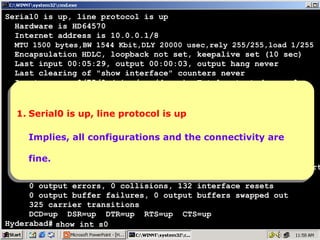
Serial0 is up, line protocol is up
Hardware is HD64570
Internet address is 10.0.0.1/8
MTU 1500 bytes,BW 1544 Kbit,DLY 20000 usec,rely 255/255,load 1/255

Encapsulation HDLC, loopback not set, keepalive set (10 sec)
Last input 00:05:29, output 00:00:03, output hang never
Last clearing of "show interface" counters never
Input queue: 0/75/0 (size/max/drops); Total output drops: 0
Queueing strategy: weighted fair
Output queue: 0/1000/64/0 (size/max total/threshold/drops)
Conversations 0/1/256 (active/max
1.Serial0 is up, line protocol is up active/max total)
Serial0 is up, line protocol is up
1. Reserved Conversations 0/0 (allocated/max allocated)
5 minute input rate 0 bits/sec, 0 packets/sec
Implies, all rate 0 bits/sec, 0 the connectivity are
5 minute output configurations and the connectivity are
Implies, all configurations and packets/sec
997 packets input, 20161 bytes, 0 no buffer
Received 875 broadcasts, 0 runts, 0 giants, 0 throttles
fine.
fine.
0 input errors, 0 CRC, 0 frame, 0 overrun, 0 ignored, 0 abort
899 packets output, 24785 bytes, 0 underruns
0 output errors, 0 collisions, 132 interface resets
0 output buffer failures, 0 output buffers swapped out
325 carrier transitions
DCD=up DSR=up DTR=up RTS=up CTS=up
Hyderabad# show int s0

19
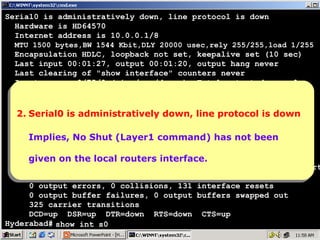
Serial0 is administratively down, line protocol is down
Hardware is HD64570
Internet address is 10.0.0.1/8
MTU 1500 bytes,BW 1544 Kbit,DLY 20000 usec,rely 255/255,load 1/255

Encapsulation HDLC, loopback not set, keepalive set (10 sec)
Last input 00:01:27, output 00:01:20, output hang never
Last clearing of "show interface" counters never
Input queue: 0/75/0 (size/max/drops); Total output drops: 0
Queueing strategy: weighted fair
Output queue: 0/1000/64/0 (size/max total/threshold/drops)
Conversations 0/1/256 (active/max active/max total)
2.Serial0 is administratively down, line protocol is down
Serial0 is administratively down, line protocol is down
2. Reserved Conversations 0/0 (allocated/max allocated)
5 minute input rate 0 bits/sec, 0 packets/sec
Implies, No rate 0 bits/sec, 0 packets/sec
5 minute outputShut (Layer1 command) has not been
Implies, No Shut (Layer1 command) has not been
995 packets input, 20133 bytes, 0 no buffer
Received the local routers interface.
given on 873 broadcasts, 0 runts, 0 giants, 0 throttles
given on the local routers interface.
0 input errors, 0 CRC, 0 frame, 0 overrun, 0 ignored, 0 abort
896 packets output, 24163 bytes, 0 underruns
0 output errors, 0 collisions, 131 interface resets
0 output buffer failures, 0 output buffers swapped out
325 carrier transitions
DCD=up DSR=up DTR=down RTS=down CTS=up
Hyderabad# show int s0

20
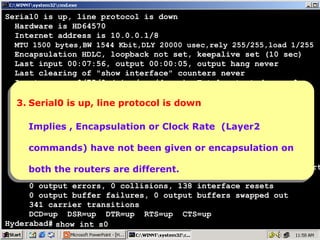
Serial0 is up, line protocol is down
Hardware is HD64570
Internet address is 10.0.0.1/8
MTU 1500 bytes,BW 1544 Kbit,DLY 20000 usec,rely 255/255,load 1/255

Encapsulation HDLC, loopback not set, keepalive set (10 sec)
Last input 00:07:56, output 00:00:05, output hang never
Last clearing of "show interface" counters never
Input queue: 0/75/0 (size/max/drops); Total output drops: 0
Queueing strategy: weighted fair
Output queue: up, line protocol is down
3. Serial0 is 0/1000/64/0 (size/max total/threshold/drops)
3. Serial0 is up, line protocol is downactive/max total)
Conversations 0/1/256 (active/max
Reserved Conversations 0/0 (allocated/max allocated)
Implies Encapsulation or 0 packets/sec
5 minute input rate 0 bits/sec,Clock Rate (Layer2
Implies ,, Encapsulation or Clock Rate (Layer2
5 minute output rate 0 bits/sec, 0 packets/sec
1028 packets input, 20595 bytes,
no buffer
commands) have not been given or encapsulation on
commands) have not been given0or encapsulation on
Received 906 broadcasts, 0 runts, 0 giants, 0 throttles
0 input routers are different.
both theerrors, 0are different. 0 overrun, 0 ignored, 0 abort
the routers CRC, 0 frame,
bothpackets output, 25475 bytes, 0 underruns
917
0 output errors, 0 collisions, 138 interface resets
0 output buffer failures, 0 output buffers swapped out
341 carrier transitions
DCD=up DSR=up DTR=up RTS=up CTS=up
Hyderabad# show int s0

21
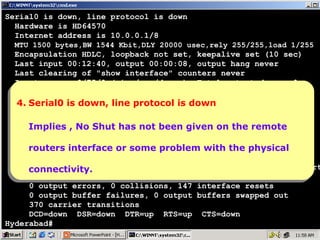
Serial0 is down, line protocol is down
Hardware is HD64570
Internet address is 10.0.0.1/8
MTU 1500 bytes,BW 1544 Kbit,DLY 20000 usec,rely 255/255,load 1/255

Encapsulation HDLC, loopback not set, keepalive set (10 sec)
Last input 00:12:40, output 00:00:08, output hang never
Last clearing of "show interface" counters never
Input queue: 0/75/0 (size/max/drops); Total output drops: 0
Queueing strategy: weighted fair
Output queue: down, line protocol is total/threshold/drops)
4. Serial0 is 0/1000/64/0 (size/max down
4. Serial0 is down, line protocol is down
Conversations 0/1/256 (active/max active/max total)
Reserved Conversations 0/0 (allocated/max allocated)
Implies No Shut bits/sec, 0 packets/sec
5 minute input rate 0 has not been given on the remote
Implies ,, No Shut has not been given on the remote
5 minute output rate 0 bits/sec, 0 packets/sec
1088 packets input, some problem with the
routers interface or some problem with the physical
routers interface or 21435 bytes, 0 no buffer physical
Received 966 broadcasts, 0 runts, 0 giants, 0 throttles
0 input errors,
connectivity. 0 CRC, 0 frame, 0 overrun, 0 ignored, 0 abort
connectivity.
945 packets output, 26091 bytes, 0 underruns
0 output errors, 0 collisions, 147 interface resets
0 output buffer failures, 0 output buffers swapped out
370 carrier transitions
DCD=down DSR=down DTR=up RTS=up CTS=down
Hyderabad#

22
23

Wan Interface Configuration

  • 1.
  • 2.
    Encapsulation PPP • Point toPoint Protocol • Open Standard HDLC • High level Data link Control • Vendor proprietary Protocol (works with Protocol (works with same and different same company Router company Routers i.e. only, i.e. Cisco-Cisco, Cisco–Nortel, Cisco– Nortel-Nortel, etc.) Multicom. • Supports Authentication • Supports Compression • No Support for Authentication • No Support for Compression 2
  • 3.
    Device Classification DCE • DataCommunication Equipment • Generate clocking (i.e. Speed). DTE • Data Termination Equipment • Accept clocking (i.e. Speed). • Master • Slave • Example of DCE device in • Example of DTE device in Leased line setup : V.35 & Leased line setup : Router G.703 Modem & Exchange (Modem & MUX) • Example of DCE device in Dial up setup : Dialup • Example of DTE device in Dial up setup : Computer Modem 3
  • 4.
    V.35 Modem E0 V.35 192.168.1.150 Cable E0 192.168.2.150 V.35 Cable 2pair of Copper Wire LAN - 192.168.1.0/24 LAN - 192.168.2.0/24 HYDERABAD OFFICE G.703 Modem HYDERABAD MUX CHENNAI OFFICE EXCHANGE G.703 Modem 4 Fiber Optic Cable CHENNAI MUX
  • 5.
    Lab Setup Wan Representation S0 HYD S1 CHE •A Back to Back Cable is used which emulates the copper wire, modems and MUX , the complete exchange setup. • Without DCE & DTE device communication is not possible. 5
  • 6.
    V.35 Back toBack Cable 6
  • 7.
    Lab Setup DCE Interface DTEInterface S0 HYD S1 CHE • Can 2 DTE devices communicate? Answer : No For Lab Setup : convert one Router to act as a DCE device. The cable will have a DCE end and a DTE end • To check : Look for the label on the cable • The DCE end of the cable connected to the router’s interface should be made as DCE by giving a CLOCKRATE command in the interface mode. 7
  • 8.
    10.0.0.1/8 S0 HYD 11.0.0.1/8 S0 S1 10.0.0.2/8 CHE E0 192.168.1.150/24 LAN - 192.168.1.0/24 17.0.0.1/8 S0 S1 11.0.0.2/8 LAN- 192.168.2.0/24 S0 16.0.0.1/8 JAI E0 192.168.9.150/24 LAN - 192.168.9.0/24 LAN - 192.168.4.0/24 S0 15.0.0.1/8 LAN - 192.168.10.0/24 SUR E0 192.168.7.150/24 13.0.0.2/8 S1 S0 14.0.0.1/8 E0 192.168.6.150/24 LAN - 192.168.6.0/24 BOM E0 192.168.5.150/24 LAN - 192.168.5.0/24 20.0.0.1/8 S0 S1 19.0.0.2/8 E0 192.168.10.150/24 E0 192.168.4.150/24 14.0.0.2/8 S1 19.0.0.1/8 S0 KOL PUNE E0 192.168.3.150/24 LAN - 192.168.7.0/24 18.0.0.1/8 S0 S1 18.0.0.2/8 S1 12.0.0.2/8 15.0.0.2/8 S1 LAN - 192.168.8.0/24 DEL 13.0.0.1/8 S0 LAN - 192.168.3.0/24 16.0.0.2/8 S1 AGRA BAN E0 192.168.2.150/24 E0 192.168.8.150/24 17.0.0.2/8 S1 12.0.0.1/8 S0 SRI S1 20.0.0.2/8 GOA E0 192.168.11.150/24 LAN - 192.168.11.0/24 E0 192.168.12.150/24 8 LAN - 192.168.12.0/24
  • 9.
    Wan Interface Configuration 10.0.0.1/8 S0 HYD E0 192.168.1.150/24 LAN- 192.168.1.0/24 S1 10.0.0.2/8 CHE E0 192.168.2.150/24 LAN - 192.168.2.0/24 9
  • 10.
  • 11.
  • 12.
    Microsoft Windows 2000[Version 5.00.2195] (C) Copyright 1985-2000 Microsoft Corp. C:> telnet 192.168.1.150 Connecting ..... ================================ Welcome to Hyderabad Router ================================ User Access Verification password : **** Hyderabad> enable password : **** Hyderabad# show controllers S 0 HD unit 0, idb = 0xB7574, driver structure at 0xBC2F8 buffer size 1524 HD unit 0, V.35 DCE cable cpb = 0x1, eda = 0x4940, cda = 0x4800 RX ring with 16 entries at 0x4014800 00 bd_ptr=0x4800 pak=0x0BE054 ds=0x401B6A8 status=80 pak_size=0 01 bd_ptr=0x4814 pak=0x0BED04 ds=0x401E5B0 status=80 pak_size=0 02 bd_ptr=0x4828 pak=0x0BE224 ds=0x401BD60 status=80 pak_size=0 03 bd_ptr=0x483C pak=0x0BEED4 ds=0x401EC68 status=80 pak_size=0 --More-- 12
  • 13.
    04 bd_ptr=0x4850 pak=0x0BEB34ds=0x401DEF8 05 bd_ptr=0x4864 pak=0x0BF0A4 ds=0x401F320 06 bd_ptr=0x4878 pak=0x0BDE84 ds=0x401AFF0 07 bd_ptr=0x488C pak=0x0BE794 ds=0x401D188 08 bd_ptr=0x48A0 pak=0x0BDCB4 ds=0x401A938 09 bd_ptr=0x48B4 pak=0x0BE964 ds=0x401D840 10 bd_ptr=0x48C8 pak=0x0BE3F4 ds=0x401C418 11 bd_ptr=0x48DC pak=0x0BDAE4 ds=0x401A280 12 bd_ptr=0x48F0 pak=0x0BD914 ds=0x4019BC8 13 bd_ptr=0x4904 pak=0x0BD744 ds=0x4019510 14 bd_ptr=0x4918 pak=0x0BD574 ds=0x4018E58 15 bd_ptr=0x492C pak=0x0BD3A4 ds=0x40187A0 16 bd_ptr=0x4940 pak=0x0BD1D4 ds=0x40180E8 cpb = 0x1, eda = 0x5014, cda = 0x5014 TX ring with 2 entries at 0x4015000 status=80 status=80 status=80 status=80 status=80 status=80 status=80 status=80 status=80 status=80 status=80 status=80 status=80 pak_size=0 pak_size=0 pak_size=0 pak_size=0 pak_size=0 pak_size=0 pak_size=0 pak_size=0 pak_size=0 pak_size=0 pak_size=0 pak_size=0 pak_size=0 00 bd_ptr=0x5000 pak=0x000000 ds=0x4031838 status=80 pak_size=22 01 bd_ptr=0x5014 pak=0x000000 ds=0x000000 status=80 pak_size=0 02 bd_ptr=0x5028 pak=0x000000 ds=0x000000 status=80 pak_size=0 0 missed datagrams, 0 overruns 0 bad datagram encapsulations, 0 memory errors 0 transmitter underruns 0 residual bit errors 13 Hyderabad#
  • 14.
    Microsoft Windows 2000[Version 5.00.2195] (C) Copyright 1985-2000 Microsoft Corp. C:> telnet 192.168.2.150 Connecting ..... ================================ Welcome to Chennai Router ================================ User Access Verification password : **** Chennai> enable password : **** Chennai# show controllers S 1 HD unit 0, idb = 0xB7574, driver structure at 0xBC2F8 buffer size 1524 HD unit 0, V.35 DTE cable cpb = 0xE1, eda = 0x4814, cda = 0x4828 RX ring with 16 entries at 0xE14800 00 bd_ptr=0x4800 pak=0x0BEB34 ds=0xE1DEF8 status=80 pak_size=13 01 bd_ptr=0x4814 pak=0x0BF0A4 ds=0xE1F320 status=80 pak_size=13 02 bd_ptr=0x4828 pak=0x0BED04 ds=0xE1E5B0 status=80 pak_size=0 03 bd_ptr=0x483C pak=0x0BE964 ds=0xE1D840 status=80 pak_size=0 --More-- 14
  • 15.
    04 bd_ptr=0x4850 pak=0x0BE794ds=0xE1D188 status=80 05 bd_ptr=0x4864 pak=0x0BE5C4 ds=0xE1CAD0 status=80 06 bd_ptr=0x4878 pak=0x0BE3F4 ds=0xE1C418 status=80 07 bd_ptr=0x488C pak=0x0BE224 ds=0xE1BD60 status=80 08 bd_ptr=0x48A0 pak=0x0BE054 ds=0xE1B6A8 status=80 09 bd_ptr=0x48B4 pak=0x0BDE84 ds=0xE1AFF0 status=80 10 bd_ptr=0x48C8 pak=0x0BDCB4 ds=0xE1A938 status=80 11 bd_ptr=0x48DC pak=0x0BDAE4 ds=0xE1A280 status=80 12 bd_ptr=0x48F0 pak=0x0BD914 ds=0xE19BC8 status=80 13 bd_ptr=0x4904 pak=0x0BD744 ds=0xE19510 status=80 14 bd_ptr=0x4918 pak=0x0BD574 ds=0xE18E58 status=80 15 bd_ptr=0x492C pak=0x0BD3A4 ds=0xE187A0 status=80 16 bd_ptr=0x4940 pak=0x0BD1D4 ds=0xE180E8 status=80 cpb = 0xE1, eda = 0x5028, cda = 0x5028 TX ring with 2 entries at 0xE15000 00 bd_ptr=0x5000 pak=0x000000 ds=0xE31964 status=80 01 bd_ptr=0x5014 pak=0x000000 ds=0xE31964 status=80 02 bd_ptr=0x5028 pak=0x000000 ds=0x000000 status=80 0 missed datagrams, 0 overruns 0 bad datagram encapsulations, 0 memory errors 0 transmitter underruns 0 residual bit errors Chennai# 15 pak_size=0 pak_size=0 pak_size=0 pak_size=0 pak_size=0 pak_size=0 pak_size=0 pak_size=0 pak_size=0 pak_size=0 pak_size=0 pak_size=0 pak_size=0 pak_size=13 pak_size=13 pak_size=0
  • 16.
    Microsoft Windows 2000[Version 5.00.2195] (C) Copyright 1985-2000 Microsoft Corp. C:> telnet 192.168.1.150 Connecting ..... ================================ Configuring Serial interface Configuring Serial interface Welcome to Hyderabad Router Router(config)#interface serial <no> Router(config)#interface serial <no> ================================ Router(config-if)#ip address <address> <mask> Router(config-if)#ip address <address> <mask> User Access Verification Router(config-if)#no shutdown password : **** Router(config-if)#no shutdown Router(config-if)#clockrate <clock rate> Hyderabad> enable Router(config-if)#clockrate <clock rate> password : **** Router(config-if)#encapsulation {ppp|hdlc} Router(config-if)#encapsulation {ppp|hdlc} Hyderabad# configure terminal Enter configuration commands, one per line. End with CNTL/Z. Hyderabad(config)# interface serial 0 Hyderabad(config-if)# ip address 10.0.0.1 255.0.0.0 Hyderabad(config-if)# no shutdown Hyderabad(config-if)# clockrate 64000 Hyderabad(config-if)# encapsulation hdlc Hyderabad(config-if)# exit Hyderabad(config)# 16
  • 17.
    Microsoft Windows 2000[Version 5.00.2195] (C) Copyright 1985-2000 Microsoft Corp. C:> telnet 192.168.2.150 Connecting ..... ================================ Configuring Serial interface Welcome to Chennai RouterConfiguring Serial interface Router(config)#interface serial <no> Router(config)#interface serial <no> ================================ Router(config-if)#ip address <address> <mask> Router(config-if)#ip address <address> <mask> User Access Verification Router(config-if)#no shutdown password : **** Router(config-if)#no shutdown Chennai> enable Router(config-if)#clockrate <clock rate> Router(config-if)#clockrate <clock rate> password : **** Router(config-if)#encapsulation {ppp|hdlc} Router(config-if)#encapsulation {ppp|hdlc} Chennai# configure terminal Enter configuration commands, one per line. End with CNTL/Z. Chennai(config)# interface serial 1 Chennai(config-if)# ip address 10.0.0.2 255.0.0.0 Chennai(config-if)# no shutdown Chennai(config-if)# encapsulation hdlc Chennai(config-if)# exit Chennai(config)# 17
  • 18.
    Microsoft Windows 2000[Version 5.00.2195] (C) Copyright 1985-2000 Microsoft Corp. C:> telnet 192.168.1.150 Connecting ..... ================================ Welcome to Hyderabad Router ================================ User Access Verification password : **** Hyderabad> enable password : **** Hyderabad# configure terminal Enter configuration commands, one per line. End with CNTL/Z. Hyderabad(config)# interface serial 0 Hyderabad(config-if)# ip address 10.0.0.1 255.0.0.0 Hyderabad(config-if)# no shutdown Hyderabad(config-if)# clockrate 64000 Hyderabad(config-if)# encapsulation hdlc Hyderabad(config-if)# exit Hyderabad(config)# exit Hyderabad# show int s0 18
  • 19.
    Serial0 is up,line protocol is up Hardware is HD64570 Internet address is 10.0.0.1/8 MTU 1500 bytes,BW 1544 Kbit,DLY 20000 usec,rely 255/255,load 1/255 Encapsulation HDLC, loopback not set, keepalive set (10 sec) Last input 00:05:29, output 00:00:03, output hang never Last clearing of "show interface" counters never Input queue: 0/75/0 (size/max/drops); Total output drops: 0 Queueing strategy: weighted fair Output queue: 0/1000/64/0 (size/max total/threshold/drops) Conversations 0/1/256 (active/max 1.Serial0 is up, line protocol is up active/max total) Serial0 is up, line protocol is up 1. Reserved Conversations 0/0 (allocated/max allocated) 5 minute input rate 0 bits/sec, 0 packets/sec Implies, all rate 0 bits/sec, 0 the connectivity are 5 minute output configurations and the connectivity are Implies, all configurations and packets/sec 997 packets input, 20161 bytes, 0 no buffer Received 875 broadcasts, 0 runts, 0 giants, 0 throttles fine. fine. 0 input errors, 0 CRC, 0 frame, 0 overrun, 0 ignored, 0 abort 899 packets output, 24785 bytes, 0 underruns 0 output errors, 0 collisions, 132 interface resets 0 output buffer failures, 0 output buffers swapped out 325 carrier transitions DCD=up DSR=up DTR=up RTS=up CTS=up Hyderabad# show int s0 19
  • 20.
    Serial0 is administrativelydown, line protocol is down Hardware is HD64570 Internet address is 10.0.0.1/8 MTU 1500 bytes,BW 1544 Kbit,DLY 20000 usec,rely 255/255,load 1/255 Encapsulation HDLC, loopback not set, keepalive set (10 sec) Last input 00:01:27, output 00:01:20, output hang never Last clearing of "show interface" counters never Input queue: 0/75/0 (size/max/drops); Total output drops: 0 Queueing strategy: weighted fair Output queue: 0/1000/64/0 (size/max total/threshold/drops) Conversations 0/1/256 (active/max active/max total) 2.Serial0 is administratively down, line protocol is down Serial0 is administratively down, line protocol is down 2. Reserved Conversations 0/0 (allocated/max allocated) 5 minute input rate 0 bits/sec, 0 packets/sec Implies, No rate 0 bits/sec, 0 packets/sec 5 minute outputShut (Layer1 command) has not been Implies, No Shut (Layer1 command) has not been 995 packets input, 20133 bytes, 0 no buffer Received the local routers interface. given on 873 broadcasts, 0 runts, 0 giants, 0 throttles given on the local routers interface. 0 input errors, 0 CRC, 0 frame, 0 overrun, 0 ignored, 0 abort 896 packets output, 24163 bytes, 0 underruns 0 output errors, 0 collisions, 131 interface resets 0 output buffer failures, 0 output buffers swapped out 325 carrier transitions DCD=up DSR=up DTR=down RTS=down CTS=up Hyderabad# show int s0 20
  • 21.
    Serial0 is up,line protocol is down Hardware is HD64570 Internet address is 10.0.0.1/8 MTU 1500 bytes,BW 1544 Kbit,DLY 20000 usec,rely 255/255,load 1/255 Encapsulation HDLC, loopback not set, keepalive set (10 sec) Last input 00:07:56, output 00:00:05, output hang never Last clearing of "show interface" counters never Input queue: 0/75/0 (size/max/drops); Total output drops: 0 Queueing strategy: weighted fair Output queue: up, line protocol is down 3. Serial0 is 0/1000/64/0 (size/max total/threshold/drops) 3. Serial0 is up, line protocol is downactive/max total) Conversations 0/1/256 (active/max Reserved Conversations 0/0 (allocated/max allocated) Implies Encapsulation or 0 packets/sec 5 minute input rate 0 bits/sec,Clock Rate (Layer2 Implies ,, Encapsulation or Clock Rate (Layer2 5 minute output rate 0 bits/sec, 0 packets/sec 1028 packets input, 20595 bytes, no buffer commands) have not been given or encapsulation on commands) have not been given0or encapsulation on Received 906 broadcasts, 0 runts, 0 giants, 0 throttles 0 input routers are different. both theerrors, 0are different. 0 overrun, 0 ignored, 0 abort the routers CRC, 0 frame, bothpackets output, 25475 bytes, 0 underruns 917 0 output errors, 0 collisions, 138 interface resets 0 output buffer failures, 0 output buffers swapped out 341 carrier transitions DCD=up DSR=up DTR=up RTS=up CTS=up Hyderabad# show int s0 21
  • 22.
    Serial0 is down,line protocol is down Hardware is HD64570 Internet address is 10.0.0.1/8 MTU 1500 bytes,BW 1544 Kbit,DLY 20000 usec,rely 255/255,load 1/255 Encapsulation HDLC, loopback not set, keepalive set (10 sec) Last input 00:12:40, output 00:00:08, output hang never Last clearing of "show interface" counters never Input queue: 0/75/0 (size/max/drops); Total output drops: 0 Queueing strategy: weighted fair Output queue: down, line protocol is total/threshold/drops) 4. Serial0 is 0/1000/64/0 (size/max down 4. Serial0 is down, line protocol is down Conversations 0/1/256 (active/max active/max total) Reserved Conversations 0/0 (allocated/max allocated) Implies No Shut bits/sec, 0 packets/sec 5 minute input rate 0 has not been given on the remote Implies ,, No Shut has not been given on the remote 5 minute output rate 0 bits/sec, 0 packets/sec 1088 packets input, some problem with the routers interface or some problem with the physical routers interface or 21435 bytes, 0 no buffer physical Received 966 broadcasts, 0 runts, 0 giants, 0 throttles 0 input errors, connectivity. 0 CRC, 0 frame, 0 overrun, 0 ignored, 0 abort connectivity. 945 packets output, 26091 bytes, 0 underruns 0 output errors, 0 collisions, 147 interface resets 0 output buffer failures, 0 output buffers swapped out 370 carrier transitions DCD=down DSR=down DTR=up RTS=up CTS=down Hyderabad# 22
  • 23.