
1
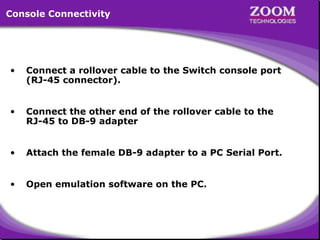
Console Connectivity

•

Connect a rollover cable to the Switch console port
(RJ-45 connector).

•

Connect the other end of the rollover cable to the
RJ-45 to DB-9 adapter

•

Attach the female DB-9 adapter to a PC Serial Port.

•

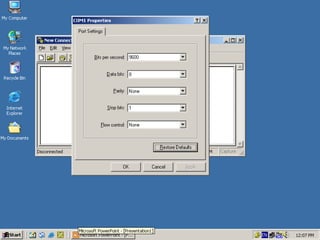
Open emulation software on the PC.

2
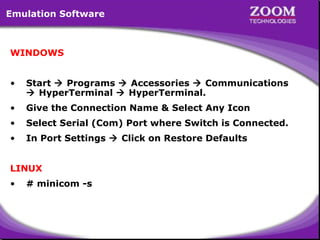
Emulation Software

WINDOWS
•

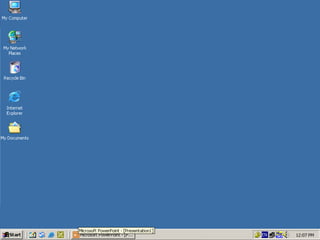
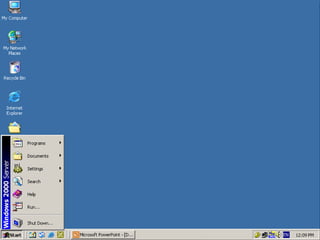
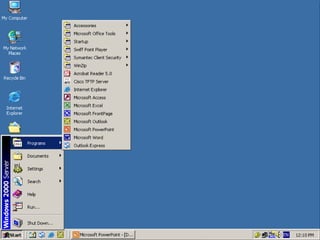
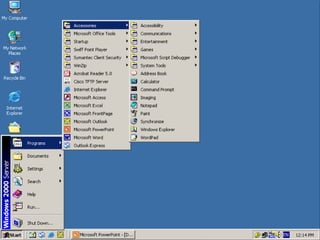
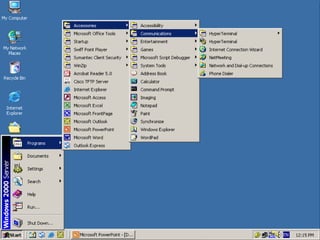
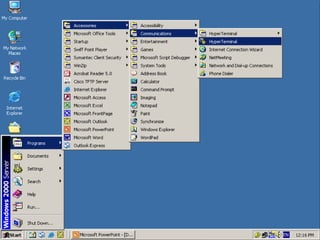
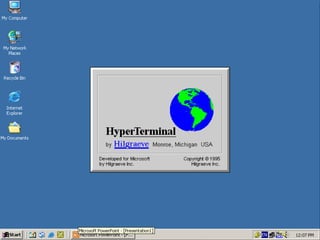
Start  Programs  Accessories  Communications
 HyperTerminal  HyperTerminal.

•

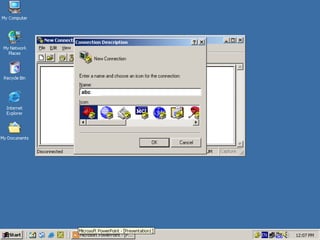
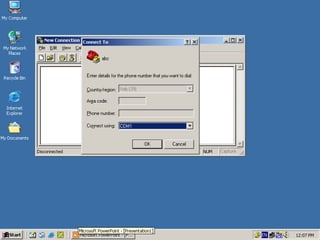
Give the Connection Name & Select Any Icon

•

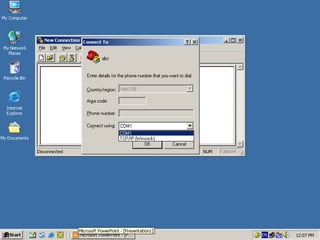
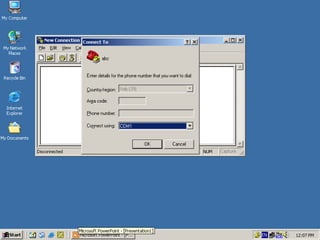
Select Serial (Com) Port where Switch is Connected.

•

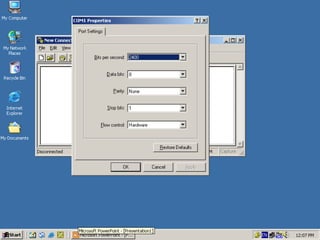
In Port Settings  Click on Restore Defaults

LINUX
•

# minicom -s

3
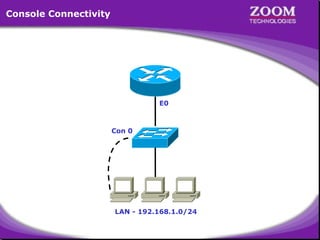
Console Connectivity

E0

Con 0

LAN - 192.168.1.0/24

4
5
6
7
8
9
10
11
abc

12
13
14
15
16
17
Catalyst 1900 Management Console
Copyright (c) Cisco Systems, Inc. 1993-1999. All rights reserved.
Enterprise Edition Software
Ethernet Address:
00-D0-D3-74-ED-40
PCA Number:
73-3122-01
PCA Serial Number:
FAB032632C9
Model Number:
WS-C1912-EN
System Serial Number: FAB0328V07D
Power Supply S/N:
APQ0313014N
PCB Serial Number:
FAB032632C9,73-3122-04
------------------------------------------------1 user(s) now active on Management Console.
User Interface Menu
[M]
[K]
[I]
[P]

Menus
Command Line
IP Configuration
Console Password

Enter Selection: I

18
Catalyst 1900 - IP Configuration
Ethernet Address: 00-D0-D3-74-ED-40
---------------------- Settings ----------------------[I] IP address
0.0.0.0
[S] Subnet mask
0.0.0.0
[G] Default gateway
0.0.0.0
[V] Management VLAN
1
[M] IP address of DNS server 1
0.0.0.0
[N] IP address of DNS server 2
0.0.0.0
[D] Domain name
[R] Use Routing Information Protocol
Enabled
-------------------- Actions -------------------------[P] Ping
[C] Clear cached DNS entries
[X] Exit to previous menu
I
Enter Selection:

19
[D] Domain name
[R] Use Routing Information Protocol
Enabled
-------------------- Actions -------------------------[P] Ping
[C] Clear cached DNS entries
[X] Exit to previous menu
Enter Selection: I
This command assigns an administrative IP address to this switch.
The new address will take effect immediately. If no IP address is
assigned (or if the IP address is removed by setting it to
0.0.0.0), and the switch is connected to a DHCP server, the DHCP
server may automatically assign an address to the switch.
Enter administrative IP address in dotted format (nnn.nnn.nnn.nnn)
Current setting ===>
New setting

===>

0. 0. 0. 0
192.168.20.65

20
Catalyst 1900 - IP Configuration
Ethernet Address: 00-D0-D3-74-ED-40
---------------------- Settings ---------------------------[I] IP address
192.168.20.65
[S] Subnet mask
0.0.0.0
[G] Default gateway
0.0.0.0
[V] Management VLAN
1
[M] IP address of DNS server 1
0.0.0.0
[N] IP address of DNS server 2
0.0.0.0
[D] Domain name
[R] Use Routing Information Protocol
Enabled
-------------------- Actions -----------------------------[P] Ping
[C] Clear cached DNS entries
[X] Exit to previous menu
S
Enter Selection:

21
[M] IP address of DNS server 1
[N] IP address of DNS server 2
[D] Domain name

0.0.0.0
0.0.0.0

[R] Use Routing Information Protocol
Enabled
-------------------- Actions -------------------------[P] Ping
[C] Clear cached DNS entries
[X] Exit to previous menu
Enter Selection: I
This command defines the subnet mask for the IP address set by the
[I] IP Address command.
Enter IP subnet mask in dotted quad format (nnn.nnn.nnn.nnn):
Current setting ===>
New setting

0. 0. 0. 0
255.255.255.0

===>

22
Catalyst 1900 - IP Configuration
Ethernet Address: 00-D0-D3-74-ED-40
---------------------- Settings ---------------------------[I] IP address
192.168.20.65
[S] Subnet mask
255.255.255.0
[G] Default gateway
0.0.0.0
[V] Management VLAN
1
[M] IP address of DNS server 1
0.0.0.0
[N] IP address of DNS server 2
0.0.0.0
[D] Domain name
[R] Use Routing Information Protocol
Enabled
-------------------- Actions -----------------------------[P] Ping
[C] Clear cached DNS entries
[X] Exit to previous menu
X
Enter Selection:

23
Catalyst 1900 Management Console
Copyright (c) Cisco Systems, Inc. 1993-1999. All rights reserved.
Enterprise Edition Software
Ethernet Address:
00-D0-D3-74-ED-40
PCA Number:
73-3122-01
PCA Serial Number:
FAB032632C9
Model Number:
WS-C1912-EN
System Serial Number: FAB0328V07D
Power Supply S/N:
APQ0313014N
PCB Serial Number:
FAB032632C9,73-3122-04
------------------------------------------------1 user(s) now active on Management Console.
User Interface Menu
[M]
[K]
[I]
[P]

Menus
Command Line
IP Configuration
Console Password

Enter Selection: P

24
User Interface Menu
[M]
[K]
[I]
[P]

Menus
Command Line
IP Configuration
Console Password

Enter Selection: P
The Management Console password can help prevent unauthorized
accesses. When specifying a password, use a minimum of
4
characters and maximum of 8 characters.
The password is case
insensitive and can contain any character with a legal keyboard
representation. For the user's protection, the password must be
entered the same way twice before it will be accepted.
Enter new password:
Reenter to verify new password:

****
****

Password modified
Press any key to continue.

25
Catalyst 1900 Management Console
Copyright (c) Cisco Systems, Inc. 1993-1999. All rights reserved.
Enterprise Edition Software
Ethernet Address:
00-D0-D3-74-ED-40
PCA Number:
73-3122-01
PCA Serial Number:
FAB032632C9
Model Number:
WS-C1912-EN
System Serial Number: FAB0328V07D
Power Supply S/N:
APQ0313014N
PCB Serial Number:
FAB032632C9,73-3122-04
------------------------------------------------1 user(s) now active on Management Console.
User Interface Menu
[M] Menus
[K] Command Line
Enter Selection: M
Enter password: ****

26
Catalyst 1900 - Main Menu
[C]
[S]
[N]
[P]
[A]
[D]
[M]
[V]
[R]
[F]
[I]
[U]
[H]
[K]

Console Settings
System
Network Management
Port Configuration
Port Addressing
Port Statistics Detail
Monitoring
Virtual LAN
Multicast Registration
Firmware
RS-232 Interface
Usage Summaries
Help
Command Line

[X] Exit Management Console
Enter Selection: S

27
Catalyst 1900 - System Configuration
System Revision: 5
Address Capacity: 1024
System UpTime:
0day(s) 00hour(s) 06minute(s) 58second(s)
---------------------- Settings ------------------------------[N] Name of system
Switch
[C] Contact name
[L] Location
[S] Switching mode

FragmentFree

[U] Use of store-and-forward for multicast
Disabled
[A] Action upon address violation
Suspend
[G] Generate alert on address violation
Enabled
[I] Address aging time
300 second(s)
[P] Network port
None
[H] Half duplex back pressure
(10-mbps ports) Disabled
[E] Enhanced congestion control (10-mbps ports) Disabled
-------------------- Actions --------------------------------[R] Reset system
[F] Reset to factory defaults
S
[V] Reset VTP to factory def. [T] Reset to enable Bridge Group
-------------------- Related Menus ---------------------------[B] Broadcast storm control
[X] Exit to Main Menu
28
Enter Selection:
[H] Half duplex back pressure
(10-mbps ports) Disabled
[E] Enhanced congestion control (10-mbps ports) Disabled
-------------------- Actions -------------------------------[R] Reset system
[F] Reset to factory defaults
[V] Reset VTP to factory def. [T] Reset to enable Bridge Group
-------------------- Related Menus ---------------------------[B] Broadcast storm control
[X] Exit to Main Menu
Enter Selection:
FragmentFree switching mode reduces bridge delay by making the
forwarding decision after 64 bytes have been received. In contrast,
Store-and-Forward switching mode waits until the entire frame has
been received before the forwarding decision is made. This command
sets the switching mode.
Select Store-and-Forward[1], or FragmentFree[2]:
Current setting ===> FragmentFree
New setting ===> Store-and-Forward

29
Catalyst 1900 - System Configuration
System Revision: 5
Address Capacity: 1024
System UpTime:
0day(s) 00hour(s) 06minute(s) 58second(s)
---------------------- Settings ------------------------------[N] Name of system
Switch
[C] Contact name
[L] Location
[S] Switching mode
Store & Forward
[U] Use of store-and-forward for multicast
Disabled
[A] Action upon address violation
Suspend
[G] Generate alert on address violation
Enabled
[I] Address aging time
300 second(s)
[P] Network port
None
[H] Half duplex back pressure
(10-mbps ports) Disabled
[E] Enhanced congestion control (10-mbps ports) Disabled
-------------------- Actions --------------------------------[R] Reset system
[F] Reset to factory defaults
[V] Reset VTP to factory def. [T] Reset to enable Bridge Group
X
-------------------- Related Menus ---------------------------[B] Broadcast storm control
[X] Exit to Main Menu
Enter Selection:
30
Catalyst 1900 - Main Menu
[C]
[S]
[N]
[P]
[A]
[D]
[M]
[V]
[R]
[F]
[I]
[U]
[H]
[K]

Console Settings
System
Network Management
Port Configuration
Port Addressing
Port Statistics Detail
Monitoring
Virtual LAN
Multicast Registration
Firmware
RS-232 Interface
Usage Summaries
Help
Command Line

[X] Exit Management Console
Enter Selection: X

31
[N]
[P]
[A]
[D]
[M]
[V]
[R]
[F]
[I]
[U]
[H]
[K]

Network Management
Port Configuration
Port Addressing
Port Statistics Detail
Monitoring
Virtual LAN
Multicast Registration
Firmware
RS-232 Interface
Usage Summaries
Help
Command Line

[X] Exit Management Console
Enter Selection: X
This command will exit and log you out of the Management Console.
Exit Management Console, [Y]es or [N]o? Yes

32
Catalyst 1900 Management Console
Copyright (c) Cisco Systems, Inc. 1993-1999. All rights reserved.
Enterprise Edition Software
Ethernet Address:
00-D0-D3-74-ED-40
PCA Number:
73-3122-01
PCA Serial Number:
FAB032632C9
Model Number:
WS-C1912-EN
System Serial Number: FAB0328V07D
Power Supply S/N:
APQ0313014N
PCB Serial Number:
FAB032632C9,73-3122-04
------------------------------------------------1 user(s) now active on Management Console.
User Interface Menu
[M] Menus
[K] Command Line
Enter Selection: K

33
CLI session with the switch is open.
To end the CLI session, enter [Exit].
User Mode
User Mode
> enable
::Commands ::
Commands
Privileged Mode
# show running-config
Privileged Mode
ping, enable
ping, enable
::Commands ::
Commands
Building configuration...
show, copy, configure terminal,
Current configuration:
reload,
reload,
!
!
!
ip address 192.168.20.65 255.255.255.0
!
!
!
!
enable password level 15 "ZOOM"
!
!
--More--

34
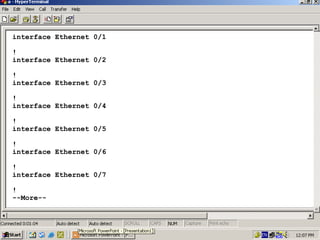
interface Ethernet 0/1
!
interface Ethernet 0/2
!
interface Ethernet 0/3
!
interface Ethernet 0/4
!
interface Ethernet 0/5
!
interface Ethernet 0/6
!
interface Ethernet 0/7
!
--More--

35
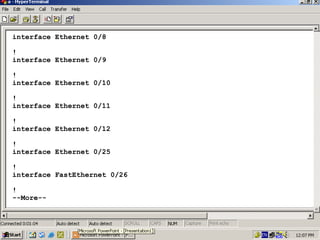
interface Ethernet 0/8
!
interface Ethernet 0/9
!
interface Ethernet 0/10
!
interface Ethernet 0/11
!
interface Ethernet 0/12
!
interface Ethernet 0/25
!
interface FastEthernet 0/26
!
--More--

36
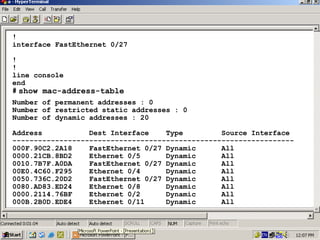
!
interface FastEthernet 0/27
!
!
line console
end
# show mac-address-table
Number of permanent addresses : 0
Number of restricted static addresses : 0
Number of dynamic addresses : 20
Address
Dest Interface
Type
Source Interface
-----------------------------------------------------------------000F.90C2.2A18
FastEthernet 0/27 Dynamic
All
0000.21CB.8BD2
Ethernet 0/5
Dynamic
All
0010.7B7F.A0DA
FastEthernet 0/27 Dynamic
All
00E0.4C60.F295
Ethernet 0/4
Dynamic
All
0050.736C.20D2
FastEthernet 0/27 Dynamic
All
0080.AD83.ED24
Ethernet 0/8
Dynamic
All
0000.2114.76BF
Ethernet 0/2
Dynamic
All
000B.2B0D.EDE4
Ethernet 0/11
Dynamic
All

37
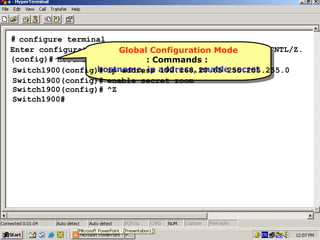
# configure terminal
Enter configuration commands, Configuration Mode with CNTL/Z.
Global Configuration Mode
Global one per line. End
(config)# hostname Switch1900 :Commands ::
: Commands
hostname, ip 192.168.20.65 255.255.255.0
Switch1900(config)# ip address address, enable secret
hostname, ip address, enable secret
Switch1900(config)# enable secret zoom
Switch1900(config)# ^Z
Switch1900#

38
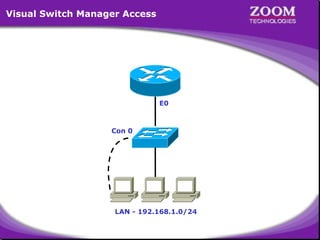
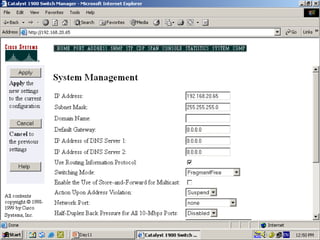
Visual Switch Manager Access

E0

Con 0

LAN - 192.168.1.0/24

39
40
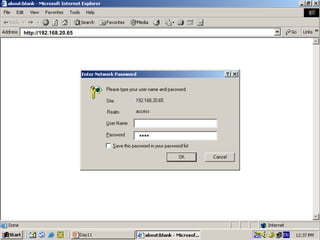
http://192.168.20.65

****

41
42
43
44
45
46
47
Virtual LAN
• A Layer 2 Security
• Divides a Single Broadcast domain into Multiple
Broadcast domains.
• By default all ports of the switch are in VLAN1 . This
VLAN1 is known as Administrative VLAN or
Management VLAN
• VLAN can be created from 2 – 1001
• Can be Configured on a Manageable switch only
• 2 Types of VLAN Membership
– Static VLAN
– Dynamic VLAN

48
Static VLAN

• Static VLAN’s are based on port numbers
• Need to manually assign a port on a switch to a
VLAN
• Also called Port-Based VLANs
• It can be a member of single VLAN and not
multiple VLAN’s

49
Dynamic VLAN

• Dynamic VLAN’s are based on the MAC address
of a PC
• Switch automatically assigns the port to a VLAN
• Each port can be a member of multiple VLAN’s
• For Dynamic VLAN configuration, a software
called VMPS( VLAN Membership Policy Server) is
needed

50
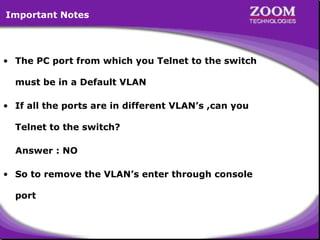
Important Notes

• The PC port from which you Telnet to the switch
must be in a Default VLAN
• If all the ports are in different VLAN’s ,can you
Telnet to the switch?
Answer : NO
• So to remove the VLAN’s enter through console
port

51
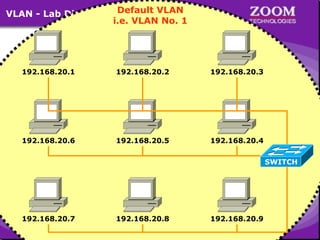
VLAN - Lab Diagram

Default VLAN
i.e. VLAN No. 1

192.168.20.1

192.168.20.2

192.168.20.3

192.168.20.6

192.168.20.5

192.168.20.4
SWITCH

192.168.20.7

192.168.20.8

192.168.20.9

52
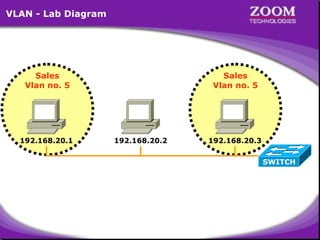
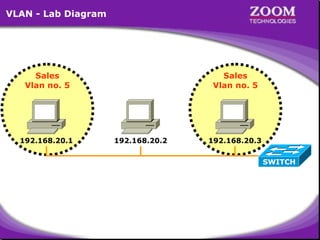
VLAN - Lab Diagram

Sales
Vlan no. 5

192.168.20.1

Sales
Vlan no. 5

192.168.20.2

192.168.20.3
SWITCH

53
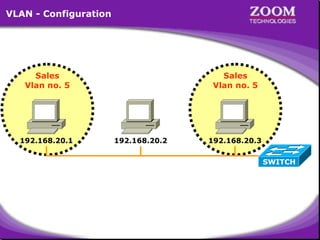
VLAN - Configuration

Sales
Vlan no. 5

192.168.20.1

Sales
Vlan no. 5

192.168.20.2

192.168.20.3
SWITCH

54
VLAN - Lab Diagram

Sales
Vlan no. 5

192.168.20.1

Sales
Vlan no. 5

192.168.20.2

192.168.20.3
SWITCH

55
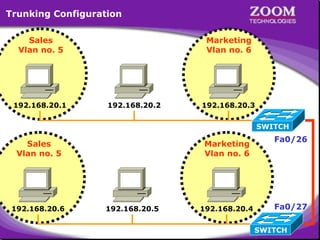
Trunking Configuration
Sales
Vlan no. 5

192.168.20.1

Marketing
Vlan no. 6

192.168.20.2

192.168.20.3
SWITCH

Sales
Vlan no. 5

192.168.20.6

Marketing
Vlan no. 6

192.168.20.5

192.168.20.4

56

Fa0/26

Fa0/27
SWITCH
Virtual LAN Trunking Protocol

• VTP is a CISCO proprietary protocol
•

used to share the VLAN configurations with multiple
switches.

• Switches are connected using Fast Ethernet ports

57
VTP Modes
VTP Mode are of three types :
• Server Mode
– A Switch configured in Server mode can Add , Modify
and Delete VLAN’s

– A Default VTP mode for all switches
• Client Mode

– A switch configured in Client mode cannot

Add , Modify and

Delete its VLAN configurations

– Doesn’t store its VLAN configuration information in the
NVRAM. Instead , learns it from the server every time it
boots up
• Transparent Mode

–

A switch configured in a Transparent Mode can Add ,
Modify and Delete VLAN configurations. Changes in one

58
transparent switch will not affect any other switch.
Spanning Tree Protocol

• Spanning Tree Protocol (STP) uses Spanning Tree
Algorithm to avoid the Switching loops in layer-2
devices (bridges or switches).
• STP works when multiple switches are used with
redundant links avoiding Broadcast Storms, Multiple
Frame Copies & Database instability.

59
STP Terminology

• Root Bridge
– The bridge with the Best (Lowest) ID.
– Out of all the switches in the network , one is elected
as a root bridge that becomes the focal point in the
network.
• BPDU
– All switches exchange information through what is
called as Bridge Protocol Data Units (BPDUs)
– BPDUs contain a lot of information to help the
switches determine the topology and any loops that
result from that topology.
– BPDUs are sent every 2 sec

60
STP Terminology
• Bridge ID
– Each switch has a unique identifier called a
Bridge ID or Switch ID
– Bridge ID = Priority + MAC address of the switch
– When a switch advertises a BPDU , they place their
switch id in these BPDUs.
• Non-Root bridge
– All Switches other than the Root Bridge are Non-Root
Bridges
• Root port
– The link directly connected to the root bridge, or the
shortest path to the root bridge is a root port. The
port with the least cost to the root bridge

61
STP Terminology

• Designated port
– Either a root port or a port that has been determined
as having the best (lower) cost
– A designated port will be marked as a forwarding
port.
• Forwarding port
– port that forwards frames
• Blocked port
– port that will not forward frames , in order to prevent
loops. However, a blocked port will always listen to
BPDUs.

62
STP - Port States

• Blocking
• Listening
• Learning
• Forwarding

63
64
Microsoft Windows 2000 [Version 5.00.2195]
(C) Copyright 1985-2000 Microsoft Corp.
C:> ping 192.168.20.2
pinging 192.168.20.2 with 32 bytes of data:
Reply from 192.168.20.2: bytes=32 time<10ms

TTL=255
TTL=255
TTL=255
TTL=255

Ping statistics for 192.168.20.2:
Packets: Sent = 4, Received = 4, Lost = 0 (0% loss),
Approximate round trip times in milli-seconds:
Minimum = 0ms, Maximum = 0ms, Average = 0ms
C:> ping 192.168.20.3
pinging 192.168.20.3 with 32 bytes of data:
Reply from 192.168.20.3: bytes=32 time<10ms

TTL=255
TTL=255
TTL=255
TTL=255

Ping statistics for 192.168.20.3:
Packets: Sent = 4, Received = 4, Lost = 0 (0% loss),
Approximate round trip times in milli-seconds:
Minimum = 0ms, Maximum = 0ms, Average = 0ms
C:>

65
Microsoft Windows 2000 [Version 5.00.2195]
(C) Copyright 1985-2000 Microsoft Corp.
C:> ping 192.168.20.1
pinging 192.168.20.1 with 32 bytes of data:
Reply from 192.168.20.1: bytes=32 time<10ms

TTL=255
TTL=255
TTL=255
TTL=255

Ping statistics for 192.168.20.1:
Packets: Sent = 4, Received = 4, Lost = 0 (0% loss),
Approximate round trip times in milli-seconds:
Minimum = 0ms, Maximum = 0ms, Average = 0ms
C:> ping 192.168.20.3
pinging 192.168.20.3 with 32 bytes of data:
Reply from 192.168.20.3: bytes=32 time<10ms

TTL=255
TTL=255
TTL=255
TTL=255

Ping statistics for 192.168.20.3:
Packets: Sent = 4, Received = 4, Lost = 0 (0% loss),
Approximate round trip times in milli-seconds:
Minimum = 0ms, Maximum = 0ms, Average = 0ms
C:>

66
Microsoft Windows 2000 [Version 5.00.2195]
(C) Copyright 1985-2000 Microsoft Corp.
C:> ping 192.168.20.1
pinging 192.168.20.1 with 32 bytes of data:
Reply from 192.168.20.1: bytes=32 time<10ms

TTL=255
TTL=255
TTL=255
TTL=255

Ping statistics for 192.168.20.1:
Packets: Sent = 4, Received = 4, Lost = 0 (0% loss),
Approximate round trip times in milli-seconds:
Minimum = 0ms, Maximum = 0ms, Average = 0ms
C:> ping 192.168.20.2
pinging 192.168.20.2 with 32 bytes of data:
Reply from 192.168.20.2: bytes=32 time<10ms

TTL=255
TTL=255
TTL=255
TTL=255

Ping statistics for 192.168.20.2:
Packets: Sent = 4, Received = 4, Lost = 0 (0% loss),
Approximate round trip times in milli-seconds:
Minimum = 0ms, Maximum = 0ms, Average = 0ms
C:>

67
Microsoft Windows 2000 [Version 5.00.2195]
(C) Copyright 1985-2000 Microsoft Corp.
C:> telnet 192.168.20.65
Connecting .....

68
Catalyst 1900 Management Console
Copyright (c) Cisco Systems, Inc. 1993-1999. All rights reserved.
Enterprise Edition Software
Ethernet Address:
00-D0-D3-74-ED-40
PCA Number:
73-3122-01
PCA Serial Number:
FAB032632C9
Model Number:
WS-C1912-EN
System Serial Number: FAB0328V07D
Power Supply S/N:
APQ0313014N
PCB Serial Number:
FAB032632C9,73-3122-04
------------------------------------------------1 user(s) now active on Management Console.
User Interface Menu
[M] Menus
[K] Command Line
Enter Selection: K
Enter password: ****

69
CLI session with the switch is open.
To end the CLI session, enter [Exit].
Switch1900> enable
Switch1900# show vlan
VLAN Name
Status
Ports
------------------------------------------------1
default
Enabled
1-12, AUI, A, B
1002 fddi-default
Suspended
1003 token-ring-defau Suspended
1004 fddinet-default Suspended
1005 trnet-default
Suspended
------------------------------------------------VLAN Type
SAID
MTU
Parent RingNo BriNo Stp Trans1 Trans2
------------------------------------------------------------------------1
Ethernet
100001 1500
0
0
0
Unkn 1002
1003
1002 FDDI
101002 1500
0
0
0
Unkn 1
1003
1003 Token-Ring
101003 1500
1005
1
0
Unkn 1
1002
1004 FDDI-Net
101004 1500
0
0
1
IEEE 0
0
1005 Token-Ring-Net 101005 1500
0
0
1
IEEE 0
0
------------------------------------------------------------------------Switch1900#

70
Switch1900#configure terminal
iguration commands, one per line. End with CNTL/Z
vlan 5 name sales
(config)#
Switch1900(config)# ^Z
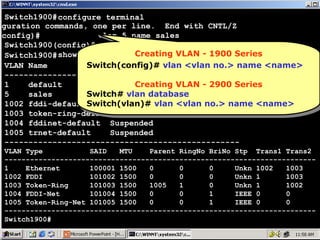
Creating VLAN --1900 Series
Switch1900# show vlan
Creating VLAN 1900 Series
VLAN Name
Status
Switch(config)# Ports <vlanno.> name <name>
Switch(config)#vlan <vlan no.> name <name>
vlan
------------------------------------------------1
default
Enabled
1-12, AUI, A, B
Creating VLAN --2900 Series
Creating VLAN 2900 Series
5
sales
Enabled
Switch# vlan database
1002 fddi-default Switch(vlan)# vlan <vlan no.> name <name>
Suspended
Switch(vlan)# vlan <vlan no.> name <name>
1003 token-ring-defau Suspended
1004 fddinet-default Suspended
1005 trnet-default
Suspended
------------------------------------------------VLAN Type
SAID
MTU
Parent RingNo BriNo Stp Trans1 Trans2
------------------------------------------------------------------------1
Ethernet
100001 1500
0
0
0
Unkn 1002
1003
1002 FDDI
101002 1500
0
0
0
Unkn 1
1003
1003 Token-Ring
101003 1500
1005
1
0
Unkn 1
1002
1004 FDDI-Net
101004 1500
0
0
1
IEEE 0
0
1005 Token-Ring-Net 101005 1500
0
0
1
IEEE 0
0
------------------------------------------------------------------------Switch1900#

71
Switch1900#configure terminal
iguration commands, one per line. End with CNTL/Z
interface ethernet 0/1
(config)#
Switch1900(config-if)# vlan-membership static 5
Switch1900(config-if)# exit
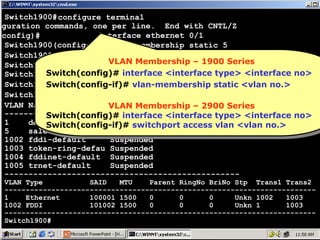
VLAN Membership – 1900 Series
VLAN Membership –
Switch1900(config)# interface ethernet 0/3 1900Series
Switch(config)# interface <interface type> <interface no>
Switch1900(config-if)# vlan-membership statictype><interface no>
Switch(config)# interface <interface 5
Switch1900(config-if)# ^Z vlan-membership static <vlan no.>
Switch(config-if)# vlan-membership static <vlan no.>
Switch(config-if)#
Switch1900# show vlan
VLAN Name
StatusMembership – 2900 Series
Ports
VLAN Membership – 2900 Series
VLAN
------------------------------------------------- <interface no>
Switch(config)# interface <interface type> <interface no>
Switch(config)# interface <interface type>
1
default
Enabled
2,4-12, AUI, A, B
Switch(config-if)# switchport access vlan <vlan no.>
5
sales
Enabled
1,3
1002 fddi-default
Suspended
1003 token-ring-defau Suspended
1004 fddinet-default Suspended
1005 trnet-default
Suspended
-------------------------------------------------

VLAN Type
SAID
MTU
Parent RingNo BriNo Stp Trans1 Trans2
------------------------------------------------------------------------1
Ethernet
100001 1500
0
0
0
Unkn 1002
1003
1002 FDDI
101002 1500
0
0
0
Unkn 1
1003
------------------------------------------------------------------------Switch1900#

72
Microsoft Windows 2000 [Version 5.00.2195]
(C) Copyright 1985-2000 Microsoft Corp.
C:> ping 192.168.20.2
pinging 192.168.20.2 with 32 bytes of data:
Request timed out.
Request timed out.
Request timed out.
Request timed out.
Ping statistics for 192.168.20.2:
Packets: Sent = 4, Received = 0, Lost = 4 (100% loss),
Approximate round trip times in milli-seconds:
Minimum = 0ms, Maximum = 0ms, Average = 0ms
C:> ping 192.168.20.3
pinging 192.168.20.3 with 32 bytes of data:
Reply from 192.168.20.3: bytes=32 time<10ms

TTL=255
TTL=255
TTL=255
TTL=255

Ping statistics for 192.168.20.3:
Packets: Sent = 4, Received = 4, Lost = 0 (0% loss),
Approximate round trip times in milli-seconds:
Minimum = 0ms, Maximum = 0ms, Average = 0ms
C:>

73
Microsoft Windows 2000 [Version 5.00.2195]
(C) Copyright 1985-2000 Microsoft Corp.
C:> ping 192.168.20.1
pinging 192.168.20.1 with 32 bytes of data:
Request timed out.
Request timed out.
Request timed out.
Request timed out.
Ping statistics for 192.168.20.1:
Packets: Sent = 4, Received = 0, Lost = 4 (100% loss),
Approximate round trip times in milli-seconds:
Minimum = 0ms, Maximum = 0ms, Average = 0ms
C:> ping 192.168.20.3
pinging 192.168.20.3 with 32 bytes of data:
Request timed out.
Request timed out.
Request timed out.
Request timed out.
Ping statistics for 192.168.20.3:
Packets: Sent = 4, Received = 0, Lost = 4 (100% loss),
Approximate round trip times in milli-seconds:
Minimum = 0ms, Maximum = 0ms, Average = 0ms
C:>

74
Microsoft Windows 2000 [Version 5.00.2195]
(C) Copyright 1985-2000 Microsoft Corp.
C:> ping 192.168.20.2
pinging 192.168.20.2 with 32 bytes of data:
Request timed out.
Request timed out.
Request timed out.
Request timed out.
Ping statistics for 192.168.20.2:
Packets: Sent = 4, Received = 0, Lost = 4 (100% loss),
Approximate round trip times in milli-seconds:
Minimum = 0ms, Maximum = 0ms, Average = 0ms
C:> ping 192.168.20.1
pinging 192.168.20.1 with 32 bytes of data:
Reply from 192.168.20.1: bytes=32 time<10ms

TTL=255
TTL=255
TTL=255
TTL=255

Ping statistics for 192.168.20.1:
Packets: Sent = 4, Received = 4, Lost = 0 (0% loss),
Approximate round trip times in milli-seconds:
Minimum = 0ms, Maximum = 0ms, Average = 0ms
C:>

75
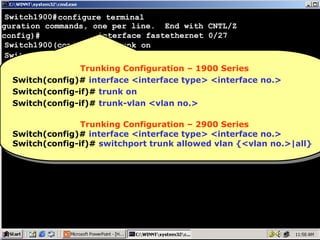
Switch1900#configure terminal
iguration commands, one per line. End with CNTL/Z
interface fastethernet 0/26
(config)#
Switch1900(config-if)# trunk on
Switch1900(config-if)# trunk-vlan 5
Switch1900(config-if)# trunk-vlan 6
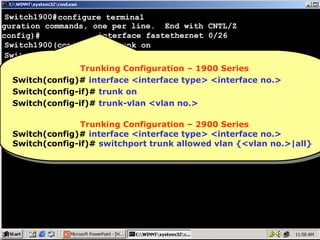
Trunking Configuration – 1900 Series
Switch1900(config-if)#
Switch(config)# interface <interface type> <interface no.>
Switch(config-if)# trunk on
Switch(config-if)# trunk-vlan <vlan no.>
Trunking Configuration – 2900 Series
Switch(config)# interface <interface type> <interface no.>
Switch(config-if)# switchport trunk allowed vlan {<vlan no.>|all}

76
Switch1900#configure terminal
iguration commands, one per line. End with CNTL/Z
interface fastethernet 0/27
(config)#
Switch1900(config-if)# trunk on
Switch1900(config-if)# trunk-vlan 5
Switch1900(config-if)# trunk-vlan 6
Trunking Configuration – 1900 Series
Switch1900(config-if)#
Switch(config)# interface <interface type> <interface no.>
Switch(config-if)# trunk on
Switch(config-if)# trunk-vlan <vlan no.>
Trunking Configuration – 2900 Series
Switch(config)# interface <interface type> <interface no.>
Switch(config-if)# switchport trunk allowed vlan {<vlan no.>|all}

77

Switching 2

  • 1.
  • 2.
    Console Connectivity • Connect arollover cable to the Switch console port (RJ-45 connector). • Connect the other end of the rollover cable to the RJ-45 to DB-9 adapter • Attach the female DB-9 adapter to a PC Serial Port. • Open emulation software on the PC. 2
  • 3.
    Emulation Software WINDOWS • Start Programs  Accessories  Communications  HyperTerminal  HyperTerminal. • Give the Connection Name & Select Any Icon • Select Serial (Com) Port where Switch is Connected. • In Port Settings  Click on Restore Defaults LINUX • # minicom -s 3
  • 4.
  • 5.
  • 6.
  • 7.
  • 8.
  • 9.
  • 10.
  • 11.
  • 12.
  • 13.
  • 14.
  • 15.
  • 16.
  • 17.
  • 18.
    Catalyst 1900 ManagementConsole Copyright (c) Cisco Systems, Inc. 1993-1999. All rights reserved. Enterprise Edition Software Ethernet Address: 00-D0-D3-74-ED-40 PCA Number: 73-3122-01 PCA Serial Number: FAB032632C9 Model Number: WS-C1912-EN System Serial Number: FAB0328V07D Power Supply S/N: APQ0313014N PCB Serial Number: FAB032632C9,73-3122-04 ------------------------------------------------1 user(s) now active on Management Console. User Interface Menu [M] [K] [I] [P] Menus Command Line IP Configuration Console Password Enter Selection: I 18
  • 19.
    Catalyst 1900 -IP Configuration Ethernet Address: 00-D0-D3-74-ED-40 ---------------------- Settings ----------------------[I] IP address 0.0.0.0 [S] Subnet mask 0.0.0.0 [G] Default gateway 0.0.0.0 [V] Management VLAN 1 [M] IP address of DNS server 1 0.0.0.0 [N] IP address of DNS server 2 0.0.0.0 [D] Domain name [R] Use Routing Information Protocol Enabled -------------------- Actions -------------------------[P] Ping [C] Clear cached DNS entries [X] Exit to previous menu I Enter Selection: 19
  • 20.
    [D] Domain name [R]Use Routing Information Protocol Enabled -------------------- Actions -------------------------[P] Ping [C] Clear cached DNS entries [X] Exit to previous menu Enter Selection: I This command assigns an administrative IP address to this switch. The new address will take effect immediately. If no IP address is assigned (or if the IP address is removed by setting it to 0.0.0.0), and the switch is connected to a DHCP server, the DHCP server may automatically assign an address to the switch. Enter administrative IP address in dotted format (nnn.nnn.nnn.nnn) Current setting ===> New setting ===> 0. 0. 0. 0 192.168.20.65 20
  • 21.
    Catalyst 1900 -IP Configuration Ethernet Address: 00-D0-D3-74-ED-40 ---------------------- Settings ---------------------------[I] IP address 192.168.20.65 [S] Subnet mask 0.0.0.0 [G] Default gateway 0.0.0.0 [V] Management VLAN 1 [M] IP address of DNS server 1 0.0.0.0 [N] IP address of DNS server 2 0.0.0.0 [D] Domain name [R] Use Routing Information Protocol Enabled -------------------- Actions -----------------------------[P] Ping [C] Clear cached DNS entries [X] Exit to previous menu S Enter Selection: 21
  • 22.
    [M] IP addressof DNS server 1 [N] IP address of DNS server 2 [D] Domain name 0.0.0.0 0.0.0.0 [R] Use Routing Information Protocol Enabled -------------------- Actions -------------------------[P] Ping [C] Clear cached DNS entries [X] Exit to previous menu Enter Selection: I This command defines the subnet mask for the IP address set by the [I] IP Address command. Enter IP subnet mask in dotted quad format (nnn.nnn.nnn.nnn): Current setting ===> New setting 0. 0. 0. 0 255.255.255.0 ===> 22
  • 23.
    Catalyst 1900 -IP Configuration Ethernet Address: 00-D0-D3-74-ED-40 ---------------------- Settings ---------------------------[I] IP address 192.168.20.65 [S] Subnet mask 255.255.255.0 [G] Default gateway 0.0.0.0 [V] Management VLAN 1 [M] IP address of DNS server 1 0.0.0.0 [N] IP address of DNS server 2 0.0.0.0 [D] Domain name [R] Use Routing Information Protocol Enabled -------------------- Actions -----------------------------[P] Ping [C] Clear cached DNS entries [X] Exit to previous menu X Enter Selection: 23
  • 24.
    Catalyst 1900 ManagementConsole Copyright (c) Cisco Systems, Inc. 1993-1999. All rights reserved. Enterprise Edition Software Ethernet Address: 00-D0-D3-74-ED-40 PCA Number: 73-3122-01 PCA Serial Number: FAB032632C9 Model Number: WS-C1912-EN System Serial Number: FAB0328V07D Power Supply S/N: APQ0313014N PCB Serial Number: FAB032632C9,73-3122-04 ------------------------------------------------1 user(s) now active on Management Console. User Interface Menu [M] [K] [I] [P] Menus Command Line IP Configuration Console Password Enter Selection: P 24
  • 25.
    User Interface Menu [M] [K] [I] [P] Menus CommandLine IP Configuration Console Password Enter Selection: P The Management Console password can help prevent unauthorized accesses. When specifying a password, use a minimum of 4 characters and maximum of 8 characters. The password is case insensitive and can contain any character with a legal keyboard representation. For the user's protection, the password must be entered the same way twice before it will be accepted. Enter new password: Reenter to verify new password: **** **** Password modified Press any key to continue. 25
  • 26.
    Catalyst 1900 ManagementConsole Copyright (c) Cisco Systems, Inc. 1993-1999. All rights reserved. Enterprise Edition Software Ethernet Address: 00-D0-D3-74-ED-40 PCA Number: 73-3122-01 PCA Serial Number: FAB032632C9 Model Number: WS-C1912-EN System Serial Number: FAB0328V07D Power Supply S/N: APQ0313014N PCB Serial Number: FAB032632C9,73-3122-04 ------------------------------------------------1 user(s) now active on Management Console. User Interface Menu [M] Menus [K] Command Line Enter Selection: M Enter password: **** 26
  • 27.
    Catalyst 1900 -Main Menu [C] [S] [N] [P] [A] [D] [M] [V] [R] [F] [I] [U] [H] [K] Console Settings System Network Management Port Configuration Port Addressing Port Statistics Detail Monitoring Virtual LAN Multicast Registration Firmware RS-232 Interface Usage Summaries Help Command Line [X] Exit Management Console Enter Selection: S 27
  • 28.
    Catalyst 1900 -System Configuration System Revision: 5 Address Capacity: 1024 System UpTime: 0day(s) 00hour(s) 06minute(s) 58second(s) ---------------------- Settings ------------------------------[N] Name of system Switch [C] Contact name [L] Location [S] Switching mode FragmentFree [U] Use of store-and-forward for multicast Disabled [A] Action upon address violation Suspend [G] Generate alert on address violation Enabled [I] Address aging time 300 second(s) [P] Network port None [H] Half duplex back pressure (10-mbps ports) Disabled [E] Enhanced congestion control (10-mbps ports) Disabled -------------------- Actions --------------------------------[R] Reset system [F] Reset to factory defaults S [V] Reset VTP to factory def. [T] Reset to enable Bridge Group -------------------- Related Menus ---------------------------[B] Broadcast storm control [X] Exit to Main Menu 28 Enter Selection:
  • 29.
    [H] Half duplexback pressure (10-mbps ports) Disabled [E] Enhanced congestion control (10-mbps ports) Disabled -------------------- Actions -------------------------------[R] Reset system [F] Reset to factory defaults [V] Reset VTP to factory def. [T] Reset to enable Bridge Group -------------------- Related Menus ---------------------------[B] Broadcast storm control [X] Exit to Main Menu Enter Selection: FragmentFree switching mode reduces bridge delay by making the forwarding decision after 64 bytes have been received. In contrast, Store-and-Forward switching mode waits until the entire frame has been received before the forwarding decision is made. This command sets the switching mode. Select Store-and-Forward[1], or FragmentFree[2]: Current setting ===> FragmentFree New setting ===> Store-and-Forward 29
  • 30.
    Catalyst 1900 -System Configuration System Revision: 5 Address Capacity: 1024 System UpTime: 0day(s) 00hour(s) 06minute(s) 58second(s) ---------------------- Settings ------------------------------[N] Name of system Switch [C] Contact name [L] Location [S] Switching mode Store & Forward [U] Use of store-and-forward for multicast Disabled [A] Action upon address violation Suspend [G] Generate alert on address violation Enabled [I] Address aging time 300 second(s) [P] Network port None [H] Half duplex back pressure (10-mbps ports) Disabled [E] Enhanced congestion control (10-mbps ports) Disabled -------------------- Actions --------------------------------[R] Reset system [F] Reset to factory defaults [V] Reset VTP to factory def. [T] Reset to enable Bridge Group X -------------------- Related Menus ---------------------------[B] Broadcast storm control [X] Exit to Main Menu Enter Selection: 30
  • 31.
    Catalyst 1900 -Main Menu [C] [S] [N] [P] [A] [D] [M] [V] [R] [F] [I] [U] [H] [K] Console Settings System Network Management Port Configuration Port Addressing Port Statistics Detail Monitoring Virtual LAN Multicast Registration Firmware RS-232 Interface Usage Summaries Help Command Line [X] Exit Management Console Enter Selection: X 31
  • 32.
    [N] [P] [A] [D] [M] [V] [R] [F] [I] [U] [H] [K] Network Management Port Configuration PortAddressing Port Statistics Detail Monitoring Virtual LAN Multicast Registration Firmware RS-232 Interface Usage Summaries Help Command Line [X] Exit Management Console Enter Selection: X This command will exit and log you out of the Management Console. Exit Management Console, [Y]es or [N]o? Yes 32
  • 33.
    Catalyst 1900 ManagementConsole Copyright (c) Cisco Systems, Inc. 1993-1999. All rights reserved. Enterprise Edition Software Ethernet Address: 00-D0-D3-74-ED-40 PCA Number: 73-3122-01 PCA Serial Number: FAB032632C9 Model Number: WS-C1912-EN System Serial Number: FAB0328V07D Power Supply S/N: APQ0313014N PCB Serial Number: FAB032632C9,73-3122-04 ------------------------------------------------1 user(s) now active on Management Console. User Interface Menu [M] Menus [K] Command Line Enter Selection: K 33
  • 34.
    CLI session withthe switch is open. To end the CLI session, enter [Exit]. User Mode User Mode > enable ::Commands :: Commands Privileged Mode # show running-config Privileged Mode ping, enable ping, enable ::Commands :: Commands Building configuration... show, copy, configure terminal, show, copy, configure terminal, Current configuration: reload, reload, ! ! ! ip address 192.168.20.65 255.255.255.0 ! ! ! ! enable password level 15 "ZOOM" ! ! --More-- 34
  • 35.
    interface Ethernet 0/1 ! interfaceEthernet 0/2 ! interface Ethernet 0/3 ! interface Ethernet 0/4 ! interface Ethernet 0/5 ! interface Ethernet 0/6 ! interface Ethernet 0/7 ! --More-- 35
  • 36.
    interface Ethernet 0/8 ! interfaceEthernet 0/9 ! interface Ethernet 0/10 ! interface Ethernet 0/11 ! interface Ethernet 0/12 ! interface Ethernet 0/25 ! interface FastEthernet 0/26 ! --More-- 36
  • 37.
    ! interface FastEthernet 0/27 ! ! lineconsole end # show mac-address-table Number of permanent addresses : 0 Number of restricted static addresses : 0 Number of dynamic addresses : 20 Address Dest Interface Type Source Interface -----------------------------------------------------------------000F.90C2.2A18 FastEthernet 0/27 Dynamic All 0000.21CB.8BD2 Ethernet 0/5 Dynamic All 0010.7B7F.A0DA FastEthernet 0/27 Dynamic All 00E0.4C60.F295 Ethernet 0/4 Dynamic All 0050.736C.20D2 FastEthernet 0/27 Dynamic All 0080.AD83.ED24 Ethernet 0/8 Dynamic All 0000.2114.76BF Ethernet 0/2 Dynamic All 000B.2B0D.EDE4 Ethernet 0/11 Dynamic All 37
  • 38.
    # configure terminal Enterconfiguration commands, Configuration Mode with CNTL/Z. Global Configuration Mode Global one per line. End (config)# hostname Switch1900 :Commands :: : Commands hostname, ip 192.168.20.65 255.255.255.0 Switch1900(config)# ip address address, enable secret hostname, ip address, enable secret Switch1900(config)# enable secret zoom Switch1900(config)# ^Z Switch1900# 38
  • 39.
    Visual Switch ManagerAccess E0 Con 0 LAN - 192.168.1.0/24 39
  • 40.
  • 41.
  • 42.
  • 43.
  • 44.
  • 45.
  • 46.
  • 47.
  • 48.
    Virtual LAN • ALayer 2 Security • Divides a Single Broadcast domain into Multiple Broadcast domains. • By default all ports of the switch are in VLAN1 . This VLAN1 is known as Administrative VLAN or Management VLAN • VLAN can be created from 2 – 1001 • Can be Configured on a Manageable switch only • 2 Types of VLAN Membership – Static VLAN – Dynamic VLAN 48
  • 49.
    Static VLAN • StaticVLAN’s are based on port numbers • Need to manually assign a port on a switch to a VLAN • Also called Port-Based VLANs • It can be a member of single VLAN and not multiple VLAN’s 49
  • 50.
    Dynamic VLAN • DynamicVLAN’s are based on the MAC address of a PC • Switch automatically assigns the port to a VLAN • Each port can be a member of multiple VLAN’s • For Dynamic VLAN configuration, a software called VMPS( VLAN Membership Policy Server) is needed 50
  • 51.
    Important Notes • ThePC port from which you Telnet to the switch must be in a Default VLAN • If all the ports are in different VLAN’s ,can you Telnet to the switch? Answer : NO • So to remove the VLAN’s enter through console port 51
  • 52.
    VLAN - LabDiagram Default VLAN i.e. VLAN No. 1 192.168.20.1 192.168.20.2 192.168.20.3 192.168.20.6 192.168.20.5 192.168.20.4 SWITCH 192.168.20.7 192.168.20.8 192.168.20.9 52
  • 53.
    VLAN - LabDiagram Sales Vlan no. 5 192.168.20.1 Sales Vlan no. 5 192.168.20.2 192.168.20.3 SWITCH 53
  • 54.
    VLAN - Configuration Sales Vlanno. 5 192.168.20.1 Sales Vlan no. 5 192.168.20.2 192.168.20.3 SWITCH 54
  • 55.
    VLAN - LabDiagram Sales Vlan no. 5 192.168.20.1 Sales Vlan no. 5 192.168.20.2 192.168.20.3 SWITCH 55
  • 56.
    Trunking Configuration Sales Vlan no.5 192.168.20.1 Marketing Vlan no. 6 192.168.20.2 192.168.20.3 SWITCH Sales Vlan no. 5 192.168.20.6 Marketing Vlan no. 6 192.168.20.5 192.168.20.4 56 Fa0/26 Fa0/27 SWITCH
  • 57.
    Virtual LAN TrunkingProtocol • VTP is a CISCO proprietary protocol • used to share the VLAN configurations with multiple switches. • Switches are connected using Fast Ethernet ports 57
  • 58.
    VTP Modes VTP Modeare of three types : • Server Mode – A Switch configured in Server mode can Add , Modify and Delete VLAN’s – A Default VTP mode for all switches • Client Mode – A switch configured in Client mode cannot Add , Modify and Delete its VLAN configurations – Doesn’t store its VLAN configuration information in the NVRAM. Instead , learns it from the server every time it boots up • Transparent Mode – A switch configured in a Transparent Mode can Add , Modify and Delete VLAN configurations. Changes in one 58 transparent switch will not affect any other switch.
  • 59.
    Spanning Tree Protocol •Spanning Tree Protocol (STP) uses Spanning Tree Algorithm to avoid the Switching loops in layer-2 devices (bridges or switches). • STP works when multiple switches are used with redundant links avoiding Broadcast Storms, Multiple Frame Copies & Database instability. 59
  • 60.
    STP Terminology • RootBridge – The bridge with the Best (Lowest) ID. – Out of all the switches in the network , one is elected as a root bridge that becomes the focal point in the network. • BPDU – All switches exchange information through what is called as Bridge Protocol Data Units (BPDUs) – BPDUs contain a lot of information to help the switches determine the topology and any loops that result from that topology. – BPDUs are sent every 2 sec 60
  • 61.
    STP Terminology • BridgeID – Each switch has a unique identifier called a Bridge ID or Switch ID – Bridge ID = Priority + MAC address of the switch – When a switch advertises a BPDU , they place their switch id in these BPDUs. • Non-Root bridge – All Switches other than the Root Bridge are Non-Root Bridges • Root port – The link directly connected to the root bridge, or the shortest path to the root bridge is a root port. The port with the least cost to the root bridge 61
  • 62.
    STP Terminology • Designatedport – Either a root port or a port that has been determined as having the best (lower) cost – A designated port will be marked as a forwarding port. • Forwarding port – port that forwards frames • Blocked port – port that will not forward frames , in order to prevent loops. However, a blocked port will always listen to BPDUs. 62
  • 63.
    STP - PortStates • Blocking • Listening • Learning • Forwarding 63
  • 64.
  • 65.
    Microsoft Windows 2000[Version 5.00.2195] (C) Copyright 1985-2000 Microsoft Corp. C:> ping 192.168.20.2 pinging 192.168.20.2 with 32 bytes of data: Reply from 192.168.20.2: bytes=32 time<10ms Reply from 192.168.20.2: bytes=32 time<10ms Reply from 192.168.20.2: bytes=32 time<10ms Reply from 192.168.20.2: bytes=32 time<10ms TTL=255 TTL=255 TTL=255 TTL=255 Ping statistics for 192.168.20.2: Packets: Sent = 4, Received = 4, Lost = 0 (0% loss), Approximate round trip times in milli-seconds: Minimum = 0ms, Maximum = 0ms, Average = 0ms C:> ping 192.168.20.3 pinging 192.168.20.3 with 32 bytes of data: Reply from 192.168.20.3: bytes=32 time<10ms Reply from 192.168.20.3: bytes=32 time<10ms Reply from 192.168.20.3: bytes=32 time<10ms Reply from 192.168.20.3: bytes=32 time<10ms TTL=255 TTL=255 TTL=255 TTL=255 Ping statistics for 192.168.20.3: Packets: Sent = 4, Received = 4, Lost = 0 (0% loss), Approximate round trip times in milli-seconds: Minimum = 0ms, Maximum = 0ms, Average = 0ms C:> 65
  • 66.
    Microsoft Windows 2000[Version 5.00.2195] (C) Copyright 1985-2000 Microsoft Corp. C:> ping 192.168.20.1 pinging 192.168.20.1 with 32 bytes of data: Reply from 192.168.20.1: bytes=32 time<10ms Reply from 192.168.20.1: bytes=32 time<10ms Reply from 192.168.20.1: bytes=32 time<10ms Reply from 192.168.20.1: bytes=32 time<10ms TTL=255 TTL=255 TTL=255 TTL=255 Ping statistics for 192.168.20.1: Packets: Sent = 4, Received = 4, Lost = 0 (0% loss), Approximate round trip times in milli-seconds: Minimum = 0ms, Maximum = 0ms, Average = 0ms C:> ping 192.168.20.3 pinging 192.168.20.3 with 32 bytes of data: Reply from 192.168.20.3: bytes=32 time<10ms Reply from 192.168.20.3: bytes=32 time<10ms Reply from 192.168.20.3: bytes=32 time<10ms Reply from 192.168.20.3: bytes=32 time<10ms TTL=255 TTL=255 TTL=255 TTL=255 Ping statistics for 192.168.20.3: Packets: Sent = 4, Received = 4, Lost = 0 (0% loss), Approximate round trip times in milli-seconds: Minimum = 0ms, Maximum = 0ms, Average = 0ms C:> 66
  • 67.
    Microsoft Windows 2000[Version 5.00.2195] (C) Copyright 1985-2000 Microsoft Corp. C:> ping 192.168.20.1 pinging 192.168.20.1 with 32 bytes of data: Reply from 192.168.20.1: bytes=32 time<10ms Reply from 192.168.20.1: bytes=32 time<10ms Reply from 192.168.20.1: bytes=32 time<10ms Reply from 192.168.20.1: bytes=32 time<10ms TTL=255 TTL=255 TTL=255 TTL=255 Ping statistics for 192.168.20.1: Packets: Sent = 4, Received = 4, Lost = 0 (0% loss), Approximate round trip times in milli-seconds: Minimum = 0ms, Maximum = 0ms, Average = 0ms C:> ping 192.168.20.2 pinging 192.168.20.2 with 32 bytes of data: Reply from 192.168.20.2: bytes=32 time<10ms Reply from 192.168.20.2: bytes=32 time<10ms Reply from 192.168.20.2: bytes=32 time<10ms Reply from 192.168.20.2: bytes=32 time<10ms TTL=255 TTL=255 TTL=255 TTL=255 Ping statistics for 192.168.20.2: Packets: Sent = 4, Received = 4, Lost = 0 (0% loss), Approximate round trip times in milli-seconds: Minimum = 0ms, Maximum = 0ms, Average = 0ms C:> 67
  • 68.
    Microsoft Windows 2000[Version 5.00.2195] (C) Copyright 1985-2000 Microsoft Corp. C:> telnet 192.168.20.65 Connecting ..... 68
  • 69.
    Catalyst 1900 ManagementConsole Copyright (c) Cisco Systems, Inc. 1993-1999. All rights reserved. Enterprise Edition Software Ethernet Address: 00-D0-D3-74-ED-40 PCA Number: 73-3122-01 PCA Serial Number: FAB032632C9 Model Number: WS-C1912-EN System Serial Number: FAB0328V07D Power Supply S/N: APQ0313014N PCB Serial Number: FAB032632C9,73-3122-04 ------------------------------------------------1 user(s) now active on Management Console. User Interface Menu [M] Menus [K] Command Line Enter Selection: K Enter password: **** 69
  • 70.
    CLI session withthe switch is open. To end the CLI session, enter [Exit]. Switch1900> enable Switch1900# show vlan VLAN Name Status Ports ------------------------------------------------1 default Enabled 1-12, AUI, A, B 1002 fddi-default Suspended 1003 token-ring-defau Suspended 1004 fddinet-default Suspended 1005 trnet-default Suspended ------------------------------------------------VLAN Type SAID MTU Parent RingNo BriNo Stp Trans1 Trans2 ------------------------------------------------------------------------1 Ethernet 100001 1500 0 0 0 Unkn 1002 1003 1002 FDDI 101002 1500 0 0 0 Unkn 1 1003 1003 Token-Ring 101003 1500 1005 1 0 Unkn 1 1002 1004 FDDI-Net 101004 1500 0 0 1 IEEE 0 0 1005 Token-Ring-Net 101005 1500 0 0 1 IEEE 0 0 ------------------------------------------------------------------------Switch1900# 70
  • 71.
    Switch1900#configure terminal iguration commands,one per line. End with CNTL/Z vlan 5 name sales (config)# Switch1900(config)# ^Z Creating VLAN --1900 Series Switch1900# show vlan Creating VLAN 1900 Series VLAN Name Status Switch(config)# Ports <vlanno.> name <name> Switch(config)#vlan <vlan no.> name <name> vlan ------------------------------------------------1 default Enabled 1-12, AUI, A, B Creating VLAN --2900 Series Creating VLAN 2900 Series 5 sales Enabled Switch# vlan database Switch# vlan database 1002 fddi-default Switch(vlan)# vlan <vlan no.> name <name> Suspended Switch(vlan)# vlan <vlan no.> name <name> 1003 token-ring-defau Suspended 1004 fddinet-default Suspended 1005 trnet-default Suspended ------------------------------------------------VLAN Type SAID MTU Parent RingNo BriNo Stp Trans1 Trans2 ------------------------------------------------------------------------1 Ethernet 100001 1500 0 0 0 Unkn 1002 1003 1002 FDDI 101002 1500 0 0 0 Unkn 1 1003 1003 Token-Ring 101003 1500 1005 1 0 Unkn 1 1002 1004 FDDI-Net 101004 1500 0 0 1 IEEE 0 0 1005 Token-Ring-Net 101005 1500 0 0 1 IEEE 0 0 ------------------------------------------------------------------------Switch1900# 71
  • 72.
    Switch1900#configure terminal iguration commands,one per line. End with CNTL/Z interface ethernet 0/1 (config)# Switch1900(config-if)# vlan-membership static 5 Switch1900(config-if)# exit VLAN Membership – 1900 Series VLAN Membership – Switch1900(config)# interface ethernet 0/3 1900Series Switch(config)# interface <interface type> <interface no> Switch1900(config-if)# vlan-membership statictype><interface no> Switch(config)# interface <interface 5 Switch1900(config-if)# ^Z vlan-membership static <vlan no.> Switch(config-if)# vlan-membership static <vlan no.> Switch(config-if)# Switch1900# show vlan VLAN Name StatusMembership – 2900 Series Ports VLAN Membership – 2900 Series VLAN ------------------------------------------------- <interface no> Switch(config)# interface <interface type> <interface no> Switch(config)# interface <interface type> 1 default Enabled 2,4-12, AUI, A, B Switch(config-if)# switchport access vlan <vlan no.> Switch(config-if)# switchport access vlan <vlan no.> 5 sales Enabled 1,3 1002 fddi-default Suspended 1003 token-ring-defau Suspended 1004 fddinet-default Suspended 1005 trnet-default Suspended ------------------------------------------------- VLAN Type SAID MTU Parent RingNo BriNo Stp Trans1 Trans2 ------------------------------------------------------------------------1 Ethernet 100001 1500 0 0 0 Unkn 1002 1003 1002 FDDI 101002 1500 0 0 0 Unkn 1 1003 ------------------------------------------------------------------------Switch1900# 72
  • 73.
    Microsoft Windows 2000[Version 5.00.2195] (C) Copyright 1985-2000 Microsoft Corp. C:> ping 192.168.20.2 pinging 192.168.20.2 with 32 bytes of data: Request timed out. Request timed out. Request timed out. Request timed out. Ping statistics for 192.168.20.2: Packets: Sent = 4, Received = 0, Lost = 4 (100% loss), Approximate round trip times in milli-seconds: Minimum = 0ms, Maximum = 0ms, Average = 0ms C:> ping 192.168.20.3 pinging 192.168.20.3 with 32 bytes of data: Reply from 192.168.20.3: bytes=32 time<10ms Reply from 192.168.20.3: bytes=32 time<10ms Reply from 192.168.20.3: bytes=32 time<10ms Reply from 192.168.20.3: bytes=32 time<10ms TTL=255 TTL=255 TTL=255 TTL=255 Ping statistics for 192.168.20.3: Packets: Sent = 4, Received = 4, Lost = 0 (0% loss), Approximate round trip times in milli-seconds: Minimum = 0ms, Maximum = 0ms, Average = 0ms C:> 73
  • 74.
    Microsoft Windows 2000[Version 5.00.2195] (C) Copyright 1985-2000 Microsoft Corp. C:> ping 192.168.20.1 pinging 192.168.20.1 with 32 bytes of data: Request timed out. Request timed out. Request timed out. Request timed out. Ping statistics for 192.168.20.1: Packets: Sent = 4, Received = 0, Lost = 4 (100% loss), Approximate round trip times in milli-seconds: Minimum = 0ms, Maximum = 0ms, Average = 0ms C:> ping 192.168.20.3 pinging 192.168.20.3 with 32 bytes of data: Request timed out. Request timed out. Request timed out. Request timed out. Ping statistics for 192.168.20.3: Packets: Sent = 4, Received = 0, Lost = 4 (100% loss), Approximate round trip times in milli-seconds: Minimum = 0ms, Maximum = 0ms, Average = 0ms C:> 74
  • 75.
    Microsoft Windows 2000[Version 5.00.2195] (C) Copyright 1985-2000 Microsoft Corp. C:> ping 192.168.20.2 pinging 192.168.20.2 with 32 bytes of data: Request timed out. Request timed out. Request timed out. Request timed out. Ping statistics for 192.168.20.2: Packets: Sent = 4, Received = 0, Lost = 4 (100% loss), Approximate round trip times in milli-seconds: Minimum = 0ms, Maximum = 0ms, Average = 0ms C:> ping 192.168.20.1 pinging 192.168.20.1 with 32 bytes of data: Reply from 192.168.20.1: bytes=32 time<10ms Reply from 192.168.20.1: bytes=32 time<10ms Reply from 192.168.20.1: bytes=32 time<10ms Reply from 192.168.20.1: bytes=32 time<10ms TTL=255 TTL=255 TTL=255 TTL=255 Ping statistics for 192.168.20.1: Packets: Sent = 4, Received = 4, Lost = 0 (0% loss), Approximate round trip times in milli-seconds: Minimum = 0ms, Maximum = 0ms, Average = 0ms C:> 75
  • 76.
    Switch1900#configure terminal iguration commands,one per line. End with CNTL/Z interface fastethernet 0/26 (config)# Switch1900(config-if)# trunk on Switch1900(config-if)# trunk-vlan 5 Switch1900(config-if)# trunk-vlan 6 Trunking Configuration – 1900 Series Trunking Configuration – 1900 Series Switch1900(config-if)# Switch(config)# interface <interface type> <interface no.> Switch(config)# interface <interface type> <interface no.> Switch(config-if)# trunk on Switch(config-if)# trunk on Switch(config-if)# trunk-vlan <vlan no.> Switch(config-if)# trunk-vlan <vlan no.> Trunking Configuration – 2900 Series Trunking Configuration – 2900 Series Switch(config)# interface <interface type> <interface no.> Switch(config)# interface <interface type> <interface no.> Switch(config-if)# switchport trunk allowed vlan {<vlan no.>|all} Switch(config-if)# switchport trunk allowed vlan {<vlan no.>|all} 76
  • 77.
    Switch1900#configure terminal iguration commands,one per line. End with CNTL/Z interface fastethernet 0/27 (config)# Switch1900(config-if)# trunk on Switch1900(config-if)# trunk-vlan 5 Switch1900(config-if)# trunk-vlan 6 Trunking Configuration – 1900 Series Trunking Configuration – 1900 Series Switch1900(config-if)# Switch(config)# interface <interface type> <interface no.> Switch(config)# interface <interface type> <interface no.> Switch(config-if)# trunk on Switch(config-if)# trunk on Switch(config-if)# trunk-vlan <vlan no.> Switch(config-if)# trunk-vlan <vlan no.> Trunking Configuration – 2900 Series Trunking Configuration – 2900 Series Switch(config)# interface <interface type> <interface no.> Switch(config)# interface <interface type> <interface no.> Switch(config-if)# switchport trunk allowed vlan {<vlan no.>|all} Switch(config-if)# switchport trunk allowed vlan {<vlan no.>|all} 77