1
IP Addressing

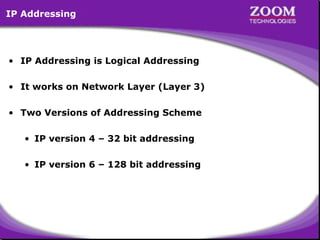
• IP Addressing is Logical Addressing
• It works on Network Layer (Layer 3)
• Two Versions of Addressing Scheme
• IP version 4 – 32 bit addressing
• IP version 6 – 128 bit addressing

2
IP version 4

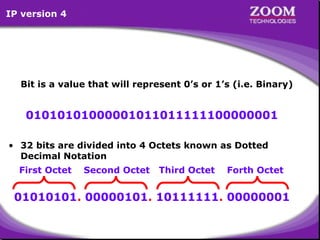
Bit is a value that will represent 0’s or 1’s (i.e. Binary)

01010101000001011011111100000001
• 32 bits are divided into 4 Octets known as Dotted
Decimal Notation
First Octet

Second Octet

Third Octet

Forth Octet

01010101. 00000101. 10111111. 00000001
3
IP version 6

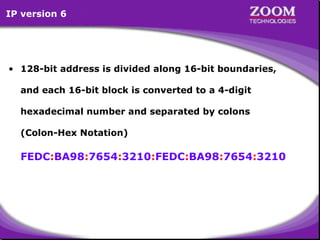
• 128-bit address is divided along 16-bit boundaries,
and each 16-bit block is converted to a 4-digit
hexadecimal number and separated by colons
(Colon-Hex Notation)

FEDC:BA98:7654:3210:FEDC:BA98:7654:3210

4
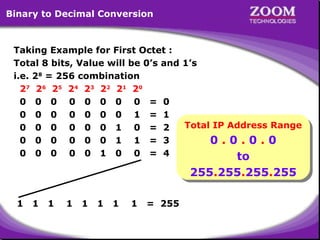
Binary to Decimal Conversion

Taking Example for First Octet :
Total 8 bits, Value will be 0’s and 1’s
i.e. 28 = 256 combination
2 7 2 6 25 24 2 3 2 2 21 2 0
0 0 0 0 0 0 0 0 = 0
0 0 0 0 0 0 0 1 = 1
Total IP Address Range
0 0 0 0 0 0 1 0 = 2
Total IP Address Range
0 0 0 0 0 0 1 1 = 3
0 .. 0 .. 0 .. 0
0 0 0 0
0 0 0 0 0 1 0 0 = 4
to

to
255.255.255.255
255.255.255.255

1

1

1

1

1

1

1

1

= 255

5
IP Address Classes

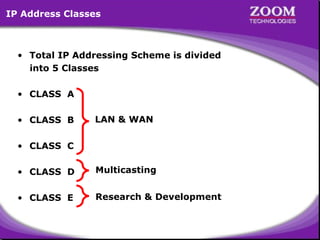
• Total IP Addressing Scheme is divided
into 5 Classes
• CLASS A
• CLASS B

LAN & WAN

• CLASS C
• CLASS D

Multicasting

• CLASS E

Research & Development

6
Priority Bit Concept
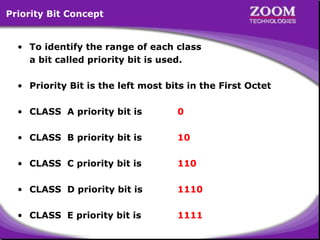
• To identify the range of each class
a bit called priority bit is used.
• Priority Bit is the left most bits in the First Octet
• CLASS A priority bit is

0

• CLASS B priority bit is

10

• CLASS C priority bit is

110

• CLASS D priority bit is

1110

• CLASS E priority bit is

1111

7
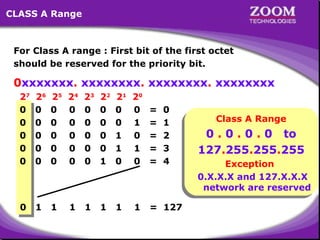
CLASS A Range

For Class A range : First bit of the first octet
should be reserved for the priority bit.

0xxxxxxx. xxxxxxxx. xxxxxxxx. xxxxxxxx
27
0
0
0
0
0

26
0
0
0
0
0

25
0
0
0
0
0

24
0
0
0
0
0

23
0
0
0
0
0

22
0
0
0
0
1

21
0
0
1
1
0

20
0
1
0
1
0

=
=
=
=
=

0

1

1

1

1

1

1

1

= 127

0
1
2
3
4

Class A Range
Class A Range

0 0 0 0 to
0 .. 0 .. 0 .. 0 to
127.255.255.255
127.255.255.255

Exception
Exception
0.X.X.X and 127.X.X.X
network are reserved

8
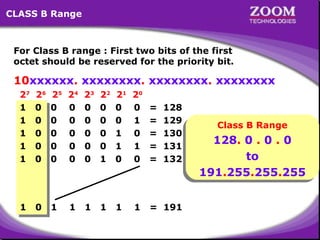
CLASS B Range

For Class B range : First two bits of the first
octet should be reserved for the priority bit.

10xxxxxx. xxxxxxxx. xxxxxxxx. xxxxxxxx
27
1
1
1
1
1

26
0
0
0
0
0

25
0
0
0
0
0

24
0
0
0
0
0

23
0
0
0
0
0

22
0
0
0
0
1

21
0
0
1
1
0

20
0
1
0
1
0

=
=
=
=
=

1

0

1

1

1

1

1

1

= 191

128
129
130
131
132

Class B Range
Class B Range

128. 0 0 0
128. 0 .. 0 .. 0
to
to
191.255.255.255
191.255.255.255

9
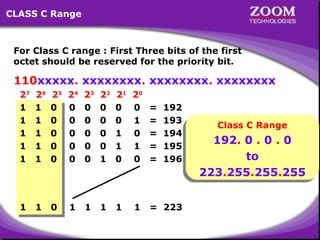
CLASS C Range

For Class C range : First Three bits of the first
octet should be reserved for the priority bit.

110xxxxx. xxxxxxxx. xxxxxxxx. xxxxxxxx
27
1
1
1
1
1

26
1
1
1
1
1

25
0
0
0
0
0

24
0
0
0
0
0

23
0
0
0
0
0

22
0
0
0
0
1

21
0
0
1
1
0

20
0
1
0
1
0

=
=
=
=
=

1

1

0

1

1

1

1

1

= 223

192
193
194
195
196

Class C Range
Class C Range

192. 0 0 0
192. 0 .. 0 .. 0
to
to
223.255.255.255
223.255.255.255

10
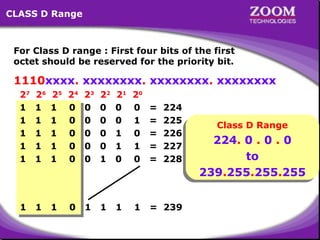
CLASS D Range

For Class D range : First four bits of the first
octet should be reserved for the priority bit.

1110xxxx. xxxxxxxx. xxxxxxxx. xxxxxxxx
27
1
1
1
1
1

26
1
1
1
1
1

25
1
1
1
1
1

24
0
0
0
0
0

23
0
0
0
0
0

22
0
0
0
0
1

21
0
0
1
1
0

20
0
1
0
1
0

=
=
=
=
=

1

1

1

0

1

1

1

1

= 239

224
225
226
227
228

Class D Range
Class D Range

224. 0 0 0
224. 0 .. 0 .. 0
to
to
239.255.255.255
239.255.255.255

11
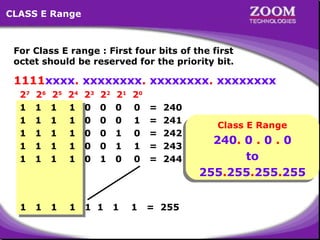
CLASS E Range

For Class E range : First four bits of the first
octet should be reserved for the priority bit.

1111xxxx. xxxxxxxx. xxxxxxxx. xxxxxxxx
27
1
1
1
1
1

26
1
1
1
1
1

25
1
1
1
1
1

24
1
1
1
1
1

23
0
0
0
0
0

22
0
0
0
0
1

1

1

1

1

1 1

21
0
0
1
1
0

1

20
0
1
0
1
0

1

=
=
=
=
=

240
241
242
243
244

Class E Range
Class E Range

240. 0 0 0
240. 0 .. 0 .. 0
to
to
255.255.255.255
255.255.255.255

= 255

12
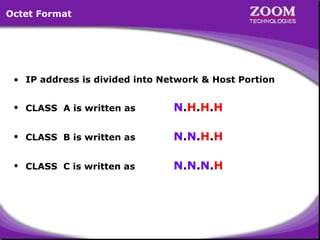
Octet Format

• IP address is divided into Network & Host Portion
• CLASS A is written as

N.H.H.H

• CLASS B is written as

N.N.H.H

• CLASS C is written as

N.N.N.H

13
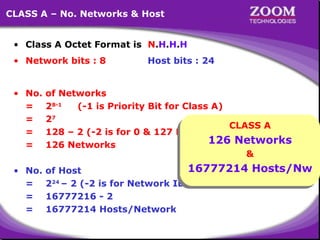
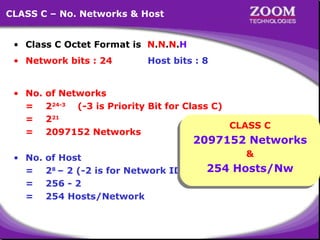
CLASS A – No. Networks & Host
• Class A Octet Format is N.H.H.H
• Network bits : 8
• No.
=
=
=
=
• No.
=
=
=

Host bits : 24

of Networks
28-1
(-1 is Priority Bit for Class A)
27
CLASS A
128 – 2 (-2 is for 0 & 127 Network) CLASS A
126 Networks
126 Networks
126 Networks
&
&

16777214 Hosts/Nw
of Host
16777214 Hosts/Nw
224 – 2 (-2 is for Network ID & Broadcast ID)
16777216 - 2
16777214 Hosts/Network
14
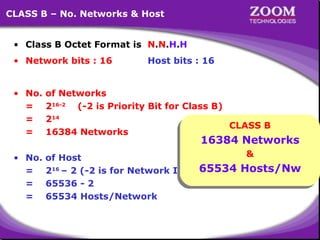
CLASS B – No. Networks & Host
• Class B Octet Format is N.N.H.H
• Network bits : 16

Host bits : 16

• No.
=
=
=

of Networks
216-2 (-2 is Priority Bit for Class B)
214
CLASS B
CLASS B
16384 Networks

• No.
=
=
=

&
&
of Host
65534 Hosts/Nw
216 – 2 (-2 is for Network ID & 65534 Hosts/Nw
Broadcast ID)
65536 - 2
65534 Hosts/Network

16384 Networks
16384 Networks

15
CLASS C – No. Networks & Host
• Class C Octet Format is N.N.N.H
• Network bits : 24

Host bits : 8

• No.
=
=
=

of Networks
224-3 (-3 is Priority Bit for Class C)
221
CLASS C
CLASS C
2097152 Networks

• No.
=
=
=

&
&
of Host
254 Hosts/Nw
28 – 2 (-2 is for Network ID & Broadcast ID)
254 Hosts/Nw
256 - 2
254 Hosts/Network

2097152 Networks
2097152 Networks

16
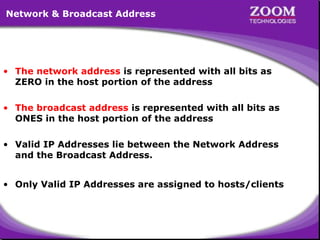
Network & Broadcast Address

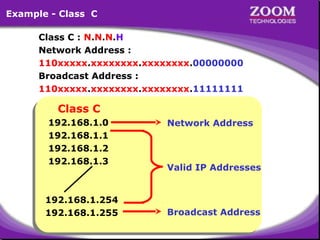
• The network address is represented with all bits as
ZERO in the host portion of the address
• The broadcast address is represented with all bits as
ONES in the host portion of the address
• Valid IP Addresses lie between the Network Address
and the Broadcast Address.
• Only Valid IP Addresses are assigned to hosts/clients

17
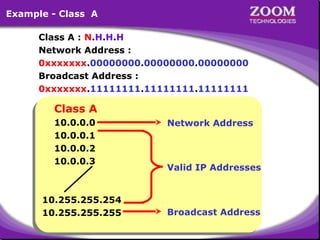
Example - Class A
Class A : N.H.H.H
Network Address :
0xxxxxxx.00000000.00000000.00000000
Broadcast Address :
0xxxxxxx.11111111.11111111.11111111

Class A
Class A
10.0.0.0
10.0.0.0
10.0.0.1
10.0.0.1
10.0.0.2
10.0.0.2
10.0.0.3
10.0.0.3

10.255.255.254
10.255.255.254
10.255.255.255
10.255.255.255

Network Address

Valid IP Addresses

Broadcast Address

18
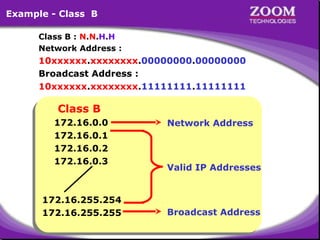
Example - Class B
Class B : N.N.H.H
Network Address :

10xxxxxx.xxxxxxxx.00000000.00000000
Broadcast Address :
10xxxxxx.xxxxxxxx.11111111.11111111

Class B
Class B

172.16.0.0
172.16.0.0
172.16.0.1
172.16.0.1
172.16.0.2
172.16.0.2
172.16.0.3
172.16.0.3

172.16.255.254
172.16.255.254
172.16.255.255
172.16.255.255

Network Address

Valid IP Addresses

Broadcast Address

19
Example - Class C
Class C : N.N.N.H
Network Address :
110xxxxx.xxxxxxxx.xxxxxxxx.00000000
Broadcast Address :
110xxxxx.xxxxxxxx.xxxxxxxx.11111111

Class C
Class C

192.168.1.0
192.168.1.0
192.168.1.1
192.168.1.1
192.168.1.2
192.168.1.2
192.168.1.3
192.168.1.3

192.168.1.254
192.168.1.254
192.168.1.255
192.168.1.255

Network Address

Valid IP Addresses

Broadcast Address

20
Private IP Address

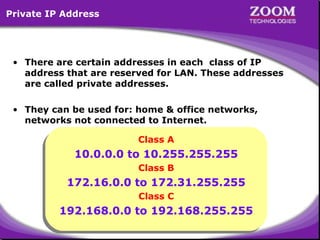
• There are certain addresses in each class of IP
address that are reserved for LAN. These addresses
are called private addresses.
• They can be used for: home & office networks,
networks not connected to Internet.
Class A
Class A

10.0.0.0 to 10.255.255.255
Class B
Class B

172.16.0.0 to 172.31.255.255
Class C
Class C

192.168.0.0 to 192.168.255.255
21
Subnet Mask

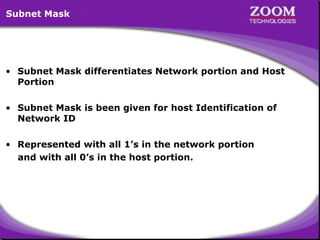
• Subnet Mask differentiates Network portion and Host
Portion
• Subnet Mask is been given for host Identification of
Network ID
• Represented with all 1’s in the network portion
and with all 0’s in the host portion.

22
Subnet Mask - Examples

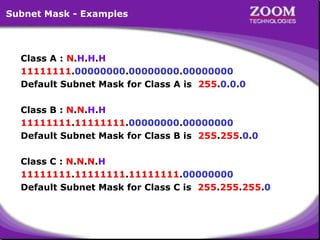
Class A : N.H.H.H
11111111.00000000.00000000.00000000
Default Subnet Mask for Class A is 255.0.0.0
Class B : N.N.H.H
11111111.11111111.00000000.00000000
Default Subnet Mask for Class B is 255.255.0.0
Class C : N.N.N.H
11111111.11111111.11111111.00000000
Default Subnet Mask for Class C is 255.255.255.0

23
How Subnet Mask Works ?
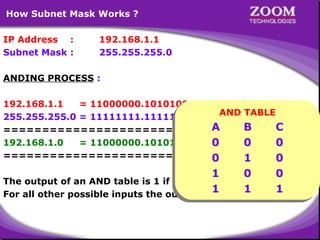
IP Address :
Subnet Mask :

192.168.1.1
255.255.255.0

ANDING PROCESS :
192.168.1.1
= 11000000.10101000.00000001.00000001
AND TABLE
AND TABLE
255.255.255.0 = 11111111.11111111.11111111.00000000
A
B
C
=======================================
A
B
C
192.168.1.0
= 11000000.10101000.00000001.00000000
0
0
0
0
0
0
=======================================
0
1
0

0
1
0
1
0
1
0are 1.0
0
The output of an AND table is 1 if both its inputs
1
1
1
1
1
For all other possible inputs the output is1
0.
24
Subnetting

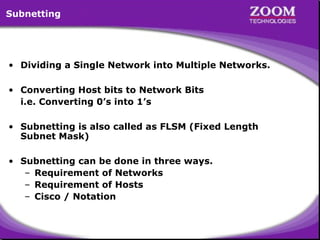
• Dividing a Single Network into Multiple Networks.
• Converting Host bits to Network Bits
i.e. Converting 0’s into 1’s
• Subnetting is also called as FLSM (Fixed Length
Subnet Mask)
• Subnetting can be done in three ways.
– Requirement of Networks
– Requirement of Hosts
– Cisco / Notation

25
Scenario
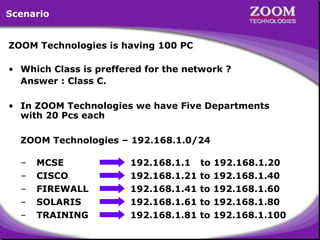
ZOOM Technologies is having 100 PC
• Which Class is preffered for the network ?
Answer : Class C.
• In ZOOM Technologies we have Five Departments
with 20 Pcs each
ZOOM Technologies – 192.168.1.0/24
–
–
–
–
–

MCSE
CISCO
FIREWALL
SOLARIS
TRAINING

192.168.1.1
192.168.1.21
192.168.1.41
192.168.1.61
192.168.1.81

to
to
to
to
to

192.168.1.20
192.168.1.40
192.168.1.60
192.168.1.80
192.168.1.100

26
Scenario (…continued)
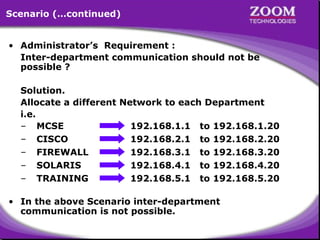
• Administrator’s Requirement :
Inter-department communication should not be
possible ?
Solution.
Allocate a different Network to each Department
i.e.
– MCSE
192.168.1.1 to 192.168.1.20
– CISCO
192.168.2.1 to 192.168.2.20
– FIREWALL
192.168.3.1 to 192.168.3.20
– SOLARIS
192.168.4.1 to 192.168.4.20
– TRAINING
192.168.5.1 to 192.168.5.20
• In the above Scenario inter-department
communication is not possible.

27
Main Aim of Subnetting

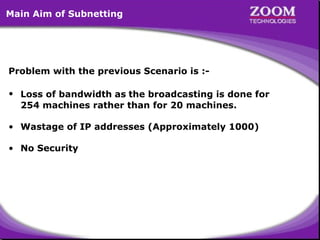
Problem with the previous Scenario is :• Loss of bandwidth as the broadcasting is done for
254 machines rather than for 20 machines.
• Wastage of IP addresses (Approximately 1000)
• No Security

28
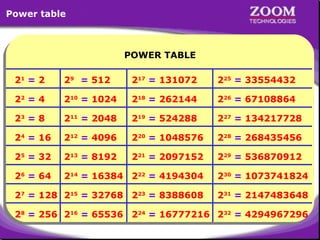
Power table

POWER TABLE
POWER TABLE
21 = 2

29 = 512

217 = 131072

225 = 33554432

22 = 4

210 = 1024

218 = 262144

226 = 67108864

23 = 8

211 = 2048

219 = 524288

227 = 134217728

24 = 16

212 = 4096

220 = 1048576

228 = 268435456

25 = 32

213 = 8192

221 = 2097152

229 = 536870912

26 = 64

214 = 16384 222 = 4194304

230 = 1073741824

27 = 128 215 = 32768 223 = 8388608

231 = 2147483648

28 = 256 216 = 65536 224 = 16777216 232 = 4294967296

29
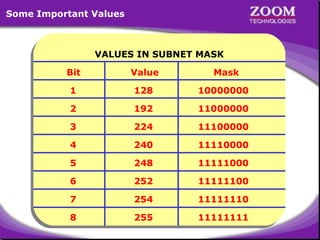
Some Important Values

VALUES IN SUBNET MASK
Bit
Bit

Value
Value

Mask
Mask

1
1

128
128

10000000
10000000

2
2

192
192

11000000
11000000

3
3

224
224

11100000
11100000

4
4

240
240

11110000
11110000

5
5

248
248

11111000
11111000

6
6

252
252

11111100
11111100

7
7

254
254

11111110
11111110

8
8

255
255

11111111
11111111

30
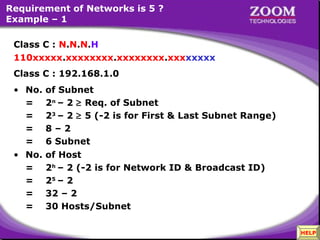
Requirement of Networks is 5 ?
Example – 1
Class C : N.N.N.H
110xxxxx.xxxxxxxx.xxxxxxxx.xxxxxxxx
Class C : 192.168.1.0
• No.
=
=
=
=
• No.
=
=
=
=

of Subnet
2n – 2 ≥ Req. of Subnet
23 – 2 ≥ 5 (-2 is for First & Last Subnet Range)
8–2
6 Subnet
of Host
2h – 2 (-2 is for Network ID & Broadcast ID)
25 – 2
32 – 2
30 Hosts/Subnet

31

HELP
Example – 1 (Continued…)
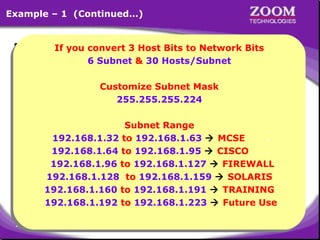
• Customize Subnet Mask = Bits to Network Bits
If you convert 3 Host
If you convert 3 Host Bits to Network Bits
255.
255.
224
6 Subnet & 30 Hosts/Subnet
Subnet & 255.
30 Hosts/Subnet
6
1
2
8
6
4
3
2

11111111 11111111 11111111 11100000
Customize Subnet Mask
.
.
.
Customize Subnet Mask
255.255.255.224
255.255.255.224
• Range of Networks
Network ID
Broadcast ID
Subnet Range
Subnet Range
192.168.1.31 x
192.168.1.0
192.168.1.32 to 192.168.1.63  MCSE
to 192.168.1.63  MCSE
192.168.1.32
..
192.168.1.32
192.168.1.63
192.168.1.64 to 192.168.1.95  CISCO
to 192.168.1.95  CISCO
192.168.1.64
..
192.168.1.64
192.168.1.95
192.168.1.96 to 192.168.1.127  FIREWALL
to 192.168.1.127  FIREWALL
192.168.1.96
192.168.1.96
192.168.1.127
192.168.1.128 to 192.168.1.159  SOLARIS
Valid Subnets
192.168.1.128 to 192.168.1.159  SOLARIS
192.168.1.128
192.168.1.159
192.168.1.160 to 192.168.1.191  TRAINING
to 192.168.1.191  TRAINING
192.168.1.160
192.168.1.160
192.168.1.191
192.168.1.192 to 192.168.1.223  Future Use
to 192.168.1.223  Future Use
192.168.1.192
192.168.1.192
192.168.1.223
192.168.1.224
192.168.1.255 x

32
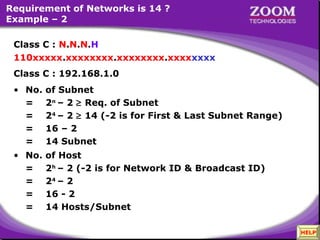
Requirement of Networks is 14 ?
Example – 2
Class C : N.N.N.H
110xxxxx.xxxxxxxx.xxxxxxxx.xxxxxxxx
Class C : 192.168.1.0
• No.
=
=
=
=

of Subnet
2n – 2 ≥ Req. of Subnet
24 – 2 ≥ 14 (-2 is for First & Last Subnet Range)
16 – 2
14 Subnet

• No.
=
=
=
=

of Host
2h – 2 (-2 is for Network ID & Broadcast ID)
24 – 2
16 - 2
14 Hosts/Subnet

33

HELP
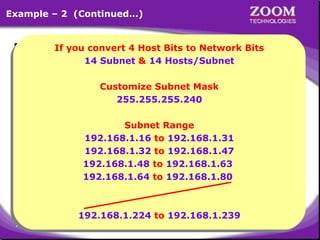
Example – 2 (Continued…)
• Customize Subnet Mask = Bits to Network Bits
If you convert 4 Host
If you convert 4 Host Bits to Network Bits
255.
255.
240
14 Subnet & 255.Hosts/Subnet
Subnet & 14 Hosts/Subnet
14
14
1
2
8
6
4
3
2
1
6

11111111 11111111 11111111 11110000
Customize Subnet Mask
.
.
.
Customize Subnet Mask
255.255.255.240
255.255.255.240
• Range of Networks
Network ID
Broadcast ID
Subnet Range
Subnet Range
–
192.168.1.15 x
192.168.1.0
192.168.1.16 to 192.168.1.31
192.168.1.16
–
192.168.1.31
192.168.1.32 to 192.168.1.47
192.168.1.32
–
192.168.1.47
192.168.1.48 to 192.168.1.63
192.168.1.48
–
192.168.1.63
192.168.1.64 to 192.168.1.80
192.168.1.64 to 192.168.1.80Valid Subnets
192.168.1.224 –
192.168.1.239
192.168.1.224 to 192.168.1.239
192.168.1.240 –
192.168.1.255 x

34
35

IP Addressing

  • 1.
  • 2.
    IP Addressing • IPAddressing is Logical Addressing • It works on Network Layer (Layer 3) • Two Versions of Addressing Scheme • IP version 4 – 32 bit addressing • IP version 6 – 128 bit addressing 2
  • 3.
    IP version 4 Bitis a value that will represent 0’s or 1’s (i.e. Binary) 01010101000001011011111100000001 • 32 bits are divided into 4 Octets known as Dotted Decimal Notation First Octet Second Octet Third Octet Forth Octet 01010101. 00000101. 10111111. 00000001 3
  • 4.
    IP version 6 •128-bit address is divided along 16-bit boundaries, and each 16-bit block is converted to a 4-digit hexadecimal number and separated by colons (Colon-Hex Notation) FEDC:BA98:7654:3210:FEDC:BA98:7654:3210 4
  • 5.
    Binary to DecimalConversion Taking Example for First Octet : Total 8 bits, Value will be 0’s and 1’s i.e. 28 = 256 combination 2 7 2 6 25 24 2 3 2 2 21 2 0 0 0 0 0 0 0 0 0 = 0 0 0 0 0 0 0 0 1 = 1 Total IP Address Range 0 0 0 0 0 0 1 0 = 2 Total IP Address Range 0 0 0 0 0 0 1 1 = 3 0 .. 0 .. 0 .. 0 0 0 0 0 0 0 0 0 0 1 0 0 = 4 to to 255.255.255.255 255.255.255.255 1 1 1 1 1 1 1 1 = 255 5
  • 6.
    IP Address Classes •Total IP Addressing Scheme is divided into 5 Classes • CLASS A • CLASS B LAN & WAN • CLASS C • CLASS D Multicasting • CLASS E Research & Development 6
  • 7.
    Priority Bit Concept •To identify the range of each class a bit called priority bit is used. • Priority Bit is the left most bits in the First Octet • CLASS A priority bit is 0 • CLASS B priority bit is 10 • CLASS C priority bit is 110 • CLASS D priority bit is 1110 • CLASS E priority bit is 1111 7
  • 8.
    CLASS A Range ForClass A range : First bit of the first octet should be reserved for the priority bit. 0xxxxxxx. xxxxxxxx. xxxxxxxx. xxxxxxxx 27 0 0 0 0 0 26 0 0 0 0 0 25 0 0 0 0 0 24 0 0 0 0 0 23 0 0 0 0 0 22 0 0 0 0 1 21 0 0 1 1 0 20 0 1 0 1 0 = = = = = 0 1 1 1 1 1 1 1 = 127 0 1 2 3 4 Class A Range Class A Range 0 0 0 0 to 0 .. 0 .. 0 .. 0 to 127.255.255.255 127.255.255.255 Exception Exception 0.X.X.X and 127.X.X.X 0.X.X.X and 127.X.X.X network are reserved network are reserved 8
  • 9.
    CLASS B Range ForClass B range : First two bits of the first octet should be reserved for the priority bit. 10xxxxxx. xxxxxxxx. xxxxxxxx. xxxxxxxx 27 1 1 1 1 1 26 0 0 0 0 0 25 0 0 0 0 0 24 0 0 0 0 0 23 0 0 0 0 0 22 0 0 0 0 1 21 0 0 1 1 0 20 0 1 0 1 0 = = = = = 1 0 1 1 1 1 1 1 = 191 128 129 130 131 132 Class B Range Class B Range 128. 0 0 0 128. 0 .. 0 .. 0 to to 191.255.255.255 191.255.255.255 9
  • 10.
    CLASS C Range ForClass C range : First Three bits of the first octet should be reserved for the priority bit. 110xxxxx. xxxxxxxx. xxxxxxxx. xxxxxxxx 27 1 1 1 1 1 26 1 1 1 1 1 25 0 0 0 0 0 24 0 0 0 0 0 23 0 0 0 0 0 22 0 0 0 0 1 21 0 0 1 1 0 20 0 1 0 1 0 = = = = = 1 1 0 1 1 1 1 1 = 223 192 193 194 195 196 Class C Range Class C Range 192. 0 0 0 192. 0 .. 0 .. 0 to to 223.255.255.255 223.255.255.255 10
  • 11.
    CLASS D Range ForClass D range : First four bits of the first octet should be reserved for the priority bit. 1110xxxx. xxxxxxxx. xxxxxxxx. xxxxxxxx 27 1 1 1 1 1 26 1 1 1 1 1 25 1 1 1 1 1 24 0 0 0 0 0 23 0 0 0 0 0 22 0 0 0 0 1 21 0 0 1 1 0 20 0 1 0 1 0 = = = = = 1 1 1 0 1 1 1 1 = 239 224 225 226 227 228 Class D Range Class D Range 224. 0 0 0 224. 0 .. 0 .. 0 to to 239.255.255.255 239.255.255.255 11
  • 12.
    CLASS E Range ForClass E range : First four bits of the first octet should be reserved for the priority bit. 1111xxxx. xxxxxxxx. xxxxxxxx. xxxxxxxx 27 1 1 1 1 1 26 1 1 1 1 1 25 1 1 1 1 1 24 1 1 1 1 1 23 0 0 0 0 0 22 0 0 0 0 1 1 1 1 1 1 1 21 0 0 1 1 0 1 20 0 1 0 1 0 1 = = = = = 240 241 242 243 244 Class E Range Class E Range 240. 0 0 0 240. 0 .. 0 .. 0 to to 255.255.255.255 255.255.255.255 = 255 12
  • 13.
    Octet Format • IPaddress is divided into Network & Host Portion • CLASS A is written as N.H.H.H • CLASS B is written as N.N.H.H • CLASS C is written as N.N.N.H 13
  • 14.
    CLASS A –No. Networks & Host • Class A Octet Format is N.H.H.H • Network bits : 8 • No. = = = = • No. = = = Host bits : 24 of Networks 28-1 (-1 is Priority Bit for Class A) 27 CLASS A 128 – 2 (-2 is for 0 & 127 Network) CLASS A 126 Networks 126 Networks 126 Networks & & 16777214 Hosts/Nw of Host 16777214 Hosts/Nw 224 – 2 (-2 is for Network ID & Broadcast ID) 16777216 - 2 16777214 Hosts/Network 14
  • 15.
    CLASS B –No. Networks & Host • Class B Octet Format is N.N.H.H • Network bits : 16 Host bits : 16 • No. = = = of Networks 216-2 (-2 is Priority Bit for Class B) 214 CLASS B CLASS B 16384 Networks • No. = = = & & of Host 65534 Hosts/Nw 216 – 2 (-2 is for Network ID & 65534 Hosts/Nw Broadcast ID) 65536 - 2 65534 Hosts/Network 16384 Networks 16384 Networks 15
  • 16.
    CLASS C –No. Networks & Host • Class C Octet Format is N.N.N.H • Network bits : 24 Host bits : 8 • No. = = = of Networks 224-3 (-3 is Priority Bit for Class C) 221 CLASS C CLASS C 2097152 Networks • No. = = = & & of Host 254 Hosts/Nw 28 – 2 (-2 is for Network ID & Broadcast ID) 254 Hosts/Nw 256 - 2 254 Hosts/Network 2097152 Networks 2097152 Networks 16
  • 17.
    Network & BroadcastAddress • The network address is represented with all bits as ZERO in the host portion of the address • The broadcast address is represented with all bits as ONES in the host portion of the address • Valid IP Addresses lie between the Network Address and the Broadcast Address. • Only Valid IP Addresses are assigned to hosts/clients 17
  • 18.
    Example - ClassA Class A : N.H.H.H Network Address : 0xxxxxxx.00000000.00000000.00000000 Broadcast Address : 0xxxxxxx.11111111.11111111.11111111 Class A Class A 10.0.0.0 10.0.0.0 10.0.0.1 10.0.0.1 10.0.0.2 10.0.0.2 10.0.0.3 10.0.0.3 10.255.255.254 10.255.255.254 10.255.255.255 10.255.255.255 Network Address Valid IP Addresses Broadcast Address 18
  • 19.
    Example - ClassB Class B : N.N.H.H Network Address : 10xxxxxx.xxxxxxxx.00000000.00000000 Broadcast Address : 10xxxxxx.xxxxxxxx.11111111.11111111 Class B Class B 172.16.0.0 172.16.0.0 172.16.0.1 172.16.0.1 172.16.0.2 172.16.0.2 172.16.0.3 172.16.0.3 172.16.255.254 172.16.255.254 172.16.255.255 172.16.255.255 Network Address Valid IP Addresses Broadcast Address 19
  • 20.
    Example - ClassC Class C : N.N.N.H Network Address : 110xxxxx.xxxxxxxx.xxxxxxxx.00000000 Broadcast Address : 110xxxxx.xxxxxxxx.xxxxxxxx.11111111 Class C Class C 192.168.1.0 192.168.1.0 192.168.1.1 192.168.1.1 192.168.1.2 192.168.1.2 192.168.1.3 192.168.1.3 192.168.1.254 192.168.1.254 192.168.1.255 192.168.1.255 Network Address Valid IP Addresses Broadcast Address 20
  • 21.
    Private IP Address •There are certain addresses in each class of IP address that are reserved for LAN. These addresses are called private addresses. • They can be used for: home & office networks, networks not connected to Internet. Class A Class A 10.0.0.0 to 10.255.255.255 10.0.0.0 to 10.255.255.255 Class B Class B 172.16.0.0 to 172.31.255.255 172.16.0.0 to 172.31.255.255 Class C Class C 192.168.0.0 to 192.168.255.255 192.168.0.0 to 192.168.255.255 21
  • 22.
    Subnet Mask • SubnetMask differentiates Network portion and Host Portion • Subnet Mask is been given for host Identification of Network ID • Represented with all 1’s in the network portion and with all 0’s in the host portion. 22
  • 23.
    Subnet Mask -Examples Class A : N.H.H.H 11111111.00000000.00000000.00000000 Default Subnet Mask for Class A is 255.0.0.0 Class B : N.N.H.H 11111111.11111111.00000000.00000000 Default Subnet Mask for Class B is 255.255.0.0 Class C : N.N.N.H 11111111.11111111.11111111.00000000 Default Subnet Mask for Class C is 255.255.255.0 23
  • 24.
    How Subnet MaskWorks ? IP Address : Subnet Mask : 192.168.1.1 255.255.255.0 ANDING PROCESS : 192.168.1.1 = 11000000.10101000.00000001.00000001 AND TABLE AND TABLE 255.255.255.0 = 11111111.11111111.11111111.00000000 A B C ======================================= A B C 192.168.1.0 = 11000000.10101000.00000001.00000000 0 0 0 0 0 0 ======================================= 0 1 0 0 1 0 1 0 1 0are 1.0 0 The output of an AND table is 1 if both its inputs 1 1 1 1 1 For all other possible inputs the output is1 0. 24
  • 25.
    Subnetting • Dividing aSingle Network into Multiple Networks. • Converting Host bits to Network Bits i.e. Converting 0’s into 1’s • Subnetting is also called as FLSM (Fixed Length Subnet Mask) • Subnetting can be done in three ways. – Requirement of Networks – Requirement of Hosts – Cisco / Notation 25
  • 26.
    Scenario ZOOM Technologies ishaving 100 PC • Which Class is preffered for the network ? Answer : Class C. • In ZOOM Technologies we have Five Departments with 20 Pcs each ZOOM Technologies – 192.168.1.0/24 – – – – – MCSE CISCO FIREWALL SOLARIS TRAINING 192.168.1.1 192.168.1.21 192.168.1.41 192.168.1.61 192.168.1.81 to to to to to 192.168.1.20 192.168.1.40 192.168.1.60 192.168.1.80 192.168.1.100 26
  • 27.
    Scenario (…continued) • Administrator’sRequirement : Inter-department communication should not be possible ? Solution. Allocate a different Network to each Department i.e. – MCSE 192.168.1.1 to 192.168.1.20 – CISCO 192.168.2.1 to 192.168.2.20 – FIREWALL 192.168.3.1 to 192.168.3.20 – SOLARIS 192.168.4.1 to 192.168.4.20 – TRAINING 192.168.5.1 to 192.168.5.20 • In the above Scenario inter-department communication is not possible. 27
  • 28.
    Main Aim ofSubnetting Problem with the previous Scenario is :• Loss of bandwidth as the broadcasting is done for 254 machines rather than for 20 machines. • Wastage of IP addresses (Approximately 1000) • No Security 28
  • 29.
    Power table POWER TABLE POWERTABLE 21 = 2 29 = 512 217 = 131072 225 = 33554432 22 = 4 210 = 1024 218 = 262144 226 = 67108864 23 = 8 211 = 2048 219 = 524288 227 = 134217728 24 = 16 212 = 4096 220 = 1048576 228 = 268435456 25 = 32 213 = 8192 221 = 2097152 229 = 536870912 26 = 64 214 = 16384 222 = 4194304 230 = 1073741824 27 = 128 215 = 32768 223 = 8388608 231 = 2147483648 28 = 256 216 = 65536 224 = 16777216 232 = 4294967296 29
  • 30.
    Some Important Values VALUESIN SUBNET MASK VALUES IN SUBNET MASK Bit Bit Value Value Mask Mask 1 1 128 128 10000000 10000000 2 2 192 192 11000000 11000000 3 3 224 224 11100000 11100000 4 4 240 240 11110000 11110000 5 5 248 248 11111000 11111000 6 6 252 252 11111100 11111100 7 7 254 254 11111110 11111110 8 8 255 255 11111111 11111111 30
  • 31.
    Requirement of Networksis 5 ? Example – 1 Class C : N.N.N.H 110xxxxx.xxxxxxxx.xxxxxxxx.xxxxxxxx Class C : 192.168.1.0 • No. = = = = • No. = = = = of Subnet 2n – 2 ≥ Req. of Subnet 23 – 2 ≥ 5 (-2 is for First & Last Subnet Range) 8–2 6 Subnet of Host 2h – 2 (-2 is for Network ID & Broadcast ID) 25 – 2 32 – 2 30 Hosts/Subnet 31 HELP
  • 32.
    Example – 1(Continued…) • Customize Subnet Mask = Bits to Network Bits If you convert 3 Host If you convert 3 Host Bits to Network Bits 255. 255. 224 6 Subnet & 30 Hosts/Subnet Subnet & 255. 30 Hosts/Subnet 6 1 2 8 6 4 3 2 11111111 11111111 11111111 11100000 Customize Subnet Mask . . . Customize Subnet Mask 255.255.255.224 255.255.255.224 • Range of Networks Network ID Broadcast ID Subnet Range Subnet Range 192.168.1.31 x 192.168.1.0 192.168.1.32 to 192.168.1.63  MCSE to 192.168.1.63  MCSE 192.168.1.32 .. 192.168.1.32 192.168.1.63 192.168.1.64 to 192.168.1.95  CISCO to 192.168.1.95  CISCO 192.168.1.64 .. 192.168.1.64 192.168.1.95 192.168.1.96 to 192.168.1.127  FIREWALL to 192.168.1.127  FIREWALL 192.168.1.96 192.168.1.96 192.168.1.127 192.168.1.128 to 192.168.1.159  SOLARIS Valid Subnets 192.168.1.128 to 192.168.1.159  SOLARIS 192.168.1.128 192.168.1.159 192.168.1.160 to 192.168.1.191  TRAINING to 192.168.1.191  TRAINING 192.168.1.160 192.168.1.160 192.168.1.191 192.168.1.192 to 192.168.1.223  Future Use to 192.168.1.223  Future Use 192.168.1.192 192.168.1.192 192.168.1.223 192.168.1.224 192.168.1.255 x 32
  • 33.
    Requirement of Networksis 14 ? Example – 2 Class C : N.N.N.H 110xxxxx.xxxxxxxx.xxxxxxxx.xxxxxxxx Class C : 192.168.1.0 • No. = = = = of Subnet 2n – 2 ≥ Req. of Subnet 24 – 2 ≥ 14 (-2 is for First & Last Subnet Range) 16 – 2 14 Subnet • No. = = = = of Host 2h – 2 (-2 is for Network ID & Broadcast ID) 24 – 2 16 - 2 14 Hosts/Subnet 33 HELP
  • 34.
    Example – 2(Continued…) • Customize Subnet Mask = Bits to Network Bits If you convert 4 Host If you convert 4 Host Bits to Network Bits 255. 255. 240 14 Subnet & 255.Hosts/Subnet Subnet & 14 Hosts/Subnet 14 14 1 2 8 6 4 3 2 1 6 11111111 11111111 11111111 11110000 Customize Subnet Mask . . . Customize Subnet Mask 255.255.255.240 255.255.255.240 • Range of Networks Network ID Broadcast ID Subnet Range Subnet Range – 192.168.1.15 x 192.168.1.0 192.168.1.16 to 192.168.1.31 192.168.1.16 to 192.168.1.31 192.168.1.16 – 192.168.1.31 192.168.1.32 to 192.168.1.47 192.168.1.32 to 192.168.1.47 192.168.1.32 – 192.168.1.47 192.168.1.48 to 192.168.1.63 192.168.1.48 to 192.168.1.63 192.168.1.48 – 192.168.1.63 192.168.1.64 to 192.168.1.80 192.168.1.64 to 192.168.1.80Valid Subnets 192.168.1.224 – 192.168.1.239 192.168.1.224 to 192.168.1.239 192.168.1.224 to 192.168.1.239 192.168.1.240 – 192.168.1.255 x 34
  • 35.