• Microsoft windows =Aero environment
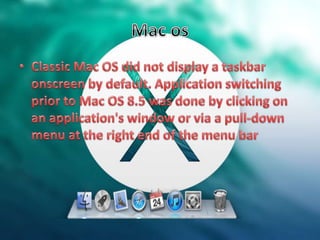
• Apple=Aqua environment
• UNIX= X environment
• Samsung= Tizen
• Htc = sense
• Nokia= Symbian
• The Start menu is a userinterface
(UI) element used in Microsoft
Windows since Windows 95 and in some
other operating systems.
• It provides a central launching point for
computer programs and performing other
tasks.
• It has different names in different operating
systems and window managers
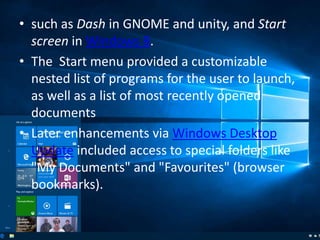
• such as Dash in GNOME and unity, and Start
screen in Windows 8.
• The Start menu provided a customizable
nested list of programs for the user to launch,
as well as a list of most recently opened
documents
• Later enhancements via Windows Desktop
Update included access to special folders like
"My Documents" and "Favourites" (browser
bookmarks).
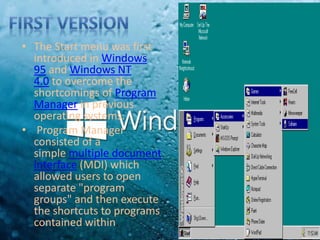
• The Start menu was first
introduced in Windows
95 and Windows NT
4.0 to overcome the
shortcomings of Program
Manager in previous
operating systems.
• Program Manager
consisted of a
simple multiple document
interface (MDI) which
allowed users to open
separate "program
groups" and then execute
the shortcuts to programs
contained within.
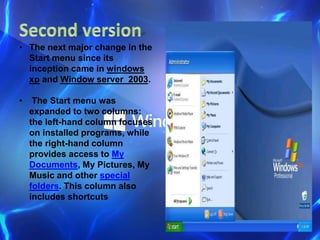
• The next major change in the
Start menu since its
inception came in windows
xp and Window server 2003.
• The Start menu was
expanded to two columns:
the left-hand column focuses
on installed programs, while
the right-hand column
provides access to My
Documents, My Pictures, My
Music and other special
folders. This column also
includes shortcuts
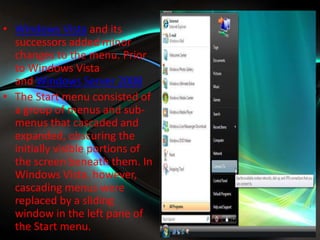
• Windows Vista and its
successors added minor
changes to the menu. Prior
to Windows Vista
and Windows Server 2008
• The Start menu consisted of
a group of menus and sub-
menus that cascaded and
expanded, obscuring the
initially visible portions of
the screen beneath them. In
Windows Vista, however,
cascading menus were
replaced by a sliding
window in the left pane of
the Start menu.
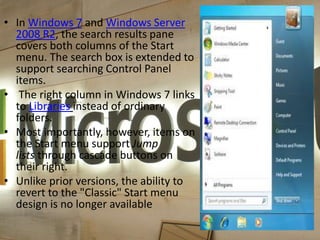
• In Windows 7 and Windows Server
2008 R2, the search results pane
covers both columns of the Start
menu. The search box is extended to
support searching Control Panel
items.
• The right column in Windows 7 links
to Libraries instead of ordinary
folders.
• Most importantly, however, items on
the Start menu support Jump
lists through cascade buttons on
their right.
• Unlike prior versions, the ability to
revert to the "Classic" Start menu
design is no longer available
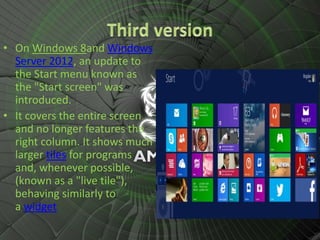
• On Windows 8and Windows
Server 2012, an update to
the Start menu known as
the "Start screen" was
introduced.
• It covers the entire screen
and no longer features the
right column. It shows much
larger tiles for programs
and, whenever possible,
(known as a "live tile"),
behaving similarly to
a widget
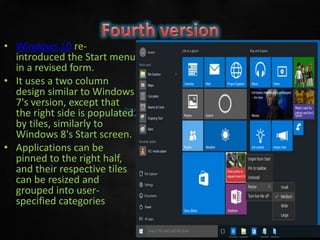
• Windows 10 re-
introduced the Start menu
in a revised form.
• It uses a two column
design similar to Windows
7's version, except that
the right side is populated
by tiles, similarly to
Windows 8's Start screen.
• Applications can be
pinned to the right half,
and their respective tiles
can be resized and
grouped into user-
specified categories
• A taskbar is an element of a graphical
user interface which has various
purposes. It typically shows which
programs or applications are running
on the device, as well as providelinks
or shortcuts to other programs or
places, such a start menu, notification
area, and clock.
• The design and layout of the taskbar
varies between individual operating
systems, but most often assumes the
form of a long strip along one edge of
the screen.
Window 1.0
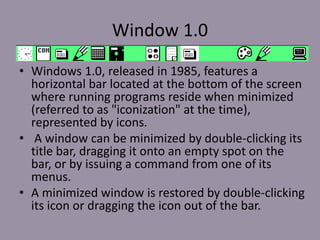
• Windows 1.0, released in 1985, features a
horizontal bar located at the bottom of the screen
where running programs reside when minimized
(referred to as "iconization" at the time),
represented by icons.
• A window can be minimized by double-clicking its
title bar, dragging it onto an empty spot on the
bar, or by issuing a command from one of its
menus.
• A minimized window is restored by double-clicking
its icon or dragging the icon out of the bar.
Window 95
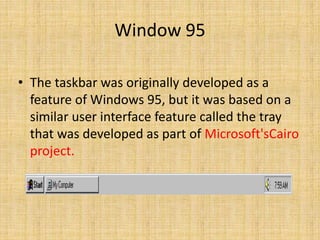
• The taskbar was originally developed as a
feature of Windows 95, but it was based on a
similar user interface feature called the tray
that was developed as part of Microsoft'sCairo
project.
Window xp
• With the window xp Microsoft changed the
behaviour of the taskbar to take advantage
of Fitts's law by removing a border of pixels
surrounding the Start button which did not
activate the menu, allowing the menu to be
activated by clicking directly in the corner of the
screen.[6]
• A standard Windows XP taskbar with multiple
tasks running. Note the Quick Launch toolbar,
introduced in Windows 98. When the notification
area is full, it can be expanded.
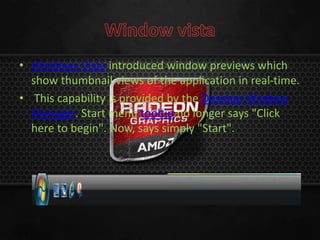
• Windows Vista introduced window previews which
show thumbnail views of the application in real-time.
• This capability is provided by the Desktop Window
Manager. Start menu tooltip no longer says "Click
here to begin". Now, says simply "Start".
• Windows 7 introduced jumplists which are menus that
provide shortcuts to recently opened documents,
frequently opened documents, folders paths (in case of
Windows Explorer), or various options (called Tasks) which
apply to that specific program or pinned website shortcut.
• Jump lists appear when the user right-clicks on an icon in
the taskbar or drags the icon upwards with the mouse left
click. Recent and frequent files and folders can be pinned
inside the jump list.
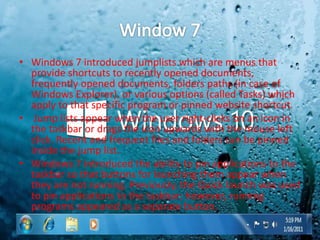
• Windows 7 introduced the ability to pin applications to the
taskbar so that buttons for launching them appear when
they are not running. Previously, the Quick launch was used
to pin applications to the taskbar; however, running
programs appeared as a separate button.
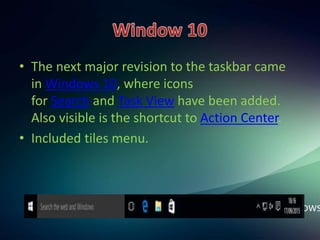
• The next major revision to the taskbar came
in Windows 10, where icons
for Search and Task View have been added.
Also visible is the shortcut to Action Center.
• Included tiles menu.
desktop startmenu task bar

desktop startmenu task bar

  • 6.
    • Microsoft windows=Aero environment • Apple=Aqua environment • UNIX= X environment • Samsung= Tizen • Htc = sense • Nokia= Symbian
  • 8.
    • The Startmenu is a userinterface (UI) element used in Microsoft Windows since Windows 95 and in some other operating systems. • It provides a central launching point for computer programs and performing other tasks. • It has different names in different operating systems and window managers
  • 9.
    • such asDash in GNOME and unity, and Start screen in Windows 8. • The Start menu provided a customizable nested list of programs for the user to launch, as well as a list of most recently opened documents • Later enhancements via Windows Desktop Update included access to special folders like "My Documents" and "Favourites" (browser bookmarks).
  • 10.
    • The Startmenu was first introduced in Windows 95 and Windows NT 4.0 to overcome the shortcomings of Program Manager in previous operating systems. • Program Manager consisted of a simple multiple document interface (MDI) which allowed users to open separate "program groups" and then execute the shortcuts to programs contained within.
  • 11.
    • The nextmajor change in the Start menu since its inception came in windows xp and Window server 2003. • The Start menu was expanded to two columns: the left-hand column focuses on installed programs, while the right-hand column provides access to My Documents, My Pictures, My Music and other special folders. This column also includes shortcuts
  • 12.
    • Windows Vistaand its successors added minor changes to the menu. Prior to Windows Vista and Windows Server 2008 • The Start menu consisted of a group of menus and sub- menus that cascaded and expanded, obscuring the initially visible portions of the screen beneath them. In Windows Vista, however, cascading menus were replaced by a sliding window in the left pane of the Start menu.
  • 13.
    • In Windows7 and Windows Server 2008 R2, the search results pane covers both columns of the Start menu. The search box is extended to support searching Control Panel items. • The right column in Windows 7 links to Libraries instead of ordinary folders. • Most importantly, however, items on the Start menu support Jump lists through cascade buttons on their right. • Unlike prior versions, the ability to revert to the "Classic" Start menu design is no longer available
  • 14.
    • On Windows8and Windows Server 2012, an update to the Start menu known as the "Start screen" was introduced. • It covers the entire screen and no longer features the right column. It shows much larger tiles for programs and, whenever possible, (known as a "live tile"), behaving similarly to a widget
  • 15.
    • Windows 10re- introduced the Start menu in a revised form. • It uses a two column design similar to Windows 7's version, except that the right side is populated by tiles, similarly to Windows 8's Start screen. • Applications can be pinned to the right half, and their respective tiles can be resized and grouped into user- specified categories
  • 17.
    • A taskbaris an element of a graphical user interface which has various purposes. It typically shows which programs or applications are running on the device, as well as providelinks or shortcuts to other programs or places, such a start menu, notification area, and clock. • The design and layout of the taskbar varies between individual operating systems, but most often assumes the form of a long strip along one edge of the screen.
  • 18.
    Window 1.0 • Windows1.0, released in 1985, features a horizontal bar located at the bottom of the screen where running programs reside when minimized (referred to as "iconization" at the time), represented by icons. • A window can be minimized by double-clicking its title bar, dragging it onto an empty spot on the bar, or by issuing a command from one of its menus. • A minimized window is restored by double-clicking its icon or dragging the icon out of the bar.
  • 19.
    Window 95 • Thetaskbar was originally developed as a feature of Windows 95, but it was based on a similar user interface feature called the tray that was developed as part of Microsoft'sCairo project.
  • 20.
    Window xp • Withthe window xp Microsoft changed the behaviour of the taskbar to take advantage of Fitts's law by removing a border of pixels surrounding the Start button which did not activate the menu, allowing the menu to be activated by clicking directly in the corner of the screen.[6] • A standard Windows XP taskbar with multiple tasks running. Note the Quick Launch toolbar, introduced in Windows 98. When the notification area is full, it can be expanded.
  • 21.
    • Windows Vistaintroduced window previews which show thumbnail views of the application in real-time. • This capability is provided by the Desktop Window Manager. Start menu tooltip no longer says "Click here to begin". Now, says simply "Start".
  • 22.
    • Windows 7introduced jumplists which are menus that provide shortcuts to recently opened documents, frequently opened documents, folders paths (in case of Windows Explorer), or various options (called Tasks) which apply to that specific program or pinned website shortcut. • Jump lists appear when the user right-clicks on an icon in the taskbar or drags the icon upwards with the mouse left click. Recent and frequent files and folders can be pinned inside the jump list. • Windows 7 introduced the ability to pin applications to the taskbar so that buttons for launching them appear when they are not running. Previously, the Quick launch was used to pin applications to the taskbar; however, running programs appeared as a separate button.
  • 23.
    • The nextmajor revision to the taskbar came in Windows 10, where icons for Search and Task View have been added. Also visible is the shortcut to Action Center. • Included tiles menu.