UNIT OF STORAGE
DATE:FRIDAY, 11TH OCTOBER, 2019.
LEARNING OBJECTIVES
 At the end of the class, students will be able
to;
 1. List the units of storage and their
numerical values.
INTRODUCTION
DEFINITION
 Unit of storage can be simply
defined as a means of
quantifying the documents
and files stored in a computer
system.
BIT (b)
 This is the smallest unit of storing
information in a computer.
 Its name is derived from the words
“BINARY” and “DIGITS”.
 It stores information using binary
digits 0’s and 1’s.
NIBBLE
 A Nibble is made up of four bits.
 2Nibbles make a Byte.
BYTE (B)
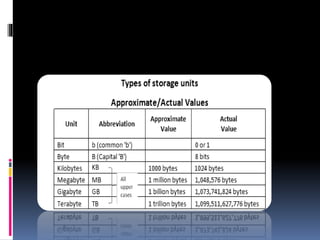
 A byte is a computer storage unit
made up of eight bits.
 It is the general term used for
representing information in the
computer.
KILOBYTE (KB)
 This is the next unit of storage
after a byte in the computer.
 It consists of 1024 bytes.
MEGABYTE (MB)
 The megabyte is also another unit of data
storage in the computer.
 It is made up of 1024Kilobytes of data.
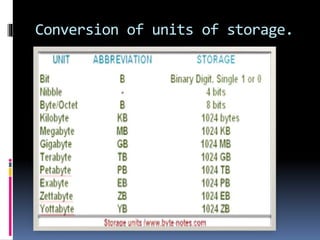
Conversion of units of storage.
 Since
QUESTION TIME
ASSIGNMENT
 1. list 5 units storage in the computer
 2. what is the value of 2048kb in megabytes?
THANK YOU!!!

Unit of storage