
Class 1
Starting WordPad!
WordPad
 Is an application
 Is used for typing text on the computer
WordPad
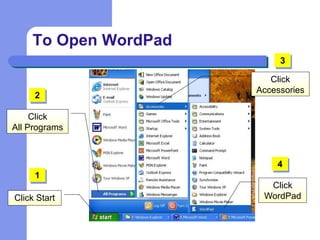
To Open WordPad
Click
All Programs
Click
WordPadClick Start
Click
Accessories
1
2
4
3
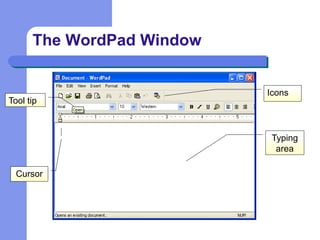
The WordPad Window
Cursor
Tool tip
Typing
area
Icons
 Type text in the typing area
 Start typing where the cursor is seen
– Cursor is blinking line (I) seen in the typing area
 All the lines of text typed are part of the
document
 The entire document is called a file
Typing Text
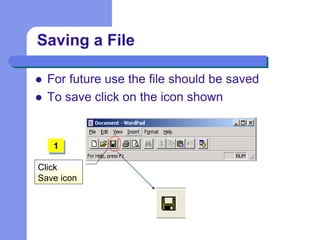
 For future use the file should be saved
 To save click on the icon shown
Saving a File
Click
Save icon
1
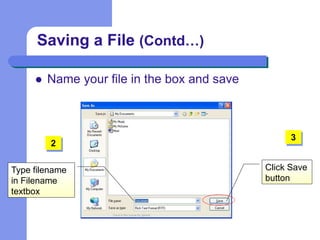
 Name your file in the box and save
Saving a File (Contd…)
Type filename
in Filename
textbox
Click Save
button
2
3
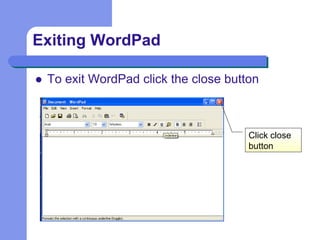
 To exit WordPad click the close button
Exiting WordPad
Click close
button
 Use of WordPad
 How to open WordPad
 Typing text in WordPad
 Saving a file
 Exiting WordPad
Now you know…
Wordpad

Wordpad

  • 1.
  • 2.
     Is anapplication  Is used for typing text on the computer WordPad
  • 3.
    To Open WordPad Click AllPrograms Click WordPadClick Start Click Accessories 1 2 4 3
  • 4.
    The WordPad Window Cursor Tooltip Typing area Icons
  • 5.
     Type textin the typing area  Start typing where the cursor is seen – Cursor is blinking line (I) seen in the typing area  All the lines of text typed are part of the document  The entire document is called a file Typing Text
  • 6.
     For futureuse the file should be saved  To save click on the icon shown Saving a File Click Save icon 1
  • 7.
     Name yourfile in the box and save Saving a File (Contd…) Type filename in Filename textbox Click Save button 2 3
  • 8.
     To exitWordPad click the close button Exiting WordPad Click close button
  • 9.
     Use ofWordPad  How to open WordPad  Typing text in WordPad  Saving a file  Exiting WordPad Now you know…