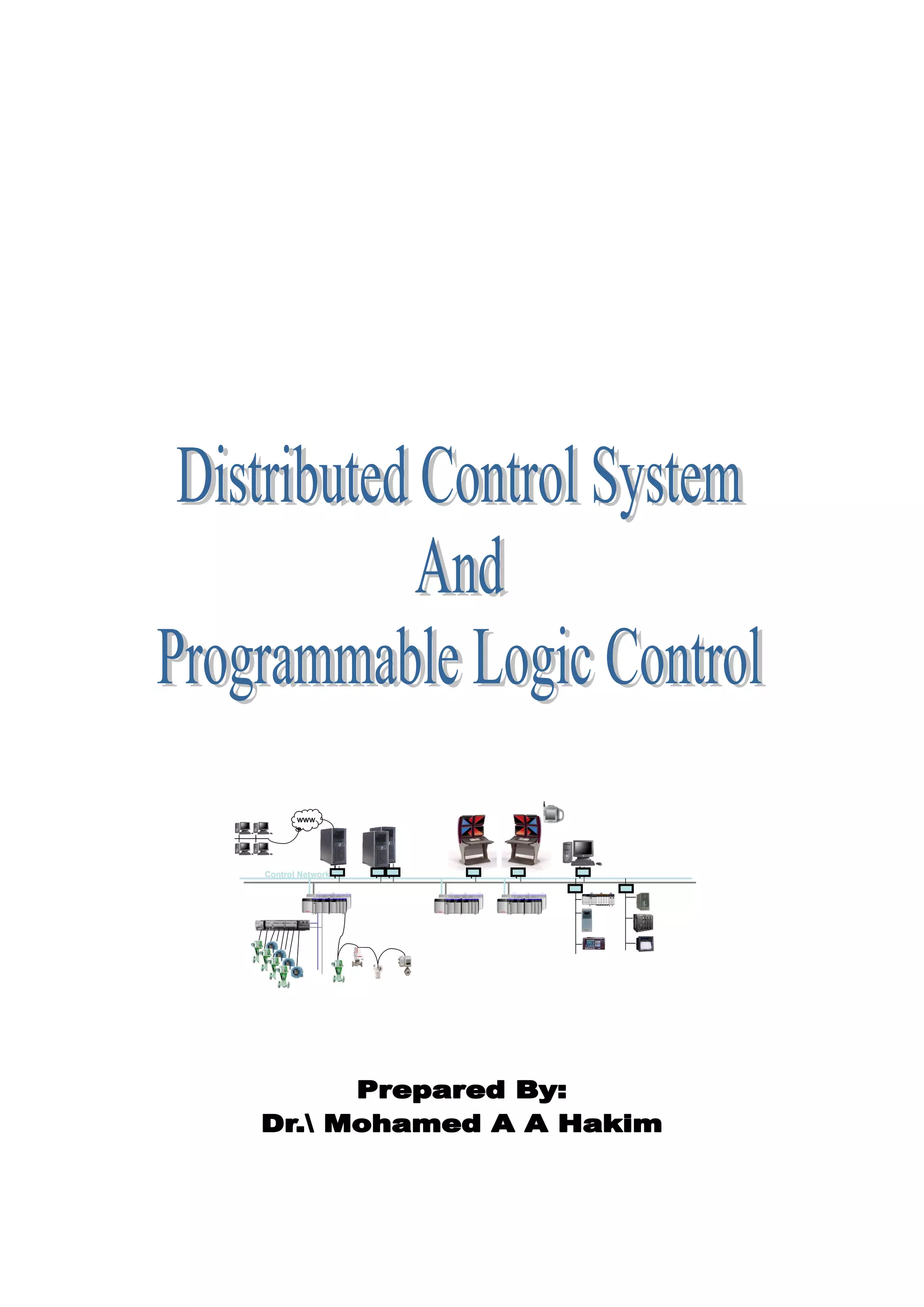
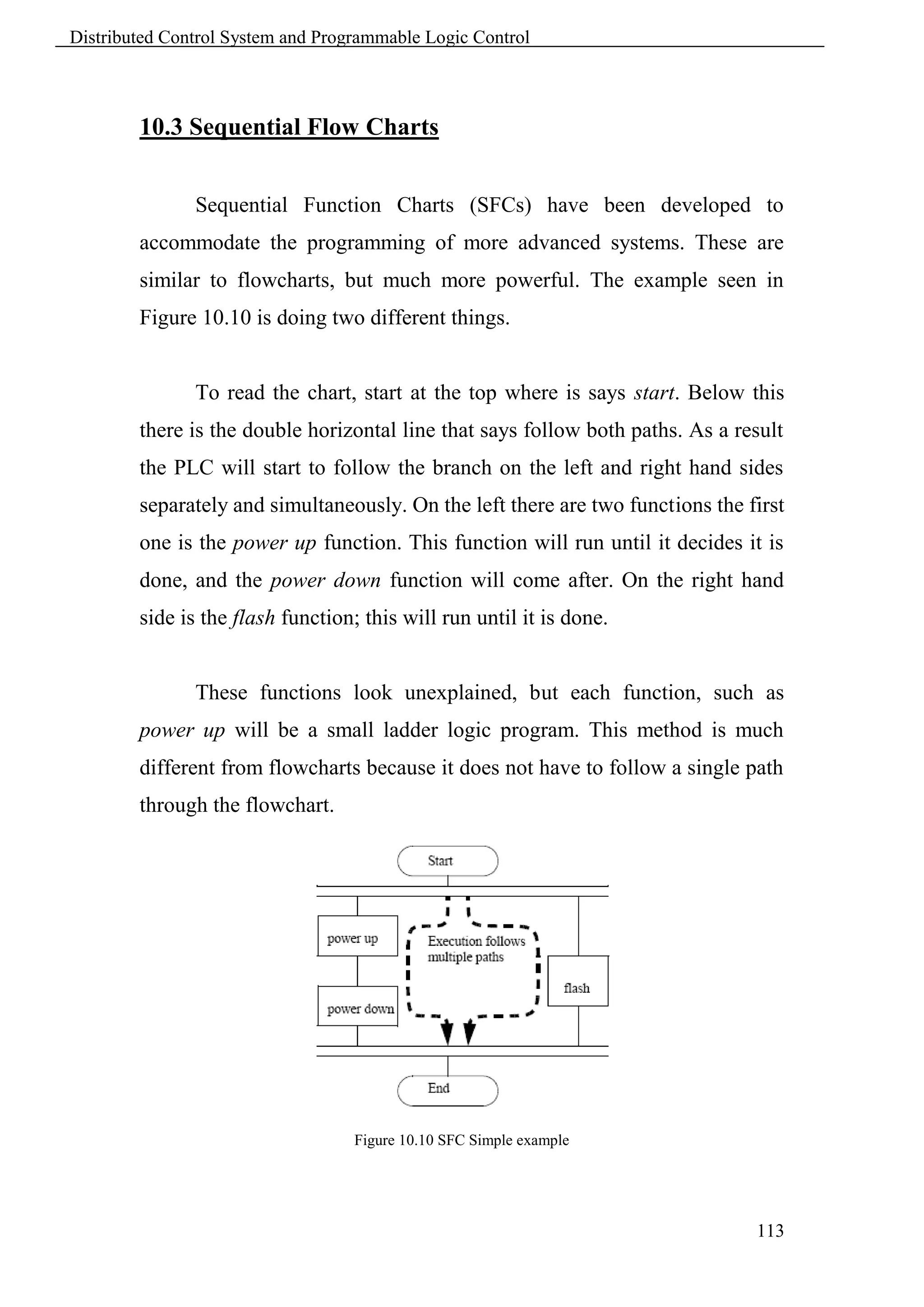
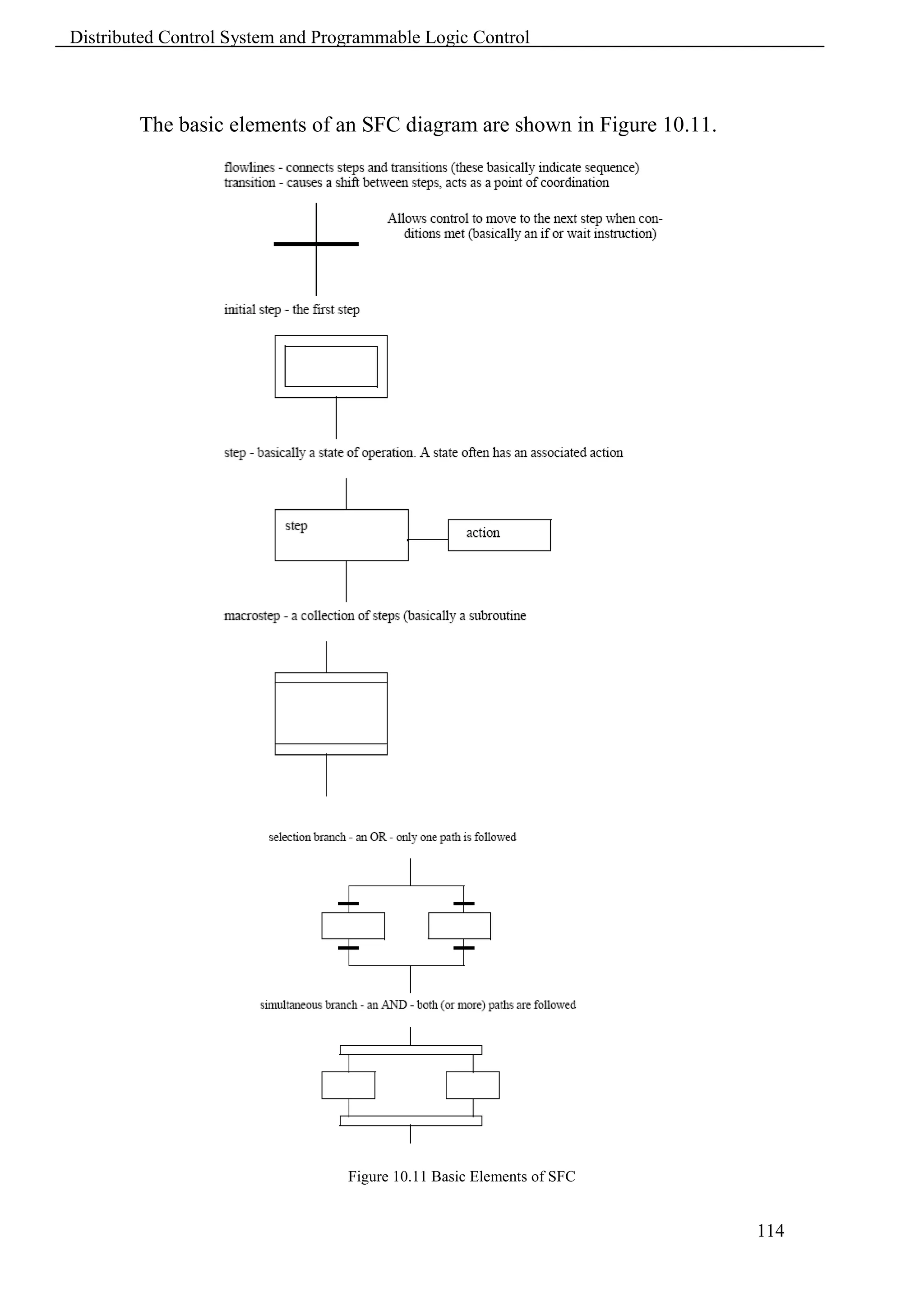
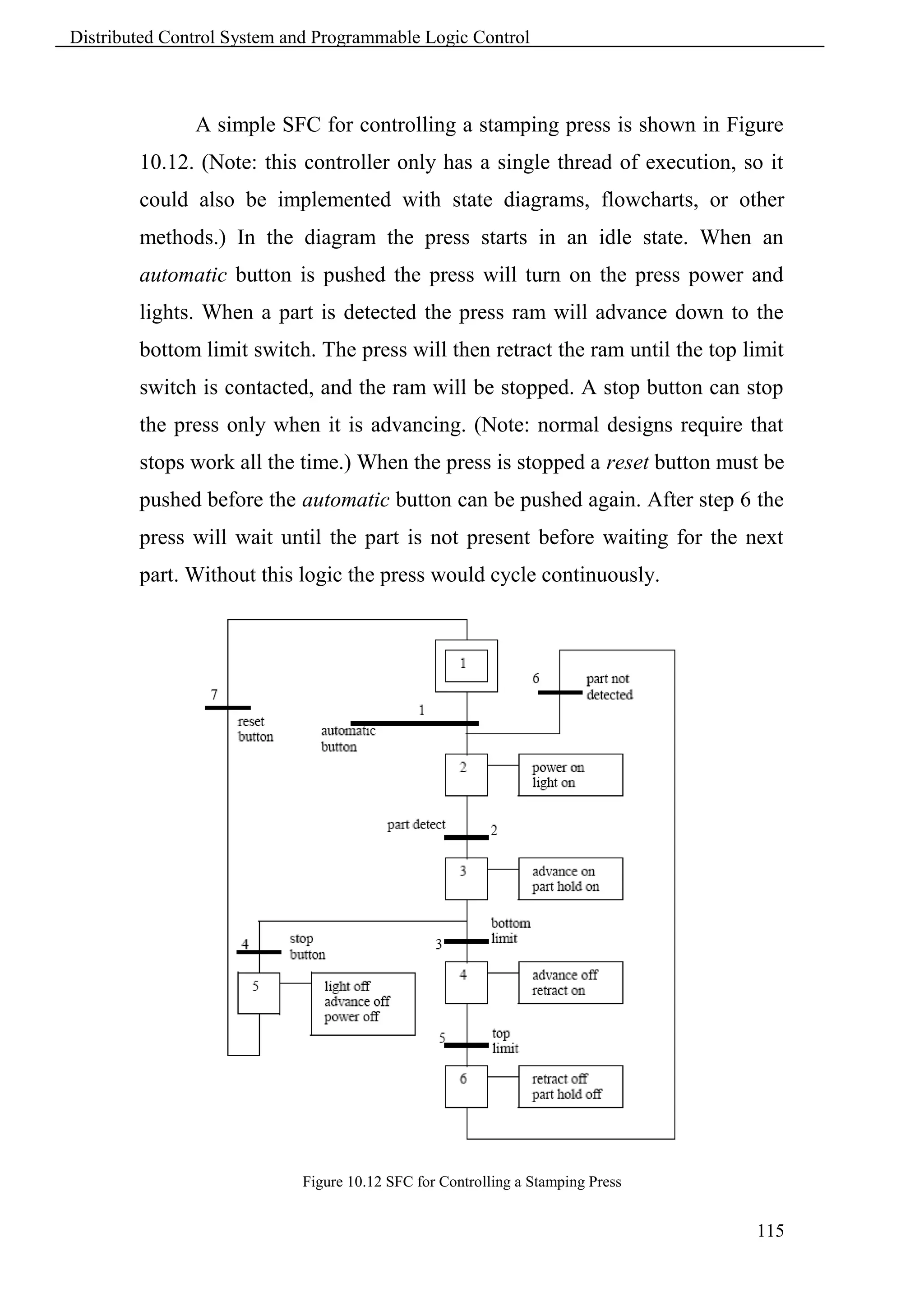
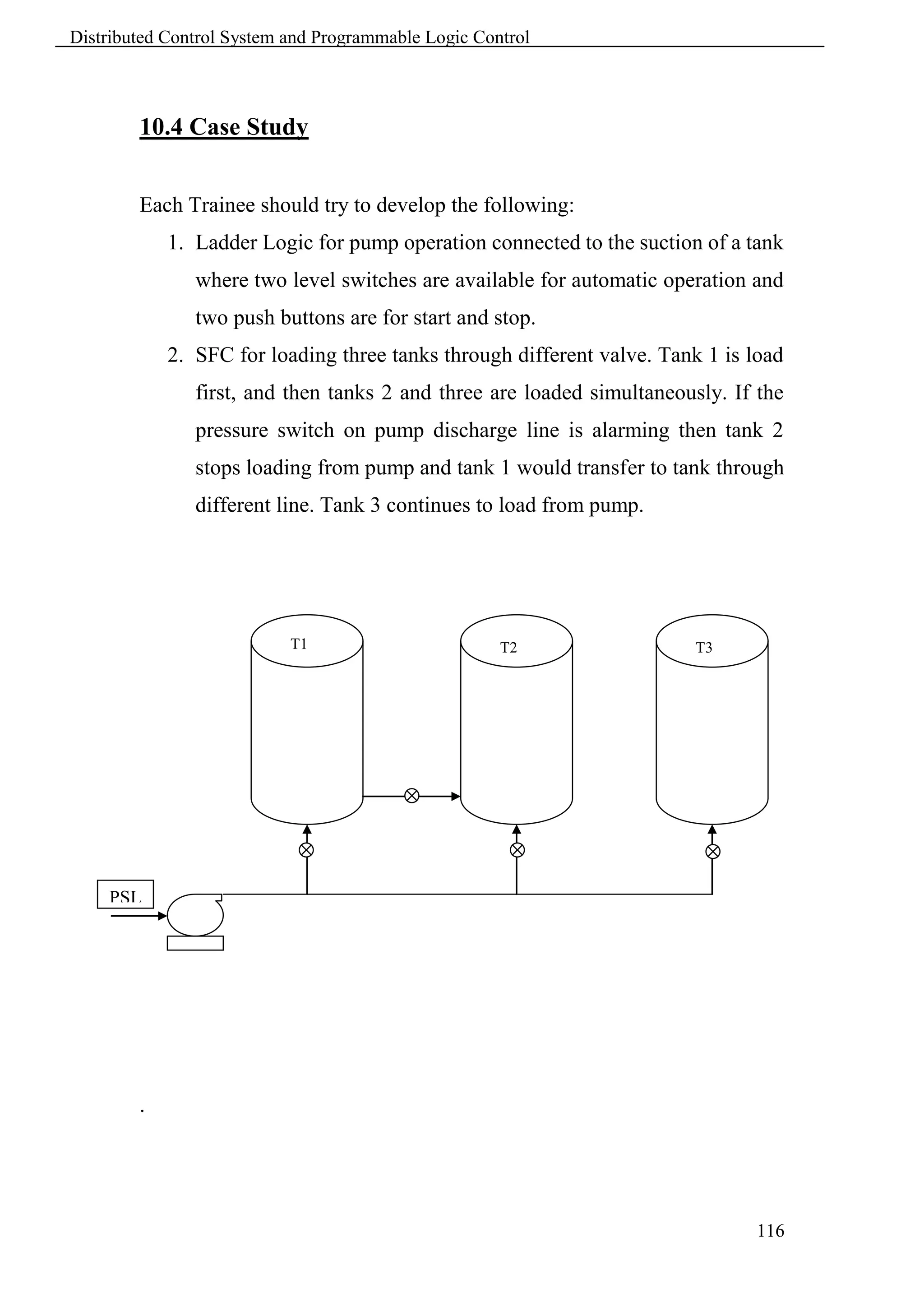
www


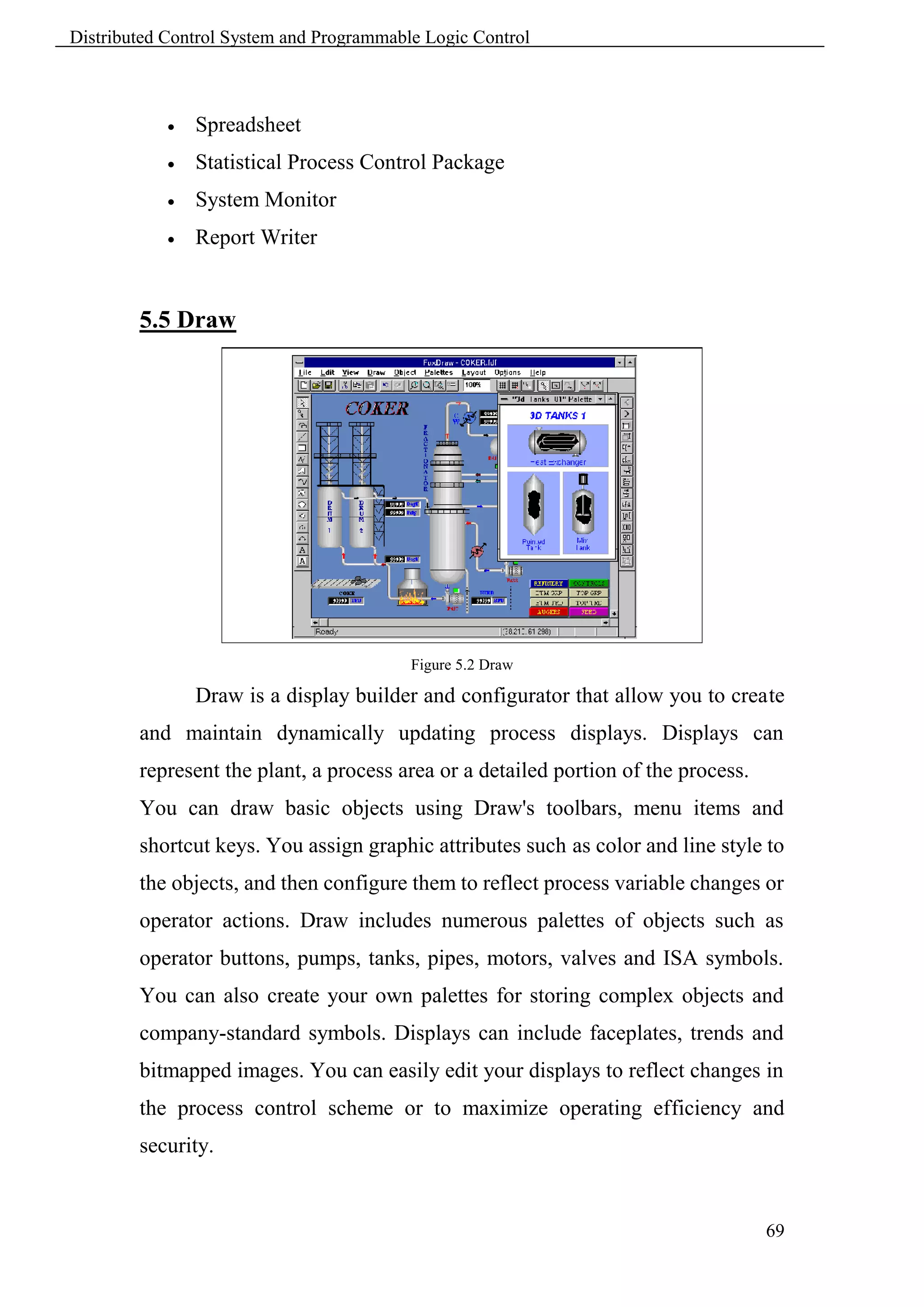
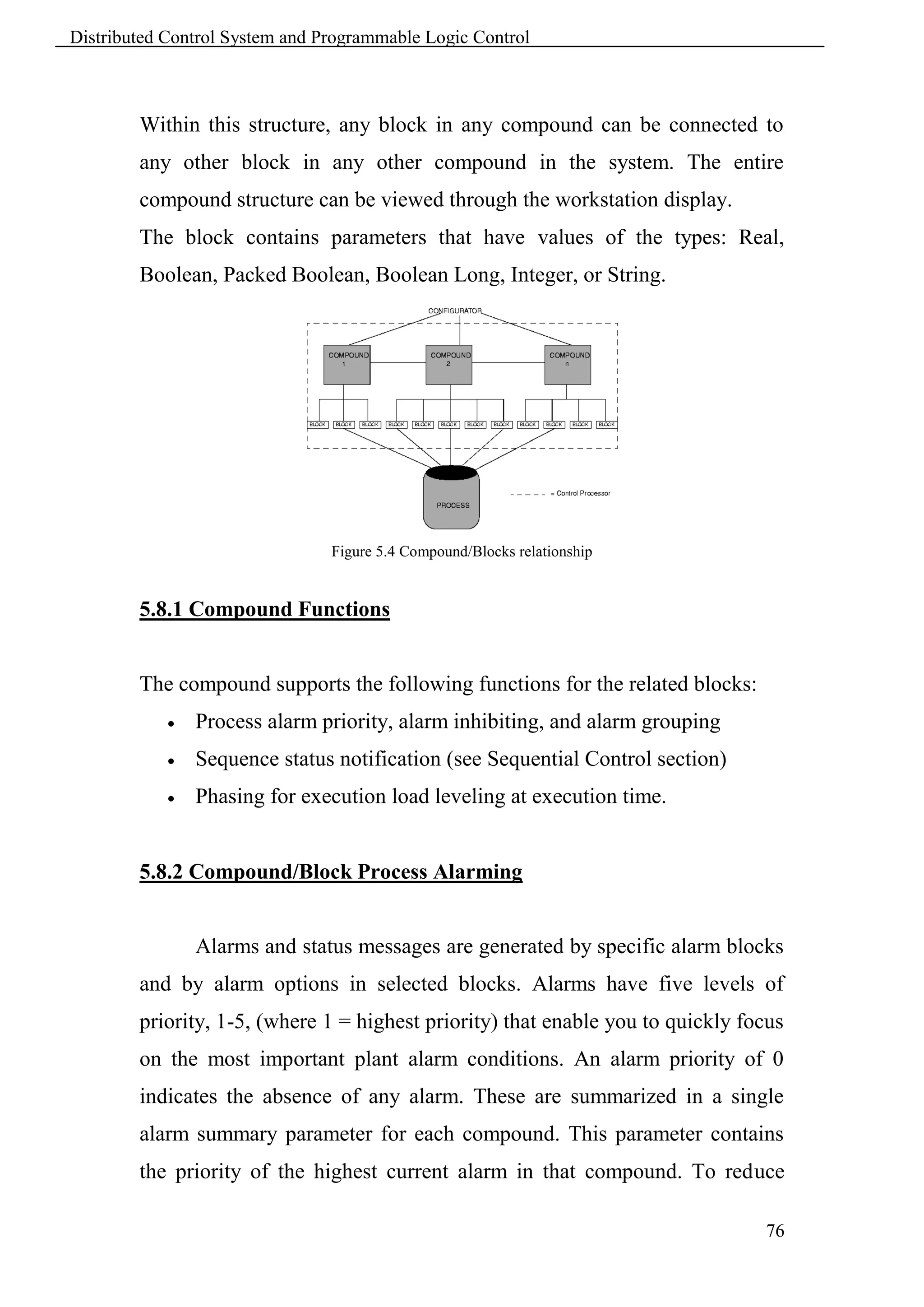
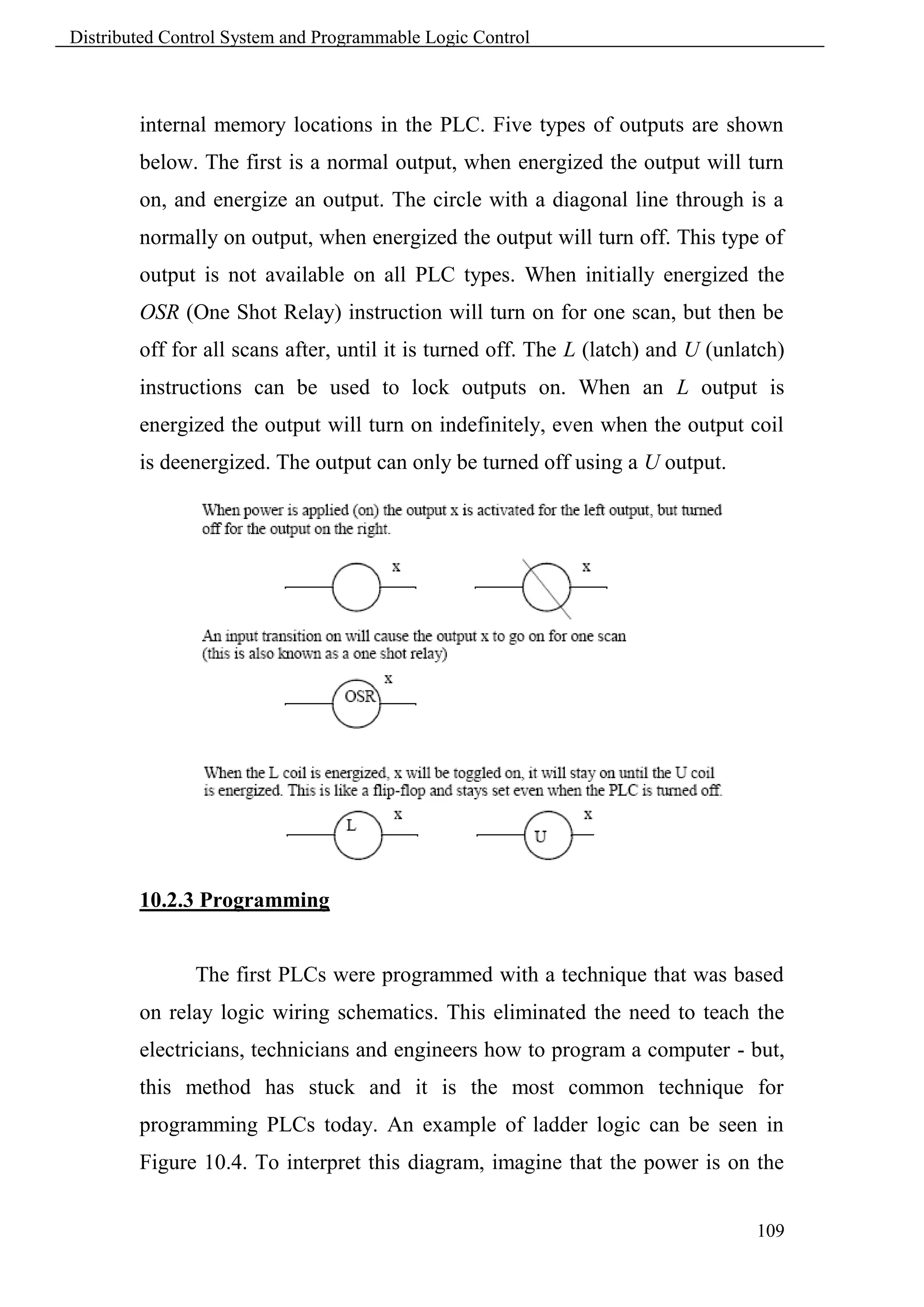
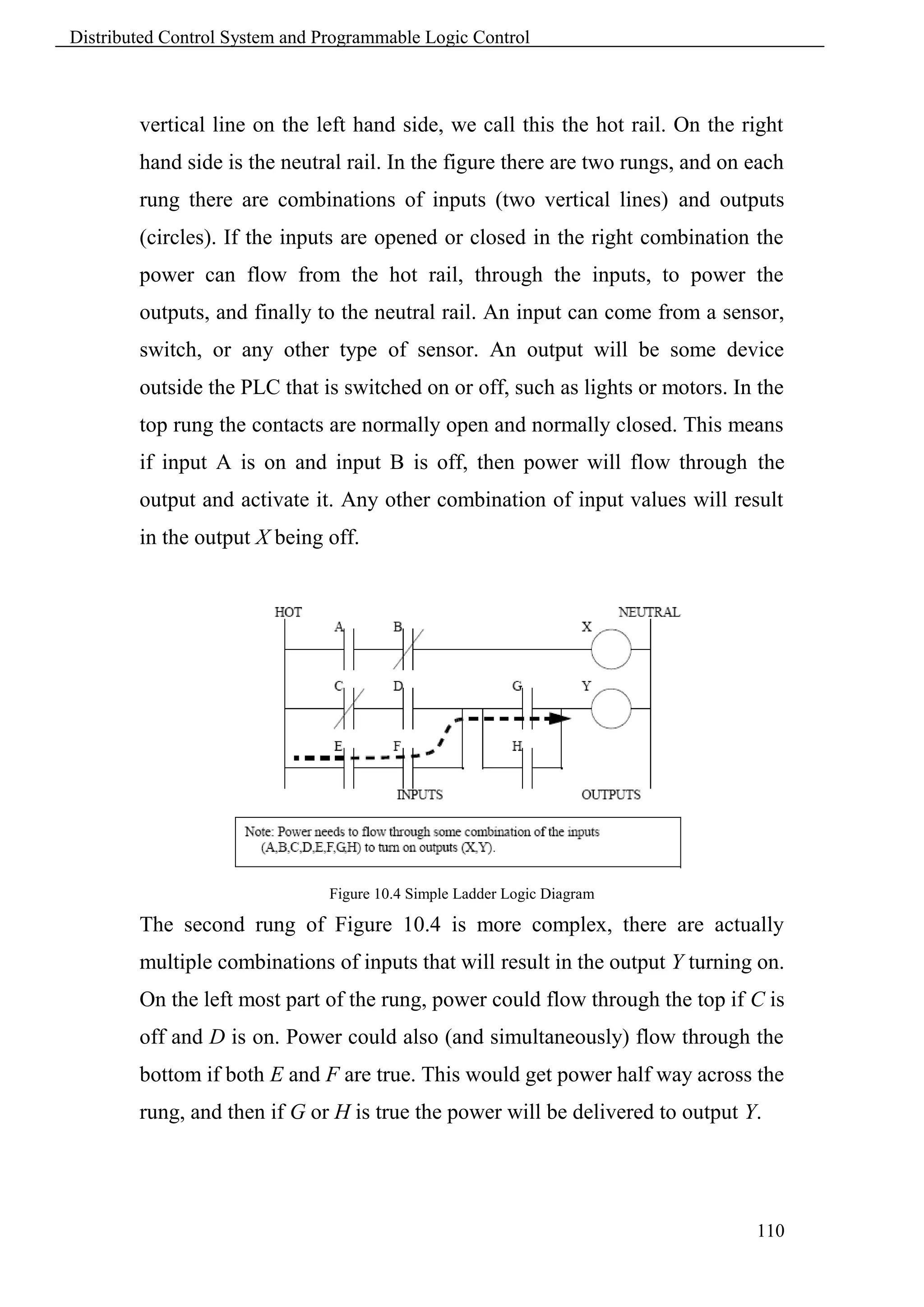
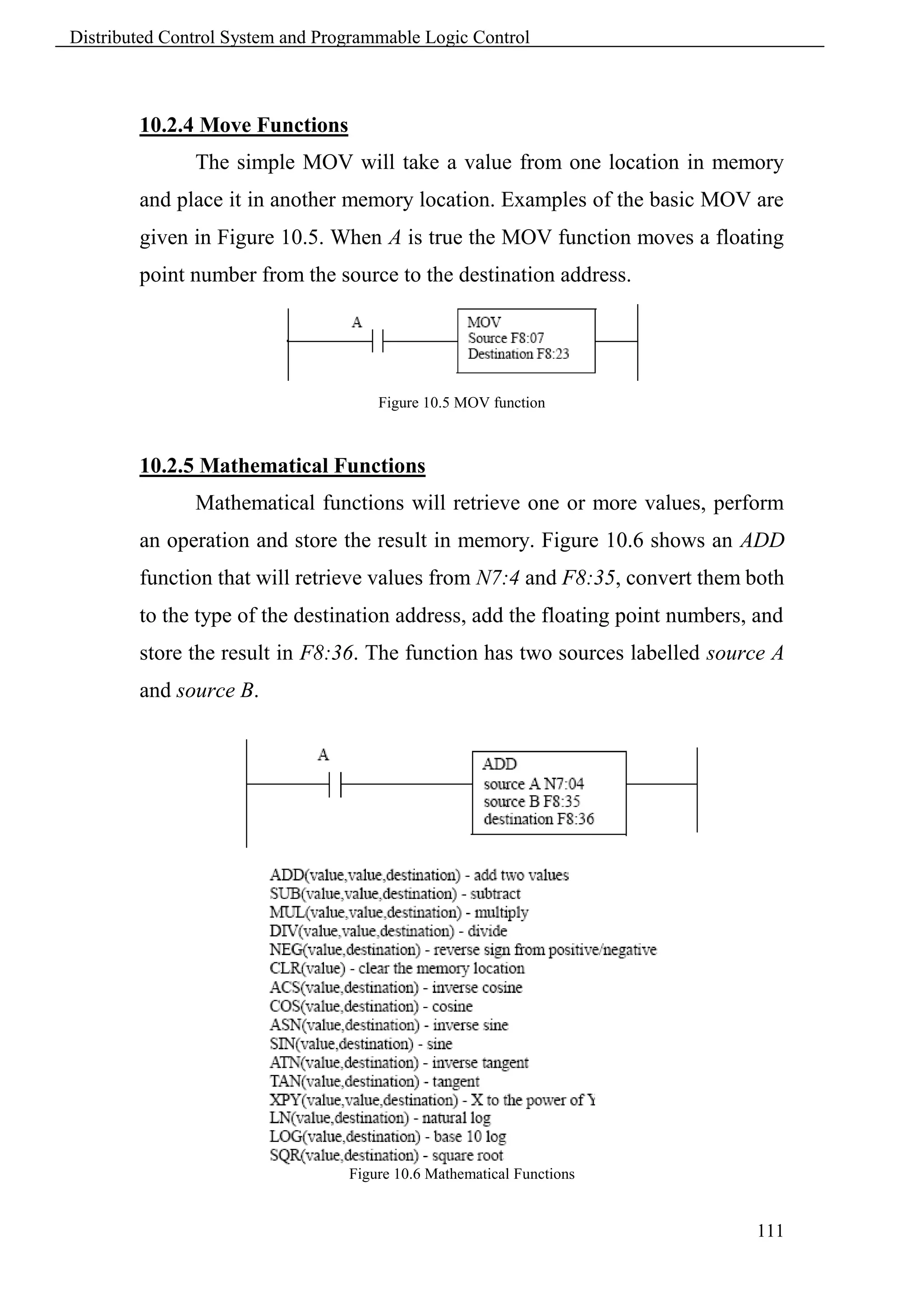
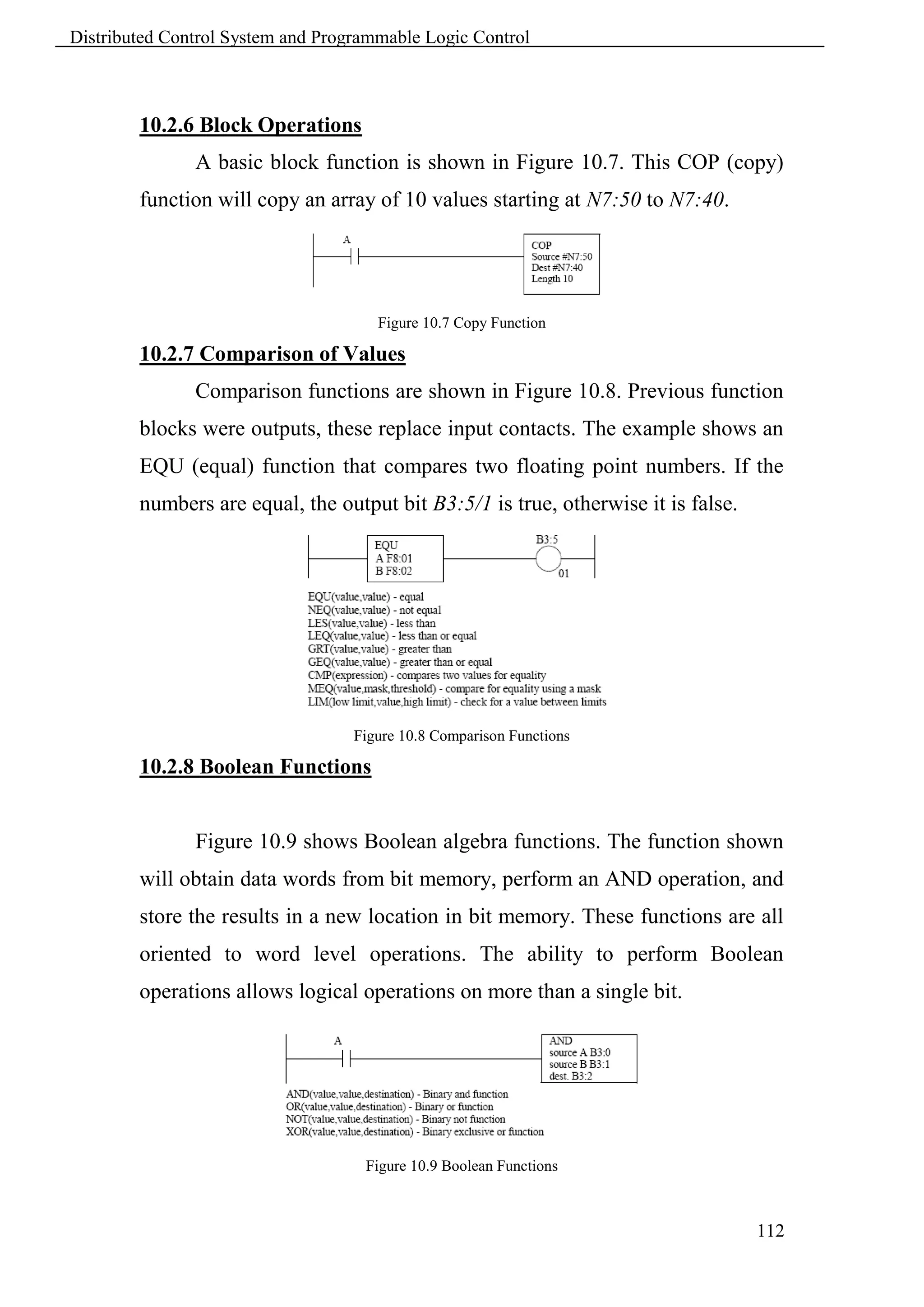
Control Network
Distributed Control System and Programmable Logic Control


        Course Aim


               The aim of this training course is to build up the procedural and
        declarative knowledge required to be recognized by projects engineer that
        don not have past background of DCS or PLC. This will help them to
        supervise projects dealing with control systems with a strong background.
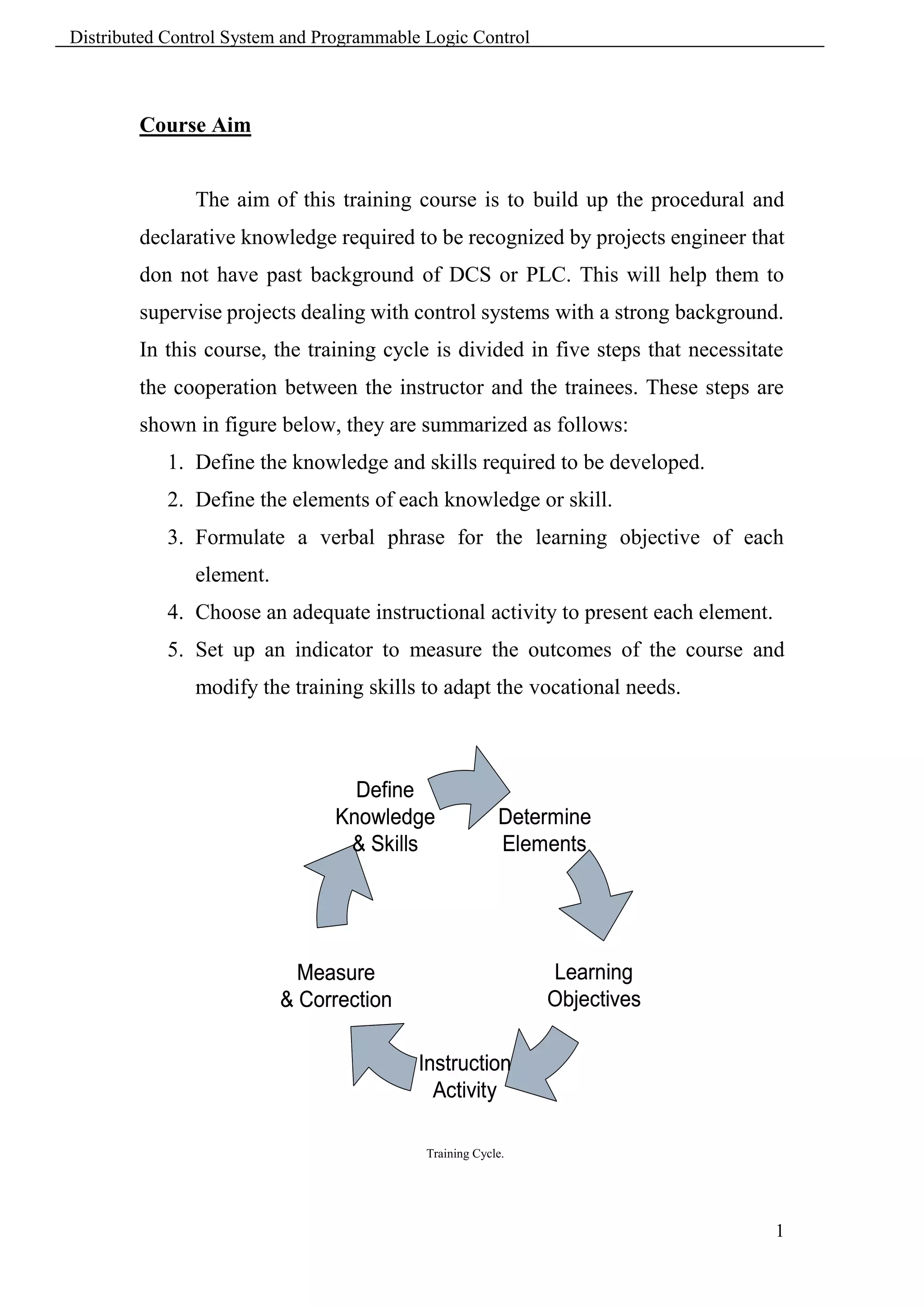
        In this course, the training cycle is divided in five steps that necessitate
        the cooperation between the instructor and the trainees. These steps are
        shown in figure below, they are summarized as follows:
            1. Define the knowledge and skills required to be developed.
            2. Define the elements of each knowledge or skill.
            3. Formulate a verbal phrase for the learning objective of each
               element.
            4. Choose an adequate instructional activity to present each element.
            5. Set up an indicator to measure the outcomes of the course and
               modify the training skills to adapt the vocational needs.


                                  Define
                                Knowledge                Determine
                                 & Skills                Elements


                            Measure                           Learning
                          & Correction                        Objectives

                                           Instruction
                                             Activity

                                            Training Cycle.


                                                                                    1
Distributed Control System and Programmable Logic Control


        Knowledge and Elements


             Illustrate DCS & PLC Benefits, Usage and History.
                    Overview of control system history.
                    Control system benefits and usage.
                    Types of control


             Develop Knowledge of DCS Components (Hardware & Software).
                    Infrastructure [Communication Bus, Interfaces, Controllers,
                      Gateways, RTU, Others].
                    Hardware and technologies.
                    Software [Configuration, Graphics, Alarming, Trending, System
                      Management, Others].


             Extend Knowledge of DCS installation and Maintenance.
                    Site Installation, Commissioning and Startup.
                    Diagnostics, Spares, Tools and Power Distribution.
                    Maintenance [Backup, Replacements and System Installation].


             Develop Knowledge of PLC Components.
                    PLC fundamentals.
                    PLC Logic.


                                                                                   2
Distributed Control System and Programmable Logic Control


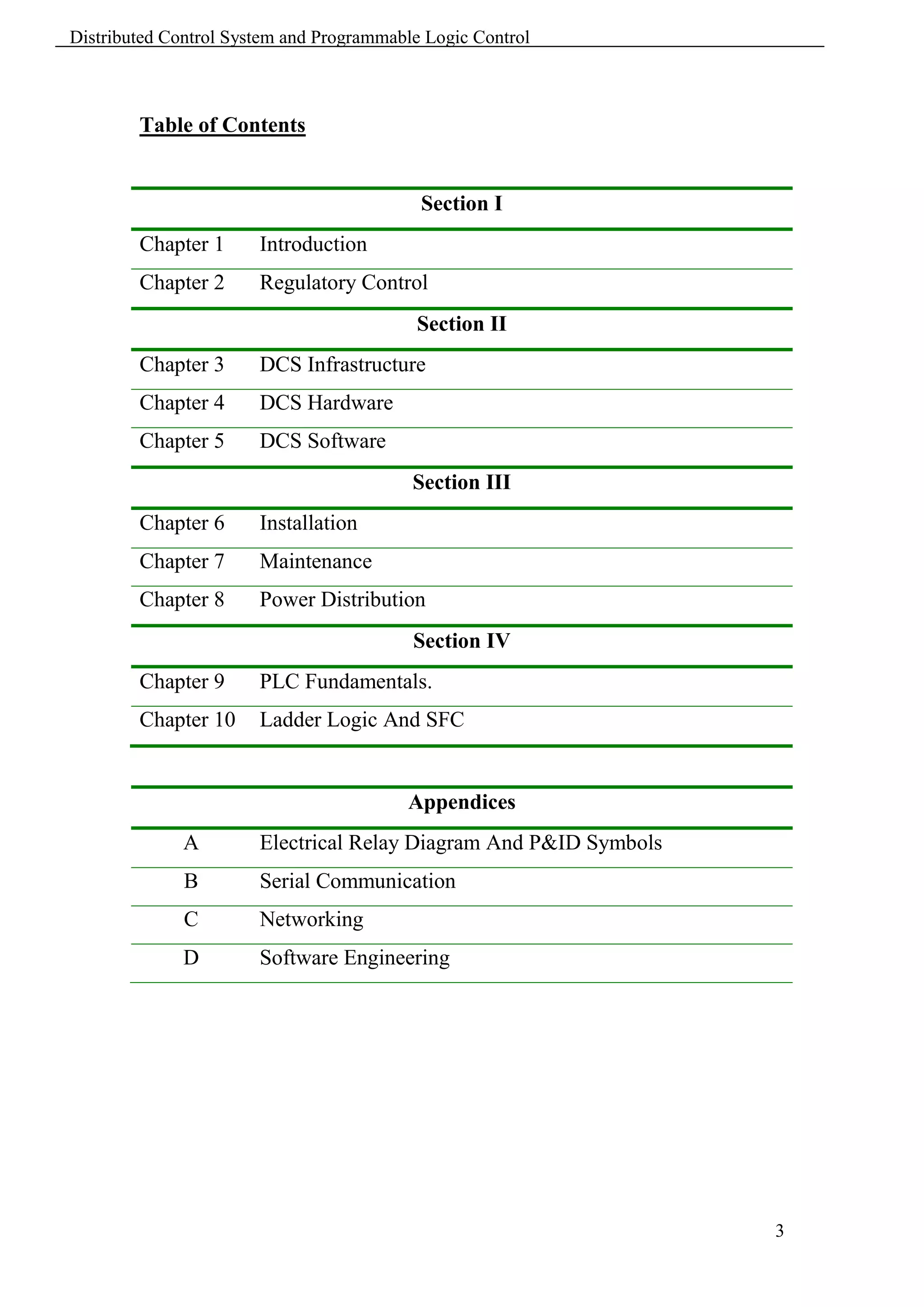
        Table of Contents


                                           Section I
        Chapter 1      Introduction
        Chapter 2      Regulatory Control
                                           Section II
        Chapter 3      DCS Infrastructure
        Chapter 4      DCS Hardware
        Chapter 5      DCS Software
                                          Section III
        Chapter 6      Installation
        Chapter 7      Maintenance
        Chapter 8      Power Distribution
                                          Section IV
        Chapter 9      PLC Fundamentals.
        Chapter 10     Ladder Logic And SFC


                                         Appendices
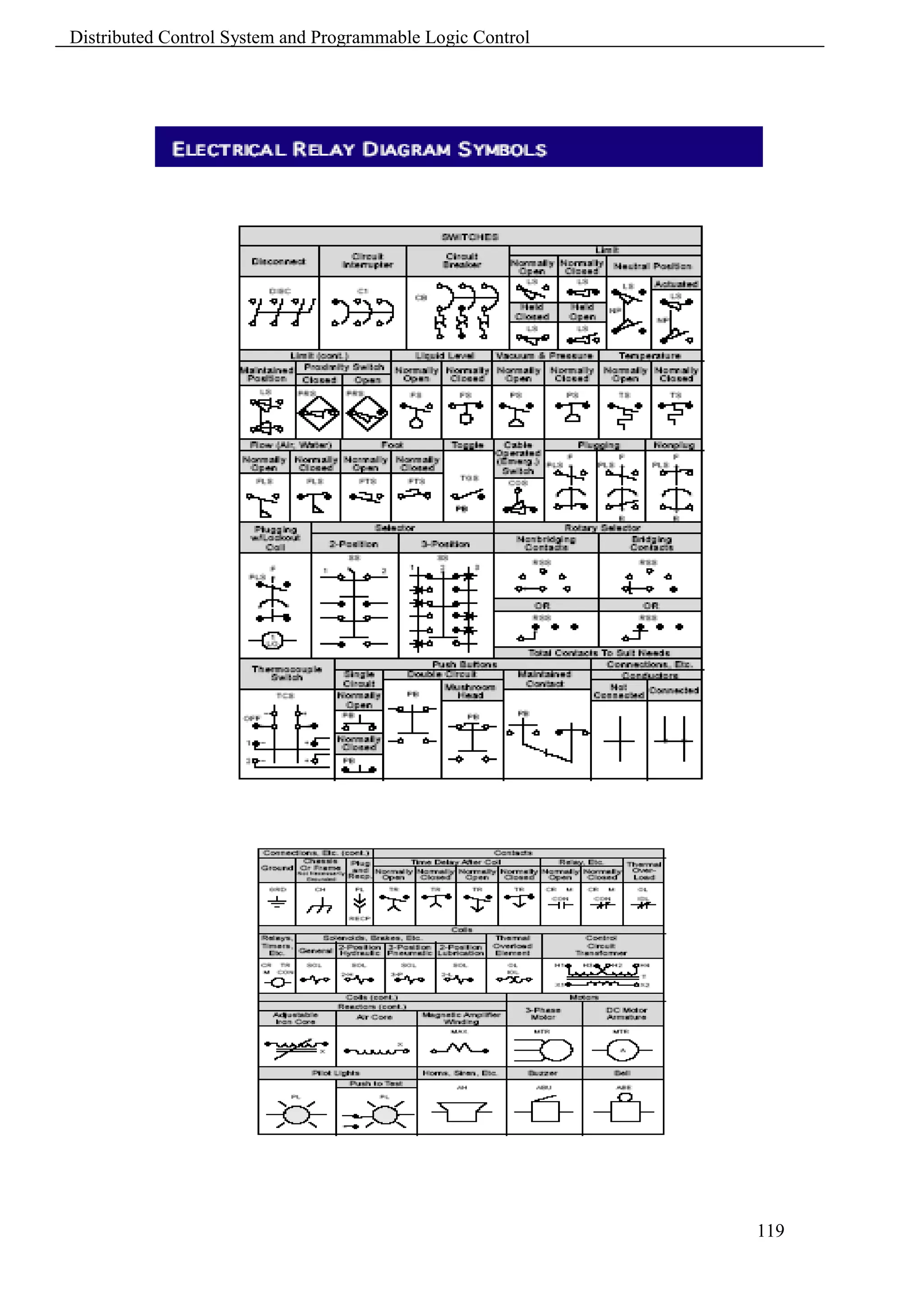
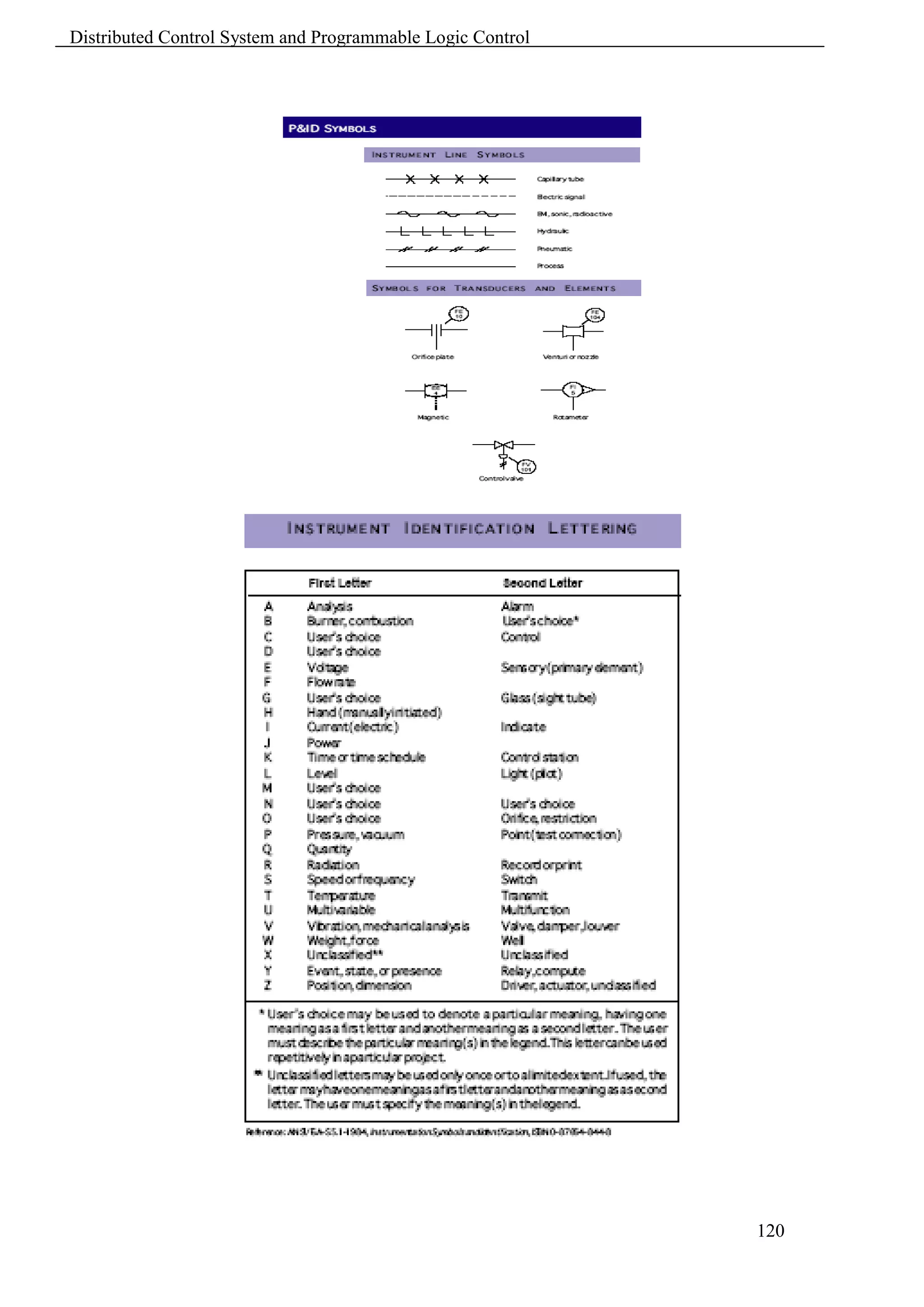
              A        Electrical Relay Diagram And P&ID Symbols
              B        Serial Communication
              C        Networking
              D        Software Engineering


                                                                   3
Distributed Control System and Programmable Logic Control


                                                            4
Distributed Control System and Programmable Logic Control


                                                 Chapter 1
                                           Control Systems

        1.1 Automation System Structure


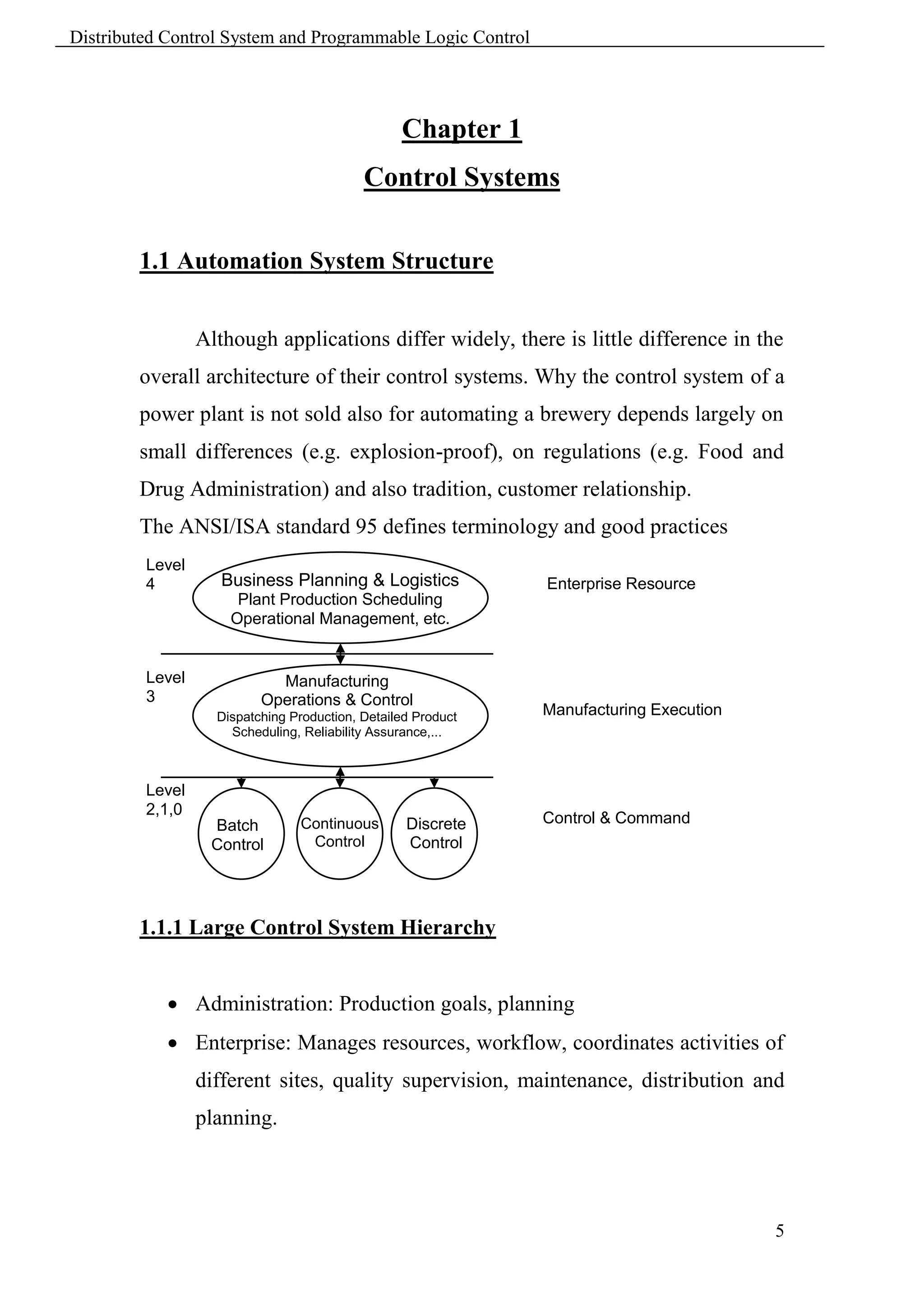
                 Although applications differ widely, there is little difference in the
        overall architecture of their control systems. Why the control system of a
        power plant is not sold also for automating a brewery depends largely on
        small differences (e.g. explosion-proof), on regulations (e.g. Food and
        Drug Administration) and also tradition, customer relationship.
        The ANSI/ISA standard 95 defines terminology and good practices
         Level
         4          Business Planning & Logistics             Enterprise Resource
                      Plant Production Scheduling             Planning
                     Operational Management, etc.


         Level              Manufacturing
         3                Operations & Control
                   Dispatching Production, Detailed Product   Manufacturing Execution
                     Scheduling, Reliability Assurance,...    System


         Level
         2,1,0
                  Batch         Continuous        Discrete    Control & Command
                  Control        Control          Control     System


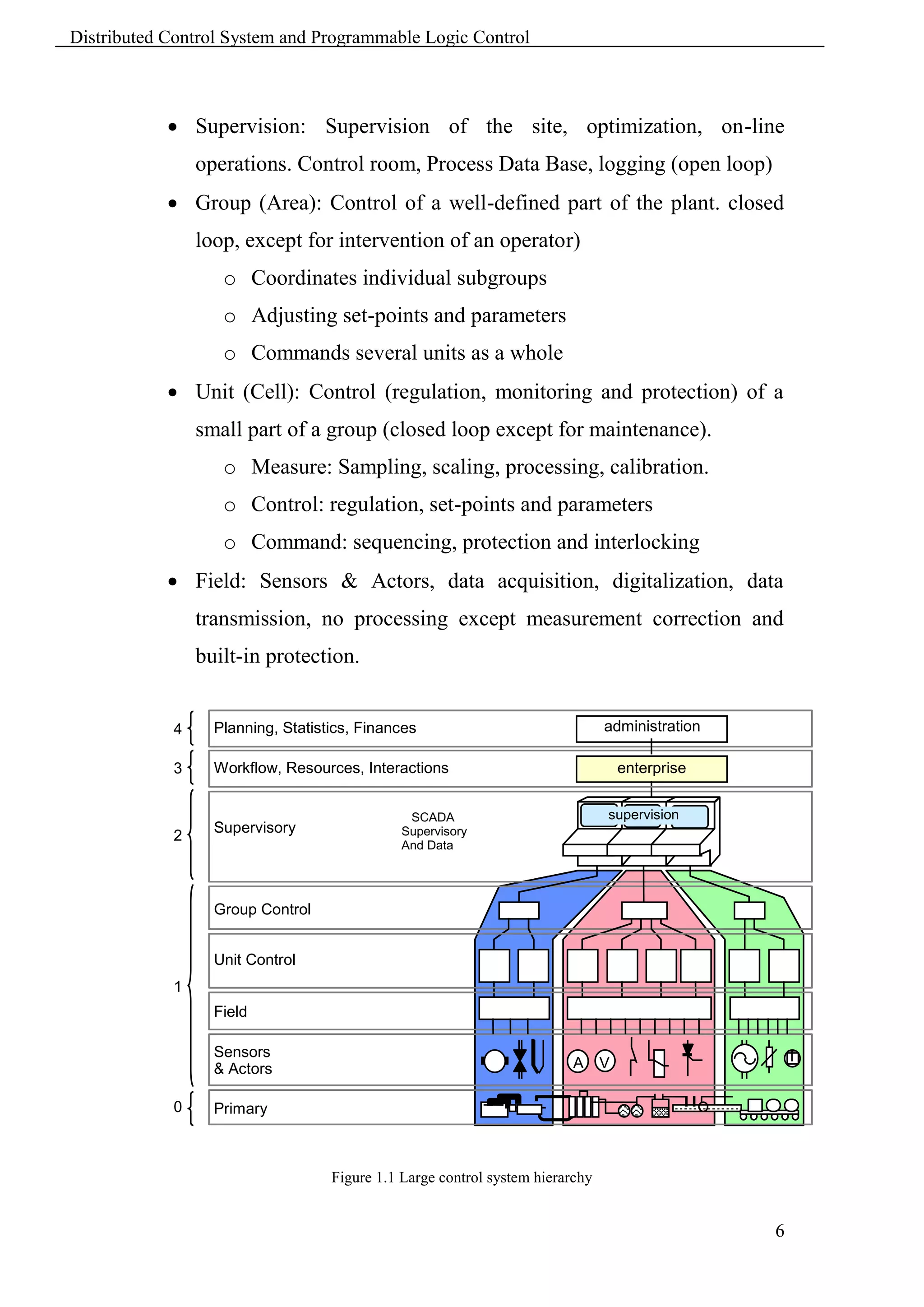
        1.1.1 Large Control System Hierarchy


             Administration: Production goals, planning
             Enterprise: Manages resources, workflow, coordinates activities of
                 different sites, quality supervision, maintenance, distribution and
                 planning.


                                                                                        5
Distributed Control System and Programmable Logic Control


             Supervision: Supervision of the site, optimization, on-line
                operations. Control room, Process Data Base, logging (open loop)
             Group (Area): Control of a well-defined part of the plant. closed
                loop, except for intervention of an operator)
                   o Coordinates individual subgroups
                   o Adjusting set-points and parameters
                   o Commands several units as a whole
             Unit (Cell): Control (regulation, monitoring and protection) of a
                small part of a group (closed loop except for maintenance).
                   o Measure: Sampling, scaling, processing, calibration.
                   o Control: regulation, set-points and parameters
                   o Command: sequencing, protection and interlocking
             Field: Sensors & Actors, data acquisition, digitalization, data
                transmission, no processing except measurement correction and
                built-in protection.


            4     Planning, Statistics, Finances                               administration

            3     Workflow, Resources, Interactions                                enterprise


                                               SCADA                           supervision
                  Supervisory                 Supervisory
                                               =
            2
                                              And Data
                                              Control
                                              Acquisition


                  Group Control


                  Unit Control
            1
                  Field

                  Sensors                                                                           T
                  & Actors                                              A      V

            0     Primary
                  technology


                                   Figure 1.1 Large control system hierarchy


                                                                                                6
Distributed Control System and Programmable Logic Control


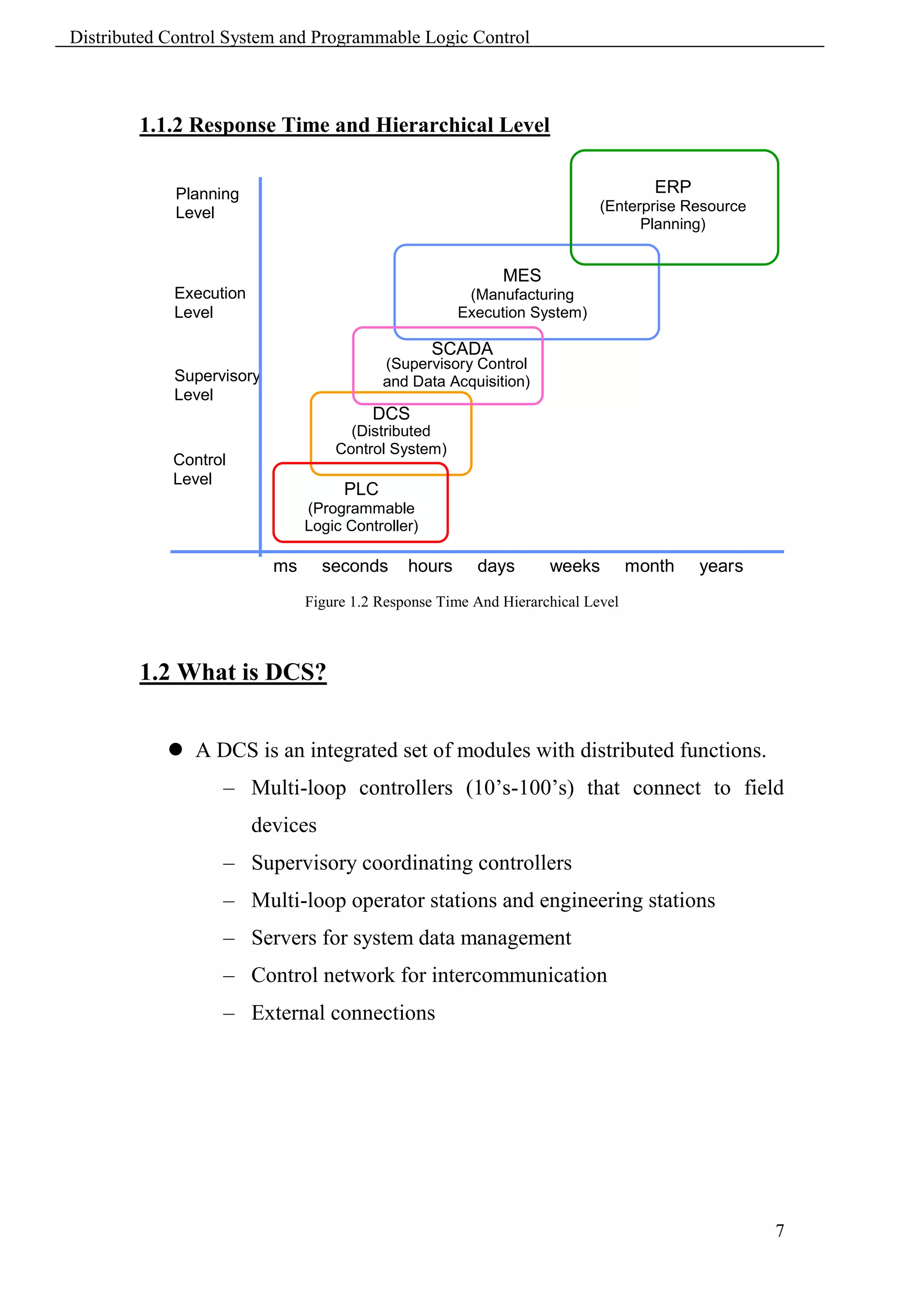
        1.1.2 Response Time and Hierarchical Level


             Planning                                                               ERP
             Level                                                         (Enterprise Resource
                                                                                 Planning)

                                                            MES
            Execution                                  (Manufacturing
            Level                                     Execution System)
                                                   SCADA
                                          (Supervisory Control
            Supervisory                   and Data Acquisition)
            Level
                                         DCS
                                     (Distributed
                                   Control System)
            Control
            Level
                                    PLC
                               (Programmable
                               Logic Controller)

                          ms      seconds     hours     days       weeks         month    years
                               Figure 1.2 Response Time And Hierarchical Level


        1.2 What is DCS?


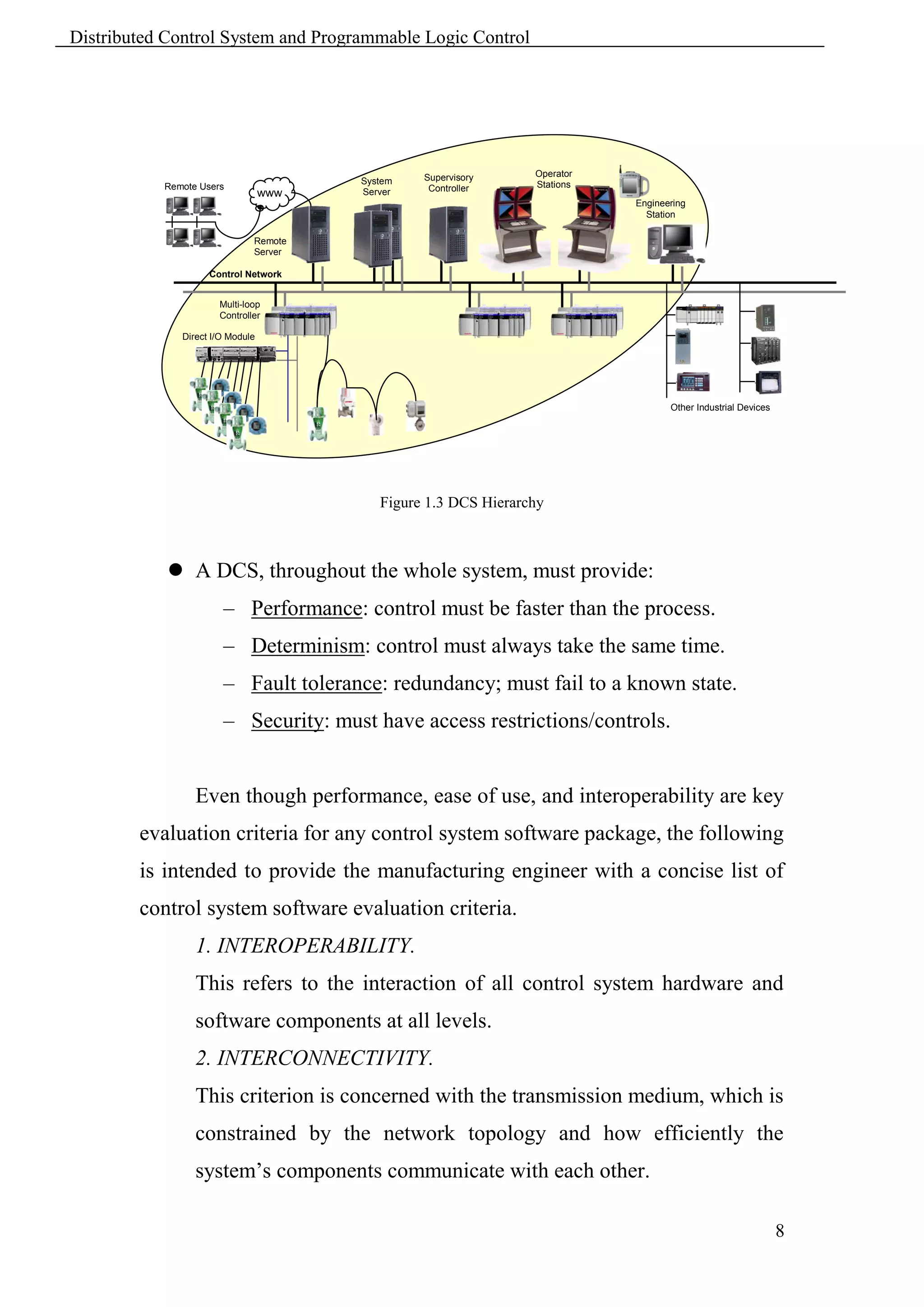
             A DCS is an integrated set of modules with distributed functions.
                   – Multi-loop controllers (10’s-100’s) that connect to field
                        devices
                   – Supervisory coordinating controllers
                   – Multi-loop operator stations and engineering stations
                   – Servers for system data management
                   – Control network for intercommunication
                   – External connections


                                                                                                  7
Distributed Control System and Programmable Logic Control


                                                 Supervisory     Operator
                                        System                   Stations
           Remote Users                           Controller
                                  www   Server
                                                                            Engineering
                                                                              Station

                              Remote
                              Server

                    Control Network


                      Multi-loop
                      Controller

              Direct I/O Module


                                                                                   Other Industrial Devices


                                           Figure 1.3 DCS Hierarchy


             A DCS, throughout the whole system, must provide:
                       – Performance: control must be faster than the process.
                       – Determinism: control must always take the same time.
                       – Fault tolerance: redundancy; must fail to a known state.
                       – Security: must have access restrictions/controls.


                 Even though performance, ease of use, and interoperability are key
        evaluation criteria for any control system software package, the following
        is intended to provide the manufacturing engineer with a concise list of
        control system software evaluation criteria.
                 1. INTEROPERABILITY.
                 This refers to the interaction of all control system hardware and
                 software components at all levels.
                 2. INTERCONNECTIVITY.
                 This criterion is concerned with the transmission medium, which is
                 constrained by the network topology and how efficiently the
                 system’s components communicate with each other.

                                                                                                              8
Distributed Control System and Programmable Logic Control


               3. DISASTER PROCESSING.
               This component is defined by the efficiency with which the
               software provides the operator with system failure information and
               the ease at which the operator is permitted to bring the system back
               to maximum operation after system failure.
               4. DATABASE.
               This refers to the software’s ability to maintain the system’s
               database.
               5. PROCESSES/DATA.
               This criterion is concerned with the variety of processes and data
               that can be controlled by the SCADA package.
               6. DIAGNOSTICS.
               The SCADA package’s ability to assist in the resolution of system
               failures is evaluated by this diagnostic utility.
               7. SECURITY.
               This component is concerned with the levels of security provided
               by the software.
               8. MONITORING/CONTROL
               Monitoring of a given process in real-time and control of that
               process, within preset parameters, is evaluated by this criteria.
               9. ALARM MANAGEMENT/LOGGING.
               This is the category for detecting, annunciating, managing, and
               storing alarm conditions.
               10. STATISTICAL PROCESS CONTROL.
               This is the portion of the SCADA package that evaluates the
               process data. Production and quality is greatly effected by this data.
               12. OPERATOR INTERFACE.
               The graphical user interface (GUI) is evaluated using this criterion.


                                                                                   9
Distributed Control System and Programmable Logic Control


               13. TRENDING.
               The software’s ability to display trending plots using historical and
               current data is considered in this category.
               14. REPORT GENERATION.
               The production of logs and reports using current real-time data and
               data retrieved from historical files is evaluated under this category.


               Due to the advancements in computer technology and low cost, a
        personal computer-based distributed control system can be installed for a
        fraction of the cost required just a few years ago. However, prior to
        selecting any piece of DCS equipment, first examine the existing
        equipment, in particular the smart controllers, for network compatibility.
        Then, examine and select the software to be employed.


        1.3 What is PLC?


               A programmable logic controller, also called a PLC or
        programmable controller, is a computer-type device used to control
        equipment in an industrial facility. The kinds of equipment that PLCs can
        control are as varied as industrial facilities themselves. Conveyor
        systems, food processing machinery, auto assembly lines…you name it
        and there’s probably a PLC out there controlling it.
               In a traditional industrial control system, all control devices are
        wired directly to each other according to how the system is supposed to
        operate. In a PLC system, however, the PLC replaces the wiring between
        the devices. Thus, instead of being wired directly to each other, all
        equipment is wired to the PLC. Then, the control program inside the PLC
        provides the “wiring” connection between the devices.


                                                                                   10
Distributed Control System and Programmable Logic Control


               The control program is the computer program stored in the PLC’s
        memory that tells the PLC what’s supposed to be going on in the system.
        The use of a PLC to provide the wiring connections between system
        devices is called soft-wiring.
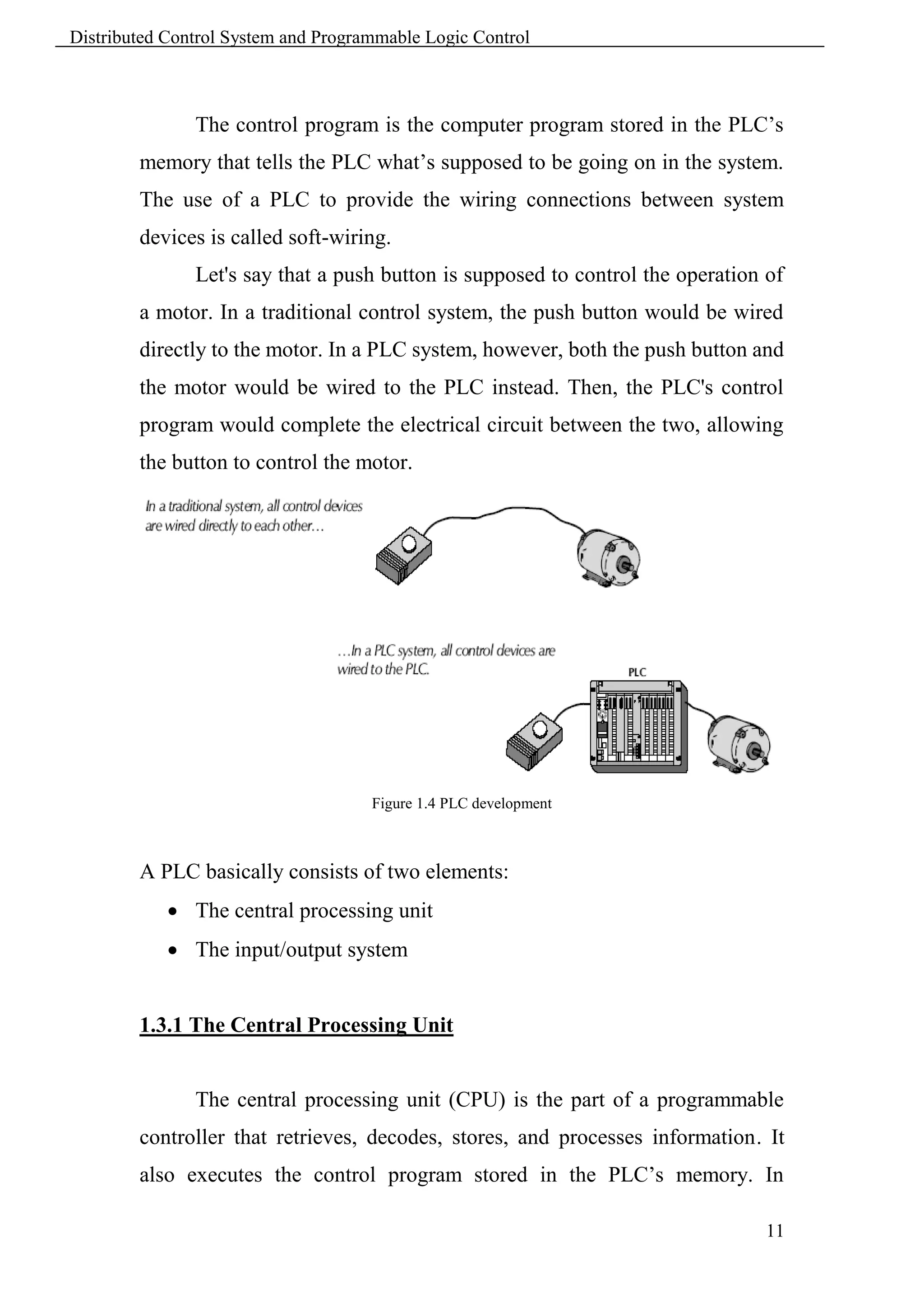
               Let's say that a push button is supposed to control the operation of
        a motor. In a traditional control system, the push button would be wired
        directly to the motor. In a PLC system, however, both the push button and
        the motor would be wired to the PLC instead. Then, the PLC's control
        program would complete the electrical circuit between the two, allowing
        the button to control the motor.


                                     Figure 1.4 PLC development


        A PLC basically consists of two elements:
             The central processing unit
             The input/output system


        1.3.1 The Central Processing Unit


               The central processing unit (CPU) is the part of a programmable
        controller that retrieves, decodes, stores, and processes information. It
        also executes the control program stored in the PLC’s memory. In

                                                                                 11
Distributed Control System and Programmable Logic Control


        essence, the CPU is the “brains” of a programmable controller. It
        functions much the same way the CPU of a regular computer does, except
        that it uses special instructions and coding to perform its functions. The
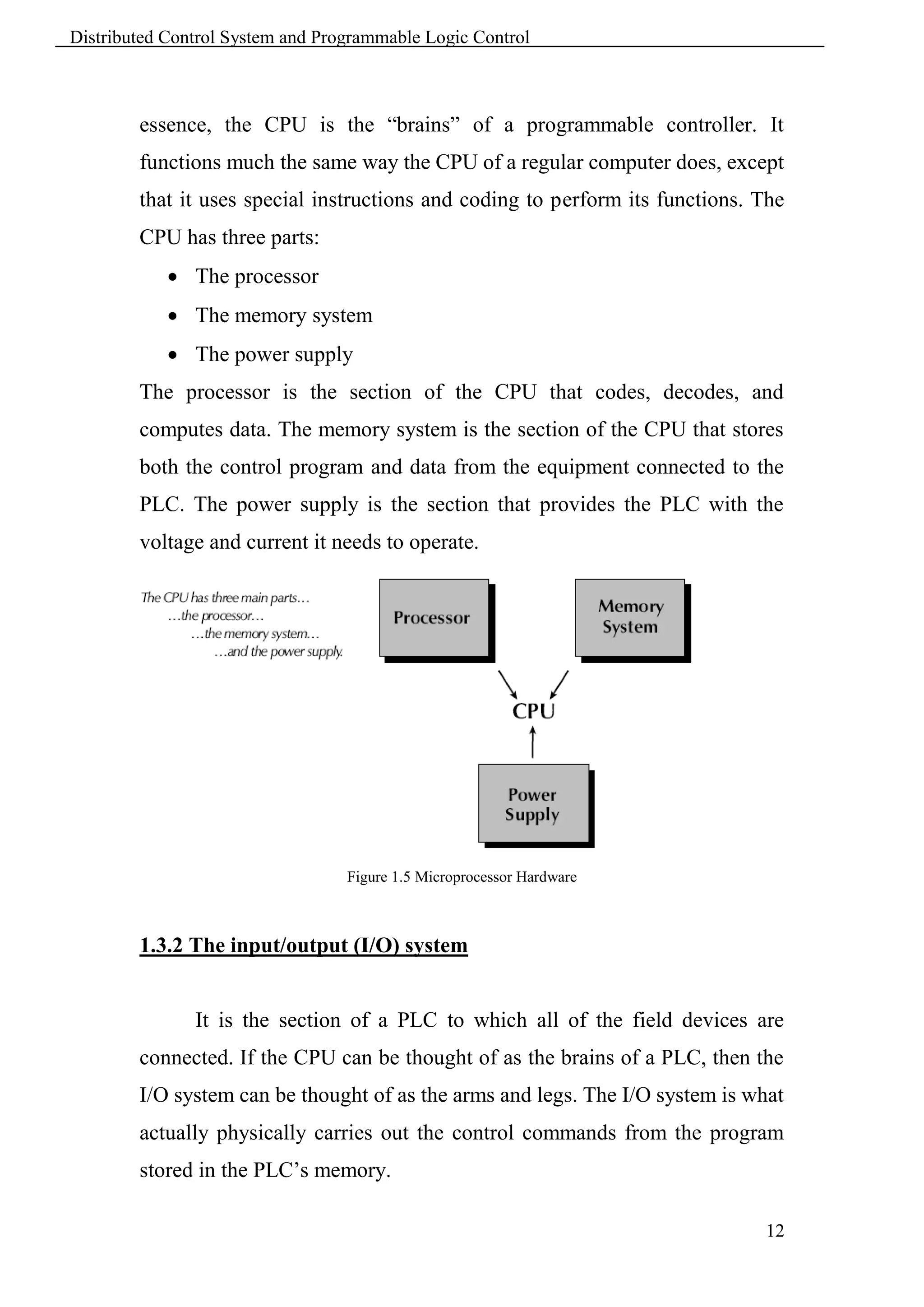
        CPU has three parts:
             The processor
             The memory system
             The power supply
        The processor is the section of the CPU that codes, decodes, and
        computes data. The memory system is the section of the CPU that stores
        both the control program and data from the equipment connected to the
        PLC. The power supply is the section that provides the PLC with the
        voltage and current it needs to operate.


                                  Figure 1.5 Microprocessor Hardware


        1.3.2 The input/output (I/O) system


               It is the section of a PLC to which all of the field devices are
        connected. If the CPU can be thought of as the brains of a PLC, then the
        I/O system can be thought of as the arms and legs. The I/O system is what
        actually physically carries out the control commands from the program
        stored in the PLC’s memory.

                                                                               12
Distributed Control System and Programmable Logic Control


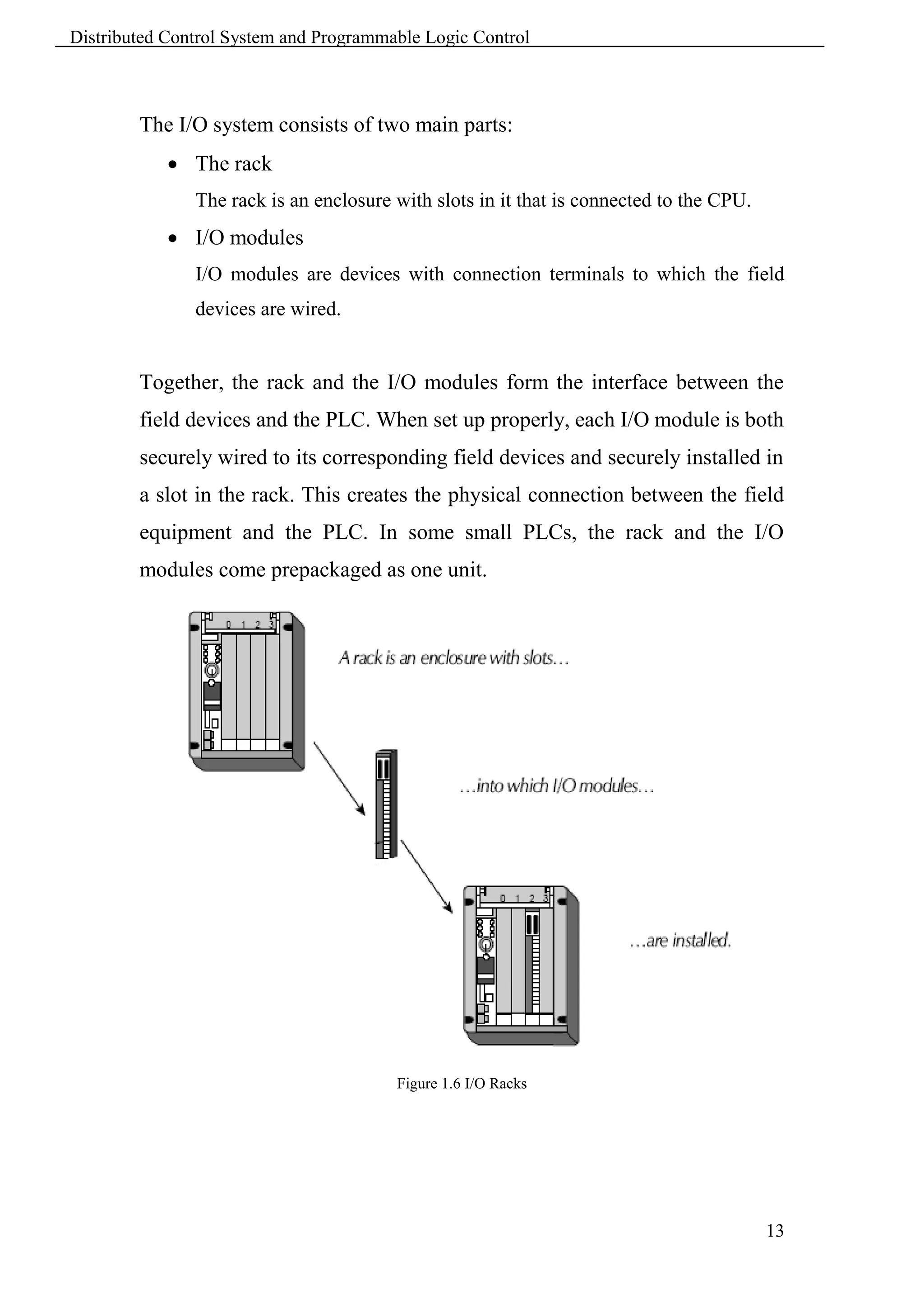
        The I/O system consists of two main parts:
             The rack
               The rack is an enclosure with slots in it that is connected to the CPU.
             I/O modules
               I/O modules are devices with connection terminals to which the field
               devices are wired.


        Together, the rack and the I/O modules form the interface between the
        field devices and the PLC. When set up properly, each I/O module is both
        securely wired to its corresponding field devices and securely installed in
        a slot in the rack. This creates the physical connection between the field
        equipment and the PLC. In some small PLCs, the rack and the I/O
        modules come prepackaged as one unit.


                                        Figure 1.6 I/O Racks


                                                                                         13
Distributed Control System and Programmable Logic Control


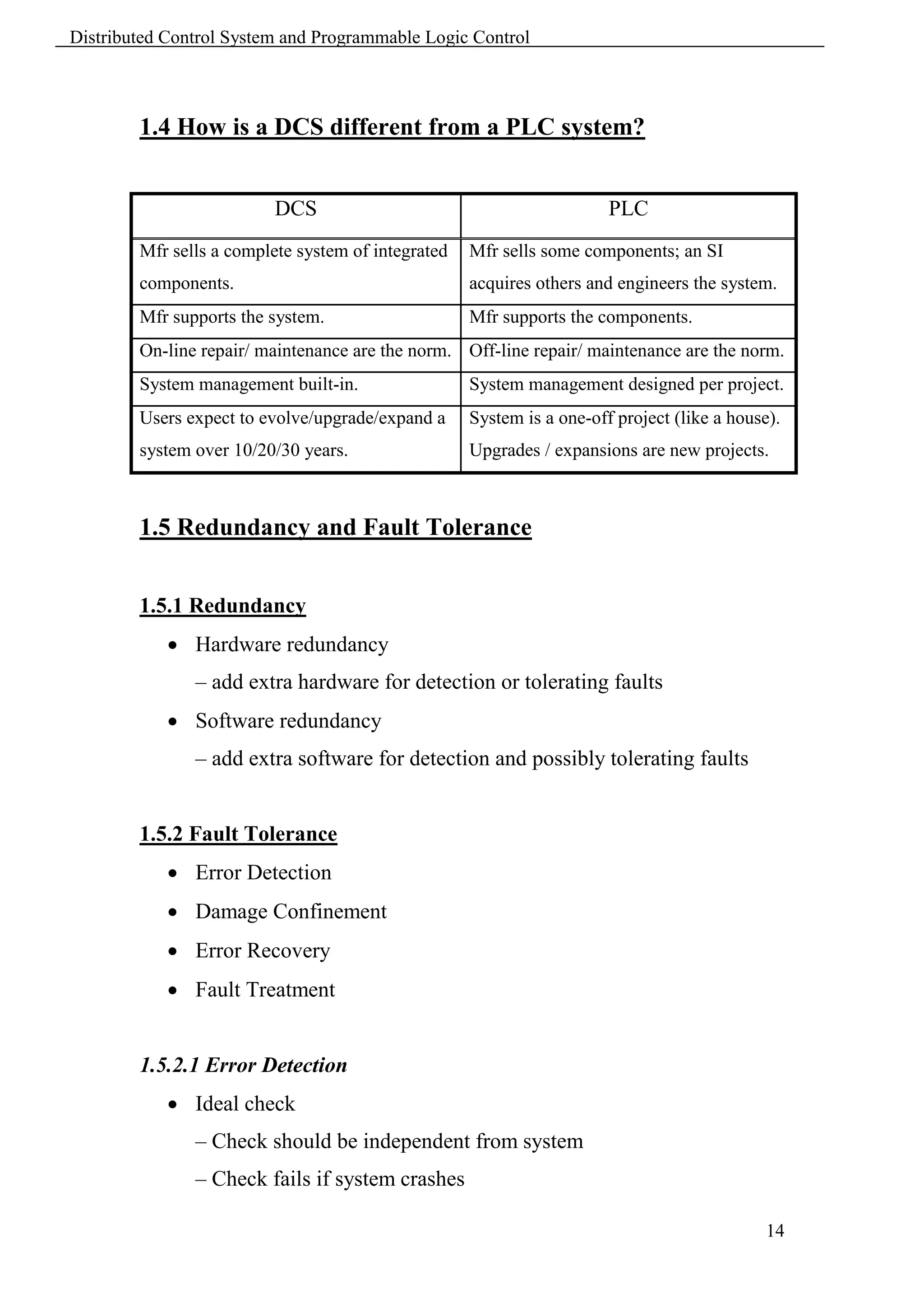
        1.4 How is a DCS different from a PLC system?


                         DCS                                           PLC
        Mfr sells a complete system of integrated   Mfr sells some components; an SI
        components.                                 acquires others and engineers the system.
        Mfr supports the system.                    Mfr supports the components.
        On-line repair/ maintenance are the norm. Off-line repair/ maintenance are the norm.
        System management built-in.                 System management designed per project.
        Users expect to evolve/upgrade/expand a     System is a one-off project (like a house).
        system over 10/20/30 years.                 Upgrades / expansions are new projects.


        1.5 Redundancy and Fault Tolerance


        1.5.1 Redundancy
             Hardware redundancy
               – add extra hardware for detection or tolerating faults
             Software redundancy
               – add extra software for detection and possibly tolerating faults


        1.5.2 Fault Tolerance
             Error Detection
             Damage Confinement
             Error Recovery
             Fault Treatment


        1.5.2.1 Error Detection
             Ideal check
               – Check should be independent from system
               – Check fails if system crashes

                                                                                             14
Distributed Control System and Programmable Logic Control


             Acceptable check
               – Cost
               – Reasonable check, e.g. monitor rate of change
             diagnostics
               – Performed “by system on system components”
               – E.g. power-up diagnostics


        1.5.2.2 Damage Confinement
             Error might propagate and spread
             Identify boundaries to state beyond which no information exchange
               has occurred


        1.5.2.3 Error Recovery
             Backward recovery
               – State is restored to an earlier state
               – Requires checkpoints
               – Most frequently used
               – Recovery overhead
             Forward recovery
               – Try to make state error-free
               – Need accurate assessment of damage
               – Highly application-dependent


        1.5.2.4 Fault Treatment
             If transient fault: restart system, goto error-free state
             System repair
               – On-line, no manual intervention, (automatic)
               – Dynamic system reconfiguration
               – Spare (hot or cold)

                                                                             15
Distributed Control System and Programmable Logic Control


        1.5.2.5 Fault Coverage
             Measure of system’s ability to perform:
               – Fault detection
               – Fault location
               – Fault containment
               – (and/or fault recovery)
             Note:
               – Recovery implies that the system as a whole is operational
               – This does not imply that a “repair” occurred
               – E.g. duplex system with benign fault can recover to continue
               operation on one non-faulty processor


        1.5.2.6 Hardware Redundancy
             Passive (static)
               – Uses fault masking to hide occurrence of fault
               – No action from the system is required
               – E.g. voting
             Active (dynamic)
               – Uses comparison for detection and/or diagnoses
               – Remove faulty hardware from system => reconfiguration
             Hybrid
               – Combine both approaches
               – Masking until diagnostic complete
               – Expensive, but better to achieve higher reliability


        1.5.2.7 Passive Hardware Redundancy
             N-Modular Redundancy (NMR)
               – N independent modules replicate the same function


                                                                              16
Distributed Control System and Programmable Logic Control


             Parallelism
               – Results are voted on requirements: N >= 3
             TMR (Triple Modular Redundancy)


        1.5.2.8 Fault tolerant structures
               Fault tolerance allows continuing operation in spite of a limited
        number of independent failures. Fault tolerance relies on work
        redundancy.


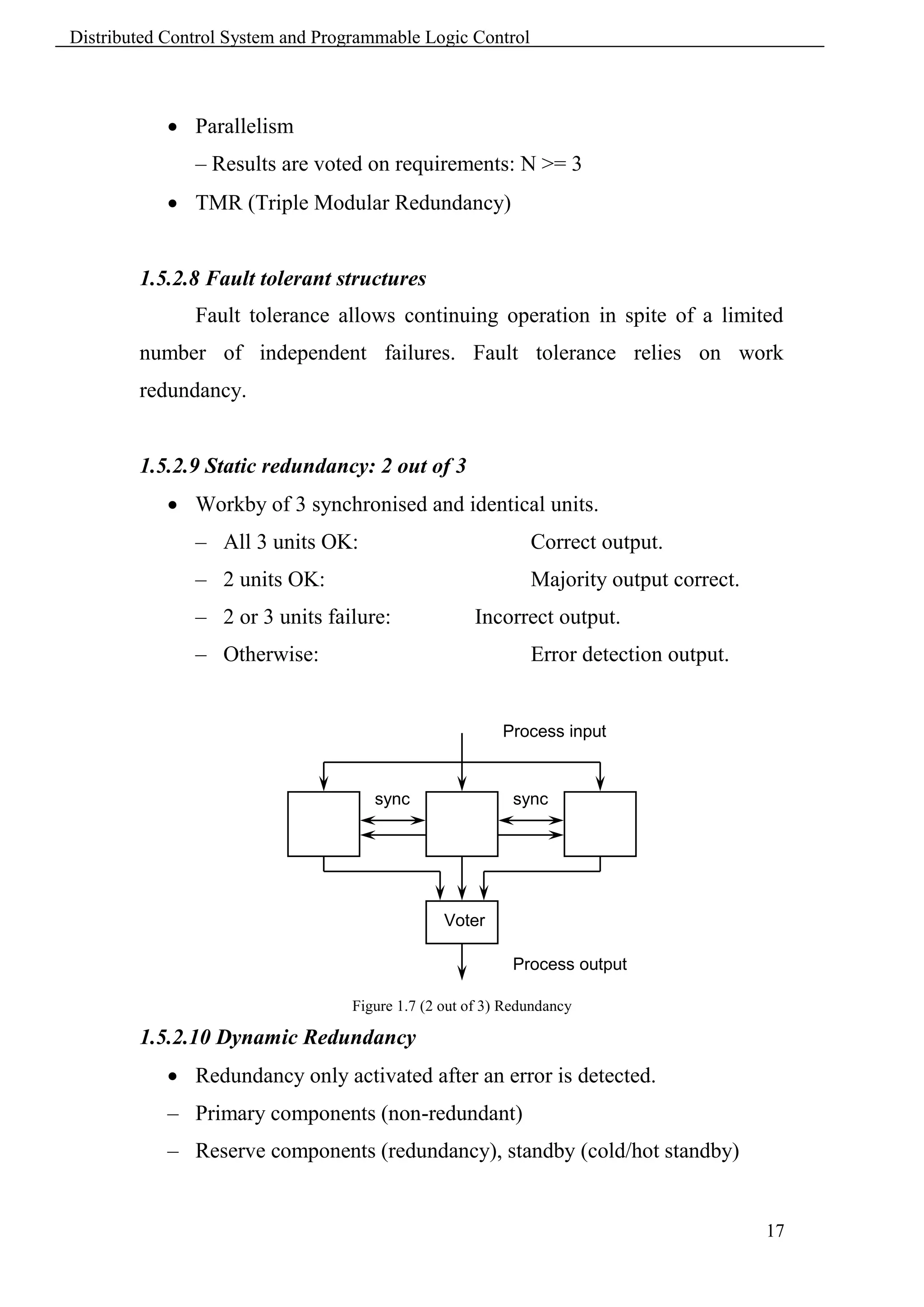
        1.5.2.9 Static redundancy: 2 out of 3
             Workby of 3 synchronised and identical units.
               – All 3 units OK:                              Correct output.
               – 2 units OK:                                  Majority output correct.
               – 2 or 3 units failure:               Incorrect output.
               – Otherwise:                                   Error detection output.


                                                          Process input


                                      sync                 sync


                                                 Voter

                                                           Process output

                                   Figure 1.7 (2 out of 3) Redundancy

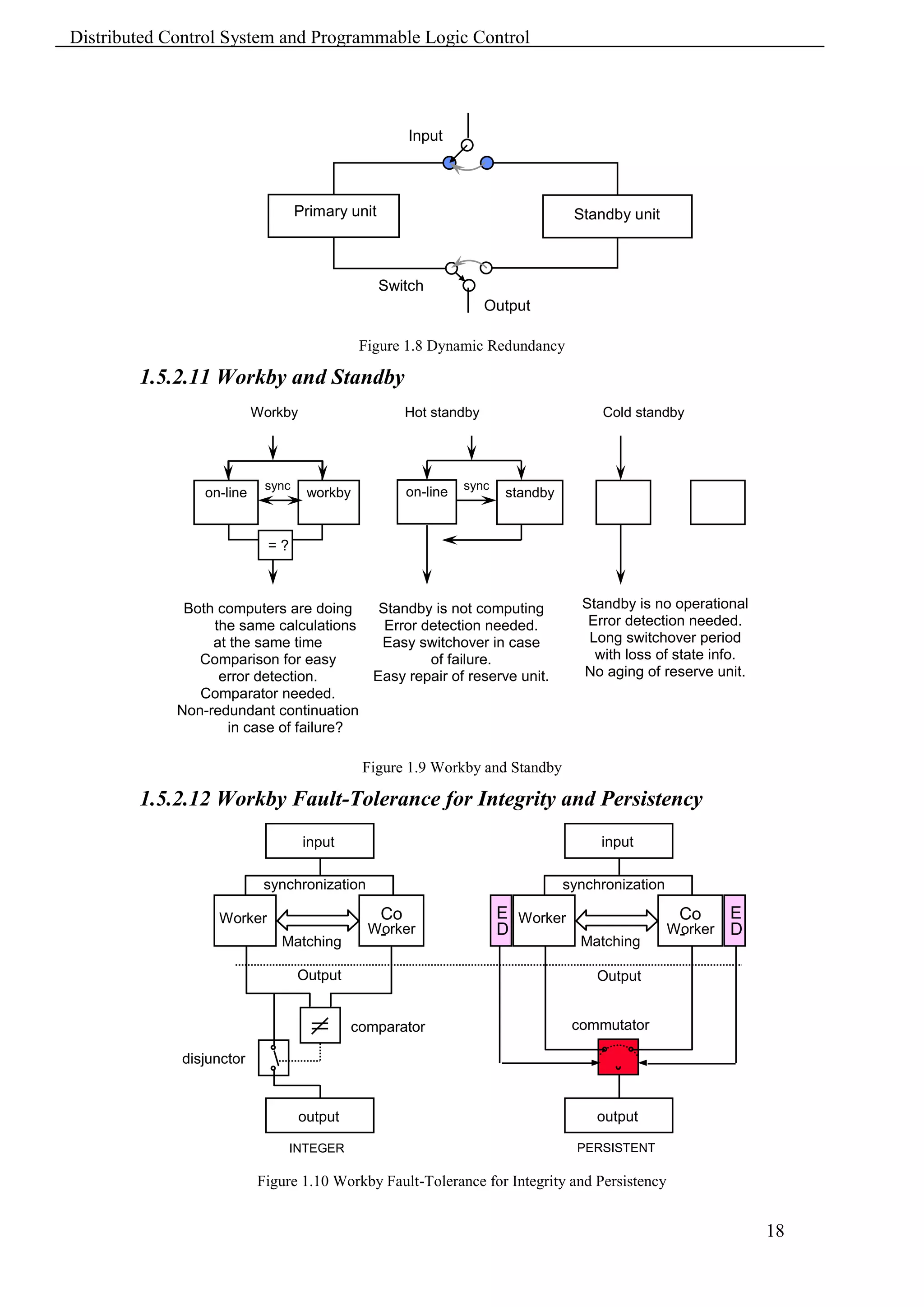
        1.5.2.10 Dynamic Redundancy
             Redundancy only activated after an error is detected.
            – Primary components (non-redundant)
            – Reserve components (redundancy), standby (cold/hot standby)


                                                                                         17
Distributed Control System and Programmable Logic Control


                                                       Input


                                   Primary unit                                     Standby unit


                                                  Switch
                                                                     Output

                                              Figure 1.8 Dynamic Redundancy

        1.5.2.11 Workby and Standby
                           Workby                      Hot standby                      Cold standby


                            sync                                 sync
                 on-line             workby            on-line           standby


                             =?


              Both computers are doing   Standby is not computing                    Standby is no operational
                  the same calculations   Error detection needed.                     Error detection needed.
                  at the same time       Easy switchover in case                      Long switchover period
                Comparison for easy              of failure.                           with loss of state info.
                   error detection.     Easy repair of reserve unit.                 No aging of reserve unit.
                Comparator needed.
             Non-redundant continuation
                    in case of failure?

                                              Figure 1.9 Workby and Standby

        1.5.2.12 Workby Fault-Tolerance for Integrity and Persistency
                                    input                                               input

                            synchronization                                        synchronization

                   Worker                         Co                    E Worker                      Co      E
                                               Worker
                                                -                       D                            Worker
                                                                                                      -       D
                              Matching                                               Matching

                                   Output                                               Output


                                             comparator                             commutator

             disjunctor


                                    output                                              output

                                  INTEGER                                            PERSISTENT

                           Figure 1.10 Workby Fault-Tolerance for Integrity and Persistency


                                                                                                                  18
Distributed Control System and Programmable Logic Control


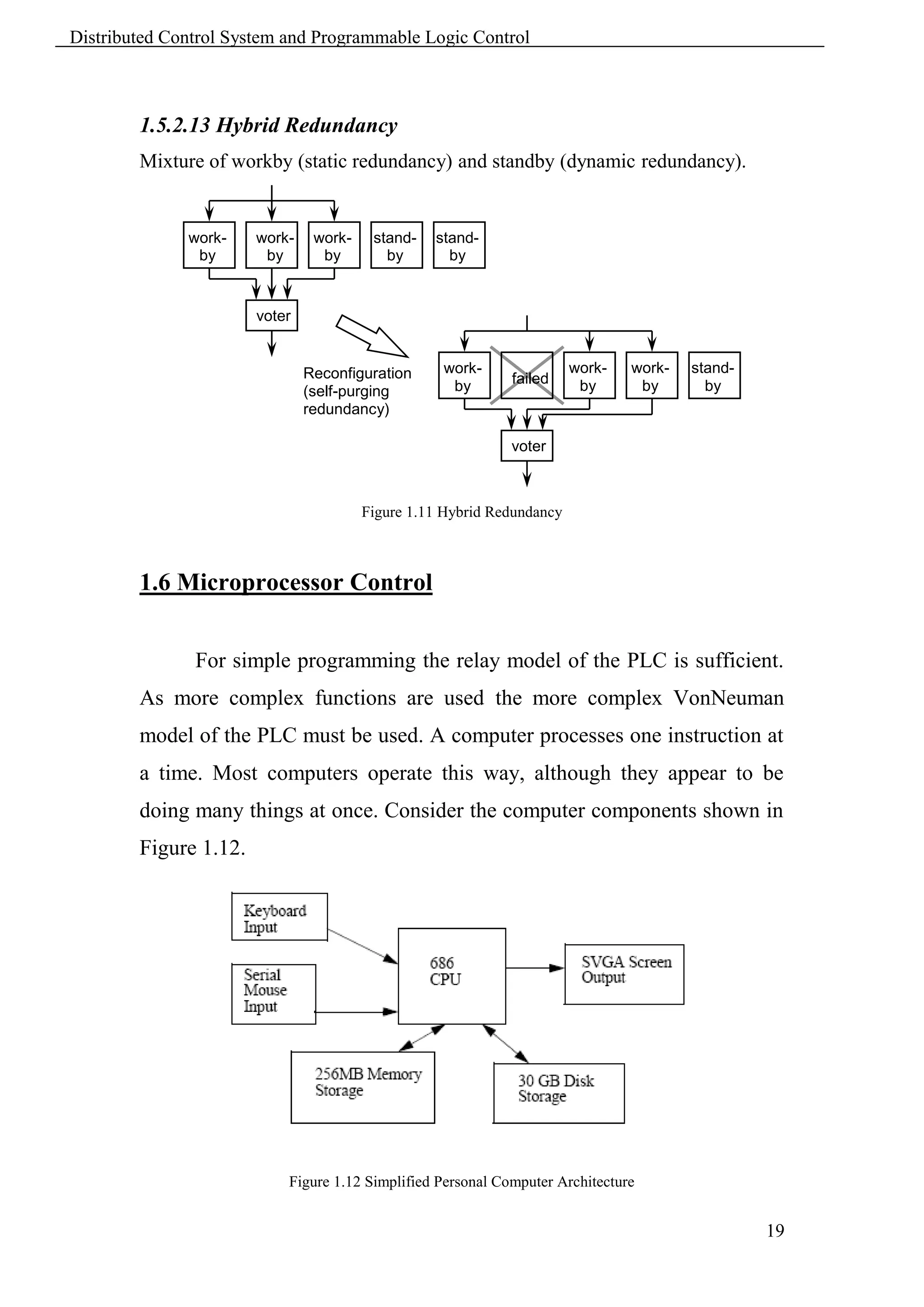
        1.5.2.13 Hybrid Redundancy
        Mixture of workby (static redundancy) and standby (dynamic redundancy).


              work-    work-    work-    stand-   stand-
               by       by       by        by       by


                       voter


                               Reconfiguration     work-                work-   work-   stand-
                                                    by       failed      by      by       by
                               (self-purging
                               redundancy)

                                                             voter


                                        Figure 1.11 Hybrid Redundancy


        1.6 Microprocessor Control


               For simple programming the relay model of the PLC is sufficient.
        As more complex functions are used the more complex VonNeuman
        model of the PLC must be used. A computer processes one instruction at
        a time. Most computers operate this way, although they appear to be
        doing many things at once. Consider the computer components shown in
        Figure 1.12.


                           Figure 1.12 Simplified Personal Computer Architecture


                                                                                                 19
Distributed Control System and Programmable Logic Control


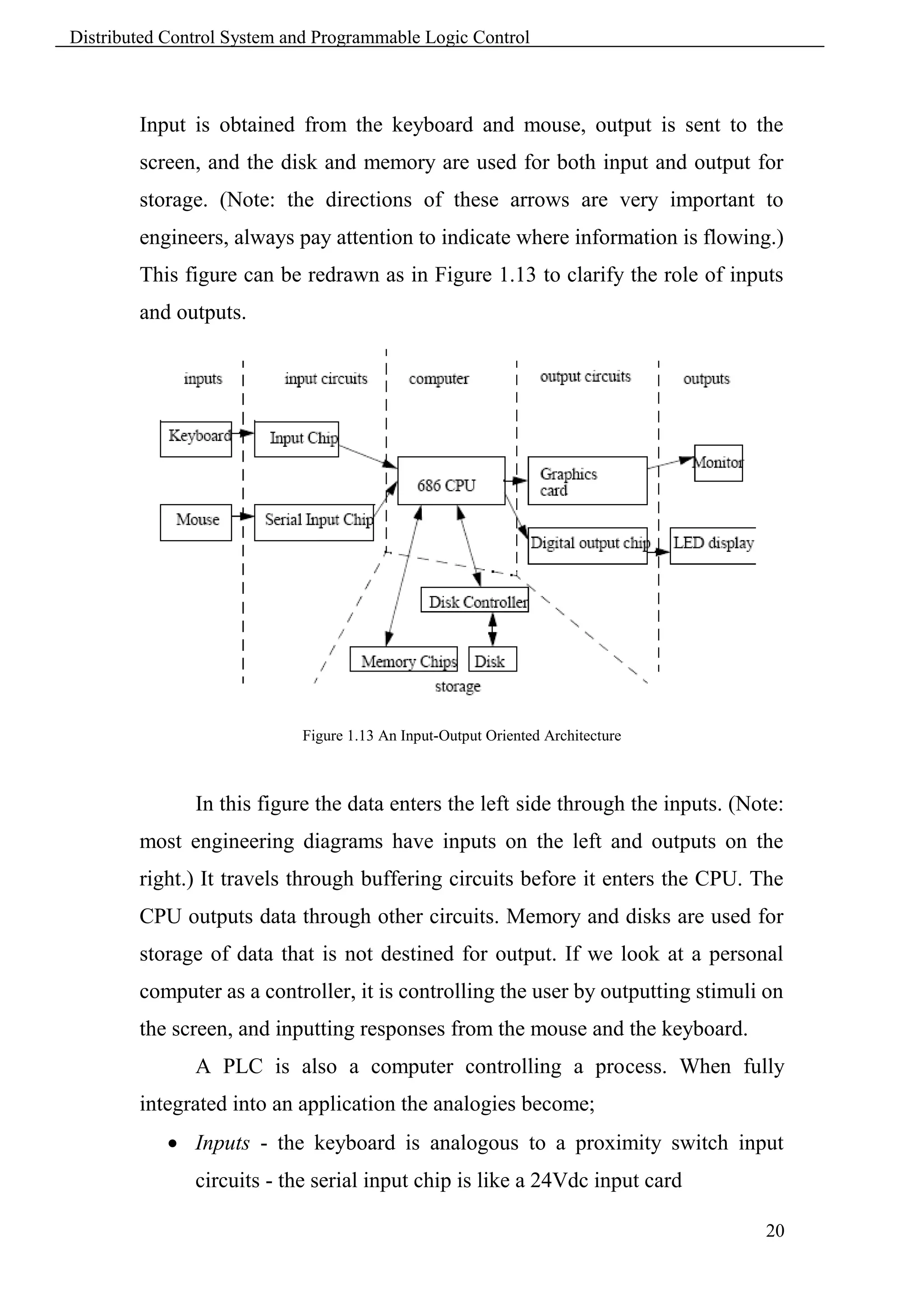
        Input is obtained from the keyboard and mouse, output is sent to the
        screen, and the disk and memory are used for both input and output for
        storage. (Note: the directions of these arrows are very important to
        engineers, always pay attention to indicate where information is flowing.)
        This figure can be redrawn as in Figure 1.13 to clarify the role of inputs
        and outputs.


                            Figure 1.13 An Input-Output Oriented Architecture


               In this figure the data enters the left side through the inputs. (Note:
        most engineering diagrams have inputs on the left and outputs on the
        right.) It travels through buffering circuits before it enters the CPU. The
        CPU outputs data through other circuits. Memory and disks are used for
        storage of data that is not destined for output. If we look at a personal
        computer as a controller, it is controlling the user by outputting stimuli on
        the screen, and inputting responses from the mouse and the keyboard.
               A PLC is also a computer controlling a process. When fully
        integrated into an application the analogies become;
             Inputs - the keyboard is analogous to a proximity switch input
               circuits - the serial input chip is like a 24Vdc input card

                                                                                   20
Distributed Control System and Programmable Logic Control


             Computer - the 686 CPU is like a PLC CPU unit
             Output circuits - a graphics card is like a triac output card
             Outputs - a monitor is like a light
             Storage - memory in PLCs is similar to memories in personal
               computers


        It is also possible to implement a PLC using a normal Personal Computer,
        although this is not advisable. In the case of a PLC the inputs and outputs
        are designed to be more reliable and rugged for harsh production
        environments.


        1.7 Role Play


        Each trainee should act a role play on the following:
            1. Automation system structure.
            2. What DCS and PLC and their differences?
            3. Redundancy and fault tolerance.


                                                                                21
Distributed Control System and Programmable Logic Control


                                         Chapter 2
                                  Regulatory Control

        2.1 Learning Objectives


         Introduce Regulatory Control.
         Understanding PID control.
         Differentiate between various control loops.


        2.2 Introduction


               Most of the applications of industrial control process used simple
        loops which regulated flows, temperatures, pressures and levels.
        Occasionally ratio and cascade control loops could be found. There are
        many benefits for using regulatory control. One of the most important is
        simply closer control of the process. Process control is one part of an
        overall control hierarchy that extends downwards to safety controls and
        other directly connected process devices, and upward to encompass
        process optimization and even higher business levels of control such as
        scheduling, inventory management.


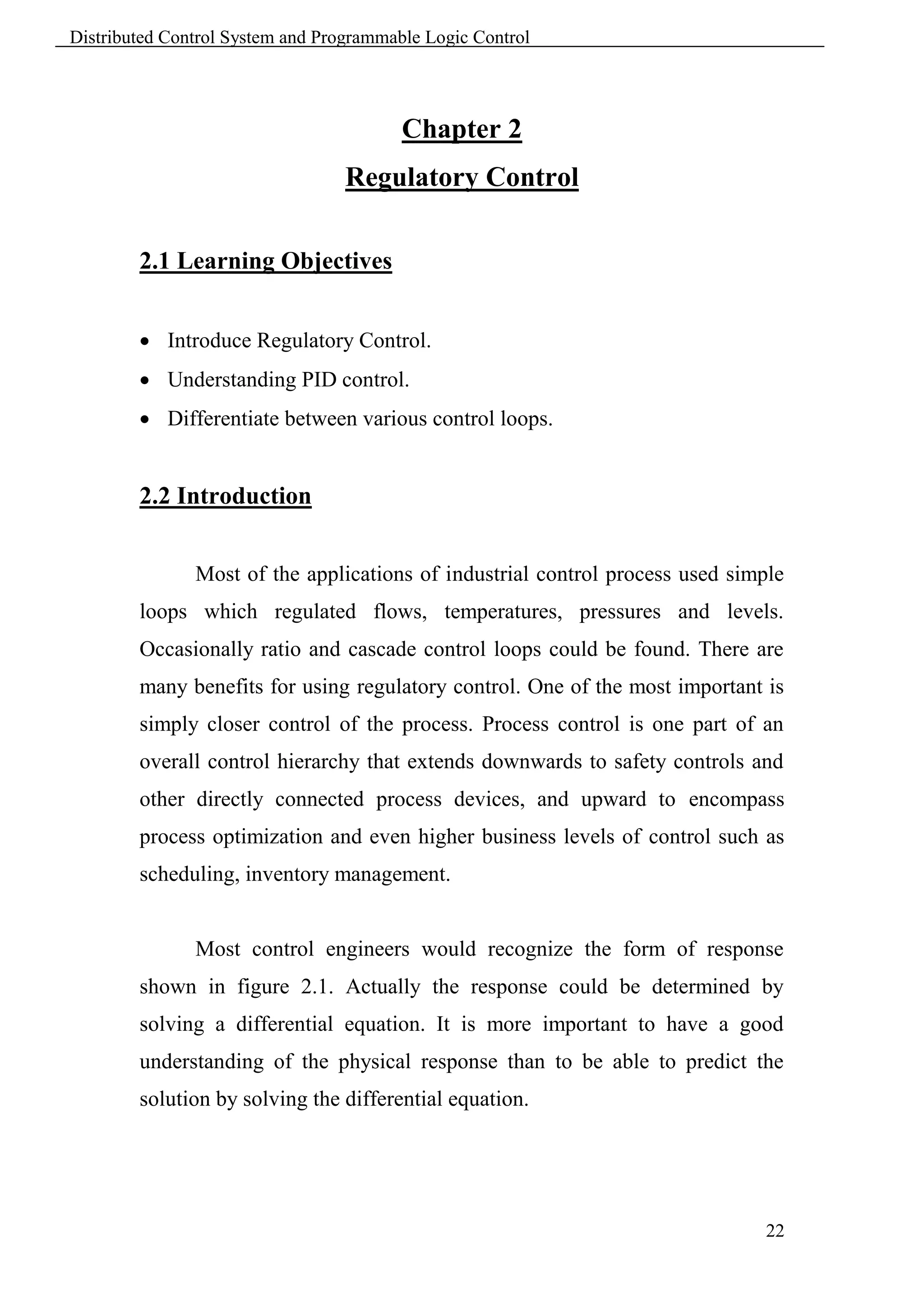
               Most control engineers would recognize the form of response
        shown in figure 2.1. Actually the response could be determined by
        solving a differential equation. It is more important to have a good
        understanding of the physical response than to be able to predict the
        solution by solving the differential equation.


                                                                              22
Distributed Control System and Programmable Logic Control


                      Figure 2.1 Response of simple dynamic process to step input change

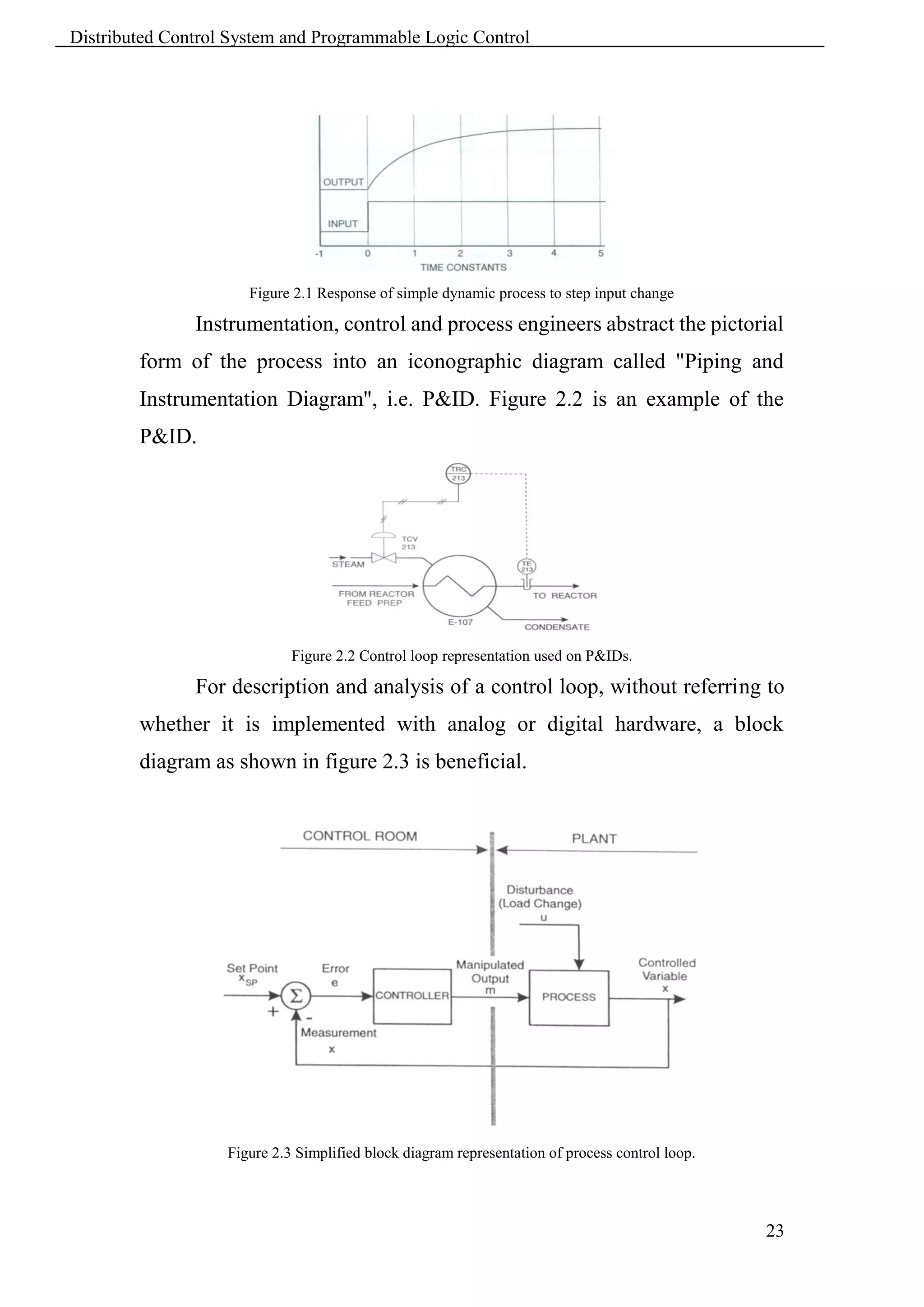
               Instrumentation, control and process engineers abstract the pictorial
        form of the process into an iconographic diagram called "Piping and
        Instrumentation Diagram", i.e. P&ID. Figure 2.2 is an example of the
        P&ID.


                             Figure 2.2 Control loop representation used on P&IDs.

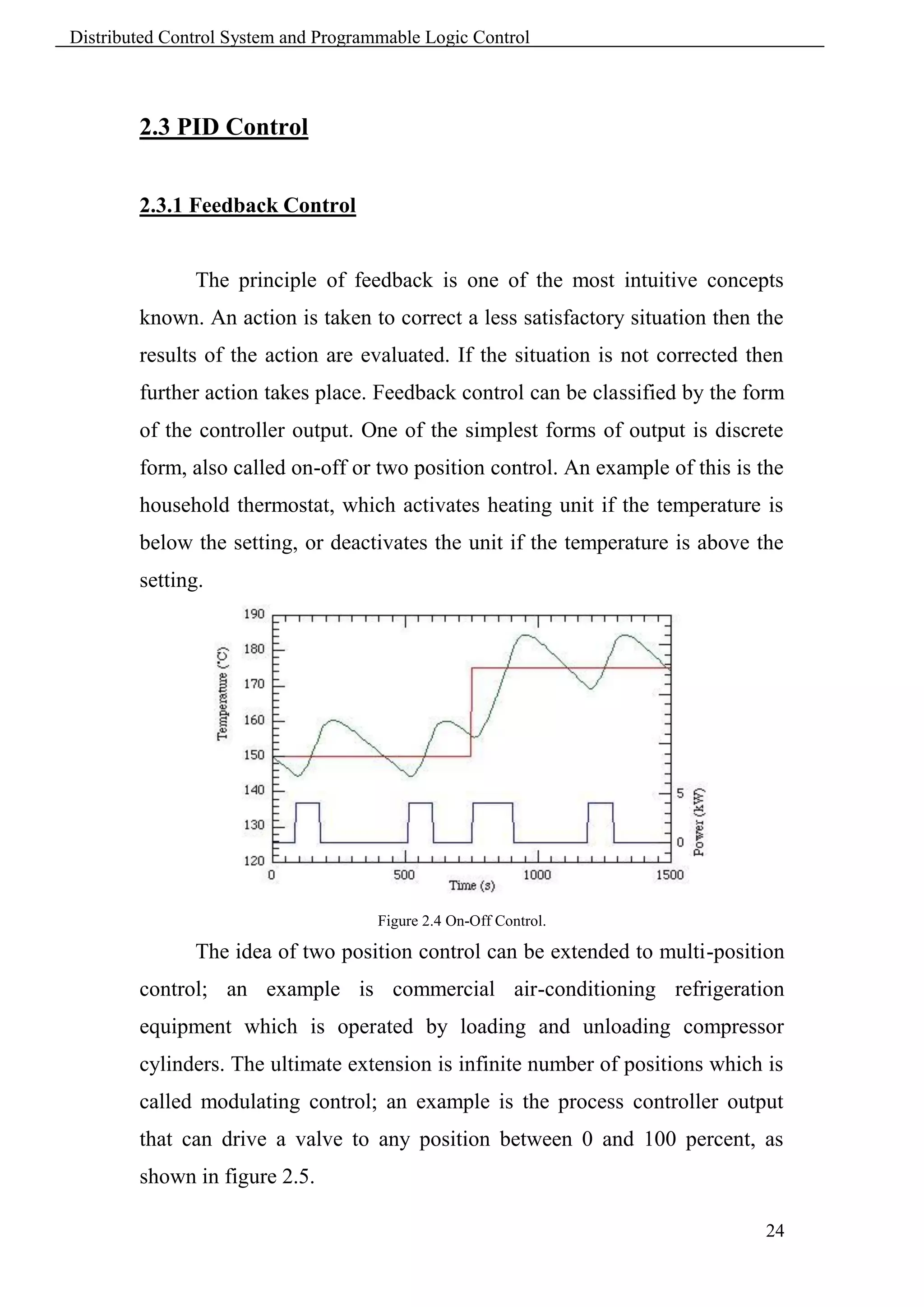
               For description and analysis of a control loop, without referring to
        whether it is implemented with analog or digital hardware, a block
        diagram as shown in figure 2.3 is beneficial.


                   Figure 2.3 Simplified block diagram representation of process control loop.


                                                                                                 23
Distributed Control System and Programmable Logic Control


        2.3 PID Control


        2.3.1 Feedback Control


               The principle of feedback is one of the most intuitive concepts
        known. An action is taken to correct a less satisfactory situation then the
        results of the action are evaluated. If the situation is not corrected then
        further action takes place. Feedback control can be classified by the form
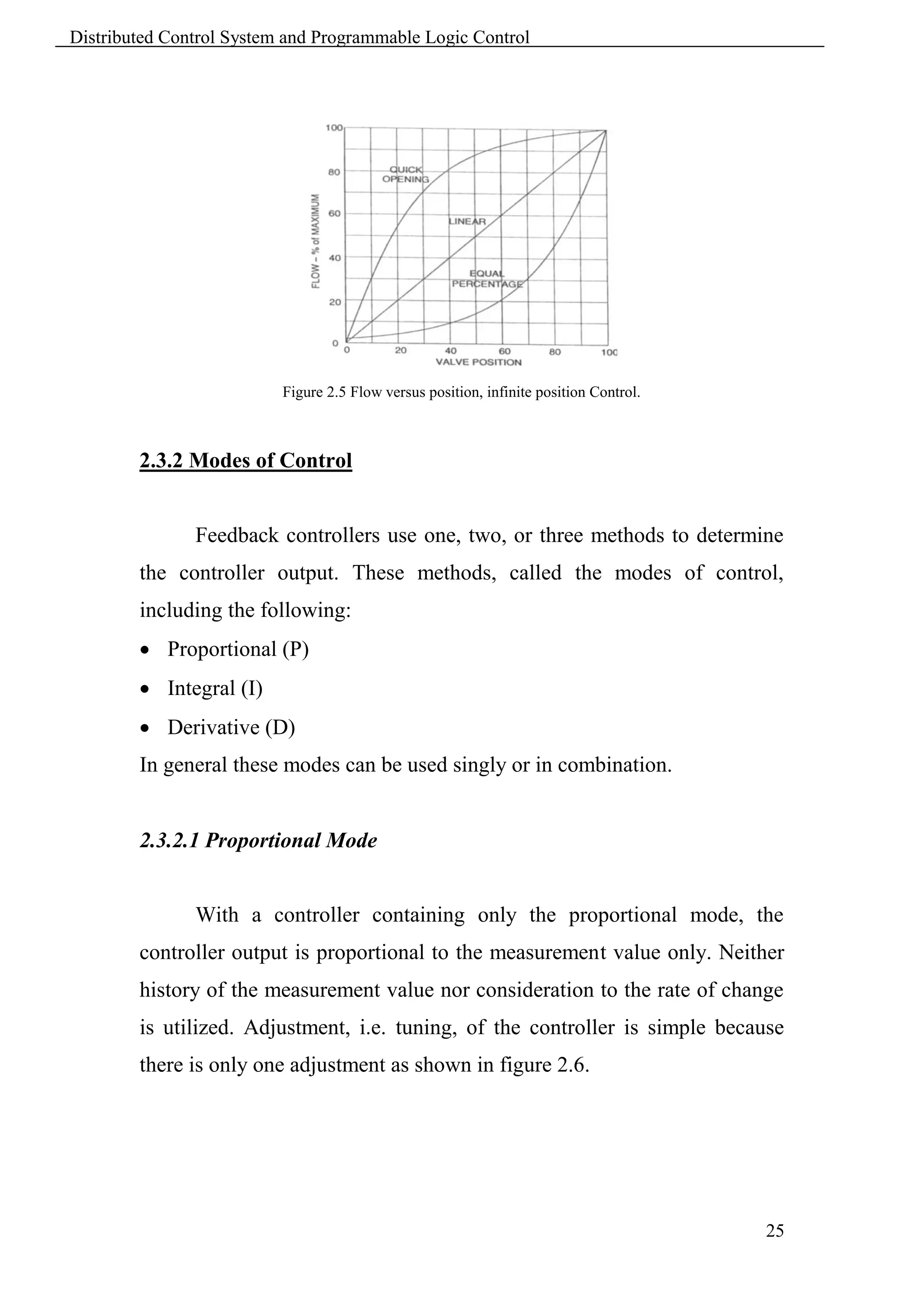
        of the controller output. One of the simplest forms of output is discrete
        form, also called on-off or two position control. An example of this is the
        household thermostat, which activates heating unit if the temperature is
        below the setting, or deactivates the unit if the temperature is above the
        setting.


                                      Figure 2.4 On-Off Control.

               The idea of two position control can be extended to multi-position
        control; an example is commercial air-conditioning refrigeration
        equipment which is operated by loading and unloading compressor
        cylinders. The ultimate extension is infinite number of positions which is
        called modulating control; an example is the process controller output
        that can drive a valve to any position between 0 and 100 percent, as
        shown in figure 2.5.

                                                                                24
Distributed Control System and Programmable Logic Control


                          Figure 2.5 Flow versus position, infinite position Control.


        2.3.2 Modes of Control


               Feedback controllers use one, two, or three methods to determine
        the controller output. These methods, called the modes of control,
        including the following:
         Proportional (P)
         Integral (I)
         Derivative (D)
        In general these modes can be used singly or in combination.


        2.3.2.1 Proportional Mode


               With a controller containing only the proportional mode, the
        controller output is proportional to the measurement value only. Neither
        history of the measurement value nor consideration to the rate of change
        is utilized. Adjustment, i.e. tuning, of the controller is simple because
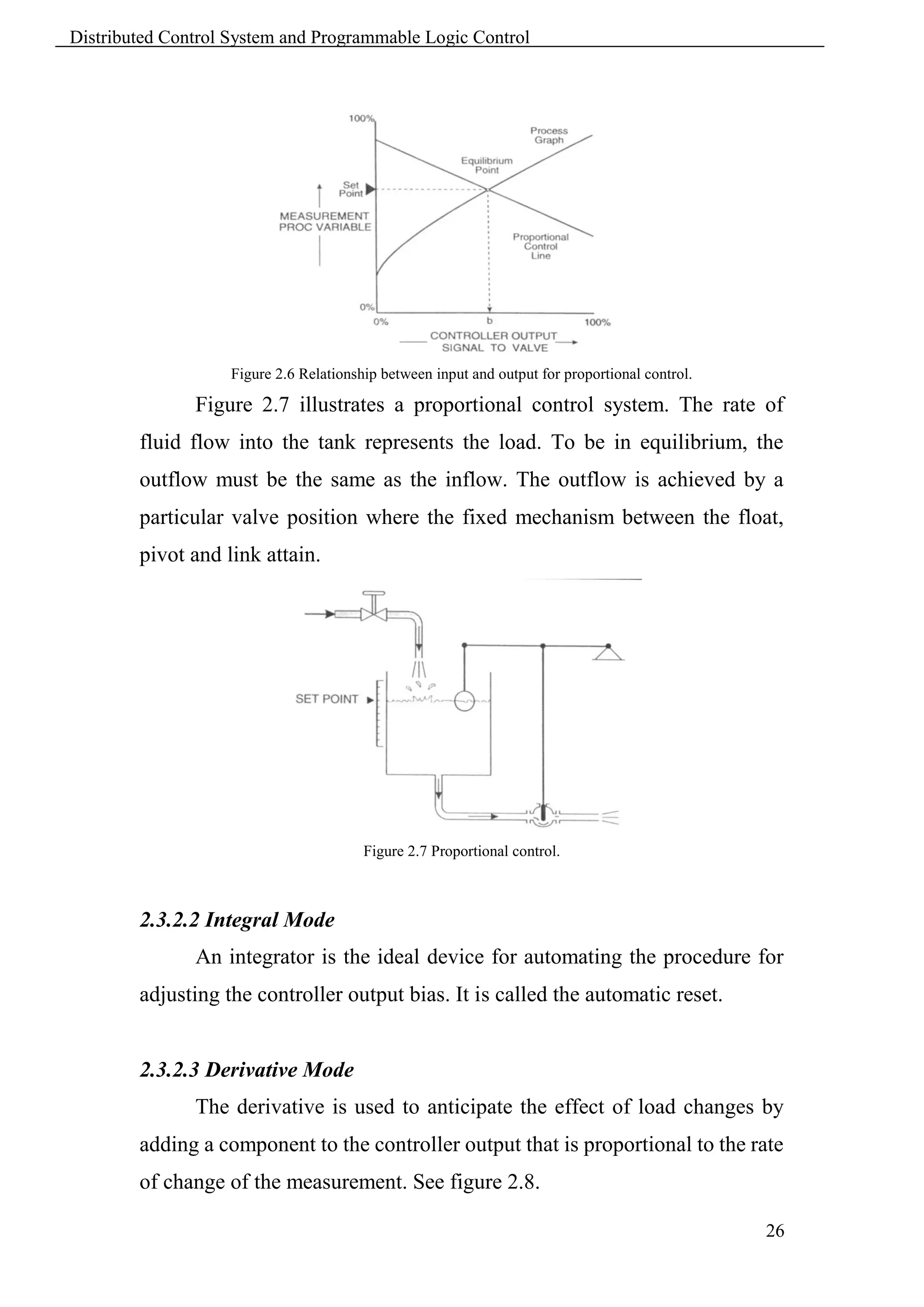
        there is only one adjustment as shown in figure 2.6.


                                                                                        25
Distributed Control System and Programmable Logic Control


                   Figure 2.6 Relationship between input and output for proportional control.

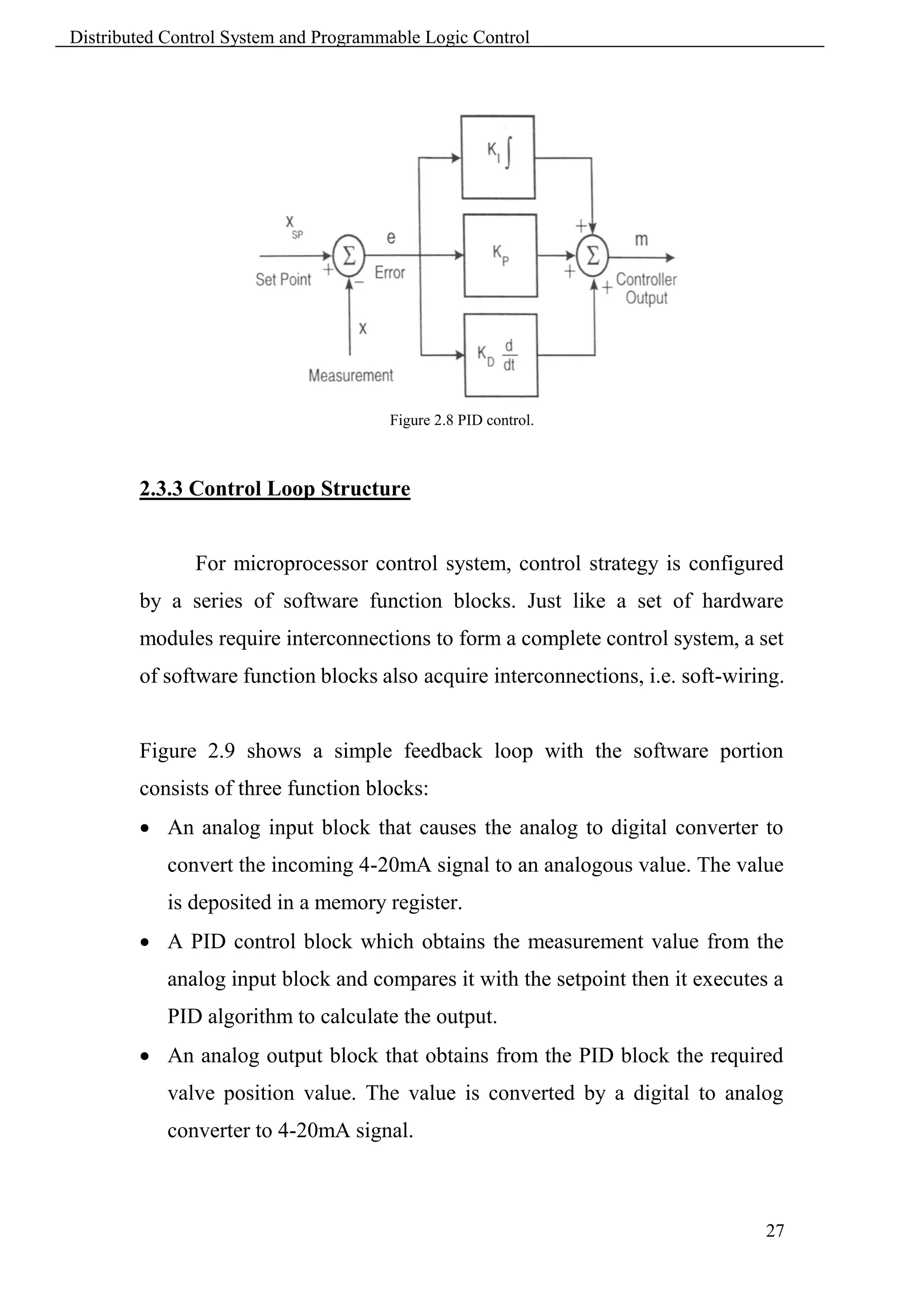
               Figure 2.7 illustrates a proportional control system. The rate of
        fluid flow into the tank represents the load. To be in equilibrium, the
        outflow must be the same as the inflow. The outflow is achieved by a
        particular valve position where the fixed mechanism between the float,
        pivot and link attain.


                                        Figure 2.7 Proportional control.


        2.3.2.2 Integral Mode
               An integrator is the ideal device for automating the procedure for
        adjusting the controller output bias. It is called the automatic reset.


        2.3.2.3 Derivative Mode
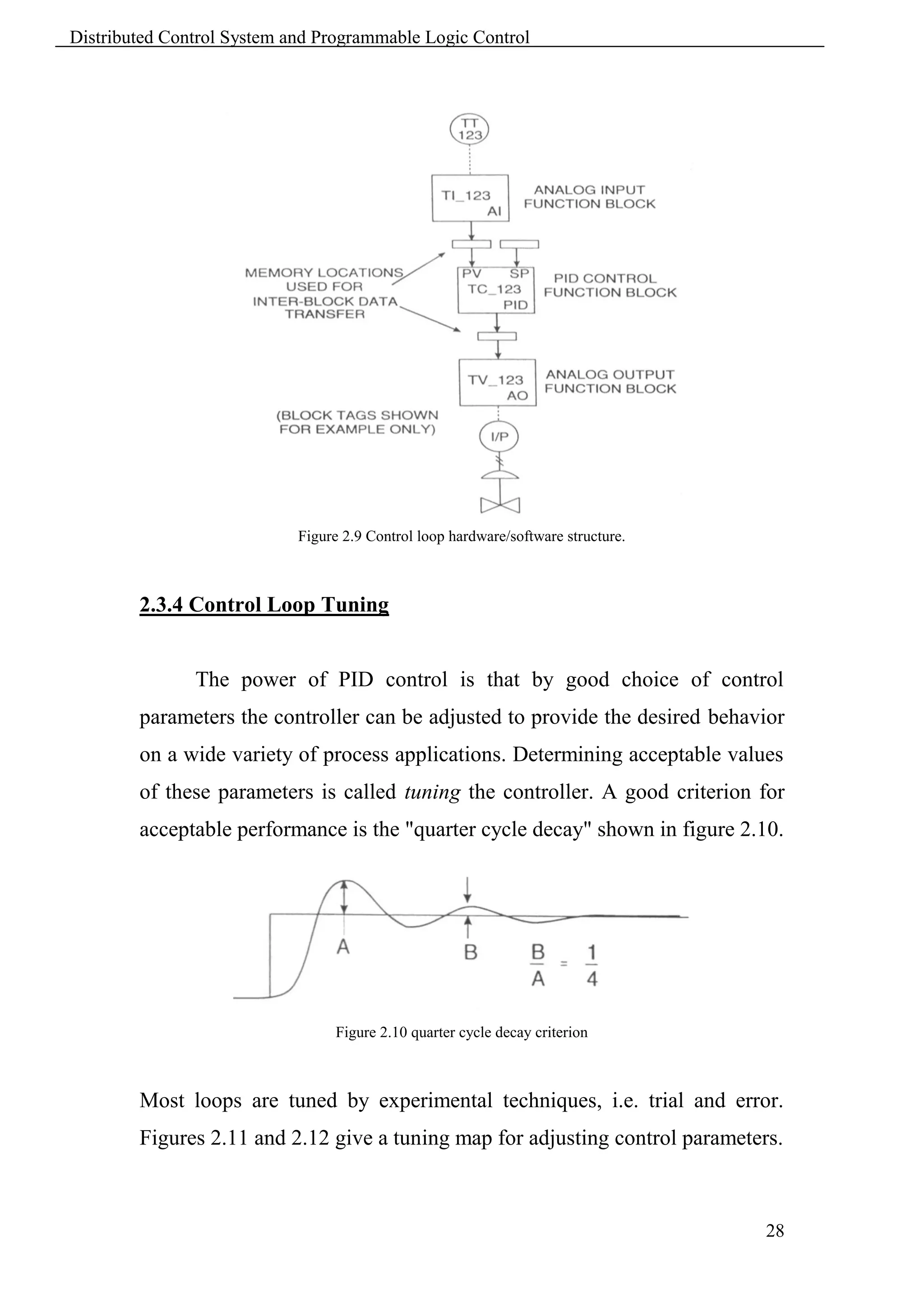
               The derivative is used to anticipate the effect of load changes by
        adding a component to the controller output that is proportional to the rate
        of change of the measurement. See figure 2.8.

                                                                                                26
Distributed Control System and Programmable Logic Control


                                       Figure 2.8 PID control.


        2.3.3 Control Loop Structure


               For microprocessor control system, control strategy is configured
        by a series of software function blocks. Just like a set of hardware
        modules require interconnections to form a complete control system, a set
        of software function blocks also acquire interconnections, i.e. soft-wiring.


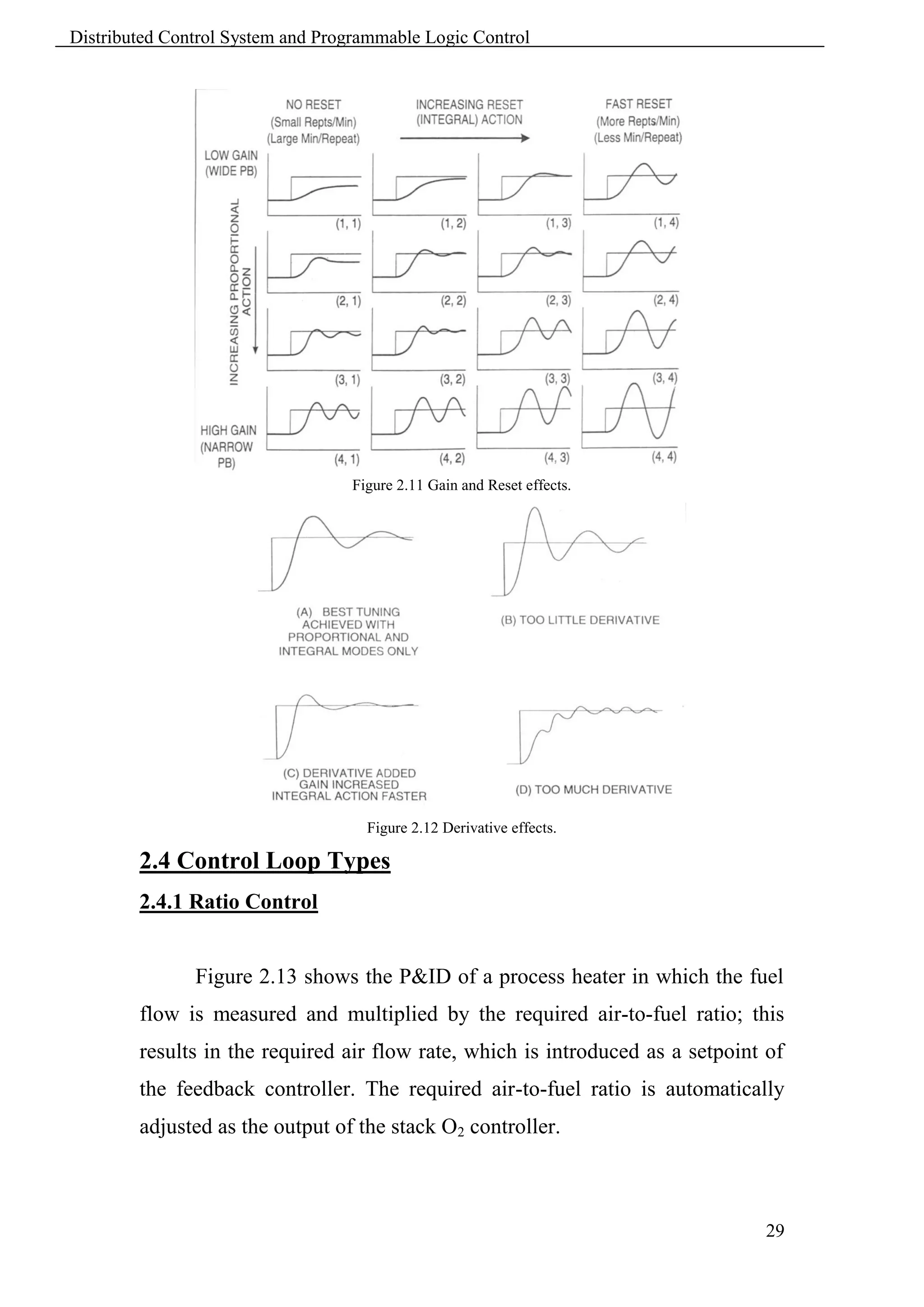
        Figure 2.9 shows a simple feedback loop with the software portion
        consists of three function blocks:
         An analog input block that causes the analog to digital converter to
            convert the incoming 4-20mA signal to an analogous value. The value
            is deposited in a memory register.
         A PID control block which obtains the measurement value from the
            analog input block and compares it with the setpoint then it executes a
            PID algorithm to calculate the output.
         An analog output block that obtains from the PID block the required
            valve position value. The value is converted by a digital to analog
            converter to 4-20mA signal.


                                                                                 27
Distributed Control System and Programmable Logic Control


                            Figure 2.9 Control loop hardware/software structure.


        2.3.4 Control Loop Tuning


               The power of PID control is that by good choice of control
        parameters the controller can be adjusted to provide the desired behavior
        on a wide variety of process applications. Determining acceptable values
        of these parameters is called tuning the controller. A good criterion for
        acceptable performance is the "quarter cycle decay" shown in figure 2.10.


                                 Figure 2.10 quarter cycle decay criterion


        Most loops are tuned by experimental techniques, i.e. trial and error.
        Figures 2.11 and 2.12 give a tuning map for adjusting control parameters.


                                                                                   28
Distributed Control System and Programmable Logic Control


                                   Figure 2.11 Gain and Reset effects.


                                     Figure 2.12 Derivative effects.

        2.4 Control Loop Types
        2.4.1 Ratio Control


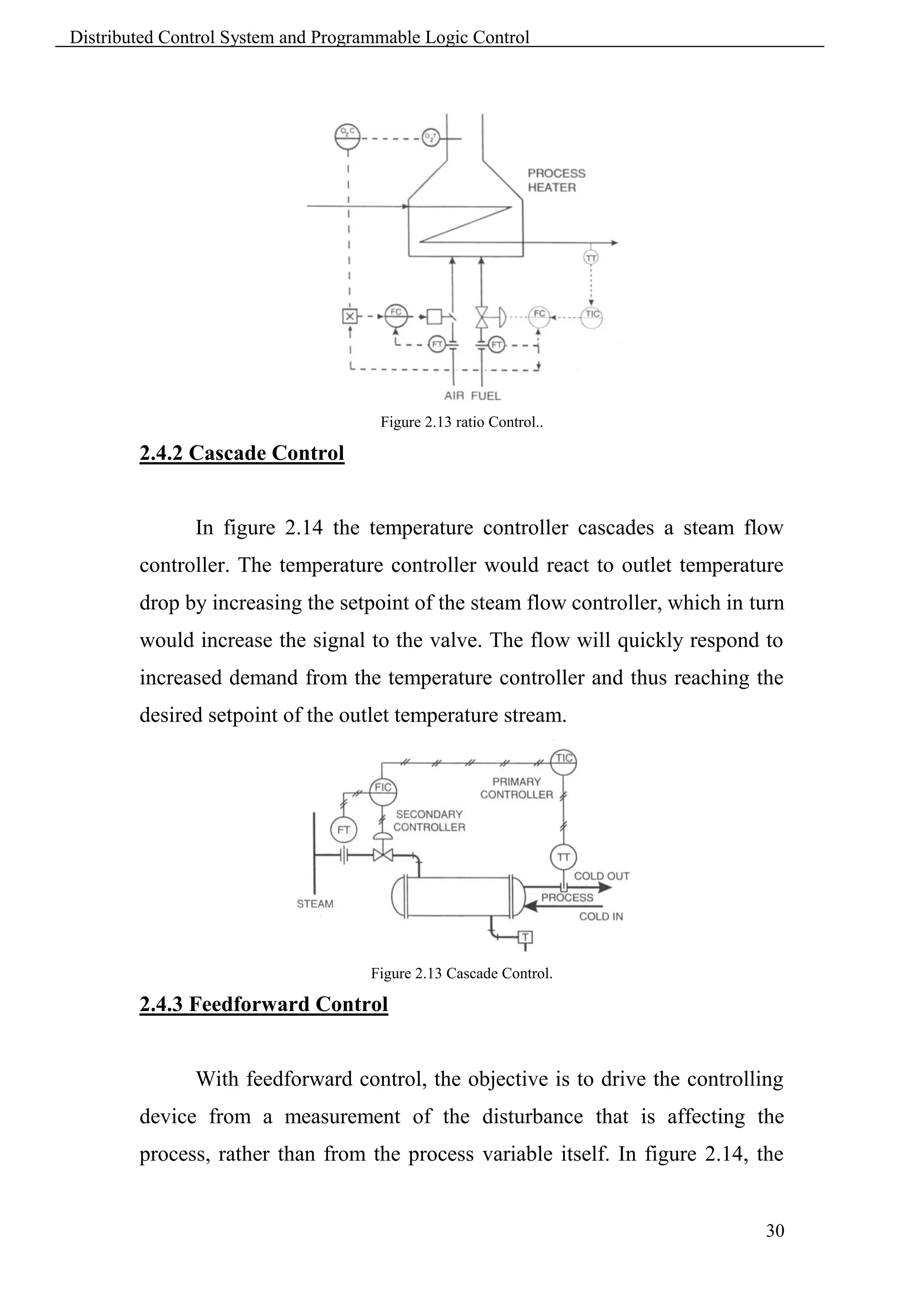
               Figure 2.13 shows the P&ID of a process heater in which the fuel
        flow is measured and multiplied by the required air-to-fuel ratio; this
        results in the required air flow rate, which is introduced as a setpoint of
        the feedback controller. The required air-to-fuel ratio is automatically
        adjusted as the output of the stack O2 controller.


                                                                                29
Distributed Control System and Programmable Logic Control


                                      Figure 2.13 ratio Control..

        2.4.2 Cascade Control


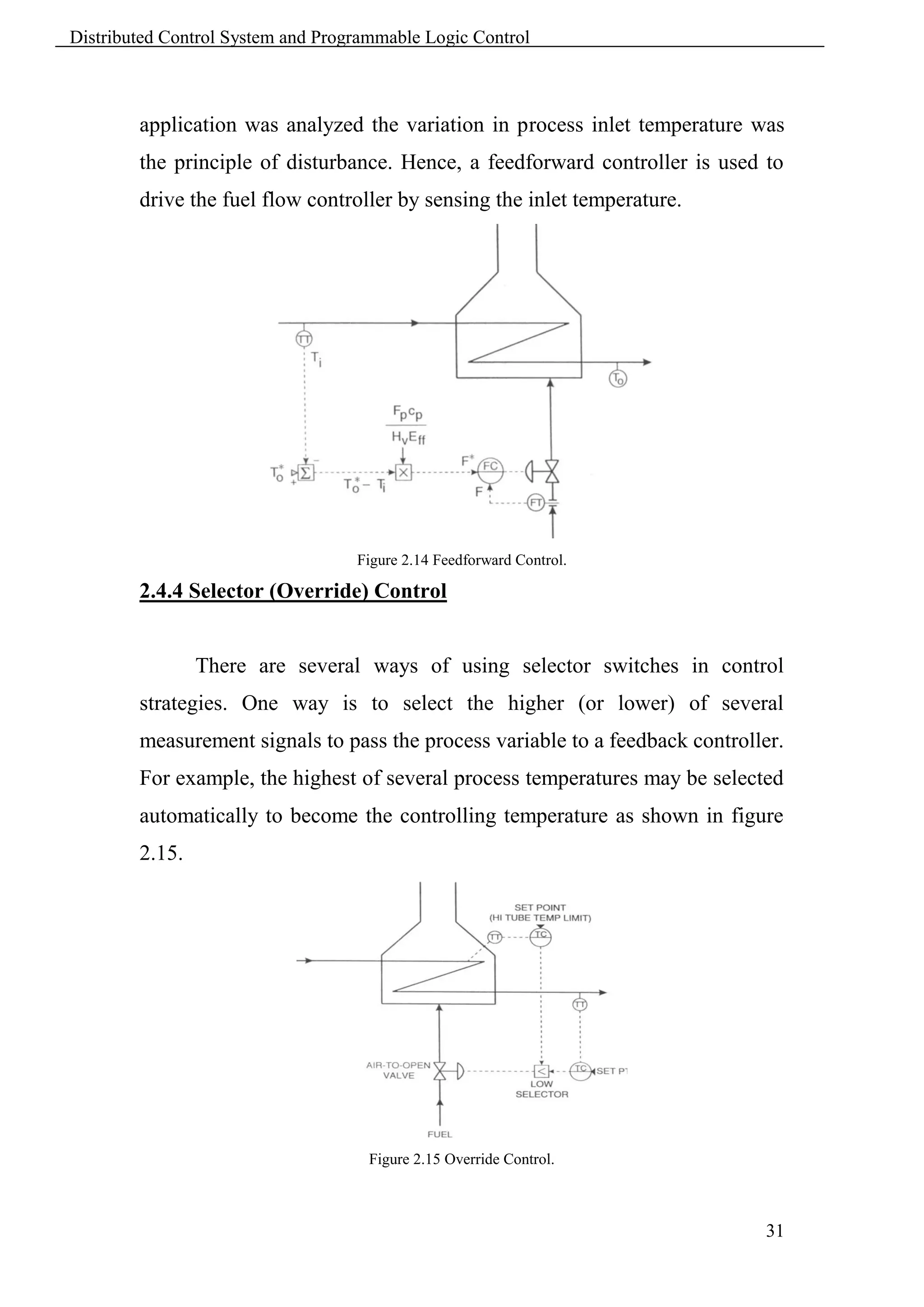
               In figure 2.14 the temperature controller cascades a steam flow
        controller. The temperature controller would react to outlet temperature
        drop by increasing the setpoint of the steam flow controller, which in turn
        would increase the signal to the valve. The flow will quickly respond to
        increased demand from the temperature controller and thus reaching the
        desired setpoint of the outlet temperature stream.


                                     Figure 2.13 Cascade Control.

        2.4.3 Feedforward Control


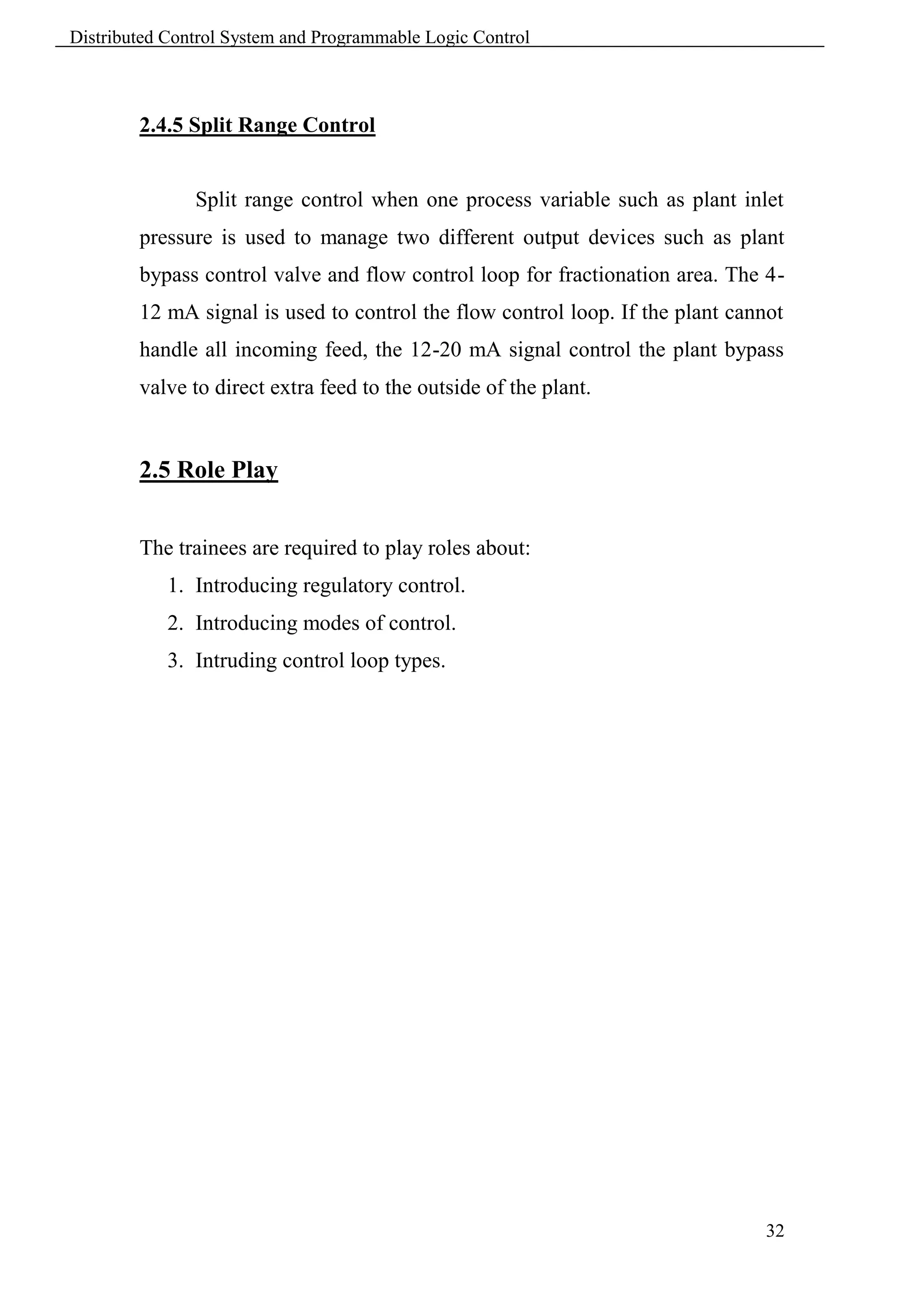
               With feedforward control, the objective is to drive the controlling
        device from a measurement of the disturbance that is affecting the
        process, rather than from the process variable itself. In figure 2.14, the


                                                                                30
Distributed Control System and Programmable Logic Control


        application was analyzed the variation in process inlet temperature was
        the principle of disturbance. Hence, a feedforward controller is used to
        drive the fuel flow controller by sensing the inlet temperature.


                                   Figure 2.14 Feedforward Control.

        2.4.4 Selector (Override) Control


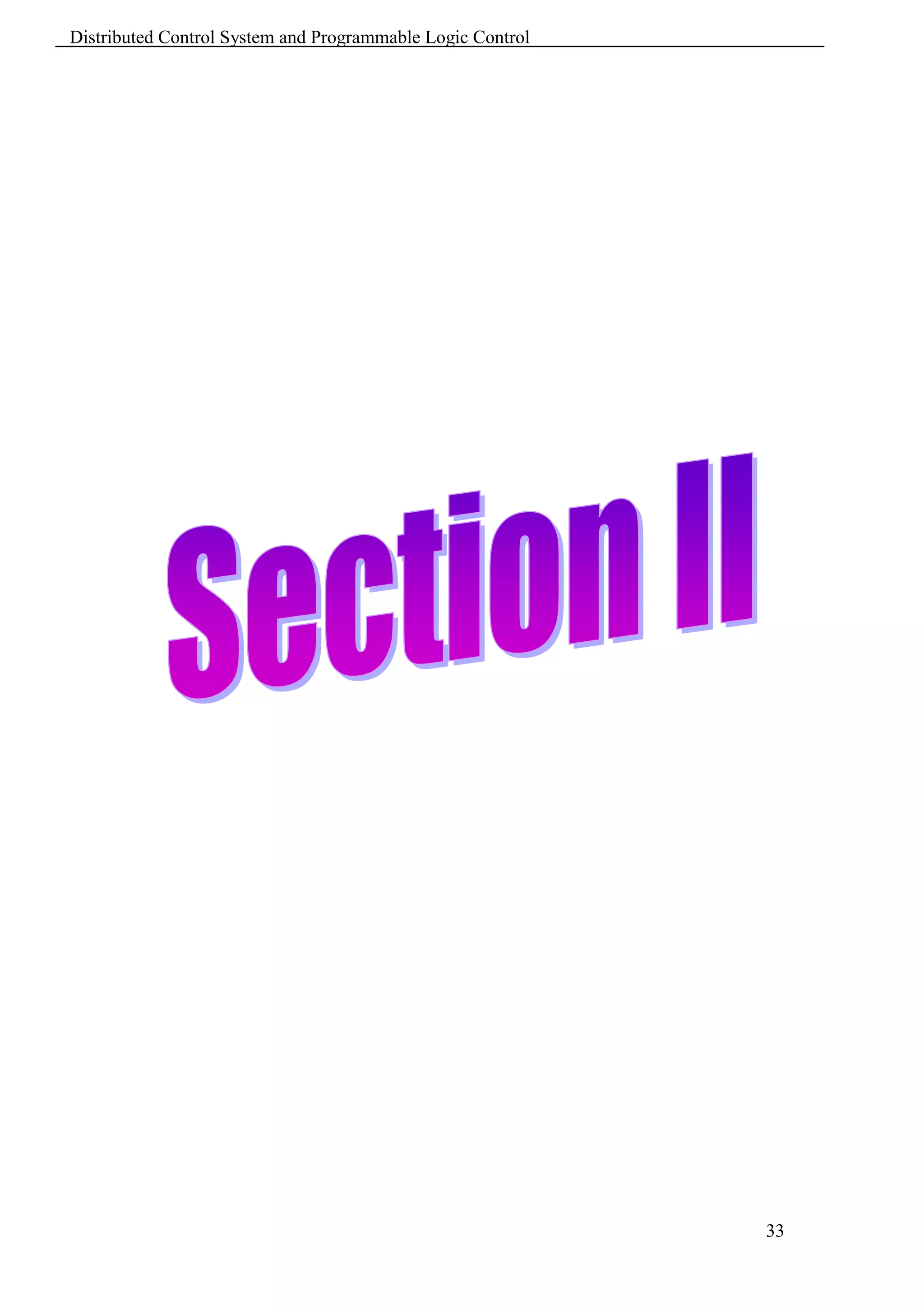
                There are several ways of using selector switches in control
        strategies. One way is to select the higher (or lower) of several
        measurement signals to pass the process variable to a feedback controller.
        For example, the highest of several process temperatures may be selected
        automatically to become the controlling temperature as shown in figure
        2.15.


                                     Figure 2.15 Override Control.


                                                                               31
Distributed Control System and Programmable Logic Control


        2.4.5 Split Range Control


               Split range control when one process variable such as plant inlet
        pressure is used to manage two different output devices such as plant
        bypass control valve and flow control loop for fractionation area. The 4-
        12 mA signal is used to control the flow control loop. If the plant cannot
        handle all incoming feed, the 12-20 mA signal control the plant bypass
        valve to direct extra feed to the outside of the plant.


        2.5 Role Play


        The trainees are required to play roles about:
            1. Introducing regulatory control.
            2. Introducing modes of control.
            3. Intruding control loop types.


                                                                                32
Distributed Control System and Programmable Logic Control


                                                            33
Distributed Control System and Programmable Logic Control


                                         Chapter 3
                                  DCS Infrastructure

        3.1 Learning Objectives


         Introduce system infrastructure interoperability and interconnectivity.
         Illustrate system components of level 2 control.


        3.2 Communication Bus


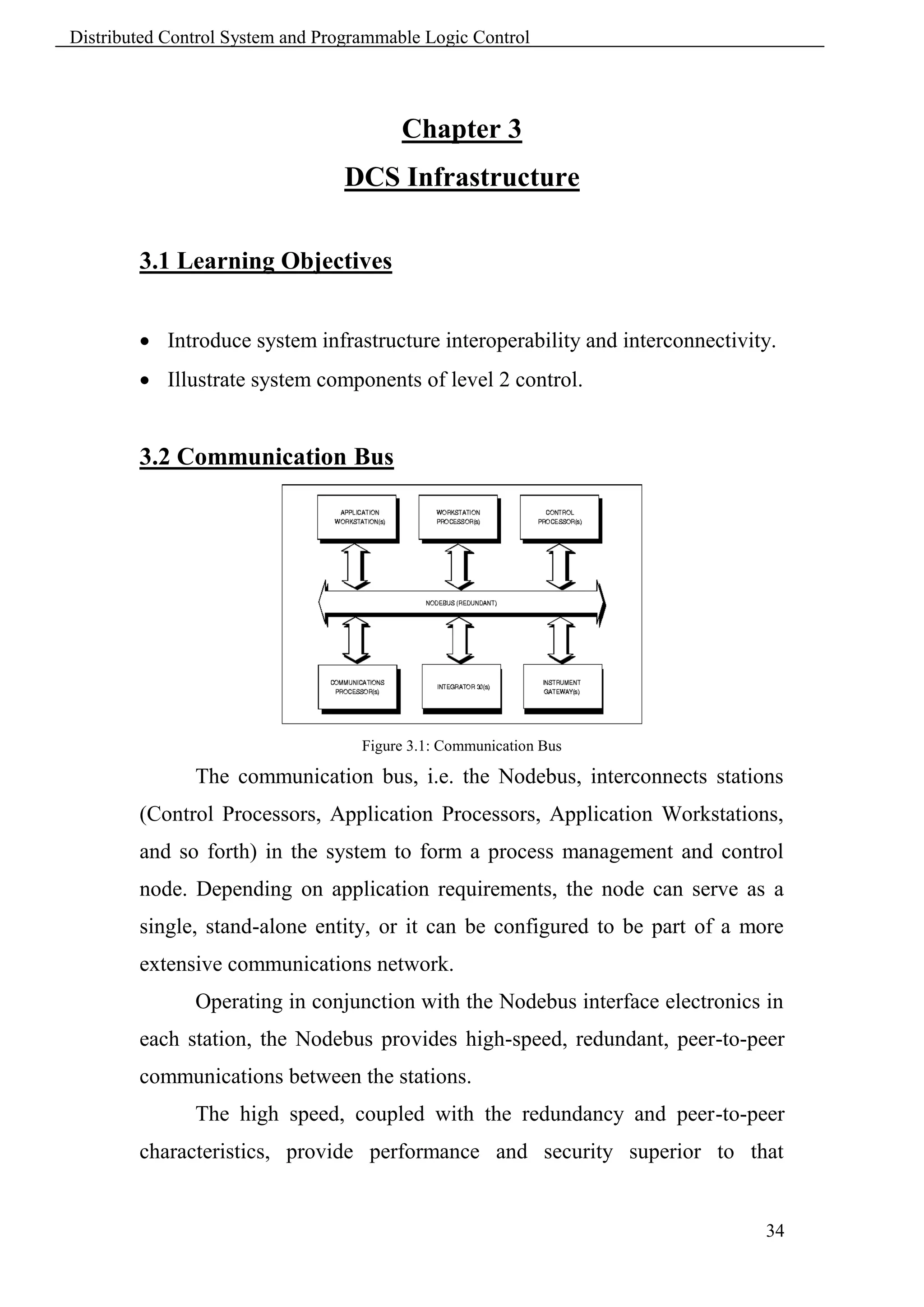
                                    Figure 3.1: Communication Bus

               The communication bus, i.e. the Nodebus, interconnects stations
        (Control Processors, Application Processors, Application Workstations,
        and so forth) in the system to form a process management and control
        node. Depending on application requirements, the node can serve as a
        single, stand-alone entity, or it can be configured to be part of a more
        extensive communications network.
               Operating in conjunction with the Nodebus interface electronics in
        each station, the Nodebus provides high-speed, redundant, peer-to-peer
        communications between the stations.
               The high speed, coupled with the redundancy and peer-to-peer
        characteristics, provide performance and security superior to that


                                                                               34
Distributed Control System and Programmable Logic Control


        provided by communication media used in conventional computer-based
        systems. Station interfaces to the Nodebus are also redundant, further
        ensuring secure communications between the stations. The Nodebus can
        be implemented in a basic, non-extended configuration or it can be
        extended through the use of Nodebus Extenders and Dual Nodebus
        Interface Extenders.


        3.2.1 Nodebus Interface


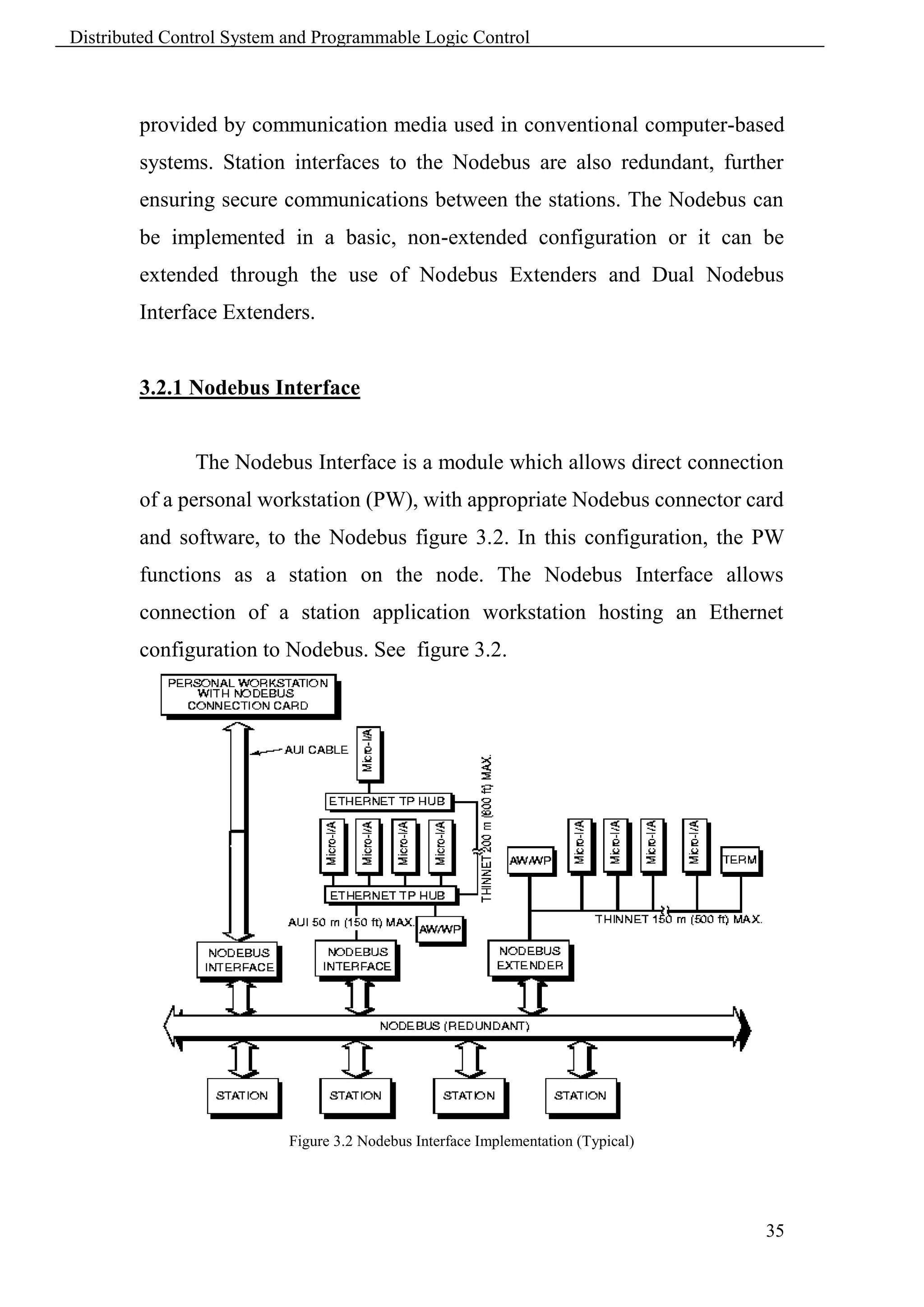
               The Nodebus Interface is a module which allows direct connection
        of a personal workstation (PW), with appropriate Nodebus connector card
        and software, to the Nodebus figure 3.2. In this configuration, the PW
        functions as a station on the node. The Nodebus Interface allows
        connection of a station application workstation hosting an Ethernet
        configuration to Nodebus. See figure 3.2.


                           Figure 3.2 Nodebus Interface Implementation (Typical)


                                                                                   35
Distributed Control System and Programmable Logic Control


               An Attachment Unit Interface (AUI) cable, connects the PW or an
        Ethernet hub configuration to the Nodebus via a Nodebus Interface. A
        coaxial cable (ThinNet) connects an Ethernet daisy chain configuration to
        the Nodebus via a Nodebus Extender. The Nodebus Interface is non-
        redundant, and can be used in any of the Nodebus configurations
        described.


        3.2.2 Dual Nodebus Interface


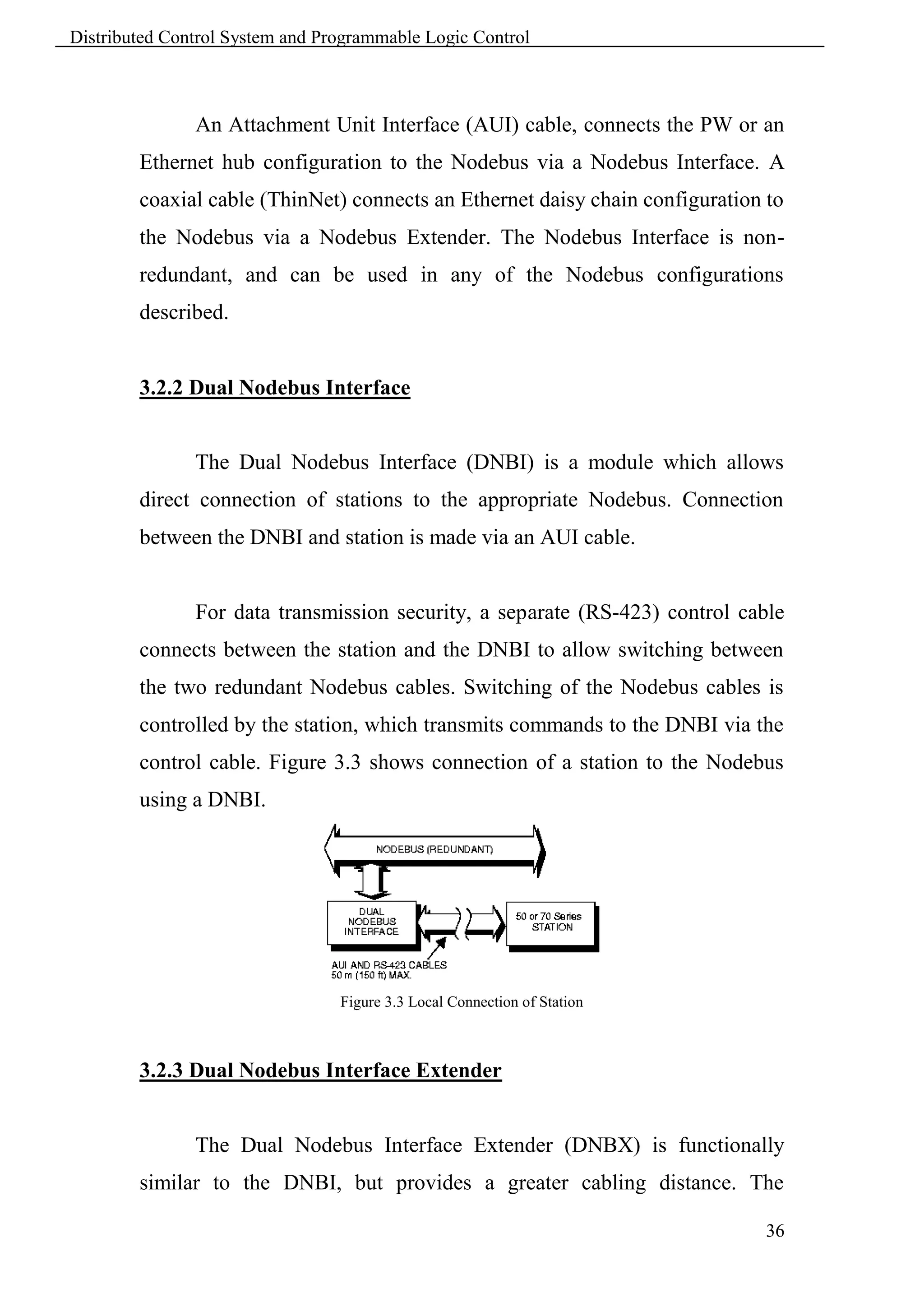
               The Dual Nodebus Interface (DNBI) is a module which allows
        direct connection of stations to the appropriate Nodebus. Connection
        between the DNBI and station is made via an AUI cable.


               For data transmission security, a separate (RS-423) control cable
        connects between the station and the DNBI to allow switching between
        the two redundant Nodebus cables. Switching of the Nodebus cables is
        controlled by the station, which transmits commands to the DNBI via the
        control cable. Figure 3.3 shows connection of a station to the Nodebus
        using a DNBI.


                                 Figure 3.3 Local Connection of Station


        3.2.3 Dual Nodebus Interface Extender


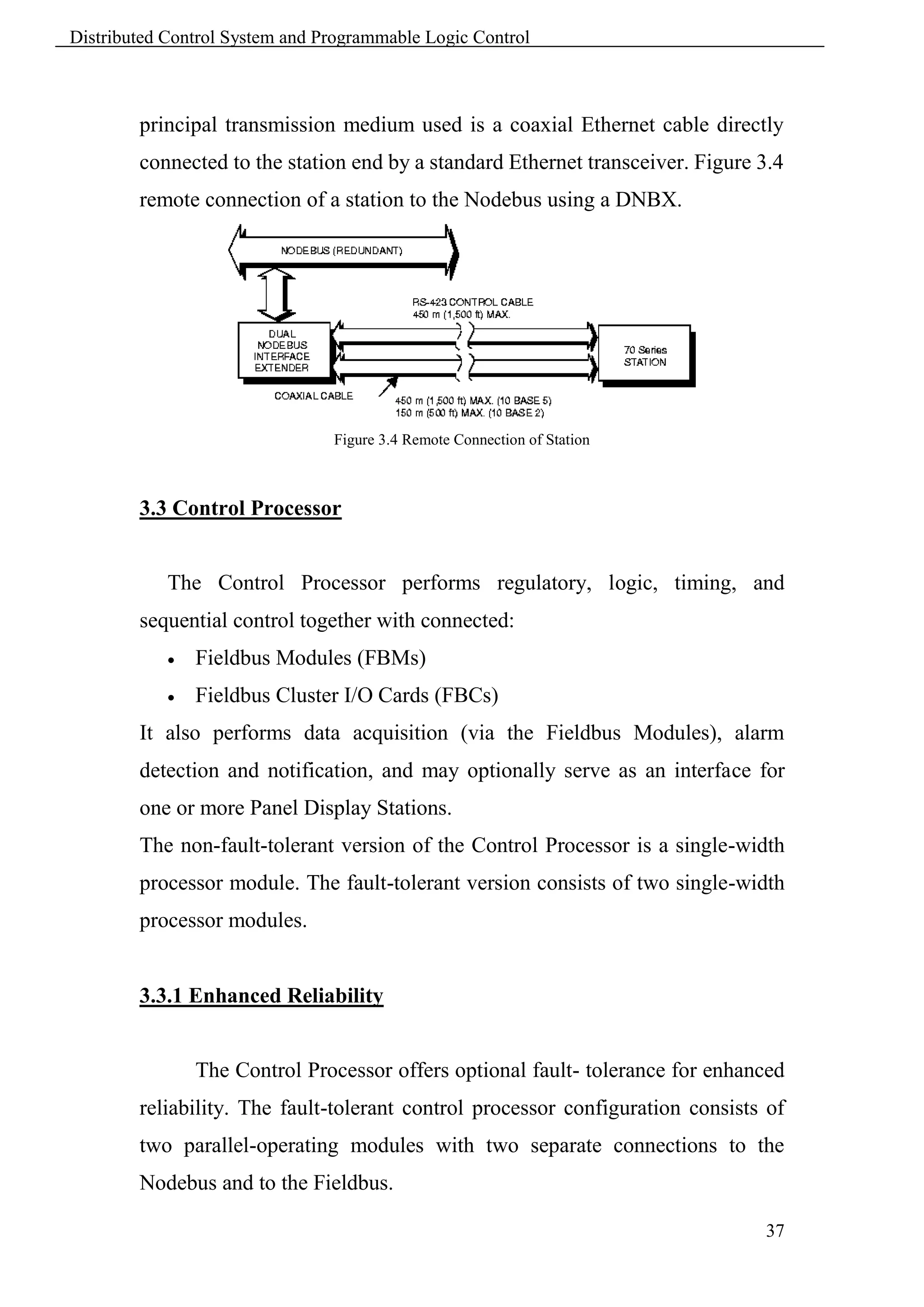
               The Dual Nodebus Interface Extender (DNBX) is functionally
        similar to the DNBI, but provides a greater cabling distance. The

                                                                               36
Distributed Control System and Programmable Logic Control


        principal transmission medium used is a coaxial Ethernet cable directly
        connected to the station end by a standard Ethernet transceiver. Figure 3.4
        remote connection of a station to the Nodebus using a DNBX.


                                Figure 3.4 Remote Connection of Station


        3.3 Control Processor


            The Control Processor performs regulatory, logic, timing, and
        sequential control together with connected:
               Fieldbus Modules (FBMs)
               Fieldbus Cluster I/O Cards (FBCs)
        It also performs data acquisition (via the Fieldbus Modules), alarm
        detection and notification, and may optionally serve as an interface for
        one or more Panel Display Stations.
        The non-fault-tolerant version of the Control Processor is a single-width
        processor module. The fault-tolerant version consists of two single-width
        processor modules.


        3.3.1 Enhanced Reliability


                The Control Processor offers optional fault- tolerance for enhanced
        reliability. The fault-tolerant control processor configuration consists of
        two parallel-operating modules with two separate connections to the
        Nodebus and to the Fieldbus.

                                                                                37
Distributed Control System and Programmable Logic Control


                  The two control processor modules, married together as a fault-
        tolerant pair, are designed to provide continued operation of the unit in
        the event of virtually any hardware failure occurring within one module
        of       the   pair.   Both   modules   receive     and   process   information
        simultaneously, and the modules themselves detect faults. One of the
        significant methods of fault detection is comparison of communication
        messages at the module external interfaces. Upon detection of a fault,
        self-diagnostics are run by both modules to determine which module is
        defective. The non-defective module then assumes control without
        affecting normal system operations.


                  To further ensure reliable communications, the fault-tolerant
        control processor performs error detection and address verification tests
        in its Nodebus and Fieldbus interfaces. For enhanced reliability during
        maintenance operations, the Control Processor is equipped with a
        recessed reset button. This feature provides for manually forcing a
        module power off and on (reboot) without removing the module from the
        enclosure.


        3.3.2 Diagnostics


                  The Control Processor uses three types of diagnostic tests to detect
        and/or isolate faults:
                 Power-up self-checks
                 Run-time and watchdog timer checks
                 Off-line diagnostics
                  Power-up self-checks are self-initiated when power is applied to
        the control processor. These checks perform sequential tests on the
        various control processor functional elements. Red and green indicators at

                                                                                     38
Distributed Control System and Programmable Logic Control


        the front of the control processor module reflect the successful (or non-
        successful) completion of the various phases of the control processor
        startup sequence.
                The run-time and watchdog timer checks provide continuous
        monitoring of control processor functions during normal system
        operations. The operator is informed of a malfunction by means of
        printed or displayed system messages.
                Off-line diagnostics are temporarily loaded into the system for the
        purpose of performing comprehensive tests and checks on various system
        stations and devices. Using the off-line diagnostics, a suspected fault in
        the control processor can be isolated and/or confirmed.


        3.4 Engineering Interface


                The   engineering     interface,   i.e.     Application   Processor,   is
        microprocessor-based application processor/file server stations. They
        perform two basic functions:
               As application processor (computer) stations, they perform
                computation intensive functions.
               As file server stations, they process file requests from tasks within
                themselves or from other stations. Bulk storage devices used with
                the Application Processors include floppy disk drives, hard disk
                drives, streaming tape drives, and CD-ROMs.


                The Application Processors operate in concert with other system
        stations (such as communication processors, workstation processors, and
        control processors), which provide the necessary means for data
        input/output and operator interfacing. A smaller system can utilize a
        single Application Processor, while a larger system can incorporate

                                                                                       39
Distributed Control System and Programmable Logic Control


        several Application Processors, each configured to perform specific
        functions. Some functions can be performed by individual Application
        Processors, while others can be shared by two or more Application
        Processors in the same network.
               For all models of the Application Processor, applications range
        from minimal functions, such as the storage of memory images, alarm
        events, and historical data, to larger-scale applications such as database
        management and program development.


        3.4.1 Application Processor Functions


               The following sections describe the major functions performed by
        the Application Processors.


        3.4.1.1 System and Network Management Functions

               The    Application     Processors     perform    system   management
        functions, which include collecting system performance statistics, data
        reconciliation,    performing      station   reloads,   providing   message
        broadcasting, handling all station alarms and messages, and maintaining
        consistent time and date in all system stations. The Application Processor
        also performs network management functions, which comprise that
        portion of system management functions which deal with the network.


        3.4.1.2 Database Management

               Database management involves the storage, manipulation, and
        retrieval of files containing data received and/or produced by the system.
        The Application Processors utilize the industry-standard Relational Data
        Base Management System.

                                                                                 40
Distributed Control System and Programmable Logic Control


        3.4.1.3 File Requests


               Each Application Processor contains a file manager, which
        manages all file requests associated with bulk memory attached to the
        Application Processor. Each Application Processor also supports a
        remote file system that allows tasks in one station to share files in
        another.


        3.4.1.4 Historical Data


               The Application Processors can be configured to contain the
        Historian function, which maintains a history of application messages and
        continuous and discrete I/O values. These values may represent any
        parameters such as measurements, setpoints, outputs, and status switches
        from stations that have been configured to collect data and send it to a
        Historian. In addition, the Historian computes and stores a history of
        averages, maximums, minimums, and other derived values. This
        information is maintained for display, reporting, and access by
        application programs. An archiving facility saves the data on removable
        media, where applicable.


               The Application Processors can be configured to maintain a history
        of errors, alarm conditions, and selected operator actions. The occurrence
        of errors, alarms, and events in other stations can be stored (for later
        review and analysis) by sending a message defining the event to the
        Historian in one or more Application Processors.


                                                                               41
Distributed Control System and Programmable Logic Control


        3.4.1.5 Graphic Display Support


                The Application Processor supports graphic displays by storing and
        retrieving display formats, by providing access to objects stored on the
        Application Processor, and by storing tasks which execute in a
        workstation processor. Application Processors not only provide storage of
        information and file management for displays, but also execute programs
        that perform display and trend service.


        3.4.1.6 Production Control Software


                Production control software represents a large range of packages
        that require varied Application Processor resources. The following is a
        list of packages provided:
               DBMS
               Historian
               Spreadsheet
               Physical Properties Library
               Mathematics Library
               BATCH
        The operation and performance of the production control software are
        determined by the particular Application Processor configuration.


        3.4.1.7 Configuration


                Configuration refers to the process of entering or selecting
        parameters to define what a software package does, or to define the
        environment for a software package. The Application Processors support
        configuration functions by providing bulk storage for configuration
        parameters and by executing some of the configuration processes.

                                                                                42
Distributed Control System and Programmable Logic Control


        3.4.1.8 Application Development Facilities


                Application development tools are provided to build programs for
        all system stations. These include tools to document, enter, translate, link,
        test, and maintain programs written in several programming languages.
        The Application Processor supports program development for all stations
        (workstation processors, control processors, and so forth).
                Assembly language, FORTRAN, and C programs can be written on
        the Application Processor using standard operating system tools. An
        optional package is available including text editors, debuggers, linkers,
        revision control, and compilers, plus execution statistics functions.


        3.4.1.9 User Application Program Execution


                The Application Processors also execute user application programs.
        These may be application packages such as special optimizations, test
        data collections, special data reductions, or other packages that you may
        have already developed. The allocation of resources reserved for user
        application varies with each Application Processor.


        3.4.2 Diagnostics


                The Application Processors utilize three types of diagnostic tests to
        detect and/or isolate faults:
               Power-up self-checks
               Run-time and watchdog timer checks
               Off-line diagnostics
                Power-up self-checks are initiated when power is applied to the
        Application Processor. These checks perform sequential tests on the

                                                                                  43
Distributed Control System and Programmable Logic Control


        various Application Processor functional elements. Any malfunction
        detected during the power-up self-checks is reported by means of
        messages printed or displayed on a directly connected printer or terminal.
                The run-time and watchdog timer checks provide continuous
        monitoring of Application Processor functions during normal system
        operations. For any processor model, you are informed of a malfunction
        by means of printed or displayed system messages. Off-line diagnostics
        are temporarily loaded into the system for the purpose of performing
        comprehensive tests and checks on various system stations and devices.
                Using the off-line diagnostics, a suspected fault in the Application
        Processor can be isolated and/or confirmed.


        3.4.3 Workstation Components


                The workstation components provide user interface to all System
        CRT display functions. A selection of workstation components is
        available for command and data entry, along with CRT pointer
        manipulation and control. These components interact with software
        resident in versions of the system Workstation Processors (WPs) and
        Application Workstation Processors (AWs). Many of these components
        (displays and keyboards) are "common" and allow interchangeability and
        simplicity in mixed technology configurations.
        Workstation components include:
               Alphanumeric Keyboard
               Annunciator and Annunciator/Numeric Keyboards
               Workstation Display (with/without Touchscreen)
               Mouse
               Trackball
               Industrial Pointing Device

                                                                                 44
Distributed Control System and Programmable Logic Control


               Workstation Processor or Application Workstation Processor
               Personal Workstation
               Modular Industrial Console
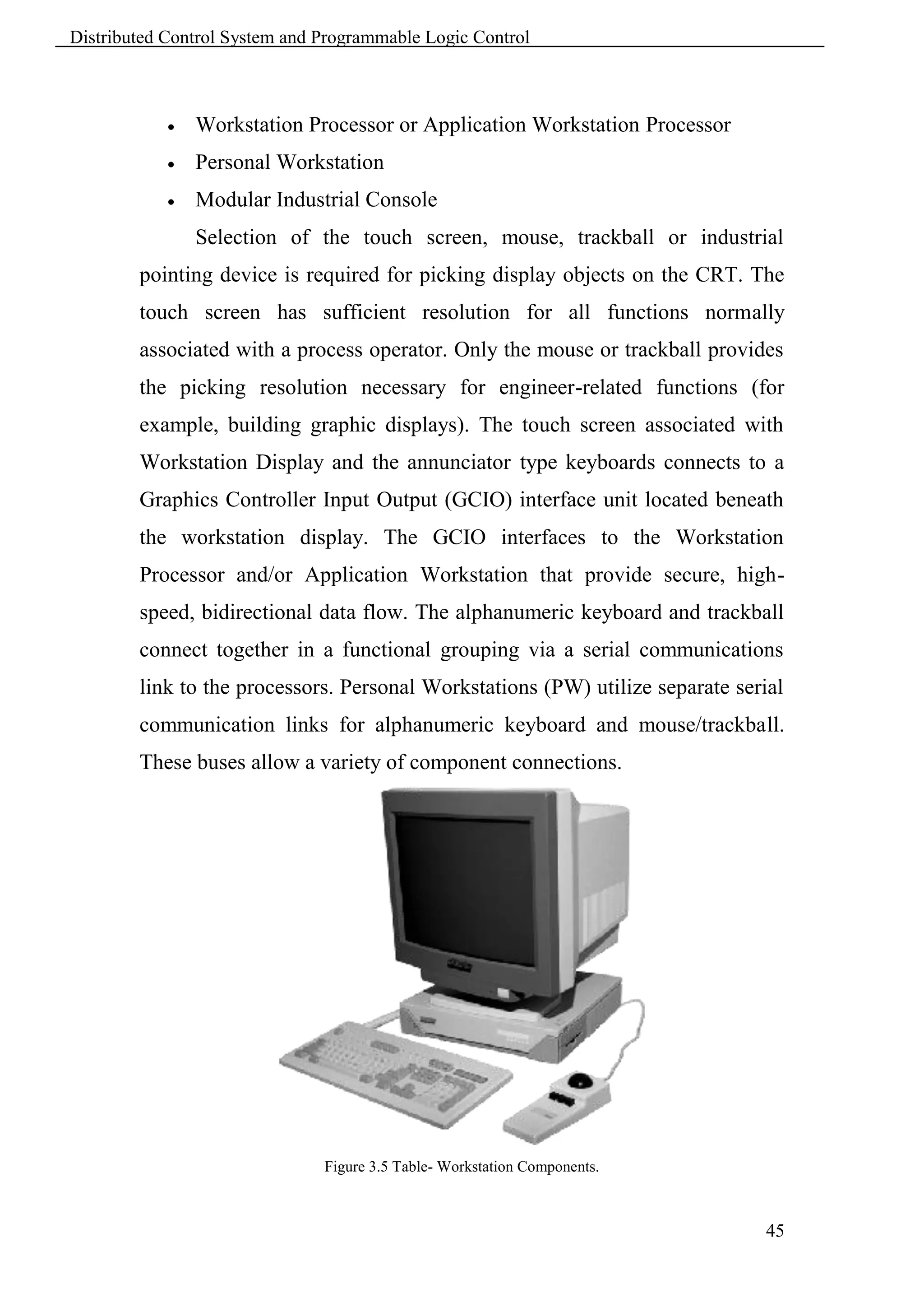
                Selection of the touch screen, mouse, trackball or industrial
        pointing device is required for picking display objects on the CRT. The
        touch screen has sufficient resolution for all functions normally
        associated with a process operator. Only the mouse or trackball provides
        the picking resolution necessary for engineer-related functions (for
        example, building graphic displays). The touch screen associated with
        Workstation Display and the annunciator type keyboards connects to a
        Graphics Controller Input Output (GCIO) interface unit located beneath
        the workstation display. The GCIO interfaces to the Workstation
        Processor and/or Application Workstation that provide secure, high-
        speed, bidirectional data flow. The alphanumeric keyboard and trackball
        connect together in a functional grouping via a serial communications
        link to the processors. Personal Workstations (PW) utilize separate serial
        communication links for alphanumeric keyboard and mouse/trackball.
        These buses allow a variety of component connections.


                               Figure 3.5 Table- Workstation Components.


                                                                                45
Distributed Control System and Programmable Logic Control


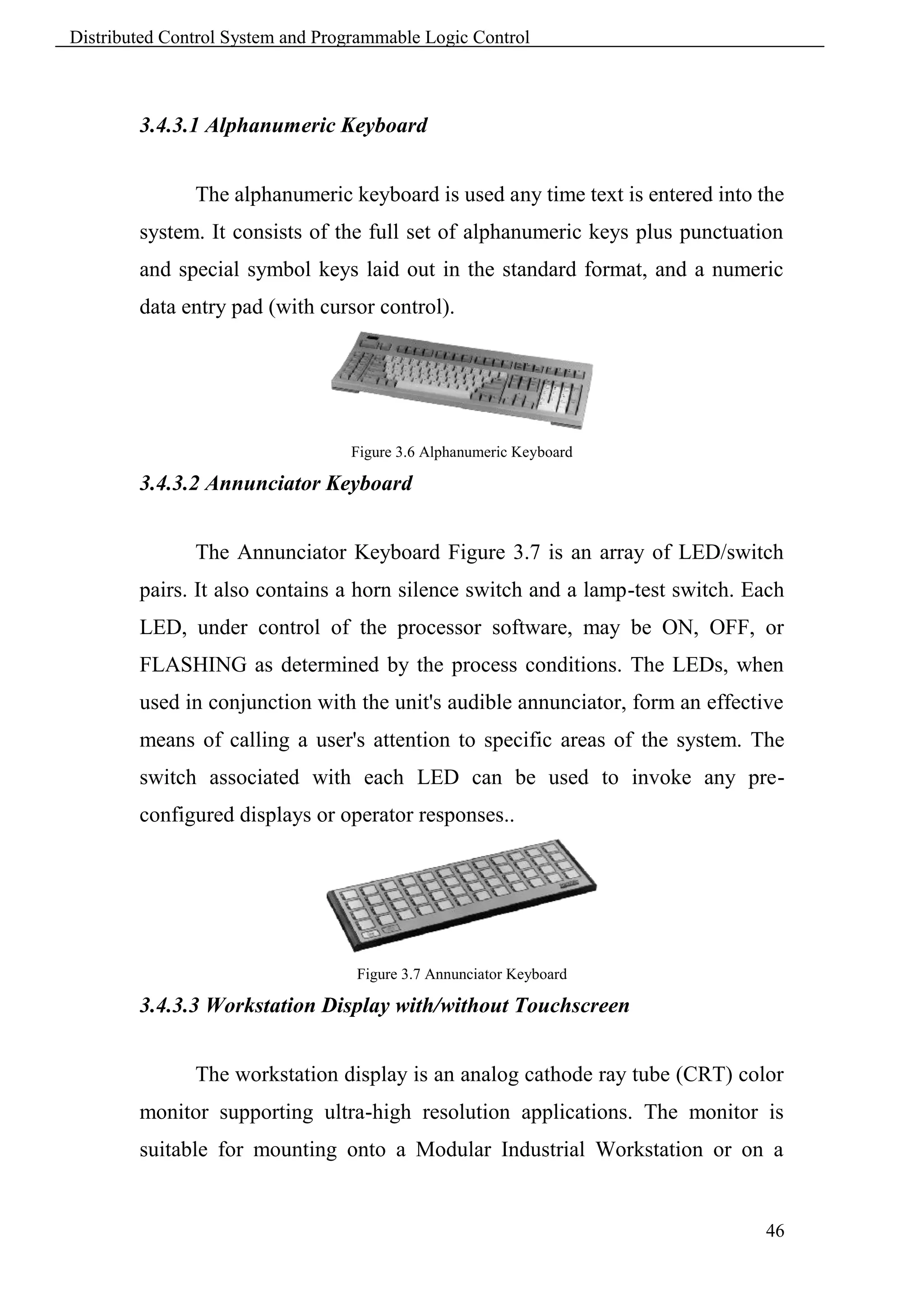
        3.4.3.1 Alphanumeric Keyboard


               The alphanumeric keyboard is used any time text is entered into the
        system. It consists of the full set of alphanumeric keys plus punctuation
        and special symbol keys laid out in the standard format, and a numeric
        data entry pad (with cursor control).


                                  Figure 3.6 Alphanumeric Keyboard

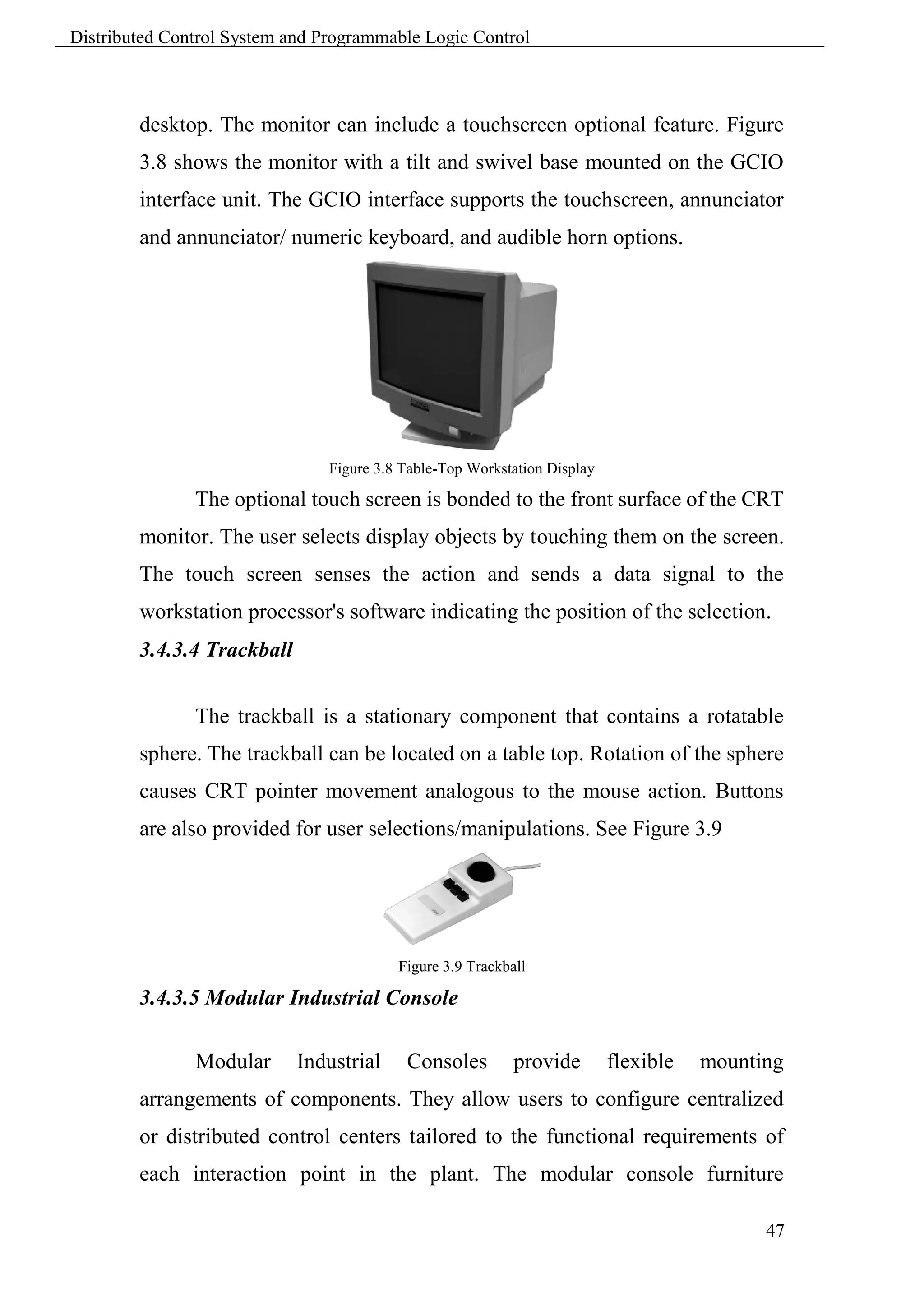
        3.4.3.2 Annunciator Keyboard


               The Annunciator Keyboard Figure 3.7 is an array of LED/switch
        pairs. It also contains a horn silence switch and a lamp-test switch. Each
        LED, under control of the processor software, may be ON, OFF, or
        FLASHING as determined by the process conditions. The LEDs, when
        used in conjunction with the unit's audible annunciator, form an effective
        means of calling a user's attention to specific areas of the system. The
        switch associated with each LED can be used to invoke any pre-
        configured displays or operator responses..


                                   Figure 3.7 Annunciator Keyboard

        3.4.3.3 Workstation Display with/without Touchscreen


               The workstation display is an analog cathode ray tube (CRT) color
        monitor supporting ultra-high resolution applications. The monitor is
        suitable for mounting onto a Modular Industrial Workstation or on a


                                                                                46
Distributed Control System and Programmable Logic Control


        desktop. The monitor can include a touchscreen optional feature. Figure
        3.8 shows the monitor with a tilt and swivel base mounted on the GCIO
        interface unit. The GCIO interface supports the touchscreen, annunciator
        and annunciator/ numeric keyboard, and audible horn options.


                                Figure 3.8 Table-Top Workstation Display

               The optional touch screen is bonded to the front surface of the CRT
        monitor. The user selects display objects by touching them on the screen.
        The touch screen senses the action and sends a data signal to the
        workstation processor's software indicating the position of the selection.
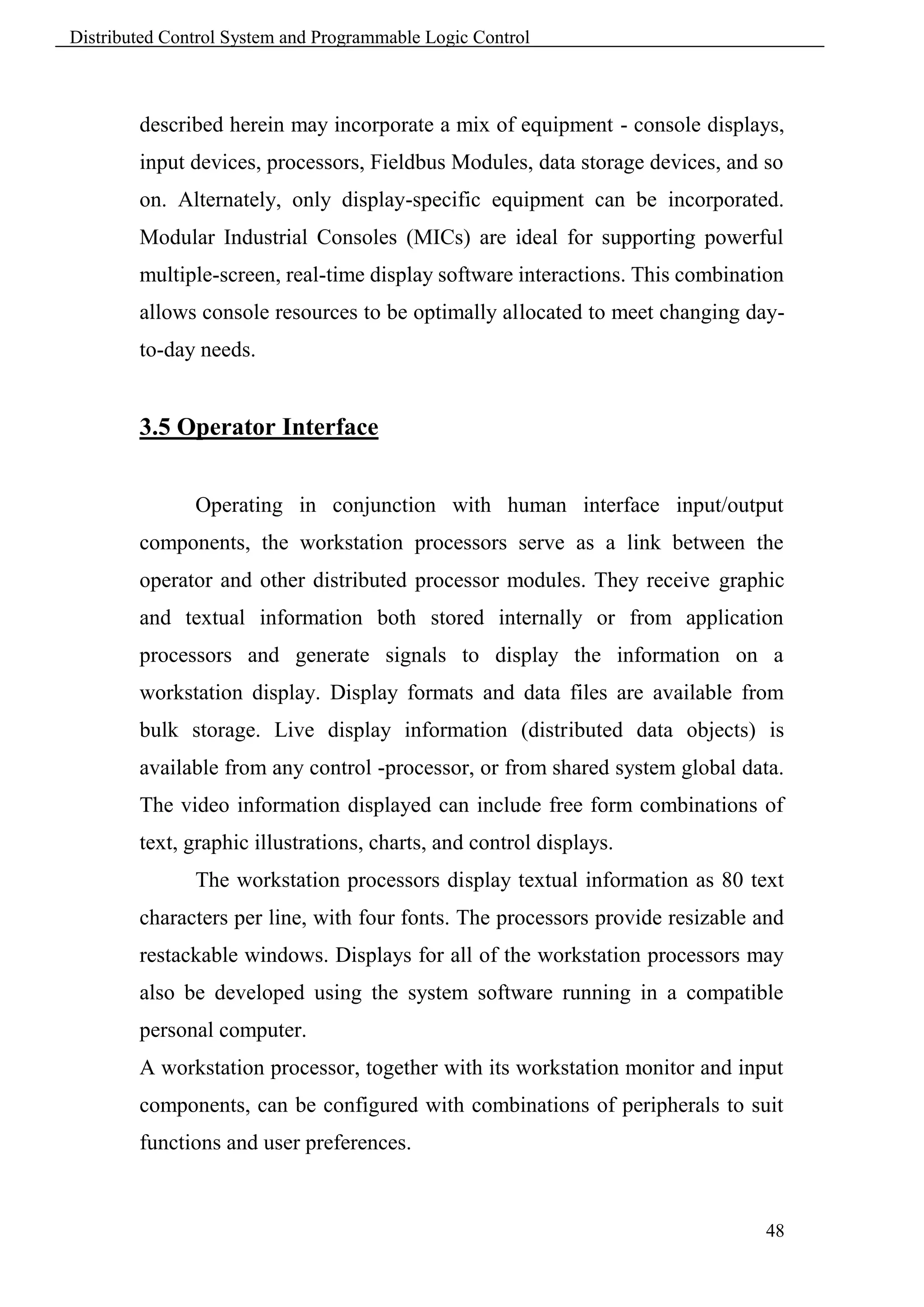
        3.4.3.4 Trackball


               The trackball is a stationary component that contains a rotatable
        sphere. The trackball can be located on a table top. Rotation of the sphere
        causes CRT pointer movement analogous to the mouse action. Buttons
        are also provided for user selections/manipulations. See Figure 3.9


                                          Figure 3.9 Trackball

        3.4.3.5 Modular Industrial Console

               Modular      Industrial     Consoles         provide        flexible   mounting
        arrangements of components. They allow users to configure centralized
        or distributed control centers tailored to the functional requirements of
        each interaction point in the plant. The modular console furniture

                                                                                            47
Distributed Control System and Programmable Logic Control


        described herein may incorporate a mix of equipment - console displays,
        input devices, processors, Fieldbus Modules, data storage devices, and so
        on. Alternately, only display-specific equipment can be incorporated.
        Modular Industrial Consoles (MICs) are ideal for supporting powerful
        multiple-screen, real-time display software interactions. This combination
        allows console resources to be optimally allocated to meet changing day-
        to-day needs.


        3.5 Operator Interface


               Operating in conjunction with human interface input/output
        components, the workstation processors serve as a link between the
        operator and other distributed processor modules. They receive graphic
        and textual information both stored internally or from application
        processors and generate signals to display the information on a
        workstation display. Display formats and data files are available from
        bulk storage. Live display information (distributed data objects) is
        available from any control -processor, or from shared system global data.
        The video information displayed can include free form combinations of
        text, graphic illustrations, charts, and control displays.
               The workstation processors display textual information as 80 text
        characters per line, with four fonts. The processors provide resizable and
        restackable windows. Displays for all of the workstation processors may
        also be developed using the system software running in a compatible
        personal computer.
        A workstation processor, together with its workstation monitor and input
        components, can be configured with combinations of peripherals to suit
        functions and user preferences.


                                                                               48
Distributed Control System and Programmable Logic Control


        3.6 Gateways


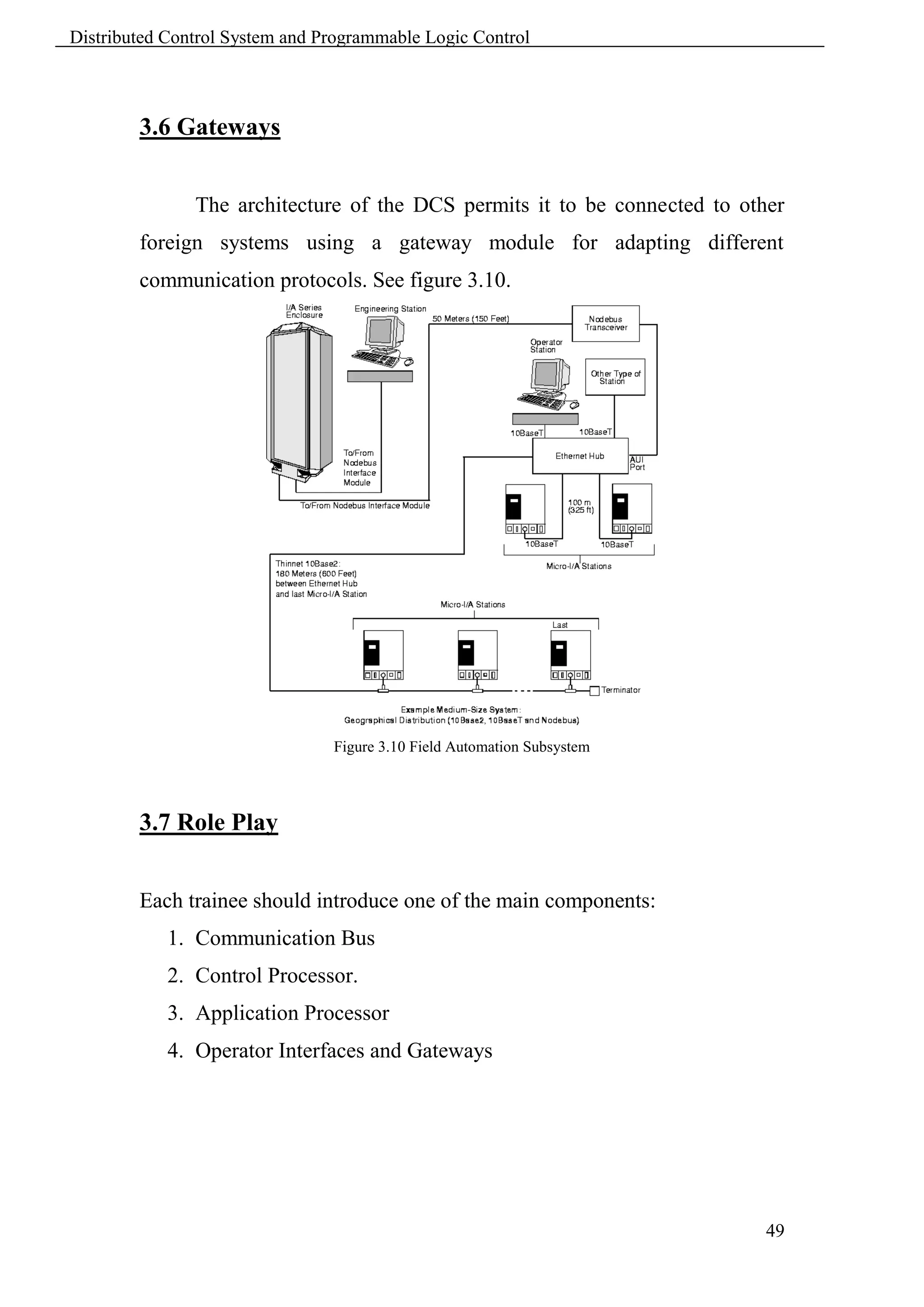
               The architecture of the DCS permits it to be connected to other
        foreign systems using a gateway module for adapting different
        communication protocols. See figure 3.10.


                                Figure 3.10 Field Automation Subsystem


        3.7 Role Play


        Each trainee should introduce one of the main components:
            1. Communication Bus
            2. Control Processor.
            3. Application Processor
            4. Operator Interfaces and Gateways


                                                                            49
Distributed Control System and Programmable Logic Control


                                         Chapter 4
                                     DCS Hardware

        4.1 Learning Objectives


         Define fieldbus communication.
         Illustrate system components of level 1 control.
         Demonstrate interconnection between different components.
         Develop knowledge base of foundation fieldbus technology.


        4.2 Fieldbus Modules


                Fieldbus Modules provide connection of digital I/O, analog I/O,
        and Intelligent Transmitters to control processors. There are two types of
        Fieldbus Modules: Main and Expansion. Some main modules can be
        expanded using an expansion module.


                A wide range of Fieldbus Modules is available to perform the
        signal conversion necessary to interface the control processor with field
        sensors and actuators.


        4.3 Fieldbus Interconnection


            The Control Processor is used in three different configurations, which
        provide broad flexibility in Fieldbus implementation:
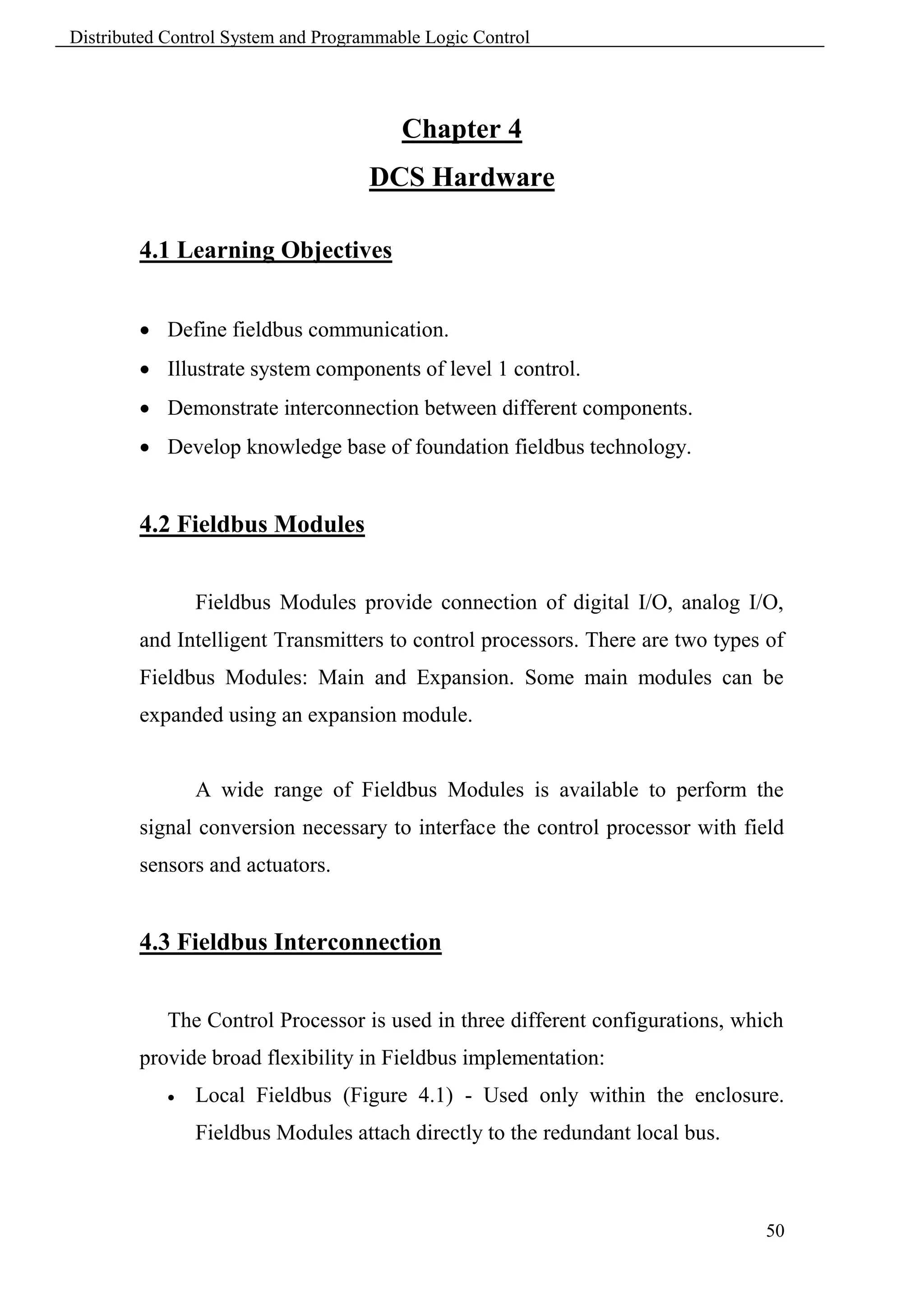
               Local Fieldbus (Figure 4.1) - Used only within the enclosure.
                Fieldbus Modules attach directly to the redundant local bus.


                                                                                50
Distributed Control System and Programmable Logic Control


                                            Figure 4.1 Local Fieldbus

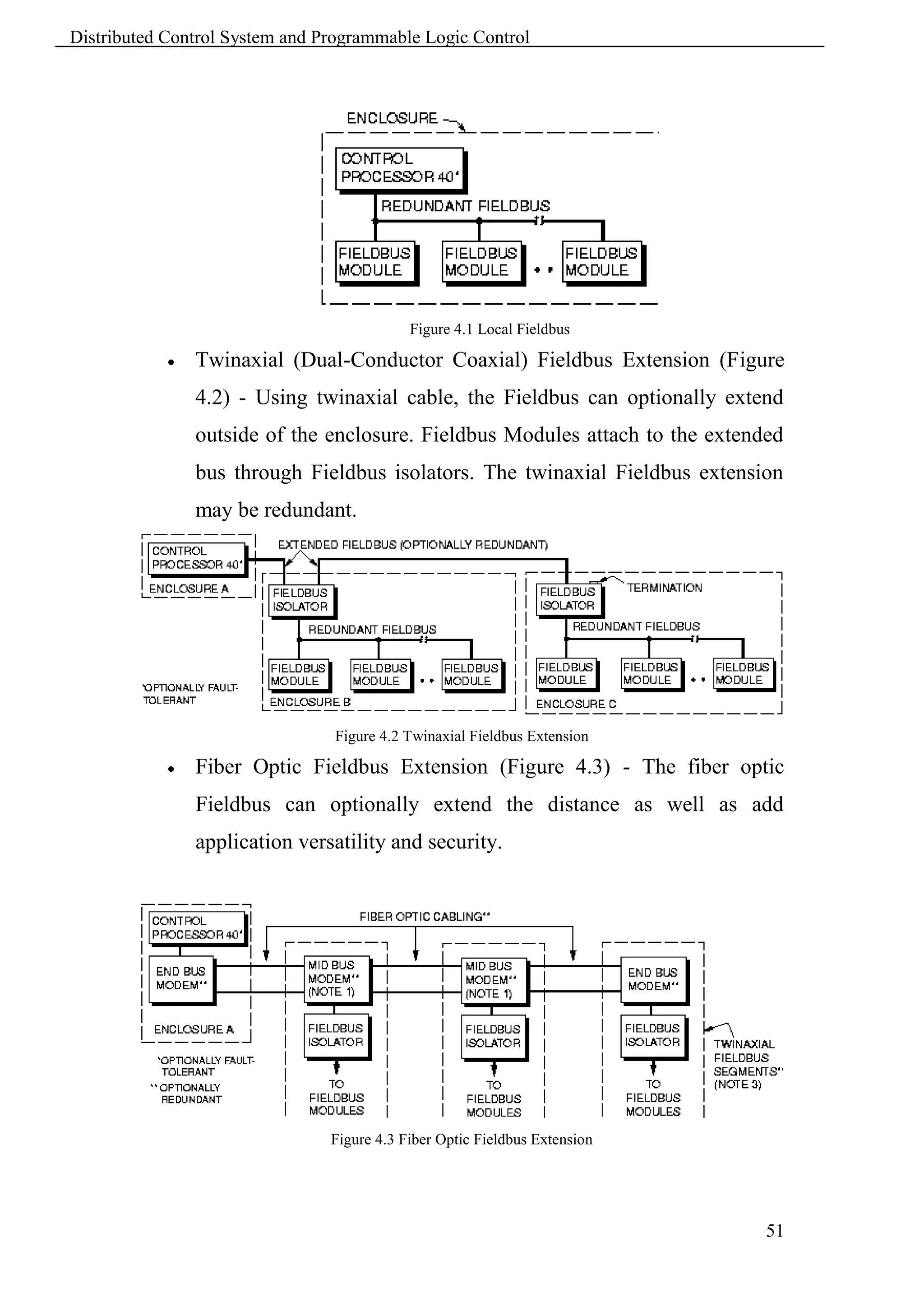
               Twinaxial (Dual-Conductor Coaxial) Fieldbus Extension (Figure
                4.2) - Using twinaxial cable, the Fieldbus can optionally extend
                outside of the enclosure. Fieldbus Modules attach to the extended
                bus through Fieldbus isolators. The twinaxial Fieldbus extension
                may be redundant.


                                Figure 4.2 Twinaxial Fieldbus Extension

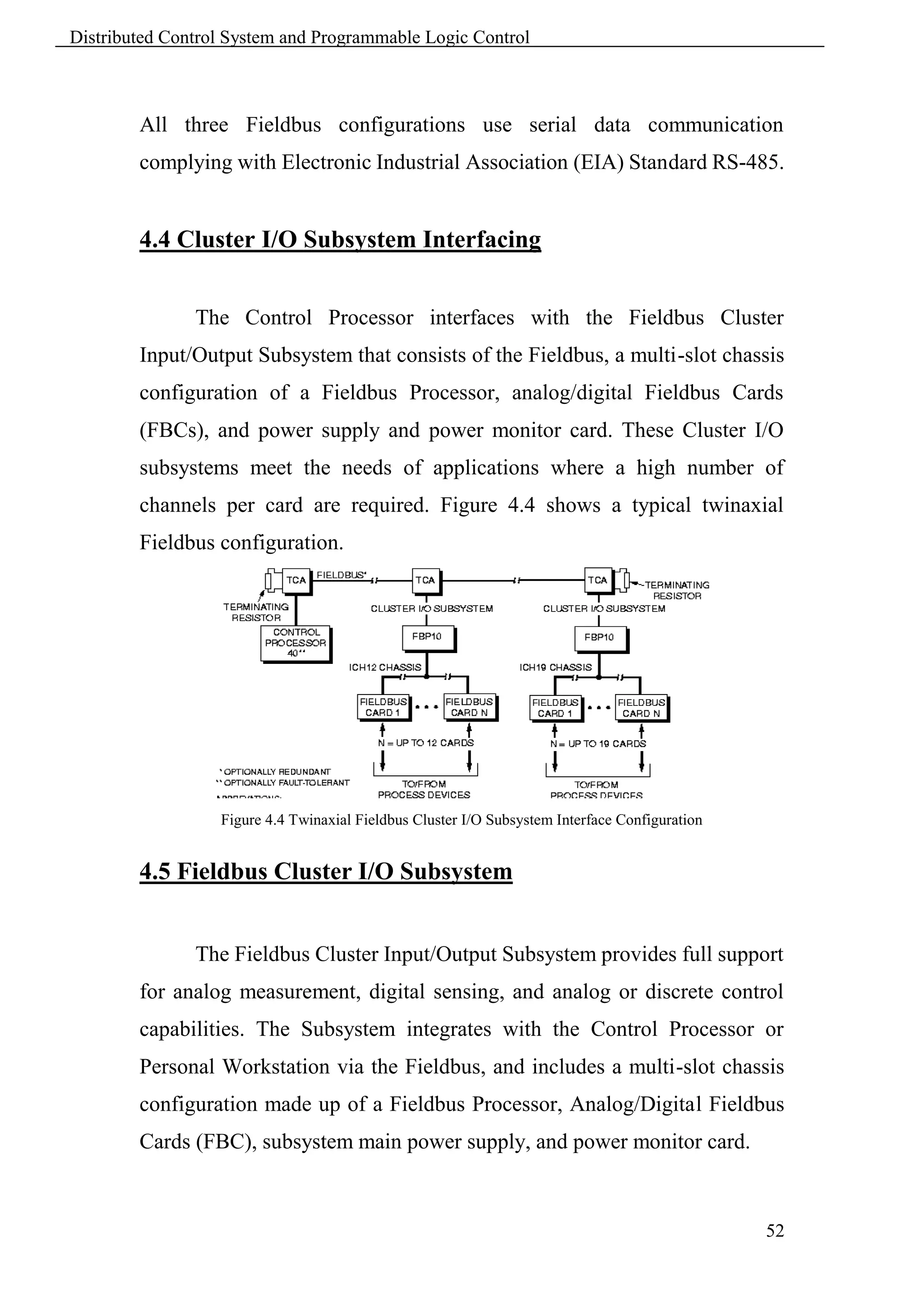
               Fiber Optic Fieldbus Extension (Figure 4.3) - The fiber optic
                Fieldbus can optionally extend the distance as well as add
                application versatility and security.


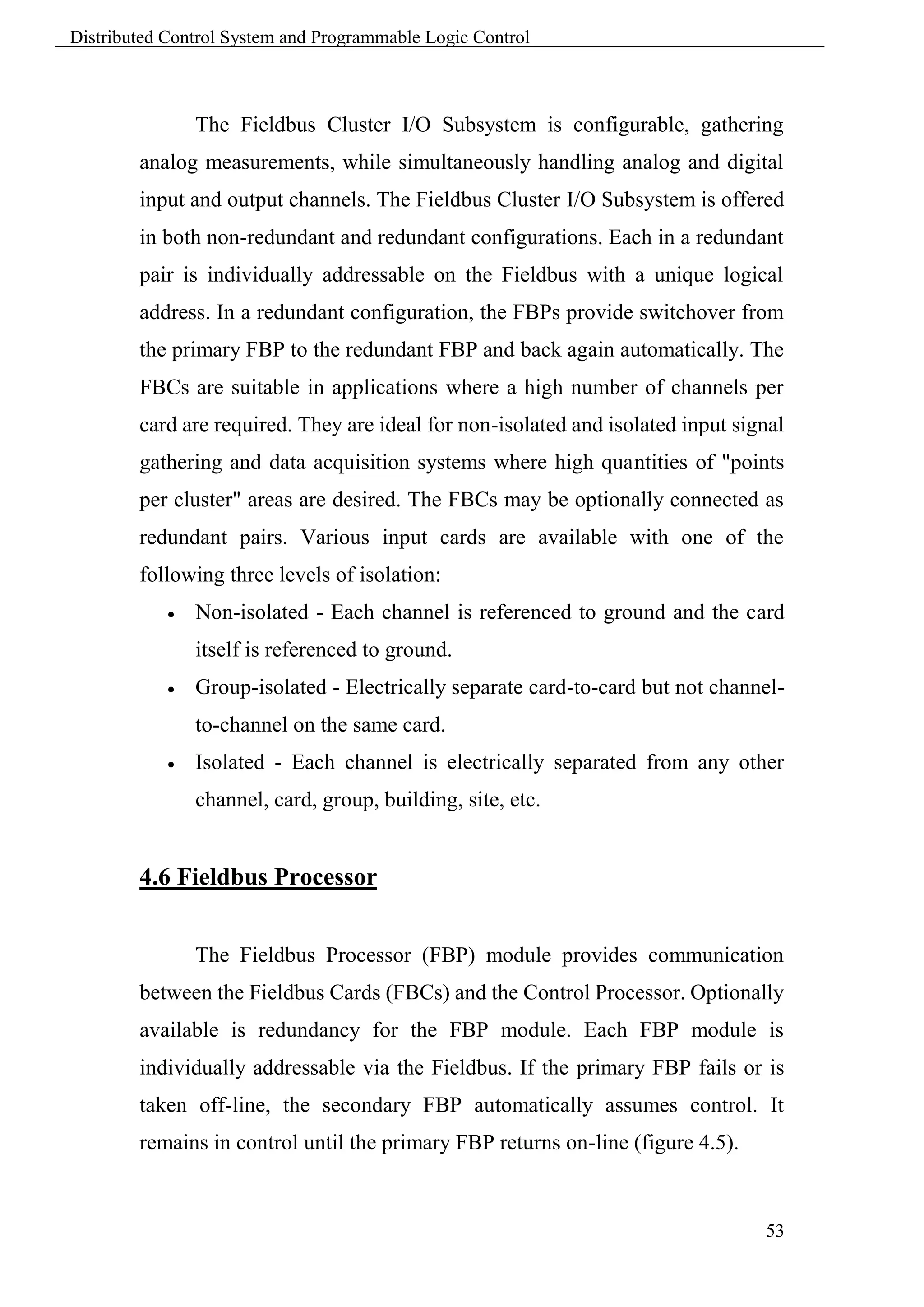
                                Figure 4.3 Fiber Optic Fieldbus Extension


                                                                               51
Distributed Control System and Programmable Logic Control


        All three Fieldbus configurations use serial data communication
        complying with Electronic Industrial Association (EIA) Standard RS-485.


        4.4 Cluster I/O Subsystem Interfacing


               The Control Processor interfaces with the Fieldbus Cluster
        Input/Output Subsystem that consists of the Fieldbus, a multi-slot chassis
        configuration of a Fieldbus Processor, analog/digital Fieldbus Cards
        (FBCs), and power supply and power monitor card. These Cluster I/O
        subsystems meet the needs of applications where a high number of
        channels per card are required. Figure 4.4 shows a typical twinaxial
        Fieldbus configuration.


                  Figure 4.4 Twinaxial Fieldbus Cluster I/O Subsystem Interface Configuration


        4.5 Fieldbus Cluster I/O Subsystem


               The Fieldbus Cluster Input/Output Subsystem provides full support
        for analog measurement, digital sensing, and analog or discrete control
        capabilities. The Subsystem integrates with the Control Processor or
        Personal Workstation via the Fieldbus, and includes a multi-slot chassis
        configuration made up of a Fieldbus Processor, Analog/Digital Fieldbus
        Cards (FBC), subsystem main power supply, and power monitor card.


                                                                                                52
Distributed Control System and Programmable Logic Control


                The Fieldbus Cluster I/O Subsystem is configurable, gathering
        analog measurements, while simultaneously handling analog and digital
        input and output channels. The Fieldbus Cluster I/O Subsystem is offered
        in both non-redundant and redundant configurations. Each in a redundant
        pair is individually addressable on the Fieldbus with a unique logical
        address. In a redundant configuration, the FBPs provide switchover from
        the primary FBP to the redundant FBP and back again automatically. The
        FBCs are suitable in applications where a high number of channels per
        card are required. They are ideal for non-isolated and isolated input signal
        gathering and data acquisition systems where high quantities of "points
        per cluster" areas are desired. The FBCs may be optionally connected as
        redundant pairs. Various input cards are available with one of the
        following three levels of isolation:
               Non-isolated - Each channel is referenced to ground and the card
                itself is referenced to ground.
               Group-isolated - Electrically separate card-to-card but not channel-
                to-channel on the same card.
               Isolated - Each channel is electrically separated from any other
                channel, card, group, building, site, etc.


        4.6 Fieldbus Processor


                The Fieldbus Processor (FBP) module provides communication
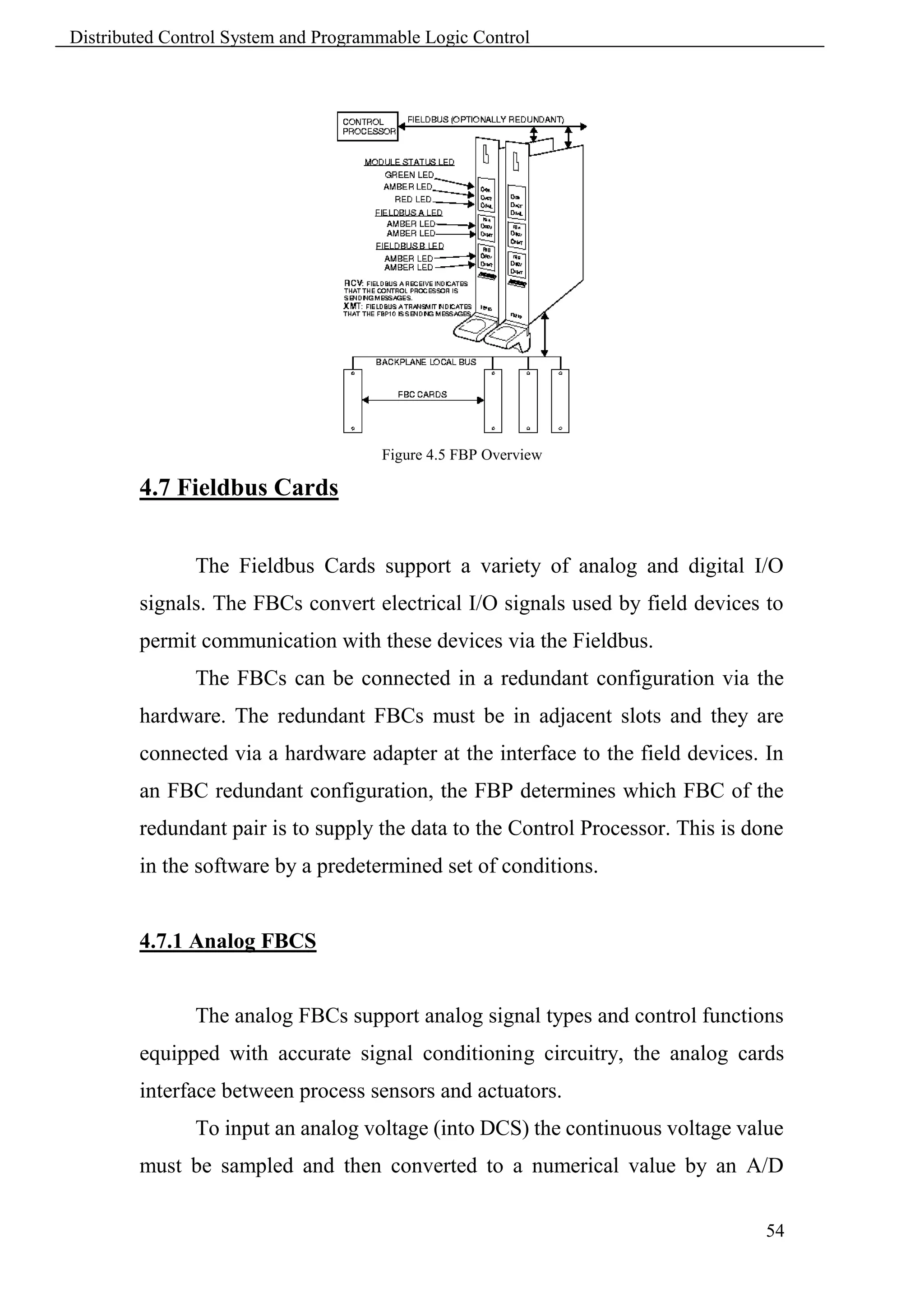
        between the Fieldbus Cards (FBCs) and the Control Processor. Optionally
        available is redundancy for the FBP module. Each FBP module is
        individually addressable via the Fieldbus. If the primary FBP fails or is
        taken off-line, the secondary FBP automatically assumes control. It
        remains in control until the primary FBP returns on-line (figure 4.5).


                                                                                 53
Distributed Control System and Programmable Logic Control


                                      Figure 4.5 FBP Overview

        4.7 Fieldbus Cards


               The Fieldbus Cards support a variety of analog and digital I/O
        signals. The FBCs convert electrical I/O signals used by field devices to
        permit communication with these devices via the Fieldbus.
               The FBCs can be connected in a redundant configuration via the
        hardware. The redundant FBCs must be in adjacent slots and they are
        connected via a hardware adapter at the interface to the field devices. In
        an FBC redundant configuration, the FBP determines which FBC of the
        redundant pair is to supply the data to the Control Processor. This is done
        in the software by a predetermined set of conditions.


        4.7.1 Analog FBCS


               The analog FBCs support analog signal types and control functions
        equipped with accurate signal conditioning circuitry, the analog cards
        interface between process sensors and actuators.
               To input an analog voltage (into DCS) the continuous voltage value
        must be sampled and then converted to a numerical value by an A/D

                                                                                54
Distributed Control System and Programmable Logic Control


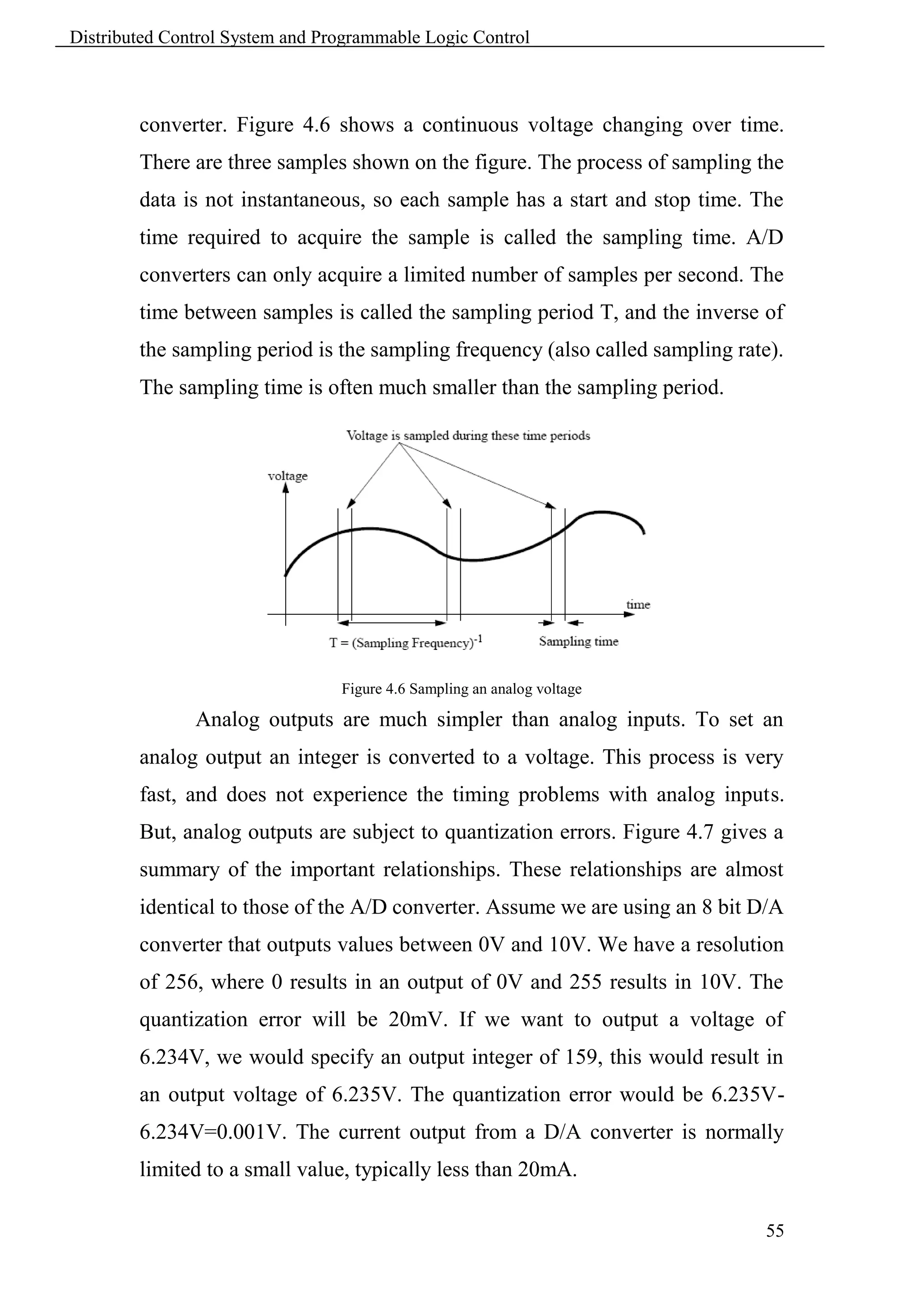
        converter. Figure 4.6 shows a continuous voltage changing over time.
        There are three samples shown on the figure. The process of sampling the
        data is not instantaneous, so each sample has a start and stop time. The
        time required to acquire the sample is called the sampling time. A/D
        converters can only acquire a limited number of samples per second. The
        time between samples is called the sampling period T, and the inverse of
        the sampling period is the sampling frequency (also called sampling rate).
        The sampling time is often much smaller than the sampling period.


                                 Figure 4.6 Sampling an analog voltage

               Analog outputs are much simpler than analog inputs. To set an
        analog output an integer is converted to a voltage. This process is very
        fast, and does not experience the timing problems with analog inputs.
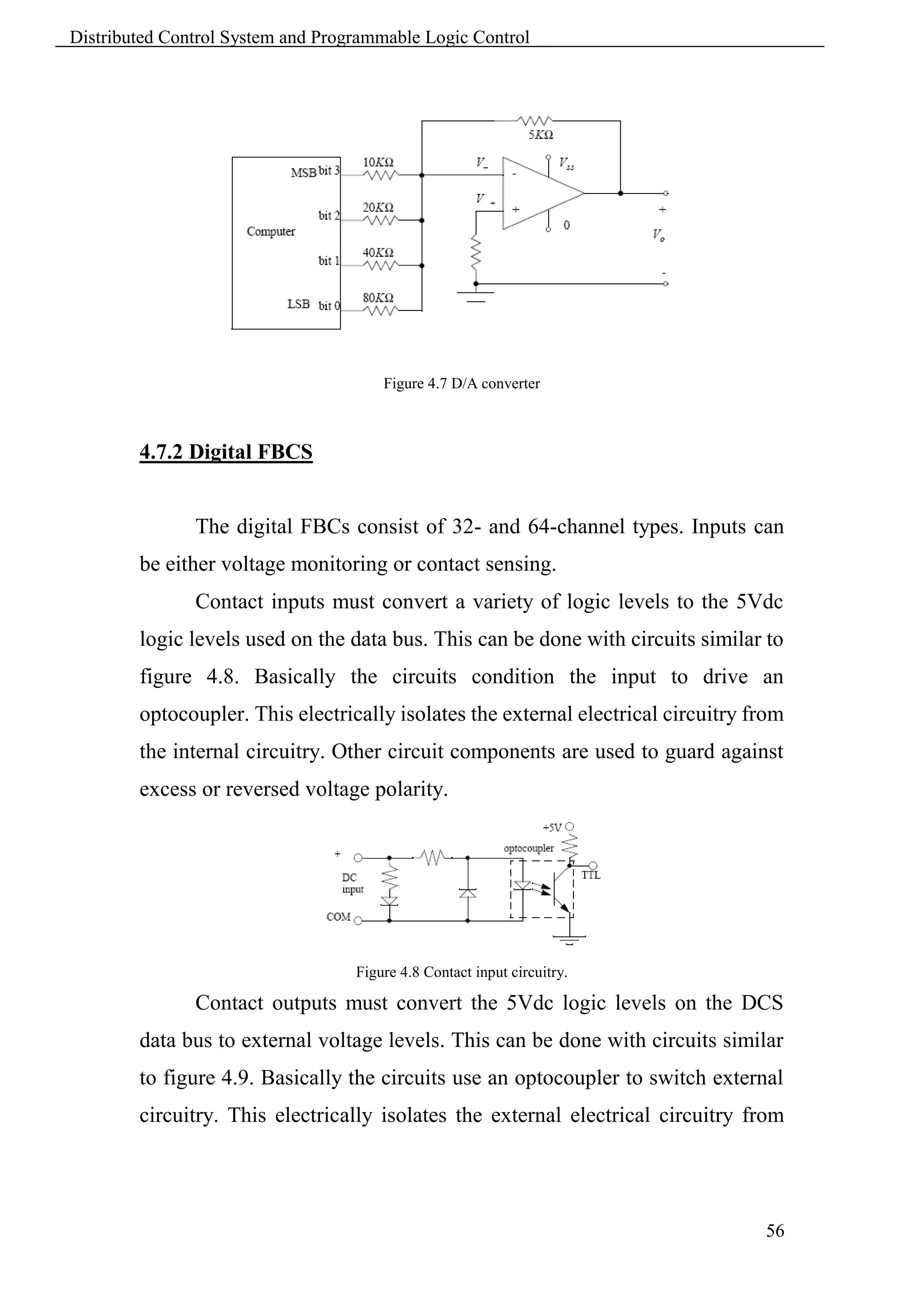
        But, analog outputs are subject to quantization errors. Figure 4.7 gives a
        summary of the important relationships. These relationships are almost
        identical to those of the A/D converter. Assume we are using an 8 bit D/A
        converter that outputs values between 0V and 10V. We have a resolution
        of 256, where 0 results in an output of 0V and 255 results in 10V. The
        quantization error will be 20mV. If we want to output a voltage of
        6.234V, we would specify an output integer of 159, this would result in
        an output voltage of 6.235V. The quantization error would be 6.235V-
        6.234V=0.001V. The current output from a D/A converter is normally
        limited to a small value, typically less than 20mA.

                                                                                55
Distributed Control System and Programmable Logic Control


                                       Figure 4.7 D/A converter


        4.7.2 Digital FBCS


               The digital FBCs consist of 32- and 64-channel types. Inputs can
        be either voltage monitoring or contact sensing.
               Contact inputs must convert a variety of logic levels to the 5Vdc
        logic levels used on the data bus. This can be done with circuits similar to
        figure 4.8. Basically the circuits condition the input to drive an
        optocoupler. This electrically isolates the external electrical circuitry from
        the internal circuitry. Other circuit components are used to guard against
        excess or reversed voltage polarity.


                                   Figure 4.8 Contact input circuitry.

               Contact outputs must convert the 5Vdc logic levels on the DCS
        data bus to external voltage levels. This can be done with circuits similar
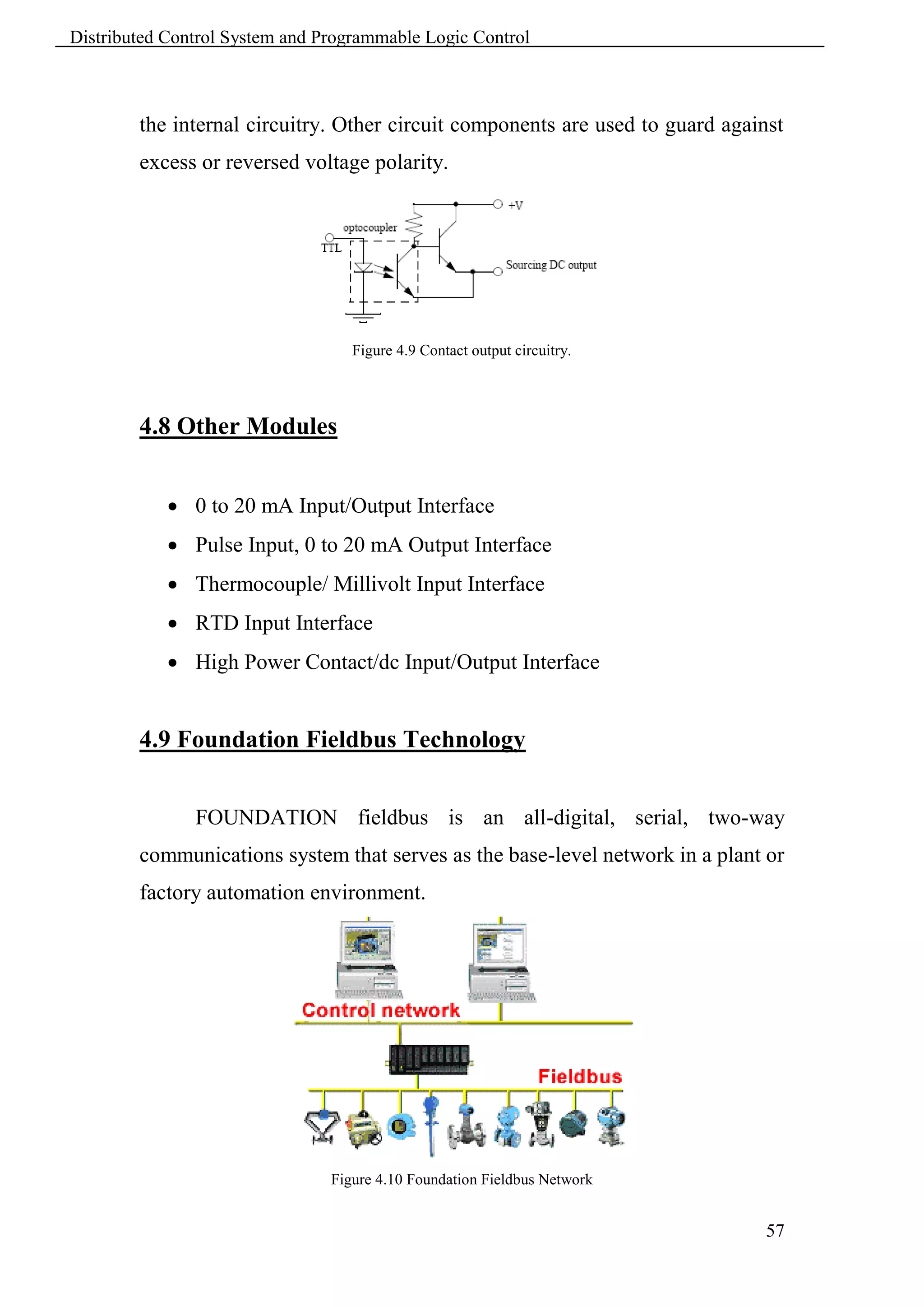
        to figure 4.9. Basically the circuits use an optocoupler to switch external
        circuitry. This electrically isolates the external electrical circuitry from


                                                                                   56
Distributed Control System and Programmable Logic Control


        the internal circuitry. Other circuit components are used to guard against
        excess or reversed voltage polarity.


                                   Figure 4.9 Contact output circuitry.


        4.8 Other Modules


             0 to 20 mA Input/Output Interface
             Pulse Input, 0 to 20 mA Output Interface
             Thermocouple/ Millivolt Input Interface
             RTD Input Interface
             High Power Contact/dc Input/Output Interface


        4.9 Foundation Fieldbus Technology


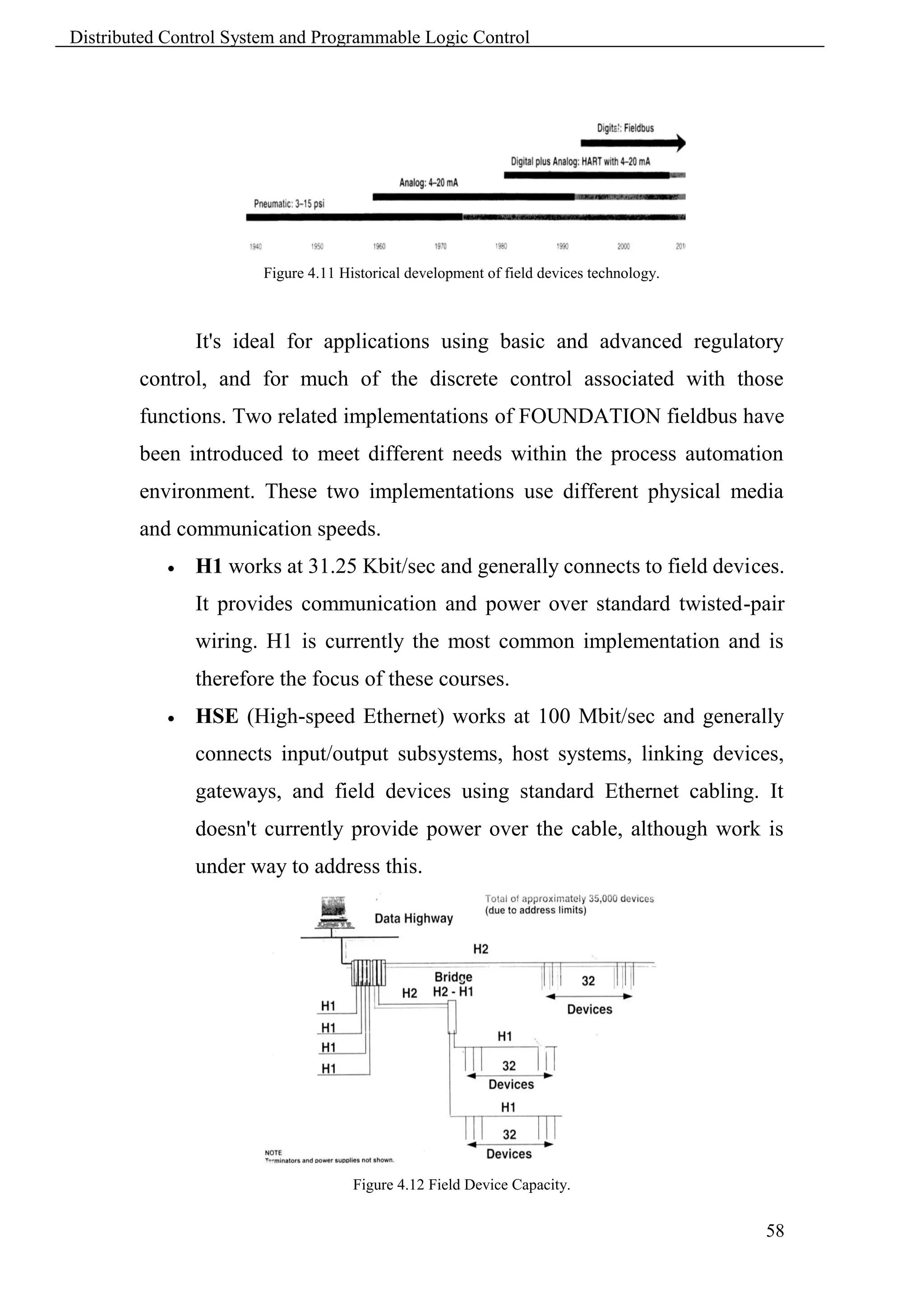
               FOUNDATION fieldbus is an all-digital, serial, two-way
        communications system that serves as the base-level network in a plant or
        factory automation environment.


                                Figure 4.10 Foundation Fieldbus Network


                                                                                57
Distributed Control System and Programmable Logic Control


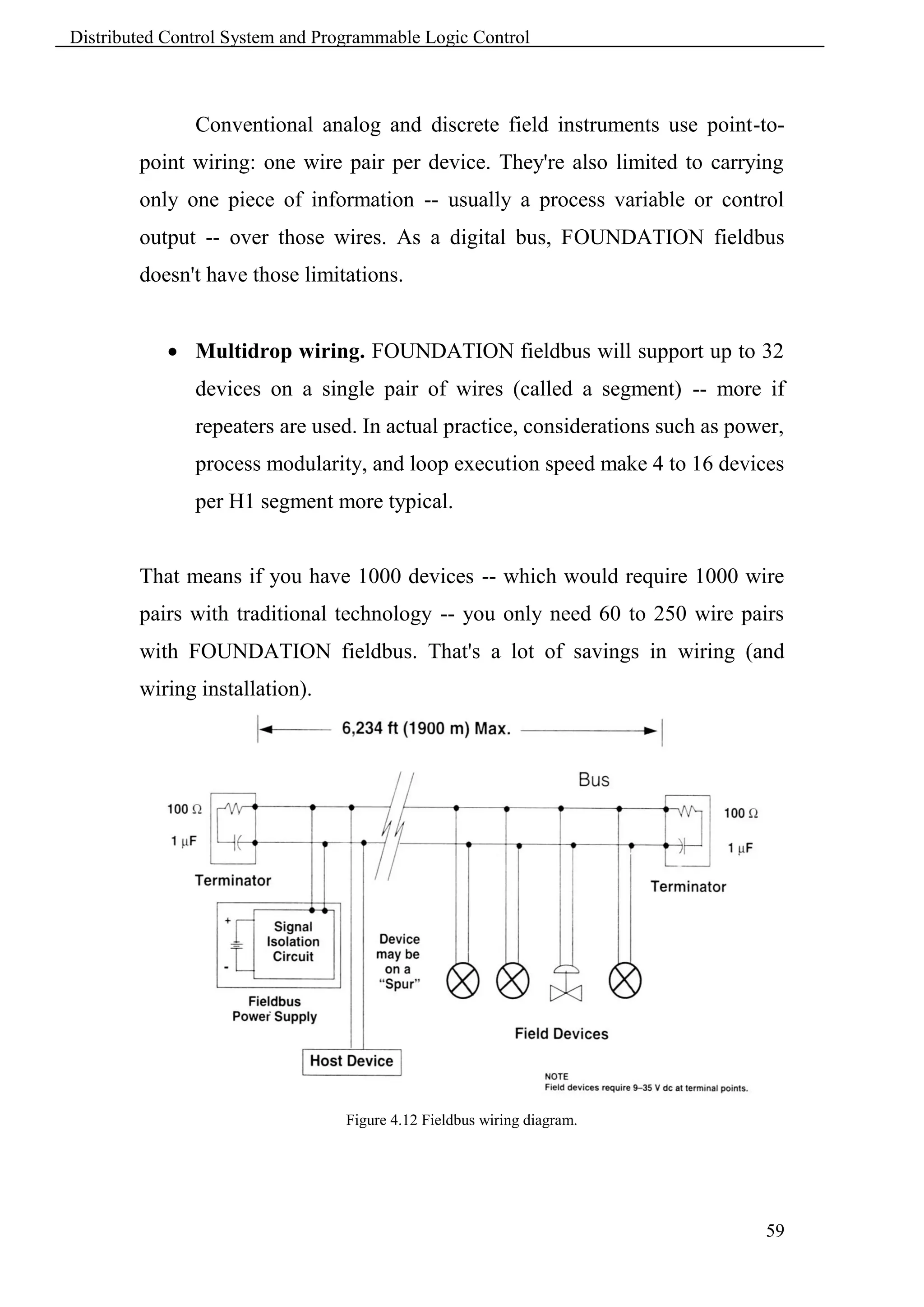
                        Figure 4.11 Historical development of field devices technology.


                It's ideal for applications using basic and advanced regulatory
        control, and for much of the discrete control associated with those
        functions. Two related implementations of FOUNDATION fieldbus have
        been introduced to meet different needs within the process automation
        environment. These two implementations use different physical media
        and communication speeds.
               H1 works at 31.25 Kbit/sec and generally connects to field devices.
                It provides communication and power over standard twisted-pair
                wiring. H1 is currently the most common implementation and is
                therefore the focus of these courses.
               HSE (High-speed Ethernet) works at 100 Mbit/sec and generally
                connects input/output subsystems, host systems, linking devices,
                gateways, and field devices using standard Ethernet cabling. It
                doesn't currently provide power over the cable, although work is
                under way to address this.


                                      Figure 4.12 Field Device Capacity.


                                                                                          58
Distributed Control System and Programmable Logic Control


               Conventional analog and discrete field instruments use point-to-
        point wiring: one wire pair per device. They're also limited to carrying
        only one piece of information -- usually a process variable or control
        output -- over those wires. As a digital bus, FOUNDATION fieldbus
        doesn't have those limitations.


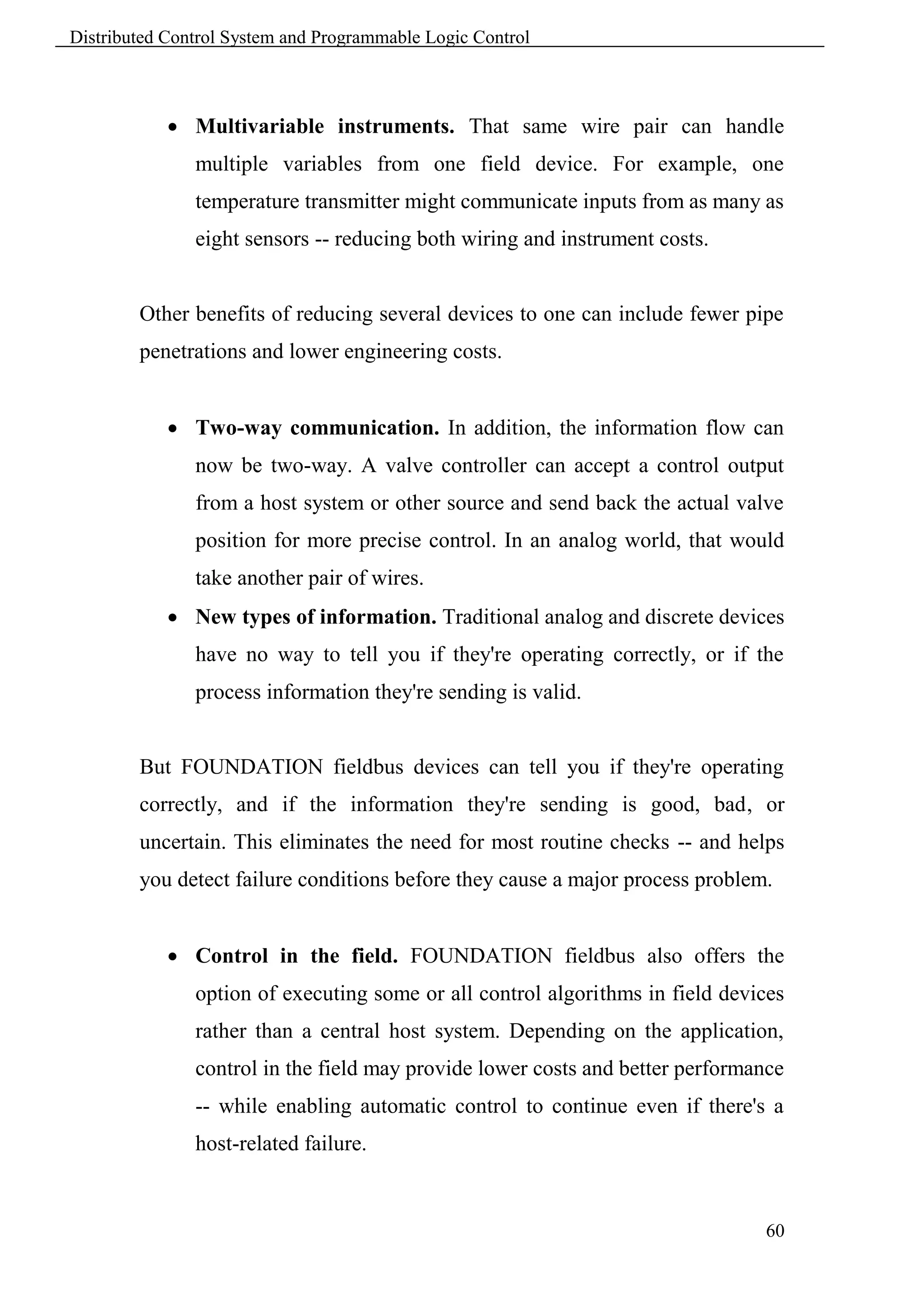
             Multidrop wiring. FOUNDATION fieldbus will support up to 32
               devices on a single pair of wires (called a segment) -- more if
               repeaters are used. In actual practice, considerations such as power,
               process modularity, and loop execution speed make 4 to 16 devices
               per H1 segment more typical.


        That means if you have 1000 devices -- which would require 1000 wire
        pairs with traditional technology -- you only need 60 to 250 wire pairs
        with FOUNDATION fieldbus. That's a lot of savings in wiring (and
        wiring installation).


                                  Figure 4.12 Fieldbus wiring diagram.


                                                                                 59
Distributed Control System and Programmable Logic Control


             Multivariable instruments. That same wire pair can handle
               multiple variables from one field device. For example, one
               temperature transmitter might communicate inputs from as many as
               eight sensors -- reducing both wiring and instrument costs.


        Other benefits of reducing several devices to one can include fewer pipe
        penetrations and lower engineering costs.


             Two-way communication. In addition, the information flow can
               now be two-way. A valve controller can accept a control output
               from a host system or other source and send back the actual valve
               position for more precise control. In an analog world, that would
               take another pair of wires.
             New types of information. Traditional analog and discrete devices
               have no way to tell you if they're operating correctly, or if the
               process information they're sending is valid.


        But FOUNDATION fieldbus devices can tell you if they're operating
        correctly, and if the information they're sending is good, bad, or
        uncertain. This eliminates the need for most routine checks -- and helps
        you detect failure conditions before they cause a major process problem.


             Control in the field. FOUNDATION fieldbus also offers the
               option of executing some or all control algorithms in field devices
               rather than a central host system. Depending on the application,
               control in the field may provide lower costs and better performance
               -- while enabling automatic control to continue even if there's a
               host-related failure.


                                                                               60
Distributed Control System and Programmable Logic Control


        FOUNDATION fieldbus is covered by standards from three major
        organizations:
               ANSI/ISA 50.02
               IEC 61158
               CENELEC EN50170:1996/A1


                The technology is managed by the independent, not-for-profit
        Fieldbus Foundation, whose 150+ member companies include users as
        well as all major process automation suppliers around the globe.
        Some suppliers have even donated fieldbus-related patents to the Fieldbus
        Foundation to encourage wider use of the technology by all Foundation
        members.


                Interoperability simply means that FOUNDATION fieldbus
        devices and host systems can work together while giving you the full
        functionality of each component.


        4.10 Role Play


        Each trainee should introduce one of the main components:
            5. Fieldbus Module and Interconnection
            6. Fieldbus Processor and Clusters.
            7. Foundation Fieldbus technology


                                                                              61
Distributed Control System and Programmable Logic Control


                                         Chapter 5
                                      DCS Software

        5.1 Learning objectives


         To be familiar with main software components of DCS.
         Understand main tasks for each application.


        5.2 Standard Application Packages
        5.2.1 System Management
        Features include:
               Display of equipment information for the station and its associated
                input/output devices, buses, and printers.
               Capability for change actions directed to the associated equipment.
               Processing of station alarm conditions and messages.
        5.2.2 Database Management
        Features include:
               Storage, retrieval, and manipulation of system data files.
               A run-time license for the embedded use of the Relational Database
                Management System.
               A spreadsheet package.


        5.2.3 Historian
        Features include:
               Maintenance     of   a   history   of   values   for   process-related
                measurements that have been configured for retention by the
                Historian.


                                                                                   62
Distributed Control System and Programmable Logic Control


               Maintenance of a history of application messages that have been
                sent to the Historian.
               Maintenance of a history of alarms and error conditions which
                generate messages for the Historian.
               Access to all Historian data by display and report application
                programs.


        5.2.4 View Display Manager
        Features include:
               Presentation of the operating environment.
               Setting of the overall operating environment according to the type
                of user. Process engineers, process operators, and software
                engineers have access to specialized functions and databases suited
                to their specific requirements and authorizations.
               Dynamic and interactive process graphics.
               Display and processing of current process alarms.
               Group and default displays for control blocks.
               Execution of embedded trending within displays.


        5.2.5 Draw Display Builder
        Features include:
               Graphical display configuration for viewing and control of process
                operation.
               Access to graphical object palettes allowing easy inclusion of
                pumps, tanks, valves, ISA symbols, and similar complex objects.
               Ready modification of existing displays using a mouse pointer,
                menu items, and quick-access toolbars.
               Association of process variables with objects in the displays.


                                                                                  63
Distributed Control System and Programmable Logic Control


               Dynamic variation of object attributes such as fill level, color,
                position, size and visibility with changes in the associated process
                variable.
               Inclusion of operator control elements such as pushbuttons and
                sliders into displays.
               A library of faceplates which may be configured by simply
                specifying the compound and block name of the block to which the
                faceplate is to be connected.


        5.3 Alarm System


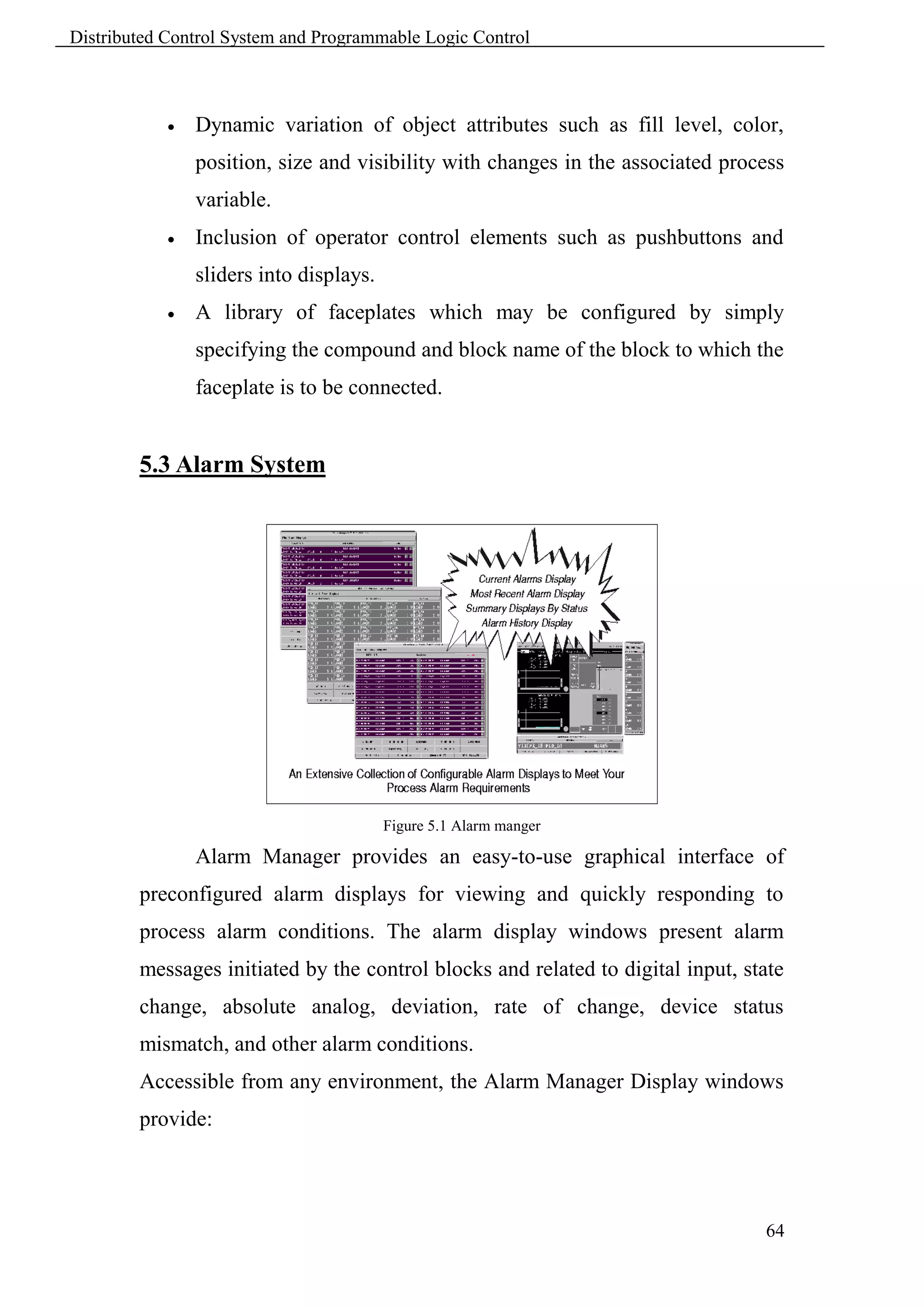
                                         Figure 5.1 Alarm manger

                Alarm Manager provides an easy-to-use graphical interface of
        preconfigured alarm displays for viewing and quickly responding to
        process alarm conditions. The alarm display windows present alarm
        messages initiated by the control blocks and related to digital input, state
        change, absolute analog, deviation, rate of change, device status
        mismatch, and other alarm conditions.
        Accessible from any environment, the Alarm Manager Display windows
        provide:


                                                                                 64
Distributed Control System and Programmable Logic Control


               Quick, easy access to the most recent alarm messages via the Most
                Recent Alarm display or Current Alarm display
               Alarm status and value information dynamically updated from the
                control station
               Color-coded priority and status indicators that allow you to quickly
                focus in on critical alarms
               Summary displays for different views of the alarm database based
                on alarm status
               An historical list of alarms
               The capability to view subsets of alarms based on specific user-
                defined criteria
               The capability to silence or temporarily mute workstation and
                annunciator horns.
               Secured access to alarming functions dependent on user or system
                responsibility
        This set of resizable alarm displays providing a variety of current and
        historic views of the process alarm database includes:
               A multi-page list of all the current alarms
               A single page of the most recent, active, unacknowledged alarms
                with dynamically updating value and status fields
               Three summary displays specific to alarm status also with updating
                values and statuses:
                   o   all active, unacknowledged alarms
                   o   all unacknowledged alarms that have returned to normal
                   o   all active, acknowledged alarms
               A list of historized alarms related to the selected historian database
               An operations display for silencing horns, temporarily muting
                horns, changing environments


                                                                                    65
Distributed Control System and Programmable Logic Control


        These displays allow you to respond to alarm conditions, filter and
        analyze specific alarm data, and maintain alarm message files for
        reporting purposes.
            The Process or Alarm button in the Display Manager (DM) window
        indicates    the     presence   of    alarms    (both   acknowledged   and
        unacknowledged) and provides access to Alarm Manager Displays.
        Initially, the Current Alarm Display (CAD) appears and the other
        displays are easily accessible from the CAD via its default Displays
        menu:
               Most Recent Alarm display (MRA)
               New Alarm display (NEWALM)
               Unacknowledged Alarms display (UNACK)
               Acknowledged Alarms display (ACKALM)
               Alarm History display (AHD)
               Operations display (OPR)
        These easy-to-use displays support the following features:
               A pre-configured number of alarms per screen or page
               Pre-configured alarm message information and formatting per
                alarm type
               A status area for indication of current Alarm Manager and display
                status, such as horns muted, match active, display paused, initial
                call-up time
               Buttons for responding to alarm conditions, such as acknowledging
                or clearing alarms, and for accessing additional alarm information
                and process displays
               Pull-down menus for editing, viewing, and filing functions
               A pull-down menu for accessing other displays
               Pop-up menus for quick access to commonly used functions


                                                                                66
Distributed Control System and Programmable Logic Control


               A scroll bar and Go To Page option for moving easily through the
                alarm list
        Although a preconfigured set of alarm displays is provided, many aspects
        of the displays and alarm message content are user configurable to
        accommodate different process control applications and operational
        needs. See the section on Alarm/Display Manager Configurator.


        5.4 Historian


                The Historian collects, stores, processes, and archives process data
        from the control system to provide data for trends, Statistical Process
        Control (SPC) charts, logs, reports, spreadsheets, and application
        programs. The Historian software is an easy-to-use data collection tool
        that allows the user to organize and enforce a plant data collection
        philosophy. The Historian provides extensive data collection and
        management functions, and data display functions for use by process
        engineers or operators.
                Typical historical data are process analog and/or digital variables
        (points). The Historian can also collect and display application generated
        messages. You can use the Historian to collect data in support of the
        following production control functions:
               Cost accounting
               Equipment performance analysis
               Historical trending
               Information retrieval
               Inventory management
               Legal record maintenance
               Lost time analysis


                                                                                 67
Distributed Control System and Programmable Logic Control


               Maintenance reporting
               Material accounting
               Process analysis
               Production reporting
               Quality control
        The Historian can:
               Retrieve variables from process databases or accept data from
                production control databases maintained by user application
                programs.
               Perform built-in calculations on the collected data.
               Store calculated (reduced) data in a real time, relational database.
        Application software in a plant-wide control system can access the
        Historian database to obtain historical data for process control, production
        control, and management information reporting.
        You can use SPC chart displays of Historian data to monitor process
        variables on-line via the Statistical Process Control Package (SPCP).
        You can build displays for trending historical data via the Display Builder
        and Display Configurator with Trending software.
        Using the Report Writer, you can generate detailed reports of historical
        data for management information.
        Examples of Industrial Software that interface with the Historian are:
               Batch Plant Management
               Data Validator
               Display Manager
               Display Configurator with Trending
               Object Manager (for process data histories)
               Operator Action Journal
               Operator Message Interface
               Real-Time Data Base Manager

                                                                                   68
Distributed Control System and Programmable Logic Control


               Spreadsheet
               Statistical Process Control Package
               System Monitor
               Report Writer


        5.5 Draw


                                          Figure 5.2 Draw

                Draw is a display builder and configurator that allow you to create
        and maintain dynamically updating process displays. Displays can
        represent the plant, a process area or a detailed portion of the process.
        You can draw basic objects using Draw's toolbars, menu items and
        shortcut keys. You assign graphic attributes such as color and line style to
        the objects, and then configure them to reflect process variable changes or
        operator actions. Draw includes numerous palettes of objects such as
        operator buttons, pumps, tanks, pipes, motors, valves and ISA symbols.
        You can also create your own palettes for storing complex objects and
        company-standard symbols. Displays can include faceplates, trends and
        bitmapped images. You can easily edit your displays to reflect changes in
        the process control scheme or to maximize operating efficiency and
        security.


                                                                                    69
Distributed Control System and Programmable Logic Control


        5.5.1 Configuration


        There are two ways of configuring a display object. You can:
            1. Choose the Dynamic Update tab to connect one of the object's
                attributes, such as visibility or fill level, to a process variable or a
                file. With this type of configuration, changes in an attribute are
                triggered dynamically by changes in the process variable. No
                operator intervention is necessary.
            2. Choose the Operator Action tab to connect the entire object to an
                action, such as opening a display or executing a command. An
                operator triggers the action by selecting the object.
        An individual object can have both types of connections, although it can
        have only one operator action.


        5.5.2 Operator Actions


                In a display configured for operator action, an operator can trigger
        events by selecting an object (typically a button), moving a slider, or
        typing text or a numeric value. In response to an operator action,
        variables can be modified, a new display can open or an overlay can
        appear.


                While you can configure only one operator action for each display
        object, you can trigger two or more events with a single operator action
        by configuring an object with a View display command script.
        Operator Actions include:
               Open Display
               Open Overlay
               Close Display/Overlay

                                                                                     70
Distributed Control System and Programmable Logic Control


               Display Command
               Relative Pick
               Momentary Contact
               Ramp
               Connect Variable
               Move Horizontal or Vertical
               Numeric/Text Entry


        5.5.3 Faceplates
                A faceplate is a dynamic representation of control block
        parameters. Draw provides a complete library of faceplates, ready to be
        connected to any control block in the control database. In addition, you
        can build your own faceplates using the standard Draw drawing tools.
        To configure a faceplate, you need only define the Compound:block to
        which the faceplate is connected. Draw automatically determines the
        proper configuration attributes for the associated Compound:block.


        5.5.4 Trends
                Trend areas represent changing data values from the real-time
        database and historian database. A data is displayed as a series of plotted
        points connected by straight lines and scaled according to the high and
        low limits configured for each trend line.


        5.5.5 Group Displays
                Group displays allow you to group faceplates and trends into
        unique layouts to meet changing operational needs.


                                                                                71
Distributed Control System and Programmable Logic Control


        5.6 View


                                           Figure 5.3 View

                View is a window into the system software, providing a user-
        friendly interface to the total process. You can interact with any or all of
        the real-time plant, field, and process data available in the system.
        View provides:
               Direct access to dynamic process displays.
               Entry into user-configurable operating environments specific to
                each user - the process engineer, process operator, and software
                engineer.
               Execution of embedded real-time and historical trending.
               Service and display of process alarms via the Alarm Manager.
               An overview of the compounds and blocks in the control database
                and access to block default detail displays via Select.
               Access to other applications, such as:
                   o   Draw software for building and configuring dynamic user
                       graphics.
                   o   System Management Displays for monitoring system
                       equipment health.
                   o   Integrated Control Configurator for configuring the control
                       database.
                   o   Historian for configuring the historization of data and system
                       messages.

                                                                                  72
Distributed Control System and Programmable Logic Control


                   o   Access to the four most recently used displays.
        Additionally, with View you have:
               Flexibility in customizing environments to conform to your site
                requirements.
               Rapid access to View while in other applications.
               Screen print utility.
               Window sizing options.
        The multi-window capability of Solaris and Windows NT operating
        systems allows you to monitor the information on a process control
        display as well as access other applications without closing any window.


        5.6.1 View Window


        View Window contains the following features:
               A top menu bar for accessing displays, configurators, and other
                applications as specified by the environment.
               A display bar of named display buttons or eight "thumbnail" mini-
                display buttons for directly accessing process displays.
               A system bar with System and Process alarm buttons indicating
                system and process health; a message bar with a dropdown list of
                the latest messages; display of the current date and time.
               A status bar indicating the current display name, current operating
                environment, Operator Action Journal logging name, printer
                logging name, Historian name.


        Using the control window menu, you can:
               Resize the View window automatically or manually.
               Move the window.


                                                                                73
Distributed Control System and Programmable Logic Control


        5.6.2 Operating Environments


               A collection of programs, utilities, and displays related to user
        tasks is provided for each of the following: process operator, process
        engineer, and software engineer. These environments, including menu
        bars, menu content, and Display Bar content, can be modified to conform
        to your site requirements. You can easily switch from one configured
        environment to another. To secure environments against unauthorized
        use, environment passwords can be configured and menu entries disabled
        based on the environment.


        5.7 Operator Action Journal


               The Operator Action Journal is a record of specific operator actions
        taken during process control operations. These actions generally consist
        of manipulating certain Control Processor, and gateway parameters as
        well as Application Processor, Application Workstation, and Workstation
        Processor shared variables. Actions of this type are the ramping or direct
        data entry of point values, toggling points, changing block statuses,
        acknowledging block alarms, and horn muting. Operator action reporting
        is limited to operator actions from the Display Manager, View, and
        Alarm Manager. Also logged are environment change actions, scripts,
        applics, and invoking other applications such as configuration.


               When the Operator Action Journal feature is enabled, all operator
        actions within the Display Manager, View, and the Alarm Manager that
        change parameters in the process database are logged to a printer and/or
        to the specified Historian database. These operator actions include
        toggling points, ramping or direct data entry of new point values,

                                                                                74
Distributed Control System and Programmable Logic Control


        changing block statuses, acknowledging block alarms, and other actions
        such as horn muting.


        Information logged as a result of each database change includes:
                   Name of the Display Manager, FoxView, or Alarm Manager that
                    requested the database change.
                   Compound:Block.Point for which the change was made.
                   The "old value" TO "new value" text for non-packed Boolean.
                   Current mask and data value for packed Boolean/long.
        Following is an example of an Operator Action Journal Report.

         Operator Action Journal Report


         Tue Aug    1 1997 17:04:05 Page 1
         08-02-97   07:57:08 GC3E31 SCRIPT /usr/fox/hi/init.cmds
         08-02-97   07:57:15 GC3E31 ChgEnv Init_Env ->Init_env
         08-02-97   07:58:19 GC3E31 ChgEnv Init+Env ->Proc_Eng_Env
         08-02-97   08:00:34 CG3E31 UC01_LEAD :SINE .OUT 16.18 to 46.18
         08-02-97   08:00:54 GC3E31 UC01_LEAD :SINE .MA Manual to Auto
         08-02-97   08:00:57 GC3E31 UC01_LEAD :SINE .LR Remote to Local
         08-02-97   08:01:01 GC3E31 UC01_LEAD :SINE .MA Auto       to Manual


        5.8 Control Configuration


                    Process control for DCS is based on the concepts of compounds
        and blocks. A compound is a logical collection of blocks that performs a
        control strategy. A block is a member of a set of algorithms that performs
        a certain control task within the compound structure. Figure 7.4 shows
        the compound/block relationship.
        The compound provides the basis for the integration of:
                   Continuous control
                   Ladder logic
                   Sequential control.


                                                                                  75
Distributed Control System and Programmable Logic Control


        Within this structure, any block in any compound can be connected to
        any other block in any other compound in the system. The entire
        compound structure can be viewed through the workstation display.
        The block contains parameters that have values of the types: Real,
        Boolean, Packed Boolean, Boolean Long, Integer, or String.


                                Figure 5.4 Compound/Blocks relationship


        5.8.1 Compound Functions


        The compound supports the following functions for the related blocks:
               Process alarm priority, alarm inhibiting, and alarm grouping
               Sequence status notification (see Sequential Control section)
               Phasing for execution load leveling at execution time.


        5.8.2 Compound/Block Process Alarming


                Alarms and status messages are generated by specific alarm blocks
        and by alarm options in selected blocks. Alarms have five levels of
        priority, 1-5, (where 1 = highest priority) that enable you to quickly focus
        on the most important plant alarm conditions. An alarm priority of 0
        indicates the absence of any alarm. These are summarized in a single
        alarm summary parameter for each compound. This parameter contains
        the priority of the highest current alarm in that compound. To reduce

                                                                                 76
Distributed Control System and Programmable Logic Control


        nuisance alarms, alarms can be inhibited at the compound level on a
        priority level basis. Alarms can also be inhibited at the block level, on
        either an alarm type basis, or an overall basis.
                Alarms are initiated by the blocks within the compound. Alarm
        messages are then sent to groups of stations or applications (for example,
        Workstations, Historians, Printers) according to configured alarm groups.
        The UNACK alarm acknowledge output parameter allows the user to
        propagate alarm acknowledge actions to all blocks in a compound.
        Stations, applications, and devices corresponding to various alarm
        destination groups are configured at the compound level or at the station
        level in the case of station compounds.
        Group numbers for individual block alarm types are configured at the
        block level.
        5.8.3 Compound/Block Phasing
                A user-defined phase number can be assigned to each compound
        using a range of integer values that varies with assigned period. Phasing
        allows the starting time of one compound/block to lead or lag the starting
        time of another compound/block, thereby leveling the block processor
        load.


        5.8.4 Compound Attributes
        The compound has the following attributes:
             Name: User-defined name that must be system-unique and no more
                than 12 characters in length. The name can be any mix of numeric
                (0 to 9), upper case alphabetic (A to Z), and the underscore (_).
             Descriptor: 32-character field for user-defined identification.
             On/Off: Parameter that enables or disables the execution of all
                blocks within the compound, where: 1 = on; 0 = off.


                                                                                    77
Distributed Control System and Programmable Logic Control


        5.8.5 Compound/Block Parameters


               Compound and block parameters contain values that are of one of
        the types Real, String, Integer, Short Integer, Long Integer, Boolean,
        Packed Boolean, Packed Long, or Character. Additionally, parameters are
        defined as being configurable, and either connectable/settable, not
        connectable/not settable, or a combination that is dependent upon the
        compound, block, and state.


        5.8.5.1 Configurable Parameters


               Configurable parameters are those parameters that can be defined
        through the Integrated Control Configurator. They can be displayable
        only, or displayable and editable.


        5.8.5.2 Connectable Parameters


               Connectable parameters are those parameters of the user interface
        in which secured, change-driven connections may be made between
        network stations, or as local direct connections within the same station.
        Each connection consists of a connectable source and a connectable sink.
        Output parameters (all outputs are connectable) are sources, while a
        connectable input may be a sink or a source, or both.
        Certain parameters that may be considered functional inputs (such as SPT
        in the PID blocks, and RATIO in the RATIO block) are settable but not
        connectable. A connectable parameter has a value record that contains the
        parameter's value, its status, and its designated value type (Real, Boolean,
        or Integer).


                                                                                    78
Distributed Control System and Programmable Logic Control


        5.8.5.3 Input Parameters


               Input parameters are connectable types that are the receivers of
        data from other connectable parameters via a path connection.
        If no source path is specified during configuration, then the resident data
        of the value record is the actual "source" of data. It can be either the
        initial default or configured value, or a new value through a SET call to
        the input parameter.
        If a source path is specified, then the data value is an output parameter of
        the same or another block, or a shared variable, thereby securing the
        input. By linking a shared variable to a block input during configuration,
        the user can establish a long-term secured connection between a remote
        application program and the block input.


        5.8.5.4 Output Parameters


               All output parameters are connectable data sources that have value
        records. There are two types: settable and nonsettable. The settability of a
        settable output is controlled by the secured status of the value record. The
        secured status is dependent on whether the block's operational mode is in
        Auto or in Manual. In either Auto or Manual, nonsettable output
        parameters cannot be written by any other source under any conditions.


               Settable outputs may be conditionally released by the block
        algorithm in the Manual mode. In Manual, the block unsecures settable
        output parameters. They can then be written by other tasks via SET calls.
        When the block switches to Auto, the block secures and updates its
        output parameter(s).


                                                                                 79
Distributed Control System and Programmable Logic Control


        5.8.5.5 Nonconnectable Parameters


               Nonconnectable parameters have no value records and are not
        linkable. They mainly consist of string-type variables like NAME, or
        nonsettable parameters that are used in the configurator only, for
        example,     block    options.    Local    algorithm   variables   are   also
        nonconnectable. Nonconnectable parameters are generally accessible
        through GET calls.
        There is also a class of nonconnectable input parameters that comprise the
        block user interface which can be manipulated through SET calls. An
        example is an alarm deadband.


        5.9 Role Play
        Each trainee should introduce one of the main applications:
            8. System Management.
            9. Historian
            10.Graphics Applications.
            11.Control Configurator.
            12.Operator Journal
            13.Alarm System.


                                                                                   80
Distributed Control System and Programmable Logic Control


                                                            81
Distributed Control System and Programmable Logic Control


                                         Chapter 6
                                        Installation

        6.1 Learning objectives


         To be able to define installation procedure for each component.


        6.2 Modular Industrial Console


               The Modular Industrial Console (MIC) provides flexible mounting
        arrangements for components. The MIC can incorporate a mixture of
        equipment: console displays, input devices, processors, Fieldbus
        modules, data storage devices, and so on.
        Modular Industrial Consoles support powerful multiple-screen, real-time
        display software interactions. This hardware/software combination allows
        console resources to be allocated with the flexibility to meet changing
        day-to-day needs. Multi-screen consoles enable comprehensive handling
        of more plant information in a coordinated fashion.
               The MIC product line (Figure 6.1) allows a highly flexible
        packaging configuration of console equipment. Individual MIC modules
        are joined on-site to provide a customized configuration using standard
        components.
        This modular approach offers you combinations of single-screen and
        multi-screen real-time display software interactions as required at a given
        console. There are, however, specific allocations for mounting equipment
        within configurations.


                                                                                82
Distributed Control System and Programmable Logic Control


                                     Figure 6.1 MIC Arrangement

        The MIC is built up from four basic pieces of equipment, each of which
        is individually configurable:
               MIC bay - basic full bay unit, full height, 27-inches wide, with bay
                module
               Spacer module - storage space between MIC full bay units
               Desktop/printer bay - a rear bay similar to the full bay unit's with a
                flat tabletop
               Free standing table - a basic multipurpose table.


        6.3 System Equipment
        6.3.1 Unloading
                The system units must be designed to withstand vibration and
        shock normally encountered during shipping and installation; however,
        extreme shocks and vibration should be avoided. The system units may
        be moved from the transportation vehicle to their intended locations by
        forklift or manual jack truck. If practical, all major movements of the
        units should be accomplished before the units are unpacked.


                                                                                   83
Distributed Control System and Programmable Logic Control


        6.3.2 Unpacking Procedure


        The following unpacking procedure applies, in general, to all system
        units:
         Inspect the exterior of the shipping carton for obvious damage. (Any
            noticeable damage should be indicated in the shipper's bill of lading.)
         Verify that the equipment received is that described in the bill of
            lading.
         Remove shipping straps, shipping shroud, and other packing materials,
            such as polyethylene bags and Styrofoam cushioning materials.
         If the unit is attached to a skid, remove all shipping hardware and
            hold-down bolts used to fasten the unit to the skid. Separate the skid
            from the unit.
         Ensure that the appropriate interconnecting cables are present, by
            comparing the cable part numbers and quantities with those listed in
            the bill of lading.


        6.3.3 System Power Checks


        Perform the following checks before you install the equipment:
         Check that all the required ac or dc power distribution network lines
            are installed.
         Check that the appropriate number of ac power outlets are installed
            and spaced appropriately.
         Switch on main system power.
         Using a multimeter, check that the appropriate operating voltage exists
            at each ac outlet or connection point.
         Switch off main system power.


                                                                                 84
Distributed Control System and Programmable Logic Control


        6.3.4 Industrial Enclosures Mounting Procedures
               Figure 6.2 shows a single dual-height modular mounting structure
        area for containing processors and modules in an Industrial Enclosure.


                          Figure 6.2 Industrial Enclosure Mounting Structure Area

               Enclosures are designed for floor mounting, and accept processor
        modules, Fieldbus modules, and data storage devices. Wires, cables, and
        conduits can enter either the bottom or the top of the enclosure. Side
        doors provide access to the wiring areas. Additionally, the doors can be
        mounted to open from left-to-right or right-to-left.
               Industrial Enclosures are available in two configurations, vented
        and sealed. The vented configuration has openings at the top and bottom
        to provide ventilation, and has a metal plate, with gasket, at the bottom
        for electrical protection purposes. A sealed enclosure has metal plates,
        with gaskets, at the top and bottom to provide a watertight seal.
            1. Check that mounting holes have been drilled in floor. If they have
               not, proceed as follows. (If below-floor cabling is to be employed,
               refer to the Site Planning document for information on the
               recommended size and placement of the floor cutout.)
                   a. Place enclosure in desired location.
                   b. Mark hole locations.
                   c. Move the enclosure away from the markings.
                   d. Drill holes in floor.


                                                                                    85
Distributed Control System and Programmable Logic Control


            2. If the enclosure is the vented type and conduit entry is to be from
               the bottom:
                   a. Drill or punch the bottom conduit enclosure plate, and
                      provide appropriate conduit fittings.
                   b. Place the conduit enclosure plate on the floor, in the precise
                      location that the enclosure is to be mounted.
                   c. Go to Step 6.
            3. If the enclosure is the vented type, and conduit entry is to be from
               the top:
                   a. Remove the vent cap and top conduit enclosure plate(s).
                   b. Drill or punch the conduit enclosure plate(s).
                   c. Replace the vent cap and conduit enclosure plate(s).
                   d. Place the enclosure plate on the floor, in the precise location
                      that the enclosure is to be mounted.
                   e. Go to Step 6.
            4. If the enclosure is the sealed type and conduit entry is to be from
               the bottom:
                   a. Drill or punch the bottom conduit enclosure plate, and
                      provide appropriate conduit fittings for a watertight seal.
                   b. Place the conduit enclosure plate on the floor, in the precise
                      location that the enclosure will be mounted.
                   c. Go to Step 6.
            5. If the enclosure is the sealed type and conduit entry is to be from
               the top:
                   a. Remove the top conduit enclosure plate.
                   b. Drill or punch the conduit enclosure plate, and provide
                      appropriate conduit fittings for a watertight seal.
                   c. Replace the conduit enclosure plate.


                                                                                    86
Distributed Control System and Programmable Logic Control


            6. Position the enclosure, with mounting gasket and enclosure plate,
               so that the holes in the enclosure base, gasket, and enclosure plate
               are aligned with the mounting holes in the floor.
            7. Install two bolts, with flat washers and lockwashers, in diagonally
               opposite mounting holes. (Do not tighten.)
            8. Install two more bolts, with flat washers and lockwashers, in the
               other two diagonally opposite mounting holes. (Do not tighten.)
            9. Install the remaining bolts, with flat washers and lockwashers, in
               the center mounting holes.
            10.Tighten all bolts evenly and equally, working from center to
               outside bolts, being careful not to overtighten. Maximum torque
               should be applied carefully.


        6.4 Software Installation


               The Installation Phase performs the installation of software
        packages. Installation of software packages is performed by vendor
        representative on target stations.


        6.5 Discussion


               Initiate a dialogue between trainees to discuss their own
        experiences and notes about different installation phases related to the
        text in this chapter.


                                                                                 87
Distributed Control System and Programmable Logic Control


                                         Chapter 7
                                      Maintenance

        7.1 Learning objectives


         Understand maintenance philosophy and procedures.


        7.2 Maintenance Philosophy


                The maintenance approach is oriented toward module replacement.
        The use of diagnostics, fault location tables, and troubleshooting guides
        described in system document, as well as the presence of status lamps
        (LEDs) on each module, enables isolation of problems to the module
        level. In addition, any module can be replaced without affecting the
        operation of any other module, including the module of a fault-tolerant
        pair.


        7.3 Preventive Maintenance


                The design of DCS equipment and associated peripheral devices is
        such that scheduled preventive maintenance on the equipment is limited
        to visual inspections, periodic cleaning procedures, and adjustment of
        system modules if necessary. While performing these routines, you
        should check for damaged cables, loose connections, inoperative fans and
        indicator lamps, wear or binding of drives and fan motors, and take
        appropriate corrective action.


                                                                               88
Distributed Control System and Programmable Logic Control


        7.3.1 Enclosures
               Perform a general visual inspection and exterior cleaning of each
        enclosure after the first six months of service. Approximately every
        12 months thereafter perform the same, depending on local environmental
        conditions. Preventive maintenance procedures for enclosures include the
        following:
            1. Wipe down the exterior of the enclosure with a soft cloth. A damp
               cloth and/or a nonabrasive cleaner can be used for hard-to-remove
               spots.
            2. Clean any dust buildup from module heat fins. Use a soft cloth. If
               heat fins are accessible from rear of enclosure, they can be cleaned
               during normal operation. Otherwise, modules can be removed and
               cleaned from front of enclosure during routine equipment
               shutdowns.
            3. Check fans (if installed) for proper operation.
            4. Check module status indicators for proper operation.
                        Green light indicates normal operation.
                        Red light indicates faulty operation.


        7.3.2 Enclosures Air Filters
               The vented configurations of all metal enclosures have an air filter
        located inside the door, behind the vents. Periodically check the condition
        of the filter for dust/dirt accumulation. Perform the following steps to
        check the condition of the filter:
            1. Locate the plastic assembly that retains the filter that is on the
               inside of the door behind the vents.
            2. Unsnap the plastic assembly from the vents and remove the filter.
            3. Wash and replace the filter, or if desired, install a new filter, and
               snap the filter retainer assembly back onto the vent assembly.

                                                                                 89
Distributed Control System and Programmable Logic Control


        7.3.3 Modular Industrial Workstations
               Perform a general visual inspection and exterior cleaning of each
        workstation as often as necessary to ensure proper operation of the
        equipment. Preventive maintenance procedures for the workstations
        should include the following:
            1. Wipe down the exterior of the enclosure with a soft cloth. A damp
               cloth and/or a nonabrasive cleaner can be used for hard-to-remove
               spots.
            2. Clean any dust buildup on disk drives (especially the signal
               connection areas), keyboards, control panels, and monitors. Use a
               soft cloth.
            3. Check fans (if installed) for proper operation.
            4. Check module status indicators for proper operation.
               Green light indicates normal operation.
               Red light indicates faulty operation.


        7.3.4 Monitor-Based Peripheral Devices
               As a rule, preventive maintenance on these devices should be
        limited to cleaning only and should be performed as often as necessary, or
        at least every twelve months.
        Wipe down the exterior of the device (excluding the monitor) with a soft
        cloth. A damp cloth and/or nonabrasive cleaner can be used for hard-to-
        remove spots.
        To clean the monitor, proceed as follows:
            1. Select a screen that does not have direct access to the process, for
               example, the Initial display.
            2. Remove power from the GCIO unit (annunciators are also
               deactivated).


                                                                                90
Distributed Control System and Programmable Logic Control


            3. Turn the monitor's power off. Do not move the mouse or depress
               any keys while the monitor is off.
            4. Dampen - do not saturate - a clean, lint-free cloth with liquid
               glass cleaner.
            5. Clean the screen by wiping with damp cloth, using circular wiping
               motion to avoid streaks.
            6. Carefully dry the screen by wiping with a second clean, lint-free
               cloth.
            7. Restore power to the monitor and GCIO.


        7.3.5 Printers
               All printers should be serviced every six months (or after 300 hours
        of operation), whichever occurs first. Refer to the associated printer user's
        guide (packed with the printer) and perform the following:
            1. Perform a general visual inspection and cleaning of the printer.
            2. Remove printer cover and inspect internal moving parts for signs of
               wear, broken or loose parts, frayed cables, and so on.
            3. Take a clean, dry, soft cloth and dust the area around carriage shaft
               and platen. Remove any loose particles of paper and dust.
            4. Lubricate printer as described in associated service instructions.
            5. Restore printer power.


        7.3.6 Keyboard
               A keyboard should be cleaned at a frequency determined by the
        environment in which it is used.
            1. Use a soft, lint-free cloth dampened with a mild detergent solution
               to clean the keys and large surfaces.
            2. Clean confined areas between the keys with a vacuum cleaner
               equipped with a fine brush attachment.

                                                                                    91
Distributed Control System and Programmable Logic Control


        7.3.7 Mouse
               The following care and cleaning procedure applies to both the inner
        and outer area of the mouse:
            1. The mouse is a very precise mechanical device, so handle it with
               care. Do not drop, hit, or otherwise subject it to shock.
            2. Do not pull on the cable. It may cause damage to both the cable
               and connector.
            3. Do not carry the mouse by holding onto the cable.
            4. Be sure to place a clean sheet of paper or use a mouse pad between
               the mouse and the flat surface. Dirt and grit could collect on the
               ball. Try not to touch the ball on the bottom.
            5. Do not use the mouse in extreme temperatures or in direct sunlight.
            6. Do not allow the mouse to come in contact with liquid spills
               (water, solutions, and so forth).
            7. The mouse housing should be cleaned with a lint-free cloth using a
               mild detergent. Use an unsoiled lint-free cloth to dry housing.
            8. Do not disassemble the mouse. If the ball in the unit needs to be
               cleaned, remove it from the lower case by detaching the cover to
               the housing. Do not remove all the screws to remove the ball.
            9. Use a lint-free cloth with mild detergent to clean the ball, and an
               unsoiled cloth to dry it.


        7.3.8 Data Storage Devices
            1. Blow away any lint or dust accumulation on or near the face of the
               floppy disk and streaming tape drive casings.
            2. Clean the outer plastic surface of the drive with a lint-free cloth or
               a sponge slightly dampened with water. Wipe off residue and dry
               with soft, lint-free cloth. Do not use abrasive cleaners, solvents, or
               strong detergents.

                                                                                  92
Distributed Control System and Programmable Logic Control


            3. Blow away any lint or dust accumulation on the signal and power
                connectors at the rear of the drive.
            4. For the streaming tape drive, clean the head using only Freon TF
                and polyurethane swabs, commonly available with VCR head
                cleaning kits. Wet the swab with the Freon TF solution, and wipe
                the head using an up and down motion. Use a dry swab to clean
                any remaining residue from the head.


        7.4 Fault Analysis


                Through the System Management facility, you can monitor the
        health of the system and perform diagnostic tests on all the system
        stations and associated peripheral devices.


        7.4.1 Startup Diagnostics
                Startup diagnostics are invoked automatically as a result of a
        power-on reset, an error, or an off-line diagnostic command. The
        diagnostics exist in each station at all times and are of two basic types:
               Reportable diagnostic - Tests a station function which, if faulty,
                does not prevent the error from being reported over the network.
               Nonreportable diagnostic - Tests a station function which, if faulty,
                inhibits the station from communicating over the network.


        7.4.2 On-line Diagnostics
                On-line diagnostics consist of Carrierband LAN LI (LAN
        Interface) Cable Tests and Nodebus Cable Tests. These tests are either
        operator-initiated or automatically invoked to isolate faults and to check
        the integrity of the communication path.


                                                                                     93
Distributed Control System and Programmable Logic Control


        7.4.3 Off-line Diagnostics
               Off-line diagnostics are used to check for, or verify the proper
        "independent" operation of a station's internal components. These tests do
        not verify any external reason for failure, thus they can be individually
        bench tested without regard to the station's subsystem configuration.


        7.5 Corrective Maintenance
        7.5.1 Module Status Indicators
               All power modules, Processor modules, LAN modules, and
        Fieldbus Modules have red and green status indicators that operate in
        accordance with the maintenance manual codes.


        7.5.2 I/A Series Module Replacement
               The maintenance approach is oriented toward module replacement.
        Fault analysis provides assistance with isolating station and peripheral
        faults. The presence of status lamps (LEDs) on each module enables an
        initial detection of problems that can exist on the module level. In
        addition, any module can be replaced without affecting the operation of
        any other module, including the other module of a fault-tolerant pair.
        Replacement of modules is similar to installation, which is described in
        the System Equipment Installation.


        7.6 Discussion


               Exchange of ideas with trainees to talk about their own experiences
        and comments about maintenance related to the text in this chapter.


                                                                                 94
Distributed Control System and Programmable Logic Control


                                         Chapter 8
                                  Power Distribution

        8.1 Learning objectives


             Understand power distribution of control systems.


        8.2 Power Connections


               Main power consists of primary and secondary power. Note the
        voltage and main power distribution requirements for each enclosure
        before you connect main power. The power should be connected through
        an uninterruptible power supply.


        8.3 Connection Procedure


        To connect the power lines proceed as follows:
            1. Switch off main system power.

            2. Open the right side door of the enclosure to access the junction

               boxes. (Two junction boxes are located in the field termination
               area.)
            3. Place the junction box power switches in the OFF position.

            4. Remove the bottom cover from each junction box.

            5. Route the power lines to the junction boxes.

            6. Connect the power lines.

            7. Replace the junction box covers.
            8. Switch ON the main system power.


                                                                             95
Distributed Control System and Programmable Logic Control


        8.4 Earth Connections


               To make earth connections to the metal enclosures, locate one of
        the tapped holes along the bottom interior of the enclosure (see Figure
        8.1). Use a ring type solderless crimp connector appropriate for the size
        of wire used, and use a star-type lock washer between the connector and
        the enclosure chassis.


                              Figure 8.1 Metal Enclosures, Earth Connection


        8.5 Discussion


               Discuss power distribution schemes.


                                                                               96
Distributed Control System and Programmable Logic Control


                                                            97
Distributed Control System and Programmable Logic Control


                                         Chapter 9
                                  PLC Fundamentals

        9.1 Learning objectives


        • Know general PLC issues
        • Understand the operation of a PLC
        • Understand the different types of inputs and outputs.


        9.2 Introduction


               Control engineering has evolved over time. In the past humans
        were the main methods for controlling a system. More recently electricity
        has been used for control and early electrical control was based on relays.
        These relays allow power to be switched on and off without a mechanical
        switch. It is common to use relays to make simple logical control
        decisions. The development of low cost computer has brought the most
        recent revolution, the Programmable Logic Controller (PLC). The advent
        of the PLC began in the 1970s, and has become the most common choice
        for manufacturing controls. PLCs have been gaining popularity on the
        factory floor and will probably remain predominant for some time to
        come. Most of this is because of the advantages they offer.
               • Cost effective for controlling complex systems.
               • Flexible and can be reapplied to control other systems quickly
               and easily.
               • Computational abilities allow more sophisticated control.
               • Trouble shooting aids make programming easier and reduce
               downtime.

                                                                                98
Distributed Control System and Programmable Logic Control


               • Reliable components make these likely to operate for years before
               failure.


        9.3 Hardware


               Many PLC configurations are available, even from a single vendor.
        But, in each of these there are common components and concepts. The
        most essential components are:
             Power Supply - This can be built into the PLC or be an external
               unit. Common voltage levels required by the PLC (with and
               without the power supply) are 24Vdc, 120Vac, 220Vac.
             CPU (Central Processing Unit) - This is a computer where ladder
               logic is stored and processed.
             I/O (Input/Output) - A number of input/output terminals must be
               provided so that the PLC can monitor the process and initiate
               actions.
             Indicator lights - These indicate the status of the PLC including
               power on, program running, and a fault. These are essential when
               diagnosing problems.
        The configuration of the PLC refers to the packaging of the components.
        Typical configurations are listed below from largest to smallest as shown
        in Figure 9.1.
             Rack - A rack is often large (up to 18” by 30” by 10”) and can hold
               multiple cards. When necessary, multiple racks can be connected
               together. These tend to be the highest cost, but also the most
               flexible and easy to maintain.
             Mini - These are similar in function to PLC racks, but about half
               the size.


                                                                               99
Distributed Control System and Programmable Logic Control


             Shoebox - A compact, all-in-one unit (about the size of a shoebox)
               that has limited expansion capabilities. Lower cost, and
               compactness make these ideal for small applications.
             Micro - These units can be as small as a deck of cards. They tend to
               have fixed quantities of I/O and limited abilities, but costs will be
               the lowest.
             Software - A software based PLC requires a computer with an
               interface card, but allows the PLC to be connected to sensors and
               other PLCs across a network.


                                 Figure 9.1 Typical configuration of PLC


        9.4 Inputs And Outputs


               Inputs to, and outputs from, a PLC are necessary to monitor and
        control a process. Both inputs and outputs can be categorized into two
        basic types: logical or continuous. Consider the example of a light bulb. If
        it can only be turned on or off, it is logical control. If the light can be
        dimmed to different levels, it is continuous. Continuous values seem
        more intuitive, but logical values are preferred because they allow more
        certainty, and simplify control. As a result most controls applications (and
        PLCs) use logical inputs and outputs for most applications. Hence, we
        will discuss logical I/O and leave continuous I/O for later.

                                                                                100
Distributed Control System and Programmable Logic Control


               Outputs to actuators allow a PLC to cause something to happen in a
        process. A short list of popular actuators is given below in order of
        relative popularity.
             Solenoid Valves - logical outputs that can switch a hydraulic or
               pneumatic flow.
             Lights - logical outputs that can often be powered directly from
               PLC output boards.
             Motor Starters - motors often draw a large amount of current when
               started, so they require motor starters, which are basically large
               relays.
             Servo Motors - a continuous output from the PLC can command a
               variable speed or position.
               Outputs from PLCs are often relays, but they can also be solid state
        electronics such as transistors for DC outputs or Triacs for AC outputs.
        Continuous outputs require special output cards with digital to analog
        converters.
               Inputs come from sensors that translate physical phenomena into
        electrical signals. Typical examples of sensors are listed below in relative
        order of popularity.
             Proximity Switches - use inductance, capacitance or light to detect
               an object logically.
             Switches - mechanical mechanisms will open or close electrical
               contacts for a logical signal.
             Potentiometer - measures angular positions continuously, using
               resistance.
             LVDT (linear variable differential transformer) - measures linear
               displacement continuously using magnetic coupling.


                                                                                101
Distributed Control System and Programmable Logic Control


               Inputs for a PLC come in a few basic varieties, the simplest are AC
        and DC inputs. Sourcing and sinking inputs are also popular. This output
        method dictates that a device does not supply any power. Instead, the
        device only switches current on or off, like a simple switch.
             Sinking - When active the output allows current to flow to a
               common ground. This is best selected when different voltages are
               supplied.
             Sourcing - When active, current flows from a supply, through the
               output device and to ground. This method is best used when all
               devices use a single supply voltage.
        This is also referred to as NPN (sinking) and PNP (sourcing). PNP is
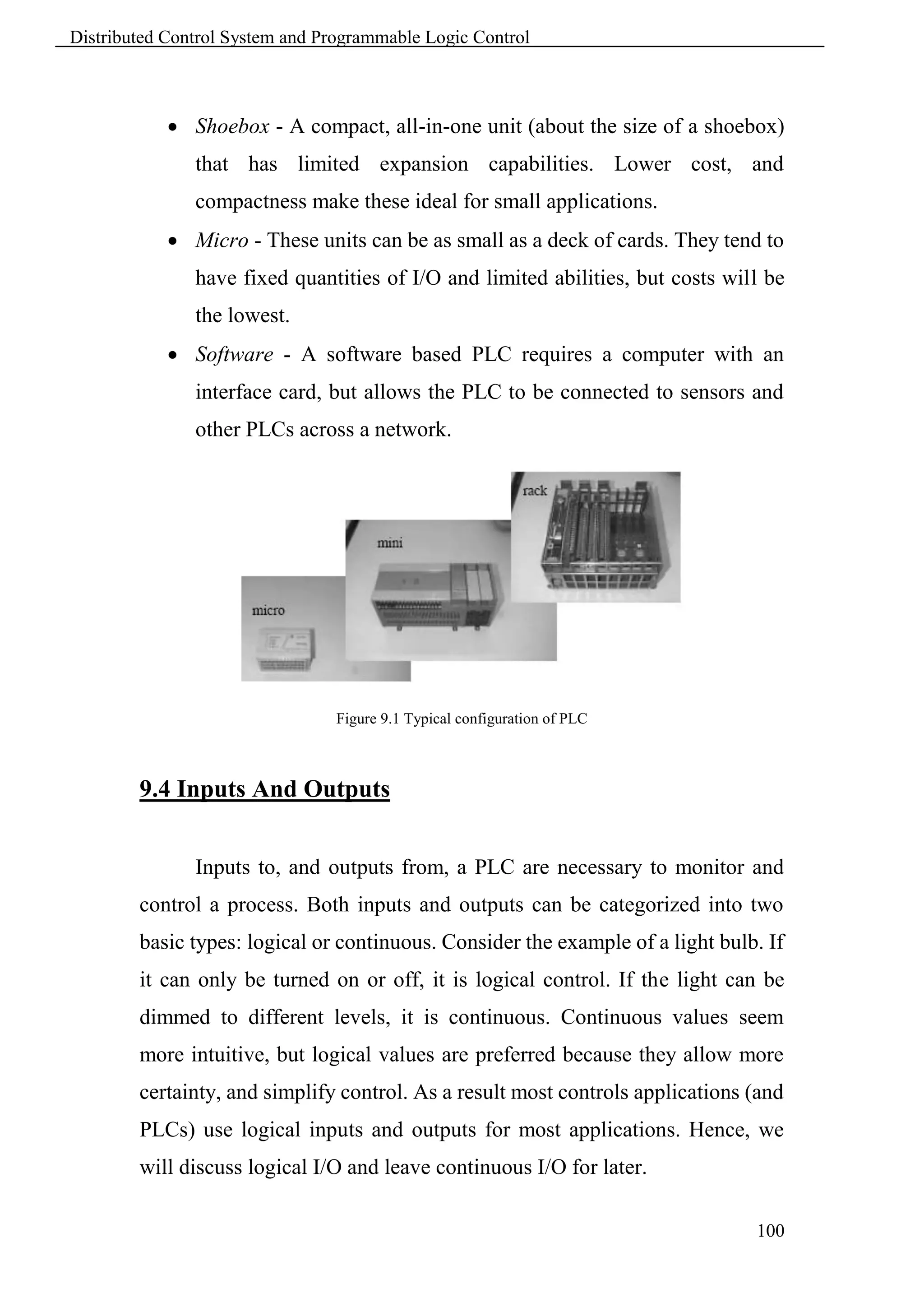
        more popular.


        9.5 Operation Sequence


               All PLCs have four basic stages of operations that are repeated
        many times per second. Initially when turned on the first time it will
        check its own hardware and software for faults. If there are no problems it
        will copy all the input and copy their values into memory, this is called
        the input scan. Using only the memory copy of the inputs the ladder logic
        program will be solved once, this is called the logic scan. While solving
        the ladder logic the output values are only changed in temporary memory.
        When the ladder scan is done the outputs will updated using the
        temporary values in memory, this is called the output scan. The PLC now
        restarts the process by starting a self check for faults. This process
        typically repeats 10 to 100 times per second as is shown in Figure 9.2.


                                                                                  102
Distributed Control System and Programmable Logic Control


                                        Figure 9.2 PLC Scan

             Self test - Checks to see if all cards error free, reset watch-dog
               timer, etc. (A watchdog timer will cause an error, and shut down
               the PLC if not reset within a short period of time - this would
               indicate that the ladder logic is not being scanned normally).
             Input scan - Reads input values from the chips in the input cards,
               and copies their values to memory. This makes the PLC operation
               faster, and avoids cases where an input changes from the start to
               the end of the program (e.g., an emergency stop). There are special
               PLC functions that read the inputs directly, and avoid the input
               tables.
             Logic solve/scan - Based on the input table in memory, the
               program is executed 1 step at a time, and outputs are updated. This
               is the focus of the later sections.
             Output scan - The output table is copied from memory to the
               output chips. These chips then drive the output devices.


            The input and output scans often confuse the beginner, but they are
        important. The input scan takes a snapshot of the inputs, and solves the
        logic. This prevents potential problems that might occur if an input that is
        used in multiple places in the ladder logic program changed while half
        ways through a ladder scan and thus changing the behaviors of half of the
        ladder logic program. This problem could have severe effects on complex
        programs. One side effect of the input scan is that if a change in input is
        too short in duration, it might fall between input scans and be missed.

                                                                                103
Distributed Control System and Programmable Logic Control


        When the PLC is initially turned on the normal outputs will be turned off.
        This does not affect the values of the inputs.


        9.5.1 The Input and Output Scans
                When the inputs to the PLC are scanned the physical input values
        are copied into memory. When the outputs to a PLC are scanned they are
        copied from memory to the physical outputs. When the ladder logic is
        scanned it uses the values in memory, not the actual input or output
        values. The primary reason for doing this is so that if a program uses an
        input value in multiple places, a change in the input value will not
        invalidate the logic. Also, if output bits were changed as each bit was
        changed, instead of all at once at the end of the scan the PLC would
        operate much slower


        9.5.2 The Logic Scan
                Ladder logic programs are modeled after relay logic. In relay logic
        each element in the ladder will switch as quickly as possible. But in a
        program elements can only be examines one at a time in a fixed sequence.
        The ladder logic will be interpreted left-to-right, top-to-bottom. The
        ladder logic scan begins at the top rung. At the end of the rung it
        interprets the top output first, and then the output branched below it. On
        the second rung it solves branches, before moving along the ladder logic
        rung.


        9.5.3 PLC Status
                The lack of keyboard and other input-output devices is very
        noticeable on a PLC. On the front of the PLC there are normally limited
        status lights. Common lights indicate;
             Power on - this will be on whenever the PLC has power.

                                                                               104
Distributed Control System and Programmable Logic Control


             Program running - this will often indicate if a program is running,
               or if no program is running.
             Fault - this will indicate when the PLC has experienced a major
               hardware or software problem.
        These lights are normally used for debugging. Limited buttons will also
        be provided for PLC hardware. The most common will be a run/program
        switch that will be switched to program when maintenance is being
        conducted, and back to run when in production. This switch normally
        requires a key to keep unauthorized personnel from altering the PLC
        program or stopping execution. A PLC will almost never have an on-off
        switch or reset button on the front. This needs to be designed into the
        remainder of the system.


        9.6 Role Play


        Conduct role plays for:
            1. Introduce PLC and benefits.
            2. Describe PLC hardware.
            3. Introduce various inputs and outputs.
            4. Describe PLC scan sequence.


                                                                             105
Distributed Control System and Programmable Logic Control


                                        Chapter 10
                               Ladder Logic and SFC

        10.1 Learning objectives


        • To be able to write simple ladder logic programs
        • Understand basic functions for calculations and comparisons.
        • Be able to develop SFCs, sequential flow charts, for a process.


        10.2 Ladder Logic


               Ladder logic is the main programming method used for PLCs. As
        mentioned before, ladder logic has been developed to mimic relay logic.
        Relays are used to let one power source close a switch for another (often
        high current) power source, while keeping them isolated. An example of a
        relay in a simple control application is shown in Figure 12.1. In this
        system the first relay on the left is used as normally closed, and will allow
        current to flow until a voltage is applied to the input A. The second relay
        is normally open and will not allow current to flow until a voltage is
        applied to the input B. If current is flowing through the first two relays
        then current will flow through the coil in the third relay, and close the
        switch for output C. This circuit would normally be drawn in the ladder
        logic form. This can be read logically as C will be on if A is off and B is
        on.


                                                                                 106
Distributed Control System and Programmable Logic Control


                                   Figure 10.1 Simple Relay Control.

               The example in Figure 10.1 does not show the entire control
        system, but only the logic. When we consider a PLC there are inputs,
        outputs, and the logic. Figure 10.2 shows a more complete representation
        of the PLC. Here there are two inputs from push buttons. We can imagine
        the inputs as activating 24V DC relay coils in the PLC. This in turn drives
        an output relay that switches 115V AC, which will turn on a light. Note,
        in actual PLCs inputs are never relays, but outputs are often relays. The
        ladder logic in the PLC is actually a computer program that the user can
        enter and change. Notice that both of the input push buttons are normally
        open, but the ladder logic inside the PLC has one normally open contact,
        and one normally closed contact. Do not think that the ladder logic in the
        PLC needs to match the inputs or outputs. Many beginners will get
        caught trying to make the ladder logic match the input types.


                                     Figure 10.2 PLC with Relays.


                                                                               107
Distributed Control System and Programmable Logic Control


               Many relays also have multiple outputs (throws) and this allows an
        output relay to also be an input simultaneously. The circuit shown in
        Figure 10.3 is an example of this; it is called a seal in circuit or latch
        circuit. In this circuit the current can flow through either branch of the
        circuit, through the contacts labeled A or B. The input B will only be on
        when the output B is on. If B is off, and A is energized, then B will turn
        on. If B turns on then the input B will turn on and keep output B on even
        if input A goes off. After B is turned on the output B will not turn off.


                                       Figure 10.3 Latch circuit


        10.2.1 Ladder Logic Inputs


               PLC inputs are easily represented in ladder logic. Below there are
        two types of inputs shown, normally open and normally closed inputs.


        10.2.2 Ladder Logic Outputs


               In ladder logic there are multiple types of outputs, but these are not
        consistently available on all PLCs. Some of the outputs will be externally
        connected to devices outside the PLC, but it is also possible to use


                                                                                    108
Distributed Control System and Programmable Logic Control


        internal memory locations in the PLC. Five types of outputs are shown
        below. The first is a normal output, when energized the output will turn
        on, and energize an output. The circle with a diagonal line through is a
        normally on output, when energized the output will turn off. This type of
        output is not available on all PLC types. When initially energized the
        OSR (One Shot Relay) instruction will turn on for one scan, but then be
        off for all scans after, until it is turned off. The L (latch) and U (unlatch)
        instructions can be used to lock outputs on. When an L output is
        energized the output will turn on indefinitely, even when the output coil
        is deenergized. The output can only be turned off using a U output.


        10.2.3 Programming


               The first PLCs were programmed with a technique that was based
        on relay logic wiring schematics. This eliminated the need to teach the
        electricians, technicians and engineers how to program a computer - but,
        this method has stuck and it is the most common technique for
        programming PLCs today. An example of ladder logic can be seen in
        Figure 10.4. To interpret this diagram, imagine that the power is on the


                                                                                  109
Distributed Control System and Programmable Logic Control


        vertical line on the left hand side, we call this the hot rail. On the right
        hand side is the neutral rail. In the figure there are two rungs, and on each
        rung there are combinations of inputs (two vertical lines) and outputs
        (circles). If the inputs are opened or closed in the right combination the
        power can flow from the hot rail, through the inputs, to power the
        outputs, and finally to the neutral rail. An input can come from a sensor,
        switch, or any other type of sensor. An output will be some device
        outside the PLC that is switched on or off, such as lights or motors. In the
        top rung the contacts are normally open and normally closed. This means
        if input A is on and input B is off, then power will flow through the
        output and activate it. Any other combination of input values will result
        in the output X being off.


                                Figure 10.4 Simple Ladder Logic Diagram

        The second rung of Figure 10.4 is more complex, there are actually
        multiple combinations of inputs that will result in the output Y turning on.
        On the left most part of the rung, power could flow through the top if C is
        off and D is on. Power could also (and simultaneously) flow through the
        bottom if both E and F are true. This would get power half way across the
        rung, and then if G or H is true the power will be delivered to output Y.


                                                                                 110
Distributed Control System and Programmable Logic Control


        10.2.4 Move Functions
               The simple MOV will take a value from one location in memory
        and place it in another memory location. Examples of the basic MOV are
        given in Figure 10.5. When A is true the MOV function moves a floating
        point number from the source to the destination address.


                                      Figure 10.5 MOV function


        10.2.5 Mathematical Functions
               Mathematical functions will retrieve one or more values, perform
        an operation and store the result in memory. Figure 10.6 shows an ADD
        function that will retrieve values from N7:4 and F8:35, convert them both
        to the type of the destination address, add the floating point numbers, and
        store the result in F8:36. The function has two sources labelled source A
        and source B.


                                  Figure 10.6 Mathematical Functions


                                                                               111
Distributed Control System and Programmable Logic Control


        10.2.6 Block Operations
               A basic block function is shown in Figure 10.7. This COP (copy)
        function will copy an array of 10 values starting at N7:50 to N7:40.


                                      Figure 10.7 Copy Function

        10.2.7 Comparison of Values
               Comparison functions are shown in Figure 10.8. Previous function
        blocks were outputs, these replace input contacts. The example shows an
        EQU (equal) function that compares two floating point numbers. If the
        numbers are equal, the output bit B3:5/1 is true, otherwise it is false.


                                   Figure 10.8 Comparison Functions

        10.2.8 Boolean Functions


               Figure 10.9 shows Boolean algebra functions. The function shown
        will obtain data words from bit memory, perform an AND operation, and
        store the results in a new location in bit memory. These functions are all
        oriented to word level operations. The ability to perform Boolean
        operations allows logical operations on more than a single bit.


                                    Figure 10.9 Boolean Functions


                                                                                   112
Distributed Control System and Programmable Logic Control


        10.3 Sequential Flow Charts


               Sequential Function Charts (SFCs) have been developed to
        accommodate the programming of more advanced systems. These are
        similar to flowcharts, but much more powerful. The example seen in
        Figure 10.10 is doing two different things.


               To read the chart, start at the top where is says start. Below this
        there is the double horizontal line that says follow both paths. As a result
        the PLC will start to follow the branch on the left and right hand sides
        separately and simultaneously. On the left there are two functions the first
        one is the power up function. This function will run until it decides it is
        done, and the power down function will come after. On the right hand
        side is the flash function; this will run until it is done.


               These functions look unexplained, but each function, such as
        power up will be a small ladder logic program. This method is much
        different from flowcharts because it does not have to follow a single path
        through the flowchart.


                                   Figure 10.10 SFC Simple example


                                                                                113
Distributed Control System and Programmable Logic Control


        The basic elements of an SFC diagram are shown in Figure 10.11.


                                  Figure 10.11 Basic Elements of SFC


                                                                          114
Distributed Control System and Programmable Logic Control


               A simple SFC for controlling a stamping press is shown in Figure
        10.12. (Note: this controller only has a single thread of execution, so it
        could also be implemented with state diagrams, flowcharts, or other
        methods.) In the diagram the press starts in an idle state. When an
        automatic button is pushed the press will turn on the press power and
        lights. When a part is detected the press ram will advance down to the
        bottom limit switch. The press will then retract the ram until the top limit
        switch is contacted, and the ram will be stopped. A stop button can stop
        the press only when it is advancing. (Note: normal designs require that
        stops work all the time.) When the press is stopped a reset button must be
        pushed before the automatic button can be pushed again. After step 6 the
        press will wait until the part is not present before waiting for the next
        part. Without this logic the press would cycle continuously.


                            Figure 10.12 SFC for Controlling a Stamping Press


                                                                                115
Distributed Control System and Programmable Logic Control


        10.4 Case Study


        Each Trainee should try to develop the following:
            1. Ladder Logic for pump operation connected to the suction of a tank
               where two level switches are available for automatic operation and
               two push buttons are for start and stop.
            2. SFC for loading three tanks through different valve. Tank 1 is load
               first, and then tanks 2 and three are loaded simultaneously. If the
               pressure switch on pump discharge line is alarming then tank 2
               stops loading from pump and tank 1 would transfer to tank through
               different line. Tank 3 continues to load from pump.


                           T1                        T2                 T3


    PSL


        .


                                                                              116
Distributed Control System and Programmable Logic Control


                                                            117
Distributed Control System and Programmable Logic Control


                                       Appendix A
                             Electrical Relay Diagram
                                             And
                                     P&ID Symbols


                                                            118
Distributed Control System and Programmable Logic Control


                                                            119
Distributed Control System and Programmable Logic Control


                                                            120
Distributed Control System and Programmable Logic Control


                                       Appendix B
                               Serial Communication

        B.1 Introduction


               Multiple control systems will be used for complex processes. These
        control systems may be PLCs, but other controllers include robots, data
        terminals and computers. For these controllers to work together, they
        must communicate. This chapter will discuss communication techniques
        between computers, and how these apply to PLCs. The simplest form of
        communication is a direct connection between two computers. A network
        will simultaneously connect a large number of computers on a network.
        Data can be transmitted one bit at a time in series, this is called serial
        communication. Data bits can also be sent in parallel. The transmission
        rate will often be limited to some maximum value, from a few bits per
        second, to billions of bits per second. The communications often have
        limited distances, from a few feet to thousands of miles/kilometers.
               Data communications have evolved from the 1800’s when
        telegraph machines were used to transmit simple messages using Morse
        code. This process was automated with teletype machines that allowed a
        user to type a message at one terminal, and the results would be printed
        on a remote terminal. Meanwhile, the telephone system began to emerge
        as a large network for interconnecting users. In the late 1950s Bell
        Telephone introduced data communication networks, and Texaco began
        to use remote monitoring and control to automate a polymerization plant.
        By the 1960s data communications and the phone system were being
        used together. In the late 1960s and 1970s modern data communications
        techniques were developed. This included the early version of the


                                                                               121
Distributed Control System and Programmable Logic Control


        Internet, called ARPAnet. Before the 1980s the most common computer
        configuration was a centralized mainframe computer with remote data
        terminals, connected with serial data line.
        In the 1980s the personal computer began to displace the central
        computer. As a result, high speed networks are now displacing the
        dedicated serial connections. Serial communications and networks are
        both very important in modern control applications. An example of a
        networked control system is shown in Figure B.1. The computer and PLC
        are connected with an RS-232 (serial data) connection. This connection
        can only connect two devices. Devicenet is used by the Computer to
        communicate with various actuators and sensors. Devicenet can support
        up to 63 actuators and sensors. The PLC inputs and outputs are connected
        as normal to the process.


                                  Figure B.1 Communication example


        B.2 Serial Communication


               Serial communications send a single bit at a time between
        computers. This only requires a single communication channel, as
        opposed to 8 channels to send a byte. With only one channel the costs are
        lower, but the communication rates are slower. The communication

                                                                             122
Distributed Control System and Programmable Logic Control


        channels are often wire based, but they may also be can be optical and
        radio. Figure B.2 shows some of the standard electrical connections. RS-
        232c is the most common standard that is based on a voltage change
        levels. At the sending computer an input will either be true or false. The
        line driver will convert a false value in to a Txd voltage between +3V to
        +15V, true will be between -3V to -15V. A cable connects the Txd and
        com on the sending computer to the Rxd and com inputs on the receiving
        computer. The receiver converts the positive and negative voltages back
        to logic voltage levels in the receiving computer. The cable length is
        limited to 50 feet to reduce the effects of electrical noise. When RS-232 is
        used on the factory floor, care is required to reduce the effects of
        electrical noise - careful grounding and shielded cables are often used.


                                    Figure B.2 Serial data standard


                                                                                   123
Distributed Control System and Programmable Logic Control


               The RS-422a cable uses a 20 mA current loop instead of voltage
        levels. This makes the systems more immune to electrical noise, so the
        cable can be up to 3000 feet long. The RS-423a standard uses a
        differential voltage level across two lines, also making the system more
        immune to electrical noise, thus allowing longer cables. To provide serial
        communication in two directions these circuits must be connected in both
        directions.


               To transmit data, the sequence of bits follows a pattern, like that
        shown in Figure B.3. The transmission starts at the left hand side. Each
        bit will be true or false for a fixed period of time, determined by the
        transmission speed.


               A typical data byte looks like the one below. The voltage/current
        on the line is made true or false. The width of the bits determines the
        possible bits per second (bps). The value shown before is used to transmit
        a single byte. Between bytes, and when the line is idle, the Txd is kept
        true, this helps the receiver detect when a sender is present. A single start
        bit is sent by making the Txd false. In this example the next eight bits are
        the transmitted data, a byte with the value 17. The data is followed by a
        parity bit that can be used to check the byte. In this example there are two
        data bits set, and even parity is being used, so the parity bit is set. The
        parity bit is followed by two stop bits to help separate this byte from the
        next one.


                                                                                 124
Distributed Control System and Programmable Logic Control


                                     Figure B.3 a serial data byte


               Some of the byte settings are optional, such as the number of data
        bits (7 or 8), the parity bit (none, even or odd) and the number of stop bits
        (1 or 2). The sending and receiving computers must know what these
        settings are to properly receive and decode the data. Most computers send
        the data asynchronously, meaning that the data could be sent at any time,
        without warning. This makes the bit settings more important.


               Another method used to detect data errors is half-duplex and full-
        duplex transmission. In half-duplex transmission the data is only sent in
        one direction. But, in full-dup transmission a copy of any byte received is
        sent back to the sender to verify that it was sent and received correctly.
        (Note: if you type and nothing shows up on a screen or characters show
        up twice you may have to change the half/full duplex setting.)


                                                                                 125
Distributed Control System and Programmable Logic Control


                The transmission speed is the maximum number of bits that can be
        sent per second. The units for this are baud. The baud rate includes the
        start, parity and stop bits. For example a 9600 baud transmission of the
        data in Figure B.3 would transfer up to 800 bytes each second. Lower
        baud rates are 120, 300, 1.2K, 2.4K and 9.6K. Higher speeds are 19.2K,
        28.8K and 33.3K. (Note: When this is set improperly you will get many
        transmission errors, or garbage on your screen.)
                Serial lines have become one of the most common methods for
        transmitting data to instruments: most personal computers have two serial
        ports. The previous discussion of serial communications techniques also
        applies to devices such as modems.


        B.3 RS-232


                The RS-232c standard is based on a low/false voltage between +3
        to +15V, and an high/true voltage between -3 to -15V (+/-12V is
        commonly used). Figure B.4 shows some of the common connection
        schemes. In all methods the txd and rxd lines are crossed so that the
        sending txd outputs are into the listening rxd inputs when communicating
        between computers. When communicating with a communication device
        (modem), these lines are not crossed. In the modem connection the dsr
        and dtr lines are used to control the flow of data. In the computer the cts
        and rts lines are connected. These lines are all used for handshaking, to
        control the flow of data from sender to receiver. The null-modem
        configuration simplifies the handshaking between computers. The three
        wire configuration is a crude way to connect to devices, and data can be
        lost.


                                                                               126
Distributed Control System and Programmable Logic Control


                             Figure B.4 Common RS-232 Connection Schemes


               Common connectors for serial communications are shown in
        Figure B.5. These connectors are either male (with pins) or female (with
        holes), and often use the assigned pins shown. The DB-9 connector is
        more common now, but the DB-25 connector is still in use. In any
        connection the RXD and TXD pins must be used to transmit and receive
        data. The COM must be connected to give a common voltage reference.
        All of the remaining pins are used for handshaking.


                                                                             127
Distributed Control System and Programmable Logic Control


                          Figure B.5 Typical RS-232 Pin Assignments and Names


               The handshaking lines are to be used to detect the status of the
        sender and receiver, and to regulate the flow of data. It would be unusual
        for most of these pins to be connected in any one application. The most
        common pins are provided on the DB-9 connector, and are also described
        below.
        TXD/RXD - (transmit data, receive data) - data lines
        DCD - (data carrier detect) - this indicates when a remote device is
        present
        RI - (ring indicator) - this is used by modems to indicate when a
        connection is about to be made.
        CTS/RTS - (clear to send, ready to send)
        DSR/DTR - (data set ready, data terminal ready) these handshaking lines
        indicate when the remote machine is ready to receive data.
        COM - a common ground to provide a common reference voltage for the
        TXD and RXD.

                                                                                128
Distributed Control System and Programmable Logic Control


                                       Appendix C
                                       Networking

        C.1 Introduction


               A computer with a single network interface can communicate with
        many other computers. This economy and flexibility has made networks
        the interface of choice, eclipsing point-to-point methods such as RS-232.
        Typical advantages of networks include resource sharing and ease of
        communication. But, networks do require more knowledge and
        understanding.
               Small networks are often called Local Area Networks (LANs).
        These may connect a few hundred computers within a distance of
        hundreds of meters. These networks are inexpensive, often costing $100
        or less per network node. Data can be transmitted at rates of millions of
        bits per second. Many controls system are using networks to
        communicate with other controllers and computers. Typical applications
        include;
             Taking quality readings with a PLC and sending the data to a
               database computer.
             Distributing recipes or special orders to batch processing
               equipment.
             Remote monitoring of equipment.
            Larger Wide Area Networks (WANs) are used for communicating
        over long distances between LANs. These are not common in controls
        applications, but might be needed for a very large scale process. An
        example might be an oil pipeline control system that is spread over
        thousands of miles.

                                                                             129
Distributed Control System and Programmable Logic Control


        C.2 Topology


               The structure of a network is called the topology. Figure C.1 shows
        the basic network topologies. The Bus and Ring topologies both share the
        same network wire. In the Star configuration each computer has a single
        wire that connects it to a central hub.


                                    Figure C.1 Network Topologies


               In the Ring and Bus topologies the network control is distributed
        between all of the computers on the network. The wiring only uses a
        single loop or run of wire. But, because there is only one wire, the
        network will slow down significantly as traffic increases. This also
        requires more sophisticated network interfaces that can determine when a
        computer is allowed to transmit messages. It is also possible for a
        problem on the network wires to halt the entire network.
               The Star topology requires more wire overall to connect each
        computer to an intelligent hub. But, the network interfaces in the
        computer become simpler, and the network becomes more reliable.
        Another term commonly used is that it is deterministic; this means that
        performance can be predicted. This can be important in critical
        applications.


                                                                              130
Distributed Control System and Programmable Logic Control


               For a factory environment the bus topology is popular. The large
        number of wires required for a star configuration can be expensive and
        confusing. The loop of wire required for a ring topology is also difficult
        to connect, and it can lead to ground loop problems. Figure C.2 shows a
        tree topology that is constructed out of smaller bus networks. Repeaters
        are used to boost the signal strength and allow the network to be larger.


                                    Figure C.2 The Tree Topology


        C.3 OSI Network Model


               The Open System Interconnection (OSI) model in Figure C.3 was
        developed as a tool to describe the various hardware and software parts
        found in a network system. It is most useful for educational purposes, and
        explaining the things that should happen for a successful network
        application. The model contains seven layers, with the hardware at the
        bottom, and the software at the top. The darkened arrow shows that a

                                                                                131
Distributed Control System and Programmable Logic Control


        message originating in an application program in computer #1 must travel
        through all of the layers in both computers to arrive at the application in
        computer #2. This could be part of the process of reading email.


                                  Figure C.3 The OSI Network Model


        Application - This is high level software on the computer.
        Presentation - Translates application requests into network operations.
        Session - This deals with multiple interactions between computers.
        Transport - Breaks up and recombines data to small packets.
        Network - Network addresses and routing added to make frame.
        Data Link - The encryption for many bits, including error correction
        added to a frame.
        Physical - The voltage and timing for a single bit in a frame.
        Interconnecting Medium - (not part of the standard) The wires or
        transmission medium of the network.


                                                                               132
Distributed Control System and Programmable Logic Control


               The Physical layer describes items such as voltage levels and
        timing for the transmission of single bits. The Data Link layer deals with
        sending a small amount of data, such as a byte, and error correction.
        Together, these two layers would describe the serial byte shown in the
        previous chapter. The Network layer determines how to move the
        message through the network. If this were for an internet connection this
        layer would be responsible for adding the correct network address. The
        Transport layer will divide small amounts of data into smaller packets, or
        recombine them into one larger piece. This layer also checks for data
        integrity, often with a checksum. The Session layer will deal with issues
        that go beyond a single block of data. In particular it will deal with
        resuming transmission if it is interrupted or corrupted. The Session layer
        will often make long term connections to the remote machine. The
        Presentation layer acts as an application interface so that syntax, formats
        and codes are consistent between the two networked machines. For
        example this might convert ’’ to ’/’ in HTML files. This layer also
        provides subroutines that the user may call to access network functions,
        and perform functions such as encryption and compression. The
        Application layer is where the user program resides. On a computer this
        might be a web browser, or a ladder logic program on a PLC.


               Most products can be described with only a couple of layers. Some
        networking products may omit layers in the model.


        C.4 Networking Hardware


               The following is a description of most of the hardware that will be
        needed in the design of networks.
             Computer - (or network enabled equipment)

                                                                               133
Distributed Control System and Programmable Logic Control


             Network Interface Hardware - The network interface may already
               be built into the computer/PLC/sensor/etc. These may cost $15 to
               over $1000.
             The Media - The physical network connection between network
               nodes.
                      10baseT (twisted pair) is the most popular. It is a pair of
                      twisted copper wires terminated with an RJ-45 connector.
                      10base2 (thin wire) is thin shielded coaxial cable with BNC
                      connectors.
                      10baseF (fiber optic) is costly, but signal transmission and
                      noise properties are very good.
             Repeaters (Physical Layer) - These accept signals and retransmit
               them so that longer networks can be built.
             Hub/Concentrator - A central connection point that network wires
               will be connected to. It will pass network packets to local
               computers or to remote networks if they are available.
             Router (Network Layer) - Will isolate different networks, but
               redirect traffic to other LANs.
             Bridges (Data link layer) - These are intelligent devices that can
               convert data on one type of network, to data on another type of
               network. These can also be used to isolate two networks.
             Gateway (Application Layer) - A Gateway is a full computer that
               will direct traffic to different networks, and possibly screen
               packets. These are often used to create firewalls for security.


        Figure C.4 and C.5 shows the basic OSI model equivalents for some of
        the networking hardware described before.


                                                                                 134
Distributed Control System and Programmable Logic Control


                              Figure C.4 Network devices and the OSI model


                             Figure C.5 The OSI network model with a router


                                                                              135
Distributed Control System and Programmable Logic Control


                                       Appendix D
                                Software Engineering


        D.1 Introduction


               A careful, structured approach to designing software will cut the
        total development time, and result in a more reliable system.


        D.2 Fail Safe Design


               It is necessary to predict how systems will fail. Some of the
        common problems that will occur are listed below.
        Component jams - An actuator or part becomes jammed. This can be
        detected by adding sensors for actuator positions and part presence.
        Operator detected failure - Some unexpected failures will be detected by
        the operator. In those cases the operator must be able to shut down the
        machine easily.
             Erroneous input - An input could be triggered unintentionally. This
               could include something falling against a start button.
             Unsafe modes - Some systems need to be entered by the operators
               or maintenance crew. People detectors can be used to prevent
               operation while people are present.
             Programming errors - A large program that is poorly written can
               behave erratically when an unanticipated input is encountered. This
               is also a problem with assumed startup conditions.


                                                                               136
Distributed Control System and Programmable Logic Control


             Sabotage - For various reasons, some individuals may try to
               damage a system. These problems can be minimized preventing
               access.
             Random failure - Each component is prone to random failure. It is
               worth considering what would happen if any of these components
               were to fail.


            Some design rules that will help improve the safety of a system are
        listed below.


        Programs
             A fail-safe design - Programs should be designed so that they
               check for problems, and shut down in safe ways. Most PLC’s also
               have imminent power failure sensors; use these whenever danger is
               present to shut down the system safely.
             Proper programming techniques and modular programming will
               help detect possible problems on paper instead of in operation.
             Modular well designed programs.
             Use predictable, non-configured programs.
             Make the program inaccessible to unauthorized persons.
             Check for system OK at start-up.
             Use PLC built in functions for error and failure detection.


        People
             Provide clear and current documentation for maintenance and
               operators.
             Provide training for new users and engineers to reduce careless and
               uninformed mistakes.


                                                                                 137
Distributed Control System and Programmable Logic Control


        D.3 Debugging

               Most engineers have taken a programming course where they
        learned to write a program and then debug it. Debugging involves
        running the program, testing it for errors, and then fixing them. Even for
        an experienced programmer it is common to spend more time debugging
        than writing software. For PLCs this is not acceptable! If you are running
        the program and it is operating irrationally it will often damage hardware.
        Also, if the error is not obvious, you should go back and reexamine the
        program design. When a program is debugged by trial and error, there are
        probably errors remaining in the logic, and the program is very hard to
        trust. Remember, a bug in a PLC program might kill somebody.


        D.4 Troubleshooting

               After a system is in operation it will eventually fail. When a failure
        occurs it is important to be able to identify and solve problems quickly.
        The following list of steps will help track down errors in a PLC system.
        Look at the process and see if it is in a normal state. i.e. no jammed
        actuators, broken parts, etc. If there are visible problems, fix them and
        restart the process.
            1. Look at the PLC to see which error lights are on. Each PLC vendor
               will provide documents that indicate which problems correspond to
               the error lights. Common error lights are given below. If any off
               the warning lights are on, look for electrical supply problems to the
               PLC.
                   a. HALT - something has stopped the CPU
                   b. RUN - the PLC thinks it is OK (and probably is)
                   c. ERROR - a physical problem has occurred with the PLC

                                                                                 138
Distributed Control System and Programmable Logic Control


            2. Check indicator lights on I/O cards, see if they match the system.
               i.e., look at sensors that are on/off, and actuators on/off, check to
               see that the lights on the PLC I/O cards agree. If any of the light
               disagrees     with     the    physical       reality,   then      interface
               electronics/mechanics need inspection.
            3. Consult the manuals, or use software if available. If no obvious
               problems exist the problem is not simple, and requires a technically
               skilled approach.
            4. If all else fails call the vendor (or the contractor) for help.


        D.5 Forcing


               Most PLCs will allow a user to force inputs and outputs. This
        means that they can be turned on, regardless of the physical inputs and
        program results. This can be convenient for debugging programs, and, it
        makes it easy to break and destroy things! When forces are used they can
        make the program perform erratically. They can also make outputs occur
        out of sequence. If there is a logic problem, then these don’t help a
        programmer identify these problems.


                                                                                      139
Distributed Control System and Programmable Logic Control


                                        References

        1. I/A series Foxboro documentation.
        2. HoneyWell Experion process knowledge system, "Honeywell
            Training.ppt"
        3. "Automation Hierarchy", By: Prof. Dr. H. Kirrmann, ABB
            Research Center, Baden, Switzerland, " AI_14_Hierarchy.ppt"
        4. http://newton.ex.ac.uk , By: C.D.H. Williams
        5. "Electrical Relay Diagram And P&ID Symbols", From Industrial
            Text and Video Co. The Leader in Electrical, Motor Control and
            PLCs Video Training Programs (www.industrialtext.com).
        6. "A PLC Primer", " www.industrialtext.com".
        7. "Automating Manufacturing Systems with PLCs", By:" Hugh
            Jack" (jackh@gvsu.edu).
        8. "Regulatory       and     Advanced        regulatory   control   system
            development", By: Harold L. Wade, Instrumentation society of
            America.
        9. Rosemount Measurement Catalog.


                                                                               140

Dcs course

  • 1.
  • 2.
    Distributed Control Systemand Programmable Logic Control Course Aim The aim of this training course is to build up the procedural and declarative knowledge required to be recognized by projects engineer that don not have past background of DCS or PLC. This will help them to supervise projects dealing with control systems with a strong background. In this course, the training cycle is divided in five steps that necessitate the cooperation between the instructor and the trainees. These steps are shown in figure below, they are summarized as follows: 1. Define the knowledge and skills required to be developed. 2. Define the elements of each knowledge or skill. 3. Formulate a verbal phrase for the learning objective of each element. 4. Choose an adequate instructional activity to present each element. 5. Set up an indicator to measure the outcomes of the course and modify the training skills to adapt the vocational needs. Define Knowledge Determine & Skills Elements Measure Learning & Correction Objectives Instruction Activity Training Cycle. 1
  • 3.
    Distributed Control Systemand Programmable Logic Control Knowledge and Elements  Illustrate DCS & PLC Benefits, Usage and History.  Overview of control system history.  Control system benefits and usage.  Types of control  Develop Knowledge of DCS Components (Hardware & Software).  Infrastructure [Communication Bus, Interfaces, Controllers, Gateways, RTU, Others].  Hardware and technologies.  Software [Configuration, Graphics, Alarming, Trending, System Management, Others].  Extend Knowledge of DCS installation and Maintenance.  Site Installation, Commissioning and Startup.  Diagnostics, Spares, Tools and Power Distribution.  Maintenance [Backup, Replacements and System Installation].  Develop Knowledge of PLC Components.  PLC fundamentals.  PLC Logic. 2
  • 4.
    Distributed Control Systemand Programmable Logic Control Table of Contents Section I Chapter 1 Introduction Chapter 2 Regulatory Control Section II Chapter 3 DCS Infrastructure Chapter 4 DCS Hardware Chapter 5 DCS Software Section III Chapter 6 Installation Chapter 7 Maintenance Chapter 8 Power Distribution Section IV Chapter 9 PLC Fundamentals. Chapter 10 Ladder Logic And SFC Appendices A Electrical Relay Diagram And P&ID Symbols B Serial Communication C Networking D Software Engineering 3
  • 5.
    Distributed Control Systemand Programmable Logic Control 4
  • 6.
    Distributed Control Systemand Programmable Logic Control Chapter 1 Control Systems 1.1 Automation System Structure Although applications differ widely, there is little difference in the overall architecture of their control systems. Why the control system of a power plant is not sold also for automating a brewery depends largely on small differences (e.g. explosion-proof), on regulations (e.g. Food and Drug Administration) and also tradition, customer relationship. The ANSI/ISA standard 95 defines terminology and good practices Level 4 Business Planning & Logistics Enterprise Resource Plant Production Scheduling Planning Operational Management, etc. Level Manufacturing 3 Operations & Control Dispatching Production, Detailed Product Manufacturing Execution Scheduling, Reliability Assurance,... System Level 2,1,0 Batch Continuous Discrete Control & Command Control Control Control System 1.1.1 Large Control System Hierarchy  Administration: Production goals, planning  Enterprise: Manages resources, workflow, coordinates activities of different sites, quality supervision, maintenance, distribution and planning. 5
  • 7.
    Distributed Control Systemand Programmable Logic Control  Supervision: Supervision of the site, optimization, on-line operations. Control room, Process Data Base, logging (open loop)  Group (Area): Control of a well-defined part of the plant. closed loop, except for intervention of an operator) o Coordinates individual subgroups o Adjusting set-points and parameters o Commands several units as a whole  Unit (Cell): Control (regulation, monitoring and protection) of a small part of a group (closed loop except for maintenance). o Measure: Sampling, scaling, processing, calibration. o Control: regulation, set-points and parameters o Command: sequencing, protection and interlocking  Field: Sensors & Actors, data acquisition, digitalization, data transmission, no processing except measurement correction and built-in protection. 4 Planning, Statistics, Finances administration 3 Workflow, Resources, Interactions enterprise SCADA supervision Supervisory Supervisory = 2 And Data Control Acquisition Group Control Unit Control 1 Field Sensors T & Actors A V 0 Primary technology Figure 1.1 Large control system hierarchy 6
  • 8.
    Distributed Control Systemand Programmable Logic Control 1.1.2 Response Time and Hierarchical Level Planning ERP Level (Enterprise Resource Planning) MES Execution (Manufacturing Level Execution System) SCADA (Supervisory Control Supervisory and Data Acquisition) Level DCS (Distributed Control System) Control Level PLC (Programmable Logic Controller) ms seconds hours days weeks month years Figure 1.2 Response Time And Hierarchical Level 1.2 What is DCS?  A DCS is an integrated set of modules with distributed functions. – Multi-loop controllers (10’s-100’s) that connect to field devices – Supervisory coordinating controllers – Multi-loop operator stations and engineering stations – Servers for system data management – Control network for intercommunication – External connections 7
  • 9.
    Distributed Control Systemand Programmable Logic Control Supervisory Operator System Stations Remote Users Controller www Server Engineering Station Remote Server Control Network Multi-loop Controller Direct I/O Module Other Industrial Devices Figure 1.3 DCS Hierarchy  A DCS, throughout the whole system, must provide: – Performance: control must be faster than the process. – Determinism: control must always take the same time. – Fault tolerance: redundancy; must fail to a known state. – Security: must have access restrictions/controls. Even though performance, ease of use, and interoperability are key evaluation criteria for any control system software package, the following is intended to provide the manufacturing engineer with a concise list of control system software evaluation criteria. 1. INTEROPERABILITY. This refers to the interaction of all control system hardware and software components at all levels. 2. INTERCONNECTIVITY. This criterion is concerned with the transmission medium, which is constrained by the network topology and how efficiently the system’s components communicate with each other. 8
  • 10.
    Distributed Control Systemand Programmable Logic Control 3. DISASTER PROCESSING. This component is defined by the efficiency with which the software provides the operator with system failure information and the ease at which the operator is permitted to bring the system back to maximum operation after system failure. 4. DATABASE. This refers to the software’s ability to maintain the system’s database. 5. PROCESSES/DATA. This criterion is concerned with the variety of processes and data that can be controlled by the SCADA package. 6. DIAGNOSTICS. The SCADA package’s ability to assist in the resolution of system failures is evaluated by this diagnostic utility. 7. SECURITY. This component is concerned with the levels of security provided by the software. 8. MONITORING/CONTROL Monitoring of a given process in real-time and control of that process, within preset parameters, is evaluated by this criteria. 9. ALARM MANAGEMENT/LOGGING. This is the category for detecting, annunciating, managing, and storing alarm conditions. 10. STATISTICAL PROCESS CONTROL. This is the portion of the SCADA package that evaluates the process data. Production and quality is greatly effected by this data. 12. OPERATOR INTERFACE. The graphical user interface (GUI) is evaluated using this criterion. 9
  • 11.
    Distributed Control Systemand Programmable Logic Control 13. TRENDING. The software’s ability to display trending plots using historical and current data is considered in this category. 14. REPORT GENERATION. The production of logs and reports using current real-time data and data retrieved from historical files is evaluated under this category. Due to the advancements in computer technology and low cost, a personal computer-based distributed control system can be installed for a fraction of the cost required just a few years ago. However, prior to selecting any piece of DCS equipment, first examine the existing equipment, in particular the smart controllers, for network compatibility. Then, examine and select the software to be employed. 1.3 What is PLC? A programmable logic controller, also called a PLC or programmable controller, is a computer-type device used to control equipment in an industrial facility. The kinds of equipment that PLCs can control are as varied as industrial facilities themselves. Conveyor systems, food processing machinery, auto assembly lines…you name it and there’s probably a PLC out there controlling it. In a traditional industrial control system, all control devices are wired directly to each other according to how the system is supposed to operate. In a PLC system, however, the PLC replaces the wiring between the devices. Thus, instead of being wired directly to each other, all equipment is wired to the PLC. Then, the control program inside the PLC provides the “wiring” connection between the devices. 10
  • 12.
    Distributed Control Systemand Programmable Logic Control The control program is the computer program stored in the PLC’s memory that tells the PLC what’s supposed to be going on in the system. The use of a PLC to provide the wiring connections between system devices is called soft-wiring. Let's say that a push button is supposed to control the operation of a motor. In a traditional control system, the push button would be wired directly to the motor. In a PLC system, however, both the push button and the motor would be wired to the PLC instead. Then, the PLC's control program would complete the electrical circuit between the two, allowing the button to control the motor. Figure 1.4 PLC development A PLC basically consists of two elements:  The central processing unit  The input/output system 1.3.1 The Central Processing Unit The central processing unit (CPU) is the part of a programmable controller that retrieves, decodes, stores, and processes information. It also executes the control program stored in the PLC’s memory. In 11
  • 13.
    Distributed Control Systemand Programmable Logic Control essence, the CPU is the “brains” of a programmable controller. It functions much the same way the CPU of a regular computer does, except that it uses special instructions and coding to perform its functions. The CPU has three parts:  The processor  The memory system  The power supply The processor is the section of the CPU that codes, decodes, and computes data. The memory system is the section of the CPU that stores both the control program and data from the equipment connected to the PLC. The power supply is the section that provides the PLC with the voltage and current it needs to operate. Figure 1.5 Microprocessor Hardware 1.3.2 The input/output (I/O) system It is the section of a PLC to which all of the field devices are connected. If the CPU can be thought of as the brains of a PLC, then the I/O system can be thought of as the arms and legs. The I/O system is what actually physically carries out the control commands from the program stored in the PLC’s memory. 12
  • 14.
    Distributed Control Systemand Programmable Logic Control The I/O system consists of two main parts:  The rack The rack is an enclosure with slots in it that is connected to the CPU.  I/O modules I/O modules are devices with connection terminals to which the field devices are wired. Together, the rack and the I/O modules form the interface between the field devices and the PLC. When set up properly, each I/O module is both securely wired to its corresponding field devices and securely installed in a slot in the rack. This creates the physical connection between the field equipment and the PLC. In some small PLCs, the rack and the I/O modules come prepackaged as one unit. Figure 1.6 I/O Racks 13
  • 15.
    Distributed Control Systemand Programmable Logic Control 1.4 How is a DCS different from a PLC system? DCS PLC Mfr sells a complete system of integrated Mfr sells some components; an SI components. acquires others and engineers the system. Mfr supports the system. Mfr supports the components. On-line repair/ maintenance are the norm. Off-line repair/ maintenance are the norm. System management built-in. System management designed per project. Users expect to evolve/upgrade/expand a System is a one-off project (like a house). system over 10/20/30 years. Upgrades / expansions are new projects. 1.5 Redundancy and Fault Tolerance 1.5.1 Redundancy  Hardware redundancy – add extra hardware for detection or tolerating faults  Software redundancy – add extra software for detection and possibly tolerating faults 1.5.2 Fault Tolerance  Error Detection  Damage Confinement  Error Recovery  Fault Treatment 1.5.2.1 Error Detection  Ideal check – Check should be independent from system – Check fails if system crashes 14
  • 16.
    Distributed Control Systemand Programmable Logic Control  Acceptable check – Cost – Reasonable check, e.g. monitor rate of change  diagnostics – Performed “by system on system components” – E.g. power-up diagnostics 1.5.2.2 Damage Confinement  Error might propagate and spread  Identify boundaries to state beyond which no information exchange has occurred 1.5.2.3 Error Recovery  Backward recovery – State is restored to an earlier state – Requires checkpoints – Most frequently used – Recovery overhead  Forward recovery – Try to make state error-free – Need accurate assessment of damage – Highly application-dependent 1.5.2.4 Fault Treatment  If transient fault: restart system, goto error-free state  System repair – On-line, no manual intervention, (automatic) – Dynamic system reconfiguration – Spare (hot or cold) 15
  • 17.
    Distributed Control Systemand Programmable Logic Control 1.5.2.5 Fault Coverage  Measure of system’s ability to perform: – Fault detection – Fault location – Fault containment – (and/or fault recovery)  Note: – Recovery implies that the system as a whole is operational – This does not imply that a “repair” occurred – E.g. duplex system with benign fault can recover to continue operation on one non-faulty processor 1.5.2.6 Hardware Redundancy  Passive (static) – Uses fault masking to hide occurrence of fault – No action from the system is required – E.g. voting  Active (dynamic) – Uses comparison for detection and/or diagnoses – Remove faulty hardware from system => reconfiguration  Hybrid – Combine both approaches – Masking until diagnostic complete – Expensive, but better to achieve higher reliability 1.5.2.7 Passive Hardware Redundancy  N-Modular Redundancy (NMR) – N independent modules replicate the same function 16
  • 18.
    Distributed Control Systemand Programmable Logic Control  Parallelism – Results are voted on requirements: N >= 3  TMR (Triple Modular Redundancy) 1.5.2.8 Fault tolerant structures Fault tolerance allows continuing operation in spite of a limited number of independent failures. Fault tolerance relies on work redundancy. 1.5.2.9 Static redundancy: 2 out of 3  Workby of 3 synchronised and identical units. – All 3 units OK: Correct output. – 2 units OK: Majority output correct. – 2 or 3 units failure: Incorrect output. – Otherwise: Error detection output. Process input sync sync Voter Process output Figure 1.7 (2 out of 3) Redundancy 1.5.2.10 Dynamic Redundancy  Redundancy only activated after an error is detected. – Primary components (non-redundant) – Reserve components (redundancy), standby (cold/hot standby) 17
  • 19.
    Distributed Control Systemand Programmable Logic Control Input Primary unit Standby unit Switch Output Figure 1.8 Dynamic Redundancy 1.5.2.11 Workby and Standby Workby Hot standby Cold standby sync sync on-line workby on-line standby =? Both computers are doing Standby is not computing Standby is no operational the same calculations Error detection needed. Error detection needed. at the same time Easy switchover in case Long switchover period Comparison for easy of failure. with loss of state info. error detection. Easy repair of reserve unit. No aging of reserve unit. Comparator needed. Non-redundant continuation in case of failure? Figure 1.9 Workby and Standby 1.5.2.12 Workby Fault-Tolerance for Integrity and Persistency input input synchronization synchronization Worker Co E Worker Co E Worker - D Worker - D Matching Matching Output Output comparator commutator disjunctor output output INTEGER PERSISTENT Figure 1.10 Workby Fault-Tolerance for Integrity and Persistency 18
  • 20.
    Distributed Control Systemand Programmable Logic Control 1.5.2.13 Hybrid Redundancy Mixture of workby (static redundancy) and standby (dynamic redundancy). work- work- work- stand- stand- by by by by by voter Reconfiguration work- work- work- stand- by failed by by by (self-purging redundancy) voter Figure 1.11 Hybrid Redundancy 1.6 Microprocessor Control For simple programming the relay model of the PLC is sufficient. As more complex functions are used the more complex VonNeuman model of the PLC must be used. A computer processes one instruction at a time. Most computers operate this way, although they appear to be doing many things at once. Consider the computer components shown in Figure 1.12. Figure 1.12 Simplified Personal Computer Architecture 19
  • 21.
    Distributed Control Systemand Programmable Logic Control Input is obtained from the keyboard and mouse, output is sent to the screen, and the disk and memory are used for both input and output for storage. (Note: the directions of these arrows are very important to engineers, always pay attention to indicate where information is flowing.) This figure can be redrawn as in Figure 1.13 to clarify the role of inputs and outputs. Figure 1.13 An Input-Output Oriented Architecture In this figure the data enters the left side through the inputs. (Note: most engineering diagrams have inputs on the left and outputs on the right.) It travels through buffering circuits before it enters the CPU. The CPU outputs data through other circuits. Memory and disks are used for storage of data that is not destined for output. If we look at a personal computer as a controller, it is controlling the user by outputting stimuli on the screen, and inputting responses from the mouse and the keyboard. A PLC is also a computer controlling a process. When fully integrated into an application the analogies become;  Inputs - the keyboard is analogous to a proximity switch input circuits - the serial input chip is like a 24Vdc input card 20
  • 22.
    Distributed Control Systemand Programmable Logic Control  Computer - the 686 CPU is like a PLC CPU unit  Output circuits - a graphics card is like a triac output card  Outputs - a monitor is like a light  Storage - memory in PLCs is similar to memories in personal computers It is also possible to implement a PLC using a normal Personal Computer, although this is not advisable. In the case of a PLC the inputs and outputs are designed to be more reliable and rugged for harsh production environments. 1.7 Role Play Each trainee should act a role play on the following: 1. Automation system structure. 2. What DCS and PLC and their differences? 3. Redundancy and fault tolerance. 21
  • 23.
    Distributed Control Systemand Programmable Logic Control Chapter 2 Regulatory Control 2.1 Learning Objectives  Introduce Regulatory Control.  Understanding PID control.  Differentiate between various control loops. 2.2 Introduction Most of the applications of industrial control process used simple loops which regulated flows, temperatures, pressures and levels. Occasionally ratio and cascade control loops could be found. There are many benefits for using regulatory control. One of the most important is simply closer control of the process. Process control is one part of an overall control hierarchy that extends downwards to safety controls and other directly connected process devices, and upward to encompass process optimization and even higher business levels of control such as scheduling, inventory management. Most control engineers would recognize the form of response shown in figure 2.1. Actually the response could be determined by solving a differential equation. It is more important to have a good understanding of the physical response than to be able to predict the solution by solving the differential equation. 22
  • 24.
    Distributed Control Systemand Programmable Logic Control Figure 2.1 Response of simple dynamic process to step input change Instrumentation, control and process engineers abstract the pictorial form of the process into an iconographic diagram called "Piping and Instrumentation Diagram", i.e. P&ID. Figure 2.2 is an example of the P&ID. Figure 2.2 Control loop representation used on P&IDs. For description and analysis of a control loop, without referring to whether it is implemented with analog or digital hardware, a block diagram as shown in figure 2.3 is beneficial. Figure 2.3 Simplified block diagram representation of process control loop. 23
  • 25.
    Distributed Control Systemand Programmable Logic Control 2.3 PID Control 2.3.1 Feedback Control The principle of feedback is one of the most intuitive concepts known. An action is taken to correct a less satisfactory situation then the results of the action are evaluated. If the situation is not corrected then further action takes place. Feedback control can be classified by the form of the controller output. One of the simplest forms of output is discrete form, also called on-off or two position control. An example of this is the household thermostat, which activates heating unit if the temperature is below the setting, or deactivates the unit if the temperature is above the setting. Figure 2.4 On-Off Control. The idea of two position control can be extended to multi-position control; an example is commercial air-conditioning refrigeration equipment which is operated by loading and unloading compressor cylinders. The ultimate extension is infinite number of positions which is called modulating control; an example is the process controller output that can drive a valve to any position between 0 and 100 percent, as shown in figure 2.5. 24
  • 26.
    Distributed Control Systemand Programmable Logic Control Figure 2.5 Flow versus position, infinite position Control. 2.3.2 Modes of Control Feedback controllers use one, two, or three methods to determine the controller output. These methods, called the modes of control, including the following:  Proportional (P)  Integral (I)  Derivative (D) In general these modes can be used singly or in combination. 2.3.2.1 Proportional Mode With a controller containing only the proportional mode, the controller output is proportional to the measurement value only. Neither history of the measurement value nor consideration to the rate of change is utilized. Adjustment, i.e. tuning, of the controller is simple because there is only one adjustment as shown in figure 2.6. 25
  • 27.
    Distributed Control Systemand Programmable Logic Control Figure 2.6 Relationship between input and output for proportional control. Figure 2.7 illustrates a proportional control system. The rate of fluid flow into the tank represents the load. To be in equilibrium, the outflow must be the same as the inflow. The outflow is achieved by a particular valve position where the fixed mechanism between the float, pivot and link attain. Figure 2.7 Proportional control. 2.3.2.2 Integral Mode An integrator is the ideal device for automating the procedure for adjusting the controller output bias. It is called the automatic reset. 2.3.2.3 Derivative Mode The derivative is used to anticipate the effect of load changes by adding a component to the controller output that is proportional to the rate of change of the measurement. See figure 2.8. 26
  • 28.
    Distributed Control Systemand Programmable Logic Control Figure 2.8 PID control. 2.3.3 Control Loop Structure For microprocessor control system, control strategy is configured by a series of software function blocks. Just like a set of hardware modules require interconnections to form a complete control system, a set of software function blocks also acquire interconnections, i.e. soft-wiring. Figure 2.9 shows a simple feedback loop with the software portion consists of three function blocks:  An analog input block that causes the analog to digital converter to convert the incoming 4-20mA signal to an analogous value. The value is deposited in a memory register.  A PID control block which obtains the measurement value from the analog input block and compares it with the setpoint then it executes a PID algorithm to calculate the output.  An analog output block that obtains from the PID block the required valve position value. The value is converted by a digital to analog converter to 4-20mA signal. 27
  • 29.
    Distributed Control Systemand Programmable Logic Control Figure 2.9 Control loop hardware/software structure. 2.3.4 Control Loop Tuning The power of PID control is that by good choice of control parameters the controller can be adjusted to provide the desired behavior on a wide variety of process applications. Determining acceptable values of these parameters is called tuning the controller. A good criterion for acceptable performance is the "quarter cycle decay" shown in figure 2.10. Figure 2.10 quarter cycle decay criterion Most loops are tuned by experimental techniques, i.e. trial and error. Figures 2.11 and 2.12 give a tuning map for adjusting control parameters. 28
  • 30.
    Distributed Control Systemand Programmable Logic Control Figure 2.11 Gain and Reset effects. Figure 2.12 Derivative effects. 2.4 Control Loop Types 2.4.1 Ratio Control Figure 2.13 shows the P&ID of a process heater in which the fuel flow is measured and multiplied by the required air-to-fuel ratio; this results in the required air flow rate, which is introduced as a setpoint of the feedback controller. The required air-to-fuel ratio is automatically adjusted as the output of the stack O2 controller. 29
  • 31.
    Distributed Control Systemand Programmable Logic Control Figure 2.13 ratio Control.. 2.4.2 Cascade Control In figure 2.14 the temperature controller cascades a steam flow controller. The temperature controller would react to outlet temperature drop by increasing the setpoint of the steam flow controller, which in turn would increase the signal to the valve. The flow will quickly respond to increased demand from the temperature controller and thus reaching the desired setpoint of the outlet temperature stream. Figure 2.13 Cascade Control. 2.4.3 Feedforward Control With feedforward control, the objective is to drive the controlling device from a measurement of the disturbance that is affecting the process, rather than from the process variable itself. In figure 2.14, the 30
  • 32.
    Distributed Control Systemand Programmable Logic Control application was analyzed the variation in process inlet temperature was the principle of disturbance. Hence, a feedforward controller is used to drive the fuel flow controller by sensing the inlet temperature. Figure 2.14 Feedforward Control. 2.4.4 Selector (Override) Control There are several ways of using selector switches in control strategies. One way is to select the higher (or lower) of several measurement signals to pass the process variable to a feedback controller. For example, the highest of several process temperatures may be selected automatically to become the controlling temperature as shown in figure 2.15. Figure 2.15 Override Control. 31
  • 33.
    Distributed Control Systemand Programmable Logic Control 2.4.5 Split Range Control Split range control when one process variable such as plant inlet pressure is used to manage two different output devices such as plant bypass control valve and flow control loop for fractionation area. The 4- 12 mA signal is used to control the flow control loop. If the plant cannot handle all incoming feed, the 12-20 mA signal control the plant bypass valve to direct extra feed to the outside of the plant. 2.5 Role Play The trainees are required to play roles about: 1. Introducing regulatory control. 2. Introducing modes of control. 3. Intruding control loop types. 32
  • 34.
    Distributed Control Systemand Programmable Logic Control 33
  • 35.
    Distributed Control Systemand Programmable Logic Control Chapter 3 DCS Infrastructure 3.1 Learning Objectives  Introduce system infrastructure interoperability and interconnectivity.  Illustrate system components of level 2 control. 3.2 Communication Bus Figure 3.1: Communication Bus The communication bus, i.e. the Nodebus, interconnects stations (Control Processors, Application Processors, Application Workstations, and so forth) in the system to form a process management and control node. Depending on application requirements, the node can serve as a single, stand-alone entity, or it can be configured to be part of a more extensive communications network. Operating in conjunction with the Nodebus interface electronics in each station, the Nodebus provides high-speed, redundant, peer-to-peer communications between the stations. The high speed, coupled with the redundancy and peer-to-peer characteristics, provide performance and security superior to that 34
  • 36.
    Distributed Control Systemand Programmable Logic Control provided by communication media used in conventional computer-based systems. Station interfaces to the Nodebus are also redundant, further ensuring secure communications between the stations. The Nodebus can be implemented in a basic, non-extended configuration or it can be extended through the use of Nodebus Extenders and Dual Nodebus Interface Extenders. 3.2.1 Nodebus Interface The Nodebus Interface is a module which allows direct connection of a personal workstation (PW), with appropriate Nodebus connector card and software, to the Nodebus figure 3.2. In this configuration, the PW functions as a station on the node. The Nodebus Interface allows connection of a station application workstation hosting an Ethernet configuration to Nodebus. See figure 3.2. Figure 3.2 Nodebus Interface Implementation (Typical) 35
  • 37.
    Distributed Control Systemand Programmable Logic Control An Attachment Unit Interface (AUI) cable, connects the PW or an Ethernet hub configuration to the Nodebus via a Nodebus Interface. A coaxial cable (ThinNet) connects an Ethernet daisy chain configuration to the Nodebus via a Nodebus Extender. The Nodebus Interface is non- redundant, and can be used in any of the Nodebus configurations described. 3.2.2 Dual Nodebus Interface The Dual Nodebus Interface (DNBI) is a module which allows direct connection of stations to the appropriate Nodebus. Connection between the DNBI and station is made via an AUI cable. For data transmission security, a separate (RS-423) control cable connects between the station and the DNBI to allow switching between the two redundant Nodebus cables. Switching of the Nodebus cables is controlled by the station, which transmits commands to the DNBI via the control cable. Figure 3.3 shows connection of a station to the Nodebus using a DNBI. Figure 3.3 Local Connection of Station 3.2.3 Dual Nodebus Interface Extender The Dual Nodebus Interface Extender (DNBX) is functionally similar to the DNBI, but provides a greater cabling distance. The 36
  • 38.
    Distributed Control Systemand Programmable Logic Control principal transmission medium used is a coaxial Ethernet cable directly connected to the station end by a standard Ethernet transceiver. Figure 3.4 remote connection of a station to the Nodebus using a DNBX. Figure 3.4 Remote Connection of Station 3.3 Control Processor The Control Processor performs regulatory, logic, timing, and sequential control together with connected:  Fieldbus Modules (FBMs)  Fieldbus Cluster I/O Cards (FBCs) It also performs data acquisition (via the Fieldbus Modules), alarm detection and notification, and may optionally serve as an interface for one or more Panel Display Stations. The non-fault-tolerant version of the Control Processor is a single-width processor module. The fault-tolerant version consists of two single-width processor modules. 3.3.1 Enhanced Reliability The Control Processor offers optional fault- tolerance for enhanced reliability. The fault-tolerant control processor configuration consists of two parallel-operating modules with two separate connections to the Nodebus and to the Fieldbus. 37
  • 39.
    Distributed Control Systemand Programmable Logic Control The two control processor modules, married together as a fault- tolerant pair, are designed to provide continued operation of the unit in the event of virtually any hardware failure occurring within one module of the pair. Both modules receive and process information simultaneously, and the modules themselves detect faults. One of the significant methods of fault detection is comparison of communication messages at the module external interfaces. Upon detection of a fault, self-diagnostics are run by both modules to determine which module is defective. The non-defective module then assumes control without affecting normal system operations. To further ensure reliable communications, the fault-tolerant control processor performs error detection and address verification tests in its Nodebus and Fieldbus interfaces. For enhanced reliability during maintenance operations, the Control Processor is equipped with a recessed reset button. This feature provides for manually forcing a module power off and on (reboot) without removing the module from the enclosure. 3.3.2 Diagnostics The Control Processor uses three types of diagnostic tests to detect and/or isolate faults:  Power-up self-checks  Run-time and watchdog timer checks  Off-line diagnostics Power-up self-checks are self-initiated when power is applied to the control processor. These checks perform sequential tests on the various control processor functional elements. Red and green indicators at 38
  • 40.
    Distributed Control Systemand Programmable Logic Control the front of the control processor module reflect the successful (or non- successful) completion of the various phases of the control processor startup sequence. The run-time and watchdog timer checks provide continuous monitoring of control processor functions during normal system operations. The operator is informed of a malfunction by means of printed or displayed system messages. Off-line diagnostics are temporarily loaded into the system for the purpose of performing comprehensive tests and checks on various system stations and devices. Using the off-line diagnostics, a suspected fault in the control processor can be isolated and/or confirmed. 3.4 Engineering Interface The engineering interface, i.e. Application Processor, is microprocessor-based application processor/file server stations. They perform two basic functions:  As application processor (computer) stations, they perform computation intensive functions.  As file server stations, they process file requests from tasks within themselves or from other stations. Bulk storage devices used with the Application Processors include floppy disk drives, hard disk drives, streaming tape drives, and CD-ROMs. The Application Processors operate in concert with other system stations (such as communication processors, workstation processors, and control processors), which provide the necessary means for data input/output and operator interfacing. A smaller system can utilize a single Application Processor, while a larger system can incorporate 39
  • 41.
    Distributed Control Systemand Programmable Logic Control several Application Processors, each configured to perform specific functions. Some functions can be performed by individual Application Processors, while others can be shared by two or more Application Processors in the same network. For all models of the Application Processor, applications range from minimal functions, such as the storage of memory images, alarm events, and historical data, to larger-scale applications such as database management and program development. 3.4.1 Application Processor Functions The following sections describe the major functions performed by the Application Processors. 3.4.1.1 System and Network Management Functions The Application Processors perform system management functions, which include collecting system performance statistics, data reconciliation, performing station reloads, providing message broadcasting, handling all station alarms and messages, and maintaining consistent time and date in all system stations. The Application Processor also performs network management functions, which comprise that portion of system management functions which deal with the network. 3.4.1.2 Database Management Database management involves the storage, manipulation, and retrieval of files containing data received and/or produced by the system. The Application Processors utilize the industry-standard Relational Data Base Management System. 40
  • 42.
    Distributed Control Systemand Programmable Logic Control 3.4.1.3 File Requests Each Application Processor contains a file manager, which manages all file requests associated with bulk memory attached to the Application Processor. Each Application Processor also supports a remote file system that allows tasks in one station to share files in another. 3.4.1.4 Historical Data The Application Processors can be configured to contain the Historian function, which maintains a history of application messages and continuous and discrete I/O values. These values may represent any parameters such as measurements, setpoints, outputs, and status switches from stations that have been configured to collect data and send it to a Historian. In addition, the Historian computes and stores a history of averages, maximums, minimums, and other derived values. This information is maintained for display, reporting, and access by application programs. An archiving facility saves the data on removable media, where applicable. The Application Processors can be configured to maintain a history of errors, alarm conditions, and selected operator actions. The occurrence of errors, alarms, and events in other stations can be stored (for later review and analysis) by sending a message defining the event to the Historian in one or more Application Processors. 41
  • 43.
    Distributed Control Systemand Programmable Logic Control 3.4.1.5 Graphic Display Support The Application Processor supports graphic displays by storing and retrieving display formats, by providing access to objects stored on the Application Processor, and by storing tasks which execute in a workstation processor. Application Processors not only provide storage of information and file management for displays, but also execute programs that perform display and trend service. 3.4.1.6 Production Control Software Production control software represents a large range of packages that require varied Application Processor resources. The following is a list of packages provided:  DBMS  Historian  Spreadsheet  Physical Properties Library  Mathematics Library  BATCH The operation and performance of the production control software are determined by the particular Application Processor configuration. 3.4.1.7 Configuration Configuration refers to the process of entering or selecting parameters to define what a software package does, or to define the environment for a software package. The Application Processors support configuration functions by providing bulk storage for configuration parameters and by executing some of the configuration processes. 42
  • 44.
    Distributed Control Systemand Programmable Logic Control 3.4.1.8 Application Development Facilities Application development tools are provided to build programs for all system stations. These include tools to document, enter, translate, link, test, and maintain programs written in several programming languages. The Application Processor supports program development for all stations (workstation processors, control processors, and so forth). Assembly language, FORTRAN, and C programs can be written on the Application Processor using standard operating system tools. An optional package is available including text editors, debuggers, linkers, revision control, and compilers, plus execution statistics functions. 3.4.1.9 User Application Program Execution The Application Processors also execute user application programs. These may be application packages such as special optimizations, test data collections, special data reductions, or other packages that you may have already developed. The allocation of resources reserved for user application varies with each Application Processor. 3.4.2 Diagnostics The Application Processors utilize three types of diagnostic tests to detect and/or isolate faults:  Power-up self-checks  Run-time and watchdog timer checks  Off-line diagnostics Power-up self-checks are initiated when power is applied to the Application Processor. These checks perform sequential tests on the 43
  • 45.
    Distributed Control Systemand Programmable Logic Control various Application Processor functional elements. Any malfunction detected during the power-up self-checks is reported by means of messages printed or displayed on a directly connected printer or terminal. The run-time and watchdog timer checks provide continuous monitoring of Application Processor functions during normal system operations. For any processor model, you are informed of a malfunction by means of printed or displayed system messages. Off-line diagnostics are temporarily loaded into the system for the purpose of performing comprehensive tests and checks on various system stations and devices. Using the off-line diagnostics, a suspected fault in the Application Processor can be isolated and/or confirmed. 3.4.3 Workstation Components The workstation components provide user interface to all System CRT display functions. A selection of workstation components is available for command and data entry, along with CRT pointer manipulation and control. These components interact with software resident in versions of the system Workstation Processors (WPs) and Application Workstation Processors (AWs). Many of these components (displays and keyboards) are "common" and allow interchangeability and simplicity in mixed technology configurations. Workstation components include:  Alphanumeric Keyboard  Annunciator and Annunciator/Numeric Keyboards  Workstation Display (with/without Touchscreen)  Mouse  Trackball  Industrial Pointing Device 44
  • 46.
    Distributed Control Systemand Programmable Logic Control  Workstation Processor or Application Workstation Processor  Personal Workstation  Modular Industrial Console Selection of the touch screen, mouse, trackball or industrial pointing device is required for picking display objects on the CRT. The touch screen has sufficient resolution for all functions normally associated with a process operator. Only the mouse or trackball provides the picking resolution necessary for engineer-related functions (for example, building graphic displays). The touch screen associated with Workstation Display and the annunciator type keyboards connects to a Graphics Controller Input Output (GCIO) interface unit located beneath the workstation display. The GCIO interfaces to the Workstation Processor and/or Application Workstation that provide secure, high- speed, bidirectional data flow. The alphanumeric keyboard and trackball connect together in a functional grouping via a serial communications link to the processors. Personal Workstations (PW) utilize separate serial communication links for alphanumeric keyboard and mouse/trackball. These buses allow a variety of component connections. Figure 3.5 Table- Workstation Components. 45
  • 47.
    Distributed Control Systemand Programmable Logic Control 3.4.3.1 Alphanumeric Keyboard The alphanumeric keyboard is used any time text is entered into the system. It consists of the full set of alphanumeric keys plus punctuation and special symbol keys laid out in the standard format, and a numeric data entry pad (with cursor control). Figure 3.6 Alphanumeric Keyboard 3.4.3.2 Annunciator Keyboard The Annunciator Keyboard Figure 3.7 is an array of LED/switch pairs. It also contains a horn silence switch and a lamp-test switch. Each LED, under control of the processor software, may be ON, OFF, or FLASHING as determined by the process conditions. The LEDs, when used in conjunction with the unit's audible annunciator, form an effective means of calling a user's attention to specific areas of the system. The switch associated with each LED can be used to invoke any pre- configured displays or operator responses.. Figure 3.7 Annunciator Keyboard 3.4.3.3 Workstation Display with/without Touchscreen The workstation display is an analog cathode ray tube (CRT) color monitor supporting ultra-high resolution applications. The monitor is suitable for mounting onto a Modular Industrial Workstation or on a 46
  • 48.
    Distributed Control Systemand Programmable Logic Control desktop. The monitor can include a touchscreen optional feature. Figure 3.8 shows the monitor with a tilt and swivel base mounted on the GCIO interface unit. The GCIO interface supports the touchscreen, annunciator and annunciator/ numeric keyboard, and audible horn options. Figure 3.8 Table-Top Workstation Display The optional touch screen is bonded to the front surface of the CRT monitor. The user selects display objects by touching them on the screen. The touch screen senses the action and sends a data signal to the workstation processor's software indicating the position of the selection. 3.4.3.4 Trackball The trackball is a stationary component that contains a rotatable sphere. The trackball can be located on a table top. Rotation of the sphere causes CRT pointer movement analogous to the mouse action. Buttons are also provided for user selections/manipulations. See Figure 3.9 Figure 3.9 Trackball 3.4.3.5 Modular Industrial Console Modular Industrial Consoles provide flexible mounting arrangements of components. They allow users to configure centralized or distributed control centers tailored to the functional requirements of each interaction point in the plant. The modular console furniture 47
  • 49.
    Distributed Control Systemand Programmable Logic Control described herein may incorporate a mix of equipment - console displays, input devices, processors, Fieldbus Modules, data storage devices, and so on. Alternately, only display-specific equipment can be incorporated. Modular Industrial Consoles (MICs) are ideal for supporting powerful multiple-screen, real-time display software interactions. This combination allows console resources to be optimally allocated to meet changing day- to-day needs. 3.5 Operator Interface Operating in conjunction with human interface input/output components, the workstation processors serve as a link between the operator and other distributed processor modules. They receive graphic and textual information both stored internally or from application processors and generate signals to display the information on a workstation display. Display formats and data files are available from bulk storage. Live display information (distributed data objects) is available from any control -processor, or from shared system global data. The video information displayed can include free form combinations of text, graphic illustrations, charts, and control displays. The workstation processors display textual information as 80 text characters per line, with four fonts. The processors provide resizable and restackable windows. Displays for all of the workstation processors may also be developed using the system software running in a compatible personal computer. A workstation processor, together with its workstation monitor and input components, can be configured with combinations of peripherals to suit functions and user preferences. 48
  • 50.
    Distributed Control Systemand Programmable Logic Control 3.6 Gateways The architecture of the DCS permits it to be connected to other foreign systems using a gateway module for adapting different communication protocols. See figure 3.10. Figure 3.10 Field Automation Subsystem 3.7 Role Play Each trainee should introduce one of the main components: 1. Communication Bus 2. Control Processor. 3. Application Processor 4. Operator Interfaces and Gateways 49
  • 51.
    Distributed Control Systemand Programmable Logic Control Chapter 4 DCS Hardware 4.1 Learning Objectives  Define fieldbus communication.  Illustrate system components of level 1 control.  Demonstrate interconnection between different components.  Develop knowledge base of foundation fieldbus technology. 4.2 Fieldbus Modules Fieldbus Modules provide connection of digital I/O, analog I/O, and Intelligent Transmitters to control processors. There are two types of Fieldbus Modules: Main and Expansion. Some main modules can be expanded using an expansion module. A wide range of Fieldbus Modules is available to perform the signal conversion necessary to interface the control processor with field sensors and actuators. 4.3 Fieldbus Interconnection The Control Processor is used in three different configurations, which provide broad flexibility in Fieldbus implementation:  Local Fieldbus (Figure 4.1) - Used only within the enclosure. Fieldbus Modules attach directly to the redundant local bus. 50
  • 52.
    Distributed Control Systemand Programmable Logic Control Figure 4.1 Local Fieldbus  Twinaxial (Dual-Conductor Coaxial) Fieldbus Extension (Figure 4.2) - Using twinaxial cable, the Fieldbus can optionally extend outside of the enclosure. Fieldbus Modules attach to the extended bus through Fieldbus isolators. The twinaxial Fieldbus extension may be redundant. Figure 4.2 Twinaxial Fieldbus Extension  Fiber Optic Fieldbus Extension (Figure 4.3) - The fiber optic Fieldbus can optionally extend the distance as well as add application versatility and security. Figure 4.3 Fiber Optic Fieldbus Extension 51
  • 53.
    Distributed Control Systemand Programmable Logic Control All three Fieldbus configurations use serial data communication complying with Electronic Industrial Association (EIA) Standard RS-485. 4.4 Cluster I/O Subsystem Interfacing The Control Processor interfaces with the Fieldbus Cluster Input/Output Subsystem that consists of the Fieldbus, a multi-slot chassis configuration of a Fieldbus Processor, analog/digital Fieldbus Cards (FBCs), and power supply and power monitor card. These Cluster I/O subsystems meet the needs of applications where a high number of channels per card are required. Figure 4.4 shows a typical twinaxial Fieldbus configuration. Figure 4.4 Twinaxial Fieldbus Cluster I/O Subsystem Interface Configuration 4.5 Fieldbus Cluster I/O Subsystem The Fieldbus Cluster Input/Output Subsystem provides full support for analog measurement, digital sensing, and analog or discrete control capabilities. The Subsystem integrates with the Control Processor or Personal Workstation via the Fieldbus, and includes a multi-slot chassis configuration made up of a Fieldbus Processor, Analog/Digital Fieldbus Cards (FBC), subsystem main power supply, and power monitor card. 52
  • 54.
    Distributed Control Systemand Programmable Logic Control The Fieldbus Cluster I/O Subsystem is configurable, gathering analog measurements, while simultaneously handling analog and digital input and output channels. The Fieldbus Cluster I/O Subsystem is offered in both non-redundant and redundant configurations. Each in a redundant pair is individually addressable on the Fieldbus with a unique logical address. In a redundant configuration, the FBPs provide switchover from the primary FBP to the redundant FBP and back again automatically. The FBCs are suitable in applications where a high number of channels per card are required. They are ideal for non-isolated and isolated input signal gathering and data acquisition systems where high quantities of "points per cluster" areas are desired. The FBCs may be optionally connected as redundant pairs. Various input cards are available with one of the following three levels of isolation:  Non-isolated - Each channel is referenced to ground and the card itself is referenced to ground.  Group-isolated - Electrically separate card-to-card but not channel- to-channel on the same card.  Isolated - Each channel is electrically separated from any other channel, card, group, building, site, etc. 4.6 Fieldbus Processor The Fieldbus Processor (FBP) module provides communication between the Fieldbus Cards (FBCs) and the Control Processor. Optionally available is redundancy for the FBP module. Each FBP module is individually addressable via the Fieldbus. If the primary FBP fails or is taken off-line, the secondary FBP automatically assumes control. It remains in control until the primary FBP returns on-line (figure 4.5). 53
  • 55.
    Distributed Control Systemand Programmable Logic Control Figure 4.5 FBP Overview 4.7 Fieldbus Cards The Fieldbus Cards support a variety of analog and digital I/O signals. The FBCs convert electrical I/O signals used by field devices to permit communication with these devices via the Fieldbus. The FBCs can be connected in a redundant configuration via the hardware. The redundant FBCs must be in adjacent slots and they are connected via a hardware adapter at the interface to the field devices. In an FBC redundant configuration, the FBP determines which FBC of the redundant pair is to supply the data to the Control Processor. This is done in the software by a predetermined set of conditions. 4.7.1 Analog FBCS The analog FBCs support analog signal types and control functions equipped with accurate signal conditioning circuitry, the analog cards interface between process sensors and actuators. To input an analog voltage (into DCS) the continuous voltage value must be sampled and then converted to a numerical value by an A/D 54
  • 56.
    Distributed Control Systemand Programmable Logic Control converter. Figure 4.6 shows a continuous voltage changing over time. There are three samples shown on the figure. The process of sampling the data is not instantaneous, so each sample has a start and stop time. The time required to acquire the sample is called the sampling time. A/D converters can only acquire a limited number of samples per second. The time between samples is called the sampling period T, and the inverse of the sampling period is the sampling frequency (also called sampling rate). The sampling time is often much smaller than the sampling period. Figure 4.6 Sampling an analog voltage Analog outputs are much simpler than analog inputs. To set an analog output an integer is converted to a voltage. This process is very fast, and does not experience the timing problems with analog inputs. But, analog outputs are subject to quantization errors. Figure 4.7 gives a summary of the important relationships. These relationships are almost identical to those of the A/D converter. Assume we are using an 8 bit D/A converter that outputs values between 0V and 10V. We have a resolution of 256, where 0 results in an output of 0V and 255 results in 10V. The quantization error will be 20mV. If we want to output a voltage of 6.234V, we would specify an output integer of 159, this would result in an output voltage of 6.235V. The quantization error would be 6.235V- 6.234V=0.001V. The current output from a D/A converter is normally limited to a small value, typically less than 20mA. 55
  • 57.
    Distributed Control Systemand Programmable Logic Control Figure 4.7 D/A converter 4.7.2 Digital FBCS The digital FBCs consist of 32- and 64-channel types. Inputs can be either voltage monitoring or contact sensing. Contact inputs must convert a variety of logic levels to the 5Vdc logic levels used on the data bus. This can be done with circuits similar to figure 4.8. Basically the circuits condition the input to drive an optocoupler. This electrically isolates the external electrical circuitry from the internal circuitry. Other circuit components are used to guard against excess or reversed voltage polarity. Figure 4.8 Contact input circuitry. Contact outputs must convert the 5Vdc logic levels on the DCS data bus to external voltage levels. This can be done with circuits similar to figure 4.9. Basically the circuits use an optocoupler to switch external circuitry. This electrically isolates the external electrical circuitry from 56
  • 58.
    Distributed Control Systemand Programmable Logic Control the internal circuitry. Other circuit components are used to guard against excess or reversed voltage polarity. Figure 4.9 Contact output circuitry. 4.8 Other Modules  0 to 20 mA Input/Output Interface  Pulse Input, 0 to 20 mA Output Interface  Thermocouple/ Millivolt Input Interface  RTD Input Interface  High Power Contact/dc Input/Output Interface 4.9 Foundation Fieldbus Technology FOUNDATION fieldbus is an all-digital, serial, two-way communications system that serves as the base-level network in a plant or factory automation environment. Figure 4.10 Foundation Fieldbus Network 57
  • 59.
    Distributed Control Systemand Programmable Logic Control Figure 4.11 Historical development of field devices technology. It's ideal for applications using basic and advanced regulatory control, and for much of the discrete control associated with those functions. Two related implementations of FOUNDATION fieldbus have been introduced to meet different needs within the process automation environment. These two implementations use different physical media and communication speeds.  H1 works at 31.25 Kbit/sec and generally connects to field devices. It provides communication and power over standard twisted-pair wiring. H1 is currently the most common implementation and is therefore the focus of these courses.  HSE (High-speed Ethernet) works at 100 Mbit/sec and generally connects input/output subsystems, host systems, linking devices, gateways, and field devices using standard Ethernet cabling. It doesn't currently provide power over the cable, although work is under way to address this. Figure 4.12 Field Device Capacity. 58
  • 60.
    Distributed Control Systemand Programmable Logic Control Conventional analog and discrete field instruments use point-to- point wiring: one wire pair per device. They're also limited to carrying only one piece of information -- usually a process variable or control output -- over those wires. As a digital bus, FOUNDATION fieldbus doesn't have those limitations.  Multidrop wiring. FOUNDATION fieldbus will support up to 32 devices on a single pair of wires (called a segment) -- more if repeaters are used. In actual practice, considerations such as power, process modularity, and loop execution speed make 4 to 16 devices per H1 segment more typical. That means if you have 1000 devices -- which would require 1000 wire pairs with traditional technology -- you only need 60 to 250 wire pairs with FOUNDATION fieldbus. That's a lot of savings in wiring (and wiring installation). Figure 4.12 Fieldbus wiring diagram. 59
  • 61.
    Distributed Control Systemand Programmable Logic Control  Multivariable instruments. That same wire pair can handle multiple variables from one field device. For example, one temperature transmitter might communicate inputs from as many as eight sensors -- reducing both wiring and instrument costs. Other benefits of reducing several devices to one can include fewer pipe penetrations and lower engineering costs.  Two-way communication. In addition, the information flow can now be two-way. A valve controller can accept a control output from a host system or other source and send back the actual valve position for more precise control. In an analog world, that would take another pair of wires.  New types of information. Traditional analog and discrete devices have no way to tell you if they're operating correctly, or if the process information they're sending is valid. But FOUNDATION fieldbus devices can tell you if they're operating correctly, and if the information they're sending is good, bad, or uncertain. This eliminates the need for most routine checks -- and helps you detect failure conditions before they cause a major process problem.  Control in the field. FOUNDATION fieldbus also offers the option of executing some or all control algorithms in field devices rather than a central host system. Depending on the application, control in the field may provide lower costs and better performance -- while enabling automatic control to continue even if there's a host-related failure. 60
  • 62.
    Distributed Control Systemand Programmable Logic Control FOUNDATION fieldbus is covered by standards from three major organizations:  ANSI/ISA 50.02  IEC 61158  CENELEC EN50170:1996/A1 The technology is managed by the independent, not-for-profit Fieldbus Foundation, whose 150+ member companies include users as well as all major process automation suppliers around the globe. Some suppliers have even donated fieldbus-related patents to the Fieldbus Foundation to encourage wider use of the technology by all Foundation members. Interoperability simply means that FOUNDATION fieldbus devices and host systems can work together while giving you the full functionality of each component. 4.10 Role Play Each trainee should introduce one of the main components: 5. Fieldbus Module and Interconnection 6. Fieldbus Processor and Clusters. 7. Foundation Fieldbus technology 61
  • 63.
    Distributed Control Systemand Programmable Logic Control Chapter 5 DCS Software 5.1 Learning objectives  To be familiar with main software components of DCS.  Understand main tasks for each application. 5.2 Standard Application Packages 5.2.1 System Management Features include:  Display of equipment information for the station and its associated input/output devices, buses, and printers.  Capability for change actions directed to the associated equipment.  Processing of station alarm conditions and messages. 5.2.2 Database Management Features include:  Storage, retrieval, and manipulation of system data files.  A run-time license for the embedded use of the Relational Database Management System.  A spreadsheet package. 5.2.3 Historian Features include:  Maintenance of a history of values for process-related measurements that have been configured for retention by the Historian. 62
  • 64.
    Distributed Control Systemand Programmable Logic Control  Maintenance of a history of application messages that have been sent to the Historian.  Maintenance of a history of alarms and error conditions which generate messages for the Historian.  Access to all Historian data by display and report application programs. 5.2.4 View Display Manager Features include:  Presentation of the operating environment.  Setting of the overall operating environment according to the type of user. Process engineers, process operators, and software engineers have access to specialized functions and databases suited to their specific requirements and authorizations.  Dynamic and interactive process graphics.  Display and processing of current process alarms.  Group and default displays for control blocks.  Execution of embedded trending within displays. 5.2.5 Draw Display Builder Features include:  Graphical display configuration for viewing and control of process operation.  Access to graphical object palettes allowing easy inclusion of pumps, tanks, valves, ISA symbols, and similar complex objects.  Ready modification of existing displays using a mouse pointer, menu items, and quick-access toolbars.  Association of process variables with objects in the displays. 63
  • 65.
    Distributed Control Systemand Programmable Logic Control  Dynamic variation of object attributes such as fill level, color, position, size and visibility with changes in the associated process variable.  Inclusion of operator control elements such as pushbuttons and sliders into displays.  A library of faceplates which may be configured by simply specifying the compound and block name of the block to which the faceplate is to be connected. 5.3 Alarm System Figure 5.1 Alarm manger Alarm Manager provides an easy-to-use graphical interface of preconfigured alarm displays for viewing and quickly responding to process alarm conditions. The alarm display windows present alarm messages initiated by the control blocks and related to digital input, state change, absolute analog, deviation, rate of change, device status mismatch, and other alarm conditions. Accessible from any environment, the Alarm Manager Display windows provide: 64
  • 66.
    Distributed Control Systemand Programmable Logic Control  Quick, easy access to the most recent alarm messages via the Most Recent Alarm display or Current Alarm display  Alarm status and value information dynamically updated from the control station  Color-coded priority and status indicators that allow you to quickly focus in on critical alarms  Summary displays for different views of the alarm database based on alarm status  An historical list of alarms  The capability to view subsets of alarms based on specific user- defined criteria  The capability to silence or temporarily mute workstation and annunciator horns.  Secured access to alarming functions dependent on user or system responsibility This set of resizable alarm displays providing a variety of current and historic views of the process alarm database includes:  A multi-page list of all the current alarms  A single page of the most recent, active, unacknowledged alarms with dynamically updating value and status fields  Three summary displays specific to alarm status also with updating values and statuses: o all active, unacknowledged alarms o all unacknowledged alarms that have returned to normal o all active, acknowledged alarms  A list of historized alarms related to the selected historian database  An operations display for silencing horns, temporarily muting horns, changing environments 65
  • 67.
    Distributed Control Systemand Programmable Logic Control These displays allow you to respond to alarm conditions, filter and analyze specific alarm data, and maintain alarm message files for reporting purposes. The Process or Alarm button in the Display Manager (DM) window indicates the presence of alarms (both acknowledged and unacknowledged) and provides access to Alarm Manager Displays. Initially, the Current Alarm Display (CAD) appears and the other displays are easily accessible from the CAD via its default Displays menu:  Most Recent Alarm display (MRA)  New Alarm display (NEWALM)  Unacknowledged Alarms display (UNACK)  Acknowledged Alarms display (ACKALM)  Alarm History display (AHD)  Operations display (OPR) These easy-to-use displays support the following features:  A pre-configured number of alarms per screen or page  Pre-configured alarm message information and formatting per alarm type  A status area for indication of current Alarm Manager and display status, such as horns muted, match active, display paused, initial call-up time  Buttons for responding to alarm conditions, such as acknowledging or clearing alarms, and for accessing additional alarm information and process displays  Pull-down menus for editing, viewing, and filing functions  A pull-down menu for accessing other displays  Pop-up menus for quick access to commonly used functions 66
  • 68.
    Distributed Control Systemand Programmable Logic Control  A scroll bar and Go To Page option for moving easily through the alarm list Although a preconfigured set of alarm displays is provided, many aspects of the displays and alarm message content are user configurable to accommodate different process control applications and operational needs. See the section on Alarm/Display Manager Configurator. 5.4 Historian The Historian collects, stores, processes, and archives process data from the control system to provide data for trends, Statistical Process Control (SPC) charts, logs, reports, spreadsheets, and application programs. The Historian software is an easy-to-use data collection tool that allows the user to organize and enforce a plant data collection philosophy. The Historian provides extensive data collection and management functions, and data display functions for use by process engineers or operators. Typical historical data are process analog and/or digital variables (points). The Historian can also collect and display application generated messages. You can use the Historian to collect data in support of the following production control functions:  Cost accounting  Equipment performance analysis  Historical trending  Information retrieval  Inventory management  Legal record maintenance  Lost time analysis 67
  • 69.
    Distributed Control Systemand Programmable Logic Control  Maintenance reporting  Material accounting  Process analysis  Production reporting  Quality control The Historian can:  Retrieve variables from process databases or accept data from production control databases maintained by user application programs.  Perform built-in calculations on the collected data.  Store calculated (reduced) data in a real time, relational database. Application software in a plant-wide control system can access the Historian database to obtain historical data for process control, production control, and management information reporting. You can use SPC chart displays of Historian data to monitor process variables on-line via the Statistical Process Control Package (SPCP). You can build displays for trending historical data via the Display Builder and Display Configurator with Trending software. Using the Report Writer, you can generate detailed reports of historical data for management information. Examples of Industrial Software that interface with the Historian are:  Batch Plant Management  Data Validator  Display Manager  Display Configurator with Trending  Object Manager (for process data histories)  Operator Action Journal  Operator Message Interface  Real-Time Data Base Manager 68
  • 70.
    Distributed Control Systemand Programmable Logic Control  Spreadsheet  Statistical Process Control Package  System Monitor  Report Writer 5.5 Draw Figure 5.2 Draw Draw is a display builder and configurator that allow you to create and maintain dynamically updating process displays. Displays can represent the plant, a process area or a detailed portion of the process. You can draw basic objects using Draw's toolbars, menu items and shortcut keys. You assign graphic attributes such as color and line style to the objects, and then configure them to reflect process variable changes or operator actions. Draw includes numerous palettes of objects such as operator buttons, pumps, tanks, pipes, motors, valves and ISA symbols. You can also create your own palettes for storing complex objects and company-standard symbols. Displays can include faceplates, trends and bitmapped images. You can easily edit your displays to reflect changes in the process control scheme or to maximize operating efficiency and security. 69
  • 71.
    Distributed Control Systemand Programmable Logic Control 5.5.1 Configuration There are two ways of configuring a display object. You can: 1. Choose the Dynamic Update tab to connect one of the object's attributes, such as visibility or fill level, to a process variable or a file. With this type of configuration, changes in an attribute are triggered dynamically by changes in the process variable. No operator intervention is necessary. 2. Choose the Operator Action tab to connect the entire object to an action, such as opening a display or executing a command. An operator triggers the action by selecting the object. An individual object can have both types of connections, although it can have only one operator action. 5.5.2 Operator Actions In a display configured for operator action, an operator can trigger events by selecting an object (typically a button), moving a slider, or typing text or a numeric value. In response to an operator action, variables can be modified, a new display can open or an overlay can appear. While you can configure only one operator action for each display object, you can trigger two or more events with a single operator action by configuring an object with a View display command script. Operator Actions include:  Open Display  Open Overlay  Close Display/Overlay 70
  • 72.
    Distributed Control Systemand Programmable Logic Control  Display Command  Relative Pick  Momentary Contact  Ramp  Connect Variable  Move Horizontal or Vertical  Numeric/Text Entry 5.5.3 Faceplates A faceplate is a dynamic representation of control block parameters. Draw provides a complete library of faceplates, ready to be connected to any control block in the control database. In addition, you can build your own faceplates using the standard Draw drawing tools. To configure a faceplate, you need only define the Compound:block to which the faceplate is connected. Draw automatically determines the proper configuration attributes for the associated Compound:block. 5.5.4 Trends Trend areas represent changing data values from the real-time database and historian database. A data is displayed as a series of plotted points connected by straight lines and scaled according to the high and low limits configured for each trend line. 5.5.5 Group Displays Group displays allow you to group faceplates and trends into unique layouts to meet changing operational needs. 71
  • 73.
    Distributed Control Systemand Programmable Logic Control 5.6 View Figure 5.3 View View is a window into the system software, providing a user- friendly interface to the total process. You can interact with any or all of the real-time plant, field, and process data available in the system. View provides:  Direct access to dynamic process displays.  Entry into user-configurable operating environments specific to each user - the process engineer, process operator, and software engineer.  Execution of embedded real-time and historical trending.  Service and display of process alarms via the Alarm Manager.  An overview of the compounds and blocks in the control database and access to block default detail displays via Select.  Access to other applications, such as: o Draw software for building and configuring dynamic user graphics. o System Management Displays for monitoring system equipment health. o Integrated Control Configurator for configuring the control database. o Historian for configuring the historization of data and system messages. 72
  • 74.
    Distributed Control Systemand Programmable Logic Control o Access to the four most recently used displays. Additionally, with View you have:  Flexibility in customizing environments to conform to your site requirements.  Rapid access to View while in other applications.  Screen print utility.  Window sizing options. The multi-window capability of Solaris and Windows NT operating systems allows you to monitor the information on a process control display as well as access other applications without closing any window. 5.6.1 View Window View Window contains the following features:  A top menu bar for accessing displays, configurators, and other applications as specified by the environment.  A display bar of named display buttons or eight "thumbnail" mini- display buttons for directly accessing process displays.  A system bar with System and Process alarm buttons indicating system and process health; a message bar with a dropdown list of the latest messages; display of the current date and time.  A status bar indicating the current display name, current operating environment, Operator Action Journal logging name, printer logging name, Historian name. Using the control window menu, you can:  Resize the View window automatically or manually.  Move the window. 73
  • 75.
    Distributed Control Systemand Programmable Logic Control 5.6.2 Operating Environments A collection of programs, utilities, and displays related to user tasks is provided for each of the following: process operator, process engineer, and software engineer. These environments, including menu bars, menu content, and Display Bar content, can be modified to conform to your site requirements. You can easily switch from one configured environment to another. To secure environments against unauthorized use, environment passwords can be configured and menu entries disabled based on the environment. 5.7 Operator Action Journal The Operator Action Journal is a record of specific operator actions taken during process control operations. These actions generally consist of manipulating certain Control Processor, and gateway parameters as well as Application Processor, Application Workstation, and Workstation Processor shared variables. Actions of this type are the ramping or direct data entry of point values, toggling points, changing block statuses, acknowledging block alarms, and horn muting. Operator action reporting is limited to operator actions from the Display Manager, View, and Alarm Manager. Also logged are environment change actions, scripts, applics, and invoking other applications such as configuration. When the Operator Action Journal feature is enabled, all operator actions within the Display Manager, View, and the Alarm Manager that change parameters in the process database are logged to a printer and/or to the specified Historian database. These operator actions include toggling points, ramping or direct data entry of new point values, 74
  • 76.
    Distributed Control Systemand Programmable Logic Control changing block statuses, acknowledging block alarms, and other actions such as horn muting. Information logged as a result of each database change includes:  Name of the Display Manager, FoxView, or Alarm Manager that requested the database change.  Compound:Block.Point for which the change was made.  The "old value" TO "new value" text for non-packed Boolean.  Current mask and data value for packed Boolean/long. Following is an example of an Operator Action Journal Report. Operator Action Journal Report Tue Aug 1 1997 17:04:05 Page 1 08-02-97 07:57:08 GC3E31 SCRIPT /usr/fox/hi/init.cmds 08-02-97 07:57:15 GC3E31 ChgEnv Init_Env ->Init_env 08-02-97 07:58:19 GC3E31 ChgEnv Init+Env ->Proc_Eng_Env 08-02-97 08:00:34 CG3E31 UC01_LEAD :SINE .OUT 16.18 to 46.18 08-02-97 08:00:54 GC3E31 UC01_LEAD :SINE .MA Manual to Auto 08-02-97 08:00:57 GC3E31 UC01_LEAD :SINE .LR Remote to Local 08-02-97 08:01:01 GC3E31 UC01_LEAD :SINE .MA Auto to Manual 5.8 Control Configuration Process control for DCS is based on the concepts of compounds and blocks. A compound is a logical collection of blocks that performs a control strategy. A block is a member of a set of algorithms that performs a certain control task within the compound structure. Figure 7.4 shows the compound/block relationship. The compound provides the basis for the integration of:  Continuous control  Ladder logic  Sequential control. 75
  • 77.
    Distributed Control Systemand Programmable Logic Control Within this structure, any block in any compound can be connected to any other block in any other compound in the system. The entire compound structure can be viewed through the workstation display. The block contains parameters that have values of the types: Real, Boolean, Packed Boolean, Boolean Long, Integer, or String. Figure 5.4 Compound/Blocks relationship 5.8.1 Compound Functions The compound supports the following functions for the related blocks:  Process alarm priority, alarm inhibiting, and alarm grouping  Sequence status notification (see Sequential Control section)  Phasing for execution load leveling at execution time. 5.8.2 Compound/Block Process Alarming Alarms and status messages are generated by specific alarm blocks and by alarm options in selected blocks. Alarms have five levels of priority, 1-5, (where 1 = highest priority) that enable you to quickly focus on the most important plant alarm conditions. An alarm priority of 0 indicates the absence of any alarm. These are summarized in a single alarm summary parameter for each compound. This parameter contains the priority of the highest current alarm in that compound. To reduce 76
  • 78.
    Distributed Control Systemand Programmable Logic Control nuisance alarms, alarms can be inhibited at the compound level on a priority level basis. Alarms can also be inhibited at the block level, on either an alarm type basis, or an overall basis. Alarms are initiated by the blocks within the compound. Alarm messages are then sent to groups of stations or applications (for example, Workstations, Historians, Printers) according to configured alarm groups. The UNACK alarm acknowledge output parameter allows the user to propagate alarm acknowledge actions to all blocks in a compound. Stations, applications, and devices corresponding to various alarm destination groups are configured at the compound level or at the station level in the case of station compounds. Group numbers for individual block alarm types are configured at the block level. 5.8.3 Compound/Block Phasing A user-defined phase number can be assigned to each compound using a range of integer values that varies with assigned period. Phasing allows the starting time of one compound/block to lead or lag the starting time of another compound/block, thereby leveling the block processor load. 5.8.4 Compound Attributes The compound has the following attributes:  Name: User-defined name that must be system-unique and no more than 12 characters in length. The name can be any mix of numeric (0 to 9), upper case alphabetic (A to Z), and the underscore (_).  Descriptor: 32-character field for user-defined identification.  On/Off: Parameter that enables or disables the execution of all blocks within the compound, where: 1 = on; 0 = off. 77
  • 79.
    Distributed Control Systemand Programmable Logic Control 5.8.5 Compound/Block Parameters Compound and block parameters contain values that are of one of the types Real, String, Integer, Short Integer, Long Integer, Boolean, Packed Boolean, Packed Long, or Character. Additionally, parameters are defined as being configurable, and either connectable/settable, not connectable/not settable, or a combination that is dependent upon the compound, block, and state. 5.8.5.1 Configurable Parameters Configurable parameters are those parameters that can be defined through the Integrated Control Configurator. They can be displayable only, or displayable and editable. 5.8.5.2 Connectable Parameters Connectable parameters are those parameters of the user interface in which secured, change-driven connections may be made between network stations, or as local direct connections within the same station. Each connection consists of a connectable source and a connectable sink. Output parameters (all outputs are connectable) are sources, while a connectable input may be a sink or a source, or both. Certain parameters that may be considered functional inputs (such as SPT in the PID blocks, and RATIO in the RATIO block) are settable but not connectable. A connectable parameter has a value record that contains the parameter's value, its status, and its designated value type (Real, Boolean, or Integer). 78
  • 80.
    Distributed Control Systemand Programmable Logic Control 5.8.5.3 Input Parameters Input parameters are connectable types that are the receivers of data from other connectable parameters via a path connection. If no source path is specified during configuration, then the resident data of the value record is the actual "source" of data. It can be either the initial default or configured value, or a new value through a SET call to the input parameter. If a source path is specified, then the data value is an output parameter of the same or another block, or a shared variable, thereby securing the input. By linking a shared variable to a block input during configuration, the user can establish a long-term secured connection between a remote application program and the block input. 5.8.5.4 Output Parameters All output parameters are connectable data sources that have value records. There are two types: settable and nonsettable. The settability of a settable output is controlled by the secured status of the value record. The secured status is dependent on whether the block's operational mode is in Auto or in Manual. In either Auto or Manual, nonsettable output parameters cannot be written by any other source under any conditions. Settable outputs may be conditionally released by the block algorithm in the Manual mode. In Manual, the block unsecures settable output parameters. They can then be written by other tasks via SET calls. When the block switches to Auto, the block secures and updates its output parameter(s). 79
  • 81.
    Distributed Control Systemand Programmable Logic Control 5.8.5.5 Nonconnectable Parameters Nonconnectable parameters have no value records and are not linkable. They mainly consist of string-type variables like NAME, or nonsettable parameters that are used in the configurator only, for example, block options. Local algorithm variables are also nonconnectable. Nonconnectable parameters are generally accessible through GET calls. There is also a class of nonconnectable input parameters that comprise the block user interface which can be manipulated through SET calls. An example is an alarm deadband. 5.9 Role Play Each trainee should introduce one of the main applications: 8. System Management. 9. Historian 10.Graphics Applications. 11.Control Configurator. 12.Operator Journal 13.Alarm System. 80
  • 82.
    Distributed Control Systemand Programmable Logic Control 81
  • 83.
    Distributed Control Systemand Programmable Logic Control Chapter 6 Installation 6.1 Learning objectives  To be able to define installation procedure for each component. 6.2 Modular Industrial Console The Modular Industrial Console (MIC) provides flexible mounting arrangements for components. The MIC can incorporate a mixture of equipment: console displays, input devices, processors, Fieldbus modules, data storage devices, and so on. Modular Industrial Consoles support powerful multiple-screen, real-time display software interactions. This hardware/software combination allows console resources to be allocated with the flexibility to meet changing day-to-day needs. Multi-screen consoles enable comprehensive handling of more plant information in a coordinated fashion. The MIC product line (Figure 6.1) allows a highly flexible packaging configuration of console equipment. Individual MIC modules are joined on-site to provide a customized configuration using standard components. This modular approach offers you combinations of single-screen and multi-screen real-time display software interactions as required at a given console. There are, however, specific allocations for mounting equipment within configurations. 82
  • 84.
    Distributed Control Systemand Programmable Logic Control Figure 6.1 MIC Arrangement The MIC is built up from four basic pieces of equipment, each of which is individually configurable:  MIC bay - basic full bay unit, full height, 27-inches wide, with bay module  Spacer module - storage space between MIC full bay units  Desktop/printer bay - a rear bay similar to the full bay unit's with a flat tabletop  Free standing table - a basic multipurpose table. 6.3 System Equipment 6.3.1 Unloading The system units must be designed to withstand vibration and shock normally encountered during shipping and installation; however, extreme shocks and vibration should be avoided. The system units may be moved from the transportation vehicle to their intended locations by forklift or manual jack truck. If practical, all major movements of the units should be accomplished before the units are unpacked. 83
  • 85.
    Distributed Control Systemand Programmable Logic Control 6.3.2 Unpacking Procedure The following unpacking procedure applies, in general, to all system units:  Inspect the exterior of the shipping carton for obvious damage. (Any noticeable damage should be indicated in the shipper's bill of lading.)  Verify that the equipment received is that described in the bill of lading.  Remove shipping straps, shipping shroud, and other packing materials, such as polyethylene bags and Styrofoam cushioning materials.  If the unit is attached to a skid, remove all shipping hardware and hold-down bolts used to fasten the unit to the skid. Separate the skid from the unit.  Ensure that the appropriate interconnecting cables are present, by comparing the cable part numbers and quantities with those listed in the bill of lading. 6.3.3 System Power Checks Perform the following checks before you install the equipment:  Check that all the required ac or dc power distribution network lines are installed.  Check that the appropriate number of ac power outlets are installed and spaced appropriately.  Switch on main system power.  Using a multimeter, check that the appropriate operating voltage exists at each ac outlet or connection point.  Switch off main system power. 84
  • 86.
    Distributed Control Systemand Programmable Logic Control 6.3.4 Industrial Enclosures Mounting Procedures Figure 6.2 shows a single dual-height modular mounting structure area for containing processors and modules in an Industrial Enclosure. Figure 6.2 Industrial Enclosure Mounting Structure Area Enclosures are designed for floor mounting, and accept processor modules, Fieldbus modules, and data storage devices. Wires, cables, and conduits can enter either the bottom or the top of the enclosure. Side doors provide access to the wiring areas. Additionally, the doors can be mounted to open from left-to-right or right-to-left. Industrial Enclosures are available in two configurations, vented and sealed. The vented configuration has openings at the top and bottom to provide ventilation, and has a metal plate, with gasket, at the bottom for electrical protection purposes. A sealed enclosure has metal plates, with gaskets, at the top and bottom to provide a watertight seal. 1. Check that mounting holes have been drilled in floor. If they have not, proceed as follows. (If below-floor cabling is to be employed, refer to the Site Planning document for information on the recommended size and placement of the floor cutout.) a. Place enclosure in desired location. b. Mark hole locations. c. Move the enclosure away from the markings. d. Drill holes in floor. 85
  • 87.
    Distributed Control Systemand Programmable Logic Control 2. If the enclosure is the vented type and conduit entry is to be from the bottom: a. Drill or punch the bottom conduit enclosure plate, and provide appropriate conduit fittings. b. Place the conduit enclosure plate on the floor, in the precise location that the enclosure is to be mounted. c. Go to Step 6. 3. If the enclosure is the vented type, and conduit entry is to be from the top: a. Remove the vent cap and top conduit enclosure plate(s). b. Drill or punch the conduit enclosure plate(s). c. Replace the vent cap and conduit enclosure plate(s). d. Place the enclosure plate on the floor, in the precise location that the enclosure is to be mounted. e. Go to Step 6. 4. If the enclosure is the sealed type and conduit entry is to be from the bottom: a. Drill or punch the bottom conduit enclosure plate, and provide appropriate conduit fittings for a watertight seal. b. Place the conduit enclosure plate on the floor, in the precise location that the enclosure will be mounted. c. Go to Step 6. 5. If the enclosure is the sealed type and conduit entry is to be from the top: a. Remove the top conduit enclosure plate. b. Drill or punch the conduit enclosure plate, and provide appropriate conduit fittings for a watertight seal. c. Replace the conduit enclosure plate. 86
  • 88.
    Distributed Control Systemand Programmable Logic Control 6. Position the enclosure, with mounting gasket and enclosure plate, so that the holes in the enclosure base, gasket, and enclosure plate are aligned with the mounting holes in the floor. 7. Install two bolts, with flat washers and lockwashers, in diagonally opposite mounting holes. (Do not tighten.) 8. Install two more bolts, with flat washers and lockwashers, in the other two diagonally opposite mounting holes. (Do not tighten.) 9. Install the remaining bolts, with flat washers and lockwashers, in the center mounting holes. 10.Tighten all bolts evenly and equally, working from center to outside bolts, being careful not to overtighten. Maximum torque should be applied carefully. 6.4 Software Installation The Installation Phase performs the installation of software packages. Installation of software packages is performed by vendor representative on target stations. 6.5 Discussion Initiate a dialogue between trainees to discuss their own experiences and notes about different installation phases related to the text in this chapter. 87
  • 89.
    Distributed Control Systemand Programmable Logic Control Chapter 7 Maintenance 7.1 Learning objectives  Understand maintenance philosophy and procedures. 7.2 Maintenance Philosophy The maintenance approach is oriented toward module replacement. The use of diagnostics, fault location tables, and troubleshooting guides described in system document, as well as the presence of status lamps (LEDs) on each module, enables isolation of problems to the module level. In addition, any module can be replaced without affecting the operation of any other module, including the module of a fault-tolerant pair. 7.3 Preventive Maintenance The design of DCS equipment and associated peripheral devices is such that scheduled preventive maintenance on the equipment is limited to visual inspections, periodic cleaning procedures, and adjustment of system modules if necessary. While performing these routines, you should check for damaged cables, loose connections, inoperative fans and indicator lamps, wear or binding of drives and fan motors, and take appropriate corrective action. 88
  • 90.
    Distributed Control Systemand Programmable Logic Control 7.3.1 Enclosures Perform a general visual inspection and exterior cleaning of each enclosure after the first six months of service. Approximately every 12 months thereafter perform the same, depending on local environmental conditions. Preventive maintenance procedures for enclosures include the following: 1. Wipe down the exterior of the enclosure with a soft cloth. A damp cloth and/or a nonabrasive cleaner can be used for hard-to-remove spots. 2. Clean any dust buildup from module heat fins. Use a soft cloth. If heat fins are accessible from rear of enclosure, they can be cleaned during normal operation. Otherwise, modules can be removed and cleaned from front of enclosure during routine equipment shutdowns. 3. Check fans (if installed) for proper operation. 4. Check module status indicators for proper operation. Green light indicates normal operation. Red light indicates faulty operation. 7.3.2 Enclosures Air Filters The vented configurations of all metal enclosures have an air filter located inside the door, behind the vents. Periodically check the condition of the filter for dust/dirt accumulation. Perform the following steps to check the condition of the filter: 1. Locate the plastic assembly that retains the filter that is on the inside of the door behind the vents. 2. Unsnap the plastic assembly from the vents and remove the filter. 3. Wash and replace the filter, or if desired, install a new filter, and snap the filter retainer assembly back onto the vent assembly. 89
  • 91.
    Distributed Control Systemand Programmable Logic Control 7.3.3 Modular Industrial Workstations Perform a general visual inspection and exterior cleaning of each workstation as often as necessary to ensure proper operation of the equipment. Preventive maintenance procedures for the workstations should include the following: 1. Wipe down the exterior of the enclosure with a soft cloth. A damp cloth and/or a nonabrasive cleaner can be used for hard-to-remove spots. 2. Clean any dust buildup on disk drives (especially the signal connection areas), keyboards, control panels, and monitors. Use a soft cloth. 3. Check fans (if installed) for proper operation. 4. Check module status indicators for proper operation. Green light indicates normal operation. Red light indicates faulty operation. 7.3.4 Monitor-Based Peripheral Devices As a rule, preventive maintenance on these devices should be limited to cleaning only and should be performed as often as necessary, or at least every twelve months. Wipe down the exterior of the device (excluding the monitor) with a soft cloth. A damp cloth and/or nonabrasive cleaner can be used for hard-to- remove spots. To clean the monitor, proceed as follows: 1. Select a screen that does not have direct access to the process, for example, the Initial display. 2. Remove power from the GCIO unit (annunciators are also deactivated). 90
  • 92.
    Distributed Control Systemand Programmable Logic Control 3. Turn the monitor's power off. Do not move the mouse or depress any keys while the monitor is off. 4. Dampen - do not saturate - a clean, lint-free cloth with liquid glass cleaner. 5. Clean the screen by wiping with damp cloth, using circular wiping motion to avoid streaks. 6. Carefully dry the screen by wiping with a second clean, lint-free cloth. 7. Restore power to the monitor and GCIO. 7.3.5 Printers All printers should be serviced every six months (or after 300 hours of operation), whichever occurs first. Refer to the associated printer user's guide (packed with the printer) and perform the following: 1. Perform a general visual inspection and cleaning of the printer. 2. Remove printer cover and inspect internal moving parts for signs of wear, broken or loose parts, frayed cables, and so on. 3. Take a clean, dry, soft cloth and dust the area around carriage shaft and platen. Remove any loose particles of paper and dust. 4. Lubricate printer as described in associated service instructions. 5. Restore printer power. 7.3.6 Keyboard A keyboard should be cleaned at a frequency determined by the environment in which it is used. 1. Use a soft, lint-free cloth dampened with a mild detergent solution to clean the keys and large surfaces. 2. Clean confined areas between the keys with a vacuum cleaner equipped with a fine brush attachment. 91
  • 93.
    Distributed Control Systemand Programmable Logic Control 7.3.7 Mouse The following care and cleaning procedure applies to both the inner and outer area of the mouse: 1. The mouse is a very precise mechanical device, so handle it with care. Do not drop, hit, or otherwise subject it to shock. 2. Do not pull on the cable. It may cause damage to both the cable and connector. 3. Do not carry the mouse by holding onto the cable. 4. Be sure to place a clean sheet of paper or use a mouse pad between the mouse and the flat surface. Dirt and grit could collect on the ball. Try not to touch the ball on the bottom. 5. Do not use the mouse in extreme temperatures or in direct sunlight. 6. Do not allow the mouse to come in contact with liquid spills (water, solutions, and so forth). 7. The mouse housing should be cleaned with a lint-free cloth using a mild detergent. Use an unsoiled lint-free cloth to dry housing. 8. Do not disassemble the mouse. If the ball in the unit needs to be cleaned, remove it from the lower case by detaching the cover to the housing. Do not remove all the screws to remove the ball. 9. Use a lint-free cloth with mild detergent to clean the ball, and an unsoiled cloth to dry it. 7.3.8 Data Storage Devices 1. Blow away any lint or dust accumulation on or near the face of the floppy disk and streaming tape drive casings. 2. Clean the outer plastic surface of the drive with a lint-free cloth or a sponge slightly dampened with water. Wipe off residue and dry with soft, lint-free cloth. Do not use abrasive cleaners, solvents, or strong detergents. 92
  • 94.
    Distributed Control Systemand Programmable Logic Control 3. Blow away any lint or dust accumulation on the signal and power connectors at the rear of the drive. 4. For the streaming tape drive, clean the head using only Freon TF and polyurethane swabs, commonly available with VCR head cleaning kits. Wet the swab with the Freon TF solution, and wipe the head using an up and down motion. Use a dry swab to clean any remaining residue from the head. 7.4 Fault Analysis Through the System Management facility, you can monitor the health of the system and perform diagnostic tests on all the system stations and associated peripheral devices. 7.4.1 Startup Diagnostics Startup diagnostics are invoked automatically as a result of a power-on reset, an error, or an off-line diagnostic command. The diagnostics exist in each station at all times and are of two basic types:  Reportable diagnostic - Tests a station function which, if faulty, does not prevent the error from being reported over the network.  Nonreportable diagnostic - Tests a station function which, if faulty, inhibits the station from communicating over the network. 7.4.2 On-line Diagnostics On-line diagnostics consist of Carrierband LAN LI (LAN Interface) Cable Tests and Nodebus Cable Tests. These tests are either operator-initiated or automatically invoked to isolate faults and to check the integrity of the communication path. 93
  • 95.
    Distributed Control Systemand Programmable Logic Control 7.4.3 Off-line Diagnostics Off-line diagnostics are used to check for, or verify the proper "independent" operation of a station's internal components. These tests do not verify any external reason for failure, thus they can be individually bench tested without regard to the station's subsystem configuration. 7.5 Corrective Maintenance 7.5.1 Module Status Indicators All power modules, Processor modules, LAN modules, and Fieldbus Modules have red and green status indicators that operate in accordance with the maintenance manual codes. 7.5.2 I/A Series Module Replacement The maintenance approach is oriented toward module replacement. Fault analysis provides assistance with isolating station and peripheral faults. The presence of status lamps (LEDs) on each module enables an initial detection of problems that can exist on the module level. In addition, any module can be replaced without affecting the operation of any other module, including the other module of a fault-tolerant pair. Replacement of modules is similar to installation, which is described in the System Equipment Installation. 7.6 Discussion Exchange of ideas with trainees to talk about their own experiences and comments about maintenance related to the text in this chapter. 94
  • 96.
    Distributed Control Systemand Programmable Logic Control Chapter 8 Power Distribution 8.1 Learning objectives  Understand power distribution of control systems. 8.2 Power Connections Main power consists of primary and secondary power. Note the voltage and main power distribution requirements for each enclosure before you connect main power. The power should be connected through an uninterruptible power supply. 8.3 Connection Procedure To connect the power lines proceed as follows: 1. Switch off main system power. 2. Open the right side door of the enclosure to access the junction boxes. (Two junction boxes are located in the field termination area.) 3. Place the junction box power switches in the OFF position. 4. Remove the bottom cover from each junction box. 5. Route the power lines to the junction boxes. 6. Connect the power lines. 7. Replace the junction box covers. 8. Switch ON the main system power. 95
  • 97.
    Distributed Control Systemand Programmable Logic Control 8.4 Earth Connections To make earth connections to the metal enclosures, locate one of the tapped holes along the bottom interior of the enclosure (see Figure 8.1). Use a ring type solderless crimp connector appropriate for the size of wire used, and use a star-type lock washer between the connector and the enclosure chassis. Figure 8.1 Metal Enclosures, Earth Connection 8.5 Discussion Discuss power distribution schemes. 96
  • 98.
    Distributed Control Systemand Programmable Logic Control 97
  • 99.
    Distributed Control Systemand Programmable Logic Control Chapter 9 PLC Fundamentals 9.1 Learning objectives • Know general PLC issues • Understand the operation of a PLC • Understand the different types of inputs and outputs. 9.2 Introduction Control engineering has evolved over time. In the past humans were the main methods for controlling a system. More recently electricity has been used for control and early electrical control was based on relays. These relays allow power to be switched on and off without a mechanical switch. It is common to use relays to make simple logical control decisions. The development of low cost computer has brought the most recent revolution, the Programmable Logic Controller (PLC). The advent of the PLC began in the 1970s, and has become the most common choice for manufacturing controls. PLCs have been gaining popularity on the factory floor and will probably remain predominant for some time to come. Most of this is because of the advantages they offer. • Cost effective for controlling complex systems. • Flexible and can be reapplied to control other systems quickly and easily. • Computational abilities allow more sophisticated control. • Trouble shooting aids make programming easier and reduce downtime. 98
  • 100.
    Distributed Control Systemand Programmable Logic Control • Reliable components make these likely to operate for years before failure. 9.3 Hardware Many PLC configurations are available, even from a single vendor. But, in each of these there are common components and concepts. The most essential components are:  Power Supply - This can be built into the PLC or be an external unit. Common voltage levels required by the PLC (with and without the power supply) are 24Vdc, 120Vac, 220Vac.  CPU (Central Processing Unit) - This is a computer where ladder logic is stored and processed.  I/O (Input/Output) - A number of input/output terminals must be provided so that the PLC can monitor the process and initiate actions.  Indicator lights - These indicate the status of the PLC including power on, program running, and a fault. These are essential when diagnosing problems. The configuration of the PLC refers to the packaging of the components. Typical configurations are listed below from largest to smallest as shown in Figure 9.1.  Rack - A rack is often large (up to 18” by 30” by 10”) and can hold multiple cards. When necessary, multiple racks can be connected together. These tend to be the highest cost, but also the most flexible and easy to maintain.  Mini - These are similar in function to PLC racks, but about half the size. 99
  • 101.
    Distributed Control Systemand Programmable Logic Control  Shoebox - A compact, all-in-one unit (about the size of a shoebox) that has limited expansion capabilities. Lower cost, and compactness make these ideal for small applications.  Micro - These units can be as small as a deck of cards. They tend to have fixed quantities of I/O and limited abilities, but costs will be the lowest.  Software - A software based PLC requires a computer with an interface card, but allows the PLC to be connected to sensors and other PLCs across a network. Figure 9.1 Typical configuration of PLC 9.4 Inputs And Outputs Inputs to, and outputs from, a PLC are necessary to monitor and control a process. Both inputs and outputs can be categorized into two basic types: logical or continuous. Consider the example of a light bulb. If it can only be turned on or off, it is logical control. If the light can be dimmed to different levels, it is continuous. Continuous values seem more intuitive, but logical values are preferred because they allow more certainty, and simplify control. As a result most controls applications (and PLCs) use logical inputs and outputs for most applications. Hence, we will discuss logical I/O and leave continuous I/O for later. 100
  • 102.
    Distributed Control Systemand Programmable Logic Control Outputs to actuators allow a PLC to cause something to happen in a process. A short list of popular actuators is given below in order of relative popularity.  Solenoid Valves - logical outputs that can switch a hydraulic or pneumatic flow.  Lights - logical outputs that can often be powered directly from PLC output boards.  Motor Starters - motors often draw a large amount of current when started, so they require motor starters, which are basically large relays.  Servo Motors - a continuous output from the PLC can command a variable speed or position. Outputs from PLCs are often relays, but they can also be solid state electronics such as transistors for DC outputs or Triacs for AC outputs. Continuous outputs require special output cards with digital to analog converters. Inputs come from sensors that translate physical phenomena into electrical signals. Typical examples of sensors are listed below in relative order of popularity.  Proximity Switches - use inductance, capacitance or light to detect an object logically.  Switches - mechanical mechanisms will open or close electrical contacts for a logical signal.  Potentiometer - measures angular positions continuously, using resistance.  LVDT (linear variable differential transformer) - measures linear displacement continuously using magnetic coupling. 101
  • 103.
    Distributed Control Systemand Programmable Logic Control Inputs for a PLC come in a few basic varieties, the simplest are AC and DC inputs. Sourcing and sinking inputs are also popular. This output method dictates that a device does not supply any power. Instead, the device only switches current on or off, like a simple switch.  Sinking - When active the output allows current to flow to a common ground. This is best selected when different voltages are supplied.  Sourcing - When active, current flows from a supply, through the output device and to ground. This method is best used when all devices use a single supply voltage. This is also referred to as NPN (sinking) and PNP (sourcing). PNP is more popular. 9.5 Operation Sequence All PLCs have four basic stages of operations that are repeated many times per second. Initially when turned on the first time it will check its own hardware and software for faults. If there are no problems it will copy all the input and copy their values into memory, this is called the input scan. Using only the memory copy of the inputs the ladder logic program will be solved once, this is called the logic scan. While solving the ladder logic the output values are only changed in temporary memory. When the ladder scan is done the outputs will updated using the temporary values in memory, this is called the output scan. The PLC now restarts the process by starting a self check for faults. This process typically repeats 10 to 100 times per second as is shown in Figure 9.2. 102
  • 104.
    Distributed Control Systemand Programmable Logic Control Figure 9.2 PLC Scan  Self test - Checks to see if all cards error free, reset watch-dog timer, etc. (A watchdog timer will cause an error, and shut down the PLC if not reset within a short period of time - this would indicate that the ladder logic is not being scanned normally).  Input scan - Reads input values from the chips in the input cards, and copies their values to memory. This makes the PLC operation faster, and avoids cases where an input changes from the start to the end of the program (e.g., an emergency stop). There are special PLC functions that read the inputs directly, and avoid the input tables.  Logic solve/scan - Based on the input table in memory, the program is executed 1 step at a time, and outputs are updated. This is the focus of the later sections.  Output scan - The output table is copied from memory to the output chips. These chips then drive the output devices. The input and output scans often confuse the beginner, but they are important. The input scan takes a snapshot of the inputs, and solves the logic. This prevents potential problems that might occur if an input that is used in multiple places in the ladder logic program changed while half ways through a ladder scan and thus changing the behaviors of half of the ladder logic program. This problem could have severe effects on complex programs. One side effect of the input scan is that if a change in input is too short in duration, it might fall between input scans and be missed. 103
  • 105.
    Distributed Control Systemand Programmable Logic Control When the PLC is initially turned on the normal outputs will be turned off. This does not affect the values of the inputs. 9.5.1 The Input and Output Scans When the inputs to the PLC are scanned the physical input values are copied into memory. When the outputs to a PLC are scanned they are copied from memory to the physical outputs. When the ladder logic is scanned it uses the values in memory, not the actual input or output values. The primary reason for doing this is so that if a program uses an input value in multiple places, a change in the input value will not invalidate the logic. Also, if output bits were changed as each bit was changed, instead of all at once at the end of the scan the PLC would operate much slower 9.5.2 The Logic Scan Ladder logic programs are modeled after relay logic. In relay logic each element in the ladder will switch as quickly as possible. But in a program elements can only be examines one at a time in a fixed sequence. The ladder logic will be interpreted left-to-right, top-to-bottom. The ladder logic scan begins at the top rung. At the end of the rung it interprets the top output first, and then the output branched below it. On the second rung it solves branches, before moving along the ladder logic rung. 9.5.3 PLC Status The lack of keyboard and other input-output devices is very noticeable on a PLC. On the front of the PLC there are normally limited status lights. Common lights indicate;  Power on - this will be on whenever the PLC has power. 104
  • 106.
    Distributed Control Systemand Programmable Logic Control  Program running - this will often indicate if a program is running, or if no program is running.  Fault - this will indicate when the PLC has experienced a major hardware or software problem. These lights are normally used for debugging. Limited buttons will also be provided for PLC hardware. The most common will be a run/program switch that will be switched to program when maintenance is being conducted, and back to run when in production. This switch normally requires a key to keep unauthorized personnel from altering the PLC program or stopping execution. A PLC will almost never have an on-off switch or reset button on the front. This needs to be designed into the remainder of the system. 9.6 Role Play Conduct role plays for: 1. Introduce PLC and benefits. 2. Describe PLC hardware. 3. Introduce various inputs and outputs. 4. Describe PLC scan sequence. 105
  • 107.
    Distributed Control Systemand Programmable Logic Control Chapter 10 Ladder Logic and SFC 10.1 Learning objectives • To be able to write simple ladder logic programs • Understand basic functions for calculations and comparisons. • Be able to develop SFCs, sequential flow charts, for a process. 10.2 Ladder Logic Ladder logic is the main programming method used for PLCs. As mentioned before, ladder logic has been developed to mimic relay logic. Relays are used to let one power source close a switch for another (often high current) power source, while keeping them isolated. An example of a relay in a simple control application is shown in Figure 12.1. In this system the first relay on the left is used as normally closed, and will allow current to flow until a voltage is applied to the input A. The second relay is normally open and will not allow current to flow until a voltage is applied to the input B. If current is flowing through the first two relays then current will flow through the coil in the third relay, and close the switch for output C. This circuit would normally be drawn in the ladder logic form. This can be read logically as C will be on if A is off and B is on. 106
  • 108.
    Distributed Control Systemand Programmable Logic Control Figure 10.1 Simple Relay Control. The example in Figure 10.1 does not show the entire control system, but only the logic. When we consider a PLC there are inputs, outputs, and the logic. Figure 10.2 shows a more complete representation of the PLC. Here there are two inputs from push buttons. We can imagine the inputs as activating 24V DC relay coils in the PLC. This in turn drives an output relay that switches 115V AC, which will turn on a light. Note, in actual PLCs inputs are never relays, but outputs are often relays. The ladder logic in the PLC is actually a computer program that the user can enter and change. Notice that both of the input push buttons are normally open, but the ladder logic inside the PLC has one normally open contact, and one normally closed contact. Do not think that the ladder logic in the PLC needs to match the inputs or outputs. Many beginners will get caught trying to make the ladder logic match the input types. Figure 10.2 PLC with Relays. 107
  • 109.
    Distributed Control Systemand Programmable Logic Control Many relays also have multiple outputs (throws) and this allows an output relay to also be an input simultaneously. The circuit shown in Figure 10.3 is an example of this; it is called a seal in circuit or latch circuit. In this circuit the current can flow through either branch of the circuit, through the contacts labeled A or B. The input B will only be on when the output B is on. If B is off, and A is energized, then B will turn on. If B turns on then the input B will turn on and keep output B on even if input A goes off. After B is turned on the output B will not turn off. Figure 10.3 Latch circuit 10.2.1 Ladder Logic Inputs PLC inputs are easily represented in ladder logic. Below there are two types of inputs shown, normally open and normally closed inputs. 10.2.2 Ladder Logic Outputs In ladder logic there are multiple types of outputs, but these are not consistently available on all PLCs. Some of the outputs will be externally connected to devices outside the PLC, but it is also possible to use 108
  • 110.
    Distributed Control Systemand Programmable Logic Control internal memory locations in the PLC. Five types of outputs are shown below. The first is a normal output, when energized the output will turn on, and energize an output. The circle with a diagonal line through is a normally on output, when energized the output will turn off. This type of output is not available on all PLC types. When initially energized the OSR (One Shot Relay) instruction will turn on for one scan, but then be off for all scans after, until it is turned off. The L (latch) and U (unlatch) instructions can be used to lock outputs on. When an L output is energized the output will turn on indefinitely, even when the output coil is deenergized. The output can only be turned off using a U output. 10.2.3 Programming The first PLCs were programmed with a technique that was based on relay logic wiring schematics. This eliminated the need to teach the electricians, technicians and engineers how to program a computer - but, this method has stuck and it is the most common technique for programming PLCs today. An example of ladder logic can be seen in Figure 10.4. To interpret this diagram, imagine that the power is on the 109
  • 111.
    Distributed Control Systemand Programmable Logic Control vertical line on the left hand side, we call this the hot rail. On the right hand side is the neutral rail. In the figure there are two rungs, and on each rung there are combinations of inputs (two vertical lines) and outputs (circles). If the inputs are opened or closed in the right combination the power can flow from the hot rail, through the inputs, to power the outputs, and finally to the neutral rail. An input can come from a sensor, switch, or any other type of sensor. An output will be some device outside the PLC that is switched on or off, such as lights or motors. In the top rung the contacts are normally open and normally closed. This means if input A is on and input B is off, then power will flow through the output and activate it. Any other combination of input values will result in the output X being off. Figure 10.4 Simple Ladder Logic Diagram The second rung of Figure 10.4 is more complex, there are actually multiple combinations of inputs that will result in the output Y turning on. On the left most part of the rung, power could flow through the top if C is off and D is on. Power could also (and simultaneously) flow through the bottom if both E and F are true. This would get power half way across the rung, and then if G or H is true the power will be delivered to output Y. 110
  • 112.
    Distributed Control Systemand Programmable Logic Control 10.2.4 Move Functions The simple MOV will take a value from one location in memory and place it in another memory location. Examples of the basic MOV are given in Figure 10.5. When A is true the MOV function moves a floating point number from the source to the destination address. Figure 10.5 MOV function 10.2.5 Mathematical Functions Mathematical functions will retrieve one or more values, perform an operation and store the result in memory. Figure 10.6 shows an ADD function that will retrieve values from N7:4 and F8:35, convert them both to the type of the destination address, add the floating point numbers, and store the result in F8:36. The function has two sources labelled source A and source B. Figure 10.6 Mathematical Functions 111
  • 113.
    Distributed Control Systemand Programmable Logic Control 10.2.6 Block Operations A basic block function is shown in Figure 10.7. This COP (copy) function will copy an array of 10 values starting at N7:50 to N7:40. Figure 10.7 Copy Function 10.2.7 Comparison of Values Comparison functions are shown in Figure 10.8. Previous function blocks were outputs, these replace input contacts. The example shows an EQU (equal) function that compares two floating point numbers. If the numbers are equal, the output bit B3:5/1 is true, otherwise it is false. Figure 10.8 Comparison Functions 10.2.8 Boolean Functions Figure 10.9 shows Boolean algebra functions. The function shown will obtain data words from bit memory, perform an AND operation, and store the results in a new location in bit memory. These functions are all oriented to word level operations. The ability to perform Boolean operations allows logical operations on more than a single bit. Figure 10.9 Boolean Functions 112
  • 114.
    Distributed Control Systemand Programmable Logic Control 10.3 Sequential Flow Charts Sequential Function Charts (SFCs) have been developed to accommodate the programming of more advanced systems. These are similar to flowcharts, but much more powerful. The example seen in Figure 10.10 is doing two different things. To read the chart, start at the top where is says start. Below this there is the double horizontal line that says follow both paths. As a result the PLC will start to follow the branch on the left and right hand sides separately and simultaneously. On the left there are two functions the first one is the power up function. This function will run until it decides it is done, and the power down function will come after. On the right hand side is the flash function; this will run until it is done. These functions look unexplained, but each function, such as power up will be a small ladder logic program. This method is much different from flowcharts because it does not have to follow a single path through the flowchart. Figure 10.10 SFC Simple example 113
  • 115.
    Distributed Control Systemand Programmable Logic Control The basic elements of an SFC diagram are shown in Figure 10.11. Figure 10.11 Basic Elements of SFC 114
  • 116.
    Distributed Control Systemand Programmable Logic Control A simple SFC for controlling a stamping press is shown in Figure 10.12. (Note: this controller only has a single thread of execution, so it could also be implemented with state diagrams, flowcharts, or other methods.) In the diagram the press starts in an idle state. When an automatic button is pushed the press will turn on the press power and lights. When a part is detected the press ram will advance down to the bottom limit switch. The press will then retract the ram until the top limit switch is contacted, and the ram will be stopped. A stop button can stop the press only when it is advancing. (Note: normal designs require that stops work all the time.) When the press is stopped a reset button must be pushed before the automatic button can be pushed again. After step 6 the press will wait until the part is not present before waiting for the next part. Without this logic the press would cycle continuously. Figure 10.12 SFC for Controlling a Stamping Press 115
  • 117.
    Distributed Control Systemand Programmable Logic Control 10.4 Case Study Each Trainee should try to develop the following: 1. Ladder Logic for pump operation connected to the suction of a tank where two level switches are available for automatic operation and two push buttons are for start and stop. 2. SFC for loading three tanks through different valve. Tank 1 is load first, and then tanks 2 and three are loaded simultaneously. If the pressure switch on pump discharge line is alarming then tank 2 stops loading from pump and tank 1 would transfer to tank through different line. Tank 3 continues to load from pump. T1 T2 T3 PSL . 116
  • 118.
    Distributed Control Systemand Programmable Logic Control 117
  • 119.
    Distributed Control Systemand Programmable Logic Control Appendix A Electrical Relay Diagram And P&ID Symbols 118
  • 120.
    Distributed Control Systemand Programmable Logic Control 119
  • 121.
    Distributed Control Systemand Programmable Logic Control 120
  • 122.
    Distributed Control Systemand Programmable Logic Control Appendix B Serial Communication B.1 Introduction Multiple control systems will be used for complex processes. These control systems may be PLCs, but other controllers include robots, data terminals and computers. For these controllers to work together, they must communicate. This chapter will discuss communication techniques between computers, and how these apply to PLCs. The simplest form of communication is a direct connection between two computers. A network will simultaneously connect a large number of computers on a network. Data can be transmitted one bit at a time in series, this is called serial communication. Data bits can also be sent in parallel. The transmission rate will often be limited to some maximum value, from a few bits per second, to billions of bits per second. The communications often have limited distances, from a few feet to thousands of miles/kilometers. Data communications have evolved from the 1800’s when telegraph machines were used to transmit simple messages using Morse code. This process was automated with teletype machines that allowed a user to type a message at one terminal, and the results would be printed on a remote terminal. Meanwhile, the telephone system began to emerge as a large network for interconnecting users. In the late 1950s Bell Telephone introduced data communication networks, and Texaco began to use remote monitoring and control to automate a polymerization plant. By the 1960s data communications and the phone system were being used together. In the late 1960s and 1970s modern data communications techniques were developed. This included the early version of the 121
  • 123.
    Distributed Control Systemand Programmable Logic Control Internet, called ARPAnet. Before the 1980s the most common computer configuration was a centralized mainframe computer with remote data terminals, connected with serial data line. In the 1980s the personal computer began to displace the central computer. As a result, high speed networks are now displacing the dedicated serial connections. Serial communications and networks are both very important in modern control applications. An example of a networked control system is shown in Figure B.1. The computer and PLC are connected with an RS-232 (serial data) connection. This connection can only connect two devices. Devicenet is used by the Computer to communicate with various actuators and sensors. Devicenet can support up to 63 actuators and sensors. The PLC inputs and outputs are connected as normal to the process. Figure B.1 Communication example B.2 Serial Communication Serial communications send a single bit at a time between computers. This only requires a single communication channel, as opposed to 8 channels to send a byte. With only one channel the costs are lower, but the communication rates are slower. The communication 122
  • 124.
    Distributed Control Systemand Programmable Logic Control channels are often wire based, but they may also be can be optical and radio. Figure B.2 shows some of the standard electrical connections. RS- 232c is the most common standard that is based on a voltage change levels. At the sending computer an input will either be true or false. The line driver will convert a false value in to a Txd voltage between +3V to +15V, true will be between -3V to -15V. A cable connects the Txd and com on the sending computer to the Rxd and com inputs on the receiving computer. The receiver converts the positive and negative voltages back to logic voltage levels in the receiving computer. The cable length is limited to 50 feet to reduce the effects of electrical noise. When RS-232 is used on the factory floor, care is required to reduce the effects of electrical noise - careful grounding and shielded cables are often used. Figure B.2 Serial data standard 123
  • 125.
    Distributed Control Systemand Programmable Logic Control The RS-422a cable uses a 20 mA current loop instead of voltage levels. This makes the systems more immune to electrical noise, so the cable can be up to 3000 feet long. The RS-423a standard uses a differential voltage level across two lines, also making the system more immune to electrical noise, thus allowing longer cables. To provide serial communication in two directions these circuits must be connected in both directions. To transmit data, the sequence of bits follows a pattern, like that shown in Figure B.3. The transmission starts at the left hand side. Each bit will be true or false for a fixed period of time, determined by the transmission speed. A typical data byte looks like the one below. The voltage/current on the line is made true or false. The width of the bits determines the possible bits per second (bps). The value shown before is used to transmit a single byte. Between bytes, and when the line is idle, the Txd is kept true, this helps the receiver detect when a sender is present. A single start bit is sent by making the Txd false. In this example the next eight bits are the transmitted data, a byte with the value 17. The data is followed by a parity bit that can be used to check the byte. In this example there are two data bits set, and even parity is being used, so the parity bit is set. The parity bit is followed by two stop bits to help separate this byte from the next one. 124
  • 126.
    Distributed Control Systemand Programmable Logic Control Figure B.3 a serial data byte Some of the byte settings are optional, such as the number of data bits (7 or 8), the parity bit (none, even or odd) and the number of stop bits (1 or 2). The sending and receiving computers must know what these settings are to properly receive and decode the data. Most computers send the data asynchronously, meaning that the data could be sent at any time, without warning. This makes the bit settings more important. Another method used to detect data errors is half-duplex and full- duplex transmission. In half-duplex transmission the data is only sent in one direction. But, in full-dup transmission a copy of any byte received is sent back to the sender to verify that it was sent and received correctly. (Note: if you type and nothing shows up on a screen or characters show up twice you may have to change the half/full duplex setting.) 125
  • 127.
    Distributed Control Systemand Programmable Logic Control The transmission speed is the maximum number of bits that can be sent per second. The units for this are baud. The baud rate includes the start, parity and stop bits. For example a 9600 baud transmission of the data in Figure B.3 would transfer up to 800 bytes each second. Lower baud rates are 120, 300, 1.2K, 2.4K and 9.6K. Higher speeds are 19.2K, 28.8K and 33.3K. (Note: When this is set improperly you will get many transmission errors, or garbage on your screen.) Serial lines have become one of the most common methods for transmitting data to instruments: most personal computers have two serial ports. The previous discussion of serial communications techniques also applies to devices such as modems. B.3 RS-232 The RS-232c standard is based on a low/false voltage between +3 to +15V, and an high/true voltage between -3 to -15V (+/-12V is commonly used). Figure B.4 shows some of the common connection schemes. In all methods the txd and rxd lines are crossed so that the sending txd outputs are into the listening rxd inputs when communicating between computers. When communicating with a communication device (modem), these lines are not crossed. In the modem connection the dsr and dtr lines are used to control the flow of data. In the computer the cts and rts lines are connected. These lines are all used for handshaking, to control the flow of data from sender to receiver. The null-modem configuration simplifies the handshaking between computers. The three wire configuration is a crude way to connect to devices, and data can be lost. 126
  • 128.
    Distributed Control Systemand Programmable Logic Control Figure B.4 Common RS-232 Connection Schemes Common connectors for serial communications are shown in Figure B.5. These connectors are either male (with pins) or female (with holes), and often use the assigned pins shown. The DB-9 connector is more common now, but the DB-25 connector is still in use. In any connection the RXD and TXD pins must be used to transmit and receive data. The COM must be connected to give a common voltage reference. All of the remaining pins are used for handshaking. 127
  • 129.
    Distributed Control Systemand Programmable Logic Control Figure B.5 Typical RS-232 Pin Assignments and Names The handshaking lines are to be used to detect the status of the sender and receiver, and to regulate the flow of data. It would be unusual for most of these pins to be connected in any one application. The most common pins are provided on the DB-9 connector, and are also described below. TXD/RXD - (transmit data, receive data) - data lines DCD - (data carrier detect) - this indicates when a remote device is present RI - (ring indicator) - this is used by modems to indicate when a connection is about to be made. CTS/RTS - (clear to send, ready to send) DSR/DTR - (data set ready, data terminal ready) these handshaking lines indicate when the remote machine is ready to receive data. COM - a common ground to provide a common reference voltage for the TXD and RXD. 128
  • 130.
    Distributed Control Systemand Programmable Logic Control Appendix C Networking C.1 Introduction A computer with a single network interface can communicate with many other computers. This economy and flexibility has made networks the interface of choice, eclipsing point-to-point methods such as RS-232. Typical advantages of networks include resource sharing and ease of communication. But, networks do require more knowledge and understanding. Small networks are often called Local Area Networks (LANs). These may connect a few hundred computers within a distance of hundreds of meters. These networks are inexpensive, often costing $100 or less per network node. Data can be transmitted at rates of millions of bits per second. Many controls system are using networks to communicate with other controllers and computers. Typical applications include;  Taking quality readings with a PLC and sending the data to a database computer.  Distributing recipes or special orders to batch processing equipment.  Remote monitoring of equipment. Larger Wide Area Networks (WANs) are used for communicating over long distances between LANs. These are not common in controls applications, but might be needed for a very large scale process. An example might be an oil pipeline control system that is spread over thousands of miles. 129
  • 131.
    Distributed Control Systemand Programmable Logic Control C.2 Topology The structure of a network is called the topology. Figure C.1 shows the basic network topologies. The Bus and Ring topologies both share the same network wire. In the Star configuration each computer has a single wire that connects it to a central hub. Figure C.1 Network Topologies In the Ring and Bus topologies the network control is distributed between all of the computers on the network. The wiring only uses a single loop or run of wire. But, because there is only one wire, the network will slow down significantly as traffic increases. This also requires more sophisticated network interfaces that can determine when a computer is allowed to transmit messages. It is also possible for a problem on the network wires to halt the entire network. The Star topology requires more wire overall to connect each computer to an intelligent hub. But, the network interfaces in the computer become simpler, and the network becomes more reliable. Another term commonly used is that it is deterministic; this means that performance can be predicted. This can be important in critical applications. 130
  • 132.
    Distributed Control Systemand Programmable Logic Control For a factory environment the bus topology is popular. The large number of wires required for a star configuration can be expensive and confusing. The loop of wire required for a ring topology is also difficult to connect, and it can lead to ground loop problems. Figure C.2 shows a tree topology that is constructed out of smaller bus networks. Repeaters are used to boost the signal strength and allow the network to be larger. Figure C.2 The Tree Topology C.3 OSI Network Model The Open System Interconnection (OSI) model in Figure C.3 was developed as a tool to describe the various hardware and software parts found in a network system. It is most useful for educational purposes, and explaining the things that should happen for a successful network application. The model contains seven layers, with the hardware at the bottom, and the software at the top. The darkened arrow shows that a 131
  • 133.
    Distributed Control Systemand Programmable Logic Control message originating in an application program in computer #1 must travel through all of the layers in both computers to arrive at the application in computer #2. This could be part of the process of reading email. Figure C.3 The OSI Network Model Application - This is high level software on the computer. Presentation - Translates application requests into network operations. Session - This deals with multiple interactions between computers. Transport - Breaks up and recombines data to small packets. Network - Network addresses and routing added to make frame. Data Link - The encryption for many bits, including error correction added to a frame. Physical - The voltage and timing for a single bit in a frame. Interconnecting Medium - (not part of the standard) The wires or transmission medium of the network. 132
  • 134.
    Distributed Control Systemand Programmable Logic Control The Physical layer describes items such as voltage levels and timing for the transmission of single bits. The Data Link layer deals with sending a small amount of data, such as a byte, and error correction. Together, these two layers would describe the serial byte shown in the previous chapter. The Network layer determines how to move the message through the network. If this were for an internet connection this layer would be responsible for adding the correct network address. The Transport layer will divide small amounts of data into smaller packets, or recombine them into one larger piece. This layer also checks for data integrity, often with a checksum. The Session layer will deal with issues that go beyond a single block of data. In particular it will deal with resuming transmission if it is interrupted or corrupted. The Session layer will often make long term connections to the remote machine. The Presentation layer acts as an application interface so that syntax, formats and codes are consistent between the two networked machines. For example this might convert ’’ to ’/’ in HTML files. This layer also provides subroutines that the user may call to access network functions, and perform functions such as encryption and compression. The Application layer is where the user program resides. On a computer this might be a web browser, or a ladder logic program on a PLC. Most products can be described with only a couple of layers. Some networking products may omit layers in the model. C.4 Networking Hardware The following is a description of most of the hardware that will be needed in the design of networks.  Computer - (or network enabled equipment) 133
  • 135.
    Distributed Control Systemand Programmable Logic Control  Network Interface Hardware - The network interface may already be built into the computer/PLC/sensor/etc. These may cost $15 to over $1000.  The Media - The physical network connection between network nodes. 10baseT (twisted pair) is the most popular. It is a pair of twisted copper wires terminated with an RJ-45 connector. 10base2 (thin wire) is thin shielded coaxial cable with BNC connectors. 10baseF (fiber optic) is costly, but signal transmission and noise properties are very good.  Repeaters (Physical Layer) - These accept signals and retransmit them so that longer networks can be built.  Hub/Concentrator - A central connection point that network wires will be connected to. It will pass network packets to local computers or to remote networks if they are available.  Router (Network Layer) - Will isolate different networks, but redirect traffic to other LANs.  Bridges (Data link layer) - These are intelligent devices that can convert data on one type of network, to data on another type of network. These can also be used to isolate two networks.  Gateway (Application Layer) - A Gateway is a full computer that will direct traffic to different networks, and possibly screen packets. These are often used to create firewalls for security. Figure C.4 and C.5 shows the basic OSI model equivalents for some of the networking hardware described before. 134
  • 136.
    Distributed Control Systemand Programmable Logic Control Figure C.4 Network devices and the OSI model Figure C.5 The OSI network model with a router 135
  • 137.
    Distributed Control Systemand Programmable Logic Control Appendix D Software Engineering D.1 Introduction A careful, structured approach to designing software will cut the total development time, and result in a more reliable system. D.2 Fail Safe Design It is necessary to predict how systems will fail. Some of the common problems that will occur are listed below. Component jams - An actuator or part becomes jammed. This can be detected by adding sensors for actuator positions and part presence. Operator detected failure - Some unexpected failures will be detected by the operator. In those cases the operator must be able to shut down the machine easily.  Erroneous input - An input could be triggered unintentionally. This could include something falling against a start button.  Unsafe modes - Some systems need to be entered by the operators or maintenance crew. People detectors can be used to prevent operation while people are present.  Programming errors - A large program that is poorly written can behave erratically when an unanticipated input is encountered. This is also a problem with assumed startup conditions. 136
  • 138.
    Distributed Control Systemand Programmable Logic Control  Sabotage - For various reasons, some individuals may try to damage a system. These problems can be minimized preventing access.  Random failure - Each component is prone to random failure. It is worth considering what would happen if any of these components were to fail. Some design rules that will help improve the safety of a system are listed below. Programs  A fail-safe design - Programs should be designed so that they check for problems, and shut down in safe ways. Most PLC’s also have imminent power failure sensors; use these whenever danger is present to shut down the system safely.  Proper programming techniques and modular programming will help detect possible problems on paper instead of in operation.  Modular well designed programs.  Use predictable, non-configured programs.  Make the program inaccessible to unauthorized persons.  Check for system OK at start-up.  Use PLC built in functions for error and failure detection. People  Provide clear and current documentation for maintenance and operators.  Provide training for new users and engineers to reduce careless and uninformed mistakes. 137
  • 139.
    Distributed Control Systemand Programmable Logic Control D.3 Debugging Most engineers have taken a programming course where they learned to write a program and then debug it. Debugging involves running the program, testing it for errors, and then fixing them. Even for an experienced programmer it is common to spend more time debugging than writing software. For PLCs this is not acceptable! If you are running the program and it is operating irrationally it will often damage hardware. Also, if the error is not obvious, you should go back and reexamine the program design. When a program is debugged by trial and error, there are probably errors remaining in the logic, and the program is very hard to trust. Remember, a bug in a PLC program might kill somebody. D.4 Troubleshooting After a system is in operation it will eventually fail. When a failure occurs it is important to be able to identify and solve problems quickly. The following list of steps will help track down errors in a PLC system. Look at the process and see if it is in a normal state. i.e. no jammed actuators, broken parts, etc. If there are visible problems, fix them and restart the process. 1. Look at the PLC to see which error lights are on. Each PLC vendor will provide documents that indicate which problems correspond to the error lights. Common error lights are given below. If any off the warning lights are on, look for electrical supply problems to the PLC. a. HALT - something has stopped the CPU b. RUN - the PLC thinks it is OK (and probably is) c. ERROR - a physical problem has occurred with the PLC 138
  • 140.
    Distributed Control Systemand Programmable Logic Control 2. Check indicator lights on I/O cards, see if they match the system. i.e., look at sensors that are on/off, and actuators on/off, check to see that the lights on the PLC I/O cards agree. If any of the light disagrees with the physical reality, then interface electronics/mechanics need inspection. 3. Consult the manuals, or use software if available. If no obvious problems exist the problem is not simple, and requires a technically skilled approach. 4. If all else fails call the vendor (or the contractor) for help. D.5 Forcing Most PLCs will allow a user to force inputs and outputs. This means that they can be turned on, regardless of the physical inputs and program results. This can be convenient for debugging programs, and, it makes it easy to break and destroy things! When forces are used they can make the program perform erratically. They can also make outputs occur out of sequence. If there is a logic problem, then these don’t help a programmer identify these problems. 139
  • 141.
    Distributed Control Systemand Programmable Logic Control References 1. I/A series Foxboro documentation. 2. HoneyWell Experion process knowledge system, "Honeywell Training.ppt" 3. "Automation Hierarchy", By: Prof. Dr. H. Kirrmann, ABB Research Center, Baden, Switzerland, " AI_14_Hierarchy.ppt" 4. http://newton.ex.ac.uk , By: C.D.H. Williams 5. "Electrical Relay Diagram And P&ID Symbols", From Industrial Text and Video Co. The Leader in Electrical, Motor Control and PLCs Video Training Programs (www.industrialtext.com). 6. "A PLC Primer", " www.industrialtext.com". 7. "Automating Manufacturing Systems with PLCs", By:" Hugh Jack" (jackh@gvsu.edu). 8. "Regulatory and Advanced regulatory control system development", By: Harold L. Wade, Instrumentation society of America. 9. Rosemount Measurement Catalog. 140