Database and GIS
Fundamentals in Exploration

             Or
There is a difference between a
   spreadsheet and a database
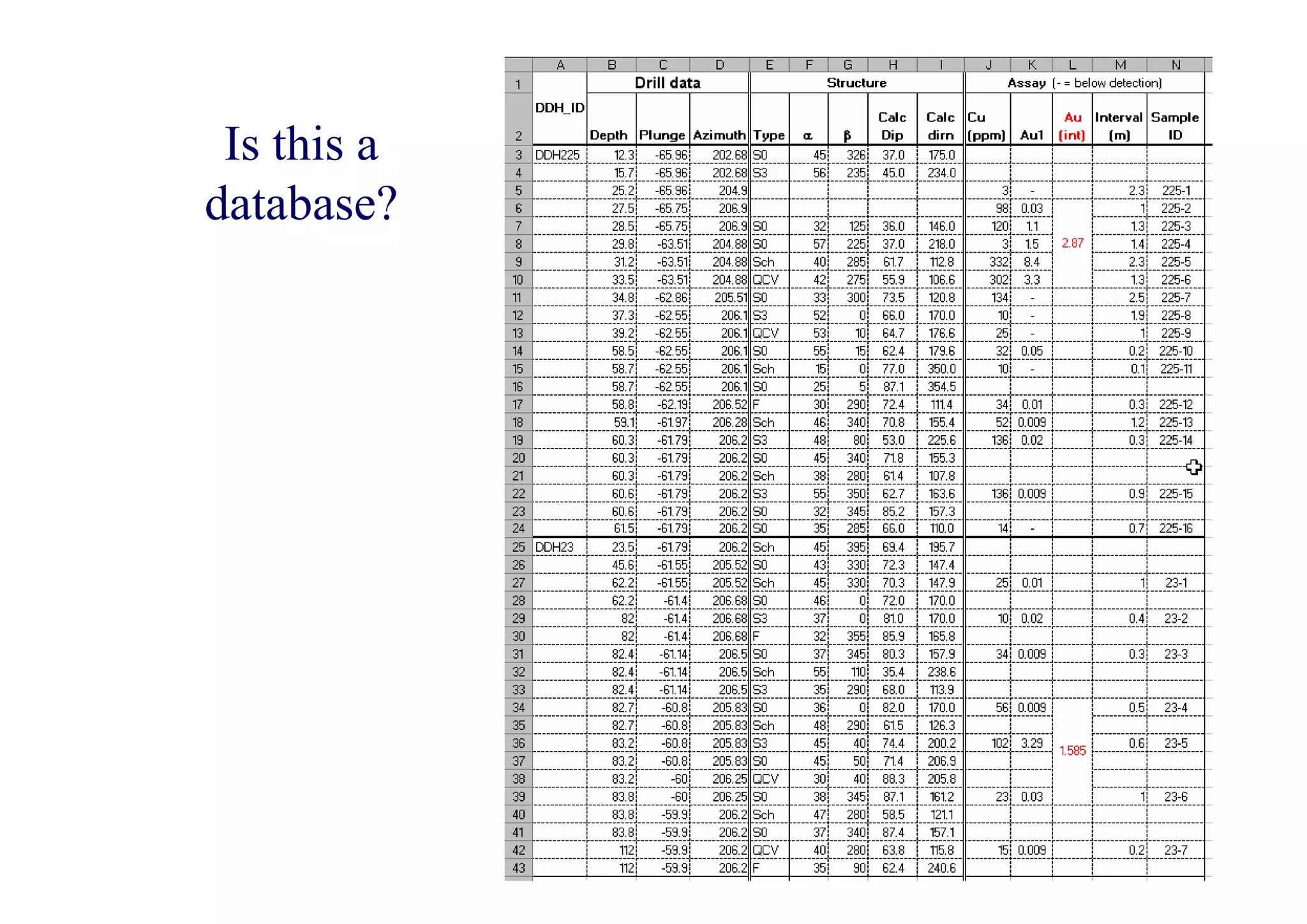
Is this a
database?
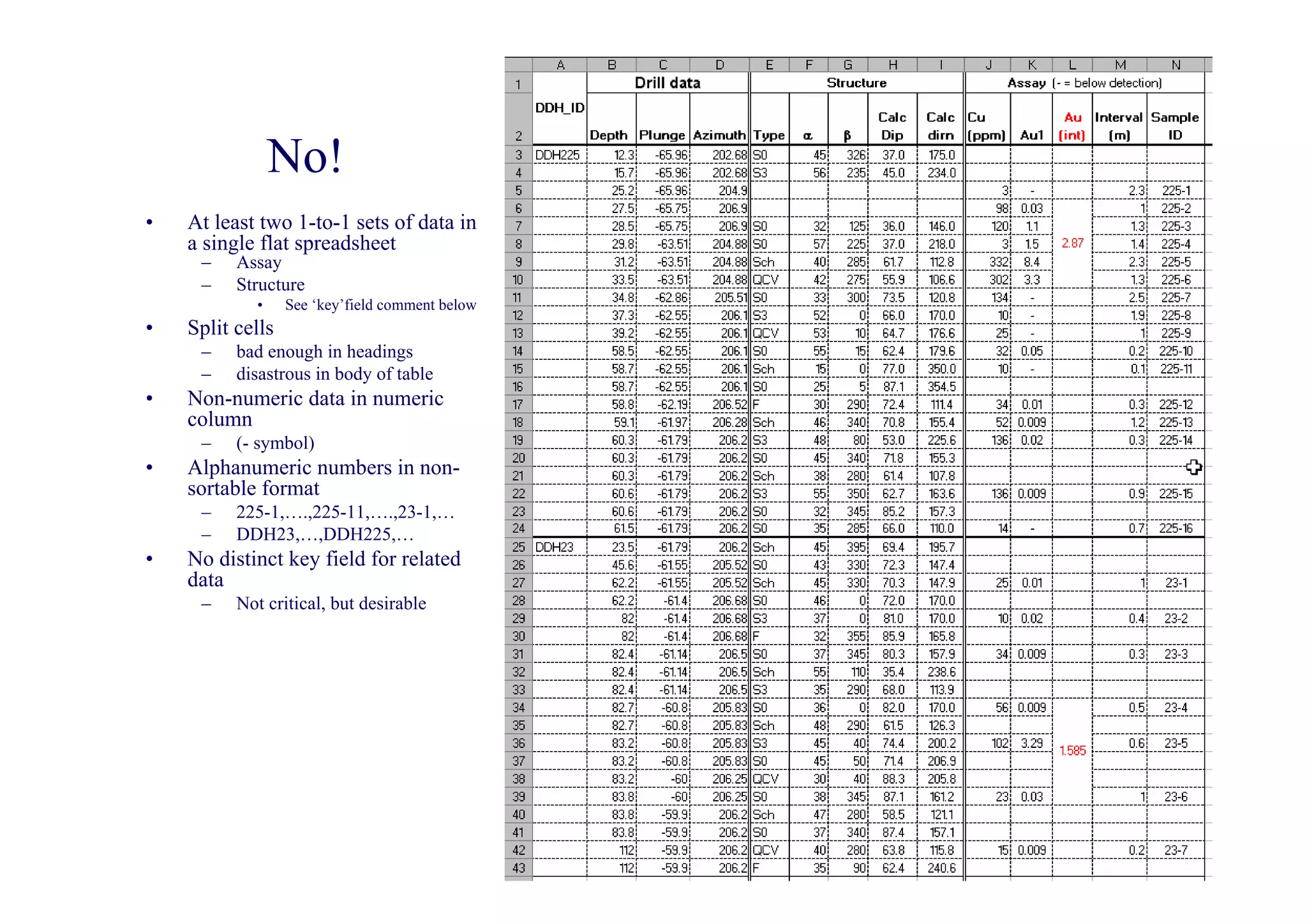
No!
•   At least two 1-to-1 sets of data in
    a single flat spreadsheet
     –    Assay
     –    Structure
            •     See ‘key’field comment below
•   Split cells
     –    bad enough in headings
     –    disastrous in body of table
•   Non-numeric data in numeric
    column
     –    (- symbol)
•   Alphanumeric numbers in non-
    sortable format
     –    225-1,….,225-11,….,23-1,…
     –    DDH23,…,DDH225,…
•   No distinct key field for related
    data
     –    Not critical, but desirable
Excel spreadsheet databases
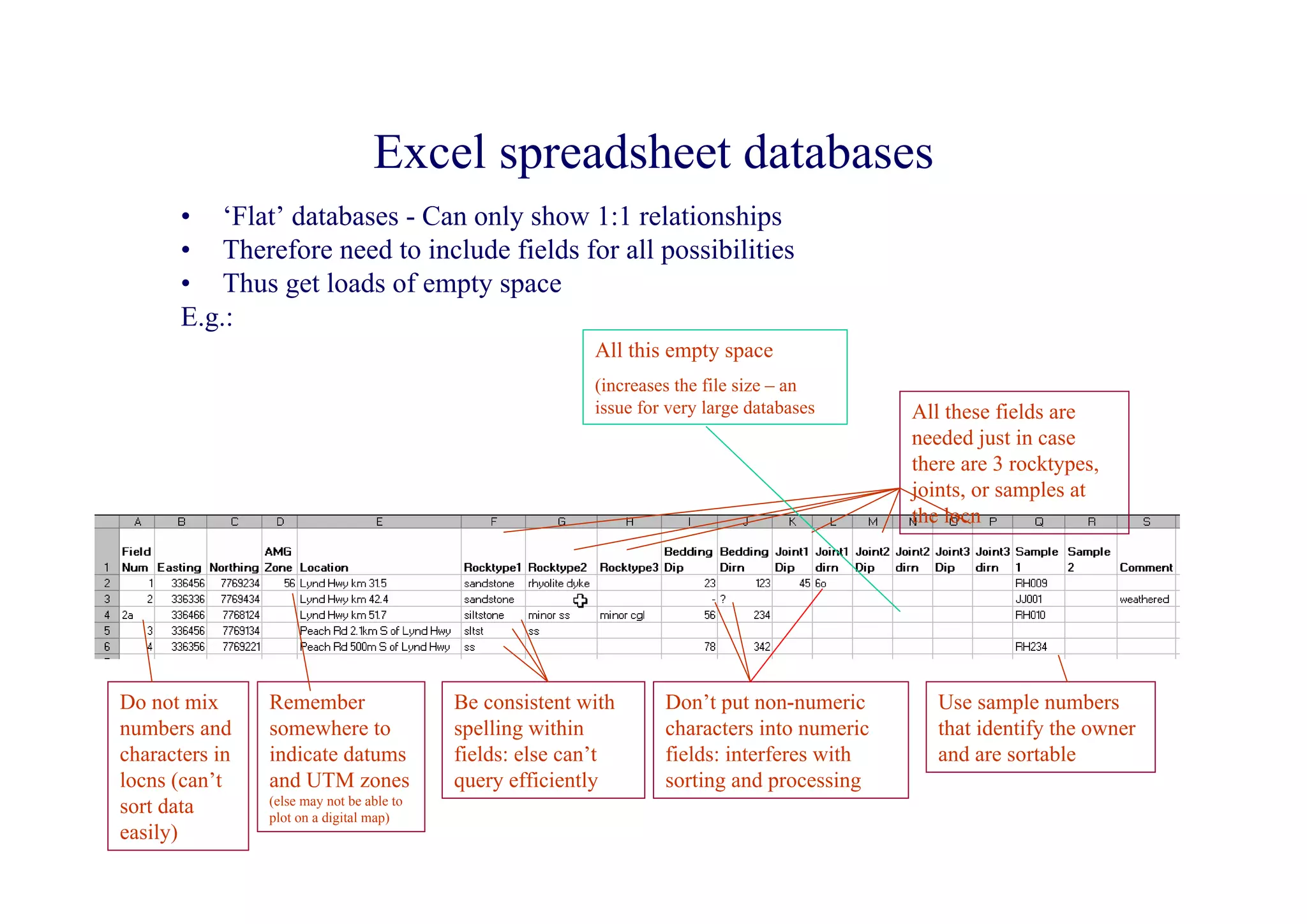
       • ‘Flat’ databases - Can only show 1:1 relationships
       • Therefore need to include fields for all possibilities
       • Thus get loads of empty space
       E.g.:
                                                          All this empty space
                                                          (increases the file size – an
                                                          issue for very large databases     All these fields are
                                                                                             needed just in case
                                                                                             there are 3 rocktypes,
                                                                                             joints, or samples at
                                                                                             the locn


Do not mix      Remember                   Be consistent with      Don’t put non-numeric        Use sample numbers
numbers and     somewhere to               spelling within         characters into numeric      that identify the owner
characters in   indicate datums            fields: else can’t      fields: interferes with      and are sortable
locns (can’t    and UTM zones              query efficiently       sorting and processing
                (else may not be able to
sort data       plot on a digital map)
easily)
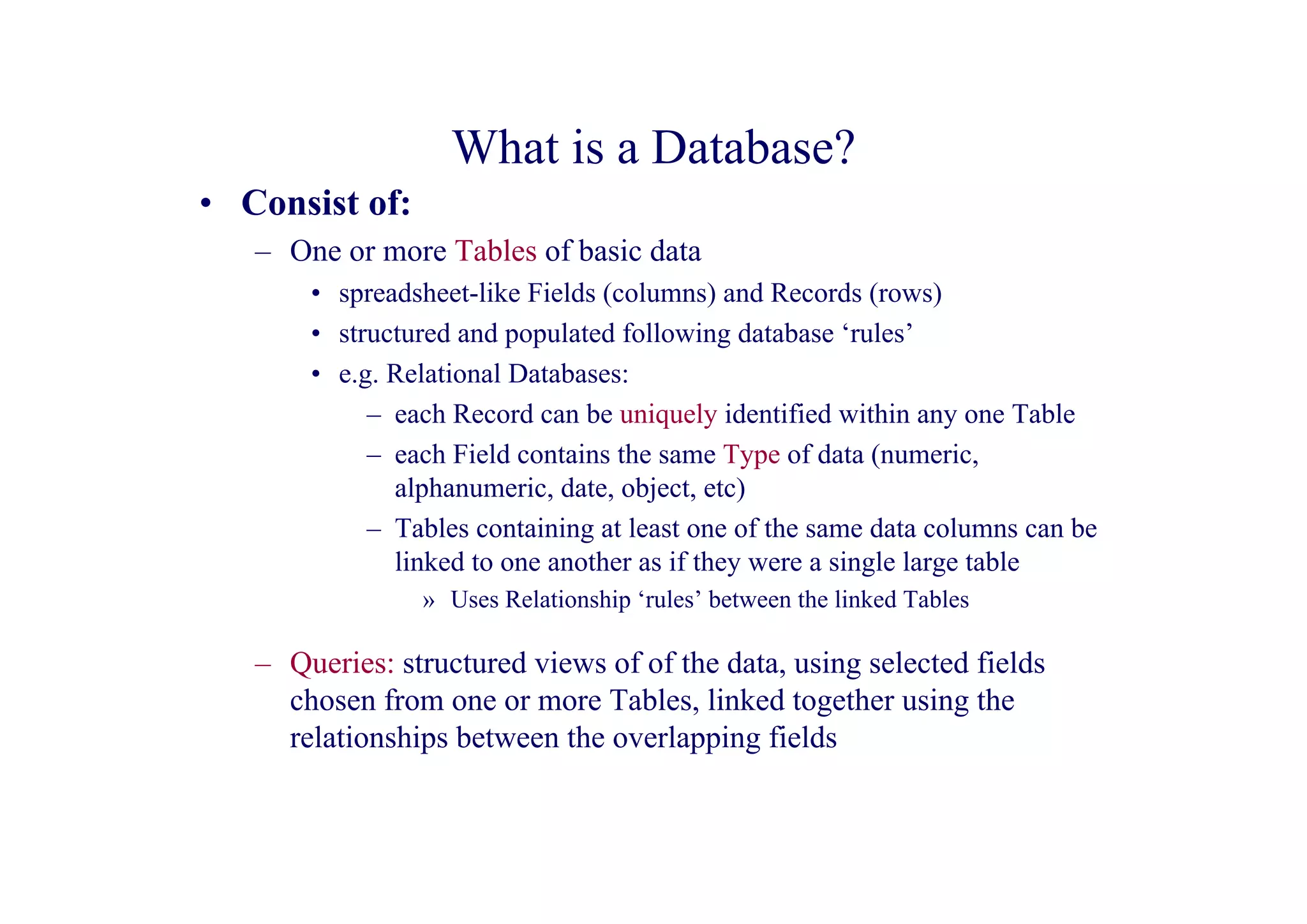
What is a Database?
• Consist of:
   – One or more Tables of basic data
       • spreadsheet-like Fields (columns) and Records (rows)
       • structured and populated following database ‘rules’
       • e.g. Relational Databases:
            – each Record can be uniquely identified within any one Table
            – each Field contains the same Type of data (numeric,
              alphanumeric, date, object, etc)
            – Tables containing at least one of the same data columns can be
              linked to one another as if they were a single large table
                » Uses Relationship ‘rules’ between the linked Tables

   – Queries: structured views of of the data, using selected fields
     chosen from one or more Tables, linked together using the
     relationships between the overlapping fields
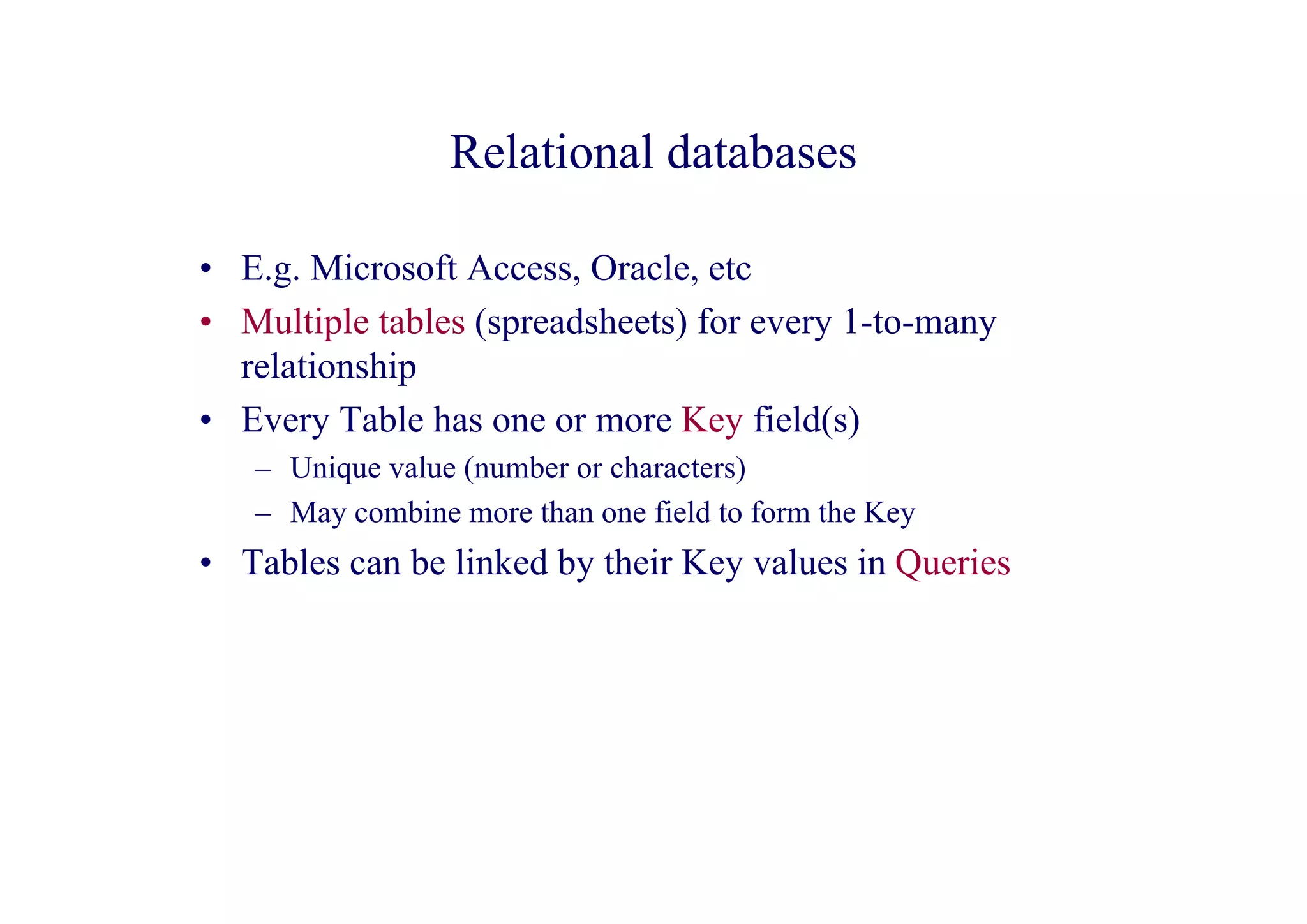
Relational databases

• E.g. Microsoft Access, Oracle, etc
• Multiple tables (spreadsheets) for every 1-to-many
  relationship
• Every Table has one or more Key field(s)
   – Unique value (number or characters)
   – May combine more than one field to form the Key
• Tables can be linked by their Key values in Queries
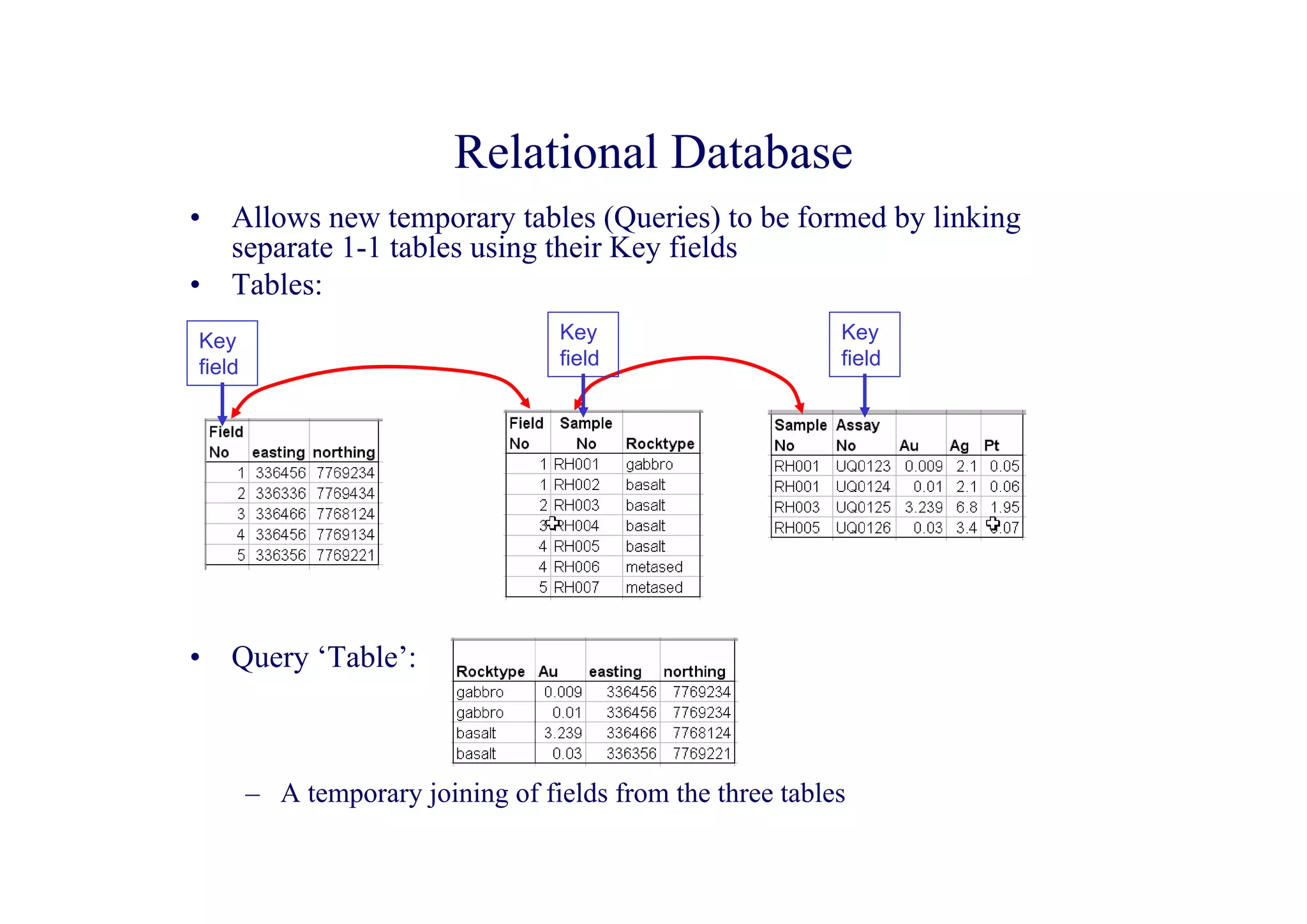
Relational Database
•   Allows new temporary tables (Queries) to be formed by linking
    separate 1-1 tables using their Key fields
•   Tables:
Key                                Key                      Key
field                              field                    field


•   Query ‘Table’:


        – A temporary joining of fields from the three tables
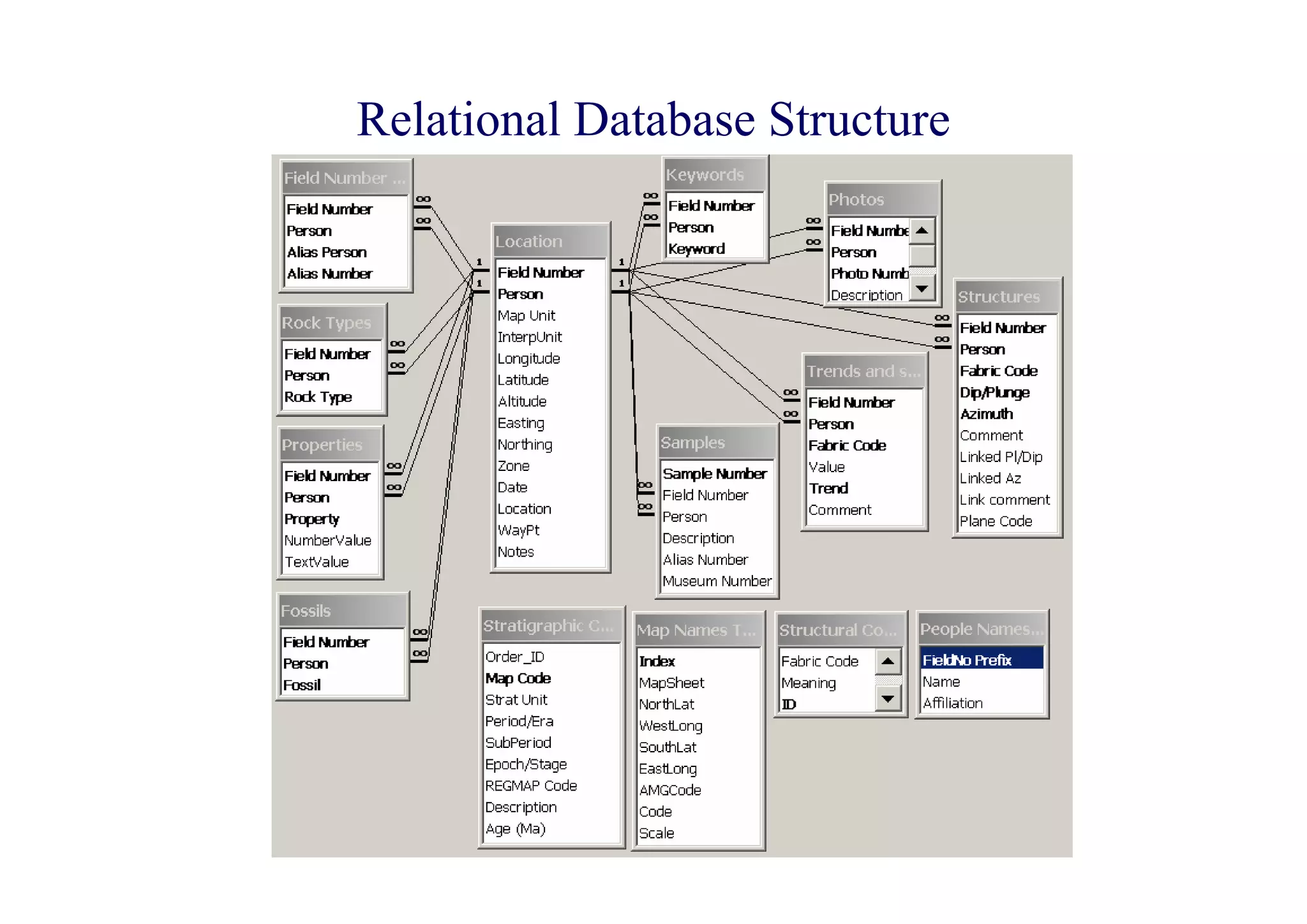
Relational Database Structure
Database design

• Poor design, even for a simple database, can lead to
  unwarranted cleaning-up at a later stage
• Think carefully about how you are going to Query your
  database - after all that’s why you are doing it
• Only include those fields that will be involved in
  subsequent queries. The more fields you have, the more
  time-consuming it is to enter data.
   – in general, don’t try to produce all-inclusive databases
   – databases tend to have a life that is limited to the project for which
     they were designed and hence extra effort may be wasted
Geographic Information Systems (GIS)
•   GIS = Spatial relational databases
     – i.e exactly the same as any other relational database (RDBS) except that at least
       some of the Tables consist of entities with a geographic location
          • Data can be displayed as a map as well as a spreadsheet-like table
     – Separate Tables can be overlayed in map view as if they were a single map
          • This is the heart of a digital map system
     – Queries can link fields from different tables (as in any RDBS)
          • but can also select data on geographic criteria
               – such as ‘Show only the data where map objects overlap’
     – Spatial Analysis of data is possible
          • Thematic mapping
               – Property distributions highlighted by colours, new symbols, contouring, etc
          • Spatial numerical analysis
               – spatial graphing


•   Commonly used GIS software:
     – ArcInfo; ArcView; MapInfo
GIS - Spatial Relational Database
•   E.g. MapInfo, ArcView, ArcInfo
•   In addition to normal fields, Tables can have an extra field (commonly
    hidden) that contains geographic information about Geographic
    objects in the Table
     – Point, Line, Arc, Polyline, Polygon, Region, etc

•   Geographic Information:
     –   Point location or Centroid location (if a polygon object)
     –   Perimeter
     –   Area
     –   Object contained on the left/right side of line
     –   Etc

•   Location information is dependent on Datums and Projections
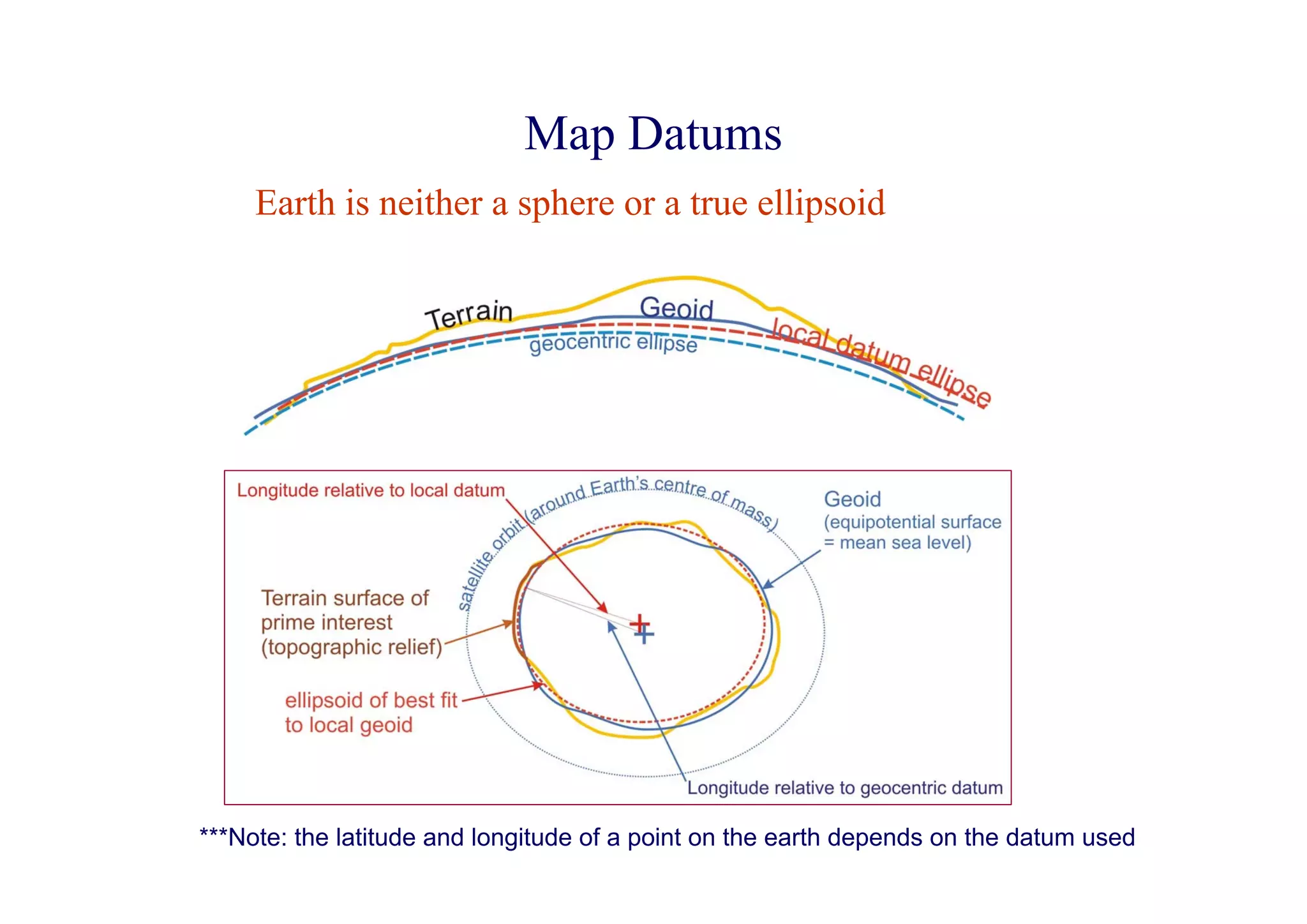
Map Datums
     Earth is neither a sphere or a true ellipsoid


***Note: the latitude and longitude of a point on the earth depends on the datum used
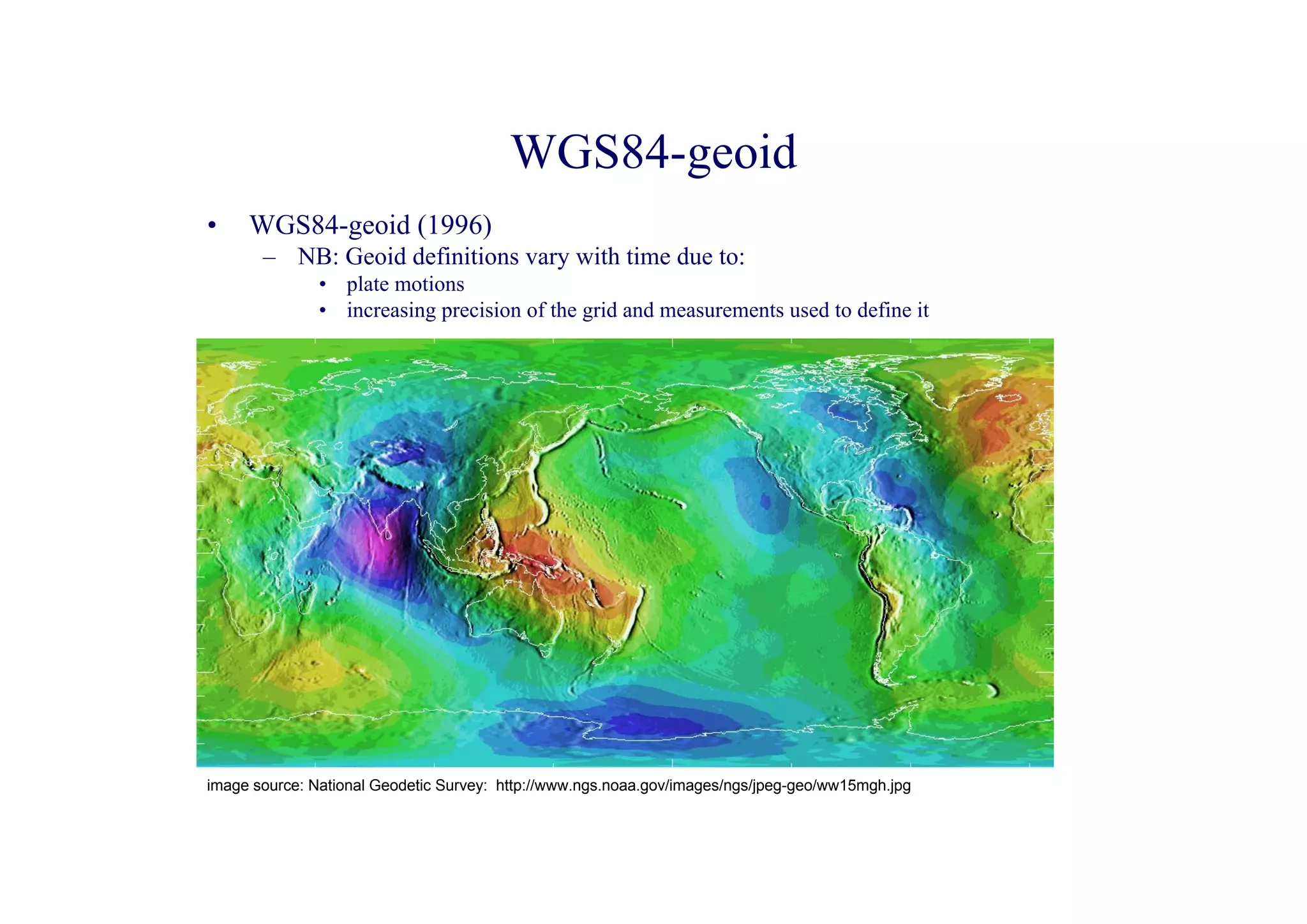
WGS84-geoid
•    WGS84-geoid (1996)
       – NB: Geoid definitions vary with time due to:
               • plate motions
               • increasing precision of the grid and measurements used to define it


image source: National Geodetic Survey: http://www.ngs.noaa.gov/images/ngs/jpeg-geo/ww15mgh.jpg
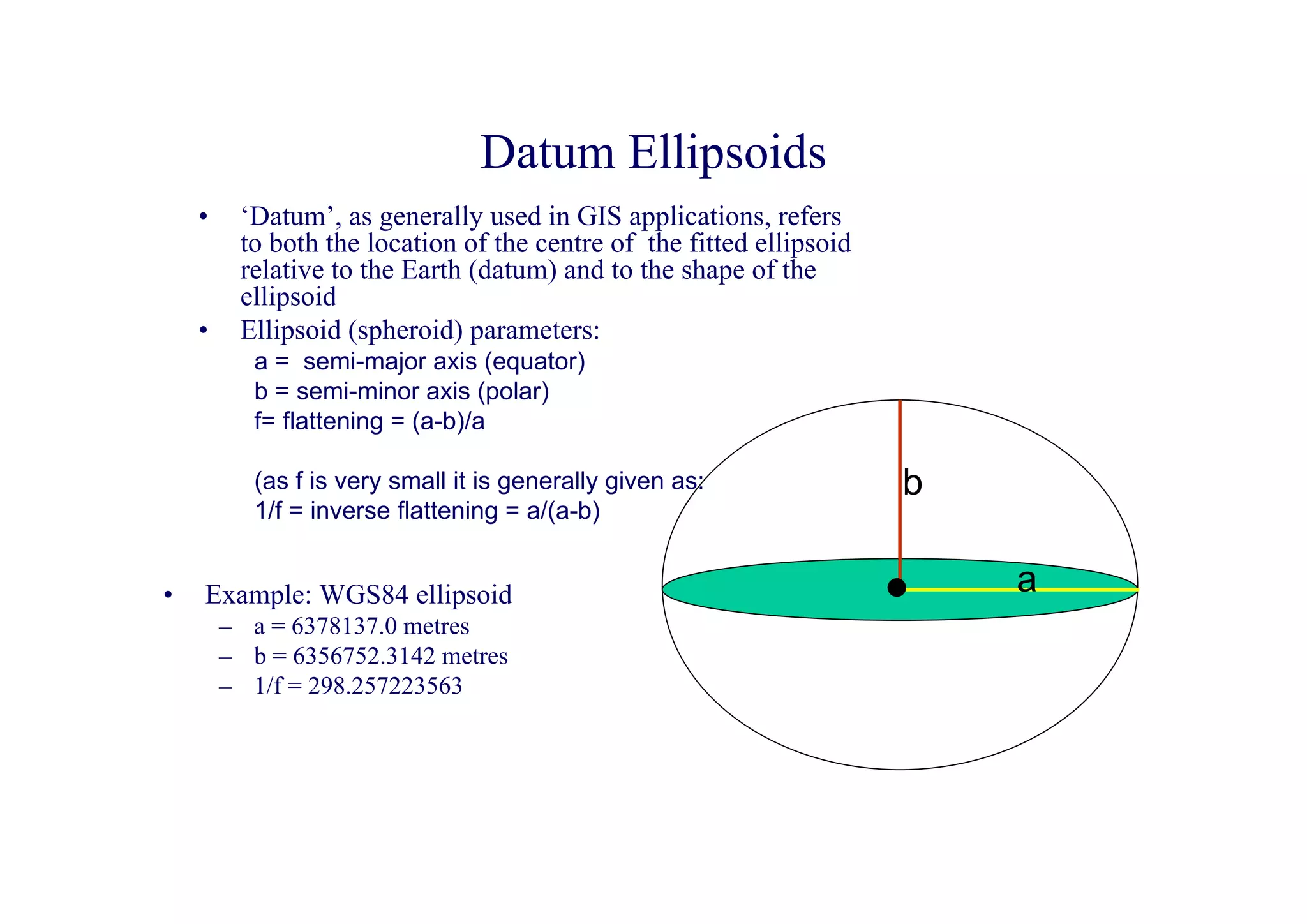
Datum Ellipsoids
    •    ‘Datum’, as generally used in GIS applications, refers
         to both the location of the centre of the fitted ellipsoid
         relative to the Earth (datum) and to the shape of the
         ellipsoid
    •    Ellipsoid (spheroid) parameters:
           a = semi-major axis (equator)
           b = semi-minor axis (polar)
           f= flattening = (a-b)/a

           (as f is very small it is generally given as:              b
           1/f = inverse flattening = a/(a-b)


•   Example: WGS84 ellipsoid                                              a
        – a = 6378137.0 metres
        – b = 6356752.3142 metres
        – 1/f = 298.257223563
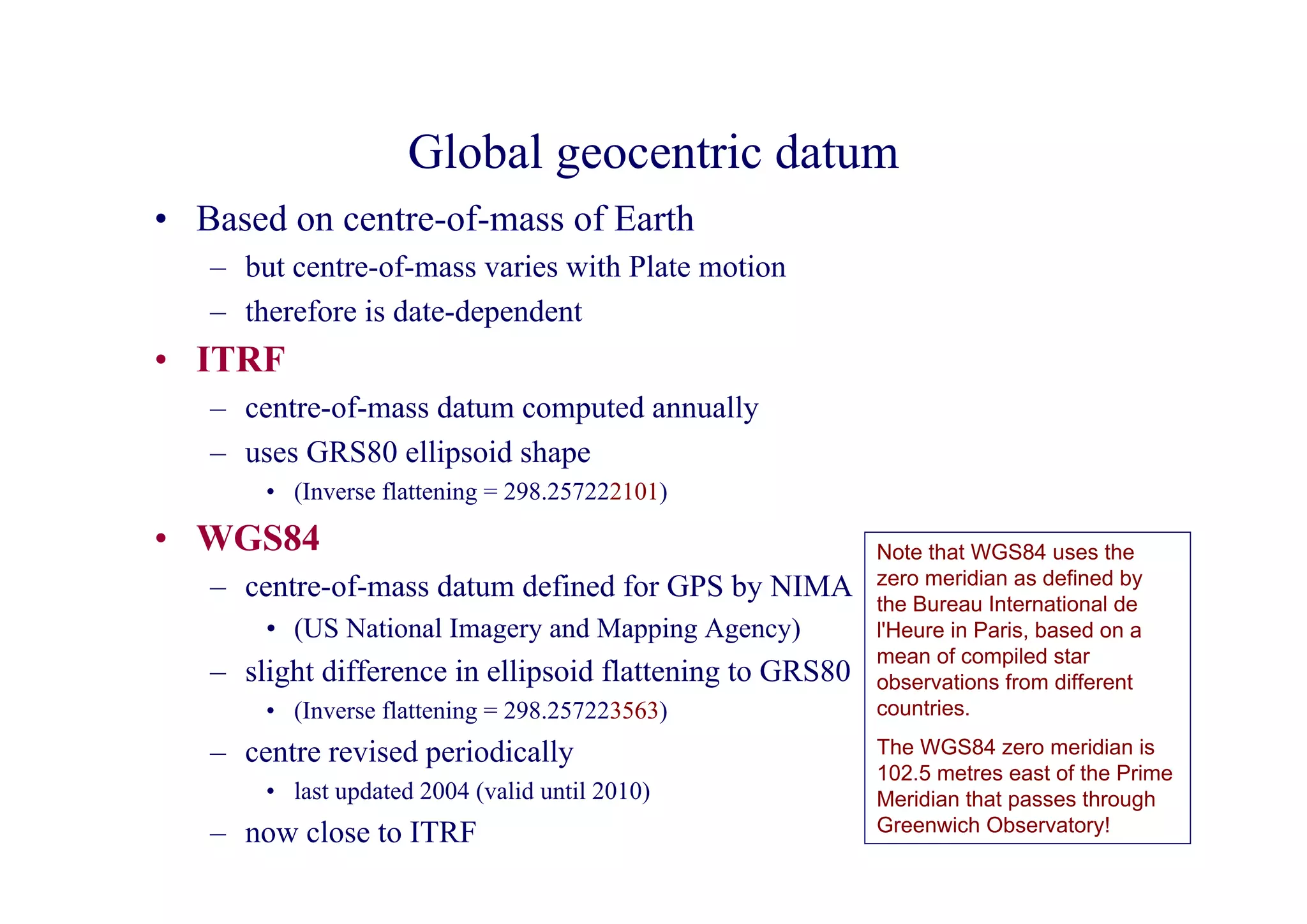
Global geocentric datum
• Based on centre-of-mass of Earth
   – but centre-of-mass varies with Plate motion
   – therefore is date-dependent
• ITRF
   – centre-of-mass datum computed annually
   – uses GRS80 ellipsoid shape
       • (Inverse flattening = 298.257222101)

• WGS84                                                   Note that WGS84 uses the
   – centre-of-mass datum defined for GPS by NIMA         zero meridian as defined by
                                                          the Bureau International de
       • (US National Imagery and Mapping Agency)         l'Heure in Paris, based on a
                                                          mean of compiled star
   – slight difference in ellipsoid flattening to GRS80   observations from different
       • (Inverse flattening = 298.257223563)             countries.

   – centre revised periodically                          The WGS84 zero meridian is
                                                          102.5 metres east of the Prime
       • last updated 2004 (valid until 2010)             Meridian that passes through
   – now close to ITRF                                    Greenwich Observatory!
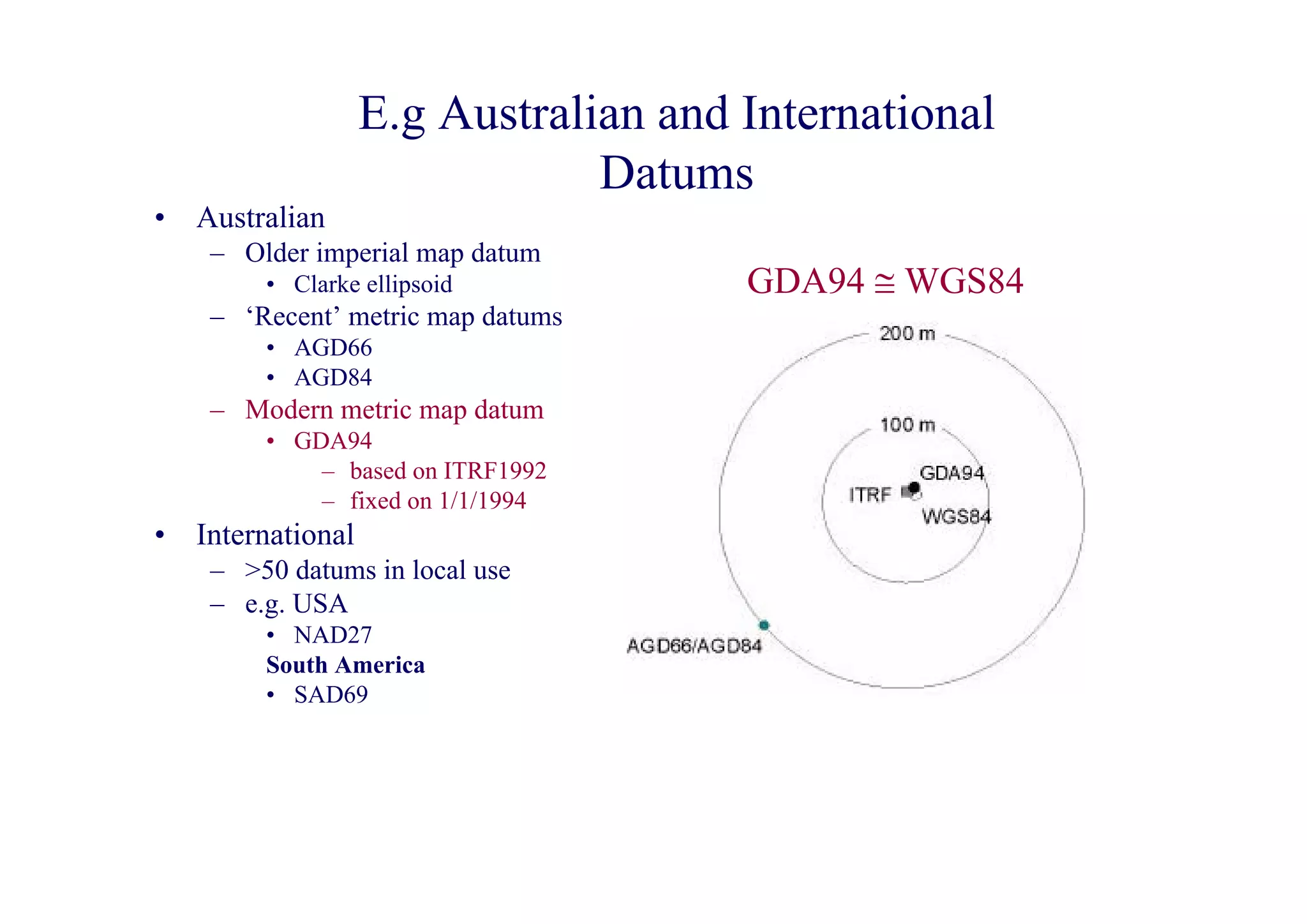
E.g Australian and International
                                Datums
•   Australian
     – Older imperial map datum
         • Clarke ellipsoid            GDA94 ≅ WGS84
     – ‘Recent’ metric map datums
         • AGD66
         • AGD84
     – Modern metric map datum
         • GDA94
             – based on ITRF1992
             – fixed on 1/1/1994
•   International
     – >50 datums in local use
     – e.g. USA
         • NAD27
         South America
         • SAD69
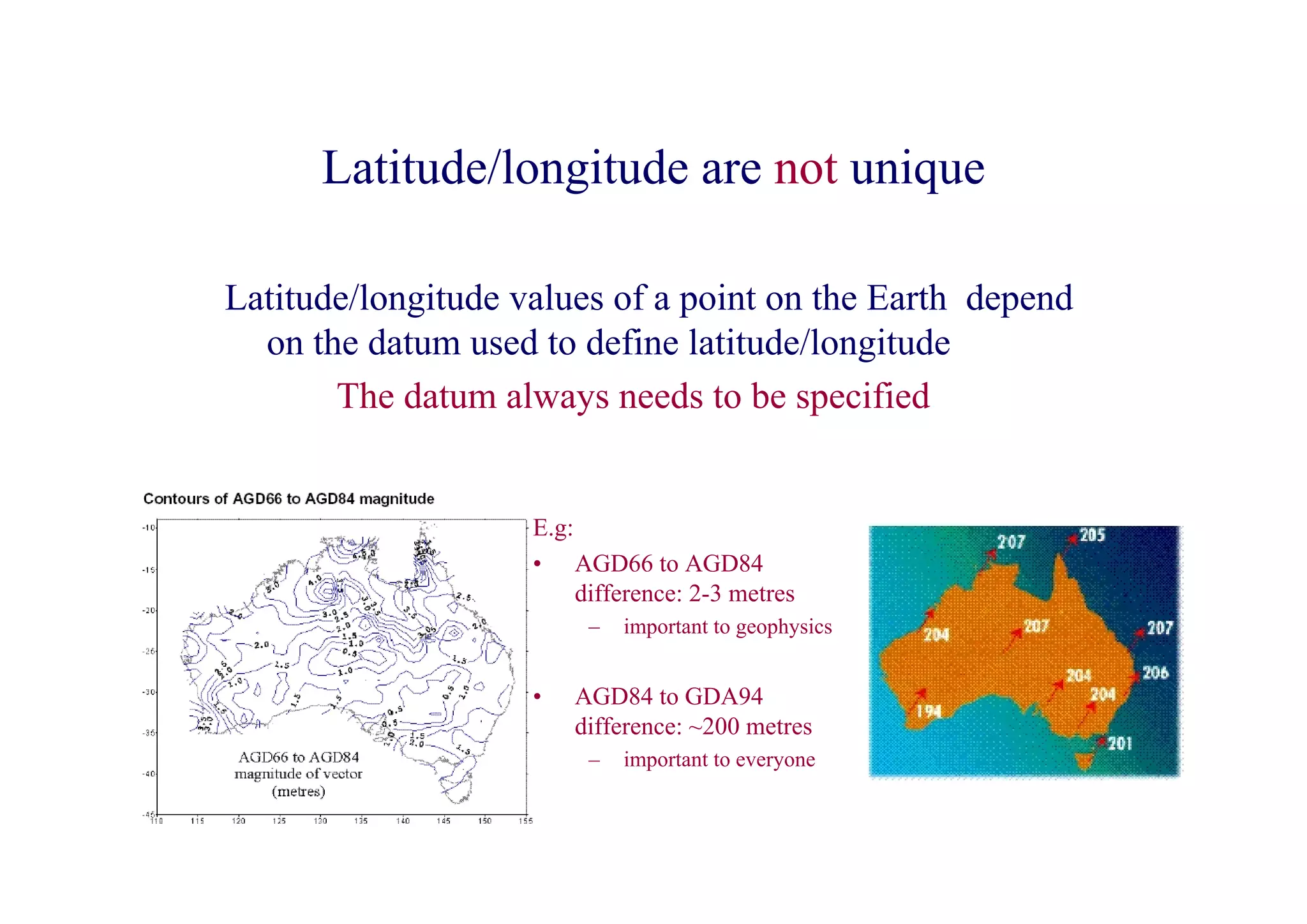
Latitude/longitude are not unique

Latitude/longitude values of a point on the Earth depend
  on the datum used to define latitude/longitude
       The datum always needs to be specified


                    E.g:
                    • AGD66 to AGD84
                         difference: 2-3 metres
                         –   important to geophysics


                    •   AGD84 to GDA94
                        difference: ~200 metres
                         –   important to everyone
Projections

• The algorithm used to project map data that has been
  projected from the terrain onto the datum ellipsoid onto a
  2D flat surface
   – e.g polar stereographic projections
       • e.g. as used for continental wander path reconstructions


• Most common map projection:
   – Universal transverse mercator (UTM)
• Others
   – conic, polyconic, gauss-kruger (similar to UTM), etc...
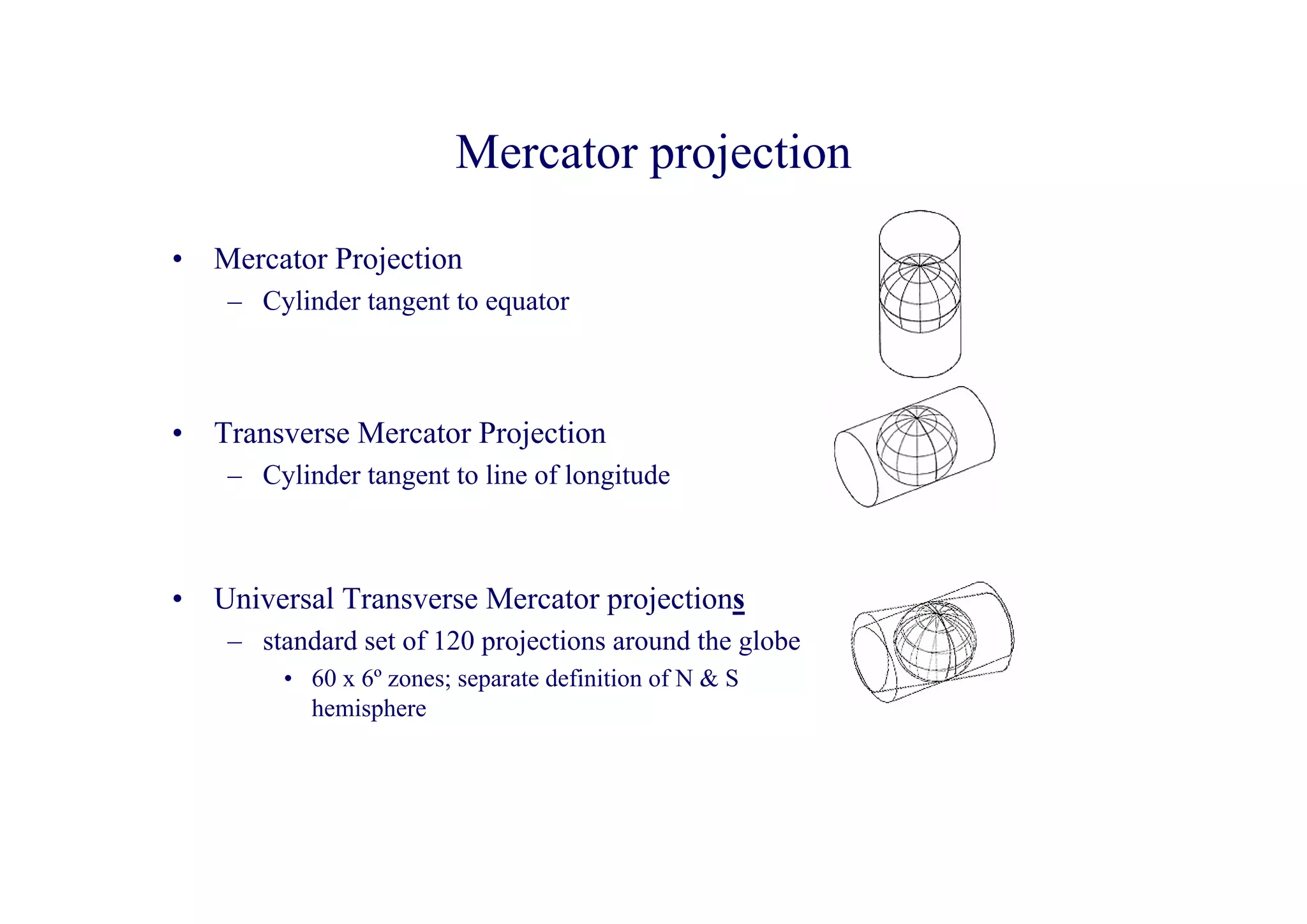
Mercator projection

•   Mercator Projection
     – Cylinder tangent to equator


•   Transverse Mercator Projection
     – Cylinder tangent to line of longitude


•   Universal Transverse Mercator projections
     – standard set of 120 projections around the globe
         • 60 x 6º zones; separate definition of N & S
           hemisphere
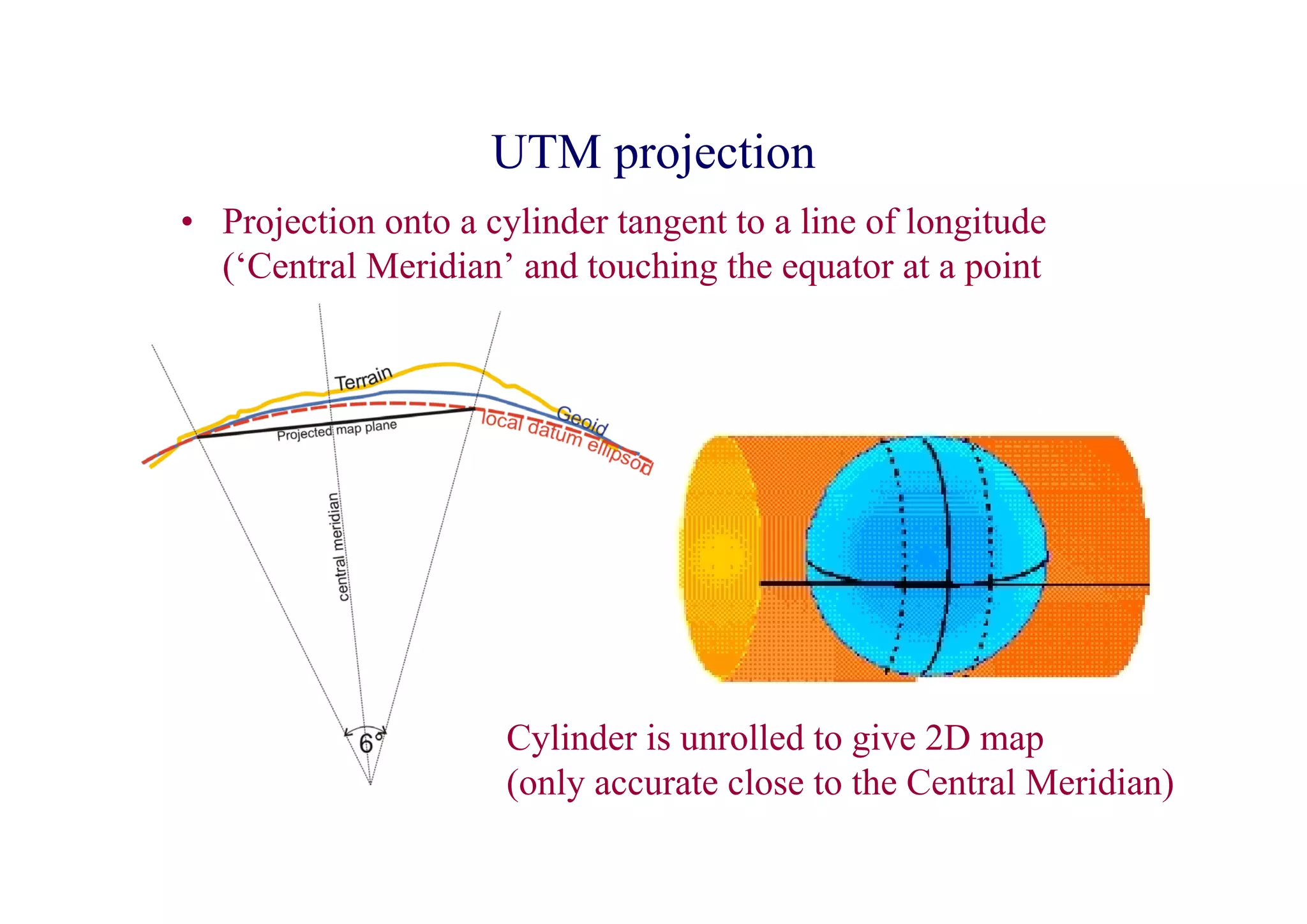
UTM projection
• Projection onto a cylinder tangent to a line of longitude
  (‘Central Meridian’ and touching the equator at a point


                      Cylinder is unrolled to give 2D map
                      (only accurate close to the Central Meridian)
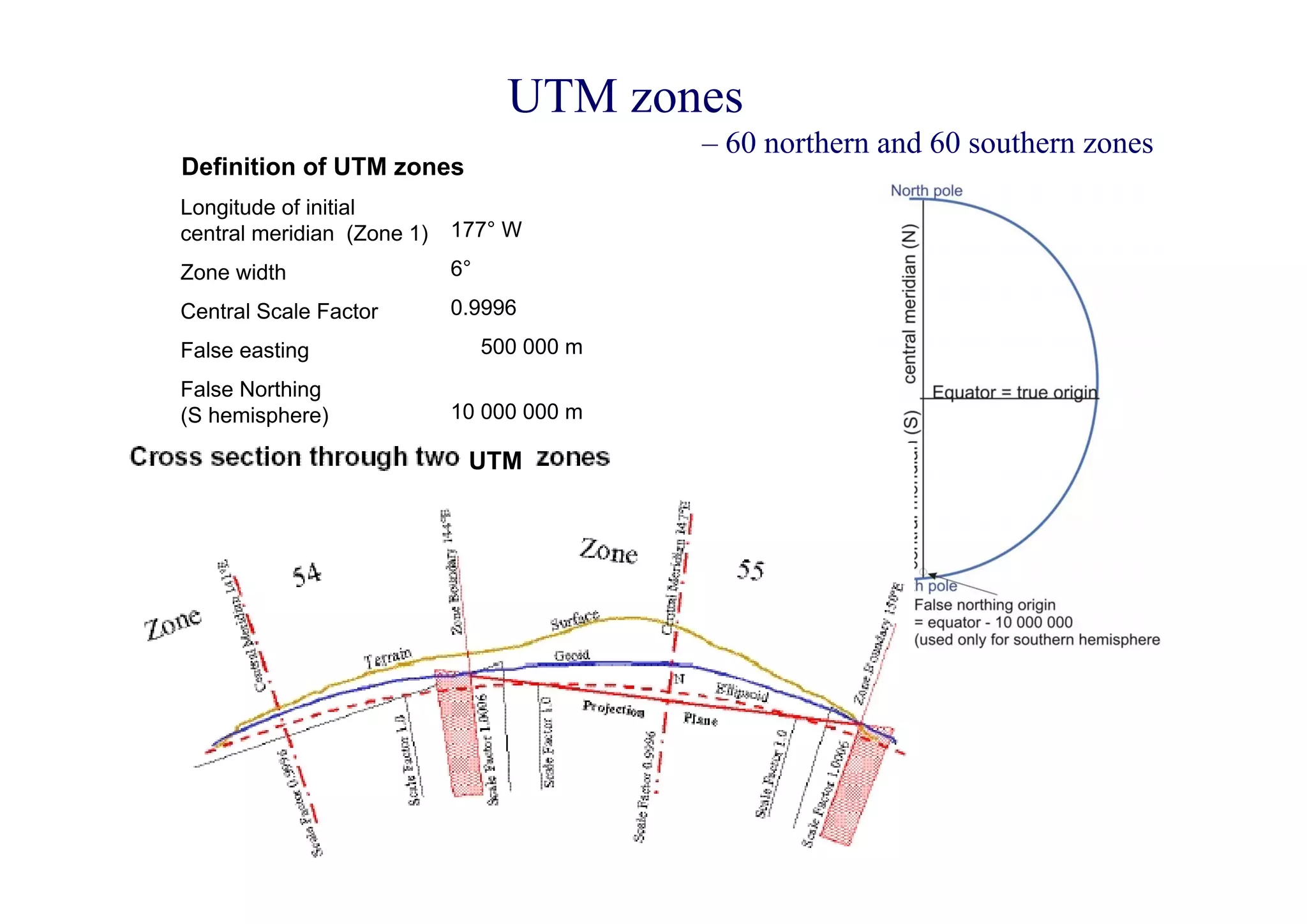
UTM zones
                                             – 60 northern and 60 southern zones
Definition of UTM zones
Longitude of initial
central meridian (Zone 1)   177° W
Zone width                  6°
Central Scale Factor        0.9996
False easting                    500 000 m
False Northing
(S hemisphere)              10 000 000 m

                             UTM
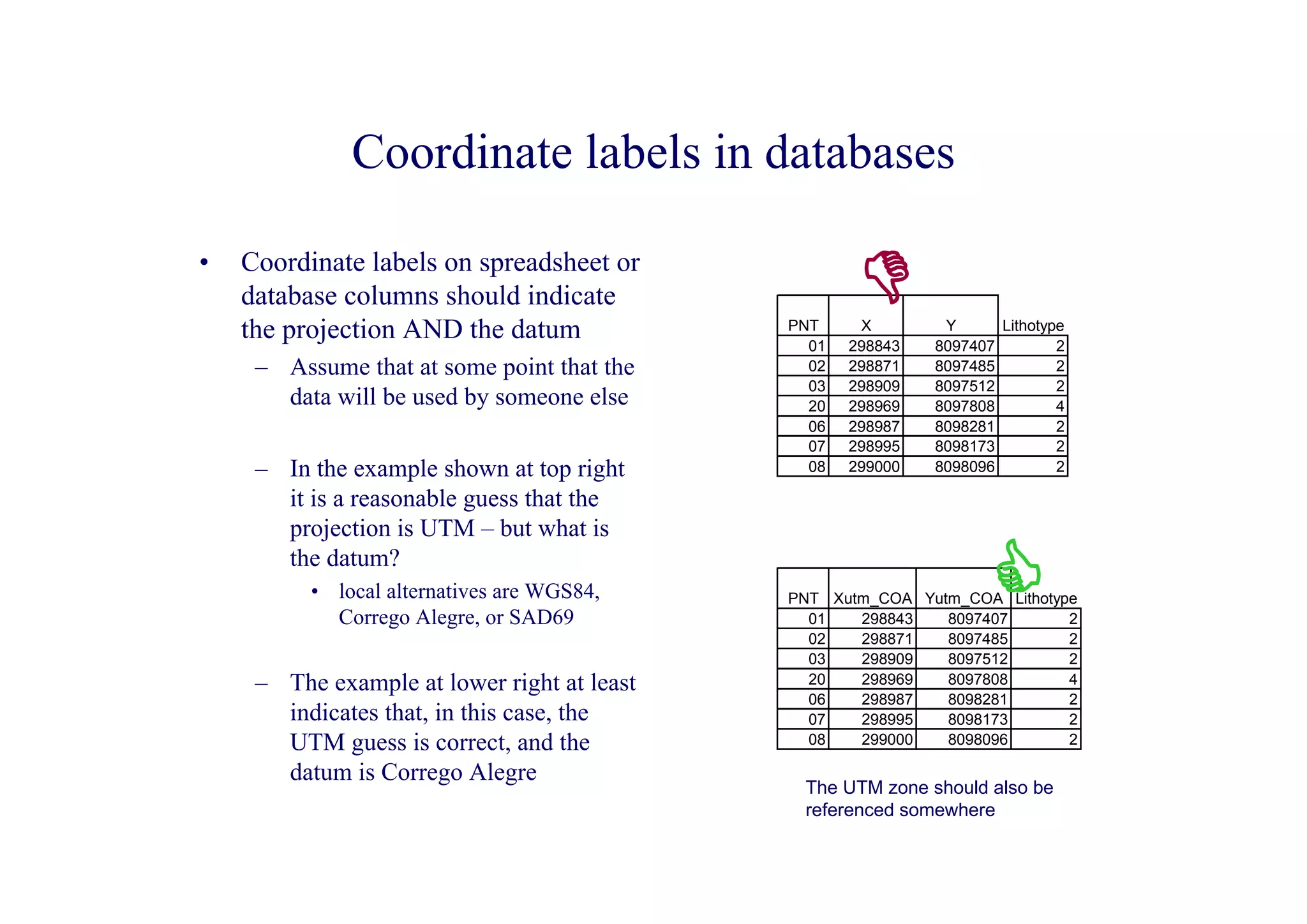
Coordinate labels in databases

•   Coordinate labels on spreadsheet or
    database columns should indicate
    the projection AND the datum             PNT
                                               01
                                                     X
                                                    298843
                                                              Y
                                                             8097407
                                                                     Lithotype
                                                                             2
     – Assume that at some point that the      02   298871   8097485         2
                                               03   298909   8097512         2
       data will be used by someone else       20   298969   8097808         4
                                               06   298987   8098281         2
                                               07   298995   8098173         2
     – In the example shown at top right       08   299000   8098096         2

       it is a reasonable guess that the
       projection is UTM – but what is
       the datum?
          • local alternatives are WGS84,    PNT Xutm_COA Yutm_COA Lithotype
            Corrego Alegre, or SAD69           01   298843   8097407       2
                                               02   298871   8097485       2
                                               03   298909   8097512       2
     – The example at lower right at least     20   298969   8097808       4
                                               06   298987   8098281       2
       indicates that, in this case, the       07   298995   8098173       2
       UTM guess is correct, and the           08   299000   8098096       2

       datum is Corrego Alegre
                                              The UTM zone should also be
                                              referenced somewhere

Database gis fundamentals

  • 1.
    Database and GIS Fundamentalsin Exploration Or There is a difference between a spreadsheet and a database
  • 2.
  • 3.
    No! • At least two 1-to-1 sets of data in a single flat spreadsheet – Assay – Structure • See ‘key’field comment below • Split cells – bad enough in headings – disastrous in body of table • Non-numeric data in numeric column – (- symbol) • Alphanumeric numbers in non- sortable format – 225-1,….,225-11,….,23-1,… – DDH23,…,DDH225,… • No distinct key field for related data – Not critical, but desirable
  • 4.
    Excel spreadsheet databases • ‘Flat’ databases - Can only show 1:1 relationships • Therefore need to include fields for all possibilities • Thus get loads of empty space E.g.: All this empty space (increases the file size – an issue for very large databases All these fields are needed just in case there are 3 rocktypes, joints, or samples at the locn Do not mix Remember Be consistent with Don’t put non-numeric Use sample numbers numbers and somewhere to spelling within characters into numeric that identify the owner characters in indicate datums fields: else can’t fields: interferes with and are sortable locns (can’t and UTM zones query efficiently sorting and processing (else may not be able to sort data plot on a digital map) easily)
  • 5.
    What is aDatabase? • Consist of: – One or more Tables of basic data • spreadsheet-like Fields (columns) and Records (rows) • structured and populated following database ‘rules’ • e.g. Relational Databases: – each Record can be uniquely identified within any one Table – each Field contains the same Type of data (numeric, alphanumeric, date, object, etc) – Tables containing at least one of the same data columns can be linked to one another as if they were a single large table » Uses Relationship ‘rules’ between the linked Tables – Queries: structured views of of the data, using selected fields chosen from one or more Tables, linked together using the relationships between the overlapping fields
  • 6.
    Relational databases • E.g.Microsoft Access, Oracle, etc • Multiple tables (spreadsheets) for every 1-to-many relationship • Every Table has one or more Key field(s) – Unique value (number or characters) – May combine more than one field to form the Key • Tables can be linked by their Key values in Queries
  • 7.
    Relational Database • Allows new temporary tables (Queries) to be formed by linking separate 1-1 tables using their Key fields • Tables: Key Key Key field field field • Query ‘Table’: – A temporary joining of fields from the three tables
  • 8.
  • 9.
    Database design • Poordesign, even for a simple database, can lead to unwarranted cleaning-up at a later stage • Think carefully about how you are going to Query your database - after all that’s why you are doing it • Only include those fields that will be involved in subsequent queries. The more fields you have, the more time-consuming it is to enter data. – in general, don’t try to produce all-inclusive databases – databases tend to have a life that is limited to the project for which they were designed and hence extra effort may be wasted
  • 10.
    Geographic Information Systems(GIS) • GIS = Spatial relational databases – i.e exactly the same as any other relational database (RDBS) except that at least some of the Tables consist of entities with a geographic location • Data can be displayed as a map as well as a spreadsheet-like table – Separate Tables can be overlayed in map view as if they were a single map • This is the heart of a digital map system – Queries can link fields from different tables (as in any RDBS) • but can also select data on geographic criteria – such as ‘Show only the data where map objects overlap’ – Spatial Analysis of data is possible • Thematic mapping – Property distributions highlighted by colours, new symbols, contouring, etc • Spatial numerical analysis – spatial graphing • Commonly used GIS software: – ArcInfo; ArcView; MapInfo
  • 11.
    GIS - SpatialRelational Database • E.g. MapInfo, ArcView, ArcInfo • In addition to normal fields, Tables can have an extra field (commonly hidden) that contains geographic information about Geographic objects in the Table – Point, Line, Arc, Polyline, Polygon, Region, etc • Geographic Information: – Point location or Centroid location (if a polygon object) – Perimeter – Area – Object contained on the left/right side of line – Etc • Location information is dependent on Datums and Projections
  • 12.
    Map Datums Earth is neither a sphere or a true ellipsoid ***Note: the latitude and longitude of a point on the earth depends on the datum used
  • 13.
    WGS84-geoid • WGS84-geoid (1996) – NB: Geoid definitions vary with time due to: • plate motions • increasing precision of the grid and measurements used to define it image source: National Geodetic Survey: http://www.ngs.noaa.gov/images/ngs/jpeg-geo/ww15mgh.jpg
  • 14.
    Datum Ellipsoids • ‘Datum’, as generally used in GIS applications, refers to both the location of the centre of the fitted ellipsoid relative to the Earth (datum) and to the shape of the ellipsoid • Ellipsoid (spheroid) parameters: a = semi-major axis (equator) b = semi-minor axis (polar) f= flattening = (a-b)/a (as f is very small it is generally given as: b 1/f = inverse flattening = a/(a-b) • Example: WGS84 ellipsoid a – a = 6378137.0 metres – b = 6356752.3142 metres – 1/f = 298.257223563
  • 15.
    Global geocentric datum •Based on centre-of-mass of Earth – but centre-of-mass varies with Plate motion – therefore is date-dependent • ITRF – centre-of-mass datum computed annually – uses GRS80 ellipsoid shape • (Inverse flattening = 298.257222101) • WGS84 Note that WGS84 uses the – centre-of-mass datum defined for GPS by NIMA zero meridian as defined by the Bureau International de • (US National Imagery and Mapping Agency) l'Heure in Paris, based on a mean of compiled star – slight difference in ellipsoid flattening to GRS80 observations from different • (Inverse flattening = 298.257223563) countries. – centre revised periodically The WGS84 zero meridian is 102.5 metres east of the Prime • last updated 2004 (valid until 2010) Meridian that passes through – now close to ITRF Greenwich Observatory!
  • 16.
    E.g Australian andInternational Datums • Australian – Older imperial map datum • Clarke ellipsoid GDA94 ≅ WGS84 – ‘Recent’ metric map datums • AGD66 • AGD84 – Modern metric map datum • GDA94 – based on ITRF1992 – fixed on 1/1/1994 • International – >50 datums in local use – e.g. USA • NAD27 South America • SAD69
  • 17.
    Latitude/longitude are notunique Latitude/longitude values of a point on the Earth depend on the datum used to define latitude/longitude The datum always needs to be specified E.g: • AGD66 to AGD84 difference: 2-3 metres – important to geophysics • AGD84 to GDA94 difference: ~200 metres – important to everyone
  • 18.
    Projections • The algorithmused to project map data that has been projected from the terrain onto the datum ellipsoid onto a 2D flat surface – e.g polar stereographic projections • e.g. as used for continental wander path reconstructions • Most common map projection: – Universal transverse mercator (UTM) • Others – conic, polyconic, gauss-kruger (similar to UTM), etc...
  • 19.
    Mercator projection • Mercator Projection – Cylinder tangent to equator • Transverse Mercator Projection – Cylinder tangent to line of longitude • Universal Transverse Mercator projections – standard set of 120 projections around the globe • 60 x 6º zones; separate definition of N & S hemisphere
  • 20.
    UTM projection • Projectiononto a cylinder tangent to a line of longitude (‘Central Meridian’ and touching the equator at a point Cylinder is unrolled to give 2D map (only accurate close to the Central Meridian)
  • 21.
    UTM zones – 60 northern and 60 southern zones Definition of UTM zones Longitude of initial central meridian (Zone 1) 177° W Zone width 6° Central Scale Factor 0.9996 False easting 500 000 m False Northing (S hemisphere) 10 000 000 m UTM
  • 22.
    Coordinate labels indatabases • Coordinate labels on spreadsheet or database columns should indicate the projection AND the datum PNT 01 X 298843 Y 8097407 Lithotype 2 – Assume that at some point that the 02 298871 8097485 2 03 298909 8097512 2 data will be used by someone else 20 298969 8097808 4 06 298987 8098281 2 07 298995 8098173 2 – In the example shown at top right 08 299000 8098096 2 it is a reasonable guess that the projection is UTM – but what is the datum? • local alternatives are WGS84, PNT Xutm_COA Yutm_COA Lithotype Corrego Alegre, or SAD69 01 298843 8097407 2 02 298871 8097485 2 03 298909 8097512 2 – The example at lower right at least 20 298969 8097808 4 06 298987 8098281 2 indicates that, in this case, the 07 298995 8098173 2 UTM guess is correct, and the 08 299000 8098096 2 datum is Corrego Alegre The UTM zone should also be referenced somewhere