Chapter 5

  Database Administration and
           Security
        Transparencies

          © Pearson Education Limited, 2004   1
Chapter 5 - Objectives
   The distinction between data
    administration and database
    administration.
   The purpose and tasks associated
    with data administration and
    database administration.
   The scope of database security.

              © Pearson Education Limited, 2004
                                       2
Chapter 5 - Objectives
   Why database security is a serious
    concern for an organization.
   The type of threats that can affect a
    database system.
   How to protect a computer system
    using computer-based controls.


               © Pearson Education Limited, 2004
                                        3
Data administration and
     database administration
   Data Administrator (DA) and Database
    Administrator (DBA) are responsible
    for managing and controlling
    activities associated with corporate
    data and corporate database,
    respectively.
   DA is more concerned with early
    stages of lifecycle and DBA is more
    concerned with Pearson stages.Limited, 2004
                    © later Education  4
Data administration
   Management and control of corporate
    data, including:
       database planning
       development and maintenance of
        standards, policies, and procedures
       conceptual and logical database design


                      © Pearson Education Limited, 2004
                                               5
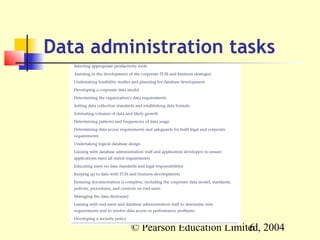
Data administration tasks


         © Pearson Education Limited, 2004
                                  6
Database administration
   Management and control of physical
    realization of a database system,
    including:
       physical database design and
        implementation
       setting security and integrity controls
       monitoring system performance
       reorganizing the database
                      © Pearson Education Limited, 2004
                                               7
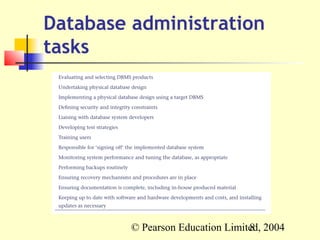
Database administration
tasks


         © Pearson Education Limited, 2004
                                  8
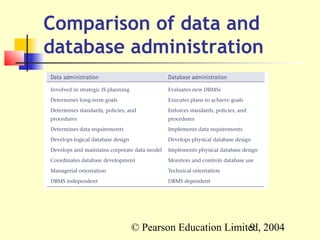
Comparison of data and
database administration


         © Pearson Education Limited, 2004
                                  9
Database security
   Mechanisms that protect the
    database against intentional or
    accidental threats.
   Not only apply to the data held in a
    database. Breaches of security may
    affect other parts of the system,
    which may in turn affect the
    database.
               © Pearson Education Limited, 2004
                                        10
Database security
   Includes hardware, software, people,
    and data.
   Growing importance of security is the
    increasing amounts of crucial
    corporate data being stored on
    computer.


              © Pearson Education Limited, 2004
                                       11
Database security
   Outcomes to avoid:
       theft and fraud
       loss of confidentiality (secrecy)
       loss of privacy
       loss of integrity
       loss of availability


                  © Pearson Education Limited, 2004
                                           12
Database security
   Threat
       Any situation or event, whether
        intentional or unintentional, that may
        adversely affect a system and
        consequently the organization.


                  © Pearson Education Limited, 2004
                                           13
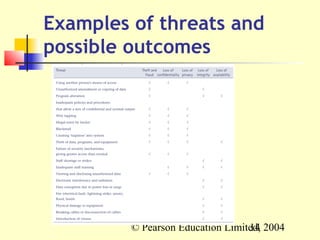
Examples of threats and
possible outcomes


         © Pearson Education Limited, 2004
                                  14
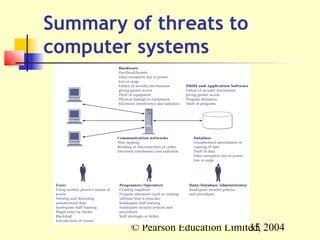
Summary of threats to
computer systems


        © Pearson Education Limited, 2004
                                 15
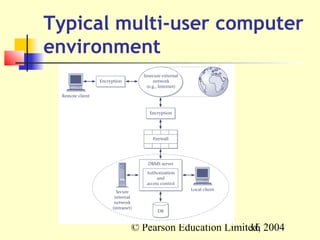
Typical multi-user computer
environment


         © Pearson Education Limited, 2004
                                  16
Countermeasures –
computer-based controls
   authorization
   views
   backup and recovery
   integrity
   encryption
   Redundant array of independent
    disks (RAID)
              © Pearson Education Limited, 2004
                                       17
Countermeasures –
computer-based controls
   Authorization
       The granting of a right or privilege that
        enables a subject to have legitimate
        access to a database system or a
        database system’s object.
   Authentication
       A mechanism that determines whether a
        user is, who he or she claims to be.

                  © Pearson Education Limited, 2004
                                           18
Countermeasures –
computer-based controls
   View
       A view is a virtual table that does not
        necessarily exist in the database but can
        be produced upon request by a
        particular user, at the time of request.


                  © Pearson Education Limited, 2004
                                           19
Countermeasures –
    computer-based controls
   Backup
       Process of periodically taking a copy of the
        database and log file (and possibly
        programs) onto offline storage media.
   Journaling
       Process of keeping and maintaining a log
        file (or journal) of all changes made to
        database to enable recovery to be
        undertaken effectively in the event of
        failure.      © Pearson Education Limited, 2004
                                               20
Countermeasures –
computer-based controls
   Integrity
       Prevents data from becoming invalid,
        and hence giving misleading or incorrect
        results.
   Encryption
       Encoding the data by a special algorithm
        that renders the data unreadable by any
        program without the decryption key.

                  © Pearson Education Limited, 2004
                                           21
Redundant array of
independent disks (RAID)
   Hardware that the DBMS runs on must
    be fault-tolerant, meaning that the
    DBMS should continue to operate
    even if one of the hardware
    components fails.
   Suggests having redundant
    components that can be seamlessly
    integrated into the working system
    whenever there are failures. 22 2004
               © Pearson Education Limited,
Redundant array of
independent disks (RAID)
   The main hardware components that
    should be fault-tolerant include disk
    drives, disk controllers, CPU, power
    supplies, and cooling fans.
   Disk drives are the most vulnerable
    components with the shortest times
    between failure of any of the
    hardware components.
               © Pearson Education Limited, 2004
                                        23
Redundant array of
independent disks (RAID)
   One solution is to provide a large disk
    array comprising an arrangement of
    several independent disks that are
    organized to improve reliability and
    at the same time increase
    performance.


               © Pearson Education Limited, 2004
                                        24

Database administration and security

  • 1.
    Chapter 5 Database Administration and Security Transparencies © Pearson Education Limited, 2004 1
  • 2.
    Chapter 5 -Objectives  The distinction between data administration and database administration.  The purpose and tasks associated with data administration and database administration.  The scope of database security. © Pearson Education Limited, 2004 2
  • 3.
    Chapter 5 -Objectives  Why database security is a serious concern for an organization.  The type of threats that can affect a database system.  How to protect a computer system using computer-based controls. © Pearson Education Limited, 2004 3
  • 4.
    Data administration and database administration  Data Administrator (DA) and Database Administrator (DBA) are responsible for managing and controlling activities associated with corporate data and corporate database, respectively.  DA is more concerned with early stages of lifecycle and DBA is more concerned with Pearson stages.Limited, 2004 © later Education 4
  • 5.
    Data administration  Management and control of corporate data, including:  database planning  development and maintenance of standards, policies, and procedures  conceptual and logical database design © Pearson Education Limited, 2004 5
  • 6.
    Data administration tasks © Pearson Education Limited, 2004 6
  • 7.
    Database administration  Management and control of physical realization of a database system, including:  physical database design and implementation  setting security and integrity controls  monitoring system performance  reorganizing the database © Pearson Education Limited, 2004 7
  • 8.
    Database administration tasks © Pearson Education Limited, 2004 8
  • 9.
    Comparison of dataand database administration © Pearson Education Limited, 2004 9
  • 10.
    Database security  Mechanisms that protect the database against intentional or accidental threats.  Not only apply to the data held in a database. Breaches of security may affect other parts of the system, which may in turn affect the database. © Pearson Education Limited, 2004 10
  • 11.
    Database security  Includes hardware, software, people, and data.  Growing importance of security is the increasing amounts of crucial corporate data being stored on computer. © Pearson Education Limited, 2004 11
  • 12.
    Database security  Outcomes to avoid:  theft and fraud  loss of confidentiality (secrecy)  loss of privacy  loss of integrity  loss of availability © Pearson Education Limited, 2004 12
  • 13.
    Database security  Threat  Any situation or event, whether intentional or unintentional, that may adversely affect a system and consequently the organization. © Pearson Education Limited, 2004 13
  • 14.
    Examples of threatsand possible outcomes © Pearson Education Limited, 2004 14
  • 15.
    Summary of threatsto computer systems © Pearson Education Limited, 2004 15
  • 16.
    Typical multi-user computer environment © Pearson Education Limited, 2004 16
  • 17.
    Countermeasures – computer-based controls  authorization  views  backup and recovery  integrity  encryption  Redundant array of independent disks (RAID) © Pearson Education Limited, 2004 17
  • 18.
    Countermeasures – computer-based controls  Authorization  The granting of a right or privilege that enables a subject to have legitimate access to a database system or a database system’s object.  Authentication  A mechanism that determines whether a user is, who he or she claims to be. © Pearson Education Limited, 2004 18
  • 19.
    Countermeasures – computer-based controls  View  A view is a virtual table that does not necessarily exist in the database but can be produced upon request by a particular user, at the time of request. © Pearson Education Limited, 2004 19
  • 20.
    Countermeasures – computer-based controls  Backup  Process of periodically taking a copy of the database and log file (and possibly programs) onto offline storage media.  Journaling  Process of keeping and maintaining a log file (or journal) of all changes made to database to enable recovery to be undertaken effectively in the event of failure. © Pearson Education Limited, 2004 20
  • 21.
    Countermeasures – computer-based controls  Integrity  Prevents data from becoming invalid, and hence giving misleading or incorrect results.  Encryption  Encoding the data by a special algorithm that renders the data unreadable by any program without the decryption key. © Pearson Education Limited, 2004 21
  • 22.
    Redundant array of independentdisks (RAID)  Hardware that the DBMS runs on must be fault-tolerant, meaning that the DBMS should continue to operate even if one of the hardware components fails.  Suggests having redundant components that can be seamlessly integrated into the working system whenever there are failures. 22 2004 © Pearson Education Limited,
  • 23.
    Redundant array of independentdisks (RAID)  The main hardware components that should be fault-tolerant include disk drives, disk controllers, CPU, power supplies, and cooling fans.  Disk drives are the most vulnerable components with the shortest times between failure of any of the hardware components. © Pearson Education Limited, 2004 23
  • 24.
    Redundant array of independentdisks (RAID)  One solution is to provide a large disk array comprising an arrangement of several independent disks that are organized to improve reliability and at the same time increase performance. © Pearson Education Limited, 2004 24