DATABASE MANAGEMENT SYSTEM
NAME: KRISHNA A PATEL
DATA AND DATABASE
• DATA
Data means facts related to any object in consideration.
• DATABASE
Database is a systematic collection of data. Databases support storage and
manipulation of data. Databases make data management easy.
For example
Facebook uses database to store, manipulate and present data related to
members, their friends, member activities, messages, advertisements and lot
more.
DBMS
• Database Management Systems is not a new concept.
• A database management system (DBMS) is system software for creating
and managing databases. DBMS is a collection of programs which enables
its users to access database, manipulate data, reporting / representation of
data .
• The DBMS provides users with a systematic way to create, retrieve, update
and manage data.
WHY DBMS ?
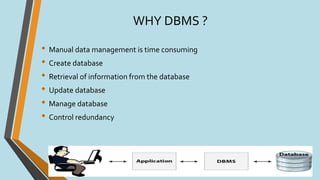
• Manual data management is time consuming
• Create database
• Retrieval of information from the database
• Update database
• Manage database
• Control redundancy
CHARACTERISTICS OF DBMS
• Provides security and removes redundancy
• Self-describing nature of a database system
• Insulation between programs and data abstraction
• Support of multiple views of the data
• Sharing of data and multiuser transaction processing
• DBMS allows entities and relations among them to form tables
• It follows the ACID concept ( Atomicity, Consistency, Isolation, and
Durability)
• DBMS supports multi-user environment that allows users to access and
manipulate data in parallel
TYPES OF DBMS
• Hierarchical DBMS
• Network DBMS
• Relational DBMS
• Object oriented DBMS
TYPES OF DBMS
• Hierarchical DBMS
In a Hierarchical database, model data is organized in a tree-like structure.
Data is stored Hierarchically (top down or bottom up) format. Data is
represented using a parent-child relationship. In Hierarchical DBMS, parent
may have many children, but children have only one parent.
• Network Model
The network database model allows each child to have multiple parents. It
helps you to address the need to model more complex relationships like as the
orders/parts many-to-many relationship. In this model, entities are organized
in a graph which can be accessed through several paths.
TYPES OF DBMS
• Relational model
Relational DBMS is the most widely used DBMS model because it is one of the
easiest.This model is based on normalizing data in the rows and columns of
the tables. Relational model stored in fixed structures and manipulated using
SQL.
• Object-Oriented Model
In Object-oriented Model data stored in the form of objects.The structure
which is called classes which display data within it. It defines a database as a
collection of objects which stores both data members values and operations.
Hierarchical DBMS Network DBMS
Relational DBMS
APPLICATIONS OF DBMS
• Banking - For customer information, account activities, payments, deposits,
loans, etc.
• Airlines - For reservations and schedule information.
• Universities - For student information, course registrations, colleges and
grades.
• Telecommunications - It helps to keep call records, monthly bills,
maintaining balances, etc.
• Sales - Use for storing customer, product & sales information.
• HR Management - For information about employees, salaries, payroll,
deduction, generation of paychecks, etc.
APPLICATIONS OF DBMS
• Manufacturing - It is used for the
management of supply chain and
for tracking production of items.
• Finance - For storing information
about stock, sales, and purchases of
financial instruments like stocks
and bonds.
POPULAR DBMS SOFTWARE
• MySQL
• MicrosoftAccess
• Oracle
• PostgreSQL
• dBASE
• FoxPro
• SQLite
• IBM DB2
• LibreOffice Base
• MariaDB
• .
ADVANTAGES OF DBMS
• DBMS offers a variety of techniques to store & retrieve data
• DBMS serves as an efficient handler to balance the needs of multiple
applications using the same data
• Uniform administration procedures for data
• Application programmers never exposed to details of data representation
and storage.
• A DBMS uses various powerful functions to store and retrieve data
efficiently.
ADVANTAGES OF DBMS
• Offers Data Integrity and Security
• The DBMS implies integrity constraints to get a high level of protection
against prohibited access to data.
• A DBMS schedules concurrent access to the data in such a manner that only
one user can access the same data at a time
• Reduced Application DevelopmentTime
DISADVANTAGES OF DBMS
DBMS may offer plenty of advantages but, it has certain flaws-
• Cost of Hardware and Software of a DBMS is quite high which increases the
budget of your organization.
• Most database management systems are often complex systems, so the
training for users to use the DBMS is required.
• In some organizations, all data is integrated into a single database which
can be damaged because of electric failure or database is corrupted on the
storage media.
• Use of the same program at a time by many users sometimes lead to the
loss of some data.
• DBMS can't perform sophisticated calculations
THANKYOU

DBMS - Database Management System

  • 1.
  • 3.
    DATA AND DATABASE •DATA Data means facts related to any object in consideration. • DATABASE Database is a systematic collection of data. Databases support storage and manipulation of data. Databases make data management easy. For example Facebook uses database to store, manipulate and present data related to members, their friends, member activities, messages, advertisements and lot more.
  • 4.
    DBMS • Database ManagementSystems is not a new concept. • A database management system (DBMS) is system software for creating and managing databases. DBMS is a collection of programs which enables its users to access database, manipulate data, reporting / representation of data . • The DBMS provides users with a systematic way to create, retrieve, update and manage data.
  • 5.
    WHY DBMS ? •Manual data management is time consuming • Create database • Retrieval of information from the database • Update database • Manage database • Control redundancy
  • 6.
    CHARACTERISTICS OF DBMS •Provides security and removes redundancy • Self-describing nature of a database system • Insulation between programs and data abstraction • Support of multiple views of the data • Sharing of data and multiuser transaction processing • DBMS allows entities and relations among them to form tables • It follows the ACID concept ( Atomicity, Consistency, Isolation, and Durability) • DBMS supports multi-user environment that allows users to access and manipulate data in parallel
  • 7.
    TYPES OF DBMS •Hierarchical DBMS • Network DBMS • Relational DBMS • Object oriented DBMS
  • 8.
    TYPES OF DBMS •Hierarchical DBMS In a Hierarchical database, model data is organized in a tree-like structure. Data is stored Hierarchically (top down or bottom up) format. Data is represented using a parent-child relationship. In Hierarchical DBMS, parent may have many children, but children have only one parent. • Network Model The network database model allows each child to have multiple parents. It helps you to address the need to model more complex relationships like as the orders/parts many-to-many relationship. In this model, entities are organized in a graph which can be accessed through several paths.
  • 9.
    TYPES OF DBMS •Relational model Relational DBMS is the most widely used DBMS model because it is one of the easiest.This model is based on normalizing data in the rows and columns of the tables. Relational model stored in fixed structures and manipulated using SQL. • Object-Oriented Model In Object-oriented Model data stored in the form of objects.The structure which is called classes which display data within it. It defines a database as a collection of objects which stores both data members values and operations.
  • 10.
    Hierarchical DBMS NetworkDBMS Relational DBMS
  • 11.
    APPLICATIONS OF DBMS •Banking - For customer information, account activities, payments, deposits, loans, etc. • Airlines - For reservations and schedule information. • Universities - For student information, course registrations, colleges and grades. • Telecommunications - It helps to keep call records, monthly bills, maintaining balances, etc. • Sales - Use for storing customer, product & sales information. • HR Management - For information about employees, salaries, payroll, deduction, generation of paychecks, etc.
  • 12.
    APPLICATIONS OF DBMS •Manufacturing - It is used for the management of supply chain and for tracking production of items. • Finance - For storing information about stock, sales, and purchases of financial instruments like stocks and bonds.
  • 13.
    POPULAR DBMS SOFTWARE •MySQL • MicrosoftAccess • Oracle • PostgreSQL • dBASE • FoxPro • SQLite • IBM DB2 • LibreOffice Base • MariaDB • .
  • 14.
    ADVANTAGES OF DBMS •DBMS offers a variety of techniques to store & retrieve data • DBMS serves as an efficient handler to balance the needs of multiple applications using the same data • Uniform administration procedures for data • Application programmers never exposed to details of data representation and storage. • A DBMS uses various powerful functions to store and retrieve data efficiently.
  • 15.
    ADVANTAGES OF DBMS •Offers Data Integrity and Security • The DBMS implies integrity constraints to get a high level of protection against prohibited access to data. • A DBMS schedules concurrent access to the data in such a manner that only one user can access the same data at a time • Reduced Application DevelopmentTime
  • 16.
    DISADVANTAGES OF DBMS DBMSmay offer plenty of advantages but, it has certain flaws- • Cost of Hardware and Software of a DBMS is quite high which increases the budget of your organization. • Most database management systems are often complex systems, so the training for users to use the DBMS is required. • In some organizations, all data is integrated into a single database which can be damaged because of electric failure or database is corrupted on the storage media. • Use of the same program at a time by many users sometimes lead to the loss of some data. • DBMS can't perform sophisticated calculations
  • 17.