Oracle 10g Database
Administrator: Implementation
and Administration
Creating an Oracle Instance
Objectives
•
•
•
•

Learn the steps for creating a database
Understand the prerequisites for creating a database
Configure initial settings for database creation
Create, start, and stop a database instance

Oracle 10g Database Administrator: Implementation and Administration

2
Objectives (continued)
• Learn the basics of managing configuration
parameter files
• Learn the purpose and location of the alert log and
trace files

Oracle 10g Database Administrator: Implementation and Administration

3
Steps for Creating a Database

Oracle 10g Database Administrator: Implementation and Administration

4
Steps for Creating a DB (continued)

Oracle 10g Database Administrator: Implementation and Administration

5
Steps for Creating a DB (continued)

Oracle 10g Database Administrator: Implementation and Administration

6
Overview of Prerequisites for Creating
a Database
• Creating a database is a separate process that
occurs after DB software has been installed
• Prerequisites:
– Oracle software must be installed on the computer
• SW may reside on a different machine than the
database

– You must be able to log on as a user with installation
privileges and with the correct set of environmental
variables in place
– The machine must have enough memory and disk
space to install and start the database
Oracle 10g Database Administrator: Implementation and Administration

7
Overview of Prerequisites for Creating
a Database (continued)
• Requirements to install Oracle 10g Enterprise
Edition on Windows 2000:
–
–
–
–
–
–
–
–

RAM: 512 MBs minimum, 1024 MBs recommended
Virtual memory: double-up the amount of RAM
Temp space: 100 MBs
Storage space: ORACLE_HOME drive for Oracle
binary files (system drive) of at least 100 MBs
Start database size: At least 800 MBs
Total space: at least 1.5 GBs recommended in total
Video adapter: greater than 256 colors
Processor speed: greater than 450 Mhz

Oracle 10g Database Administrator: Implementation and Administration

8
Choosing Configuration
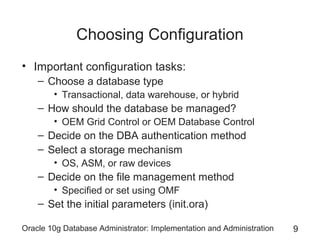
• Important configuration tasks:
– Choose a database type
• Transactional, data warehouse, or hybrid

– How should the database be managed?
• OEM Grid Control or OEM Database Control

– Decide on the DBA authentication method
– Select a storage mechanism
• OS, ASM, or raw devices

– Decide on the file management method
• Specified or set using OMF

– Set the initial parameters (init.ora)
Oracle 10g Database Administrator: Implementation and Administration

9
Database Type

Oracle 10g Database Administrator: Implementation and Administration

10
Database Management Tool

Oracle 10g Database Administrator: Implementation and Administration

11
DBA Authentication Methods
• The DBA authentication method encompasses the
method used to validate logon of users with the
SYSDBA or SYSOPER role
– SYSDBA: ADMIN role and can CREATE DATABASE
– SYSOPER: has system privileges to start up, shut
down, and back up the database, and modify
database components

• Two authentication methods:
– OS authentication
– Password file authentication
Oracle 10g Database Administrator: Implementation and Administration

12
Operating System (OS) Authentication
• User logs without specifying user name/password
• To set up OS authentication, follow these steps:
1.
2.
3.
4.

Create OS user for the DBA
Unix only: Create an OSDBA group
Optional: Create an OSOPER group
Set the initialization parameter
REMOTE_LOGIN_PASSWORDFILE to NONE
5. Assign OS user to OSDBA or OSOPER group
6. Create Oracle user in DB with same name

• To log on to SQL*Plus using OS authentication:
sqlplus /nolog
CONNECT /@ORACLASS AS SYSDBA
Oracle 10g Database Administrator: Implementation and Administration

13
Password File Authentication
• Encrypted file contains user names and passwords
• To set up password file authentication:
– Create a new password file (orapwd)
• Windows: PWD<sid>.ORA, in
ORACLE_HOMEdatabase
• Unix: orapw<sid>.ora, typically in ORACLE_HOME/dbs

1. REMOTE_LOGIN_PASSWORD FILE = EXCLUSIVE
2. Log on to DB with SYSDBA privileges
3. Create the new DBA user name if needed
4. Grant SYSDBA or SYSOPER privilege to user
Oracle 10g Database Administrator: Implementation and Administration

14
Password File Authentication
(continued)
• You can log on to the database with SYSDBA or
SYSOPER roles in Enterprise Manager as well as
in SQL*Plus

Oracle 10g Database Administrator: Implementation and Administration

15
Password File Authentication
(continued)

Oracle 10g Database Administrator: Implementation and Administration

16
Storage Management Methods

Oracle 10g Database Administrator: Implementation and Administration

17
File Management Methods
• The two primary tasks in file management are:
– Location of files
• Oracle recommends that you multiplex control files

– Addition, expansion, and deletion of files
• Storage requirements grow and shrink according to
the activity in the database

• There are two basic file management methods
available for a new database
– User-managed
– Oracle Managed Files
Oracle 10g Database Administrator: Implementation and Administration

18
File Management Methods (continued)

Oracle 10g Database Administrator: Implementation and Administration

19
User-Managed File Management
• A good reason for using the user-managed method
of file management is to continue with a customized
file management standard that was in place for
earlier versions of the database
– Advantage: administrator has total control
– Disadvantage: many tasks involve manual intervention

• To implement user-managed redo log files, use the
LOGFILES clause in CREATE DATABASE
• Omitting a fully qualified DATAFILE clause in
CREATE DATABASE causes Oracle 10g to create
OMFs as the datafiles for the SYSTEM tablespace
Oracle 10g Database Administrator: Implementation and Administration

20
Oracle Managed Files
• OMF automates most menial file management
tasks, leaving more important decisions to DBA
– File creation/expansion/deletion as DB size changes

• Advantages:
– Adherence to OFA naming standards
– Automatic removal of dependent datafiles when a
tablespace is dropped
– Simplified syntax for CREATE DATABASE
– Automated expansion and addition of datafiles as
storage requirements change
Oracle 10g Database Administrator: Implementation and Administration

21
Oracle Managed Files (continued)
• Main disadvantage: inability to control exact size
and name of datafiles, control files, and log files
• You can create some files as user-managed files
and leave others as OMF in the same database
• Specify values in these initialization parameters:
DB_CREATE_FILE_DEST = D:oracleproduct10.2.0
DB_CREATE_ONLINE_LOG_DEST_1 = D:oracleproduct10.2.0
DB_CREATE_ONLINE_LOG_DEST_2 = E:oracleproduct10.2.0

– The directories must already exist
– On CREATE DATABASE, omit the parameters for
control file, redo log file, and SYSTEM tablespace
datafiles

• Names comply with OFA
Oracle 10g Database Administrator: Implementation and Administration

22
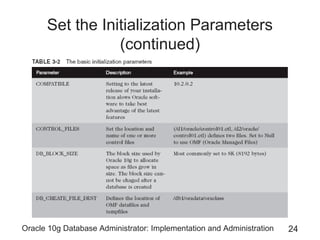
Set the Initialization Parameters

Oracle 10g Database Administrator: Implementation and Administration

23
Set the Initialization Parameters
(continued)

Oracle 10g Database Administrator: Implementation and Administration

24
Set the Initialization Parameters
(continued)

Oracle 10g Database Administrator: Implementation and Administration

25
Set the Initialization Parameters
(continued)

Oracle 10g Database Administrator: Implementation and Administration

26
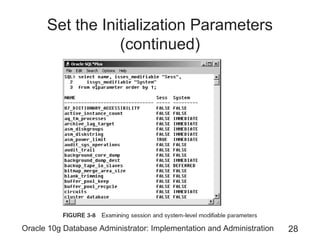
Set the Initialization Parameters
(continued)

Oracle 10g Database Administrator: Implementation and Administration

27
Set the Initialization Parameters
(continued)

Oracle 10g Database Administrator: Implementation and Administration

28
Creating a Database
• To create a database you can use:
– Database Configuration Assistant (DBCA tool)
– CREATE DATABASE command

• You can use the DBCA tool to generate scripts for
creating a database manually
– You can use these scripts if you have multiple
consistent databases to create at different sites

• CREATE DATABASE gives you greater flexibility
but unnecessary complexity with settings
– You do need to be familiar with its syntax
Oracle 10g Database Administrator: Implementation and Administration

29
Create a New Database Using the
Database Configuration Assistant

Oracle 10g Database Administrator: Implementation and Administration

30
Create a New Database Using the
DCBA Tool (continued)

Oracle 10g Database Administrator: Implementation and Administration

31
Create a New Database Using the
DCBA Tool (continued)

Oracle 10g Database Administrator: Implementation and Administration

32
Create a New Database Using the
DCBA Tool (continued)

Oracle 10g Database Administrator: Implementation and Administration

33
Create a New Database Using the
DCBA Tool (continued)

Oracle 10g Database Administrator: Implementation and Administration

34
Create a New Database Using the
DCBA Tool (continued)

Oracle 10g Database Administrator: Implementation and Administration

35
Connecting to a New Database

Oracle 10g Database Administrator: Implementation and Administration

36
Connecting to a New Database
(continued)

Oracle 10g Database Administrator: Implementation and Administration

37
Creating a Database Manually

Oracle 10g Database Administrator: Implementation and Administration

38
Creating a Database Manually
(continued)

Oracle 10g Database Administrator: Implementation and Administration

39
Creating a Database Manually
(continued)
CREATE DATABASE "trial02"
MAXINSTANCES 8
MAXLOGHISTORY 1
MAXLOGFILES 16
MAXLOGMEMBERS 3
MAXDATAFILES 100
DATAFILE 'ORACLE_BASEoradatatrial02system01.dbf' SIZE 300M REUSE
AUTOEXTEND ON NEXT 10240K MAXSIZE UNLIMITED
EXTENT MANAGEMENT LOCAL
SYSAUX DATAFILE 'ORACLE_BASEoradatatrial02sysaux01.dbf' SIZE 120M
REUSE
AUTOEXTEND ON NEXT 10240K MAXSIZE UNLIMITED
DEFAULT TEMPORARY TABLESPACE TEMP TEMPFILE
'ORACLE_BASEoradatatrial02temp01.dbf' SIZE 20M REUSE
AUTOEXTEND ON NEXT 640K MAXSIZE UNLIMITED
UNDO TABLESPACE "UNDOTBS1" DATAFILE
'ORACLE_BASEoradatatrial02undotbs01.dbf' SIZE 200M REUSE
AUTOEXTEND ON NEXT 5120K MAXSIZE UNLIMITED
CHARACTER SET WE8MSWIN1252
NATIONAL CHARACTER SET AL16UTF16
LOGFILE GROUP 1 ('ORACLE_BASEoradatatrial02redo01.log') SIZE 10240K,
GROUP 2 ('ORACLE_BASEoradatatrial02redo02.log') SIZE 10240K,
GROUP 3 ('ORACLE_BASEoradatatrial02redo03.log') SIZE 10240K
USER SYS IDENTIFIED BY "&&sysPassword"
USER SYSTEM IDENTIFIED BY "&&systemPassword"
;

Oracle 10g Database Administrator: Implementation and Administration

40
Creating a Database Manually
(continued)
• CREATE DATABASE is simple when using OMF
– DB_FILE_DEST tells where to locate datafiles
– DB_ONLINE_LOGFILE_DEST_n tells where to
place control and redo log files
– If you omit these parameters from init<sid>.ora, you
can still use OMF, placing files in a default directory
• To invoke OMF, omit all of the filenames and
locations in CREATE DATABASE
CREATE DATABASE testOFM
MAXINSTANCES 1
CHARACTER SET WE8MSWIN1252
NATIONAL CHARACTER SET AL16UTF16;

• To execute the scripts, execute the batch file
created in ORACLE_BASE/admin/trial02/scripts
Oracle 10g Database Administrator: Implementation and Administration

41
Starting and Stopping the Instance
and Database
• To shut down a running database using SQL*Plus:
1. Start a Command Prompt window (or shell)
2. Start up SQL*Plus without logging: sqlplus /nolog
3. Connect as SYS with SYSDBA
CONNECT SYS/<password>@trial01 AS SYSDBA

1. Type SHUTDOWN IMMEDIATE and press Enter
Database closed.
Database dismounted.
ORACLE instance shut down.

• There are four options for SHUTDOWN:
– NORMAL, TRANSACTIONAL, IMMEDIATE, ABORT
Oracle 10g Database Administrator: Implementation and Administration

42
Starting and Stopping the Instance
and Database (continued)
• To start DB, change step 4 in previous slide:
STARTUP PFILE=ORACLE_BASEadmintrial01pfileinittrial01.ora

– PFILE parameter needed if you have not created the
SPFILE

• STARTUP options:
– NOMOUNT, MOUNT, OPEN, PFILE

Oracle 10g Database Administrator: Implementation and Administration

43
Starting and Stopping the Instance
and Database (continued)

Oracle 10g Database Administrator: Implementation and Administration

44
Managing Text and Binary (Server)
Parameter Files
• Starting up a DB using a PFILE requires an explicit
sequence of commands, restarting DB as follows:
SHUTDOWN;
STARTUP MOUNT PFILE='C:oracleproduct10.2.0
0admintria01pfileinittrial01.ora’;
ALTER DATBASE OPEN;

• The SPFILE can be used to create a PFILE or vice
versa:
CREATE PFILE='C:oracleproduct10.2.0admintrial01pfileinittrial01.ora'
FROM SPFILE='C:oracleproduct10.2.0db_1databasespfiletrial01.ora';
CREATE SPFILE='C:oracleproduct10.2.0db_1databasespfiletrial01.ora'
FROM PFILE='C:oracleproduct10.2.0admintrial01pfileinittrial01.ora';

Oracle 10g Database Administrator: Implementation and Administration

45
The Alert Log and Trace Files
• The alert log is essential because it will contain all
the essential information for the smooth running of
your database
– All critical errors will be written to the alert log

• Trace files contain more detailed log and tracing
information about general processing
– Trace files can be used to track down problems not
causing critical failures, generally using special tools
• E.g. , TKPROF

Oracle 10g Database Administrator: Implementation and Administration

46
Expanding OFA Just a Little More
• The OFA needs to be expanded from Chapter 1 to
include other factors introduced in this chapter
– Chapter 1 described OFA as requiring a directory
structure as follows:
– Admin/<database name>
– bdump
– cdump
– create
– pfile
– udump
– db_1
– client_1
– oradata/<database name>
– flash_recovery_area/<database name>

Oracle 10g Database Administrator: Implementation and Administration

47
Summary
• Installing the Oracle 10g database software is a
separate process from that of creating a database
• Databases can be created using the Database
Configuration Assistant (DBCA tool) or manually
using the CREATE DATABASE command
• When creating a DB manually it is best to generate
scripts using DBCA first, and then to edit them
• The OS-specific installation guide describes
minimum requirements for installing a new database
• The DBA authentication method determines how
Oracle 10g validates users logging on with SYSDBA
or SYSOPER privileges
Oracle 10g Database Administrator: Implementation and Administration

48
Summary (continued)
• OS authentication relies on the OS’s security to
validate the user/password, and authorization group
• The REMOTE_LOGIN_PASSWORDFILE parameter
is set to NONE for OS authentication
• Password file authentication stores user names and
passwords and group membership in an encrypted
file in the OS
• Set REMOTE_LOGIN_PASSWORDFILE to
EXCLUSIVE for password file authentication
• The ORAPWD utility generates the password file for
SYSDBA and SYSOPER and then the database
maintains it with changes to passwords
Oracle 10g Database Administrator: Implementation and Administration

49
Summary (continued)
• Control files can be multiplexed (each subsequent
control file is an exact copy of the first control file)
– Multiplexed copies of control files should be located
on different physical devices to guard against damage

• Prevent bottlenecks in data access by placing data
on several physical devices (spreads the demand)
• Oracle Managed Files ease the DBA’s ongoing
problem of monitoring and controlling the growth of
datafiles
• User-managed file management offers more
detailed control over datafiles than Oracle Managed
Files, but requires more manual maintenance tasks
Oracle 10g Database Administrator: Implementation and Administration

50
Summary (continued)
• The OMF method automates removal of dependent
datafiles when a tablespace is dropped
• OMF handles datafile creation, naming, and sizing
• The parameter of DB_CREATE_FILE_DEST
initialization sets the location of datafiles when
using OMF
• The DB_CREATE_ONLINE_LOG_DEST_
initialization parameters set the location of control
files and redo log files when using OMF
• OMF uses OFA as its file-naming standard
Oracle 10g Database Administrator: Implementation and Administration

51
Summary (continued)
• Initialization parameters are: basic and advanced
• When using a binary parameter file, initialization
parameters can be changed at the session level for
the life of a database connection
• The DBCA tool leads you through several steps to
create a new database
– Types of database configurations, including Custom,
Data Warehouse, Transaction Processing, and
General Purpose

• Dedicated Server mode does not work well for very
large OLTP databases
Oracle 10g Database Administrator: Implementation and Administration

52
Summary (continued)
• DBCA provides an opportunity to customize
memory size and initialization parameters
• Adjusting of tablespace/datafile sizes and locations
depends on the DB type selected using DBCA
• After creating a new database, use Net Manager to
set up a Net Service name for the database
• To create a DB manually, first set up a directory
structure for the files that are to be created
• Create a password file to implement password file
authentication when the new database is created
Oracle 10g Database Administrator: Implementation and Administration

53
Summary (continued)
• A DB service must be started if using Windows, but
is not required if you are using Unix or Linux
• CREATE DATABASE generates datafiles, control
files, etc.
• Manually created DBs should have tablespaces
called SYSTEM for metadata, SYSAUX for Oracle
add-on options, temporary storage, an undo
tablespace, and a tablespace for other schemas
• Manually created DBs should include minimum
scripting generation options, as created by DBCA
• To use SHUTDOWN in SQL*Plus, log in as
SYSDBA

Oracle 10g Database Administrator: Implementation and Administration

54
Summary (continued)
• SHUTDOWN IMMEDIATE is faster than
SHUTDOWN NORMAL
• SHUTDOWN ABORT is used only when the
database has errors and does not shut down with
NORMAL, IMMEDIATE, or TRANSACTIONAL
• A DB can be started up with a text or binary
configuration initialization parameter file
– A binary file allows changing of most parameters
with the database up and running

• Alert log contains critical errors
Oracle 10g Database Administrator: Implementation and Administration

55

Creating database

  • 1.
    Oracle 10g Database Administrator:Implementation and Administration Creating an Oracle Instance
  • 2.
    Objectives • • • • Learn the stepsfor creating a database Understand the prerequisites for creating a database Configure initial settings for database creation Create, start, and stop a database instance Oracle 10g Database Administrator: Implementation and Administration 2
  • 3.
    Objectives (continued) • Learnthe basics of managing configuration parameter files • Learn the purpose and location of the alert log and trace files Oracle 10g Database Administrator: Implementation and Administration 3
  • 4.
    Steps for Creatinga Database Oracle 10g Database Administrator: Implementation and Administration 4
  • 5.
    Steps for Creatinga DB (continued) Oracle 10g Database Administrator: Implementation and Administration 5
  • 6.
    Steps for Creatinga DB (continued) Oracle 10g Database Administrator: Implementation and Administration 6
  • 7.
    Overview of Prerequisitesfor Creating a Database • Creating a database is a separate process that occurs after DB software has been installed • Prerequisites: – Oracle software must be installed on the computer • SW may reside on a different machine than the database – You must be able to log on as a user with installation privileges and with the correct set of environmental variables in place – The machine must have enough memory and disk space to install and start the database Oracle 10g Database Administrator: Implementation and Administration 7
  • 8.
    Overview of Prerequisitesfor Creating a Database (continued) • Requirements to install Oracle 10g Enterprise Edition on Windows 2000: – – – – – – – – RAM: 512 MBs minimum, 1024 MBs recommended Virtual memory: double-up the amount of RAM Temp space: 100 MBs Storage space: ORACLE_HOME drive for Oracle binary files (system drive) of at least 100 MBs Start database size: At least 800 MBs Total space: at least 1.5 GBs recommended in total Video adapter: greater than 256 colors Processor speed: greater than 450 Mhz Oracle 10g Database Administrator: Implementation and Administration 8
  • 9.
    Choosing Configuration • Importantconfiguration tasks: – Choose a database type • Transactional, data warehouse, or hybrid – How should the database be managed? • OEM Grid Control or OEM Database Control – Decide on the DBA authentication method – Select a storage mechanism • OS, ASM, or raw devices – Decide on the file management method • Specified or set using OMF – Set the initial parameters (init.ora) Oracle 10g Database Administrator: Implementation and Administration 9
  • 10.
    Database Type Oracle 10gDatabase Administrator: Implementation and Administration 10
  • 11.
    Database Management Tool Oracle10g Database Administrator: Implementation and Administration 11
  • 12.
    DBA Authentication Methods •The DBA authentication method encompasses the method used to validate logon of users with the SYSDBA or SYSOPER role – SYSDBA: ADMIN role and can CREATE DATABASE – SYSOPER: has system privileges to start up, shut down, and back up the database, and modify database components • Two authentication methods: – OS authentication – Password file authentication Oracle 10g Database Administrator: Implementation and Administration 12
  • 13.
    Operating System (OS)Authentication • User logs without specifying user name/password • To set up OS authentication, follow these steps: 1. 2. 3. 4. Create OS user for the DBA Unix only: Create an OSDBA group Optional: Create an OSOPER group Set the initialization parameter REMOTE_LOGIN_PASSWORDFILE to NONE 5. Assign OS user to OSDBA or OSOPER group 6. Create Oracle user in DB with same name • To log on to SQL*Plus using OS authentication: sqlplus /nolog CONNECT /@ORACLASS AS SYSDBA Oracle 10g Database Administrator: Implementation and Administration 13
  • 14.
    Password File Authentication •Encrypted file contains user names and passwords • To set up password file authentication: – Create a new password file (orapwd) • Windows: PWD<sid>.ORA, in ORACLE_HOMEdatabase • Unix: orapw<sid>.ora, typically in ORACLE_HOME/dbs 1. REMOTE_LOGIN_PASSWORD FILE = EXCLUSIVE 2. Log on to DB with SYSDBA privileges 3. Create the new DBA user name if needed 4. Grant SYSDBA or SYSOPER privilege to user Oracle 10g Database Administrator: Implementation and Administration 14
  • 15.
    Password File Authentication (continued) •You can log on to the database with SYSDBA or SYSOPER roles in Enterprise Manager as well as in SQL*Plus Oracle 10g Database Administrator: Implementation and Administration 15
  • 16.
    Password File Authentication (continued) Oracle10g Database Administrator: Implementation and Administration 16
  • 17.
    Storage Management Methods Oracle10g Database Administrator: Implementation and Administration 17
  • 18.
    File Management Methods •The two primary tasks in file management are: – Location of files • Oracle recommends that you multiplex control files – Addition, expansion, and deletion of files • Storage requirements grow and shrink according to the activity in the database • There are two basic file management methods available for a new database – User-managed – Oracle Managed Files Oracle 10g Database Administrator: Implementation and Administration 18
  • 19.
    File Management Methods(continued) Oracle 10g Database Administrator: Implementation and Administration 19
  • 20.
    User-Managed File Management •A good reason for using the user-managed method of file management is to continue with a customized file management standard that was in place for earlier versions of the database – Advantage: administrator has total control – Disadvantage: many tasks involve manual intervention • To implement user-managed redo log files, use the LOGFILES clause in CREATE DATABASE • Omitting a fully qualified DATAFILE clause in CREATE DATABASE causes Oracle 10g to create OMFs as the datafiles for the SYSTEM tablespace Oracle 10g Database Administrator: Implementation and Administration 20
  • 21.
    Oracle Managed Files •OMF automates most menial file management tasks, leaving more important decisions to DBA – File creation/expansion/deletion as DB size changes • Advantages: – Adherence to OFA naming standards – Automatic removal of dependent datafiles when a tablespace is dropped – Simplified syntax for CREATE DATABASE – Automated expansion and addition of datafiles as storage requirements change Oracle 10g Database Administrator: Implementation and Administration 21
  • 22.
    Oracle Managed Files(continued) • Main disadvantage: inability to control exact size and name of datafiles, control files, and log files • You can create some files as user-managed files and leave others as OMF in the same database • Specify values in these initialization parameters: DB_CREATE_FILE_DEST = D:oracleproduct10.2.0 DB_CREATE_ONLINE_LOG_DEST_1 = D:oracleproduct10.2.0 DB_CREATE_ONLINE_LOG_DEST_2 = E:oracleproduct10.2.0 – The directories must already exist – On CREATE DATABASE, omit the parameters for control file, redo log file, and SYSTEM tablespace datafiles • Names comply with OFA Oracle 10g Database Administrator: Implementation and Administration 22
  • 23.
    Set the InitializationParameters Oracle 10g Database Administrator: Implementation and Administration 23
  • 24.
    Set the InitializationParameters (continued) Oracle 10g Database Administrator: Implementation and Administration 24
  • 25.
    Set the InitializationParameters (continued) Oracle 10g Database Administrator: Implementation and Administration 25
  • 26.
    Set the InitializationParameters (continued) Oracle 10g Database Administrator: Implementation and Administration 26
  • 27.
    Set the InitializationParameters (continued) Oracle 10g Database Administrator: Implementation and Administration 27
  • 28.
    Set the InitializationParameters (continued) Oracle 10g Database Administrator: Implementation and Administration 28
  • 29.
    Creating a Database •To create a database you can use: – Database Configuration Assistant (DBCA tool) – CREATE DATABASE command • You can use the DBCA tool to generate scripts for creating a database manually – You can use these scripts if you have multiple consistent databases to create at different sites • CREATE DATABASE gives you greater flexibility but unnecessary complexity with settings – You do need to be familiar with its syntax Oracle 10g Database Administrator: Implementation and Administration 29
  • 30.
    Create a NewDatabase Using the Database Configuration Assistant Oracle 10g Database Administrator: Implementation and Administration 30
  • 31.
    Create a NewDatabase Using the DCBA Tool (continued) Oracle 10g Database Administrator: Implementation and Administration 31
  • 32.
    Create a NewDatabase Using the DCBA Tool (continued) Oracle 10g Database Administrator: Implementation and Administration 32
  • 33.
    Create a NewDatabase Using the DCBA Tool (continued) Oracle 10g Database Administrator: Implementation and Administration 33
  • 34.
    Create a NewDatabase Using the DCBA Tool (continued) Oracle 10g Database Administrator: Implementation and Administration 34
  • 35.
    Create a NewDatabase Using the DCBA Tool (continued) Oracle 10g Database Administrator: Implementation and Administration 35
  • 36.
    Connecting to aNew Database Oracle 10g Database Administrator: Implementation and Administration 36
  • 37.
    Connecting to aNew Database (continued) Oracle 10g Database Administrator: Implementation and Administration 37
  • 38.
    Creating a DatabaseManually Oracle 10g Database Administrator: Implementation and Administration 38
  • 39.
    Creating a DatabaseManually (continued) Oracle 10g Database Administrator: Implementation and Administration 39
  • 40.
    Creating a DatabaseManually (continued) CREATE DATABASE "trial02" MAXINSTANCES 8 MAXLOGHISTORY 1 MAXLOGFILES 16 MAXLOGMEMBERS 3 MAXDATAFILES 100 DATAFILE 'ORACLE_BASEoradatatrial02system01.dbf' SIZE 300M REUSE AUTOEXTEND ON NEXT 10240K MAXSIZE UNLIMITED EXTENT MANAGEMENT LOCAL SYSAUX DATAFILE 'ORACLE_BASEoradatatrial02sysaux01.dbf' SIZE 120M REUSE AUTOEXTEND ON NEXT 10240K MAXSIZE UNLIMITED DEFAULT TEMPORARY TABLESPACE TEMP TEMPFILE 'ORACLE_BASEoradatatrial02temp01.dbf' SIZE 20M REUSE AUTOEXTEND ON NEXT 640K MAXSIZE UNLIMITED UNDO TABLESPACE "UNDOTBS1" DATAFILE 'ORACLE_BASEoradatatrial02undotbs01.dbf' SIZE 200M REUSE AUTOEXTEND ON NEXT 5120K MAXSIZE UNLIMITED CHARACTER SET WE8MSWIN1252 NATIONAL CHARACTER SET AL16UTF16 LOGFILE GROUP 1 ('ORACLE_BASEoradatatrial02redo01.log') SIZE 10240K, GROUP 2 ('ORACLE_BASEoradatatrial02redo02.log') SIZE 10240K, GROUP 3 ('ORACLE_BASEoradatatrial02redo03.log') SIZE 10240K USER SYS IDENTIFIED BY "&&sysPassword" USER SYSTEM IDENTIFIED BY "&&systemPassword" ; Oracle 10g Database Administrator: Implementation and Administration 40
  • 41.
    Creating a DatabaseManually (continued) • CREATE DATABASE is simple when using OMF – DB_FILE_DEST tells where to locate datafiles – DB_ONLINE_LOGFILE_DEST_n tells where to place control and redo log files – If you omit these parameters from init<sid>.ora, you can still use OMF, placing files in a default directory • To invoke OMF, omit all of the filenames and locations in CREATE DATABASE CREATE DATABASE testOFM MAXINSTANCES 1 CHARACTER SET WE8MSWIN1252 NATIONAL CHARACTER SET AL16UTF16; • To execute the scripts, execute the batch file created in ORACLE_BASE/admin/trial02/scripts Oracle 10g Database Administrator: Implementation and Administration 41
  • 42.
    Starting and Stoppingthe Instance and Database • To shut down a running database using SQL*Plus: 1. Start a Command Prompt window (or shell) 2. Start up SQL*Plus without logging: sqlplus /nolog 3. Connect as SYS with SYSDBA CONNECT SYS/<password>@trial01 AS SYSDBA 1. Type SHUTDOWN IMMEDIATE and press Enter Database closed. Database dismounted. ORACLE instance shut down. • There are four options for SHUTDOWN: – NORMAL, TRANSACTIONAL, IMMEDIATE, ABORT Oracle 10g Database Administrator: Implementation and Administration 42
  • 43.
    Starting and Stoppingthe Instance and Database (continued) • To start DB, change step 4 in previous slide: STARTUP PFILE=ORACLE_BASEadmintrial01pfileinittrial01.ora – PFILE parameter needed if you have not created the SPFILE • STARTUP options: – NOMOUNT, MOUNT, OPEN, PFILE Oracle 10g Database Administrator: Implementation and Administration 43
  • 44.
    Starting and Stoppingthe Instance and Database (continued) Oracle 10g Database Administrator: Implementation and Administration 44
  • 45.
    Managing Text andBinary (Server) Parameter Files • Starting up a DB using a PFILE requires an explicit sequence of commands, restarting DB as follows: SHUTDOWN; STARTUP MOUNT PFILE='C:oracleproduct10.2.0 0admintria01pfileinittrial01.ora’; ALTER DATBASE OPEN; • The SPFILE can be used to create a PFILE or vice versa: CREATE PFILE='C:oracleproduct10.2.0admintrial01pfileinittrial01.ora' FROM SPFILE='C:oracleproduct10.2.0db_1databasespfiletrial01.ora'; CREATE SPFILE='C:oracleproduct10.2.0db_1databasespfiletrial01.ora' FROM PFILE='C:oracleproduct10.2.0admintrial01pfileinittrial01.ora'; Oracle 10g Database Administrator: Implementation and Administration 45
  • 46.
    The Alert Logand Trace Files • The alert log is essential because it will contain all the essential information for the smooth running of your database – All critical errors will be written to the alert log • Trace files contain more detailed log and tracing information about general processing – Trace files can be used to track down problems not causing critical failures, generally using special tools • E.g. , TKPROF Oracle 10g Database Administrator: Implementation and Administration 46
  • 47.
    Expanding OFA Justa Little More • The OFA needs to be expanded from Chapter 1 to include other factors introduced in this chapter – Chapter 1 described OFA as requiring a directory structure as follows: – Admin/<database name> – bdump – cdump – create – pfile – udump – db_1 – client_1 – oradata/<database name> – flash_recovery_area/<database name> Oracle 10g Database Administrator: Implementation and Administration 47
  • 48.
    Summary • Installing theOracle 10g database software is a separate process from that of creating a database • Databases can be created using the Database Configuration Assistant (DBCA tool) or manually using the CREATE DATABASE command • When creating a DB manually it is best to generate scripts using DBCA first, and then to edit them • The OS-specific installation guide describes minimum requirements for installing a new database • The DBA authentication method determines how Oracle 10g validates users logging on with SYSDBA or SYSOPER privileges Oracle 10g Database Administrator: Implementation and Administration 48
  • 49.
    Summary (continued) • OSauthentication relies on the OS’s security to validate the user/password, and authorization group • The REMOTE_LOGIN_PASSWORDFILE parameter is set to NONE for OS authentication • Password file authentication stores user names and passwords and group membership in an encrypted file in the OS • Set REMOTE_LOGIN_PASSWORDFILE to EXCLUSIVE for password file authentication • The ORAPWD utility generates the password file for SYSDBA and SYSOPER and then the database maintains it with changes to passwords Oracle 10g Database Administrator: Implementation and Administration 49
  • 50.
    Summary (continued) • Controlfiles can be multiplexed (each subsequent control file is an exact copy of the first control file) – Multiplexed copies of control files should be located on different physical devices to guard against damage • Prevent bottlenecks in data access by placing data on several physical devices (spreads the demand) • Oracle Managed Files ease the DBA’s ongoing problem of monitoring and controlling the growth of datafiles • User-managed file management offers more detailed control over datafiles than Oracle Managed Files, but requires more manual maintenance tasks Oracle 10g Database Administrator: Implementation and Administration 50
  • 51.
    Summary (continued) • TheOMF method automates removal of dependent datafiles when a tablespace is dropped • OMF handles datafile creation, naming, and sizing • The parameter of DB_CREATE_FILE_DEST initialization sets the location of datafiles when using OMF • The DB_CREATE_ONLINE_LOG_DEST_ initialization parameters set the location of control files and redo log files when using OMF • OMF uses OFA as its file-naming standard Oracle 10g Database Administrator: Implementation and Administration 51
  • 52.
    Summary (continued) • Initializationparameters are: basic and advanced • When using a binary parameter file, initialization parameters can be changed at the session level for the life of a database connection • The DBCA tool leads you through several steps to create a new database – Types of database configurations, including Custom, Data Warehouse, Transaction Processing, and General Purpose • Dedicated Server mode does not work well for very large OLTP databases Oracle 10g Database Administrator: Implementation and Administration 52
  • 53.
    Summary (continued) • DBCAprovides an opportunity to customize memory size and initialization parameters • Adjusting of tablespace/datafile sizes and locations depends on the DB type selected using DBCA • After creating a new database, use Net Manager to set up a Net Service name for the database • To create a DB manually, first set up a directory structure for the files that are to be created • Create a password file to implement password file authentication when the new database is created Oracle 10g Database Administrator: Implementation and Administration 53
  • 54.
    Summary (continued) • ADB service must be started if using Windows, but is not required if you are using Unix or Linux • CREATE DATABASE generates datafiles, control files, etc. • Manually created DBs should have tablespaces called SYSTEM for metadata, SYSAUX for Oracle add-on options, temporary storage, an undo tablespace, and a tablespace for other schemas • Manually created DBs should include minimum scripting generation options, as created by DBCA • To use SHUTDOWN in SQL*Plus, log in as SYSDBA Oracle 10g Database Administrator: Implementation and Administration 54
  • 55.
    Summary (continued) • SHUTDOWNIMMEDIATE is faster than SHUTDOWN NORMAL • SHUTDOWN ABORT is used only when the database has errors and does not shut down with NORMAL, IMMEDIATE, or TRANSACTIONAL • A DB can be started up with a text or binary configuration initialization parameter file – A binary file allows changing of most parameters with the database up and running • Alert log contains critical errors Oracle 10g Database Administrator: Implementation and Administration 55