Advanced Databases
Basic Database
Administration
S. O. INFOTECH PVT. LTD
UNDER GUIDANCE OF
SENIOR DBA
Mr. ANJIT SINGH
Guide to Oracle 10g
1
Advanced Databases 2
Advanced Databases
Objectives
• Define database administration.
• Understand database administration tasks.
• Perform database administration tasks
using Oracle 11g Enterprise Manager.
• Understand Oracle 11g and SQL Server
data storage structures.
3
Advanced Databases
What is Database
Administration?
• A Function information technology (IT)
department
• Database Administrator (DBA)
– Overall health / Performance
– Manages Security
– Setup Test and Dev. Environments
• http://www.bls.gov/ooh/computer-and-
information-technology/database-
administrators.htm
4
Advanced Databases
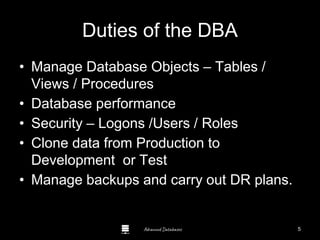
Duties of the DBA
• Manage Database Objects – Tables /
Views / Procedures
• Database performance
• Security – Logons /Users / Roles
• Clone data from Production to
Development or Test
• Manage backups and carry out DR plans.
Guide to Oracle 10g
5
Advanced Databases
DBA Tools
Guide to Oracle 10g
6
Advanced Databases
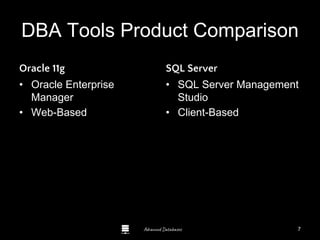
DBA Tools Product Comparison
Oracle 11g
• Oracle Enterprise
Manager
• Web-Based
SQL Server
• SQL Server Management
Studio
• Client-Based
Guide to Oracle 10g
7
Advanced Databases
Startup / Shutdown
8
Advanced Databases
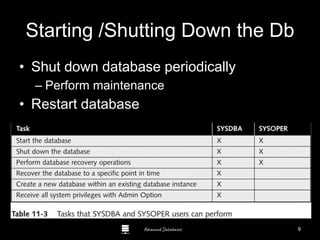
Starting /Shutting Down the Db
• Shut down database periodically
– Perform maintenance
• Restart database
Guide to Oracle 10g
9
Advanced Databases
Creating an Administrative
Connection
• Shutting down database makes database
unavailable for user connections
• DBA must log onto database using
administrative connection
• SYS user account
Guide to Oracle 10g
10
Advanced Databases
Using OEM to Shut Down and Start
a Database Instance
• DBA shuts down database instance using
Normal, Transactional, or Immediate
shutdown option
– Shutdown process performs five following
tasks:
• Writes contents of data buffer cache to datafiles
• Writes contents of redo log buffer to redo log files
• Closes all files
• Stops all background processes
• Deallocates SGA in server’s main memory
11
Advanced Databases
Instance Options
Startup
• Start in one of two
modes:
– Unrestricted
– Restricted
– Mount(data file recovery)
– No mount(control file)
– Open
Shutdown
• Specify one of four ways
to handle existing user
connections:
– Normal
– Immediate
– Abort
12
Advanced Databases
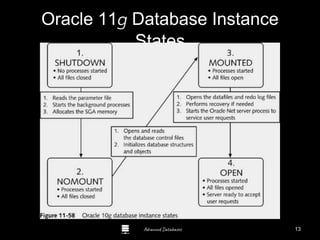
Oracle 11g Database Instance
States
13
Advanced Databases
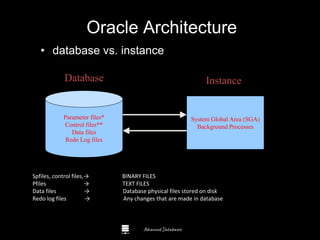
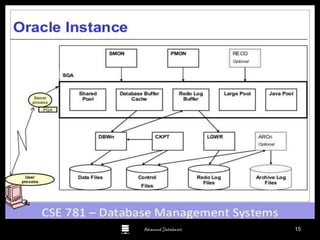
Oracle Architecture
• database vs. instance
Parameter files*
Control files**
Data files
Redo Log files
System Global Area (SGA)
Background Processes
Disk Memory
Database Instance
Spfiles, control files,→ BINARY FILES
Pfiles → TEXT FILES
Data files → Database physical files stored on disk
Redo log files → Any changes that are made in database
Advanced Databases 15
Advanced Databases
Oracle Enterprise Manager
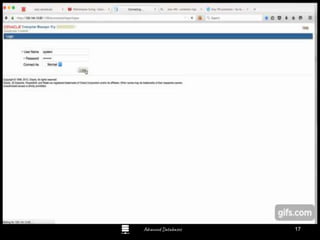
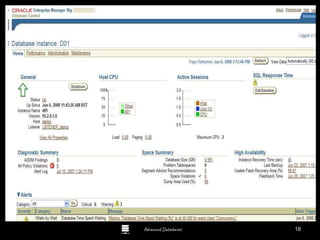
• User account must have DBA role
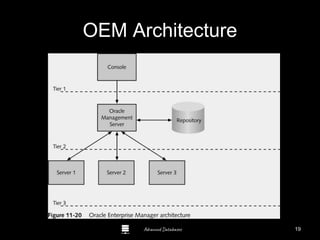
• Oracle Enterprise Manager (OEM)
– Three-tier architecture
– Console
• Oracle Management Server (OMS)
– Interacts with repository
– Makes it easier for DBAs to administer
multiple databases in organization’s network
16
Advanced Databases 17
Advanced Databases 18
Advanced Databases
OEM Architecture
19
Advanced Databases
Demo
DBA Consoles
Guide to Oracle 10g
20
Advanced Databases
Managing Oracle 11g Data Storage
• Like most DBMS’s the logical structures
– Tables
– Constraints
– Views / Procedures
• Can be stored in physical data structures
– Files on disk
– Dedicated drive partitions
– RAM Guide to Oracle 10g
21
Advanced Databases
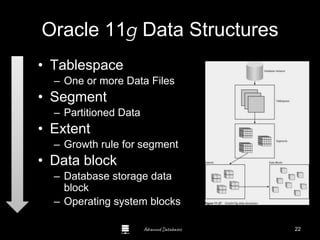
Oracle 11g Data Structures
• Tablespace
– One or more Data Files
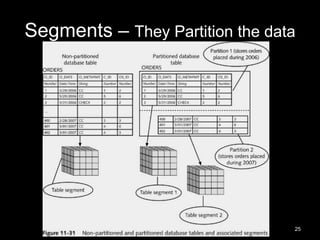
• Segment
– Partitioned Data
• Extent
– Growth rule for segment
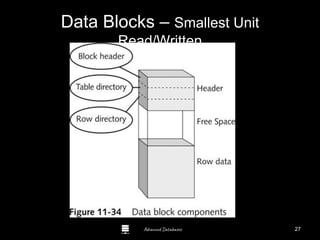
• Data block
– Database storage data
block
– Operating system blocks
22
Advanced Databases
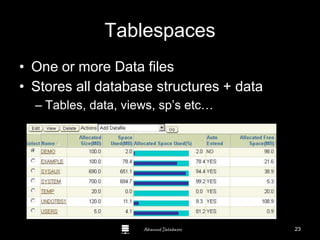
Tablespaces
• One or more Data files
• Stores all database structures + data
– Tables, data, views, sp’s etc…
Guide to Oracle 10g
23
Advanced Databases
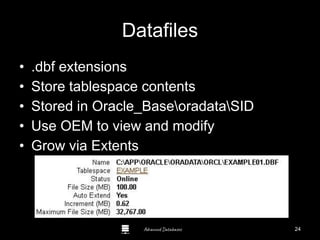
Datafiles
• .dbf extensions
• Store tablespace contents
• Stored in Oracle_BaseoradataSID
• Use OEM to view and modify
• Grow via Extents
Guide to Oracle 10g
24
Advanced Databases
Segments – They Partition the data
25
Advanced Databases
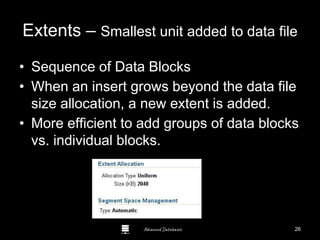
Extents – Smallest unit added to data file
• Sequence of Data Blocks
• When an insert grows beyond the data file
size allocation, a new extent is added.
• More efficient to add groups of data blocks
vs. individual blocks.
Guide to Oracle 10g
26
Advanced Databases
Data Blocks – Smallest Unit
Read/Written
27
Advanced Databases
Managing Oracle 11g Data
Structures
• Create tablespace
• Manage datafile extents
– Autoextensible tablespace
• Configure tablespace and datafile
properties
•Demo! Guide to Oracle 10g
28
Advanced Databases
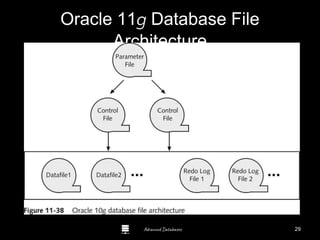
Oracle 11g Database File
Architecture
29
Advanced Databases
Parameter File
• Text file
• Specifies configuration information about
Oracle 10g database instance
• init.ora
– Stored in Oracle_BaseadminSIDpfile folder
• DBAs can edit parameter file
– Modify database configuration
Guide to Oracle 10g
30
Advanced Databases
Control Files
• Store information about database structure
and state
• Stored in Oracle_BaseoradataSID
• Three separate control files by default:
– CONTROL01.CTL
– CONTROL02.CTL
– CONTROL03.CTL
– All contain same data
– At least one must be present
31
Advanced Databases
Redo Log Files
• Records information to undo action query
changes
• .log extension
• Stored in Oracle_BaseORADATASID
• Pre-image
• Rollback segment
Guide to Oracle 10g
32
Advanced Databases
User Accounts
33
Advanced Databases
Creating and Managing User
Accounts
• Create new user account
– General information about user account
– System privileges user has in database
– User’s tablespace quota on database server
–Demo!
Guide to Oracle 10g
34
Advanced Databases
Specifying General User
Information
• Use OEM
– General page:
• Name
• Profile
• Authentication
• Default tablespace
• Temporary tablespace
• Status
Guide to Oracle 10g
35
Advanced Databases
Specifying System Privileges
• System privilege
• Object privilege
• Enable new user to interact with Oracle
11g database
– DBA grants system privileges
– Use System Privileges page in Create User
page
• Admin OptionGuide to Oracle 10g
36
Advanced Databases
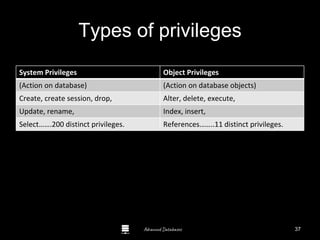
Types of privileges
System Privileges Object Privileges
(Action on database) (Action on database objects)
Create, create session, drop, Alter, delete, execute,
Update, rename, Index, insert,
Select…….200 distinct privileges. References……..11 distinct privileges.
Guide to Oracle 10g
37
Advanced Databases
Tablespace Quotas
• Specifies amount of disk space that user’s
database objects can occupy in default
tablespace
• Must be assigned
• Quota Size value:
– None, default
– Unlimited
– Value Guide to Oracle 10g
38
Advanced Databases
Editing Existing User Accounts
• Use OEM
– Select user account to be modified on Users
page
– General page opens
– Select other links to modify properties
Guide to Oracle 10g
39
Advanced Databases
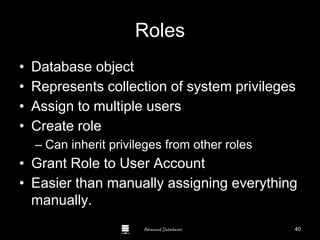
Roles
• Database object
• Represents collection of system privileges
• Assign to multiple users
• Create role
– Can inherit privileges from other roles
• Grant Role to User Account
• Easier than manually assigning everything
manually.
40
Advanced Databases
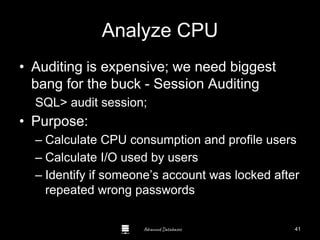
Analyze CPU
• Auditing is expensive; we need biggest
bang for the buck - Session Auditing
SQL> audit session;
• Purpose:
– Calculate CPU consumption and profile users
– Calculate I/O used by users
– Identify if someone’s account was locked after
repeated wrong passwords
41
Advanced Databases
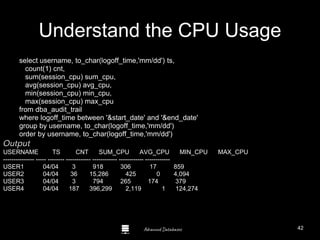
Understand the CPU Usage
select username, to_char(logoff_time,'mm/dd') ts,
count(1) cnt,
sum(session_cpu) sum_cpu,
avg(session_cpu) avg_cpu,
min(session_cpu) min_cpu,
max(session_cpu) max_cpu
from dba_audit_trail
where logoff_time between '&start_date' and '&end_date'
group by username, to_char(logoff_time,'mm/dd')
order by username, to_char(logoff_time,'mm/dd')
Output
USERNAME TS CNT SUM_CPU AVG_CPU MIN_CPU MAX_CPU
--------------- ----- -------- ------------ ------------ ------------ ------------
USER1 04/04 3 918 306 17 859
USER2 04/04 36 15,286 425 0 4,094
USER3 04/04 3 794 265 174 379
USER4 04/04 187 396,299 2,119 1 124,274
42
Advanced Databases
The Oracle Data
Dictionary
• Collection of tables and views that show the inner
workings and structure of the db
• “static” data dictionary views
– owned by SYS
– created by catalog.sql script at db creation
– contain DDL info
• dynamic data dictionary views
– also referred to as V$ views
– based on virtual tables (X$ tables)
– provide info about the instance
43
Advanced Databases
Some more activities of DBA’s
• Sqlloader→ loading text or .csv files to the
database.
• Table compression→ compressing table size.
• Import/export→ type of backups and
recovery for small business.
• Database transport→ transporting database
from one system to another system.
• Backups and recovery
• Scheduling→ scheduling any repeating
process.
44
Advanced Databases
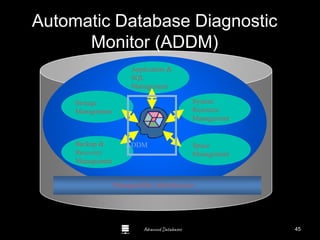
Automatic Database Diagnostic
Monitor (ADDM)
Application &
SQL
Management
System
Resource
Management
Space
Management
Backup &
Recovery
Management
Storage
Management
ADDM
Manageability Infrastructure
45
Advanced Databases
SQL
Advisor
High-load
SQL
IO / CPU
issues
RAC issues
Automatic Diagnostic Engine
Snapshots in
Automatic Workload
Repository
Self-Diagnostic Engine
System
Resource
Advice
Network + DB
config Advice
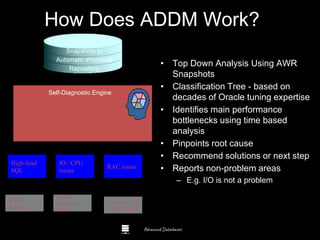
• Top Down Analysis Using AWR
Snapshots
• Classification Tree - based on
decades of Oracle tuning expertise
• Identifies main performance
bottlenecks using time based
analysis
• Pinpoints root cause
• Recommend solutions or next step
• Reports non-problem areas
– E.g. I/O is not a problem
How Does ADDM Work?
46
Advanced Databases
Questions?
Guide to Oracle 10g
47
Advanced Databases 48

Oracle DBA

  • 1.
    Advanced Databases Basic Database Administration S.O. INFOTECH PVT. LTD UNDER GUIDANCE OF SENIOR DBA Mr. ANJIT SINGH Guide to Oracle 10g 1
  • 2.
  • 3.
    Advanced Databases Objectives • Definedatabase administration. • Understand database administration tasks. • Perform database administration tasks using Oracle 11g Enterprise Manager. • Understand Oracle 11g and SQL Server data storage structures. 3
  • 4.
    Advanced Databases What isDatabase Administration? • A Function information technology (IT) department • Database Administrator (DBA) – Overall health / Performance – Manages Security – Setup Test and Dev. Environments • http://www.bls.gov/ooh/computer-and- information-technology/database- administrators.htm 4
  • 5.
    Advanced Databases Duties ofthe DBA • Manage Database Objects – Tables / Views / Procedures • Database performance • Security – Logons /Users / Roles • Clone data from Production to Development or Test • Manage backups and carry out DR plans. Guide to Oracle 10g 5
  • 6.
  • 7.
    Advanced Databases DBA ToolsProduct Comparison Oracle 11g • Oracle Enterprise Manager • Web-Based SQL Server • SQL Server Management Studio • Client-Based Guide to Oracle 10g 7
  • 8.
  • 9.
    Advanced Databases Starting /ShuttingDown the Db • Shut down database periodically – Perform maintenance • Restart database Guide to Oracle 10g 9
  • 10.
    Advanced Databases Creating anAdministrative Connection • Shutting down database makes database unavailable for user connections • DBA must log onto database using administrative connection • SYS user account Guide to Oracle 10g 10
  • 11.
    Advanced Databases Using OEMto Shut Down and Start a Database Instance • DBA shuts down database instance using Normal, Transactional, or Immediate shutdown option – Shutdown process performs five following tasks: • Writes contents of data buffer cache to datafiles • Writes contents of redo log buffer to redo log files • Closes all files • Stops all background processes • Deallocates SGA in server’s main memory 11
  • 12.
    Advanced Databases Instance Options Startup •Start in one of two modes: – Unrestricted – Restricted – Mount(data file recovery) – No mount(control file) – Open Shutdown • Specify one of four ways to handle existing user connections: – Normal – Immediate – Abort 12
  • 13.
    Advanced Databases Oracle 11gDatabase Instance States 13
  • 14.
    Advanced Databases Oracle Architecture •database vs. instance Parameter files* Control files** Data files Redo Log files System Global Area (SGA) Background Processes Disk Memory Database Instance Spfiles, control files,→ BINARY FILES Pfiles → TEXT FILES Data files → Database physical files stored on disk Redo log files → Any changes that are made in database
  • 15.
  • 16.
    Advanced Databases Oracle EnterpriseManager • User account must have DBA role • Oracle Enterprise Manager (OEM) – Three-tier architecture – Console • Oracle Management Server (OMS) – Interacts with repository – Makes it easier for DBAs to administer multiple databases in organization’s network 16
  • 17.
  • 18.
  • 19.
  • 20.
  • 21.
    Advanced Databases Managing Oracle11g Data Storage • Like most DBMS’s the logical structures – Tables – Constraints – Views / Procedures • Can be stored in physical data structures – Files on disk – Dedicated drive partitions – RAM Guide to Oracle 10g 21
  • 22.
    Advanced Databases Oracle 11gData Structures • Tablespace – One or more Data Files • Segment – Partitioned Data • Extent – Growth rule for segment • Data block – Database storage data block – Operating system blocks 22
  • 23.
    Advanced Databases Tablespaces • Oneor more Data files • Stores all database structures + data – Tables, data, views, sp’s etc… Guide to Oracle 10g 23
  • 24.
    Advanced Databases Datafiles • .dbfextensions • Store tablespace contents • Stored in Oracle_BaseoradataSID • Use OEM to view and modify • Grow via Extents Guide to Oracle 10g 24
  • 25.
    Advanced Databases Segments –They Partition the data 25
  • 26.
    Advanced Databases Extents –Smallest unit added to data file • Sequence of Data Blocks • When an insert grows beyond the data file size allocation, a new extent is added. • More efficient to add groups of data blocks vs. individual blocks. Guide to Oracle 10g 26
  • 27.
    Advanced Databases Data Blocks– Smallest Unit Read/Written 27
  • 28.
    Advanced Databases Managing Oracle11g Data Structures • Create tablespace • Manage datafile extents – Autoextensible tablespace • Configure tablespace and datafile properties •Demo! Guide to Oracle 10g 28
  • 29.
    Advanced Databases Oracle 11gDatabase File Architecture 29
  • 30.
    Advanced Databases Parameter File •Text file • Specifies configuration information about Oracle 10g database instance • init.ora – Stored in Oracle_BaseadminSIDpfile folder • DBAs can edit parameter file – Modify database configuration Guide to Oracle 10g 30
  • 31.
    Advanced Databases Control Files •Store information about database structure and state • Stored in Oracle_BaseoradataSID • Three separate control files by default: – CONTROL01.CTL – CONTROL02.CTL – CONTROL03.CTL – All contain same data – At least one must be present 31
  • 32.
    Advanced Databases Redo LogFiles • Records information to undo action query changes • .log extension • Stored in Oracle_BaseORADATASID • Pre-image • Rollback segment Guide to Oracle 10g 32
  • 33.
  • 34.
    Advanced Databases Creating andManaging User Accounts • Create new user account – General information about user account – System privileges user has in database – User’s tablespace quota on database server –Demo! Guide to Oracle 10g 34
  • 35.
    Advanced Databases Specifying GeneralUser Information • Use OEM – General page: • Name • Profile • Authentication • Default tablespace • Temporary tablespace • Status Guide to Oracle 10g 35
  • 36.
    Advanced Databases Specifying SystemPrivileges • System privilege • Object privilege • Enable new user to interact with Oracle 11g database – DBA grants system privileges – Use System Privileges page in Create User page • Admin OptionGuide to Oracle 10g 36
  • 37.
    Advanced Databases Types ofprivileges System Privileges Object Privileges (Action on database) (Action on database objects) Create, create session, drop, Alter, delete, execute, Update, rename, Index, insert, Select…….200 distinct privileges. References……..11 distinct privileges. Guide to Oracle 10g 37
  • 38.
    Advanced Databases Tablespace Quotas •Specifies amount of disk space that user’s database objects can occupy in default tablespace • Must be assigned • Quota Size value: – None, default – Unlimited – Value Guide to Oracle 10g 38
  • 39.
    Advanced Databases Editing ExistingUser Accounts • Use OEM – Select user account to be modified on Users page – General page opens – Select other links to modify properties Guide to Oracle 10g 39
  • 40.
    Advanced Databases Roles • Databaseobject • Represents collection of system privileges • Assign to multiple users • Create role – Can inherit privileges from other roles • Grant Role to User Account • Easier than manually assigning everything manually. 40
  • 41.
    Advanced Databases Analyze CPU •Auditing is expensive; we need biggest bang for the buck - Session Auditing SQL> audit session; • Purpose: – Calculate CPU consumption and profile users – Calculate I/O used by users – Identify if someone’s account was locked after repeated wrong passwords 41
  • 42.
    Advanced Databases Understand theCPU Usage select username, to_char(logoff_time,'mm/dd') ts, count(1) cnt, sum(session_cpu) sum_cpu, avg(session_cpu) avg_cpu, min(session_cpu) min_cpu, max(session_cpu) max_cpu from dba_audit_trail where logoff_time between '&start_date' and '&end_date' group by username, to_char(logoff_time,'mm/dd') order by username, to_char(logoff_time,'mm/dd') Output USERNAME TS CNT SUM_CPU AVG_CPU MIN_CPU MAX_CPU --------------- ----- -------- ------------ ------------ ------------ ------------ USER1 04/04 3 918 306 17 859 USER2 04/04 36 15,286 425 0 4,094 USER3 04/04 3 794 265 174 379 USER4 04/04 187 396,299 2,119 1 124,274 42
  • 43.
    Advanced Databases The OracleData Dictionary • Collection of tables and views that show the inner workings and structure of the db • “static” data dictionary views – owned by SYS – created by catalog.sql script at db creation – contain DDL info • dynamic data dictionary views – also referred to as V$ views – based on virtual tables (X$ tables) – provide info about the instance 43
  • 44.
    Advanced Databases Some moreactivities of DBA’s • Sqlloader→ loading text or .csv files to the database. • Table compression→ compressing table size. • Import/export→ type of backups and recovery for small business. • Database transport→ transporting database from one system to another system. • Backups and recovery • Scheduling→ scheduling any repeating process. 44
  • 45.
    Advanced Databases Automatic DatabaseDiagnostic Monitor (ADDM) Application & SQL Management System Resource Management Space Management Backup & Recovery Management Storage Management ADDM Manageability Infrastructure 45
  • 46.
    Advanced Databases SQL Advisor High-load SQL IO /CPU issues RAC issues Automatic Diagnostic Engine Snapshots in Automatic Workload Repository Self-Diagnostic Engine System Resource Advice Network + DB config Advice • Top Down Analysis Using AWR Snapshots • Classification Tree - based on decades of Oracle tuning expertise • Identifies main performance bottlenecks using time based analysis • Pinpoints root cause • Recommend solutions or next step • Reports non-problem areas – E.g. I/O is not a problem How Does ADDM Work? 46
  • 47.
  • 48.