Computing for Engineering
Prepared by: Eng. Shireen Mansour
Petroleum Department
Chemical Department
Civil Department
Faculty of Engineering
12/20/2014 1
Contents:
1. Introduction
2. Characteristics of Computer
3. History of Computer
4. Generation of Computer
5. Classification of Computer
6. Computer Components
12/20/2014 2
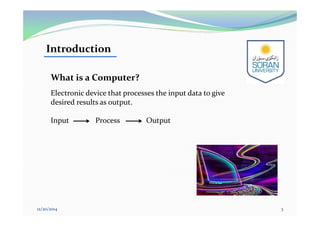
What is a Computer?
Electronic device that processes the input data to give
desired results as output.
Input Process Output
Introduction
12/20/2014 3
 Speed: Instructions per second measured by : ms, µs, ns, and ps.
 Accuracy: 100%
 Huge Storage Capability: measured by KB, MB, GB, TB
 Versatility: ability to process any kind of data to perform different tasks:
play, music, letter, …etc.
 Reliability: 100% accurate.
 Diligence: ability to perform repeated operation efficiently without get tired.
 Networking: interconnected in to a network.
Characteristics of Computer
12/20/2014 4
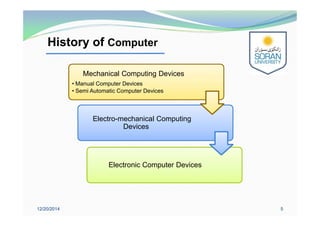
History of Computer
12/20/2014 5
Electronic Computer DevicesElectronic Computer Devices
Electro-mechanical Computing
Devices
Electro-mechanical Computing
Devices
Mechanical Computing Devices
• Manual Computer Devices
• Semi Automatic Computer Devices
Mechanical Computing Devices
• Manual Computer Devices
• Semi Automatic Computer Devices
History of Computer
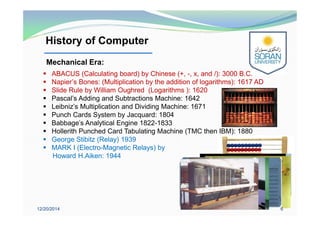
 ABACUS (Calculating board) by Chinese (+, -, x, and /): 3000 B.C.
 Napier’s Bones: (Multiplication by the addition of logarithms): 1617 AD
 Slide Rule by William Oughred (Logarithms ): 1620
 Pascal’s Adding and Subtractions Machine: 1642
 Leibniz’s Multiplication and Dividing Machine: 1671
 Punch Cards System by Jacquard: 1804
 Babbage's Analytical Engine 1822-1833
 Hollerith Punched Card Tabulating Machine (TMC then IBM): 1880
 George Stibitz (Relay) 1939
 MARK I (Electro-Magnetic Relays) by
Howard H.Aiken: 1944
12/20/2014 6
Mechanical Era:
History of Computer(Cont.)
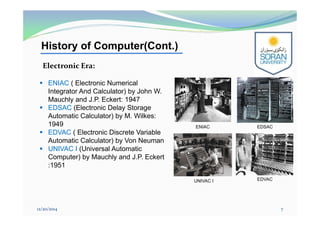
 ENIAC ( Electronic Numerical
Integrator And Calculator) by John W.
Mauchly and J.P. Eckert: 1947
 EDSAC (Electronic Delay Storage
Automatic Calculator) by M. Wilkes:
1949
 EDVAC ( Electronic Discrete Variable
Automatic Calculator) by Von Neuman
 UNIVAC I (Universal Automatic
Computer) by Mauchly and J.P. Eckert
:1951
12/20/2014 7
Electronic Era:
ENIAC EDSAC
EDVACUNIVAC I
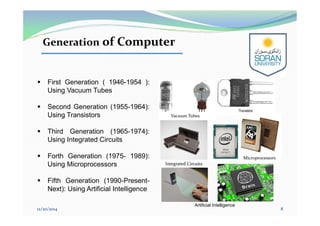
Generation of Computer
 First Generation ( 1946-1954 ):
Using Vacuum Tubes
 Second Generation (1955-1964):
Using Transistors
 Third Generation (1965-1974):
Using Integrated Circuits
 Forth Generation (1975- 1989):
Using Microprocessors
 Fifth Generation (1990-Present-
Next): Using Artificial Intelligence
12/20/2014 8
Integrated Circuits
Microprocessors
Vacuum Tubes
Artificial Intelligence
Digital Computer
Classification of Computer
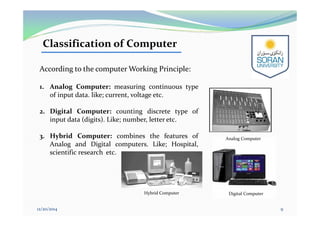
According to the computer Working Principle:
1. Analog Computer: measuring continuous type
of input data. like; current, voltage etc.
2. Digital Computer: counting discrete type of
input data (digits). Like; number, letter etc.
3. Hybrid Computer: combines the features of
Analog and Digital computers. Like; Hospital,
scientific research etc.
12/20/2014 9
Analog Computer
Hybrid Computer
Classification of Computer(Cont.)
According to the purpose of use:
1. Special Purpose Computer: doing particular task or application.
(Hybrid computer).
2. General Purpose Computer: doing different tasks or different
applications. (Digital computer).
12/20/2014 10
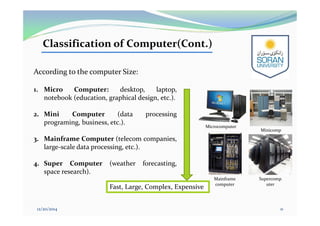
According to the computer Size:
1. Micro Computer: desktop, laptop,
notebook (education, graphical design, etc.).
2. Mini Computer (data processing
programing, business, etc.).
3. Mainframe Computer (telecom companies,
large-scale data processing, etc.).
4. Super Computer (weather forecasting,
space research).
Fast, Large, Complex, Expensive
12/20/2014 11
Classification of Computer(Cont.)
Minicomp
uter
Microcomputer
Mainframe
computer
Supercomp
uter
Classification of Computer(Cont.)
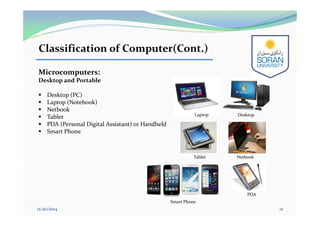
Microcomputers:
Desktop and Portable
 Desktop (PC)
 Laptop (Notebook)
 Netbook
 Tablet
 PDA (Personal Digital Assistant) or Handheld
 Smart Phone
12/20/2014 12
DesktopLaptop
NetbookTablet
PDA
Smart Phone
Computer Components
12/20/2014 13
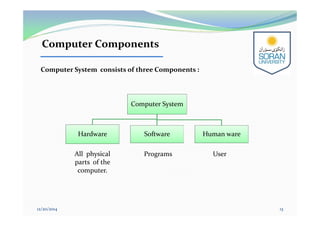
Computer System consists of three Components :
Computer System
Hardware Software Human ware
All physical
parts of the
computer.
Programs User
Computer Components (Cont.)
12/20/2014 14
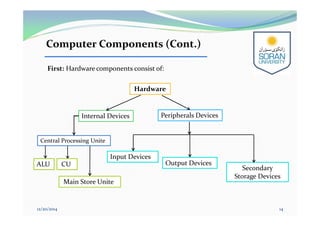
First: Hardware components consist of:
Input Devices
Output Devices
Central Processing Unite
Internal Devices Peripherals Devices
Hardware
Secondary
Storage Devices
ALU CU
Main Store Unite
Hardware Components
12/20/2014 15
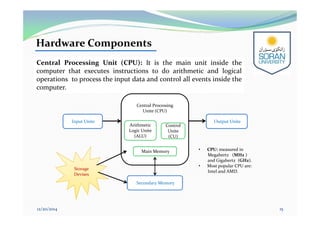
Central Processing Unit (CPU): It is the main unit inside the
computer that executes instructions to do arithmetic and logical
operations to process the input data and control all events inside the
computer.
Input Unite Output Unite
Central Processing
Unite (CPU)
Arithmetic
Logic Unite
(ALU)
Control
Unite
(CU)
Main Memory
Secondary Memory
Storage
Devises
Storage
Devises
• CPU: measured in
Megahertz (MHz )
and Gigahertz (GHz).
• Most popular CPU are:
Intel and AMD.
Hardware Components (Cont.)
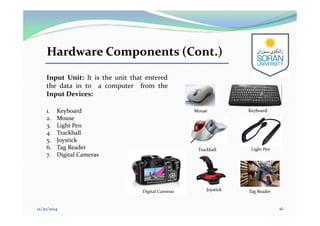
Input Unit: It is the unit that entered
the data in to a computer from the
Input Devices:
1. Keyboard
2. Mouse
3. Light Pen
4. Trackball
5. Joystick
6. Tag Reader
7. Digital Cameras
12/20/2014 16
Keyboard
Trackball Light Pen
Tag ReaderJoystickDigital Cameras
Mouse
Hardware Components (Cont.)
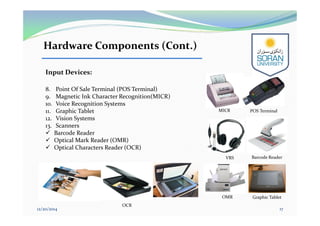
Input Devices:
8. Point Of Sale Terminal (POS Terminal)
9. Magnetic Ink Character Recognition(MICR)
10. Voice Recognition Systems
11. Graphic Tablet
12. Vision Systems
13. Scanners
 Barcode Reader
 Optical Mark Reader (OMR)
 Optical Characters Reader (OCR)
12/20/2014 17
VRS
MICR POS Terminal
Graphic Tablet
Barcode Reader
OMR
OCR
Hardware Components (Cont.)
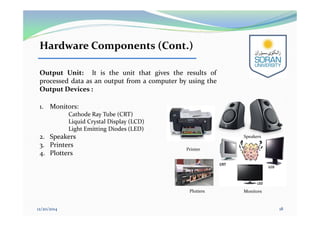
Output Unit: It is the unit that gives the results of
processed data as an output from a computer by using the
Output Devices :
1. Monitors:
Cathode Ray Tube (CRT)
Liquid Crystal Display (LCD)
Light Emitting Diodes (LED)
2. Speakers
3. Printers
4. Plotters
12/20/2014 18
Monitors
Speakers
Plotters
Printer
Hardware Components (Cont.)
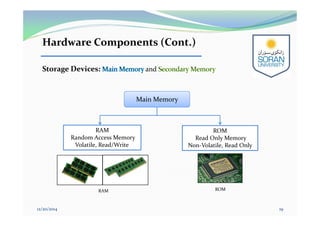
Storage Devices: and
12/20/2014 19
RAM
Random Access Memory
Volatile, Read/Write
ROM
Read Only Memory
Non-Volatile, Read Only
Main MemoryMain Memory
ROMRAM
Hardware Components (Cont.)
Secondary MemorySecondary Memory
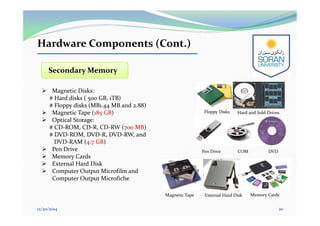
 Magnetic Disks:
# Hard disks ( 500 GB, 1TB)
# Floppy disks (MB1.44 MB and 2.88)
 Magnetic Tape (185 GB)
 Optical Storage:
# CD-ROM, CD-R, CD-RW (700 MB)
# DVD-ROM, DVD-R, DVD-RW, and
DVD-RAM (4.7 GB)
 Pen Drive
 Memory Cards
 External Hard Disk
 Computer Output Microfilm and
Computer Output Microfiche
12/20/2014 20
Floppy Disks Hard and Sold Drives
Pen Drive DVDCOM
External Hard Disk Memory CardsMagnetic Tape
Hardware Components (Cont.)
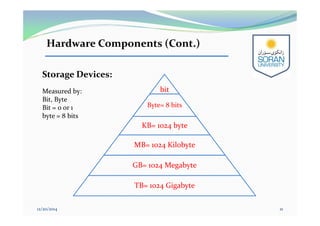
Storage Devices:
Measured by:
Bit, Byte
Bit = 0 or 1
byte = 8 bits
bit
Byte= 8 bits
KB= 1024 byte
MB= 1024 Kilobyte
GB= 1024 Megabyte
TB= 1024 Gigabyte
12/20/2014 21
Computer Components (Cont.)
12/20/2014 22
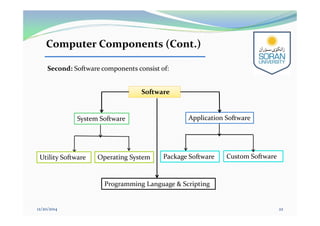
Second: Software components consist of:
Package Software Custom Software
System Software Application Software
SoftwareSoftware
Programming Language & Scripting
Operating SystemUtility Software
Software Components
12/20/2014 23
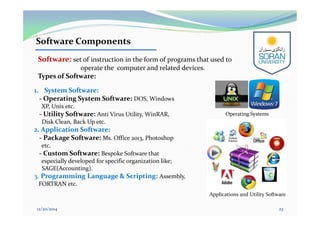
1. System Software:
- Operating System Software: DOS, Windows
XP, Unix etc.
- Utility Software: Anti Virus Utility, WinRAR,
Disk Clean, Back Up etc.
2. Application Software:
- Package Software: Ms. Office 2013, Photoshop
etc.
- Custom Software: Bespoke Software that
especially developed for specific organization like;
SAGE(Accounting).
3. Programming Language & Scripting: Assembly,
FORTRAN etc.
Software: set of instruction in the form of programs that used to
operate the computer and related devices.
Types of Software:
Applications and Utility Software
Operating Systems
Booting
12/20/2014 24
Loading the system files of the operation system from the disk
into the computer memory.
Types of Booting:
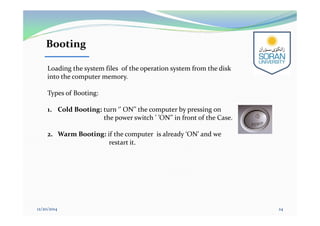
1. Cold Booting: turn ‘’ ON’’ the computer by pressing on
the power switch ’ ’ON’’ in front of the Case.
2. Warm Booting: if the computer is already ‘ON’ and we
restart it.

Computing for Engineering - Lecture 01

  • 1.
    Computing for Engineering Preparedby: Eng. Shireen Mansour Petroleum Department Chemical Department Civil Department Faculty of Engineering 12/20/2014 1
  • 2.
    Contents: 1. Introduction 2. Characteristicsof Computer 3. History of Computer 4. Generation of Computer 5. Classification of Computer 6. Computer Components 12/20/2014 2
  • 3.
    What is aComputer? Electronic device that processes the input data to give desired results as output. Input Process Output Introduction 12/20/2014 3
  • 4.
     Speed: Instructionsper second measured by : ms, µs, ns, and ps.  Accuracy: 100%  Huge Storage Capability: measured by KB, MB, GB, TB  Versatility: ability to process any kind of data to perform different tasks: play, music, letter, …etc.  Reliability: 100% accurate.  Diligence: ability to perform repeated operation efficiently without get tired.  Networking: interconnected in to a network. Characteristics of Computer 12/20/2014 4
  • 5.
    History of Computer 12/20/20145 Electronic Computer DevicesElectronic Computer Devices Electro-mechanical Computing Devices Electro-mechanical Computing Devices Mechanical Computing Devices • Manual Computer Devices • Semi Automatic Computer Devices Mechanical Computing Devices • Manual Computer Devices • Semi Automatic Computer Devices
  • 6.
    History of Computer ABACUS (Calculating board) by Chinese (+, -, x, and /): 3000 B.C.  Napier’s Bones: (Multiplication by the addition of logarithms): 1617 AD  Slide Rule by William Oughred (Logarithms ): 1620  Pascal’s Adding and Subtractions Machine: 1642  Leibniz’s Multiplication and Dividing Machine: 1671  Punch Cards System by Jacquard: 1804  Babbage's Analytical Engine 1822-1833  Hollerith Punched Card Tabulating Machine (TMC then IBM): 1880  George Stibitz (Relay) 1939  MARK I (Electro-Magnetic Relays) by Howard H.Aiken: 1944 12/20/2014 6 Mechanical Era:
  • 7.
    History of Computer(Cont.) ENIAC ( Electronic Numerical Integrator And Calculator) by John W. Mauchly and J.P. Eckert: 1947  EDSAC (Electronic Delay Storage Automatic Calculator) by M. Wilkes: 1949  EDVAC ( Electronic Discrete Variable Automatic Calculator) by Von Neuman  UNIVAC I (Universal Automatic Computer) by Mauchly and J.P. Eckert :1951 12/20/2014 7 Electronic Era: ENIAC EDSAC EDVACUNIVAC I
  • 8.
    Generation of Computer First Generation ( 1946-1954 ): Using Vacuum Tubes  Second Generation (1955-1964): Using Transistors  Third Generation (1965-1974): Using Integrated Circuits  Forth Generation (1975- 1989): Using Microprocessors  Fifth Generation (1990-Present- Next): Using Artificial Intelligence 12/20/2014 8 Integrated Circuits Microprocessors Vacuum Tubes Artificial Intelligence
  • 9.
    Digital Computer Classification ofComputer According to the computer Working Principle: 1. Analog Computer: measuring continuous type of input data. like; current, voltage etc. 2. Digital Computer: counting discrete type of input data (digits). Like; number, letter etc. 3. Hybrid Computer: combines the features of Analog and Digital computers. Like; Hospital, scientific research etc. 12/20/2014 9 Analog Computer Hybrid Computer
  • 10.
    Classification of Computer(Cont.) Accordingto the purpose of use: 1. Special Purpose Computer: doing particular task or application. (Hybrid computer). 2. General Purpose Computer: doing different tasks or different applications. (Digital computer). 12/20/2014 10
  • 11.
    According to thecomputer Size: 1. Micro Computer: desktop, laptop, notebook (education, graphical design, etc.). 2. Mini Computer (data processing programing, business, etc.). 3. Mainframe Computer (telecom companies, large-scale data processing, etc.). 4. Super Computer (weather forecasting, space research). Fast, Large, Complex, Expensive 12/20/2014 11 Classification of Computer(Cont.) Minicomp uter Microcomputer Mainframe computer Supercomp uter
  • 12.
    Classification of Computer(Cont.) Microcomputers: Desktopand Portable  Desktop (PC)  Laptop (Notebook)  Netbook  Tablet  PDA (Personal Digital Assistant) or Handheld  Smart Phone 12/20/2014 12 DesktopLaptop NetbookTablet PDA Smart Phone
  • 13.
    Computer Components 12/20/2014 13 ComputerSystem consists of three Components : Computer System Hardware Software Human ware All physical parts of the computer. Programs User
  • 14.
    Computer Components (Cont.) 12/20/201414 First: Hardware components consist of: Input Devices Output Devices Central Processing Unite Internal Devices Peripherals Devices Hardware Secondary Storage Devices ALU CU Main Store Unite
  • 15.
    Hardware Components 12/20/2014 15 CentralProcessing Unit (CPU): It is the main unit inside the computer that executes instructions to do arithmetic and logical operations to process the input data and control all events inside the computer. Input Unite Output Unite Central Processing Unite (CPU) Arithmetic Logic Unite (ALU) Control Unite (CU) Main Memory Secondary Memory Storage Devises Storage Devises • CPU: measured in Megahertz (MHz ) and Gigahertz (GHz). • Most popular CPU are: Intel and AMD.
  • 16.
    Hardware Components (Cont.) InputUnit: It is the unit that entered the data in to a computer from the Input Devices: 1. Keyboard 2. Mouse 3. Light Pen 4. Trackball 5. Joystick 6. Tag Reader 7. Digital Cameras 12/20/2014 16 Keyboard Trackball Light Pen Tag ReaderJoystickDigital Cameras Mouse
  • 17.
    Hardware Components (Cont.) InputDevices: 8. Point Of Sale Terminal (POS Terminal) 9. Magnetic Ink Character Recognition(MICR) 10. Voice Recognition Systems 11. Graphic Tablet 12. Vision Systems 13. Scanners  Barcode Reader  Optical Mark Reader (OMR)  Optical Characters Reader (OCR) 12/20/2014 17 VRS MICR POS Terminal Graphic Tablet Barcode Reader OMR OCR
  • 18.
    Hardware Components (Cont.) OutputUnit: It is the unit that gives the results of processed data as an output from a computer by using the Output Devices : 1. Monitors: Cathode Ray Tube (CRT) Liquid Crystal Display (LCD) Light Emitting Diodes (LED) 2. Speakers 3. Printers 4. Plotters 12/20/2014 18 Monitors Speakers Plotters Printer
  • 19.
    Hardware Components (Cont.) StorageDevices: and 12/20/2014 19 RAM Random Access Memory Volatile, Read/Write ROM Read Only Memory Non-Volatile, Read Only Main MemoryMain Memory ROMRAM
  • 20.
    Hardware Components (Cont.) SecondaryMemorySecondary Memory  Magnetic Disks: # Hard disks ( 500 GB, 1TB) # Floppy disks (MB1.44 MB and 2.88)  Magnetic Tape (185 GB)  Optical Storage: # CD-ROM, CD-R, CD-RW (700 MB) # DVD-ROM, DVD-R, DVD-RW, and DVD-RAM (4.7 GB)  Pen Drive  Memory Cards  External Hard Disk  Computer Output Microfilm and Computer Output Microfiche 12/20/2014 20 Floppy Disks Hard and Sold Drives Pen Drive DVDCOM External Hard Disk Memory CardsMagnetic Tape
  • 21.
    Hardware Components (Cont.) StorageDevices: Measured by: Bit, Byte Bit = 0 or 1 byte = 8 bits bit Byte= 8 bits KB= 1024 byte MB= 1024 Kilobyte GB= 1024 Megabyte TB= 1024 Gigabyte 12/20/2014 21
  • 22.
    Computer Components (Cont.) 12/20/201422 Second: Software components consist of: Package Software Custom Software System Software Application Software SoftwareSoftware Programming Language & Scripting Operating SystemUtility Software
  • 23.
    Software Components 12/20/2014 23 1.System Software: - Operating System Software: DOS, Windows XP, Unix etc. - Utility Software: Anti Virus Utility, WinRAR, Disk Clean, Back Up etc. 2. Application Software: - Package Software: Ms. Office 2013, Photoshop etc. - Custom Software: Bespoke Software that especially developed for specific organization like; SAGE(Accounting). 3. Programming Language & Scripting: Assembly, FORTRAN etc. Software: set of instruction in the form of programs that used to operate the computer and related devices. Types of Software: Applications and Utility Software Operating Systems
  • 24.
    Booting 12/20/2014 24 Loading thesystem files of the operation system from the disk into the computer memory. Types of Booting: 1. Cold Booting: turn ‘’ ON’’ the computer by pressing on the power switch ’ ’ON’’ in front of the Case. 2. Warm Booting: if the computer is already ‘ON’ and we restart it.