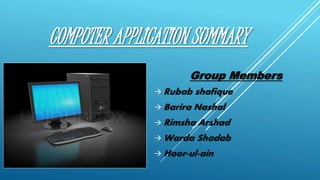
COMPUTER APPLICATION SUMMARY
Group Members
 Rubab shafique
 Barira Nashal
 Rimsha Arshad
 Warda Shadab
 Hoor-ul-ain
COMPUTER APPLICATION
Bit:
A computer is an electronic machine. Computer have two states: on and off. Each one or zero is called a bit.
It's the smallest unit of information.
Byte (Eight Bits): 8 bits grouped together are called a byte.
American Standard Code for Information Interchange (ASCII) :
128 64 32 16 8 4 2 1
"A" is stored on computer as 0 1 0 0 0 0 0 1 (ASC.65)
"&" is stored on computer as 0 0 1 0 0 1 1 0 (ASC.38)
kilobyte(KB) :Normally defined as 1,000 bytes . Exactly, kilobyte is 1,024 bytes.
A megabyte (MB) :Normally defined as 1,000 kilobytes . Exactly, 1 Megabyte = 1,024 kilobytes
Data: Collection of raw facts or unprocessed information.
Field: Data Item or Unit of Information. ( R.No., Name, Address)
Record: Group of interrelated Fields or information item.
File: One or more records or group of records (Table, Sheet, doc)
Data base: Group of interrelated files.
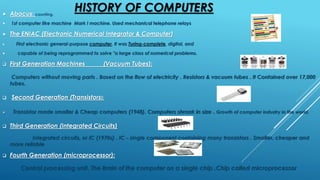
HISTORY OF COMPUTERS Abacus; counting.
 1st computer like machine Mark I machine. Used mechanical telephone relays
 The ENIAC (Electronic Numerical Integrator & Computer)
 First electronic general-purpose computer, It was Turing-complete, digital, and
 capable of being reprogrammed to solve "a large class of numerical problems.
 First Generation Machines (Vacuum Tubes):
Computers without moving parts . Based on the flow of electricity . Resistors & vacuum tubes . It Contained over 17,000
tubes.
 Second Generation (Transistors):
 Transistor made smaller & Cheap computers (1948). Computers shrank in size . Growth of computer industry in the world.
 Third Generation (Integrated Circuits)
Integrated circuits, or IC (1970s) . IC - single component containing many transistors . Smaller, cheaper and
more reliable
 Fourth Generation (microprocessor):
Central processing unit. The Brain of the computer on a single chip .Chip called microprocessor
4
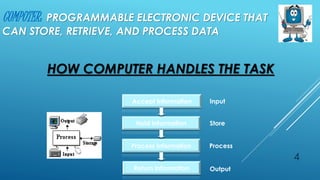
COMPUTER: PROGRAMMABLE ELECTRONIC DEVICE THAT
CAN STORE, RETRIEVE, AND PROCESS DATA
Accept Information
Hold Information
Process Information
Return Information
Input
Store
Process
Output
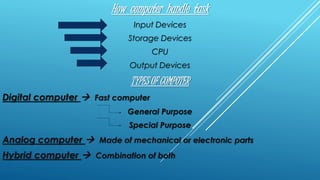
HOW COMPUTER HANDLES THE TASK
How computer handle task
Input Devices
Storage Devices
CPU
Output Devices
TYPES OF COMPUTER
Digital computer  Fast computer
General Purpose
Special Purpose
Analog computer  Made of mechanical or electronic parts
Hybrid computer  Combination of both
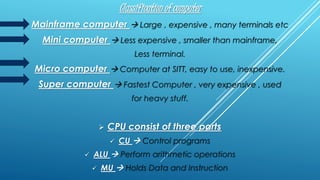
Classification of computer
Mainframe computer  Large , expensive , many terminals etc
Mini computer  Less expensive , smaller than mainframe,
Less terminal.
Micro computer  Computer at SITT, easy to use, inexpensive.
Super computer  Fastest Computer , very expensive , used
for heavy stuff.
 CPU consist of three parts
 CU  Control programs
 ALU  Perform arithmetic operations
 MU  Holds Data and Instruction
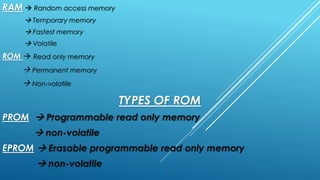
RAM  Random access memory
 Temporary memory
 Fastest memory
 Volatile
ROM  Read only memory
 Permanent memory
 Non-volatile
TYPES OF ROM
PROM  Programmable read only memory
 non-volatile
EPROM  Erasable programmable read only memory
 non-volatile
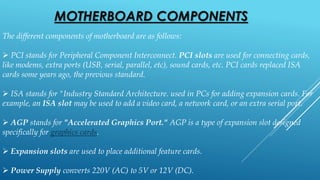
MOTHERBOARD COMPONENTS
The different components of motherboard are as follows:
 PCI stands for Peripheral Component Interconnect. PCI slots are used for connecting cards,
like modems, extra ports (USB, serial, parallel, etc), sound cards, etc. PCI cards replaced ISA
cards some years ago, the previous standard.
 ISA stands for "Industry Standard Architecture. used in PCs for adding expansion cards. For
example, an ISA slot may be used to add a video card, a network card, or an extra serial port.
 AGP stands for "Accelerated Graphics Port." AGP is a type of expansion slot designed
specifically for graphics cards.
 Expansion slots are used to place additional feature cards.
 Power Supply converts 220V (AC) to 5V or 12V (DC).
All the circuits are placed on the motherboard.
 Interface cards are used to add new features to the computer.
 RAM stands for Random Access Memory. It is the temporary memory i.e
volatile memory
CPU stands for Central Processing unit. It is the brain of computer.
 Hard drive is the permanent storage which is used to store information.
DVD or CD- ROM are used to read information stored on CD.
Floppy Disks store information on floppy.
PORTS
The different ports are as follows:
 Serial ports are of 9 or 25 pins which is used to connect mouse or
modem.
 Parallel port are used to connect printer and tape drive.
 USB ports stands for Universal Serial Bus ports. These ports are used to
connect multiple devices.
 Ethernet port are used to connect a computer to a network.
 VGA port are used to connect a monitor.
INPUT DEVICES
Input devices are used to enter data in the computer. They are of two types
Manual input devices: data is entered manually
Direct data entry (DDE) devices: data is entered through a source
Keyboard is a board with 100 keys. The keys are arranged in four groups.
Mouse is a common pointing device.
Trackerball is a replacement to mouse and is used where space is less because it has a
ball which move pointer
Scanner is used to input printed images into computer.
Any picture is taken by a webcam.
Video camera is used to capture moving images.
DDE devices include bar code reader, OMR, OCR, etc.
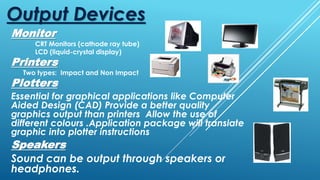
Monitor
CRT Monitors (cathode ray tube)
LCD (liquid-crystal display)
Printers
Two types: Impact and Non Impact
Output Devices
Plotters
Essential for graphical applications like Computer
Aided Design (CAD) Provide a better quality
graphics output than printers Allow the use of
different colours .Application package will translate
graphic into plotter instructions
Speakers
Sound can be output through speakers or
headphones.
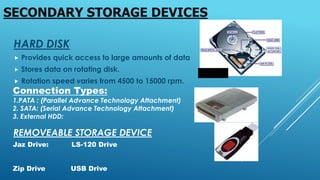
HARD DISK
 Provides quick access to large amounts of data
 Stores data on rotating disk.
 Rotation speed varies from 4500 to 15000 rpm.
SECONDARY STORAGE DEVICES
Connection Types:
1.PATA : (Parallel Advance Technology Attachment)
2. SATA: (Serial Advance Technology Attachment)
3. External HDD:
REMOVEABLE STORAGE DEVICE
Jaz Drive: LS-120 Drive
Zip Drive USB Drive
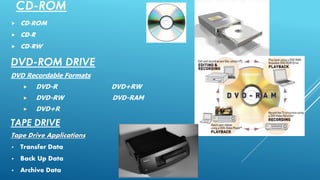
CD-ROM
 CD-ROM
 CD-R
 CD-RW
DVD-ROM DRIVE
DVD Recordable Formats
 DVD-R DVD+RW
 DVD-RW DVD-RAM
 DVD+R
TAPE DRIVE
Tape Drive Applications
• Transfer Data
• Back Up Data
• Archive Data
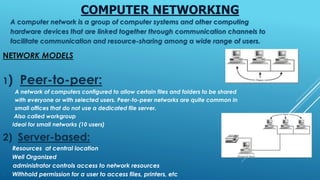
COMPUTER NETWORKING
A computer network is a group of computer systems and other computing
hardware devices that are linked together through communication channels to
facilitate communication and resource-sharing among a wide range of users.
NETWORK MODELS
1) Peer-to-peer:
A network of computers configured to allow certain files and folders to be shared
with everyone or with selected users. Peer-to-peer networks are quite common in
small offices that do not use a dedicated file server.
• Also called workgroup
• Ideal for small networks (10 users)
2) Server-based:
• Resources at central location
• Well Organized
administrator controls access to network resources
• Withhold permission for a user to access files, printers, etc
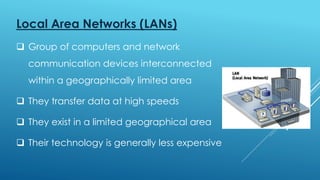
Local Area Networks (LANs)
 Group of computers and network
communication devices interconnected
within a geographically limited area
 They transfer data at high speeds
 They exist in a limited geographical area
 Their technology is generally less expensive
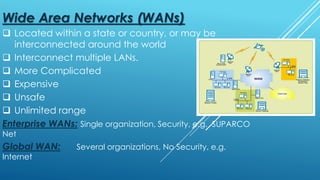
Wide Area Networks (WANs)
 Located within a state or country, or may be
interconnected around the world
 Interconnect multiple LANs.
 More Complicated
 Expensive
 Unsafe
 Unlimited range
Enterprise WANs: Single organization, Security, e.g. SUPARCO
Net
Global WAN: Several organizations, No Security, e.g.
Internet
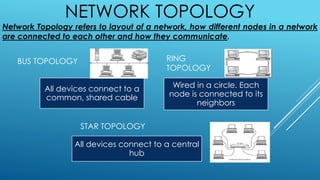
All devices connect to a
common, shared cable
Wired in a circle. Each
node is connected to its
neighbors
All devices connect to a central
hub
BUS TOPOLOGY RING
TOPOLOGY
STAR TOPOLOGY
NETWORK TOPOLOGY
Network Topology refers to layout of a network, how different nodes in a network
are connected to each other and how they communicate.
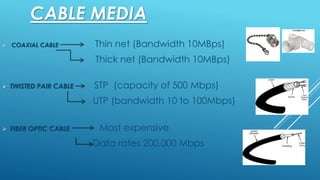
CABLE MEDIA
 COAXIAL CABLE Thin net (Bandwidth 10MBps)
Thick net (Bandwidth 10MBps)
 TWISTED PAIR CABLE STP (capacity of 500 Mbps)
UTP (bandwidth 10 to 100Mbps)
 FIBER OPTIC CABLE Most expensive
Data rates 200,000 Mbps
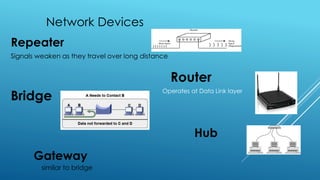
Network Devices
Repeater
Signals weaken as they travel over long distance
Operates at Data Link layer
similar to bridge
Gateway
Router
Hub
Bridge

Computer summary

  • 1.
    COMPUTER APPLICATION SUMMARY GroupMembers  Rubab shafique  Barira Nashal  Rimsha Arshad  Warda Shadab  Hoor-ul-ain
  • 2.
    COMPUTER APPLICATION Bit: A computeris an electronic machine. Computer have two states: on and off. Each one or zero is called a bit. It's the smallest unit of information. Byte (Eight Bits): 8 bits grouped together are called a byte. American Standard Code for Information Interchange (ASCII) : 128 64 32 16 8 4 2 1 "A" is stored on computer as 0 1 0 0 0 0 0 1 (ASC.65) "&" is stored on computer as 0 0 1 0 0 1 1 0 (ASC.38) kilobyte(KB) :Normally defined as 1,000 bytes . Exactly, kilobyte is 1,024 bytes. A megabyte (MB) :Normally defined as 1,000 kilobytes . Exactly, 1 Megabyte = 1,024 kilobytes Data: Collection of raw facts or unprocessed information. Field: Data Item or Unit of Information. ( R.No., Name, Address) Record: Group of interrelated Fields or information item. File: One or more records or group of records (Table, Sheet, doc) Data base: Group of interrelated files.
  • 3.
    HISTORY OF COMPUTERSAbacus; counting.  1st computer like machine Mark I machine. Used mechanical telephone relays  The ENIAC (Electronic Numerical Integrator & Computer)  First electronic general-purpose computer, It was Turing-complete, digital, and  capable of being reprogrammed to solve "a large class of numerical problems.  First Generation Machines (Vacuum Tubes): Computers without moving parts . Based on the flow of electricity . Resistors & vacuum tubes . It Contained over 17,000 tubes.  Second Generation (Transistors):  Transistor made smaller & Cheap computers (1948). Computers shrank in size . Growth of computer industry in the world.  Third Generation (Integrated Circuits) Integrated circuits, or IC (1970s) . IC - single component containing many transistors . Smaller, cheaper and more reliable  Fourth Generation (microprocessor): Central processing unit. The Brain of the computer on a single chip .Chip called microprocessor
  • 4.
    4 COMPUTER: PROGRAMMABLE ELECTRONICDEVICE THAT CAN STORE, RETRIEVE, AND PROCESS DATA Accept Information Hold Information Process Information Return Information Input Store Process Output HOW COMPUTER HANDLES THE TASK
  • 5.
    How computer handletask Input Devices Storage Devices CPU Output Devices TYPES OF COMPUTER Digital computer  Fast computer General Purpose Special Purpose Analog computer  Made of mechanical or electronic parts Hybrid computer  Combination of both
  • 6.
    Classification of computer Mainframecomputer  Large , expensive , many terminals etc Mini computer  Less expensive , smaller than mainframe, Less terminal. Micro computer  Computer at SITT, easy to use, inexpensive. Super computer  Fastest Computer , very expensive , used for heavy stuff.  CPU consist of three parts  CU  Control programs  ALU  Perform arithmetic operations  MU  Holds Data and Instruction
  • 7.
    RAM  Randomaccess memory  Temporary memory  Fastest memory  Volatile ROM  Read only memory  Permanent memory  Non-volatile TYPES OF ROM PROM  Programmable read only memory  non-volatile EPROM  Erasable programmable read only memory  non-volatile
  • 8.
    MOTHERBOARD COMPONENTS The differentcomponents of motherboard are as follows:  PCI stands for Peripheral Component Interconnect. PCI slots are used for connecting cards, like modems, extra ports (USB, serial, parallel, etc), sound cards, etc. PCI cards replaced ISA cards some years ago, the previous standard.  ISA stands for "Industry Standard Architecture. used in PCs for adding expansion cards. For example, an ISA slot may be used to add a video card, a network card, or an extra serial port.  AGP stands for "Accelerated Graphics Port." AGP is a type of expansion slot designed specifically for graphics cards.  Expansion slots are used to place additional feature cards.  Power Supply converts 220V (AC) to 5V or 12V (DC).
  • 9.
    All the circuitsare placed on the motherboard.  Interface cards are used to add new features to the computer.  RAM stands for Random Access Memory. It is the temporary memory i.e volatile memory CPU stands for Central Processing unit. It is the brain of computer.  Hard drive is the permanent storage which is used to store information. DVD or CD- ROM are used to read information stored on CD. Floppy Disks store information on floppy.
  • 10.
    PORTS The different portsare as follows:  Serial ports are of 9 or 25 pins which is used to connect mouse or modem.  Parallel port are used to connect printer and tape drive.  USB ports stands for Universal Serial Bus ports. These ports are used to connect multiple devices.  Ethernet port are used to connect a computer to a network.  VGA port are used to connect a monitor.
  • 11.
    INPUT DEVICES Input devicesare used to enter data in the computer. They are of two types Manual input devices: data is entered manually Direct data entry (DDE) devices: data is entered through a source Keyboard is a board with 100 keys. The keys are arranged in four groups. Mouse is a common pointing device. Trackerball is a replacement to mouse and is used where space is less because it has a ball which move pointer Scanner is used to input printed images into computer. Any picture is taken by a webcam. Video camera is used to capture moving images. DDE devices include bar code reader, OMR, OCR, etc.
  • 12.
    Monitor CRT Monitors (cathoderay tube) LCD (liquid-crystal display) Printers Two types: Impact and Non Impact Output Devices Plotters Essential for graphical applications like Computer Aided Design (CAD) Provide a better quality graphics output than printers Allow the use of different colours .Application package will translate graphic into plotter instructions Speakers Sound can be output through speakers or headphones.
  • 13.
    HARD DISK  Providesquick access to large amounts of data  Stores data on rotating disk.  Rotation speed varies from 4500 to 15000 rpm. SECONDARY STORAGE DEVICES Connection Types: 1.PATA : (Parallel Advance Technology Attachment) 2. SATA: (Serial Advance Technology Attachment) 3. External HDD: REMOVEABLE STORAGE DEVICE Jaz Drive: LS-120 Drive Zip Drive USB Drive
  • 14.
    CD-ROM  CD-ROM  CD-R CD-RW DVD-ROM DRIVE DVD Recordable Formats  DVD-R DVD+RW  DVD-RW DVD-RAM  DVD+R TAPE DRIVE Tape Drive Applications • Transfer Data • Back Up Data • Archive Data
  • 15.
    COMPUTER NETWORKING A computernetwork is a group of computer systems and other computing hardware devices that are linked together through communication channels to facilitate communication and resource-sharing among a wide range of users. NETWORK MODELS 1) Peer-to-peer: A network of computers configured to allow certain files and folders to be shared with everyone or with selected users. Peer-to-peer networks are quite common in small offices that do not use a dedicated file server. • Also called workgroup • Ideal for small networks (10 users) 2) Server-based: • Resources at central location • Well Organized administrator controls access to network resources • Withhold permission for a user to access files, printers, etc
  • 16.
    Local Area Networks(LANs)  Group of computers and network communication devices interconnected within a geographically limited area  They transfer data at high speeds  They exist in a limited geographical area  Their technology is generally less expensive
  • 17.
    Wide Area Networks(WANs)  Located within a state or country, or may be interconnected around the world  Interconnect multiple LANs.  More Complicated  Expensive  Unsafe  Unlimited range Enterprise WANs: Single organization, Security, e.g. SUPARCO Net Global WAN: Several organizations, No Security, e.g. Internet
  • 18.
    All devices connectto a common, shared cable Wired in a circle. Each node is connected to its neighbors All devices connect to a central hub BUS TOPOLOGY RING TOPOLOGY STAR TOPOLOGY NETWORK TOPOLOGY Network Topology refers to layout of a network, how different nodes in a network are connected to each other and how they communicate.
  • 19.
    CABLE MEDIA  COAXIALCABLE Thin net (Bandwidth 10MBps) Thick net (Bandwidth 10MBps)  TWISTED PAIR CABLE STP (capacity of 500 Mbps) UTP (bandwidth 10 to 100Mbps)  FIBER OPTIC CABLE Most expensive Data rates 200,000 Mbps
  • 20.
    Network Devices Repeater Signals weakenas they travel over long distance Operates at Data Link layer similar to bridge Gateway Router Hub Bridge