BASICS OF COMPUTERS
LECTURE #1 (COMPUTER APPLICATIONS)
INTRODUCTION
• Nowadays, computers are an integral part of our lives.
• They are used in almost every aspect of life such as
economics, medical, education, entertainment etc.
• Computer is derived from “compute” meaning “to
calculate”.
• Computer is defined as “An electronic machine that accepts
data from the user, processes the data by performing
calculations and operations on it, and generates the desired
output results”.
DIGITALAND ANALOG COMPUTERS
• Digital computer uses distinct values to represent the data
internally.
• All information are represented using the digits 0s and 1s.
• The computers that we use at our homes and offices are
digital computers.
• Analog computer represents data as variable across a
continuous range of values.
• The earliest computers were analog computers. E.g. Slide
rule
• Analog computers are used for measuring of parameters that
vary continuously in real time, such as temperature, pressure
and voltage. They are less precise then digital computers.
CHARACTERISTICS OF COMPUTER
• Speed: The computer can process data very fast, at the rate of
millions of instructions per second.
• Accuracy: Computer provides a high degree of accuracy.
• Diligence: Computer does not get tired and can perform long
complex calculations.
• Storage Capability: Large volumes of data and information can be
stored in the computer and also retrieved whenever required.
• Primary Memory => Limited Data (Temporary)
• Secondary Memory => Large Amount of Data (Permanent)
• Versatility: Computer can perform different types of tasks with
the same ease
Computer can only perform tasks that it has been programmed to
do. It takes instructions from user and does not take its own
decisions.
HISTORY OF COMPUTER
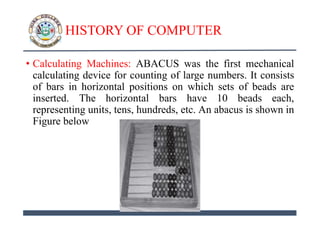
• Calculating Machines: ABACUS was the first mechanical
calculating device for counting of large numbers. It consists
of bars in horizontal positions on which sets of beads are
inserted. The horizontal bars have 10 beads each,
representing units, tens, hundreds, etc. An abacus is shown in
Figure below
HISTORY OF COMPUTER
• Napier’s Bones: A mechanical device built for the purpose of
multiplication in 1617 ad. by an English mathematician John
Napier.
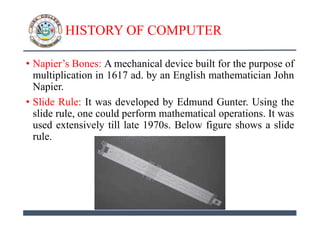
• Slide Rule: It was developed by Edmund Gunter. Using the
slide rule, one could perform mathematical operations. It was
used extensively till late 1970s. Below figure shows a slide
rule.
HISTORY OF COMPUTER
• Pascal’s Adding and Subtraction Machine: Developed by
Blaise Pascal. It could add and subtract. The machine
consisted of wheels, gears and cylinders.
• Leibniz’s Multiplication and Dividing Machine: Developed
by Gottfried Leibniz. It is a mechanical device that could
both multiply and divide.
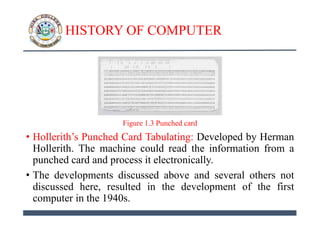
• Punch Card System: Developed by Jacquard to control the
power loom in 1801. It could recognize the presence of hole
in the punched card as binary one and the absence of the hole
as binary zero. See Figure 1.3
• Babbage’s Analytical Engine: Developed by Charles
Babbage. It is a general purpose calculating machine.
HISTORY OF COMPUTER
Figure 1.3 Punched card
• Hollerith’s Punched Card Tabulating: Developed by Herman
Hollerith. The machine could read the information from a
punched card and process it electronically.
• The developments discussed above and several others not
discussed here, resulted in the development of the first
computer in the 1940s.
GENERATIONS OF COMPUTER
• The computer has evolved from a large—sized simple
calculating machine to a smaller but much more powerful
machine. The evolution of computer to the current state is
defined in terms of the generations of computer.
1) First Generation (1940 to 1956): Using Vacuum Tubes
2) Second Generation (1956 to 1963): Using Transistors
3) Third Generation (1964 to 1971): Using Integrated Circuits
4) Fourth Generation (1971 to present): Using Microprocessors
5) Fifth Generation (Present and Next): Using Artificial Intelligence
CLASSIFICATION OF COMPUTERS
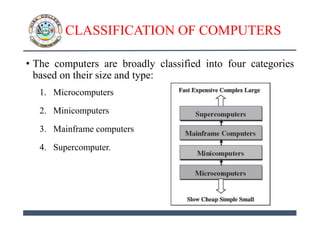
• The computers are broadly classified into four categories
based on their size and type:
1. Microcomputers
2. Minicomputers
3. Mainframe computers
4. Supercomputer.
THE COMPUTER SYSTEM
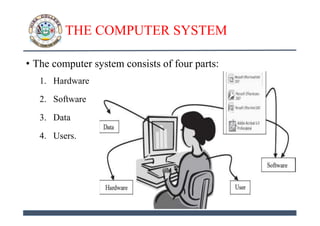
• The computer system consists of four parts:
1. Hardware
2. Software
3. Data
4. Users.
THE COMPUTER SYSTEM
1. Hardware
• Hardware consists of the mechanical parts that make up the
computer as a machine.
• The hardware consists of physical devices of the computer.
• The devices are required for input, output, storage and
processing of the data.
• Keyboard, monitor, hard disk drive, floppy disk drive,
printer, processor and motherboard are some of the hardware
devices.
THE COMPUTER SYSTEM
2. Software:
• Software is a set of instructions that tells the computer about
the tasks to be performed and how these tasks are to be
performed.
• Program is a set of instructions, written in a language
understood by the computer, to perform a specific task.
• A set of programs and documents are collectively called
software.
• The hardware of the computer system cannot perform any
task on its own. Software instructs the computer about the
task to be performed.
• Different software can be loaded on the same hardware to
perform different kinds of tasks.
THE COMPUTER SYSTEM
3. Data
• Data are isolated values or raw facts, which by themselves
have no much significance.
• For example, the data like 29, January, and 1994 just
represent values.
• The data is provided as input to the computer, which is
processed to generate some meaningful information.
• For example, 29, January and 1994 are processed by the
computer to give the date of birth of a person.
THE COMPUTER SYSTEM
4. Users
• Users are people who write computer programs or interact
with the computer.
• They are also known as skinware, liveware, humanware or
peopleware.
• Programmers, data entry operators, system analyst and
computer hardware engineers fall into this category.
THE INPUT-PROCESS-OUTPUT CONCEPT
• A computer is an electronic device that:
1. Accepts data (Input)
2. Processes data
3. Generates output
4. Stores data.
• The concept of generating output information from the input
data is also referred to as input-process-output concept.
THE INPUT-PROCESS-OUTPUT CONCEPT
• Input: The computer accepts input data from the user via an input
device like keyboard. The input data can be characters, word,
text, sound, images, document, etc.
• Process: The computer processes the input data. For this, it
performs some actions on the data by using the instructions or
program given by the user of the data. The action could be an
arithmetic or logic calculation, editing, modifying a document,
etc. During processing, the data, instructions and the output are
stored temporarily in the computer’s main memory.
• Output: The output is the result generated after the processing of
data. The output may be in the form of text, sound, image,
document, etc. The computer may display the output on a
monitor, send output to the printer for printing, play the output,
etc.
• Storage: The input data, instructions and output are stored
permanently in the secondary storage devices like disk or tape.
The stored data can be retrieved later, whenever needed.
COMPONENTS OF COMPUTER
HARDWARE
• The computer system hardware comprises of three main
components:
1. Input / Output (I/O) Unit,
2. Central Processing Unit (CPU)
3. Memory Unit.
COMPONENTS OF COMPUTER
HARDWARE
1. Input / Output Unit
• The user interacts with the computer via the I/O unit.
• The Input unit accepts data from the user and the Output unit
provides the processed data i.e. the information to the user.
• The Input unit converts the data that it accepts from the user,
into a form that is understandable by the computer.
• Similarly, the Output unit provides the output in a form that
is understandable by the user.
• The input is provided to the computer using input devices
like keyboard, trackball and mouse.
• Some of the commonly used output devices are monitor and
printer.
COMPONENTS OF COMPUTER
HARDWARE
2. Central Processing Unit (CPU)
• Central Processing Unit CPU controls, coordinates and
supervises the operations of the computer.
• It is responsible for processing of the input data.
• CPU consists of Arithmetic Logic Unit (ALU) and Control
Unit (CU).
• ALU performs all the arithmetic and logic operations on the input
data.
• CU controls the overall operations of the computer i.e. it checks the
sequence of execution of instructions, and, controls and coordinates
the overall functioning of the units of computer.
• Additionally, CPU also has a set of registers for temporary
storage of data, instructions, addresses and intermediate
results of calculation.
COMPONENTS OF COMPUTER
HARDWARE
3. Memory Unit
• Memory unit stores the data, instructions, intermediate results and
output, temporarily, during the processing of data. This memory is also
called the main memory or primary memory of the computer.
• The input data that is to be processed is brought into the main memory
before processing.
• The instructions required for processing of data and any intermediate
results are also stored in the main memory.
• The output is stored in memory before being transferred to the output
device.
• CPU can work with the information stored in the main memory.
• Another kind of storage unit is also referred to as the secondary
memory of the computer.
• The data, the programs and the output are stored permanently in the
storage unit of the computer. Magnetic disks, optical disks and
magnetic tapes are examples of secondary memory.
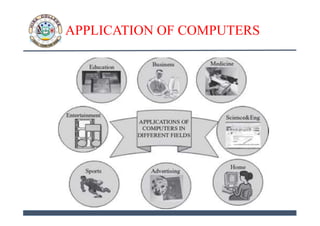
APPLICATION OF COMPUTERS
• Computers have proliferated into various areas of our lives.
Some of the application areas of the computer are listed
below:
• Education: Computers are extensively used, as a tool and as
an aid, for imparting education. Educators use computers to
prepare notes and presentations of their lectures.
• Entertainment: Computers have had a major impact on the
entertainment industry. The user can download and view
movies, play games, chat, book tickets for cinema halls, use
multimedia for making movies, etc.
• Sports: A computer can be used to watch a game, view the
scores, improve the game, play games (like chess, etc.) and
create games.
APPLICATION OF COMPUTERS
• Advertising: Computer is a powerful advertising media.
Advertisement can be displayed on different websites,
electronic-mails can be sent and reviews of a product by
different customers can be posted.
• Medicine: Medical researchers and practitioners use
computers to access information about the advances in
medical research or to take opinion of doctors globally. The
medical history of patients is stored in the computers.
• Science and Engineering: Scientists and engineers use
computers for performing complex scientific calculations,
for designing and making drawings (CAD/CAM
applications) and also for simulating and testing the designs.
APPLICATION OF COMPUTERS
• Government: The government uses computers to manage its
own operations and also for e-governance. The websites of
the different government departments provide information to
the users.
• Home: Computers have now become an integral part of
home equipment. At home, people use computers to play
games, to maintain the home accounts, for communicating
with friends and relatives via Internet, for paying bills, for
education and learning, etc.
• The list of applications of computers is so long that it is not
possible to discuss all of them here.
APPLICATION OF COMPUTERS

1 basics of computers

  • 1.
    BASICS OF COMPUTERS LECTURE#1 (COMPUTER APPLICATIONS)
  • 2.
    INTRODUCTION • Nowadays, computersare an integral part of our lives. • They are used in almost every aspect of life such as economics, medical, education, entertainment etc. • Computer is derived from “compute” meaning “to calculate”. • Computer is defined as “An electronic machine that accepts data from the user, processes the data by performing calculations and operations on it, and generates the desired output results”.
  • 3.
    DIGITALAND ANALOG COMPUTERS •Digital computer uses distinct values to represent the data internally. • All information are represented using the digits 0s and 1s. • The computers that we use at our homes and offices are digital computers. • Analog computer represents data as variable across a continuous range of values. • The earliest computers were analog computers. E.g. Slide rule • Analog computers are used for measuring of parameters that vary continuously in real time, such as temperature, pressure and voltage. They are less precise then digital computers.
  • 4.
    CHARACTERISTICS OF COMPUTER •Speed: The computer can process data very fast, at the rate of millions of instructions per second. • Accuracy: Computer provides a high degree of accuracy. • Diligence: Computer does not get tired and can perform long complex calculations. • Storage Capability: Large volumes of data and information can be stored in the computer and also retrieved whenever required. • Primary Memory => Limited Data (Temporary) • Secondary Memory => Large Amount of Data (Permanent) • Versatility: Computer can perform different types of tasks with the same ease Computer can only perform tasks that it has been programmed to do. It takes instructions from user and does not take its own decisions.
  • 5.
    HISTORY OF COMPUTER •Calculating Machines: ABACUS was the first mechanical calculating device for counting of large numbers. It consists of bars in horizontal positions on which sets of beads are inserted. The horizontal bars have 10 beads each, representing units, tens, hundreds, etc. An abacus is shown in Figure below
  • 6.
    HISTORY OF COMPUTER •Napier’s Bones: A mechanical device built for the purpose of multiplication in 1617 ad. by an English mathematician John Napier. • Slide Rule: It was developed by Edmund Gunter. Using the slide rule, one could perform mathematical operations. It was used extensively till late 1970s. Below figure shows a slide rule.
  • 7.
    HISTORY OF COMPUTER •Pascal’s Adding and Subtraction Machine: Developed by Blaise Pascal. It could add and subtract. The machine consisted of wheels, gears and cylinders. • Leibniz’s Multiplication and Dividing Machine: Developed by Gottfried Leibniz. It is a mechanical device that could both multiply and divide. • Punch Card System: Developed by Jacquard to control the power loom in 1801. It could recognize the presence of hole in the punched card as binary one and the absence of the hole as binary zero. See Figure 1.3 • Babbage’s Analytical Engine: Developed by Charles Babbage. It is a general purpose calculating machine.
  • 8.
    HISTORY OF COMPUTER Figure1.3 Punched card • Hollerith’s Punched Card Tabulating: Developed by Herman Hollerith. The machine could read the information from a punched card and process it electronically. • The developments discussed above and several others not discussed here, resulted in the development of the first computer in the 1940s.
  • 9.
    GENERATIONS OF COMPUTER •The computer has evolved from a large—sized simple calculating machine to a smaller but much more powerful machine. The evolution of computer to the current state is defined in terms of the generations of computer. 1) First Generation (1940 to 1956): Using Vacuum Tubes 2) Second Generation (1956 to 1963): Using Transistors 3) Third Generation (1964 to 1971): Using Integrated Circuits 4) Fourth Generation (1971 to present): Using Microprocessors 5) Fifth Generation (Present and Next): Using Artificial Intelligence
  • 10.
    CLASSIFICATION OF COMPUTERS •The computers are broadly classified into four categories based on their size and type: 1. Microcomputers 2. Minicomputers 3. Mainframe computers 4. Supercomputer.
  • 11.
    THE COMPUTER SYSTEM •The computer system consists of four parts: 1. Hardware 2. Software 3. Data 4. Users.
  • 12.
    THE COMPUTER SYSTEM 1.Hardware • Hardware consists of the mechanical parts that make up the computer as a machine. • The hardware consists of physical devices of the computer. • The devices are required for input, output, storage and processing of the data. • Keyboard, monitor, hard disk drive, floppy disk drive, printer, processor and motherboard are some of the hardware devices.
  • 13.
    THE COMPUTER SYSTEM 2.Software: • Software is a set of instructions that tells the computer about the tasks to be performed and how these tasks are to be performed. • Program is a set of instructions, written in a language understood by the computer, to perform a specific task. • A set of programs and documents are collectively called software. • The hardware of the computer system cannot perform any task on its own. Software instructs the computer about the task to be performed. • Different software can be loaded on the same hardware to perform different kinds of tasks.
  • 14.
    THE COMPUTER SYSTEM 3.Data • Data are isolated values or raw facts, which by themselves have no much significance. • For example, the data like 29, January, and 1994 just represent values. • The data is provided as input to the computer, which is processed to generate some meaningful information. • For example, 29, January and 1994 are processed by the computer to give the date of birth of a person.
  • 15.
    THE COMPUTER SYSTEM 4.Users • Users are people who write computer programs or interact with the computer. • They are also known as skinware, liveware, humanware or peopleware. • Programmers, data entry operators, system analyst and computer hardware engineers fall into this category.
  • 16.
    THE INPUT-PROCESS-OUTPUT CONCEPT •A computer is an electronic device that: 1. Accepts data (Input) 2. Processes data 3. Generates output 4. Stores data. • The concept of generating output information from the input data is also referred to as input-process-output concept.
  • 17.
    THE INPUT-PROCESS-OUTPUT CONCEPT •Input: The computer accepts input data from the user via an input device like keyboard. The input data can be characters, word, text, sound, images, document, etc. • Process: The computer processes the input data. For this, it performs some actions on the data by using the instructions or program given by the user of the data. The action could be an arithmetic or logic calculation, editing, modifying a document, etc. During processing, the data, instructions and the output are stored temporarily in the computer’s main memory. • Output: The output is the result generated after the processing of data. The output may be in the form of text, sound, image, document, etc. The computer may display the output on a monitor, send output to the printer for printing, play the output, etc. • Storage: The input data, instructions and output are stored permanently in the secondary storage devices like disk or tape. The stored data can be retrieved later, whenever needed.
  • 18.
    COMPONENTS OF COMPUTER HARDWARE •The computer system hardware comprises of three main components: 1. Input / Output (I/O) Unit, 2. Central Processing Unit (CPU) 3. Memory Unit.
  • 19.
    COMPONENTS OF COMPUTER HARDWARE 1.Input / Output Unit • The user interacts with the computer via the I/O unit. • The Input unit accepts data from the user and the Output unit provides the processed data i.e. the information to the user. • The Input unit converts the data that it accepts from the user, into a form that is understandable by the computer. • Similarly, the Output unit provides the output in a form that is understandable by the user. • The input is provided to the computer using input devices like keyboard, trackball and mouse. • Some of the commonly used output devices are monitor and printer.
  • 20.
    COMPONENTS OF COMPUTER HARDWARE 2.Central Processing Unit (CPU) • Central Processing Unit CPU controls, coordinates and supervises the operations of the computer. • It is responsible for processing of the input data. • CPU consists of Arithmetic Logic Unit (ALU) and Control Unit (CU). • ALU performs all the arithmetic and logic operations on the input data. • CU controls the overall operations of the computer i.e. it checks the sequence of execution of instructions, and, controls and coordinates the overall functioning of the units of computer. • Additionally, CPU also has a set of registers for temporary storage of data, instructions, addresses and intermediate results of calculation.
  • 21.
    COMPONENTS OF COMPUTER HARDWARE 3.Memory Unit • Memory unit stores the data, instructions, intermediate results and output, temporarily, during the processing of data. This memory is also called the main memory or primary memory of the computer. • The input data that is to be processed is brought into the main memory before processing. • The instructions required for processing of data and any intermediate results are also stored in the main memory. • The output is stored in memory before being transferred to the output device. • CPU can work with the information stored in the main memory. • Another kind of storage unit is also referred to as the secondary memory of the computer. • The data, the programs and the output are stored permanently in the storage unit of the computer. Magnetic disks, optical disks and magnetic tapes are examples of secondary memory.
  • 22.
    APPLICATION OF COMPUTERS •Computers have proliferated into various areas of our lives. Some of the application areas of the computer are listed below: • Education: Computers are extensively used, as a tool and as an aid, for imparting education. Educators use computers to prepare notes and presentations of their lectures. • Entertainment: Computers have had a major impact on the entertainment industry. The user can download and view movies, play games, chat, book tickets for cinema halls, use multimedia for making movies, etc. • Sports: A computer can be used to watch a game, view the scores, improve the game, play games (like chess, etc.) and create games.
  • 23.
    APPLICATION OF COMPUTERS •Advertising: Computer is a powerful advertising media. Advertisement can be displayed on different websites, electronic-mails can be sent and reviews of a product by different customers can be posted. • Medicine: Medical researchers and practitioners use computers to access information about the advances in medical research or to take opinion of doctors globally. The medical history of patients is stored in the computers. • Science and Engineering: Scientists and engineers use computers for performing complex scientific calculations, for designing and making drawings (CAD/CAM applications) and also for simulating and testing the designs.
  • 24.
    APPLICATION OF COMPUTERS •Government: The government uses computers to manage its own operations and also for e-governance. The websites of the different government departments provide information to the users. • Home: Computers have now become an integral part of home equipment. At home, people use computers to play games, to maintain the home accounts, for communicating with friends and relatives via Internet, for paying bills, for education and learning, etc. • The list of applications of computers is so long that it is not possible to discuss all of them here.
  • 25.