11/27/2020 1
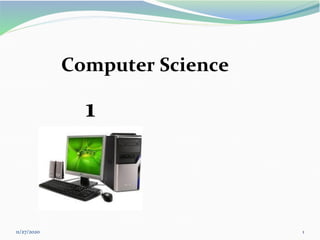
Computer Science
1
11/27/2020 2
Contents:
1. Introduction
2. Characteristics of Computer
3. History of Computer
4. Generation of Computer
5. Classification of Computer
6. Computer Components
11/27/2020 3
Introduction
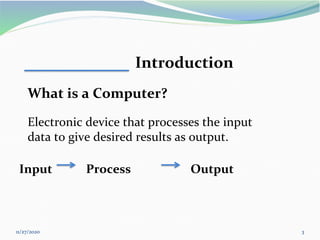
What is a Computer?
Electronic device that processes the input
data to give desired results as output.
Input Process Output
4
Characteristics of Computer
▪ Speed: Instructions per second measured by :
ms, µs, ns, and ps.
▪ Accuracy: 100%
▪ Huge Storage Capability: measured by KB, MB, GB, TB
▪ Versatility: ability to process any kind of data to perform
different tasks: play, music, letter, …etc.
▪ Reliability: 100% accurate.
▪ Diligence: ability to perform repeated operation efficiently
without get tired.
▪ Networking: interconnected in to a netwo
5
11/27/2020
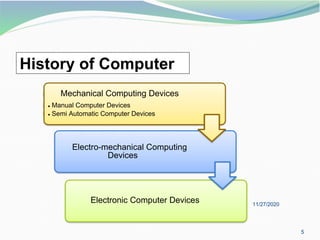
Electronic Computer Devices
Electro-mechanical Computing
Devices
Mechanical Computing Devices
• Manual Computer Devices
• Semi Automatic Computer Devices
History of Computer
11/27/2020 6
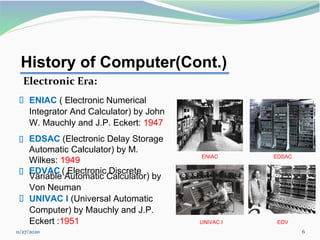
▪ EDSAC (Electronic Delay Storage
Automatic Calculator) by M.
Wilkes: 1949
▪ EDVAC ( Electronic Discrete
ENIAC EDSAC
History of Computer(Cont.)
Electronic Era:
▪ ENIAC ( Electronic Numerical
Integrator And Calculator) by John
W. Mauchly and J.P. Eckert: 1947
Variable Automatic Calculator) by
Von Neuman
▪ UNIVAC I (Universal Automatic
Computer) by Mauchly and J.P.
Eckert :1951 UNIVAC I EDV
11/27/2020 7
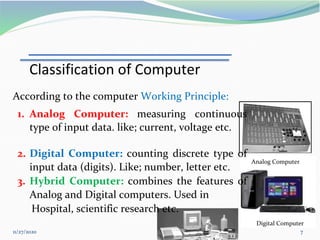
Digital Computer
Analog Computer
According to the computer Working Principle:
1. Analog Computer: measuring continuous
type of input data. like; current, voltage etc.
2. Digital Computer: counting discrete type of
input data (digits). Like; number, letter etc.
3. Hybrid Computer: combines the features of
Analog and Digital computers. Used in
Hospital, scientific research etc.
Classification of Computer
11/27/2020 8
Classification of Computer(Cont.)
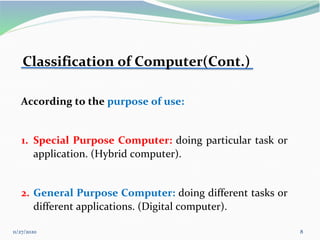
According to the purpose of use:
1. Special Purpose Computer: doing particular task or
application. (Hybrid computer).
2. General Purpose Computer: doing different tasks or
different applications. (Digital computer).
11/27/2020 9
Desktop
Laptop
Classification of Computer(Cont.)
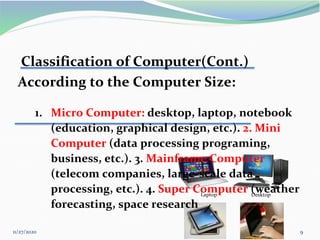
According to the Computer Size:
1. Micro Computer: desktop, laptop, notebook
(education, graphical design, etc.). 2. Mini
Computer (data processing programing,
business, etc.). 3. Mainframe Computer
(telecom companies, large-scale data
processing, etc.). 4. Super Computer (weather
forecasting, space research
11/27/2020 10
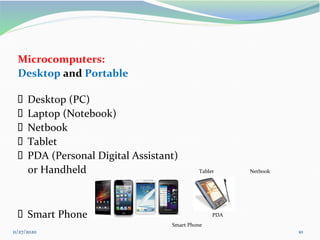
Microcomputers:
Desktop and Portable
▪ Desktop (PC)
▪ Laptop (Notebook)
▪ Netbook
▪ Tablet
▪ PDA (Personal Digital Assistant)
or Handheld Tablet Netbook
▪ Smart Phone
Smart Phone
PDA
11/27/2020 11
Computer Components
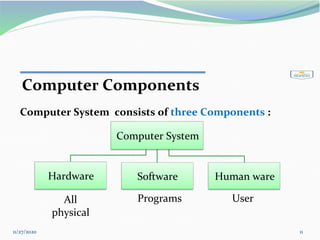
Computer System consists of three Components :
Computer System
Hardware Software Human ware
All
physical
Programs User
11/27/2020 12
Computer Components (Cont.)
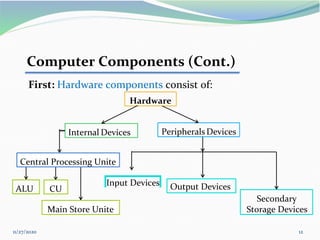
First: Hardware components consist of:
Input Devices Output Devices
Internal Devices Peripherals Devices
Hardware
Secondary
Storage Devices
ALU CU
Main Store Unite
Central Processing Unite
11/27/2020 13
Hardware
Components
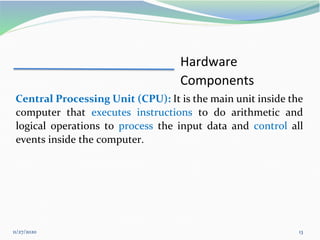
Central Processing Unit (CPU): It is the main unit inside the
computer that executes instructions to do arithmetic and
logical operations to process the input data and control all
events inside the computer.
11/27/2020 14
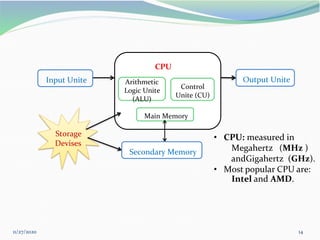
Input Unite Output Unite
CPU
Arithmetic
Logic Unite
ALU)
(
Control
Unite (CU)
Main Memory
Secondary Memory
Storage
Devises
• CPU: measured in
Megahertz (MHz )
andGigahertz (GHz).
• Most popular CPU are:
Intel and AMD.
11/27/2020 15
Hardware Components (Cont.)
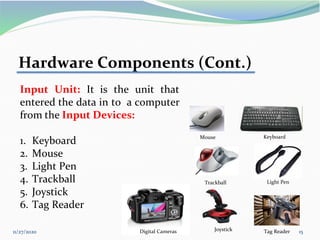
Input Unit: It is the unit that
entered the data in to a computer
from the Input Devices:
1. Keyboard
2. Mouse
3. Light Pen
4. Trackball
5. Joystick
6. Tag Reader
Keyboard
Trackball Light Pen
Tag Reader
Joystick
Digital Cameras
Mouse
11/27/2020 16
MICR POS Terminal
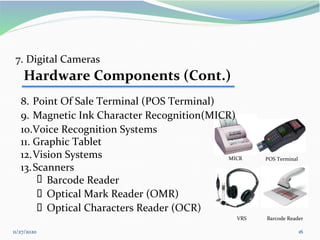
11. Graphic Tablet
12.Vision Systems
13.Scanners
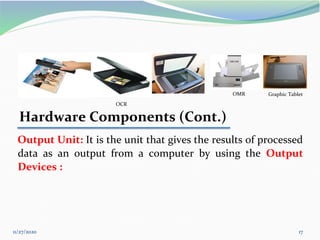
▪ Barcode Reader
7. Digital Cameras
Hardware Components (Cont.)
8. Point Of Sale Terminal (POS Terminal)
9. Magnetic Ink Character Recognition(MICR)
10.Voice Recognition Systems
▪ Optical Mark Reader (OMR)
▪ Optical Characters Reader (OCR)
VRS Barcode Reader
11/27/2020 17
OCR
Hardware Components (Cont.)
Output Unit: It is the unit that gives the results of processed
data as an output from a computer by using the Output
Devices :
Graphic Tablet
OMR
11/27/2020 18
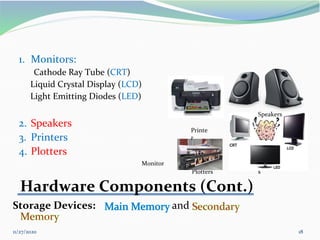
1. Monitors:
Cathode Ray Tube (CRT)
Liquid Crystal Display (LCD)
Light Emitting Diodes (LED)
2. Speakers
3. Printers
4. Plotters
Monitor
Plotters s
Hardware Components (Cont.)
Storage Devices: and
Speakers
Printe
r
11/27/2020 19
Hardware Components (Cont.)
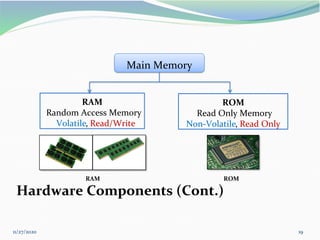
RAM
Random Access Memory
Volatile, Read/Write
ROM
Read Only Memory
Non-Volatile, Read Only
Main Memory
ROM
RAM
11/27/2020 20
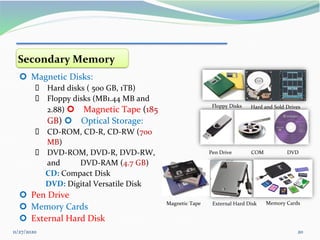
Floppy Disks Hard and Sold Drives
Pen Drive DVD
COM
External Hard Disk Memory Cards
Magnetic Tape
Secondary Memory
 Magnetic Disks:
▪ Hard disks ( 500 GB, 1TB)
▪ Floppy disks (MB1.44 MB and
2.88)  Magnetic Tape (185
GB)  Optical Storage:
▪ CD-ROM, CD-R, CD-RW (700
MB)
▪ DVD-ROM, DVD-R, DVD-RW,
and DVD-RAM (4.7 GB)
CD: Compact Disk
DVD: Digital Versatile Disk
 Pen Drive
 Memory Cards
 External Hard Disk
11/27/2020 21
 Computer Output Microfilm and Computer
Output Microfiche
11/27/2020 22
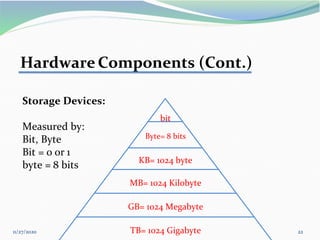
Hardware Components (Cont.)
Storage Devices:
Measured by:
Bit, Byte
Bit = 0 or 1
byte = 8 bits
bit
Byte= 8 bits
KB= 1024 byte
MB= 1024 Kilobyte
GB= 1024 Megabyte
TB= 1024 Gigabyte
11/27/2020 23
Computer Components (Cont.)
Second: Software components consist of:
11/27/2020 24
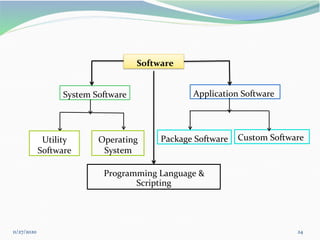
Package Software Custom Software
System Software Application Software
Software
Programming Language &
Scripting
Operating
System
Utility
Software
11/27/2020 25
Software
Components
Software: set of instruction in the form of programs that used to operate
the computer and related devices. Types of Software:
1. System Software:
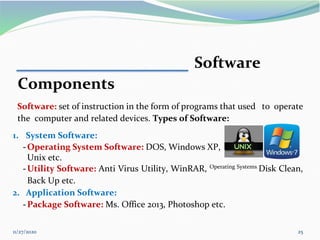
-Operating System Software: DOS, Windows XP,
Unix etc.
-Utility Software: Anti Virus Utility, WinRAR, Operating Systems
Disk Clean,
Back Up etc.
2. Application Software:
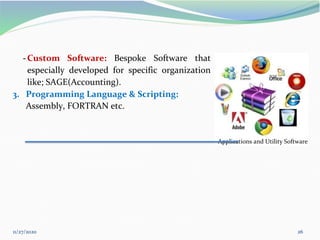
-Package Software: Ms. Office 2013, Photoshop etc.
11/27/2020 26
-Custom Software: Bespoke Software that
especially developed for specific organization
like; SAGE(Accounting).
3. Programming Language & Scripting:
Assembly, FORTRAN etc.
Applications and Utility Software

Computer Science 1 computer report 1.ppt.pdf

  • 1.
  • 2.
    11/27/2020 2 Contents: 1. Introduction 2.Characteristics of Computer 3. History of Computer 4. Generation of Computer 5. Classification of Computer 6. Computer Components
  • 3.
    11/27/2020 3 Introduction What isa Computer? Electronic device that processes the input data to give desired results as output. Input Process Output
  • 4.
    4 Characteristics of Computer ▪Speed: Instructions per second measured by : ms, µs, ns, and ps. ▪ Accuracy: 100% ▪ Huge Storage Capability: measured by KB, MB, GB, TB ▪ Versatility: ability to process any kind of data to perform different tasks: play, music, letter, …etc. ▪ Reliability: 100% accurate. ▪ Diligence: ability to perform repeated operation efficiently without get tired. ▪ Networking: interconnected in to a netwo
  • 5.
    5 11/27/2020 Electronic Computer Devices Electro-mechanicalComputing Devices Mechanical Computing Devices • Manual Computer Devices • Semi Automatic Computer Devices History of Computer
  • 6.
    11/27/2020 6 ▪ EDSAC(Electronic Delay Storage Automatic Calculator) by M. Wilkes: 1949 ▪ EDVAC ( Electronic Discrete ENIAC EDSAC History of Computer(Cont.) Electronic Era: ▪ ENIAC ( Electronic Numerical Integrator And Calculator) by John W. Mauchly and J.P. Eckert: 1947 Variable Automatic Calculator) by Von Neuman ▪ UNIVAC I (Universal Automatic Computer) by Mauchly and J.P. Eckert :1951 UNIVAC I EDV
  • 7.
    11/27/2020 7 Digital Computer AnalogComputer According to the computer Working Principle: 1. Analog Computer: measuring continuous type of input data. like; current, voltage etc. 2. Digital Computer: counting discrete type of input data (digits). Like; number, letter etc. 3. Hybrid Computer: combines the features of Analog and Digital computers. Used in Hospital, scientific research etc. Classification of Computer
  • 8.
    11/27/2020 8 Classification ofComputer(Cont.) According to the purpose of use: 1. Special Purpose Computer: doing particular task or application. (Hybrid computer). 2. General Purpose Computer: doing different tasks or different applications. (Digital computer).
  • 9.
    11/27/2020 9 Desktop Laptop Classification ofComputer(Cont.) According to the Computer Size: 1. Micro Computer: desktop, laptop, notebook (education, graphical design, etc.). 2. Mini Computer (data processing programing, business, etc.). 3. Mainframe Computer (telecom companies, large-scale data processing, etc.). 4. Super Computer (weather forecasting, space research
  • 10.
    11/27/2020 10 Microcomputers: Desktop andPortable ▪ Desktop (PC) ▪ Laptop (Notebook) ▪ Netbook ▪ Tablet ▪ PDA (Personal Digital Assistant) or Handheld Tablet Netbook ▪ Smart Phone Smart Phone PDA
  • 11.
    11/27/2020 11 Computer Components ComputerSystem consists of three Components : Computer System Hardware Software Human ware All physical Programs User
  • 12.
    11/27/2020 12 Computer Components(Cont.) First: Hardware components consist of: Input Devices Output Devices Internal Devices Peripherals Devices Hardware Secondary Storage Devices ALU CU Main Store Unite Central Processing Unite
  • 13.
    11/27/2020 13 Hardware Components Central ProcessingUnit (CPU): It is the main unit inside the computer that executes instructions to do arithmetic and logical operations to process the input data and control all events inside the computer.
  • 14.
    11/27/2020 14 Input UniteOutput Unite CPU Arithmetic Logic Unite ALU) ( Control Unite (CU) Main Memory Secondary Memory Storage Devises • CPU: measured in Megahertz (MHz ) andGigahertz (GHz). • Most popular CPU are: Intel and AMD.
  • 15.
    11/27/2020 15 Hardware Components(Cont.) Input Unit: It is the unit that entered the data in to a computer from the Input Devices: 1. Keyboard 2. Mouse 3. Light Pen 4. Trackball 5. Joystick 6. Tag Reader Keyboard Trackball Light Pen Tag Reader Joystick Digital Cameras Mouse
  • 16.
    11/27/2020 16 MICR POSTerminal 11. Graphic Tablet 12.Vision Systems 13.Scanners ▪ Barcode Reader 7. Digital Cameras Hardware Components (Cont.) 8. Point Of Sale Terminal (POS Terminal) 9. Magnetic Ink Character Recognition(MICR) 10.Voice Recognition Systems ▪ Optical Mark Reader (OMR) ▪ Optical Characters Reader (OCR) VRS Barcode Reader
  • 17.
    11/27/2020 17 OCR Hardware Components(Cont.) Output Unit: It is the unit that gives the results of processed data as an output from a computer by using the Output Devices : Graphic Tablet OMR
  • 18.
    11/27/2020 18 1. Monitors: CathodeRay Tube (CRT) Liquid Crystal Display (LCD) Light Emitting Diodes (LED) 2. Speakers 3. Printers 4. Plotters Monitor Plotters s Hardware Components (Cont.) Storage Devices: and Speakers Printe r
  • 19.
    11/27/2020 19 Hardware Components(Cont.) RAM Random Access Memory Volatile, Read/Write ROM Read Only Memory Non-Volatile, Read Only Main Memory ROM RAM
  • 20.
    11/27/2020 20 Floppy DisksHard and Sold Drives Pen Drive DVD COM External Hard Disk Memory Cards Magnetic Tape Secondary Memory  Magnetic Disks: ▪ Hard disks ( 500 GB, 1TB) ▪ Floppy disks (MB1.44 MB and 2.88)  Magnetic Tape (185 GB)  Optical Storage: ▪ CD-ROM, CD-R, CD-RW (700 MB) ▪ DVD-ROM, DVD-R, DVD-RW, and DVD-RAM (4.7 GB) CD: Compact Disk DVD: Digital Versatile Disk  Pen Drive  Memory Cards  External Hard Disk
  • 21.
    11/27/2020 21  ComputerOutput Microfilm and Computer Output Microfiche
  • 22.
    11/27/2020 22 Hardware Components(Cont.) Storage Devices: Measured by: Bit, Byte Bit = 0 or 1 byte = 8 bits bit Byte= 8 bits KB= 1024 byte MB= 1024 Kilobyte GB= 1024 Megabyte TB= 1024 Gigabyte
  • 23.
    11/27/2020 23 Computer Components(Cont.) Second: Software components consist of:
  • 24.
    11/27/2020 24 Package SoftwareCustom Software System Software Application Software Software Programming Language & Scripting Operating System Utility Software
  • 25.
    11/27/2020 25 Software Components Software: setof instruction in the form of programs that used to operate the computer and related devices. Types of Software: 1. System Software: -Operating System Software: DOS, Windows XP, Unix etc. -Utility Software: Anti Virus Utility, WinRAR, Operating Systems Disk Clean, Back Up etc. 2. Application Software: -Package Software: Ms. Office 2013, Photoshop etc.
  • 26.
    11/27/2020 26 -Custom Software:Bespoke Software that especially developed for specific organization like; SAGE(Accounting). 3. Programming Language & Scripting: Assembly, FORTRAN etc. Applications and Utility Software