

Communication Using a Network
Data Communication
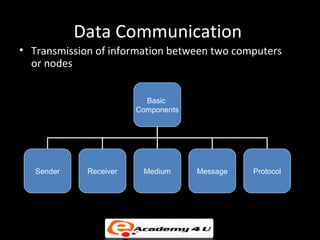
• Transmission of information between two computers
  or nodes


                          Basic
                        Components


   Sender    Receiver    Medium      Message   Protocol
Signaling Techniques – I
• Two types of Signaling techniques:
   – Baseband
   – Broadband
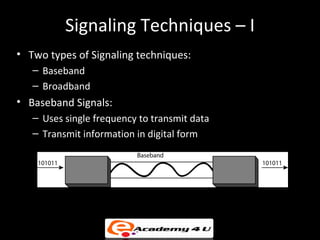
• Baseband Signals:
   – Uses single frequency to transmit data
   – Transmit information in digital form
Signaling Techniques – II
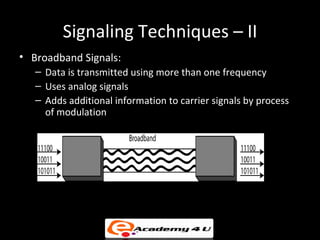
• Broadband Signals:
   – Data is transmitted using more than one frequency
   – Uses analog signals
   – Adds additional information to carrier signals by process
     of modulation
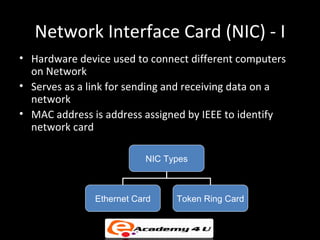
Network Interface Card (NIC) - I
• Hardware device used to connect different computers
  on Network
• Serves as a link for sending and receiving data on a
  network
• MAC address is address assigned by IEEE to identify
  network card

                          NIC Types


               Ethernet Card    Token Ring Card
Network Interface Card (NIC) - II
• Operates at layer 2 of the OSI model
• Supports data transfer rate of 10, 100 or 1000
  Mbps
• User can select an NIC depending on the type
  of network, protocol and media used
• MAC address is stored on the PROM of the
  NIC
Ethernet Card
• Used in devices which are connected using Ethernet
  technology
• Two types of Ethernet network card – Wired and
  wireless
• A wireless Ethernet card can not communicate with a
  wired Ethernet card and vice-versa
• Different types of Ethernet cards can be used depending
  on the type of network and corresponding connector
  that is required
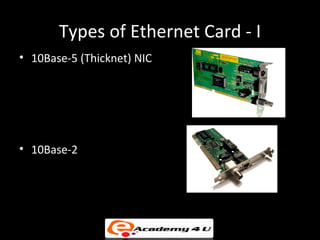
Types of Ethernet Card - I
• 10Base-5 (Thicknet) NIC


• 10Base-2
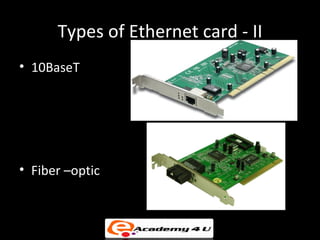
Types of Ethernet card - II
• 10BaseT


• Fiber –optic
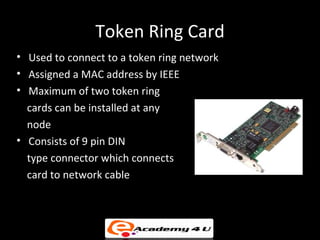
Token Ring Card
• Used to connect to a token ring network
• Assigned a MAC address by IEEE
• Maximum of two token ring
  cards can be installed at any
  node
• Consists of 9 pin DIN
  type connector which connects
  card to network cable
Physical Connections
• Physical Connections
   – NIC either connected on a PCI or PCI-X slot
   – NIC cards can be connected to an USB port or can have a
     PC card connection
• Depends on one of the cable connectors:
   – BNC connector
   – ST-fiber optic connector
   – RJ-45 connector
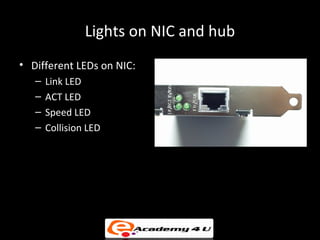
Lights on NIC and hub
• Different LEDs on NIC:
   –   Link LED
   –   ACT LED
   –   Speed LED
   –   Collision LED
• LEDs on Hub:
   – Power LED
   – Port LED
Different LEDs on a NIC
• Link LED – Used to indicate whether any
  network connection is present or not
• Act LED – If this LED flashes it indicates that
  some activity is taking place on the network
• Speed LED – ON state indicates that it
  operates at 100 Mbps and off for 10 Mbps
• Collision LED – Glows when a collision takes
  place and present on some old NICs
MAC Address
•   Also known as hardware or physical address
•   Used to identify nodes at lower levels of the OSI model
•   MAC address assigned by IEEE
•   Is a 12 digit hexadecimal number (48 bit address)
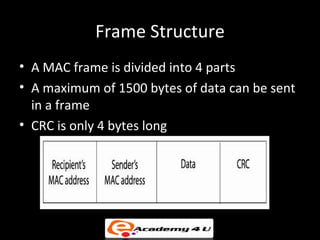
Frame Structure
• A MAC frame is divided into 4 parts
• A maximum of 1500 bytes of data can be sent
  in a frame
• CRC is only 4 bytes long
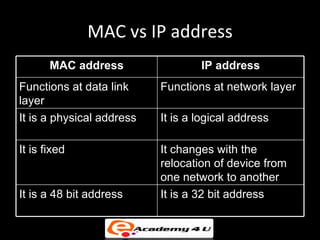
MAC vs IP address
       MAC address                 IP address
Functions at data link     Functions at network layer
layer
It is a physical address   It is a logical address

It is fixed                It changes with the
                           relocation of device from
                           one network to another
It is a 48 bit address     It is a 32 bit address
Installing the NIC
• Different factors while choosing NIC:
   – Bus type (Expansion slot)
   – Speed
   – Connection type (cabling)
• Hardware Requirements:
   – Pentium I/233MHz
   – 32 MB RAM
   – 2 GB of available hard disk
Direct Cable Connection
• One device acts as a host and other acts as a guest
• Can also use infrared connection, if both nodes have required
  hardware
• All the latest versions of windows provide a software which
  allows a user to have a direct serial-to-serial, parallel-to-
  parallel, or infrared-to-infrared connection with the other PC.
• To establish a connection using serial ports, a cable known as
  null modem is used
• Connection speed of serial data cable connection is very slow
  but it’s a cheaper option when NICs are not available
Diagnostic and Repair of Physical
          Cabling using tools
• Tools can be used to identify the problems and also
  troubleshoot these problems
• Various tools available for checking network are:
   – Volt-ohm meters (VOMs) – Cable-testing tool used to
     measure parameters
      • Analog
      • Digital
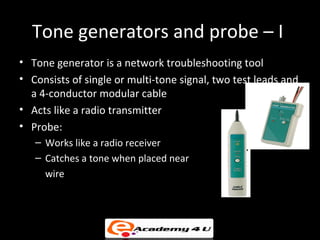
Tone generators and probe – I
• Tone generator is a network troubleshooting tool
• Consists of single or multi-tone signal, two test leads and
  a 4-conductor modular cable
• Acts like a radio transmitter
• Probe:
   – Works like a radio receiver
   – Catches a tone when placed near
     wire
Optical tester
• Fiber optic NICs mostly do not have any lights so making
  the diagnosis of the problem becomes little difficult
• Optical tester is used to inspect the quality of the
  connections

Communication using network

  • 1.
  • 2.
    Data Communication • Transmissionof information between two computers or nodes Basic Components Sender Receiver Medium Message Protocol
  • 3.
    Signaling Techniques –I • Two types of Signaling techniques: – Baseband – Broadband • Baseband Signals: – Uses single frequency to transmit data – Transmit information in digital form
  • 4.
    Signaling Techniques –II • Broadband Signals: – Data is transmitted using more than one frequency – Uses analog signals – Adds additional information to carrier signals by process of modulation
  • 5.
    Network Interface Card(NIC) - I • Hardware device used to connect different computers on Network • Serves as a link for sending and receiving data on a network • MAC address is address assigned by IEEE to identify network card NIC Types Ethernet Card Token Ring Card
  • 6.
    Network Interface Card(NIC) - II • Operates at layer 2 of the OSI model • Supports data transfer rate of 10, 100 or 1000 Mbps • User can select an NIC depending on the type of network, protocol and media used • MAC address is stored on the PROM of the NIC
  • 7.
    Ethernet Card • Usedin devices which are connected using Ethernet technology • Two types of Ethernet network card – Wired and wireless • A wireless Ethernet card can not communicate with a wired Ethernet card and vice-versa • Different types of Ethernet cards can be used depending on the type of network and corresponding connector that is required
  • 8.
    Types of EthernetCard - I • 10Base-5 (Thicknet) NIC • 10Base-2
  • 9.
    Types of Ethernetcard - II • 10BaseT • Fiber –optic
  • 10.
    Token Ring Card •Used to connect to a token ring network • Assigned a MAC address by IEEE • Maximum of two token ring cards can be installed at any node • Consists of 9 pin DIN type connector which connects card to network cable
  • 11.
    Physical Connections • PhysicalConnections – NIC either connected on a PCI or PCI-X slot – NIC cards can be connected to an USB port or can have a PC card connection • Depends on one of the cable connectors: – BNC connector – ST-fiber optic connector – RJ-45 connector
  • 12.
    Lights on NICand hub • Different LEDs on NIC: – Link LED – ACT LED – Speed LED – Collision LED • LEDs on Hub: – Power LED – Port LED
  • 13.
    Different LEDs ona NIC • Link LED – Used to indicate whether any network connection is present or not • Act LED – If this LED flashes it indicates that some activity is taking place on the network • Speed LED – ON state indicates that it operates at 100 Mbps and off for 10 Mbps • Collision LED – Glows when a collision takes place and present on some old NICs
  • 14.
    MAC Address • Also known as hardware or physical address • Used to identify nodes at lower levels of the OSI model • MAC address assigned by IEEE • Is a 12 digit hexadecimal number (48 bit address)
  • 15.
    Frame Structure • AMAC frame is divided into 4 parts • A maximum of 1500 bytes of data can be sent in a frame • CRC is only 4 bytes long
  • 16.
    MAC vs IPaddress MAC address IP address Functions at data link Functions at network layer layer It is a physical address It is a logical address It is fixed It changes with the relocation of device from one network to another It is a 48 bit address It is a 32 bit address
  • 17.
    Installing the NIC •Different factors while choosing NIC: – Bus type (Expansion slot) – Speed – Connection type (cabling) • Hardware Requirements: – Pentium I/233MHz – 32 MB RAM – 2 GB of available hard disk
  • 18.
    Direct Cable Connection •One device acts as a host and other acts as a guest • Can also use infrared connection, if both nodes have required hardware • All the latest versions of windows provide a software which allows a user to have a direct serial-to-serial, parallel-to- parallel, or infrared-to-infrared connection with the other PC. • To establish a connection using serial ports, a cable known as null modem is used • Connection speed of serial data cable connection is very slow but it’s a cheaper option when NICs are not available
  • 19.
    Diagnostic and Repairof Physical Cabling using tools • Tools can be used to identify the problems and also troubleshoot these problems • Various tools available for checking network are: – Volt-ohm meters (VOMs) – Cable-testing tool used to measure parameters • Analog • Digital
  • 20.
    Tone generators andprobe – I • Tone generator is a network troubleshooting tool • Consists of single or multi-tone signal, two test leads and a 4-conductor modular cable • Acts like a radio transmitter • Probe: – Works like a radio receiver – Catches a tone when placed near wire
  • 21.
    Optical tester • Fiberoptic NICs mostly do not have any lights so making the diagnosis of the problem becomes little difficult • Optical tester is used to inspect the quality of the connections