0BSCHOOL OF TECHNOLOGY 
Networking Technology 
Laboratory # 1 – Network Components 
1. Complete the following table; identifying, briefly describing and explaining the functionality of 
the following network components: 
Image Network 
Component 
Brief Description Functionality 
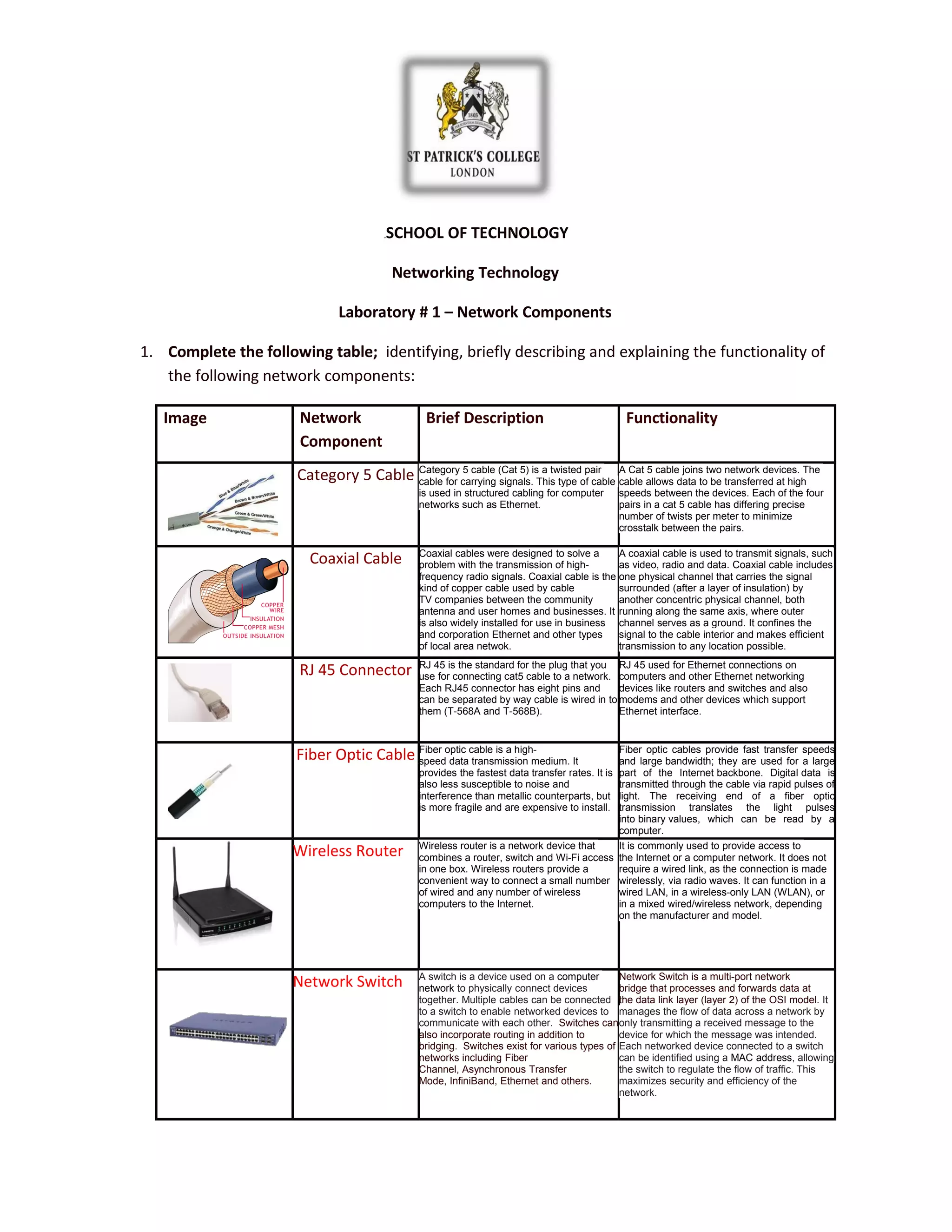
Category 5 Cable Category 5 cable (Cat 5) is a twisted pair 
cable for carrying signals. This type of cable 
is used in structured cabling for computer 
networks such as Ethernet. 
A Cat 5 cable joins two network devices. The 
cable allows data to be transferred at high 
speeds between the devices. Each of the four 
pairs in a cat 5 cable has differing precise 
number of twists per meter to minimize 
crosstalk between the pairs. 
Coaxial Cable Coaxial cables were designed to solve a 
problem with the transmission of high-frequency 
radio signals. Coaxial cable is the 
kind of copper cable used by cable 
TV companies between the community 
antenna and user homes and businesses. It 
is also widely installed for use in business 
and corporation Ethernet and other types 
of local area netwok. 
A coaxial cable is used to transmit signals, such 
as video, radio and data. Coaxial cable includes 
one physical channel that carries the signal 
surrounded (after a layer of insulation) by 
another concentric physical channel, both 
running along the same axis, where outer 
channel serves as a ground. It confines the 
signal to the cable interior and makes efficient 
transmission to any location possible. 
RJ 45 Connector RJ 45 is the standard for the plug that you 
use for connecting cat5 cable to a network. 
Each RJ45 connector has eight pins and 
can be separated by way cable is wired in to 
them (T-568A and T-568B). 
RJ 45 used for Ethernet connections on 
computers and other Ethernet networking 
devices like routers and switches and also 
modems and other devices which support 
Ethernet interface. 
Fiber Optic Cable Fiber optic cable is a high-speed 
data transmission medium. It 
provides the fastest data transfer rates. It is 
also less susceptible to noise and 
interference than metallic counterparts, but 
is more fragile and are expensive to install. 
Fiber optic cables provide fast transfer speeds 
and large bandwidth; they are used for a large 
part of the Internet backbone. Digital data is 
transmitted through the cable via rapid pulses of 
light. The receiving end of a fiber optic 
transmission translates the light pulses 
into binary values, which can be read by a 
computer. 
Wireless Router Wireless router is a network device that 
combines a router, switch and Wi-Fi access 
in one box. Wireless routers provide a 
convenient way to connect a small number 
of wired and any number of wireless 
computers to the Internet. 
It is commonly used to provide access to 
the Internet or a computer network. It does not 
require a wired link, as the connection is made 
wirelessly, via radio waves. It can function in a 
wired LAN, in a wireless-only LAN (WLAN), or 
in a mixed wired/wireless network, depending 
on the manufacturer and model. 
Network Switch A switch is a device used on a computer 
network to physically connect devices 
together. Multiple cables can be connected 
to a switch to enable networked devices to 
communicate with each other. Switches can 
also incorporate routing in addition to 
bridging. Switches exist for various types of 
networks including Fiber 
Channel, Asynchronous Transfer 
Mode, InfiniBand, Ethernet and others. 
Network Switch is a multi-port network 
bridge that processes and forwards data at 
the data link layer (layer 2) of the OSI model. It 
manages the flow of data across a network by 
only transmitting a received message to the 
device for which the message was intended. 
Each networked device connected to a switch 
can be identified using a MAC address, allowing 
the switch to regulate the flow of traffic. This 
maximizes security and efficiency of the 
network.
1B2. The Network Interface Card 
· Draw and describe basic signaling methods and their characteristics. 
· Explain the role of the Network Interface Card. 
· View* and briefly describe the installation procedure of an NIC> 
· Discuss selection and configuration of a network interface card. 
· Identify how the relevant parameters and protocols are set. 
· Discuss the factors that affect the performance of network interface cards. 
· Discuss how drivers are selected and implemented for various network components. 
*Note: There are several videos on You Tube on the topic of NIC installation 
This Laboratory Investigation addresses Assessment Criteria 3.2, 3.3, 3.4, 3.5, 4.3 
Basic signaling methods and their characteristics. 
There are many ways that signals can be created with the goal of networking. Most common would be electrical impulses 
that travel copper wire, pulses of light that travel through strands of glass or plastic, radio transmissions, etc. Encoded signals have 
certain charichteristics where the basic would be anolog or digital. 
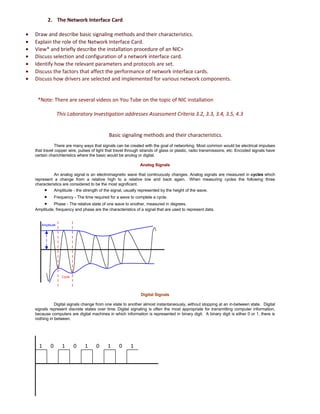
Analog Signals 
An analog signal is an electromagnetic wave that continuously changes. Analog signals are measured in cycles which 
represent a change from a relative high to a relative low and back again. When measuring cycles the following three 
characteristics are considered to be the most significant. 
· Amplitude - the strength of the signal, usually represented by the height of the wave. 
· Frequency - The time required for a wave to complete a cycle. 
· Phase - The relative state of one wave to another, measured in degrees. 
Amplitude, frequency and phase are the characteristics of a signal that are used to represent data. 
Digital Signals 
Amplitude 
Cycle 
Digital signals change from one state to another almost instantaneously, without stopping at an in-between state. Digital 
signals represent discrete states over time. Digital signaling is often the most appropriate for transmitting computer information, 
because computers are digital machines in which information is represented in binary digit. A binary digit is either 0 or 1, there is 
nothing in between. 
1 0 1 0 1 0 1 0 1
Digital Signaling vs. Analog 
Digital signaling in general is less expensive to make the equipment, less vulnerable to errors caused by interference, offer 
better security, faster performance, higher reliability and less error prone. Analog signaling in general more easily multiplexed and 
less vulnerable to attenuation. Each type of signal generation and transmission has its advantages and disadvantages. While 
digital signaling seems to be quickly replacing almost all analog signaling, it isn't likely to ever do so completely. 
Network Interface Card 
Network interface cards act as the physical interface or connection between the computer and the network cable. The cards 
are installed in an expansion slot in each computer and server on the network. After the NIC has been installed, the network cable 
is attached to the card's port to make the actual physical connection between the computer and the rest of the network. The role of 
the NIC is to: 
· Prepare data from the computer for the network cable. 
· Send the data to another computer. 
· Control the flow of data between the computer and the cabling system. 
· Receive incoming data from the cable and translate it into bytes that can be understood by the computer's central 
processing unit (CPU). 
Some of the factors that could affect performance of Network Interface Card are: 
· Incorrect software drivers for the NIC 
· Network traffic collisions due to a poorly operating Switch 
· Too many users on the wire 
· Incompatible speed between network components i.e. 10mbit switch that services 100mbit NIC’s 
· Bad weather 
· Cabling issues 
· EMF interference 
Instalation & Configuration of Network Interface Card 
( Windows 7; Intel Gigabit PRO/1000 CT Desktop Adapter PCI-express (EXPI9301CT)) 
https://www.youtube.com/watch?v=mZovieBB9cQ 
1 Read the users guide and familiarize yourself with the new card. 
2 Power down PC and remove the AC power cord. 
3 Find an available Peripheral Component Interconnect (PCI) slot on the motherboard 
4 Seat the card in the PCI slot on firmly with gentle pressure along the length of the card, especially right about the slot 
itself. 
1 Plug computer in and power it up. 
2 Windows will detect that you have installed a new hardware and in most cases it will install the drivers automatically, 
otherwise install the drivers manually from the CD supplied with the network card 
3 Verify Windows recognizes the new card by selecting Start -> Control Panel -> System and Security -> Device 
Manager -> Network Adapters -> Intel Gigabit 100 and check that „Device Status" box says "This device is working 
properly". 
4 Check that new driver is set up and up to date by selecting Start -> Control Panel -> System and Security -> Device 
Manager -> Network Adapters -> Intel Gigabit 100-> right mouse click-> Properties-> Driver details 
Intel Gigabit PRO/1000 CT Desktop Adapter PCI-express Main Specifications 
· Device Type Network adapter 
· Form Factor Plug-in card - low profile 
· Interface (Bus) Type PCI Express x1 
· PCI Specification Revision PCIe 1.1 
· Cabling Type Ethernet 10Base-T,Ethernet 100Base-TX,Ethernet 1000Base-T 
· Data Link Protocol 10Mb LAN,100Mb LAN,GigE 
· Data Transfer Rate 1000 Mbps 
· Processor 1 x 82574L – Intel 
In my opinion, Intel Gigabit CT Desktop Adapter offers decent system performance with increased end-user productivity. 
Specifically, the Intel Gigabit CT Desktop Adapter uses auto- negotiation to ensure the adapter runs at the highest available 
network speed (10,100,or 1000 Mbps),and maintains full bandwidth capacity with the dedicated bandwidth of a PCIe 
input/output (I/O) bus. Based on the low-power Intel 82574L Gigabit Ethernet Controller, this desktop adapter offers optimal 
performance in a low-cost, low-power, compact profile. Teaming support and an array of other advanced features such as: 
enabled widespread deployment, remote wake/boot, point-and-click power over individual adapters,advanced connection 
teaming, virtual local area network (VLAN) configuration and other advanced adapter features alows to use this adapter as an 
entry-level server adapter also. 
In order to identify how the relevant parameters and protocols are set for NIC following steps to be completed:
1) Select Start -> Control panel -> Network and Internet -> Network and Sharing Center to check connection to a 
network and access to the Internet. 
2) Check local area connections by clicking on change adaptor settings link on the left side of Network and Sharing 
center. Double click on Local Area Connection icon which will display LAN status. It shows the network connection 
duration, the speed of the connection, number of bytes sent and received etc. 
3) Click Details to see the Network connection details: IP address, subnet mask, protocol type, DHCP status etc. 
4) Click Properties -> (on Network area connections status) -> Internet protocol version 4 (TCP/IPv4) -> Properties 
to access protocol settings

Acr5 dcb

  • 1.
    0BSCHOOL OF TECHNOLOGY Networking Technology Laboratory # 1 – Network Components 1. Complete the following table; identifying, briefly describing and explaining the functionality of the following network components: Image Network Component Brief Description Functionality Category 5 Cable Category 5 cable (Cat 5) is a twisted pair cable for carrying signals. This type of cable is used in structured cabling for computer networks such as Ethernet. A Cat 5 cable joins two network devices. The cable allows data to be transferred at high speeds between the devices. Each of the four pairs in a cat 5 cable has differing precise number of twists per meter to minimize crosstalk between the pairs. Coaxial Cable Coaxial cables were designed to solve a problem with the transmission of high-frequency radio signals. Coaxial cable is the kind of copper cable used by cable TV companies between the community antenna and user homes and businesses. It is also widely installed for use in business and corporation Ethernet and other types of local area netwok. A coaxial cable is used to transmit signals, such as video, radio and data. Coaxial cable includes one physical channel that carries the signal surrounded (after a layer of insulation) by another concentric physical channel, both running along the same axis, where outer channel serves as a ground. It confines the signal to the cable interior and makes efficient transmission to any location possible. RJ 45 Connector RJ 45 is the standard for the plug that you use for connecting cat5 cable to a network. Each RJ45 connector has eight pins and can be separated by way cable is wired in to them (T-568A and T-568B). RJ 45 used for Ethernet connections on computers and other Ethernet networking devices like routers and switches and also modems and other devices which support Ethernet interface. Fiber Optic Cable Fiber optic cable is a high-speed data transmission medium. It provides the fastest data transfer rates. It is also less susceptible to noise and interference than metallic counterparts, but is more fragile and are expensive to install. Fiber optic cables provide fast transfer speeds and large bandwidth; they are used for a large part of the Internet backbone. Digital data is transmitted through the cable via rapid pulses of light. The receiving end of a fiber optic transmission translates the light pulses into binary values, which can be read by a computer. Wireless Router Wireless router is a network device that combines a router, switch and Wi-Fi access in one box. Wireless routers provide a convenient way to connect a small number of wired and any number of wireless computers to the Internet. It is commonly used to provide access to the Internet or a computer network. It does not require a wired link, as the connection is made wirelessly, via radio waves. It can function in a wired LAN, in a wireless-only LAN (WLAN), or in a mixed wired/wireless network, depending on the manufacturer and model. Network Switch A switch is a device used on a computer network to physically connect devices together. Multiple cables can be connected to a switch to enable networked devices to communicate with each other. Switches can also incorporate routing in addition to bridging. Switches exist for various types of networks including Fiber Channel, Asynchronous Transfer Mode, InfiniBand, Ethernet and others. Network Switch is a multi-port network bridge that processes and forwards data at the data link layer (layer 2) of the OSI model. It manages the flow of data across a network by only transmitting a received message to the device for which the message was intended. Each networked device connected to a switch can be identified using a MAC address, allowing the switch to regulate the flow of traffic. This maximizes security and efficiency of the network.
  • 2.
    1B2. The NetworkInterface Card · Draw and describe basic signaling methods and their characteristics. · Explain the role of the Network Interface Card. · View* and briefly describe the installation procedure of an NIC> · Discuss selection and configuration of a network interface card. · Identify how the relevant parameters and protocols are set. · Discuss the factors that affect the performance of network interface cards. · Discuss how drivers are selected and implemented for various network components. *Note: There are several videos on You Tube on the topic of NIC installation This Laboratory Investigation addresses Assessment Criteria 3.2, 3.3, 3.4, 3.5, 4.3 Basic signaling methods and their characteristics. There are many ways that signals can be created with the goal of networking. Most common would be electrical impulses that travel copper wire, pulses of light that travel through strands of glass or plastic, radio transmissions, etc. Encoded signals have certain charichteristics where the basic would be anolog or digital. Analog Signals An analog signal is an electromagnetic wave that continuously changes. Analog signals are measured in cycles which represent a change from a relative high to a relative low and back again. When measuring cycles the following three characteristics are considered to be the most significant. · Amplitude - the strength of the signal, usually represented by the height of the wave. · Frequency - The time required for a wave to complete a cycle. · Phase - The relative state of one wave to another, measured in degrees. Amplitude, frequency and phase are the characteristics of a signal that are used to represent data. Digital Signals Amplitude Cycle Digital signals change from one state to another almost instantaneously, without stopping at an in-between state. Digital signals represent discrete states over time. Digital signaling is often the most appropriate for transmitting computer information, because computers are digital machines in which information is represented in binary digit. A binary digit is either 0 or 1, there is nothing in between. 1 0 1 0 1 0 1 0 1
  • 3.
    Digital Signaling vs.Analog Digital signaling in general is less expensive to make the equipment, less vulnerable to errors caused by interference, offer better security, faster performance, higher reliability and less error prone. Analog signaling in general more easily multiplexed and less vulnerable to attenuation. Each type of signal generation and transmission has its advantages and disadvantages. While digital signaling seems to be quickly replacing almost all analog signaling, it isn't likely to ever do so completely. Network Interface Card Network interface cards act as the physical interface or connection between the computer and the network cable. The cards are installed in an expansion slot in each computer and server on the network. After the NIC has been installed, the network cable is attached to the card's port to make the actual physical connection between the computer and the rest of the network. The role of the NIC is to: · Prepare data from the computer for the network cable. · Send the data to another computer. · Control the flow of data between the computer and the cabling system. · Receive incoming data from the cable and translate it into bytes that can be understood by the computer's central processing unit (CPU). Some of the factors that could affect performance of Network Interface Card are: · Incorrect software drivers for the NIC · Network traffic collisions due to a poorly operating Switch · Too many users on the wire · Incompatible speed between network components i.e. 10mbit switch that services 100mbit NIC’s · Bad weather · Cabling issues · EMF interference Instalation & Configuration of Network Interface Card ( Windows 7; Intel Gigabit PRO/1000 CT Desktop Adapter PCI-express (EXPI9301CT)) https://www.youtube.com/watch?v=mZovieBB9cQ 1 Read the users guide and familiarize yourself with the new card. 2 Power down PC and remove the AC power cord. 3 Find an available Peripheral Component Interconnect (PCI) slot on the motherboard 4 Seat the card in the PCI slot on firmly with gentle pressure along the length of the card, especially right about the slot itself. 1 Plug computer in and power it up. 2 Windows will detect that you have installed a new hardware and in most cases it will install the drivers automatically, otherwise install the drivers manually from the CD supplied with the network card 3 Verify Windows recognizes the new card by selecting Start -> Control Panel -> System and Security -> Device Manager -> Network Adapters -> Intel Gigabit 100 and check that „Device Status" box says "This device is working properly". 4 Check that new driver is set up and up to date by selecting Start -> Control Panel -> System and Security -> Device Manager -> Network Adapters -> Intel Gigabit 100-> right mouse click-> Properties-> Driver details Intel Gigabit PRO/1000 CT Desktop Adapter PCI-express Main Specifications · Device Type Network adapter · Form Factor Plug-in card - low profile · Interface (Bus) Type PCI Express x1 · PCI Specification Revision PCIe 1.1 · Cabling Type Ethernet 10Base-T,Ethernet 100Base-TX,Ethernet 1000Base-T · Data Link Protocol 10Mb LAN,100Mb LAN,GigE · Data Transfer Rate 1000 Mbps · Processor 1 x 82574L – Intel In my opinion, Intel Gigabit CT Desktop Adapter offers decent system performance with increased end-user productivity. Specifically, the Intel Gigabit CT Desktop Adapter uses auto- negotiation to ensure the adapter runs at the highest available network speed (10,100,or 1000 Mbps),and maintains full bandwidth capacity with the dedicated bandwidth of a PCIe input/output (I/O) bus. Based on the low-power Intel 82574L Gigabit Ethernet Controller, this desktop adapter offers optimal performance in a low-cost, low-power, compact profile. Teaming support and an array of other advanced features such as: enabled widespread deployment, remote wake/boot, point-and-click power over individual adapters,advanced connection teaming, virtual local area network (VLAN) configuration and other advanced adapter features alows to use this adapter as an entry-level server adapter also. In order to identify how the relevant parameters and protocols are set for NIC following steps to be completed:
  • 4.
    1) Select Start-> Control panel -> Network and Internet -> Network and Sharing Center to check connection to a network and access to the Internet. 2) Check local area connections by clicking on change adaptor settings link on the left side of Network and Sharing center. Double click on Local Area Connection icon which will display LAN status. It shows the network connection duration, the speed of the connection, number of bytes sent and received etc. 3) Click Details to see the Network connection details: IP address, subnet mask, protocol type, DHCP status etc. 4) Click Properties -> (on Network area connections status) -> Internet protocol version 4 (TCP/IPv4) -> Properties to access protocol settings