Local Area Network Basics
IEEE Standards
• An association that promotes engineering and
  electronic improvement
• IEEE 802 was started in February 1980
• IEEE 802 committee defines frames, speed,
  distances and types of cabling to use for
  networking
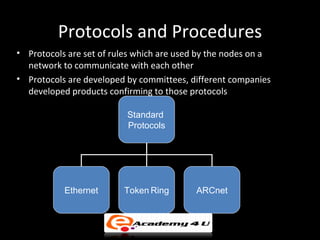
Protocols and Procedures
• Protocols are set of rules which are used by the nodes on a
  network to communicate with each other
• Protocols are developed by committees, different companies
  developed products confirming to those protocols

                          Standard
                          Protocols


           Ethernet      Token Ring        ARCnet
LAN Architecture - I
• 802.3
  – Defines a standard for physical layer and data link
    layer of the Ethernet architecture that uses wired
    connection
  – Ethernet is an architecture that mainly uses bus
    topology
  – Defines various cabling used for different types of
    topologies
LAN Architecture - II
• 802.4
   – Defines a standard for Token Bus architecture
   – Token bus is similar to token ring, but it uses
     coaxial cables
LAN Architecture - III
• 802.5
  – Defines a standard for Token ring architecture
  – Uses the 10 Base T cabling standard
  – Uses twisted pair cabling to connect devices
    instead of coaxial cable
  – Passes data from one computer to another like in
    a token bus network
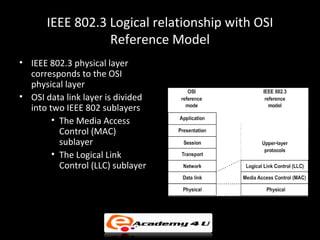
IEEE 802.3 Logical relationship with OSI
                 Reference Model
• IEEE 802.3 physical layer
  corresponds to the OSI
  physical layer
• OSI data link layer is divided
  into two IEEE 802 sublayers
        • The Media Access
          Control (MAC)
          sublayer
        • The Logical Link
          Control (LLC) sublayer
Ethernet
• Defined by IEEE as the 802.3 standard
• Most widely adapted LAN technology
• Supports data transfer rates of 10 Mbps, 100 Mbps and 1
  Gbps
Introduction to Ethernet
• Nodes on an Ethernet network are either DTE (computer,
  printer) or DCE (switch, router)
• Three data rates currently defined for the operation over
  optical fiber and twisted-pair cables
   – 10 Mbps – 10Base-T Ethernet
   – 100 Mbps - Fast Ethernet
   – 1000 Mbps - Gigabit Ethernet
Working of Ethernet
• Ethernet frame is used to transfer data over a
  network
• Each device in an Ethernet network is
  uniquely identified by a 48 bit (6 bytes)
  address called Ethernet address
• Ethernet addresses are represented as six
  pairs of hexadecimal digits separated by a
  colon.
Elements of Ethernet System

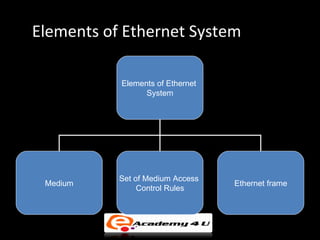
           Elements of Ethernet
                 System


           Set of Medium Access
 Medium                           Ethernet frame
                Control Rules
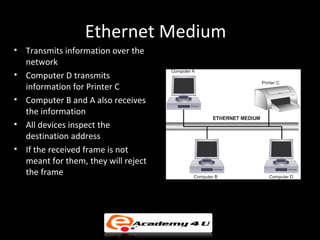
Ethernet Medium
• Transmits information over the
  network
• Computer D transmits
  information for Printer C
• Computer B and A also receives
  the information
• All devices inspect the
  destination address
• If the received frame is not
  meant for them, they will reject
  the frame
Data Transmission
• When a computer wants to transmit, it listens
  to the cable (transmission medium)
• If two or more devices simultaneously
  transmit data on an idle cable, collision may
  occur
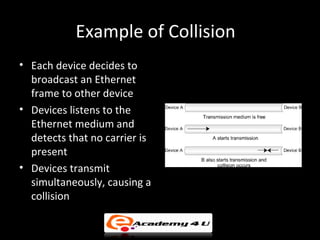
Example of Collision
• Each device decides to
  broadcast an Ethernet
  frame to other device
• Devices listens to the
  Ethernet medium and
  detects that no carrier is
  present
• Devices transmit
  simultaneously, causing a
  collision
Carrier Sense Multiple Access/ Collision
            Detection (CSMA/CD)
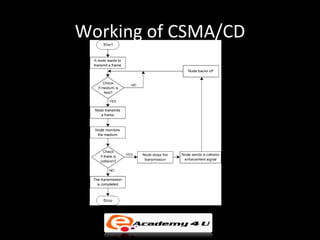
• Permits one device to access to the network
  media at a time to avoid collision
• Networks using CSMA/CD technology such as
  Ethernet, network devices compete for the
  network media
Working of CSMA/CD
Carrier Sensing Multiple Access / Collision
            Avoidance (CSMA/CA)

• Set of rules that can avoid collisions, unlike CSMA/CD
  that handles network transmissions once collisions are
  detected
• In CSMA/CA, all devices are forced to wait for a random
  number of time slots and sense the medium again
• If the medium is sensed to be busy, the device stops the
  timer until it becomes free again.
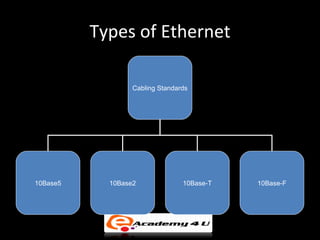
Types of Ethernet

                  Cabling Standards


10Base5     10Base2              10Base-T   10Base-F
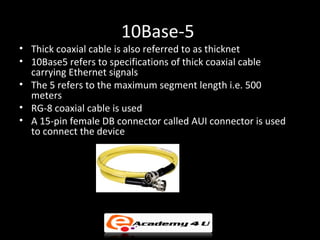
10Base-5
• Thick coaxial cable is also referred to as thicknet
• 10Base5 refers to specifications of thick coaxial cable
  carrying Ethernet signals
• The 5 refers to the maximum segment length i.e. 500
  meters
• RG-8 coaxial cable is used
• A 15-pin female DB connector called AUI connector is used
  to connect the device
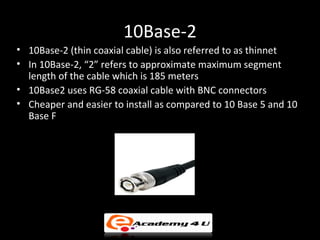
10Base-2
• 10Base-2 (thin coaxial cable) is also referred to as thinnet
• In 10Base-2, “2” refers to approximate maximum segment
  length of the cable which is 185 meters
• 10Base2 uses RG-58 coaxial cable with BNC connectors
• Cheaper and easier to install as compared to 10 Base 5 and 10
  Base F
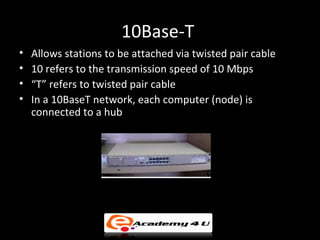
10Base-T
•   Allows stations to be attached via twisted pair cable
•   10 refers to the transmission speed of 10 Mbps
•   “T” refers to twisted pair cable
•   In a 10BaseT network, each computer (node) is
    connected to a hub
10 Base-F
• Uses fiber optic cable
• Possesses excellent noise immunity and is the method
  of choice when running between buildings or widely
  separated hubs
• 10 Base-F is expensive as the connectors and
  terminators used in 10 Base-F are costly
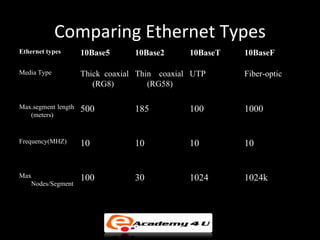
Comparing Ethernet Types
Ethernet types       10Base5      10Base2      10BaseT   10BaseF

Media Type           Thick coaxial Thin coaxial UTP      Fiber-optic
                        (RG8)         (RG58)

Max.segment length   500          185          100       1000
   (meters)


Frequency(MHZ)       10           10           10        10


Max                  100          30           1024      1024k
   Nodes/Segment
Extending the network
• A computer network can be extended using repeaters,
  hubs and bridges
• In computer networks, a bridge is an Internetworking
  device
• Repeater regenerates signal
• Repeaters remove the unwanted noise in an incoming
  signal
• A hub is a multi port repeater which provides a common
  point for the connection of network devices

Lan basic

  • 1.
  • 2.
    IEEE Standards • Anassociation that promotes engineering and electronic improvement • IEEE 802 was started in February 1980 • IEEE 802 committee defines frames, speed, distances and types of cabling to use for networking
  • 3.
    Protocols and Procedures •Protocols are set of rules which are used by the nodes on a network to communicate with each other • Protocols are developed by committees, different companies developed products confirming to those protocols Standard Protocols Ethernet Token Ring ARCnet
  • 4.
    LAN Architecture -I • 802.3 – Defines a standard for physical layer and data link layer of the Ethernet architecture that uses wired connection – Ethernet is an architecture that mainly uses bus topology – Defines various cabling used for different types of topologies
  • 5.
    LAN Architecture -II • 802.4 – Defines a standard for Token Bus architecture – Token bus is similar to token ring, but it uses coaxial cables
  • 6.
    LAN Architecture -III • 802.5 – Defines a standard for Token ring architecture – Uses the 10 Base T cabling standard – Uses twisted pair cabling to connect devices instead of coaxial cable – Passes data from one computer to another like in a token bus network
  • 7.
    IEEE 802.3 Logicalrelationship with OSI Reference Model • IEEE 802.3 physical layer corresponds to the OSI physical layer • OSI data link layer is divided into two IEEE 802 sublayers • The Media Access Control (MAC) sublayer • The Logical Link Control (LLC) sublayer
  • 8.
    Ethernet • Defined byIEEE as the 802.3 standard • Most widely adapted LAN technology • Supports data transfer rates of 10 Mbps, 100 Mbps and 1 Gbps
  • 9.
    Introduction to Ethernet •Nodes on an Ethernet network are either DTE (computer, printer) or DCE (switch, router) • Three data rates currently defined for the operation over optical fiber and twisted-pair cables – 10 Mbps – 10Base-T Ethernet – 100 Mbps - Fast Ethernet – 1000 Mbps - Gigabit Ethernet
  • 10.
    Working of Ethernet •Ethernet frame is used to transfer data over a network • Each device in an Ethernet network is uniquely identified by a 48 bit (6 bytes) address called Ethernet address • Ethernet addresses are represented as six pairs of hexadecimal digits separated by a colon.
  • 11.
    Elements of EthernetSystem Elements of Ethernet System Set of Medium Access Medium Ethernet frame Control Rules
  • 12.
    Ethernet Medium • Transmitsinformation over the network • Computer D transmits information for Printer C • Computer B and A also receives the information • All devices inspect the destination address • If the received frame is not meant for them, they will reject the frame
  • 13.
    Data Transmission • Whena computer wants to transmit, it listens to the cable (transmission medium) • If two or more devices simultaneously transmit data on an idle cable, collision may occur
  • 14.
    Example of Collision •Each device decides to broadcast an Ethernet frame to other device • Devices listens to the Ethernet medium and detects that no carrier is present • Devices transmit simultaneously, causing a collision
  • 15.
    Carrier Sense MultipleAccess/ Collision Detection (CSMA/CD) • Permits one device to access to the network media at a time to avoid collision • Networks using CSMA/CD technology such as Ethernet, network devices compete for the network media
  • 16.
  • 17.
    Carrier Sensing MultipleAccess / Collision Avoidance (CSMA/CA) • Set of rules that can avoid collisions, unlike CSMA/CD that handles network transmissions once collisions are detected • In CSMA/CA, all devices are forced to wait for a random number of time slots and sense the medium again • If the medium is sensed to be busy, the device stops the timer until it becomes free again.
  • 18.
    Types of Ethernet Cabling Standards 10Base5 10Base2 10Base-T 10Base-F
  • 19.
    10Base-5 • Thick coaxialcable is also referred to as thicknet • 10Base5 refers to specifications of thick coaxial cable carrying Ethernet signals • The 5 refers to the maximum segment length i.e. 500 meters • RG-8 coaxial cable is used • A 15-pin female DB connector called AUI connector is used to connect the device
  • 20.
    10Base-2 • 10Base-2 (thincoaxial cable) is also referred to as thinnet • In 10Base-2, “2” refers to approximate maximum segment length of the cable which is 185 meters • 10Base2 uses RG-58 coaxial cable with BNC connectors • Cheaper and easier to install as compared to 10 Base 5 and 10 Base F
  • 21.
    10Base-T • Allows stations to be attached via twisted pair cable • 10 refers to the transmission speed of 10 Mbps • “T” refers to twisted pair cable • In a 10BaseT network, each computer (node) is connected to a hub
  • 22.
    10 Base-F • Usesfiber optic cable • Possesses excellent noise immunity and is the method of choice when running between buildings or widely separated hubs • 10 Base-F is expensive as the connectors and terminators used in 10 Base-F are costly
  • 23.
    Comparing Ethernet Types Ethernettypes 10Base5 10Base2 10BaseT 10BaseF Media Type Thick coaxial Thin coaxial UTP Fiber-optic (RG8) (RG58) Max.segment length 500 185 100 1000 (meters) Frequency(MHZ) 10 10 10 10 Max 100 30 1024 1024k Nodes/Segment
  • 24.
    Extending the network •A computer network can be extended using repeaters, hubs and bridges • In computer networks, a bridge is an Internetworking device • Repeater regenerates signal • Repeaters remove the unwanted noise in an incoming signal • A hub is a multi port repeater which provides a common point for the connection of network devices