
Exam Prep:
Microsoft Technology Associate 98-366: Networking
Fundamentals
Course Topics
Network Fundamentals
01 | Understanding Local Area Networking
02 | Defining Networks with the OSI Model
03 | Understanding Wired and Wireless Networks
04 | Understanding Internet Protocol (IP)
05 | TCP/IP Tools
06 | Network Services
07 | Understanding Wide Area Networks
08 | Defining Network Infrastructure and Security
• Target Audience
• IT Help Desk staff interested in moving into Network/Systems Administration
• Anyone interested in learning more about networking
• Suggested Prerequisites/Supporting Material
• Exam 98-349: Windows Operating System Fundamentals
Setting Expectations
Understanding Local Area Networking
Module 1
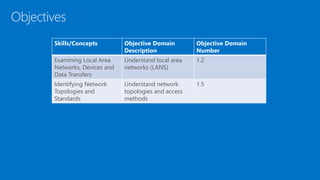
Objectives
Skills/Concepts Objective Domain
Description
Objective Domain
Number
Examining Local Area
Networks, Devices and
Data Transfers
Understand local area
networks (LANS)
1.2
Identifying Network
Topologies and
Standards
Understand network
topologies and access
methods
1.5
Network components and Terminology
• Data
• Node
• Client
• Server
• Peer
• Network adapter
• Hub
• Switch
• Router
• Media
• Transport Protocol
• Bandwidth
Local Area Network
A Local Area Network (LAN)
is group of computers
confined to a small
geographic area, such as a
single building
A LAN is a group of
computers or devices that
share a common
communication medium,
such as cabled or wireless
connections
• Networks are used to exchange data
• Reasons for networks include
• Sharing information
• Communication
• Organizing data
Networks
• Network documentation helps describe, define, and
explain the physical and logical method for
connecting devices
• The documentation phase occurs before a network
is built, or when changes are made to the network
• Microsoft Visio is a tool that can be used to
document networks
Network Documentation
• A Hub is the most basic
central connecting
device
• Hubs enable computers
on a network to
communicate
• A host sends data to the
hub. The hub sends the
data to all devices
connected to the hub
Hub
•
•
• Switches work the same
was as a hub, but they
can identify the
intended recipient of
the data
• Switches can send and
receive data at the same
time
Switch
•
•
• Routers enable
computers to
communicate and allow
communication between
two networks – such as
your home network and
the Internet
• This communications link
between the one
network and the other is
where the LAN ends
Router
192.168.1.1
Internet
24.136.72.110
• A network adapter can connect to the network by
using cable (wired) or by air (wireless)
Network Adapter and RJ45 Patch Cable
A network adapter, also known
as a network interface card
(NIC), is the hardware device
that enables you to send and
receive from your computer
RJ45 is the most common type
of network adapter connection
• The wireless access point (WAP) acts as the central
connecting device for the network
• Wireless networks can consist of many types of
devices other than traditional PCs:
• Smart phones
• PDAs
• Tablet computers
• Micro computers
• PCs and laptops equipped with wireless network adapters can connect to these
networks as well
Wireless Access Point
• Device Manager Showing Network Adapters
• Network Adapter Properties
• IP Address
Demo
• Serial data transfer is the transfer of one bit at a
time—in other words, transfer in a single-bit stream,
like a one lane highway
• On the network cable, data travels in a single bit
stream
Serial Data Transfer
• Data transfer rate defines the maximum bits per
second (bps) that can be transmitted over a network
• Rated in bits, and signified with a lowercase b (for
example, 10 Mbps)
• The lowercase b differentiates this unit from data that
is stored on a hard drive, which uses an upper case B
that stands for bytes (for example 10 MB)
• Types of Transfers
• Broadcast sends data to every other host on the
network
• Unicast sends data to a specific host
Data Transfer Rate
• Most every computer and many other devices have
an Internet Protocol (IP) address
• An IP address uniquely identifies your device and
the associated network and allows each device to
send and receive information
• A typical example of an IPv4 address would be
192.168.1.1
• Every IP address is broken down into two parts by a
subnet address
• Network ID 192.168.1
• Host ID 1
IP Address
• Computers and other devices are connected using
copper-based twisted-pair cables or wireless
equipment
LAN
• A virtual LAN (VLAN) is a group of hosts with a common set of
requirements that communicate as if they were connected together in
a normal fashion on one switch, regardless of their physical location.
Virtual LAN
Port 1: VLAN1
Port 2: VLAN1
Port 3: VLAN2
Port 4:
Port 5: VLAN1
Port 6: VLAN1
Port 7: VLAN2
Port 8: VLAN1
Port 9:
Port 10:
• A network topology defines the physical connections of hosts in a
computer network.
• There are several types of physical topologies including:
• Bus
• Ring
• Star
• Mesh
• Tree
Network Topology
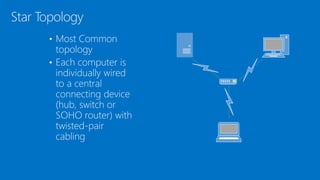
• Most Common
topology
• Each computer is
individually wired
to a central
connecting device
(hub, switch or
SOHO router) with
twisted-pair
cabling
Star Topology
• Every computer
connects to every
other computer; no
central connecting
device is needed.
Mesh Topology
• In a LAN environment,
each computer is
connected to the
network using a closed
loop
• Used by Token Ring
and Fiber Distributed
Data Interface (FDDI)
Ring Topology
• A Token Ring network sends data logically in a ring fashion, meaning
that a token goes to each computer, one at a time, and continues on in
cycles
• Physically Token Ring computers are connected in a star fashion
• Namely, all computers in a Token Ring network are connected to a
central connecting device known as a Multistation Access Unit (MAU or
MSAU)
Token Ring
• Institute of Electrical and Electronics Engineers (IEEE) standard (802.3)
that defines how information is sent and received between network
adapters, hubs, switches, and other devices
• Ethernet is the de facto standard and is the most widely-installed local
area network technology
• Common types of Ethernet include:
• 802.3u or Fast Ethernet that runs at 100 Mbps
• 802.3ab or Gigabit Ethernet
Ethernet
• Computers on Ethernet networks communicate via frames
• A frame is a sequence of bits containing a detectable beginning and
end of a packet in the stream of bits
• A frame is a data packet residing on Layer 2 of the OSI model
Frames
frame
crc
(4 bytes)
preamble
(8 bytes)
• Computing is done at a central location using terminals that are
attached to this main system
• Mainframes are a powerful computer and the rest of the devices
connected to the computer are known as terminals (or dumb
terminals)
• Each terminal consisted solely of a keyboard and display with no
processing power
Centralized Computing
• The client/server model is an architecture that distributes applications
between servers and client computers
• Server: System that provides services such as Windows Server 2008 R2
• Client: Device that requests services such as Windows 7
Client/Server Model
• Peer-to-peer networking distributes applications or workloads between
computers
• Peers are both service providers and service requestors
Peer-to-Peer Networking
• Distributive computing includes both client-server and peer-to-peer
networks
• Every device or workstation has its own processing power
Distributed Computing
• Centralized computing has made a comeback of sorts. Remote
Desktop Services and remote sessions to computers are based off of
the centralized computing model
• Thin-client computers do not have a hard drive and store an operating
system in RAM, to be loaded up every time the device is turned on
• All other applications and data are stored centrally, this system is a
blend of centralized and distributive computing
Remote Desktop Services and Remote Sessions
• More powerful computers that provide centralized services:
• File
• Print
• Database
• Network controller
• Messaging/Email
• Web
Servers
Client and Server Operating Systems
Client Operating Systems Server Operating Systems
Windows 8 Windows Server 2012
Windows 7 Windows Server 2008 R2
Windows Server 2008
Windows Vista
Windows XP
Windows Server 2003
Windows 2000 Professional Windows 2000 Server
Windows NT 4.0 Workstation
Windows ME/98/95
Windows NT 4.0 Server
• Peer-to-peer or P2P has recently taking on an additional meaning
• P2P can also refer to file sharing networks
• Examples of file sharing networks
• Napster
• Gnutella
• G2
• Other technologies also take advantage of P2P file sharing:
• Skype
• VoIP
• Cloud computing
P2P
• Understand local area networks (LANs), including but not limited to
LAN elements, design, perimeter networks, IP addressing, and LAN
types
• Understand network topologies and access methods, including
topologies such as star, mesh, and ring; Ethernet architecture; and the
client-server and peer-to-peer networking models
Summary
Understanding local area networking

Understanding local area networking

  • 1.
    Exam Prep: Microsoft TechnologyAssociate 98-366: Networking Fundamentals
  • 2.
    Course Topics Network Fundamentals 01| Understanding Local Area Networking 02 | Defining Networks with the OSI Model 03 | Understanding Wired and Wireless Networks 04 | Understanding Internet Protocol (IP) 05 | TCP/IP Tools 06 | Network Services 07 | Understanding Wide Area Networks 08 | Defining Network Infrastructure and Security
  • 3.
    • Target Audience •IT Help Desk staff interested in moving into Network/Systems Administration • Anyone interested in learning more about networking • Suggested Prerequisites/Supporting Material • Exam 98-349: Windows Operating System Fundamentals Setting Expectations
  • 4.
    Understanding Local AreaNetworking Module 1
  • 5.
    Objectives Skills/Concepts Objective Domain Description ObjectiveDomain Number Examining Local Area Networks, Devices and Data Transfers Understand local area networks (LANS) 1.2 Identifying Network Topologies and Standards Understand network topologies and access methods 1.5
  • 6.
    Network components andTerminology • Data • Node • Client • Server • Peer • Network adapter • Hub • Switch • Router • Media • Transport Protocol • Bandwidth
  • 7.
    Local Area Network ALocal Area Network (LAN) is group of computers confined to a small geographic area, such as a single building A LAN is a group of computers or devices that share a common communication medium, such as cabled or wireless connections
  • 8.
    • Networks areused to exchange data • Reasons for networks include • Sharing information • Communication • Organizing data Networks
  • 9.
    • Network documentationhelps describe, define, and explain the physical and logical method for connecting devices • The documentation phase occurs before a network is built, or when changes are made to the network • Microsoft Visio is a tool that can be used to document networks Network Documentation
  • 10.
    • A Hubis the most basic central connecting device • Hubs enable computers on a network to communicate • A host sends data to the hub. The hub sends the data to all devices connected to the hub Hub • •
  • 11.
    • Switches workthe same was as a hub, but they can identify the intended recipient of the data • Switches can send and receive data at the same time Switch • •
  • 12.
    • Routers enable computersto communicate and allow communication between two networks – such as your home network and the Internet • This communications link between the one network and the other is where the LAN ends Router 192.168.1.1 Internet 24.136.72.110
  • 13.
    • A networkadapter can connect to the network by using cable (wired) or by air (wireless) Network Adapter and RJ45 Patch Cable A network adapter, also known as a network interface card (NIC), is the hardware device that enables you to send and receive from your computer RJ45 is the most common type of network adapter connection
  • 14.
    • The wirelessaccess point (WAP) acts as the central connecting device for the network • Wireless networks can consist of many types of devices other than traditional PCs: • Smart phones • PDAs • Tablet computers • Micro computers • PCs and laptops equipped with wireless network adapters can connect to these networks as well Wireless Access Point
  • 15.
    • Device ManagerShowing Network Adapters • Network Adapter Properties • IP Address Demo
  • 16.
    • Serial datatransfer is the transfer of one bit at a time—in other words, transfer in a single-bit stream, like a one lane highway • On the network cable, data travels in a single bit stream Serial Data Transfer
  • 17.
    • Data transferrate defines the maximum bits per second (bps) that can be transmitted over a network • Rated in bits, and signified with a lowercase b (for example, 10 Mbps) • The lowercase b differentiates this unit from data that is stored on a hard drive, which uses an upper case B that stands for bytes (for example 10 MB) • Types of Transfers • Broadcast sends data to every other host on the network • Unicast sends data to a specific host Data Transfer Rate
  • 18.
    • Most everycomputer and many other devices have an Internet Protocol (IP) address • An IP address uniquely identifies your device and the associated network and allows each device to send and receive information • A typical example of an IPv4 address would be 192.168.1.1 • Every IP address is broken down into two parts by a subnet address • Network ID 192.168.1 • Host ID 1 IP Address
  • 19.
    • Computers andother devices are connected using copper-based twisted-pair cables or wireless equipment LAN
  • 20.
    • A virtualLAN (VLAN) is a group of hosts with a common set of requirements that communicate as if they were connected together in a normal fashion on one switch, regardless of their physical location. Virtual LAN Port 1: VLAN1 Port 2: VLAN1 Port 3: VLAN2 Port 4: Port 5: VLAN1 Port 6: VLAN1 Port 7: VLAN2 Port 8: VLAN1 Port 9: Port 10:
  • 21.
    • A networktopology defines the physical connections of hosts in a computer network. • There are several types of physical topologies including: • Bus • Ring • Star • Mesh • Tree Network Topology
  • 22.
    • Most Common topology •Each computer is individually wired to a central connecting device (hub, switch or SOHO router) with twisted-pair cabling Star Topology
  • 23.
    • Every computer connectsto every other computer; no central connecting device is needed. Mesh Topology
  • 24.
    • In aLAN environment, each computer is connected to the network using a closed loop • Used by Token Ring and Fiber Distributed Data Interface (FDDI) Ring Topology
  • 25.
    • A TokenRing network sends data logically in a ring fashion, meaning that a token goes to each computer, one at a time, and continues on in cycles • Physically Token Ring computers are connected in a star fashion • Namely, all computers in a Token Ring network are connected to a central connecting device known as a Multistation Access Unit (MAU or MSAU) Token Ring
  • 26.
    • Institute ofElectrical and Electronics Engineers (IEEE) standard (802.3) that defines how information is sent and received between network adapters, hubs, switches, and other devices • Ethernet is the de facto standard and is the most widely-installed local area network technology • Common types of Ethernet include: • 802.3u or Fast Ethernet that runs at 100 Mbps • 802.3ab or Gigabit Ethernet Ethernet
  • 27.
    • Computers onEthernet networks communicate via frames • A frame is a sequence of bits containing a detectable beginning and end of a packet in the stream of bits • A frame is a data packet residing on Layer 2 of the OSI model Frames frame crc (4 bytes) preamble (8 bytes)
  • 28.
    • Computing isdone at a central location using terminals that are attached to this main system • Mainframes are a powerful computer and the rest of the devices connected to the computer are known as terminals (or dumb terminals) • Each terminal consisted solely of a keyboard and display with no processing power Centralized Computing
  • 29.
    • The client/servermodel is an architecture that distributes applications between servers and client computers • Server: System that provides services such as Windows Server 2008 R2 • Client: Device that requests services such as Windows 7 Client/Server Model
  • 30.
    • Peer-to-peer networkingdistributes applications or workloads between computers • Peers are both service providers and service requestors Peer-to-Peer Networking
  • 31.
    • Distributive computingincludes both client-server and peer-to-peer networks • Every device or workstation has its own processing power Distributed Computing
  • 32.
    • Centralized computinghas made a comeback of sorts. Remote Desktop Services and remote sessions to computers are based off of the centralized computing model • Thin-client computers do not have a hard drive and store an operating system in RAM, to be loaded up every time the device is turned on • All other applications and data are stored centrally, this system is a blend of centralized and distributive computing Remote Desktop Services and Remote Sessions
  • 33.
    • More powerfulcomputers that provide centralized services: • File • Print • Database • Network controller • Messaging/Email • Web Servers
  • 34.
    Client and ServerOperating Systems Client Operating Systems Server Operating Systems Windows 8 Windows Server 2012 Windows 7 Windows Server 2008 R2 Windows Server 2008 Windows Vista Windows XP Windows Server 2003 Windows 2000 Professional Windows 2000 Server Windows NT 4.0 Workstation Windows ME/98/95 Windows NT 4.0 Server
  • 35.
    • Peer-to-peer orP2P has recently taking on an additional meaning • P2P can also refer to file sharing networks • Examples of file sharing networks • Napster • Gnutella • G2 • Other technologies also take advantage of P2P file sharing: • Skype • VoIP • Cloud computing P2P
  • 36.
    • Understand localarea networks (LANs), including but not limited to LAN elements, design, perimeter networks, IP addressing, and LAN types • Understand network topologies and access methods, including topologies such as star, mesh, and ring; Ethernet architecture; and the client-server and peer-to-peer networking models Summary

Editor's Notes

  • #3 1 minute
  • #4 1 minute
  • #6 This should also be a review for the 70-642.
  • #14 This adapter might be integrated into the motherboard or act as a separate device that connects to a PCI slot or perhaps a PC card slot or USB port.