DISK
STRUCTURES
&
FILE HANDLING
FLOPPY
DISK
3 ½ INCH
5 ¼ INCH
HARD DISK
FILE ALLOCATION
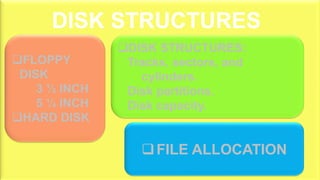
DISK STRUCTURES:
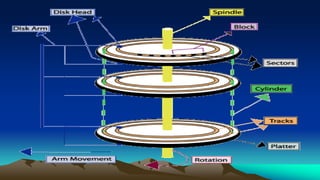
Tracks, sectors, and
cylinders.
Disk partitions.
Disk capacity.
DISK STRUCTURES
FILE
FILE HANDLING
FILE HANDLE
FILE ERRORS
FILE POINTER
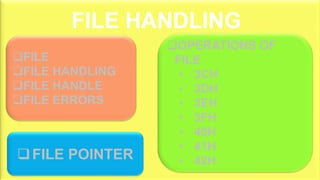
OPERATIONS OF
FILE
• 3CH
• 3DH
• 3EH
• 3FH
• 40H
• 41H
• 42H
FILE HANDLING
DISK STRUCTURES
The actual physical details of disk
FLOPPY DISK
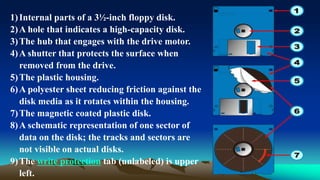
1)Internal parts of a 3½-inch floppy disk.
2)A hole that indicates a high-capacity disk.
3)The hub that engages with the drive motor.
4)A shutter that protects the surface when
removed from the drive.
5)The plastic housing.
6)A polyester sheet reducing friction against the
disk media as it rotates within the housing.
7)The magnetic coated plastic disk.
8)A schematic representation of one sector of
data on the disk; the tracks and sectors are
not visible on actual disks.
9)The write protection tab (unlabeled) is upper
left.
 3 ½ INCH
 5 ¼ INCH
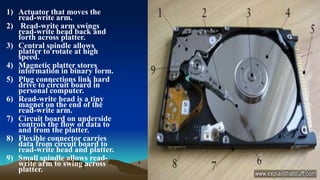
HARD DISK
1) Actuator that moves the
read-write arm.
2) Read-write arm swings
read-write head back and
forth across platter.
3) Central spindle allows
platter to rotate at high
speed.
4) Magnetic platter stores
information in binary form.
5) Plug connections link hard
drive to circuit board in
personal computer.
6) Read-write head is a tiny
magnet on the end of the
read-write arm.
7) Circuit board on underside
controls the flow of data to
and from the platter.
8) Flexible connector carries
data from circuit board to
read-write head and platter.
9) Small spindle allows read-
write arm to swing across
platter.
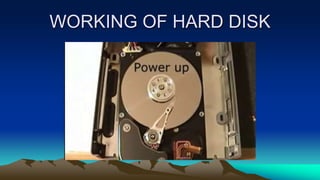
WORKING OF HARD DISK
STRUCTURE OF
DISK
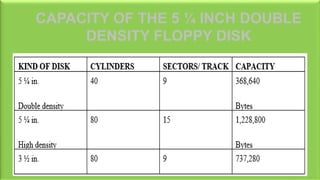
CAPACITY OF THE 5 ¼ INCH DOUBLE
DENSITY FLOPPY DISK
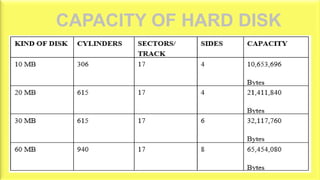
CAPACITY OF HARD DISK
FILE ALLOCATION
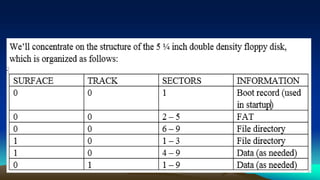
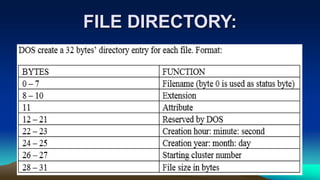
To keep the track of data stored on a disk, DOS uses
a directory structure. The first tracks and sectors of a
disk contain information about the disk’s file
structure.
FILE DIRECTORY:
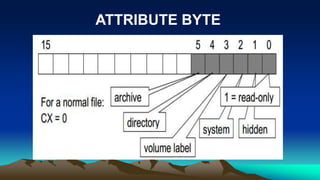
ATTRIBUTE BYTE
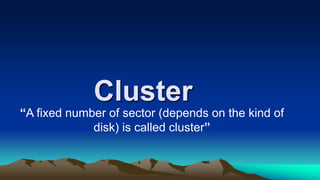
Cluster
“A fixed number of sector (depends on the kind of
disk) is called cluster”
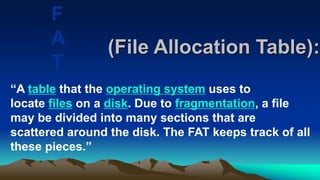
(File Allocation Table):
“A table that the operating system uses to
locate files on a disk. Due to fragmentation, a file
may be divided into many sections that are
scattered around the disk. The FAT keeps track of all
these pieces.”
F
A
T
DOS
HOW DOS READ A FILE?
• DOS gets the starting
cluster number from
directory.
• DOS read that particular
cluster number from disk
and stored in DTA (Data
Transfer Area). The
program that initiated the
read retrieves data from
HOW DOS STORES A FILE?
• DOS locates an unused
directory entry and stores
the filename, attribute,
creation time and date.
• DOS searches the FAT for
the first entry indicating
unused cluster (000 means
unused) and stores the
starting cluster number in
the directory. Let’s suppose
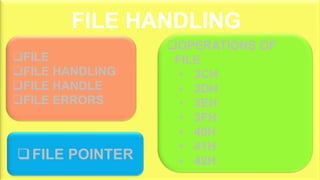
FILE HANDLING
FILE
FILE HANDLING
FILE HANDLE
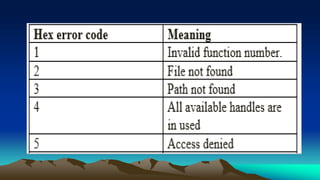
FILE ERRORS
FILE POINTER
OPERATIONS OF
FILE
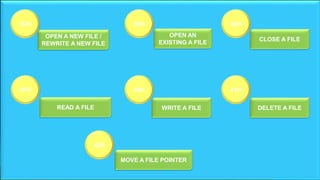
• 3CH
• 3DH
• 3EH
• 3FH
• 40H
• 41H
• 42H
FILE HANDLING
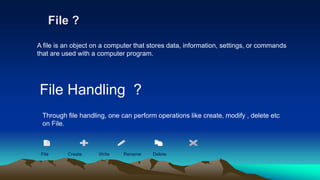
File ?
File Handling ?
A file is an object on a computer that stores data, information, settings, or commands
that are used with a computer program.
Through file handling, one can perform operations like create, modify , delete etc
on File.
File Create Write Rename Delete
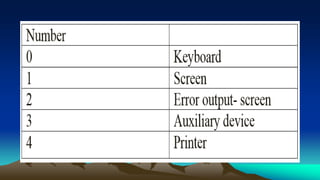
FILE HANDLES
When file is created or open in a
program, DOS assign it a unique
number called file handle.
FILE ERRORS
OPERATIONS OF FLE
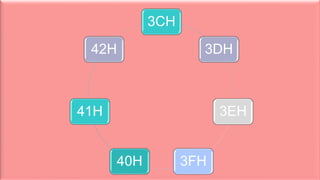
3CH
3DH
3EH
3FH40H
41H
42H
3CH
42H
3EH3DH
40H 41H3FH
OPEN A NEW FILE /
REWRITE A NEW FILE
MOVE A FILE POINTER
DELETE A FILEWRITE A FILEREAD A FILE
CLOSE A FILE
OPEN AN
EXISTING A FILE
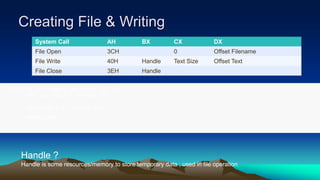
Creating File & Writing
FILE DB "c:example_newhello.txt",0
TEXT DB "HELLO I AM TEXT",0
TEXT_SIZE = $ - OFFSET TEXT
HANDLE DW ?
System Call AH BX CX DX
File Open 3CH 0 Offset Filename
File Write 40H Handle Text Size Offset Text
File Close 3EH Handle
Handle ?
Handle is some resources/memory to store temporary data , used in file operation
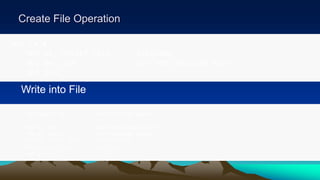
Create File Operation
MOV CX,0
MOV DX, OFFSET FILE ; FILENAME
MOV AH, 3CH ; 3CH FOR CREATING FILE
INT 21H
Write into File
MOV HANDLE, AX ; MAKE RESOURCES HANDLE
MOV AH, 40H ; 40H FOR WRITING INTO FILE
MOV BX, HANDLE ; COPY RESOURCES HANDLE
MOV DX, OFFSET TEXT ; TEXT TO WRITE
MOV CX, TEXT_SIZE ; TEXT SIZE
INT 21H;
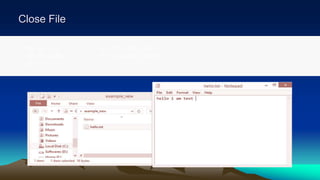
Close File
MOV AH, 3EH ; 3EH FOR CLOSE FILE
MOV BX, HANDLE ; COPY RESOURCES HANDLE
INT 21H
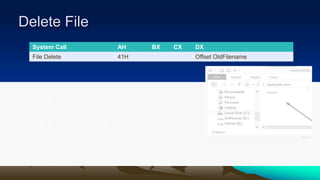
Delete File
.DATA
FILE DB "C:EXAMPLE_NEWWORLD.TXT",0
.CODE
MOV DX, OFFSET FILE ; OLD FILENAME
MOV AH, 41H ; 41H FOR DELETE FILE
INT 21H
System Call AH BX CX DX
File Delete 41H Offset OldFilename
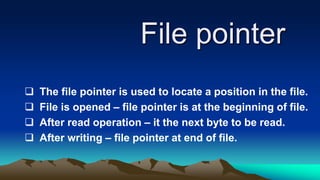
File pointer
 The file pointer is used to locate a position in the file.
 File is opened – file pointer is at the beginning of file.
 After read operation – it the next byte to be read.
 After writing – file pointer at end of file.
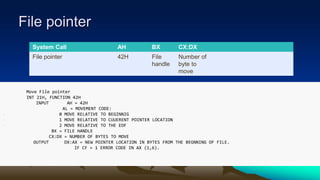
File pointer
Move File pointer
INT 21H, FUNCTION 42H
INPUT AH = 42H
AL = MOVEMENT CODE:
• 0 MOVE RELATIVE TO BEGINNIG
• 1 MOVE RELATIVE TO CUUERENT POINTER LOCATION
• 2 MOVE RELATIVE TO THE EOF
BX = FILE HANDLE
CX:DX = NUMBER OF BYTES TO MOVE
OUTPUT DX:AX = NEW POINTER LOCATION IN BYTES FROM THE BEGNNING OF FILE.
IF CF = 1 ERROR CODE IN AX (1,6).
System Call AH BX CX:DX
File pointer 42H File
handle
Number of
byte to
move
Caption

Coal presentationt

  • 1.
  • 2.
    FLOPPY DISK 3 ½ INCH 5¼ INCH HARD DISK FILE ALLOCATION DISK STRUCTURES: Tracks, sectors, and cylinders. Disk partitions. Disk capacity. DISK STRUCTURES
  • 4.
    FILE FILE HANDLING FILE HANDLE FILEERRORS FILE POINTER OPERATIONS OF FILE • 3CH • 3DH • 3EH • 3FH • 40H • 41H • 42H FILE HANDLING
  • 5.
    DISK STRUCTURES The actualphysical details of disk
  • 6.
  • 7.
    1)Internal parts ofa 3½-inch floppy disk. 2)A hole that indicates a high-capacity disk. 3)The hub that engages with the drive motor. 4)A shutter that protects the surface when removed from the drive. 5)The plastic housing. 6)A polyester sheet reducing friction against the disk media as it rotates within the housing. 7)The magnetic coated plastic disk. 8)A schematic representation of one sector of data on the disk; the tracks and sectors are not visible on actual disks. 9)The write protection tab (unlabeled) is upper left.
  • 8.
     3 ½INCH  5 ¼ INCH
  • 9.
  • 10.
    1) Actuator thatmoves the read-write arm. 2) Read-write arm swings read-write head back and forth across platter. 3) Central spindle allows platter to rotate at high speed. 4) Magnetic platter stores information in binary form. 5) Plug connections link hard drive to circuit board in personal computer. 6) Read-write head is a tiny magnet on the end of the read-write arm. 7) Circuit board on underside controls the flow of data to and from the platter. 8) Flexible connector carries data from circuit board to read-write head and platter. 9) Small spindle allows read- write arm to swing across platter.
  • 11.
  • 12.
  • 14.
    CAPACITY OF THE5 ¼ INCH DOUBLE DENSITY FLOPPY DISK
  • 15.
  • 16.
    FILE ALLOCATION To keepthe track of data stored on a disk, DOS uses a directory structure. The first tracks and sectors of a disk contain information about the disk’s file structure.
  • 18.
  • 19.
  • 20.
    Cluster “A fixed numberof sector (depends on the kind of disk) is called cluster”
  • 21.
    (File Allocation Table): “Atable that the operating system uses to locate files on a disk. Due to fragmentation, a file may be divided into many sections that are scattered around the disk. The FAT keeps track of all these pieces.” F A T

  • 22.
    DOS HOW DOS READA FILE? • DOS gets the starting cluster number from directory. • DOS read that particular cluster number from disk and stored in DTA (Data Transfer Area). The program that initiated the read retrieves data from HOW DOS STORES A FILE? • DOS locates an unused directory entry and stores the filename, attribute, creation time and date. • DOS searches the FAT for the first entry indicating unused cluster (000 means unused) and stores the starting cluster number in the directory. Let’s suppose
  • 23.
  • 24.
    FILE FILE HANDLING FILE HANDLE FILEERRORS FILE POINTER OPERATIONS OF FILE • 3CH • 3DH • 3EH • 3FH • 40H • 41H • 42H FILE HANDLING
  • 25.
    File ? File Handling? A file is an object on a computer that stores data, information, settings, or commands that are used with a computer program. Through file handling, one can perform operations like create, modify , delete etc on File. File Create Write Rename Delete
  • 26.
    FILE HANDLES When fileis created or open in a program, DOS assign it a unique number called file handle.
  • 28.
  • 30.
  • 31.
  • 32.
    3CH 42H 3EH3DH 40H 41H3FH OPEN ANEW FILE / REWRITE A NEW FILE MOVE A FILE POINTER DELETE A FILEWRITE A FILEREAD A FILE CLOSE A FILE OPEN AN EXISTING A FILE
  • 33.
    Creating File &Writing FILE DB "c:example_newhello.txt",0 TEXT DB "HELLO I AM TEXT",0 TEXT_SIZE = $ - OFFSET TEXT HANDLE DW ? System Call AH BX CX DX File Open 3CH 0 Offset Filename File Write 40H Handle Text Size Offset Text File Close 3EH Handle Handle ? Handle is some resources/memory to store temporary data , used in file operation
  • 34.
    Create File Operation MOVCX,0 MOV DX, OFFSET FILE ; FILENAME MOV AH, 3CH ; 3CH FOR CREATING FILE INT 21H Write into File MOV HANDLE, AX ; MAKE RESOURCES HANDLE MOV AH, 40H ; 40H FOR WRITING INTO FILE MOV BX, HANDLE ; COPY RESOURCES HANDLE MOV DX, OFFSET TEXT ; TEXT TO WRITE MOV CX, TEXT_SIZE ; TEXT SIZE INT 21H;
  • 35.
    Close File MOV AH,3EH ; 3EH FOR CLOSE FILE MOV BX, HANDLE ; COPY RESOURCES HANDLE INT 21H
  • 36.
    Delete File .DATA FILE DB"C:EXAMPLE_NEWWORLD.TXT",0 .CODE MOV DX, OFFSET FILE ; OLD FILENAME MOV AH, 41H ; 41H FOR DELETE FILE INT 21H System Call AH BX CX DX File Delete 41H Offset OldFilename
  • 37.
    File pointer  Thefile pointer is used to locate a position in the file.  File is opened – file pointer is at the beginning of file.  After read operation – it the next byte to be read.  After writing – file pointer at end of file.
  • 38.
    File pointer Move Filepointer INT 21H, FUNCTION 42H INPUT AH = 42H AL = MOVEMENT CODE: • 0 MOVE RELATIVE TO BEGINNIG • 1 MOVE RELATIVE TO CUUERENT POINTER LOCATION • 2 MOVE RELATIVE TO THE EOF BX = FILE HANDLE CX:DX = NUMBER OF BYTES TO MOVE OUTPUT DX:AX = NEW POINTER LOCATION IN BYTES FROM THE BEGNNING OF FILE. IF CF = 1 ERROR CODE IN AX (1,6). System Call AH BX CX:DX File pointer 42H File handle Number of byte to move
  • 39.