PC Boot UP Sequence
- Powered on CPU starts executing code located
from FFFF0H – called BIOS
- The code performs POST
- After POST reads the boot sector
(floppy, hard disk – sequence set in BIOS features)
- Checks for AA55H at 07DFEH
( Boot signature)
- Sector read into memory area 07C00H.
- Jumps to start to execute the code.
DISK ORGANIZATION
 Logical sector 0 known as the boot sector contains all the
critical information regarding the disk medium’s
characteristics .
 The first byte in this sector should be a jump instruction.
 JMP (opcode 0E9H) followed by a 16 bit immediate value
(displacement) or
 a short jump JMP (opcode 0EBH) followed by an 8-bit
immediate value (displacement) and then by an no-
operation NOP (opcode 90h).
 The final component of the boot sector is bootstrap.
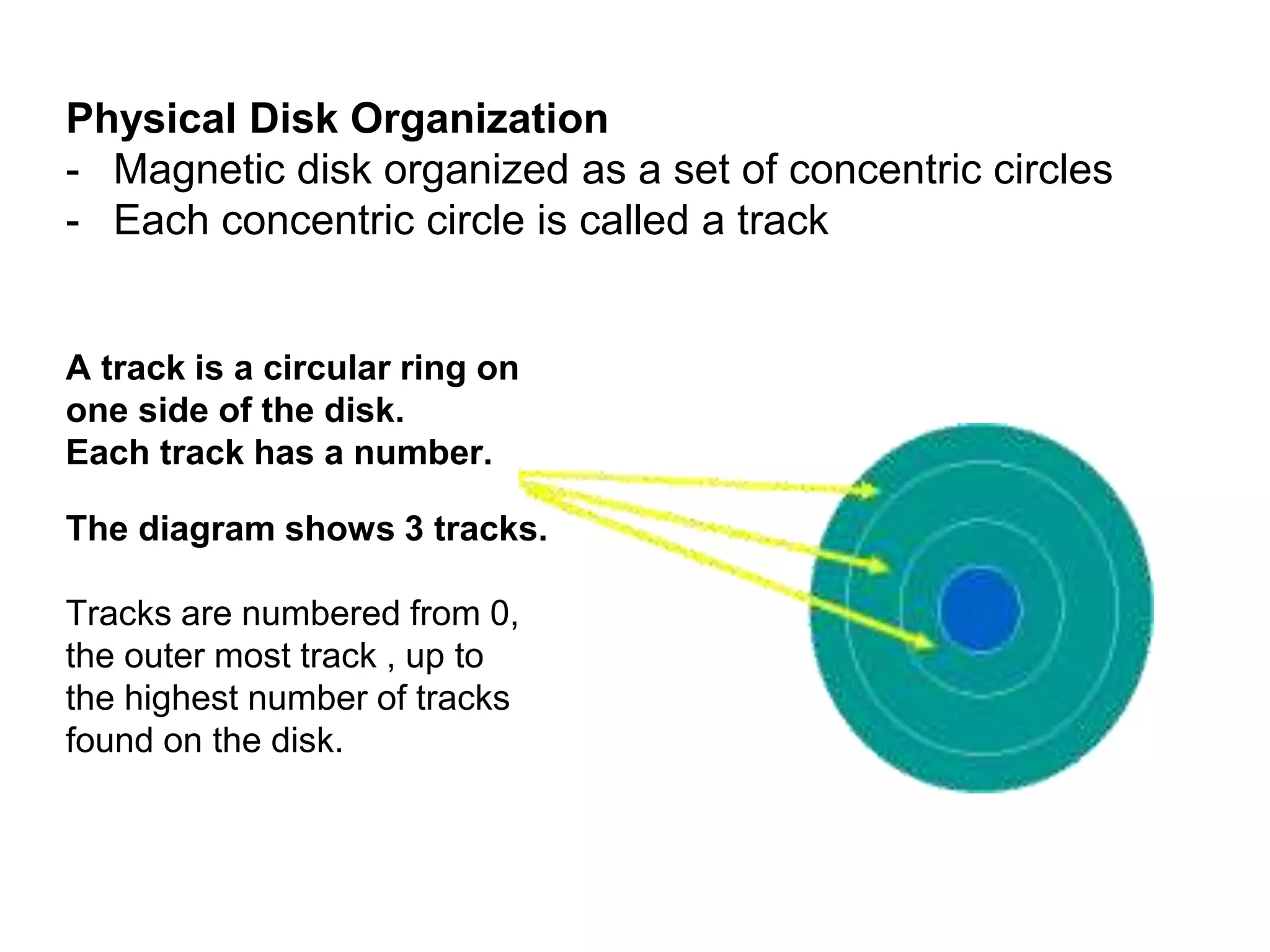
Physical Disk Organization
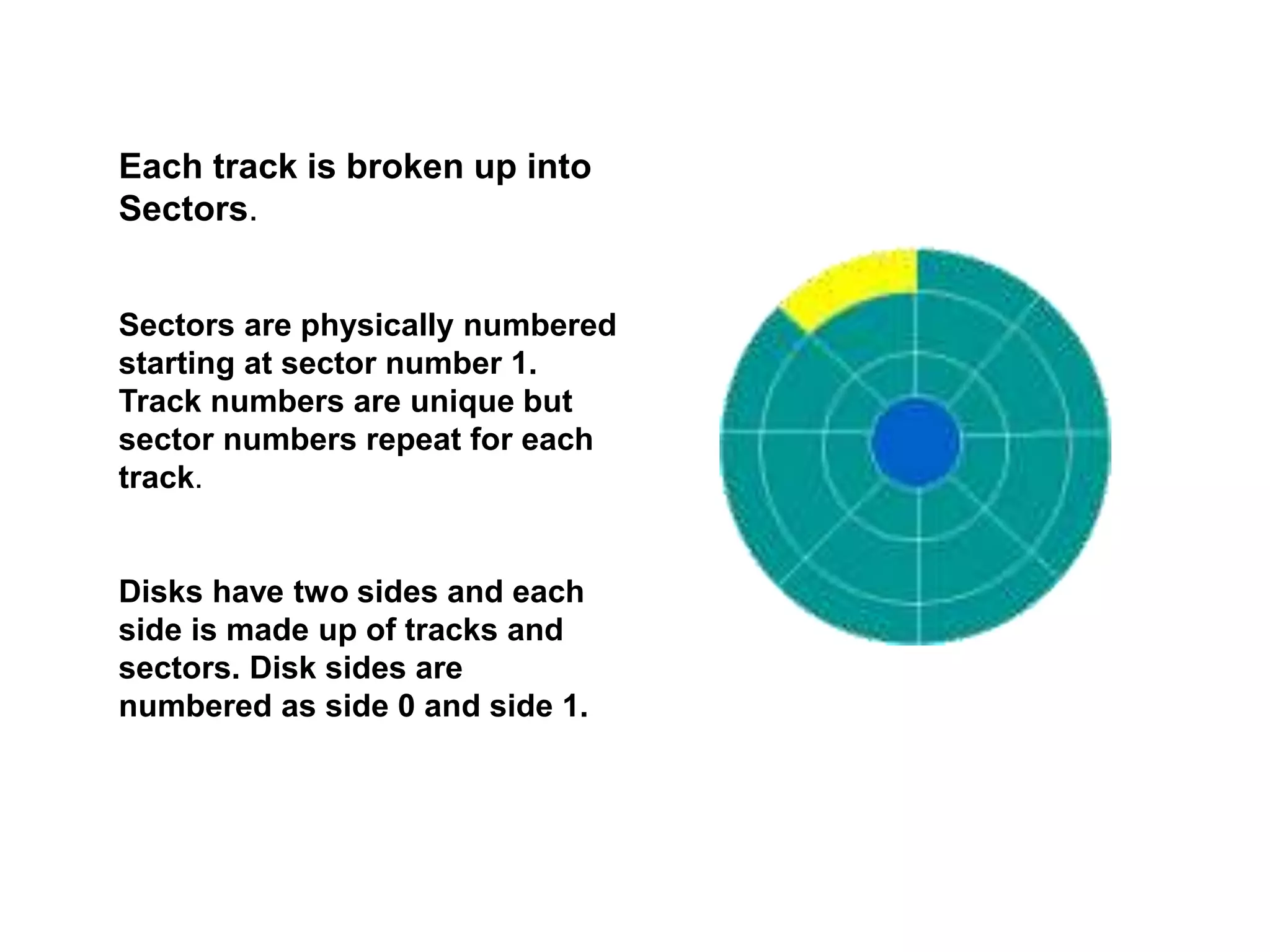
- Magnetic disk organized as a set of concentric circles
- Each concentric circle is called a track
A track is a circular ring on
one side of the disk.
Each track has a number.
The diagram shows 3 tracks.
Tracks are numbered from 0,
the outer most track , up to
the highest number of tracks
found on the disk.
Each track is broken up into
Sectors.
Sectors are physically numbered
starting at sector number 1.
Track numbers are unique but
sector numbers repeat for each
track.
Disks have two sides and each
side is made up of tracks and
sectors. Disk sides are
numbered as side 0 and side 1.
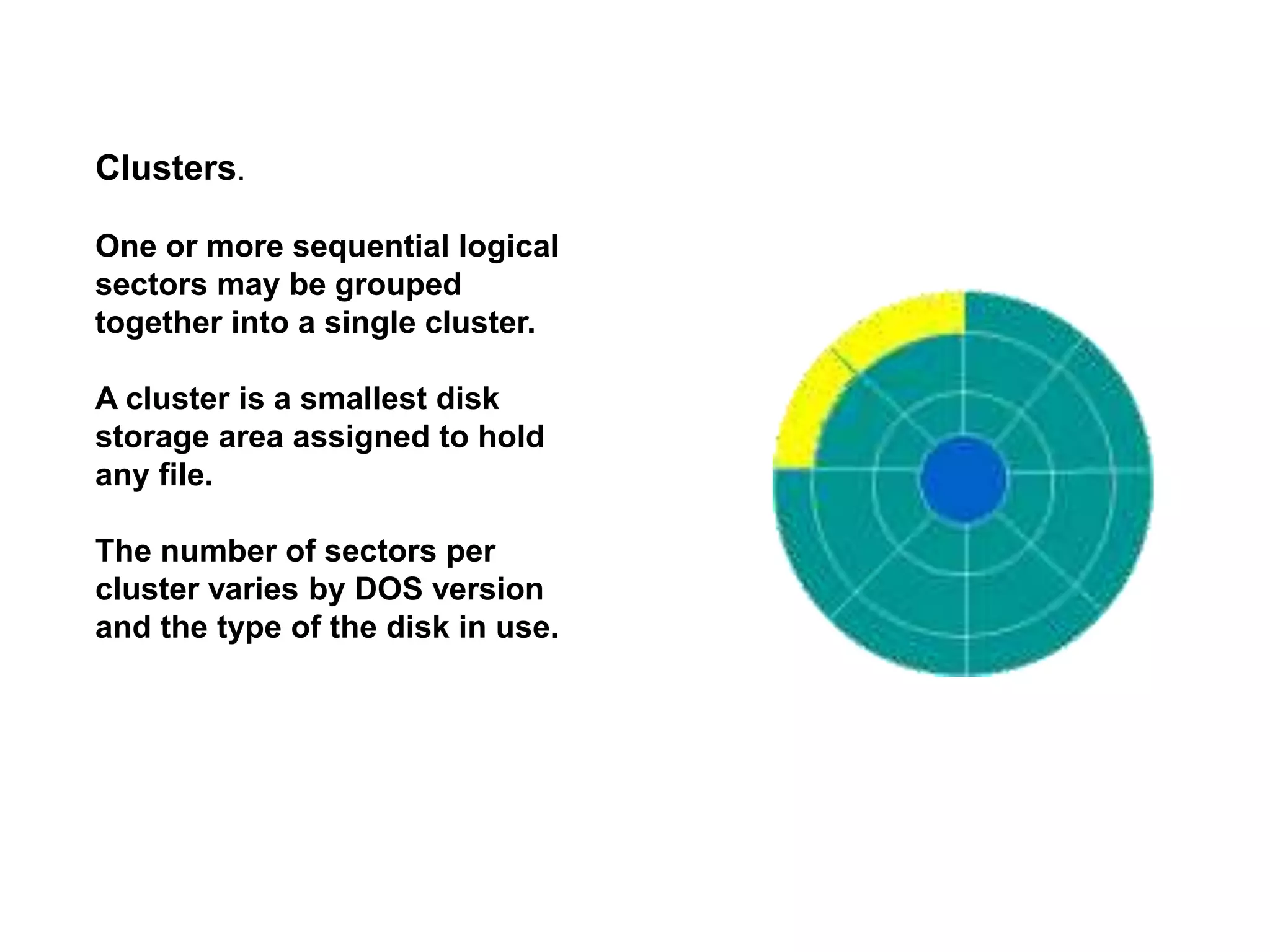
Clusters.
One or more sequential logical
sectors may be grouped
together into a single cluster.
A cluster is a smallest disk
storage area assigned to hold
any file.
The number of sectors per
cluster varies by DOS version
and the type of the disk in use.
00 - 02H
(3 bytes)
E9 XX XX or EB XX 90
03 - 0AH
(8 bytes)
Disk formatting program
0B - 0CH
(2 bytes)
Number of bytes per sector
0DH
(1 byte)
Number of sectors per Cluster
0E - 0FH
(2 bytes)
Reserved sectors (including the boot sector itself)
10H
(1 byte)
Number of File Allocation Tables (FAT)
11 - 12H
(2 bytes)
Number of root directory entries
13 - 14H
(2 bytes)
Total sectors on disk
15H
(1 byte)
Media descriptor byte
16 - 17H
(2 bytes)
Number of sectors per FAT
18 - 19H
(2 bytes)
Sectors per track
1A - 1BH
(2 bytes)
Number of heads
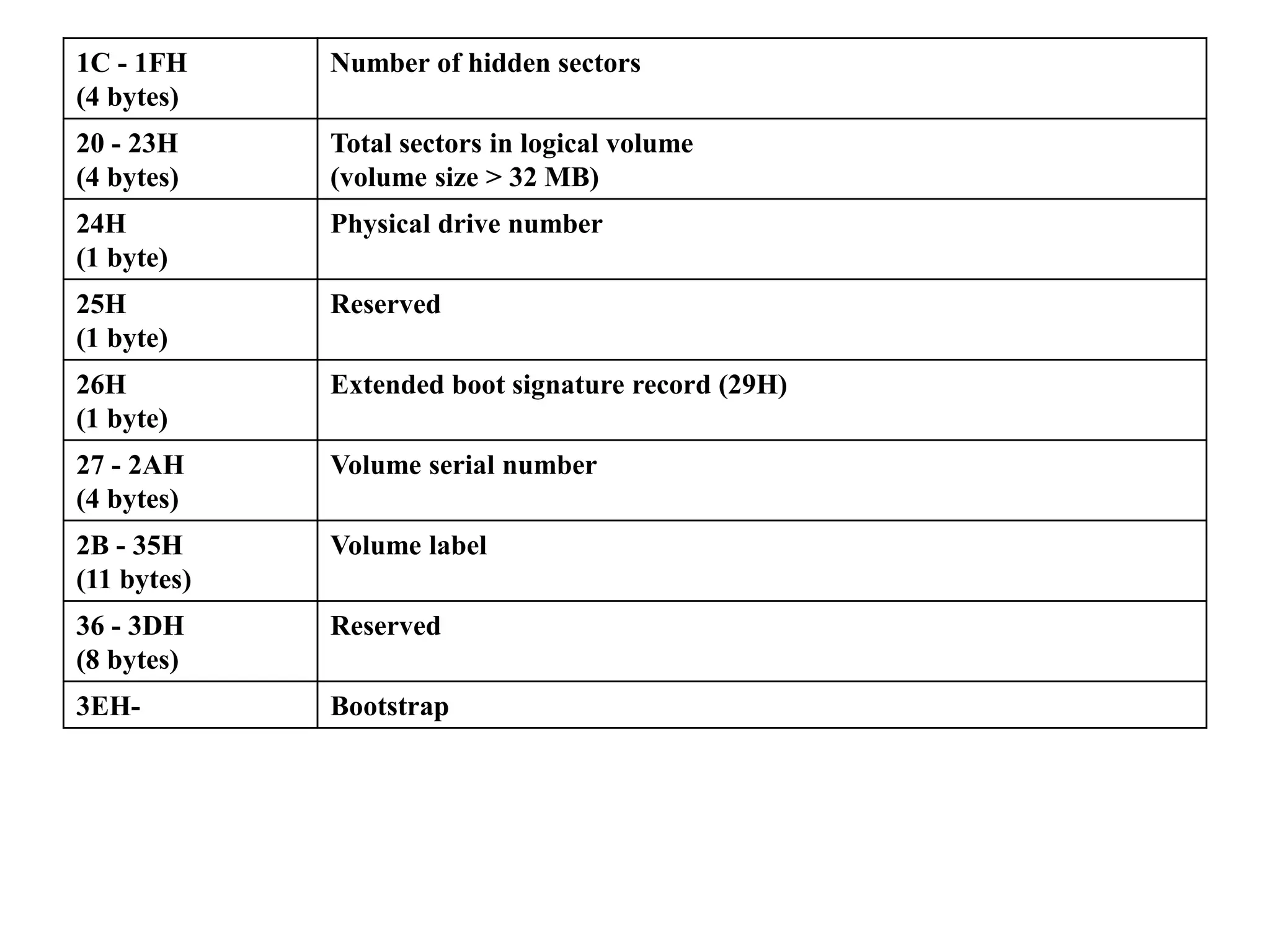
1C - 1FH
(4 bytes)
Number of hidden sectors
20 - 23H
(4 bytes)
Total sectors in logical volume
(volume size > 32 MB)
24H
(1 byte)
Physical drive number
25H
(1 byte)
Reserved
26H
(1 byte)
Extended boot signature record (29H)
27 - 2AH
(4 bytes)
Volume serial number
2B - 35H
(11 bytes)
Volume label
36 - 3DH
(8 bytes)
Reserved
3EH- Bootstrap
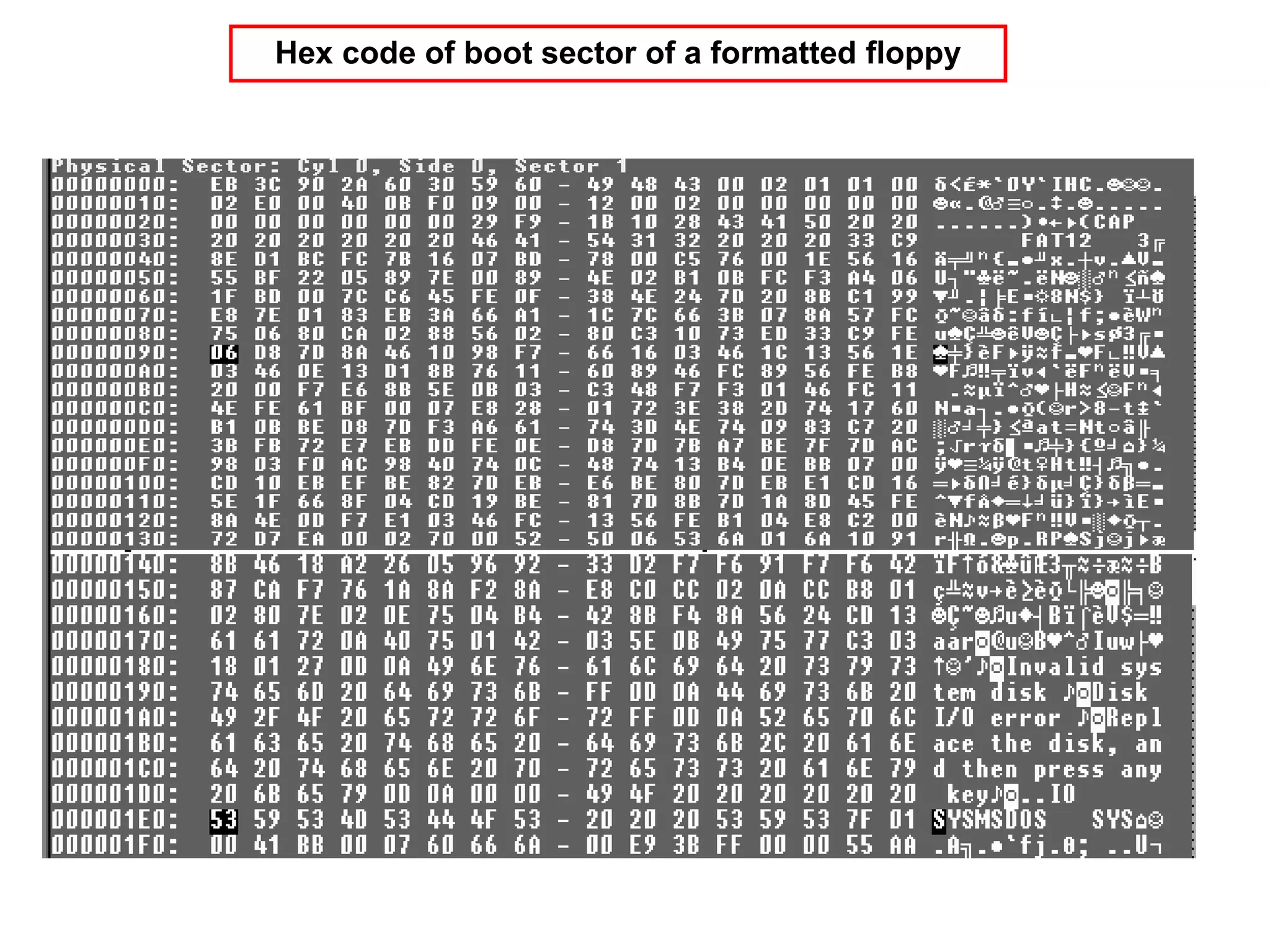
Hex code of boot sector of a formatted floppy
Logical interpretation boot sector of a formatted floppy
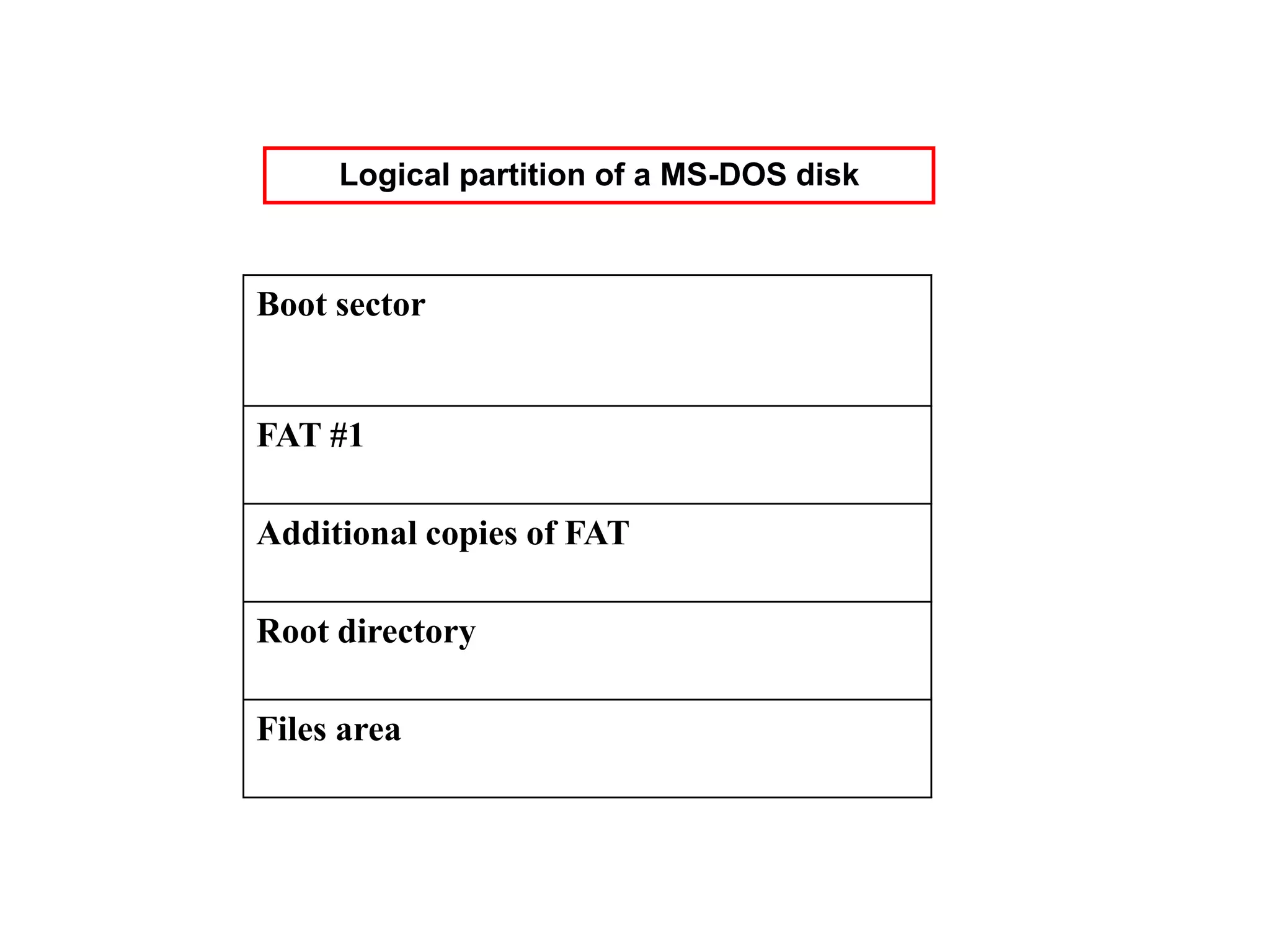
Boot sector
FAT #1
Additional copies of FAT
Root directory
Files area
Logical partition of a MS-DOS disk
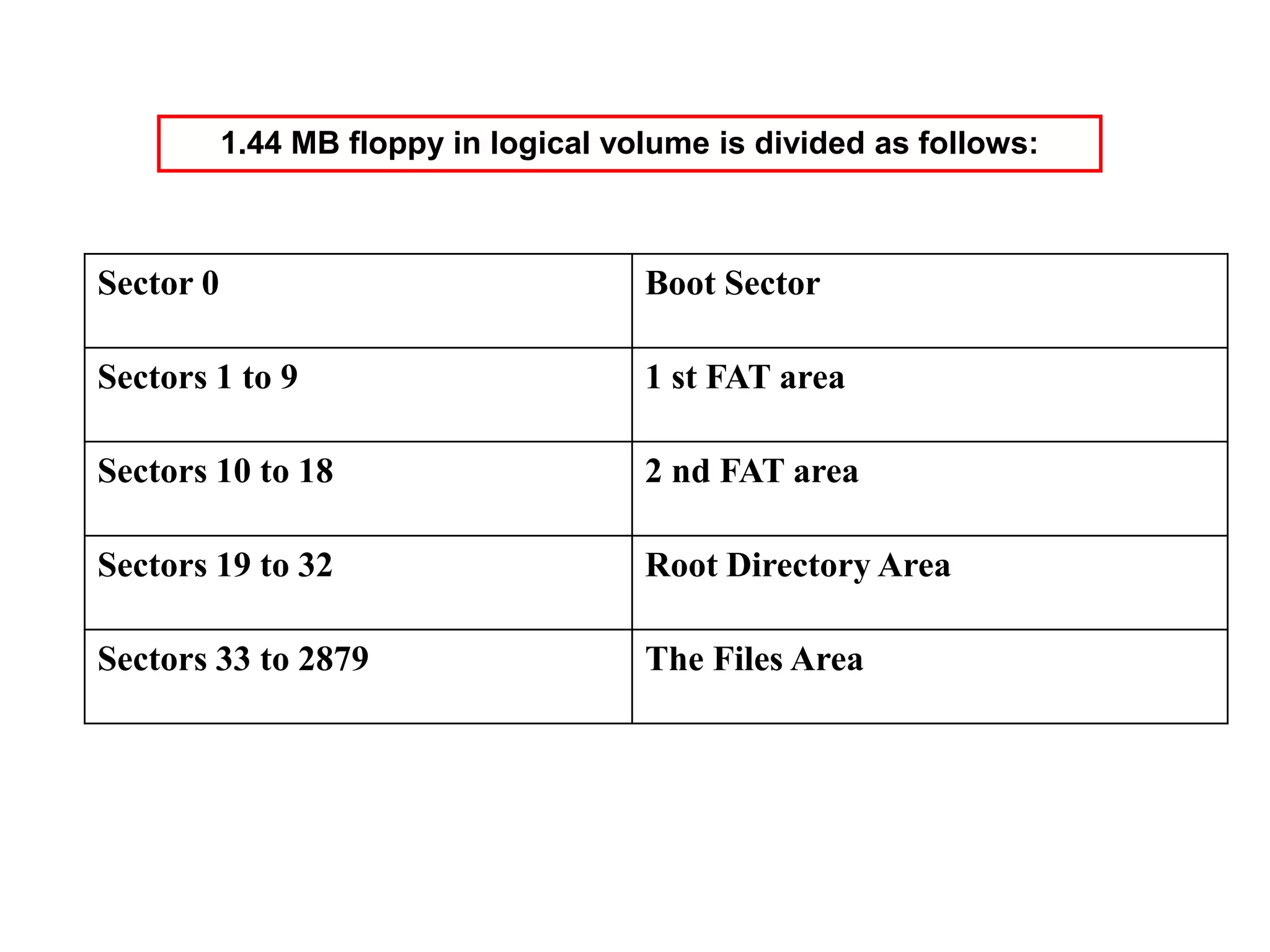
Sector 0 Boot Sector
Sectors 1 to 9 1 st FAT area
Sectors 10 to 18 2 nd FAT area
Sectors 19 to 32 Root Directory Area
Sectors 33 to 2879 The Files Area
1.44 MB floppy in logical volume is divided as follows:
00 - 07H
(8 bytes)
Filename
08 - 0AH
(3 bytes)
File Extension
0BH
(1 byte)
File Attribute
0C – 15H
(10 bytes)
Reserved
16 - 17H
(2 bytes)
Time of creation or Last Updating
18 - 19H
(2 bytes)
Date of creation or Last Updating
1A - 1BH
(2 bytes)
Starting Cluster Number
1C – 1FH
(4 bytes)
Size of the File
ROOT DIRECTORY
Root directory taken from a floppy
Root directory
• If the first byte of the directory entry is one
among the values given below, then they
are interpreted as follows
Content Interpretation
E5H Erased File
00H A Directory Entry which has never been used or the end of occupied
portion of the Directory
05H First character of the file name is E5H
Attribute Byte Interpretation
Bit Interpretation
0 Read only file
1 Hidden file
2 System file
3 Volume label
4 Directory
5 Archive bit
6 Reserved
7 Reserved
Time field
Bits Contents
0-4 Binary Numbers from 0-29
corresponding to 0-58 seconds
5-10 Binary Numbers from 0-59
corresponding to 0-59 minutes
11-15 Binary Numbers from 0-23
corresponding to 0-23 hours
Date field
Bits Contents
0-4 Day(1-31)
5-8 Month(1-12)
9-15 Year(Base year 1980)
12 bit content 16 bit content Interpretation
000H 0000H Cluster is available
FF0 – FF6 H FFF0 – FFF6 H Cluster is reserved
FF7H FFF7H Bad Cluster
FF8-FFF H FFF8-FFFF H Last Cluster in the File
Any other value Any other value Next Cluster in the File
File Allocation Table ( FAT)
FD FF FF FF 4F 00 FF 8F 00 07 F0 FF 09 A0 00 0B E0 00
FFD FFF FFF 004 FFF 008 007 FFF 009 00A 00B 00E
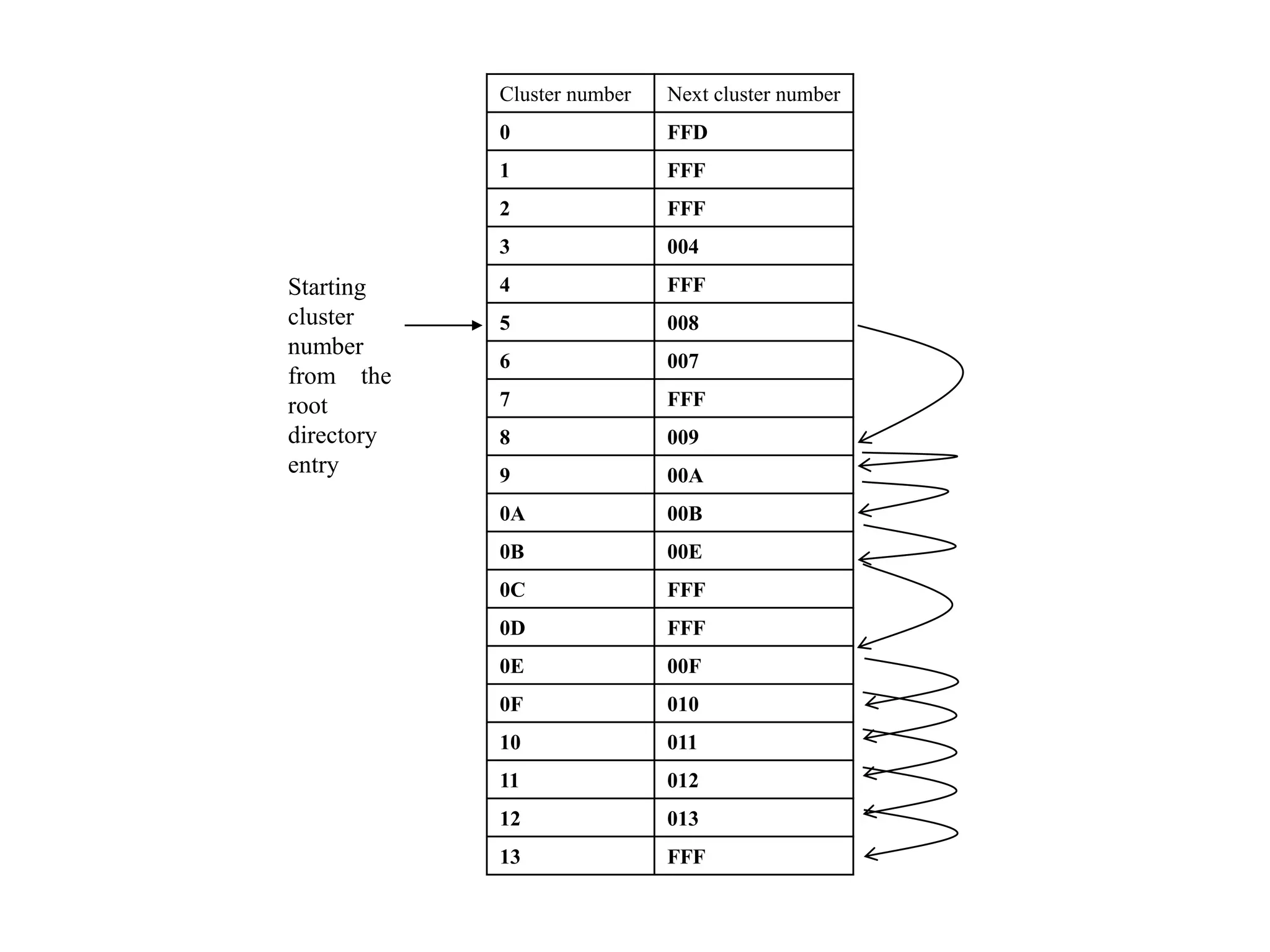
Interpreting the File Allocation Table
Starting
cluster
number
from the
root
directory
entry
Cluster number Next cluster number
0 FFD
1 FFF
2 FFF
3 004
4 FFF
5 008
6 007
7 FFF
8 009
9 00A
0A 00B
0B 00E
0C FFF
0D FFF
0E 00F
0F 010
10 011
11 012
12 013
13 FFF
Real Mode Vs Protected mode
• Whenever any X86 processor is powered on
– It operates in real Mode
– In real mode it can access only 1 MB memory space
– Real Mode operation will only support single user
single tasking operating system
– X86 processor access memory by specifying address
in form of segment : offset
– In real mode Effective address= segment * 16 +
offset
– In real mode Maximum segment size can be 64KB as
16 bit offset are used
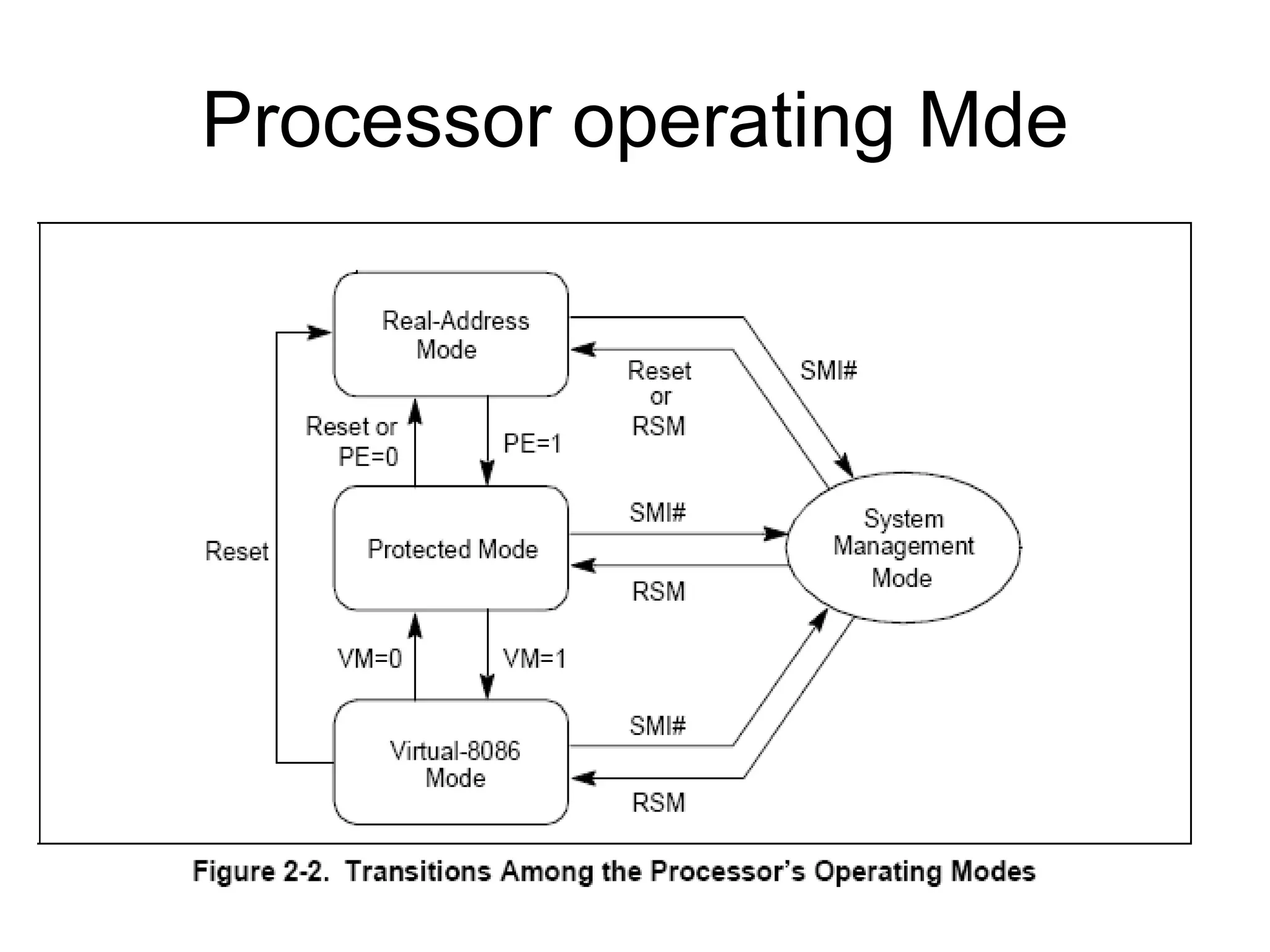
Processor operating Mde
The control register structure of the microprocessor.
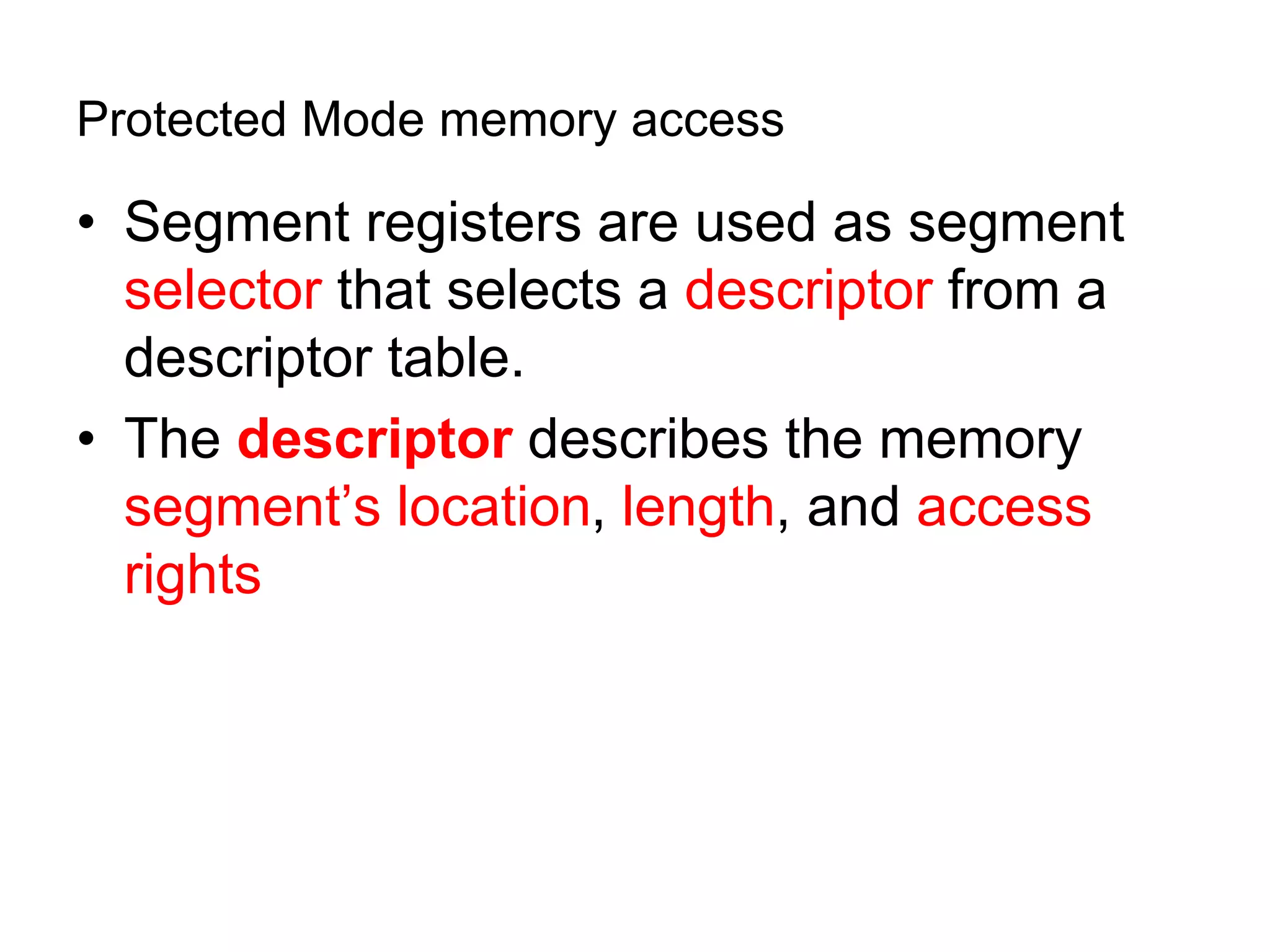
Protected Mode memory access
• Segment registers are used as segment
selector that selects a descriptor from a
descriptor table.
• The descriptor describes the memory
segment’s location, length, and access
rights
The contents of a segment register during protected mode operation of the 80286
80386,80486 and all pentium processors .
• Global descriptors contain segment
definitions that apply to all programs. Stored
in GDT
• Local descriptors are usually unique to an
application. Stored in LDT
– a global descriptor might be called a system
descriptor, and local descriptor an application
descriptor
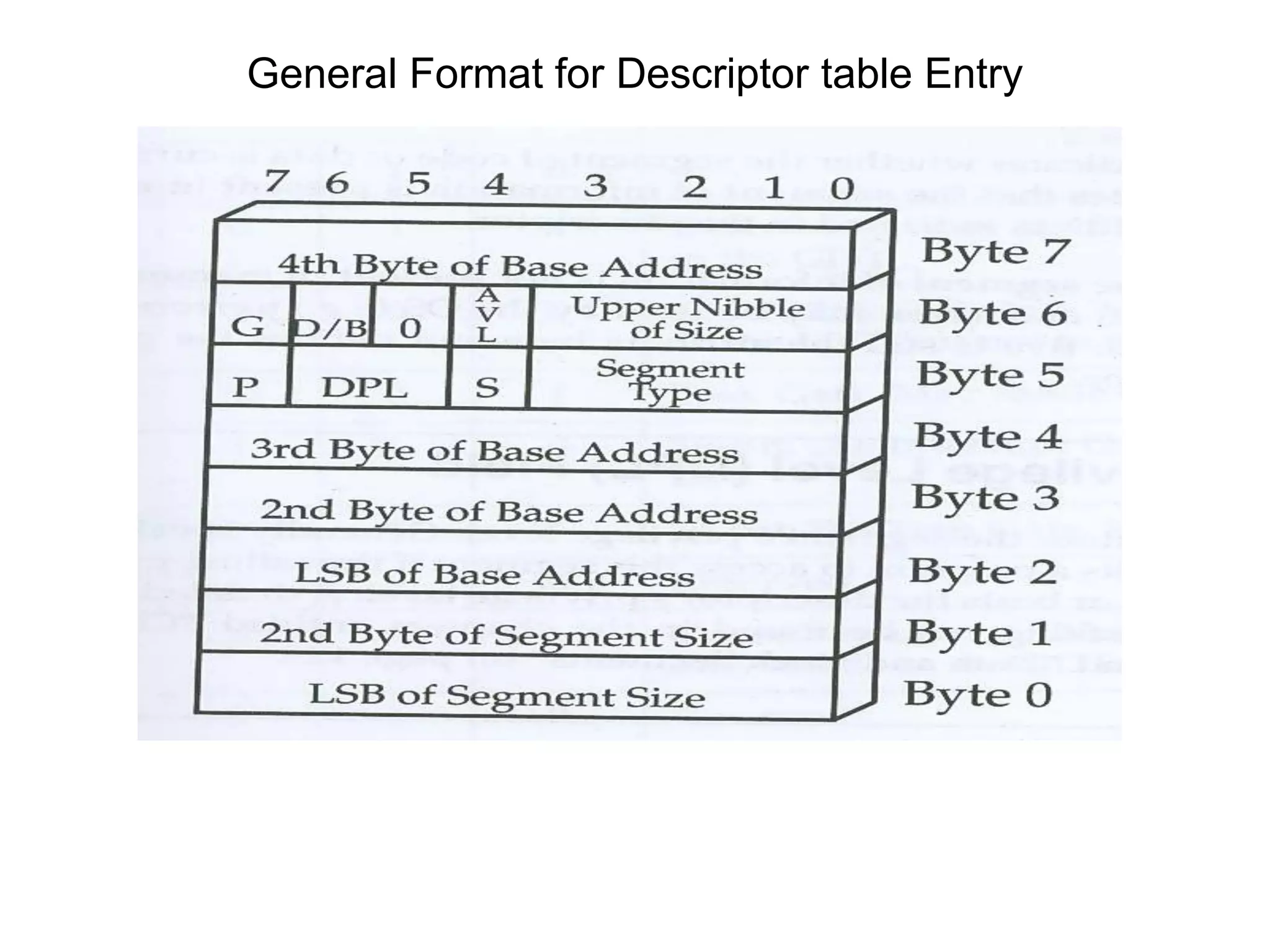
– each descriptor is 8 bytes in length
– global and local descriptor tables are a
maximum of 64K bytes in length
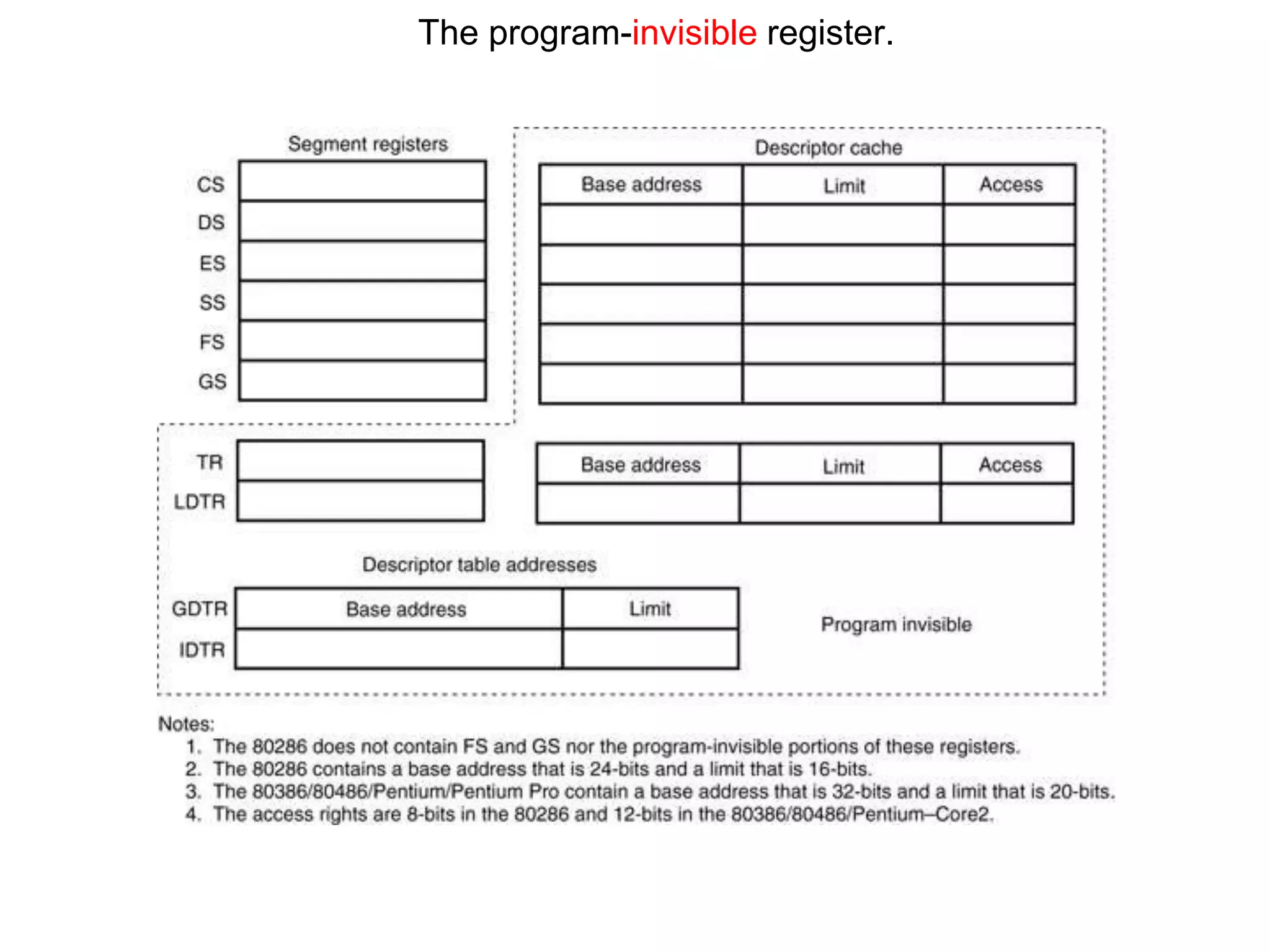
The program-invisible register.
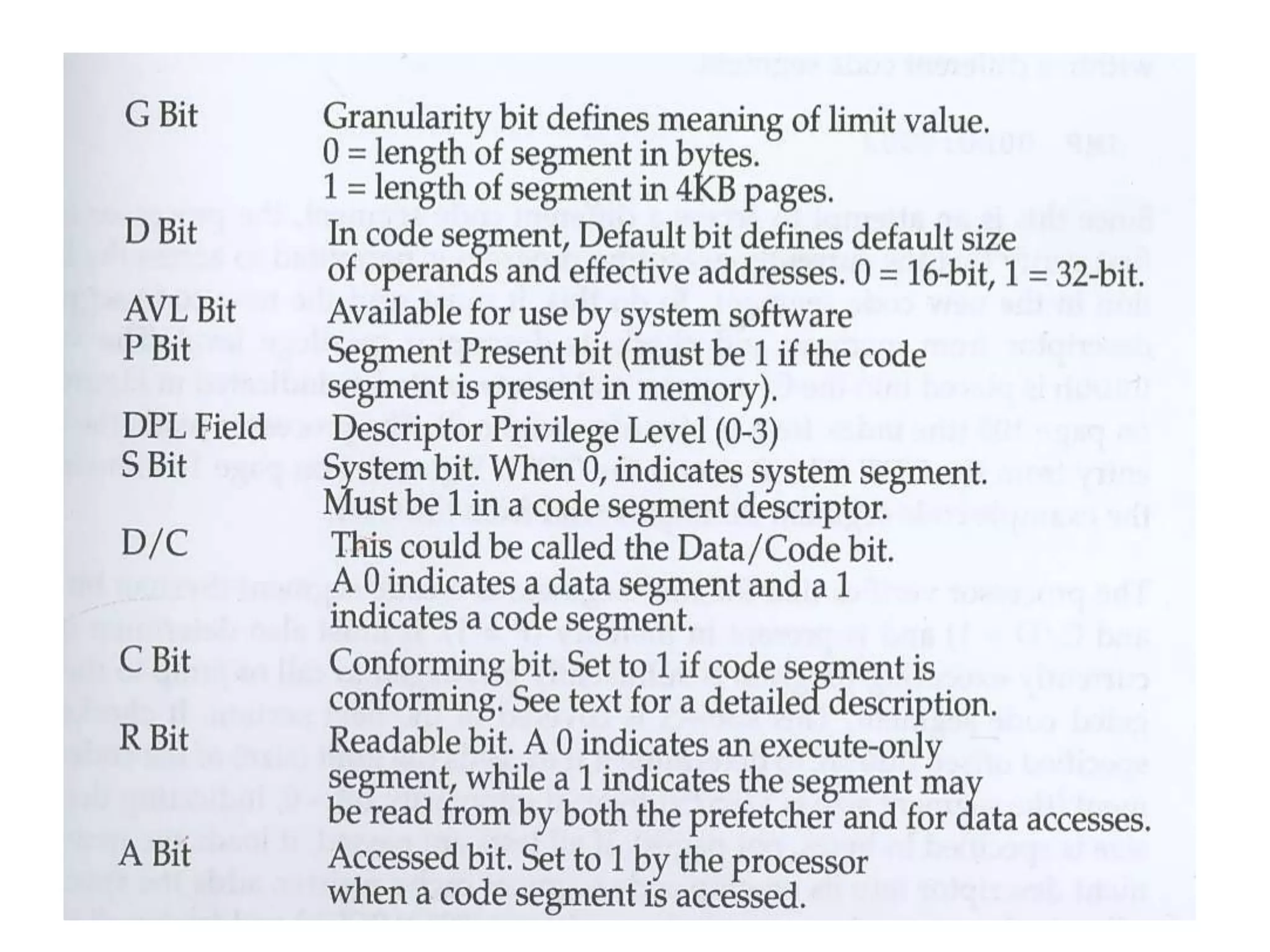
General Format for Descriptor table Entry
disk.ppt
disk.ppt

disk.ppt

  • 1.
    PC Boot UPSequence
  • 2.
    - Powered onCPU starts executing code located from FFFF0H – called BIOS - The code performs POST - After POST reads the boot sector (floppy, hard disk – sequence set in BIOS features) - Checks for AA55H at 07DFEH ( Boot signature) - Sector read into memory area 07C00H. - Jumps to start to execute the code.
  • 3.
  • 4.
     Logical sector0 known as the boot sector contains all the critical information regarding the disk medium’s characteristics .  The first byte in this sector should be a jump instruction.  JMP (opcode 0E9H) followed by a 16 bit immediate value (displacement) or  a short jump JMP (opcode 0EBH) followed by an 8-bit immediate value (displacement) and then by an no- operation NOP (opcode 90h).  The final component of the boot sector is bootstrap.
  • 5.
    Physical Disk Organization -Magnetic disk organized as a set of concentric circles - Each concentric circle is called a track A track is a circular ring on one side of the disk. Each track has a number. The diagram shows 3 tracks. Tracks are numbered from 0, the outer most track , up to the highest number of tracks found on the disk.
  • 6.
    Each track isbroken up into Sectors. Sectors are physically numbered starting at sector number 1. Track numbers are unique but sector numbers repeat for each track. Disks have two sides and each side is made up of tracks and sectors. Disk sides are numbered as side 0 and side 1.
  • 7.
    Clusters. One or moresequential logical sectors may be grouped together into a single cluster. A cluster is a smallest disk storage area assigned to hold any file. The number of sectors per cluster varies by DOS version and the type of the disk in use.
  • 8.
    00 - 02H (3bytes) E9 XX XX or EB XX 90 03 - 0AH (8 bytes) Disk formatting program 0B - 0CH (2 bytes) Number of bytes per sector 0DH (1 byte) Number of sectors per Cluster 0E - 0FH (2 bytes) Reserved sectors (including the boot sector itself) 10H (1 byte) Number of File Allocation Tables (FAT) 11 - 12H (2 bytes) Number of root directory entries 13 - 14H (2 bytes) Total sectors on disk 15H (1 byte) Media descriptor byte 16 - 17H (2 bytes) Number of sectors per FAT 18 - 19H (2 bytes) Sectors per track 1A - 1BH (2 bytes) Number of heads
  • 9.
    1C - 1FH (4bytes) Number of hidden sectors 20 - 23H (4 bytes) Total sectors in logical volume (volume size > 32 MB) 24H (1 byte) Physical drive number 25H (1 byte) Reserved 26H (1 byte) Extended boot signature record (29H) 27 - 2AH (4 bytes) Volume serial number 2B - 35H (11 bytes) Volume label 36 - 3DH (8 bytes) Reserved 3EH- Bootstrap
  • 10.
    Hex code ofboot sector of a formatted floppy
  • 11.
    Logical interpretation bootsector of a formatted floppy
  • 12.
    Boot sector FAT #1 Additionalcopies of FAT Root directory Files area Logical partition of a MS-DOS disk
  • 13.
    Sector 0 BootSector Sectors 1 to 9 1 st FAT area Sectors 10 to 18 2 nd FAT area Sectors 19 to 32 Root Directory Area Sectors 33 to 2879 The Files Area 1.44 MB floppy in logical volume is divided as follows:
  • 14.
    00 - 07H (8bytes) Filename 08 - 0AH (3 bytes) File Extension 0BH (1 byte) File Attribute 0C – 15H (10 bytes) Reserved 16 - 17H (2 bytes) Time of creation or Last Updating 18 - 19H (2 bytes) Date of creation or Last Updating 1A - 1BH (2 bytes) Starting Cluster Number 1C – 1FH (4 bytes) Size of the File ROOT DIRECTORY
  • 15.
    Root directory takenfrom a floppy
  • 16.
    Root directory • Ifthe first byte of the directory entry is one among the values given below, then they are interpreted as follows Content Interpretation E5H Erased File 00H A Directory Entry which has never been used or the end of occupied portion of the Directory 05H First character of the file name is E5H
  • 17.
    Attribute Byte Interpretation BitInterpretation 0 Read only file 1 Hidden file 2 System file 3 Volume label 4 Directory 5 Archive bit 6 Reserved 7 Reserved
  • 18.
    Time field Bits Contents 0-4Binary Numbers from 0-29 corresponding to 0-58 seconds 5-10 Binary Numbers from 0-59 corresponding to 0-59 minutes 11-15 Binary Numbers from 0-23 corresponding to 0-23 hours
  • 19.
    Date field Bits Contents 0-4Day(1-31) 5-8 Month(1-12) 9-15 Year(Base year 1980)
  • 20.
    12 bit content16 bit content Interpretation 000H 0000H Cluster is available FF0 – FF6 H FFF0 – FFF6 H Cluster is reserved FF7H FFF7H Bad Cluster FF8-FFF H FFF8-FFFF H Last Cluster in the File Any other value Any other value Next Cluster in the File File Allocation Table ( FAT)
  • 21.
    FD FF FFFF 4F 00 FF 8F 00 07 F0 FF 09 A0 00 0B E0 00 FFD FFF FFF 004 FFF 008 007 FFF 009 00A 00B 00E Interpreting the File Allocation Table
  • 22.
    Starting cluster number from the root directory entry Cluster numberNext cluster number 0 FFD 1 FFF 2 FFF 3 004 4 FFF 5 008 6 007 7 FFF 8 009 9 00A 0A 00B 0B 00E 0C FFF 0D FFF 0E 00F 0F 010 10 011 11 012 12 013 13 FFF
  • 23.
    Real Mode VsProtected mode • Whenever any X86 processor is powered on – It operates in real Mode – In real mode it can access only 1 MB memory space – Real Mode operation will only support single user single tasking operating system – X86 processor access memory by specifying address in form of segment : offset – In real mode Effective address= segment * 16 + offset – In real mode Maximum segment size can be 64KB as 16 bit offset are used
  • 24.
  • 25.
    The control registerstructure of the microprocessor.
  • 26.
    Protected Mode memoryaccess • Segment registers are used as segment selector that selects a descriptor from a descriptor table. • The descriptor describes the memory segment’s location, length, and access rights
  • 27.
    The contents ofa segment register during protected mode operation of the 80286 80386,80486 and all pentium processors .
  • 28.
    • Global descriptorscontain segment definitions that apply to all programs. Stored in GDT • Local descriptors are usually unique to an application. Stored in LDT – a global descriptor might be called a system descriptor, and local descriptor an application descriptor – each descriptor is 8 bytes in length – global and local descriptor tables are a maximum of 64K bytes in length
  • 29.
  • 30.
    General Format forDescriptor table Entry