By: Zainab Almugbel
1
Book Title
 Ramez Elmasri and Shamkant Navathe,
"Fundamentals of Database Systems" 6th Edition,
2010.
2
Outline
 Introduction
 Comparing storages
 Primary Storage: Memory Hierarchy
 Secondary Storage: Disk Storage Devices
 Placing File Records on Disk
 Records
 Blocking
 Files of Records
 Operation on Files
 Methods for organizing records of a file on disk
 Parallelizing Disk Access using RAID Technology
3
Comparing storages
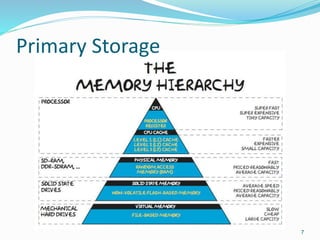
Primary Storage: Memory Hierarchy
Secondary Storage: Disk Storage Devices
4
Introduction
 Physical Schema Level
 Storage:
 Primary Storage
 Secondary Storage
5
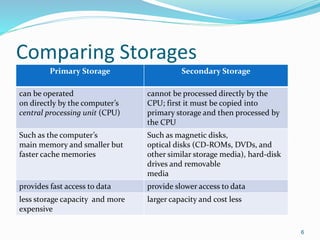
Comparing Storages
Primary Storage Secondary Storage
can be operated
on directly by the computer’s
central processing unit (CPU)
cannot be processed directly by the
CPU; first it must be copied into
primary storage and then processed by
the CPU
Such as the computer’s
main memory and smaller but
faster cache memories
Such as magnetic disks,
optical disks (CD-ROMs, DVDs, and
other similar storage media), hard-disk
drives and removable
media
provides fast access to data provide slower access to data
less storage capacity and more
expensive
larger capacity and cost less
6
Primary Storage
7
Secondary Storage: Disk Storage
Devices
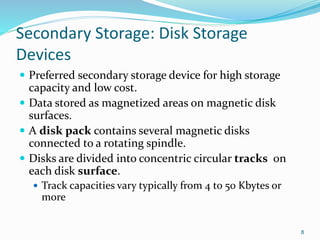
 Preferred secondary storage device for high storage
capacity and low cost.
 Data stored as magnetized areas on magnetic disk
surfaces.
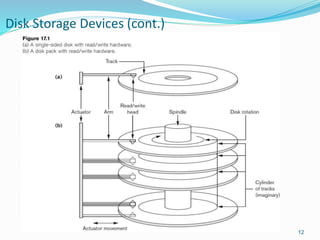
 A disk pack contains several magnetic disks
connected to a rotating spindle.
 Disks are divided into concentric circular tracks on
each disk surface.
 Track capacities vary typically from 4 to 50 Kbytes or
more
8
Disk Storage Devices (cont.)
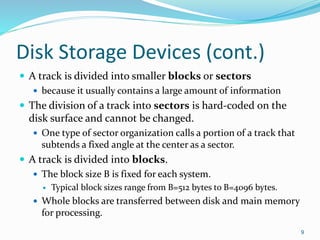
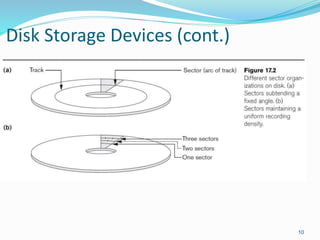
 A track is divided into smaller blocks or sectors
 because it usually contains a large amount of information
 The division of a track into sectors is hard-coded on the
disk surface and cannot be changed.
 One type of sector organization calls a portion of a track that
subtends a fixed angle at the center as a sector.
 A track is divided into blocks.
 The block size B is fixed for each system.
 Typical block sizes range from B=512 bytes to B=4096 bytes.
 Whole blocks are transferred between disk and main memory
for processing.
9
Disk Storage Devices (cont.)
10
Disk Storage Devices (cont.)
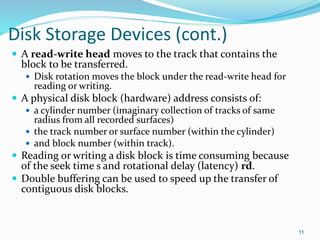
 A read-write head moves to the track that contains the
block to be transferred.
 Disk rotation moves the block under the read-write head for
reading or writing.
 A physical disk block (hardware) address consists of:
 a cylinder number (imaginary collection of tracks of same
radius from all recorded surfaces)
 the track number or surface number (within the cylinder)
 and block number (within track).
 Reading or writing a disk block is time consuming because
of the seek time s and rotational delay (latency) rd.
 Double buffering can be used to speed up the transfer of
contiguous disk blocks.
11
Disk Storage Devices (cont.)
12
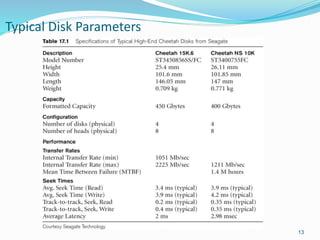
Typical Disk Parameters
13
Review
Questions Additional Resources
 Reading or writing a
disk block is time
consuming, it that
statement ture? Why?
 Which type of storage
is used for storing
database?
 How disk storage
devices work?
 Following videos to show how
hard drive works:
 http://youtube.com/watch?v
=TvkIi6NVnqY
 https://www.youtube.com/w
atch?v=Cj8-WNjaGuM
14
Records
Blocking
Files of Records
15
Records
 Data is usually stored in the form of records. Each
record consists of a collection of related data values or
items, where each value is formed of one or more
bytes and corresponds to a particular field of the
record.
 Records usually describe entities and their attributes.
For example, an EMPLOYEE record represents an
employee entity, and each field value in the record
specifies some attribute of that employee, such as
Name, Birth_date, Salary, or Supervisor.
16
Records (Cont.)
 Fixed and variable length records
 Records contain fields which have values of a
particular type
 E.g., amount, date, time, age
 Fields themselves may be fixed length or variable
length
 Variable length fields can be mixed into one record:
 Separator characters or length fields are needed so that
the record can be “parsed.”
17
Blocking
 Blocking:
 Refers to storing a number of records in one block on
the disk.
 Blocking factor (bfr) refers to the number of records
per block.
 There may be empty space in a block if an integral
number of records do not fit in one block.
 Spanned Records:
 Refers to records that exceed the size of one or more
blocks and hence span a number of blocks.
18
Files of Records
 A file is a sequence of records, where each record is a
collection of data values (or data items).
 A file descriptor (or file header) includes information
that describes the file, such as the field names and their
data types, and the addresses of the file blocks on disk.
 Records are stored on disk blocks.
 The blocking factor bfr for a file is the (average) number
of file records stored in a disk block.
 A file can have fixed-length records or variable-length
records.
19
Files of Records (cont.)
 File records can be unspanned or spanned
 Unspanned: no record can span two blocks
 Spanned: a record can be stored in more than one block
 The physical disk blocks that are allocated to hold the
records of a file can be contiguous, linked, or indexed.
 In a file of fixed-length records, all records have the same
format. Usually, unspanned blocking is used with such
files.
 Files of variable-length records require additional
information to be stored in each record, such as separator
characters and field types.
 Usually spanned blocking is used with such files.
20
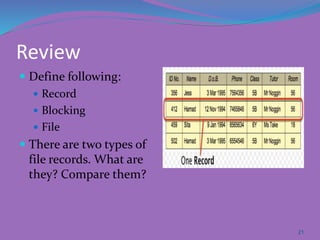
Review
 Define following:
 Record
 Blocking
 File
 There are two types of
file records. What are
they? Compare them?
21
22
Operation on Files
 Typical file operations include:
 OPEN: Readies the file for access, and associates a pointer that will refer to a
current file record at each point in time.
 FIND: Searches for the first file record that satisfies a certain condition, and
makes it the current file record.
 FINDNEXT: Searches for the next file record (from the current record) that
satisfies a certain condition, and makes it the current file record.
 READ: Reads the current file record into a program variable.
 INSERT: Inserts a new record into the file & makes it the current file record.
 DELETE: Removes the current file record from the file, usually by marking
the record to indicate that it is no longer valid.
 MODIFY: Changes the values of some fields of the current file record.
 CLOSE: Terminates access to the file.
 REORGANIZE: Reorganizes the file records.
 For example, the records marked deleted are physically removed from the
file or a new organization of the file records is created.
 READ_ORDERED: Read the file blocks in order of a specific field of the file.
23
Review
 List three different operations on file?
 True/False
 Find operation searches for the next file record that
satisfies a certain condition
 Close operation terminates access to the file
 When records physically removed from the file, the
reorganize operation is required
24
Heap file
Sorted file
Hashing Techniques
RAID
25
Unordered Files
 Also called a heap or a pile file.
 New records are inserted at the end of the file.
 A linear search through the file records is necessary
to search for a record.
 This requires reading and searching half the file blocks
on the average, and is hence quite expensive.
 Record insertion is quite efficient.
 Reading the records in order of a particular field
requires sorting the file records.
26
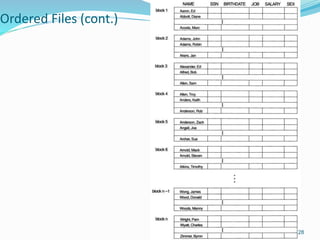
Ordered Files
 Also called a sequential file.
 File records are kept sorted by the values of an ordering field.
 Insertion is expensive: records must be inserted in the correct order.
 It is common to keep a separate unordered overflow (or transaction)
file for new records to improve insertion efficiency; this is
periodically merged with the main ordered file.
 A binary search can be used to search for a record on its ordering field
value.
 This requires reading and searching log2 of the file blocks on the
average, an improvement over linear search.
 Reading the records in order of the ordering field is quite efficient.
27
Ordered Files (cont.)
28
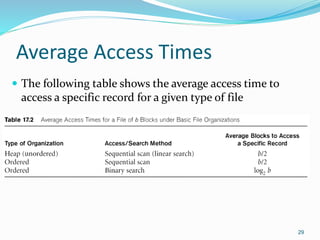
Average Access Times
 The following table shows the average access time to
access a specific record for a given type of file
29
Hashed Files
 Hashing for disk files is called External Hashing
 The file blocks are divided into M equal-sized buckets, numbered
bucket0, bucket1, ..., bucketM-1.
 Typically, a bucket corresponds to one (or a fixed number of) disk
block.
 One of the file fields is designated to be the hash key of the file.
 The record with hash key value K is stored in bucket i, where i=h(K),
and h is the hashing function.
 Search is very efficient on the hash key.
 Collisions occur when a new record hashes to a bucket that is already
full.
 An overflow file is kept for storing such records.
 Overflow records that hash to each bucket can be linked together.
30
Hashed Files (cont.)
 There are numerous methods for collision resolution, including the
following:
 Open addressing: Proceeding from the occupied position
specified by the hash address, the program checks the subsequent
positions in order until an unused (empty) position is found.
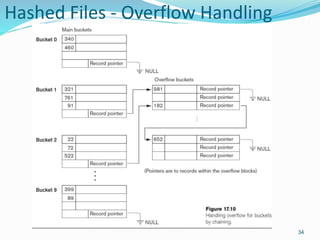
 Chaining: For this method, various overflow locations are kept,
usually by extending the array with a number of overflow positions.
In addition, a pointer field is added to each record location. A
collision is resolved by placing the new record in an unused
overflow location and setting the pointer of the occupied hash
address location to the address of that overflow location.
 Multiple hashing: The program applies a second hash function if
the first results in a collision. If another collision results, the
program uses open addressing or applies a third hash function and
then uses open addressing if necessary.
31
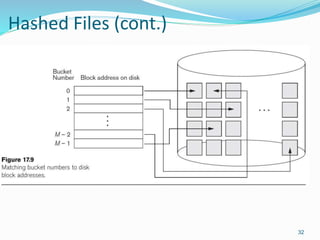
Hashed Files (cont.)
32
Hashed Files (cont.)
 To reduce overflow records, a hash file is typically kept
70-80% full.
 The hash function h should distribute the records
uniformly among the buckets
 Otherwise, search time will be increased because many
overflow records will exist.
 Main disadvantages of static external hashing:
 Fixed number of buckets M is a problem if the number
of records in the file grows or shrinks.
 Ordered access on the hash key is quite inefficient
(requires sorting the records).
33
Hashed Files - Overflow Handling
34
Parallelizing Disk Access using RAID
Technology
 Secondary storage technology must take steps to keep
up in performance and reliability with processor
technology.
 A major advance in secondary storage technology is
represented by the development of RAID, which
originally stood for Redundant Arrays of
Inexpensive Disks.
 The main goal of RAID is to even out the widely
different rates of performance improvement of disks
against those in memory and microprocessors.
38
RAID Technology (cont.)
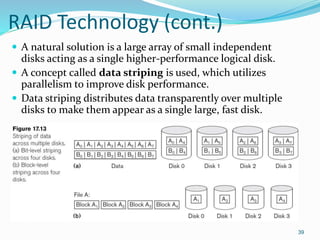
 A natural solution is a large array of small independent
disks acting as a single higher-performance logical disk.
 A concept called data striping is used, which utilizes
parallelism to improve disk performance.
 Data striping distributes data transparently over multiple
disks to make them appear as a single large, fast disk.
39
RAID Technology (cont.)
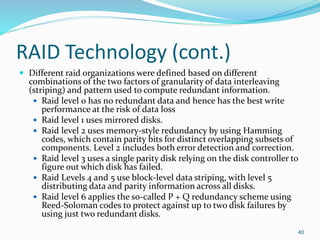
 Different raid organizations were defined based on different
combinations of the two factors of granularity of data interleaving
(striping) and pattern used to compute redundant information.
 Raid level 0 has no redundant data and hence has the best write
performance at the risk of data loss
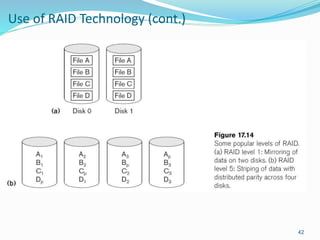
 Raid level 1 uses mirrored disks.
 Raid level 2 uses memory-style redundancy by using Hamming
codes, which contain parity bits for distinct overlapping subsets of
components. Level 2 includes both error detection and correction.
 Raid level 3 uses a single parity disk relying on the disk controller to
figure out which disk has failed.
 Raid Levels 4 and 5 use block-level data striping, with level 5
distributing data and parity information across all disks.
 Raid level 6 applies the so-called P + Q redundancy scheme using
Reed-Soloman codes to protect against up to two disk failures by
using just two redundant disks.
40
Use of RAID Technology (cont.)
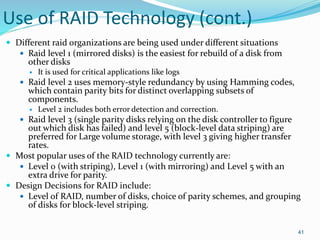
 Different raid organizations are being used under different situations
 Raid level 1 (mirrored disks) is the easiest for rebuild of a disk from
other disks
 It is used for critical applications like logs
 Raid level 2 uses memory-style redundancy by using Hamming codes,
which contain parity bits for distinct overlapping subsets of
components.
 Level 2 includes both error detection and correction.
 Raid level 3 (single parity disks relying on the disk controller to figure
out which disk has failed) and level 5 (block-level data striping) are
preferred for Large volume storage, with level 3 giving higher transfer
rates.
 Most popular uses of the RAID technology currently are:
 Level 0 (with striping), Level 1 (with mirroring) and Level 5 with an
extra drive for parity.
 Design Decisions for RAID include:
 Level of RAID, number of disks, choice of parity schemes, and grouping
of disks for block-level striping.
41
Use of RAID Technology (cont.)
42
Review
Scenario Questions
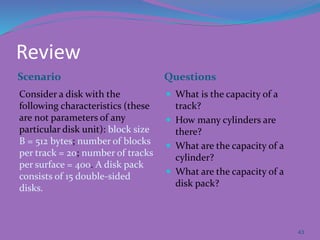
Consider a disk with the
following characteristics (these
are not parameters of any
particular disk unit): block size
B = 512 bytes; number of blocks
per track = 20; number of tracks
per surface = 400. A disk pack
consists of 15 double-sided
disks.
 What is the capacity of a
track?
 How many cylinders are
there?
 What are the capacity of a
cylinder?
 What are the capacity of a
disk pack?
43
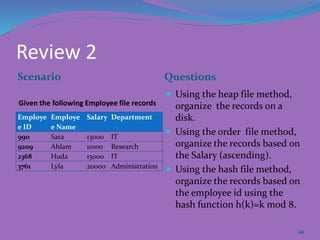
Review 2
Scenario Questions
Employe
e ID
Employe
e Name
Salary Department
990 Sara 13000 IT
9209 Ahlam 10100 Research
2368 Huda 15000 IT
3761 Lyla 20000 Administration
 Using the heap file method,
organize the records on a
disk.
 Using the order file method,
organize the records based on
the Salary (ascending).
 Using the hash file method,
organize the records based on
the employee id using the
hash function h(k)=k mod 8.
44
Given the following Employee file records
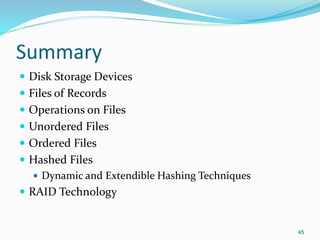
Summary
 Disk Storage Devices
 Files of Records
 Operations on Files
 Unordered Files
 Ordered Files
 Hashed Files
 Dynamic and Extendible Hashing Techniques
 RAID Technology
45

Ch 17 disk storage, basic files structure, and hashing

  • 1.
  • 2.
    Book Title  RamezElmasri and Shamkant Navathe, "Fundamentals of Database Systems" 6th Edition, 2010. 2
  • 3.
    Outline  Introduction  Comparingstorages  Primary Storage: Memory Hierarchy  Secondary Storage: Disk Storage Devices  Placing File Records on Disk  Records  Blocking  Files of Records  Operation on Files  Methods for organizing records of a file on disk  Parallelizing Disk Access using RAID Technology 3
  • 4.
    Comparing storages Primary Storage:Memory Hierarchy Secondary Storage: Disk Storage Devices 4
  • 5.
    Introduction  Physical SchemaLevel  Storage:  Primary Storage  Secondary Storage 5
  • 6.
    Comparing Storages Primary StorageSecondary Storage can be operated on directly by the computer’s central processing unit (CPU) cannot be processed directly by the CPU; first it must be copied into primary storage and then processed by the CPU Such as the computer’s main memory and smaller but faster cache memories Such as magnetic disks, optical disks (CD-ROMs, DVDs, and other similar storage media), hard-disk drives and removable media provides fast access to data provide slower access to data less storage capacity and more expensive larger capacity and cost less 6
  • 7.
  • 8.
    Secondary Storage: DiskStorage Devices  Preferred secondary storage device for high storage capacity and low cost.  Data stored as magnetized areas on magnetic disk surfaces.  A disk pack contains several magnetic disks connected to a rotating spindle.  Disks are divided into concentric circular tracks on each disk surface.  Track capacities vary typically from 4 to 50 Kbytes or more 8
  • 9.
    Disk Storage Devices(cont.)  A track is divided into smaller blocks or sectors  because it usually contains a large amount of information  The division of a track into sectors is hard-coded on the disk surface and cannot be changed.  One type of sector organization calls a portion of a track that subtends a fixed angle at the center as a sector.  A track is divided into blocks.  The block size B is fixed for each system.  Typical block sizes range from B=512 bytes to B=4096 bytes.  Whole blocks are transferred between disk and main memory for processing. 9
  • 10.
  • 11.
    Disk Storage Devices(cont.)  A read-write head moves to the track that contains the block to be transferred.  Disk rotation moves the block under the read-write head for reading or writing.  A physical disk block (hardware) address consists of:  a cylinder number (imaginary collection of tracks of same radius from all recorded surfaces)  the track number or surface number (within the cylinder)  and block number (within track).  Reading or writing a disk block is time consuming because of the seek time s and rotational delay (latency) rd.  Double buffering can be used to speed up the transfer of contiguous disk blocks. 11
  • 12.
  • 13.
  • 14.
    Review Questions Additional Resources Reading or writing a disk block is time consuming, it that statement ture? Why?  Which type of storage is used for storing database?  How disk storage devices work?  Following videos to show how hard drive works:  http://youtube.com/watch?v =TvkIi6NVnqY  https://www.youtube.com/w atch?v=Cj8-WNjaGuM 14
  • 15.
  • 16.
    Records  Data isusually stored in the form of records. Each record consists of a collection of related data values or items, where each value is formed of one or more bytes and corresponds to a particular field of the record.  Records usually describe entities and their attributes. For example, an EMPLOYEE record represents an employee entity, and each field value in the record specifies some attribute of that employee, such as Name, Birth_date, Salary, or Supervisor. 16
  • 17.
    Records (Cont.)  Fixedand variable length records  Records contain fields which have values of a particular type  E.g., amount, date, time, age  Fields themselves may be fixed length or variable length  Variable length fields can be mixed into one record:  Separator characters or length fields are needed so that the record can be “parsed.” 17
  • 18.
    Blocking  Blocking:  Refersto storing a number of records in one block on the disk.  Blocking factor (bfr) refers to the number of records per block.  There may be empty space in a block if an integral number of records do not fit in one block.  Spanned Records:  Refers to records that exceed the size of one or more blocks and hence span a number of blocks. 18
  • 19.
    Files of Records A file is a sequence of records, where each record is a collection of data values (or data items).  A file descriptor (or file header) includes information that describes the file, such as the field names and their data types, and the addresses of the file blocks on disk.  Records are stored on disk blocks.  The blocking factor bfr for a file is the (average) number of file records stored in a disk block.  A file can have fixed-length records or variable-length records. 19
  • 20.
    Files of Records(cont.)  File records can be unspanned or spanned  Unspanned: no record can span two blocks  Spanned: a record can be stored in more than one block  The physical disk blocks that are allocated to hold the records of a file can be contiguous, linked, or indexed.  In a file of fixed-length records, all records have the same format. Usually, unspanned blocking is used with such files.  Files of variable-length records require additional information to be stored in each record, such as separator characters and field types.  Usually spanned blocking is used with such files. 20
  • 21.
    Review  Define following: Record  Blocking  File  There are two types of file records. What are they? Compare them? 21
  • 22.
  • 23.
    Operation on Files Typical file operations include:  OPEN: Readies the file for access, and associates a pointer that will refer to a current file record at each point in time.  FIND: Searches for the first file record that satisfies a certain condition, and makes it the current file record.  FINDNEXT: Searches for the next file record (from the current record) that satisfies a certain condition, and makes it the current file record.  READ: Reads the current file record into a program variable.  INSERT: Inserts a new record into the file & makes it the current file record.  DELETE: Removes the current file record from the file, usually by marking the record to indicate that it is no longer valid.  MODIFY: Changes the values of some fields of the current file record.  CLOSE: Terminates access to the file.  REORGANIZE: Reorganizes the file records.  For example, the records marked deleted are physically removed from the file or a new organization of the file records is created.  READ_ORDERED: Read the file blocks in order of a specific field of the file. 23
  • 24.
    Review  List threedifferent operations on file?  True/False  Find operation searches for the next file record that satisfies a certain condition  Close operation terminates access to the file  When records physically removed from the file, the reorganize operation is required 24
  • 25.
  • 26.
    Unordered Files  Alsocalled a heap or a pile file.  New records are inserted at the end of the file.  A linear search through the file records is necessary to search for a record.  This requires reading and searching half the file blocks on the average, and is hence quite expensive.  Record insertion is quite efficient.  Reading the records in order of a particular field requires sorting the file records. 26
  • 27.
    Ordered Files  Alsocalled a sequential file.  File records are kept sorted by the values of an ordering field.  Insertion is expensive: records must be inserted in the correct order.  It is common to keep a separate unordered overflow (or transaction) file for new records to improve insertion efficiency; this is periodically merged with the main ordered file.  A binary search can be used to search for a record on its ordering field value.  This requires reading and searching log2 of the file blocks on the average, an improvement over linear search.  Reading the records in order of the ordering field is quite efficient. 27
  • 28.
  • 29.
    Average Access Times The following table shows the average access time to access a specific record for a given type of file 29
  • 30.
    Hashed Files  Hashingfor disk files is called External Hashing  The file blocks are divided into M equal-sized buckets, numbered bucket0, bucket1, ..., bucketM-1.  Typically, a bucket corresponds to one (or a fixed number of) disk block.  One of the file fields is designated to be the hash key of the file.  The record with hash key value K is stored in bucket i, where i=h(K), and h is the hashing function.  Search is very efficient on the hash key.  Collisions occur when a new record hashes to a bucket that is already full.  An overflow file is kept for storing such records.  Overflow records that hash to each bucket can be linked together. 30
  • 31.
    Hashed Files (cont.) There are numerous methods for collision resolution, including the following:  Open addressing: Proceeding from the occupied position specified by the hash address, the program checks the subsequent positions in order until an unused (empty) position is found.  Chaining: For this method, various overflow locations are kept, usually by extending the array with a number of overflow positions. In addition, a pointer field is added to each record location. A collision is resolved by placing the new record in an unused overflow location and setting the pointer of the occupied hash address location to the address of that overflow location.  Multiple hashing: The program applies a second hash function if the first results in a collision. If another collision results, the program uses open addressing or applies a third hash function and then uses open addressing if necessary. 31
  • 32.
  • 33.
    Hashed Files (cont.) To reduce overflow records, a hash file is typically kept 70-80% full.  The hash function h should distribute the records uniformly among the buckets  Otherwise, search time will be increased because many overflow records will exist.  Main disadvantages of static external hashing:  Fixed number of buckets M is a problem if the number of records in the file grows or shrinks.  Ordered access on the hash key is quite inefficient (requires sorting the records). 33
  • 34.
    Hashed Files -Overflow Handling 34
  • 35.
    Parallelizing Disk Accessusing RAID Technology  Secondary storage technology must take steps to keep up in performance and reliability with processor technology.  A major advance in secondary storage technology is represented by the development of RAID, which originally stood for Redundant Arrays of Inexpensive Disks.  The main goal of RAID is to even out the widely different rates of performance improvement of disks against those in memory and microprocessors. 38
  • 36.
    RAID Technology (cont.) A natural solution is a large array of small independent disks acting as a single higher-performance logical disk.  A concept called data striping is used, which utilizes parallelism to improve disk performance.  Data striping distributes data transparently over multiple disks to make them appear as a single large, fast disk. 39
  • 37.
    RAID Technology (cont.) Different raid organizations were defined based on different combinations of the two factors of granularity of data interleaving (striping) and pattern used to compute redundant information.  Raid level 0 has no redundant data and hence has the best write performance at the risk of data loss  Raid level 1 uses mirrored disks.  Raid level 2 uses memory-style redundancy by using Hamming codes, which contain parity bits for distinct overlapping subsets of components. Level 2 includes both error detection and correction.  Raid level 3 uses a single parity disk relying on the disk controller to figure out which disk has failed.  Raid Levels 4 and 5 use block-level data striping, with level 5 distributing data and parity information across all disks.  Raid level 6 applies the so-called P + Q redundancy scheme using Reed-Soloman codes to protect against up to two disk failures by using just two redundant disks. 40
  • 38.
    Use of RAIDTechnology (cont.)  Different raid organizations are being used under different situations  Raid level 1 (mirrored disks) is the easiest for rebuild of a disk from other disks  It is used for critical applications like logs  Raid level 2 uses memory-style redundancy by using Hamming codes, which contain parity bits for distinct overlapping subsets of components.  Level 2 includes both error detection and correction.  Raid level 3 (single parity disks relying on the disk controller to figure out which disk has failed) and level 5 (block-level data striping) are preferred for Large volume storage, with level 3 giving higher transfer rates.  Most popular uses of the RAID technology currently are:  Level 0 (with striping), Level 1 (with mirroring) and Level 5 with an extra drive for parity.  Design Decisions for RAID include:  Level of RAID, number of disks, choice of parity schemes, and grouping of disks for block-level striping. 41
  • 39.
    Use of RAIDTechnology (cont.) 42
  • 40.
    Review Scenario Questions Consider adisk with the following characteristics (these are not parameters of any particular disk unit): block size B = 512 bytes; number of blocks per track = 20; number of tracks per surface = 400. A disk pack consists of 15 double-sided disks.  What is the capacity of a track?  How many cylinders are there?  What are the capacity of a cylinder?  What are the capacity of a disk pack? 43
  • 41.
    Review 2 Scenario Questions Employe eID Employe e Name Salary Department 990 Sara 13000 IT 9209 Ahlam 10100 Research 2368 Huda 15000 IT 3761 Lyla 20000 Administration  Using the heap file method, organize the records on a disk.  Using the order file method, organize the records based on the Salary (ascending).  Using the hash file method, organize the records based on the employee id using the hash function h(k)=k mod 8. 44 Given the following Employee file records
  • 42.
    Summary  Disk StorageDevices  Files of Records  Operations on Files  Unordered Files  Ordered Files  Hashed Files  Dynamic and Extendible Hashing Techniques  RAID Technology 45