KESHAV
About FAT 32 File system
FAT is a File Allocation Table which stores all your
files and locate them on the hard drive .
FAT32 is defined as the disk file allocation system
from microsoft which uses 32-bit values for Fat
entries inspite of using 16-bit values used by the
original FAT system.
FAT32 was introduced to overcome the volume
size limit of FAT16 while it still allows memory
constrained DOS-real mode to handle the format.
FAT32 supports an increased number of possible
clusters and can able to reuse most of the existing
code so that the conventional memory footprints
can be reduced by less than 5 kb under DOS.
Other storage medium like pen drives , memory
cards etc. are still using FAt32 file system has
default. It is compatible on both Windows and Mac
system’s.
You may also lose files from FAT32 hard drive
partition by several reasons which includes
malfunctions of the operating system,unreliable
third party application,
Virus attack,sudden power failure,accidental shut
of the system during formatting etc.
Various Silent Features of FAT 32 file system
•Compatibility:Works with all versions of
Windows, Mac, Linux, game consoles and
practically anything with a USB port.
•File Size Limit: We can create file up to 4 GB
(2³²-1)of size.
•Partition Size: We can create maximum
partition size of 8 TB and minimum of 39 MB.
•Ideal Use: Use it on removable drives for
maximum compatibility with the widest range of
devices, assuming you don’t have any files 4GB or
larger in size.
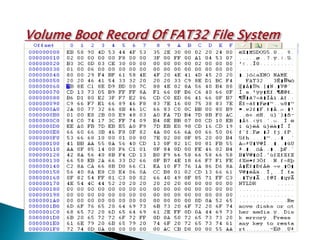
Volume Boot Record Of FAT32 File System
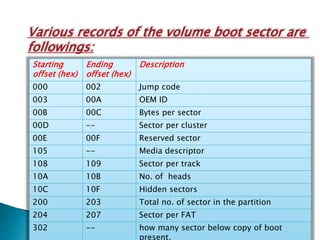
Various records of the volume boot sector are
followings:
Starting
offset (hex)
Ending
offset (hex)
Description
000 002 Jump code
003 00A OEM ID
00B 00C Bytes per sector
00D -- Sector per cluster
00E 00F Reserved sector
105 -- Media descriptor
108 109 Sector per track
10A 10B No. of heads
10C 10F Hidden sectors
200 203 Total no. of sector in the partition
204 207 Sector per FAT
302 -- how many sector below copy of boot
present.
Bytes per sctor:-This value stores information that how many bytes
contained in the sector.
Sector per cluster:-This value stores the information that how many
sector in one cluster.
Reserved sector:-This value stores the information that how many
sectors are reserved for that patrtition.
Hidden sector:-This value stores that how many sectors are hidden for
that partition.
Total No. of sector:-This value keep value that how many sectors in
that partition.
Sector per FAT:-This keeps the information that how many sector for
one FAT.
Media descriptor:-This keeps information that which type of media is
being used (like F8-hard disk).
Various regions of FAT32 partition:
1. Reserved region
2. FAT region
3. Data region
RESERVED REGION:-this region is reserved for the information
about the FAT partition.
FAT REGION:- this region stores two copy of FAT i.e. FAT and
FAT1 and the size of FAT region is two times of sector per FAT
value.This region starts after the reserved region.
DATA REGION:-This region starts just after the end of FAT region.
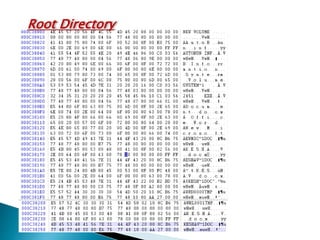
Data region starts with the root directory.Root Directory stores the
information(like file name, creation and modification date and
time of file,starting cluster of the file in that partition and the size
of file ) about every files of that partition.
Root Directory
In the previous slide we have seen the the image of ROOT
DIRECTORY.
And in the image we can see the selected region this selected
region is the file (KESHAV.DOC).
In the selected region last four bytes is the size of file and two
bytes before size is the low word starting cluster of the file.
Fat 32 file system

Fat 32 file system

  • 1.
  • 2.
    About FAT 32File system FAT is a File Allocation Table which stores all your files and locate them on the hard drive . FAT32 is defined as the disk file allocation system from microsoft which uses 32-bit values for Fat entries inspite of using 16-bit values used by the original FAT system. FAT32 was introduced to overcome the volume size limit of FAT16 while it still allows memory constrained DOS-real mode to handle the format. FAT32 supports an increased number of possible clusters and can able to reuse most of the existing code so that the conventional memory footprints can be reduced by less than 5 kb under DOS.
  • 3.
    Other storage mediumlike pen drives , memory cards etc. are still using FAt32 file system has default. It is compatible on both Windows and Mac system’s. You may also lose files from FAT32 hard drive partition by several reasons which includes malfunctions of the operating system,unreliable third party application, Virus attack,sudden power failure,accidental shut of the system during formatting etc.
  • 4.
    Various Silent Featuresof FAT 32 file system •Compatibility:Works with all versions of Windows, Mac, Linux, game consoles and practically anything with a USB port. •File Size Limit: We can create file up to 4 GB (2³²-1)of size. •Partition Size: We can create maximum partition size of 8 TB and minimum of 39 MB. •Ideal Use: Use it on removable drives for maximum compatibility with the widest range of devices, assuming you don’t have any files 4GB or larger in size.
  • 5.
    Volume Boot RecordOf FAT32 File System
  • 6.
    Various records ofthe volume boot sector are followings: Starting offset (hex) Ending offset (hex) Description 000 002 Jump code 003 00A OEM ID 00B 00C Bytes per sector 00D -- Sector per cluster 00E 00F Reserved sector 105 -- Media descriptor 108 109 Sector per track 10A 10B No. of heads 10C 10F Hidden sectors 200 203 Total no. of sector in the partition 204 207 Sector per FAT 302 -- how many sector below copy of boot present.
  • 7.
    Bytes per sctor:-Thisvalue stores information that how many bytes contained in the sector. Sector per cluster:-This value stores the information that how many sector in one cluster. Reserved sector:-This value stores the information that how many sectors are reserved for that patrtition. Hidden sector:-This value stores that how many sectors are hidden for that partition. Total No. of sector:-This value keep value that how many sectors in that partition. Sector per FAT:-This keeps the information that how many sector for one FAT. Media descriptor:-This keeps information that which type of media is being used (like F8-hard disk).
  • 8.
    Various regions ofFAT32 partition: 1. Reserved region 2. FAT region 3. Data region RESERVED REGION:-this region is reserved for the information about the FAT partition. FAT REGION:- this region stores two copy of FAT i.e. FAT and FAT1 and the size of FAT region is two times of sector per FAT value.This region starts after the reserved region. DATA REGION:-This region starts just after the end of FAT region. Data region starts with the root directory.Root Directory stores the information(like file name, creation and modification date and time of file,starting cluster of the file in that partition and the size of file ) about every files of that partition.
  • 9.
  • 10.
    In the previousslide we have seen the the image of ROOT DIRECTORY. And in the image we can see the selected region this selected region is the file (KESHAV.DOC). In the selected region last four bytes is the size of file and two bytes before size is the low word starting cluster of the file.