Disk Storage, Basic File Structures, Hashing, and
Modern Storage Architectures
Physical Database Design
Disk Storage, Basic File Structures, Hashing, and
Modern Storage Architectures
Physical Database Design
Adapted from
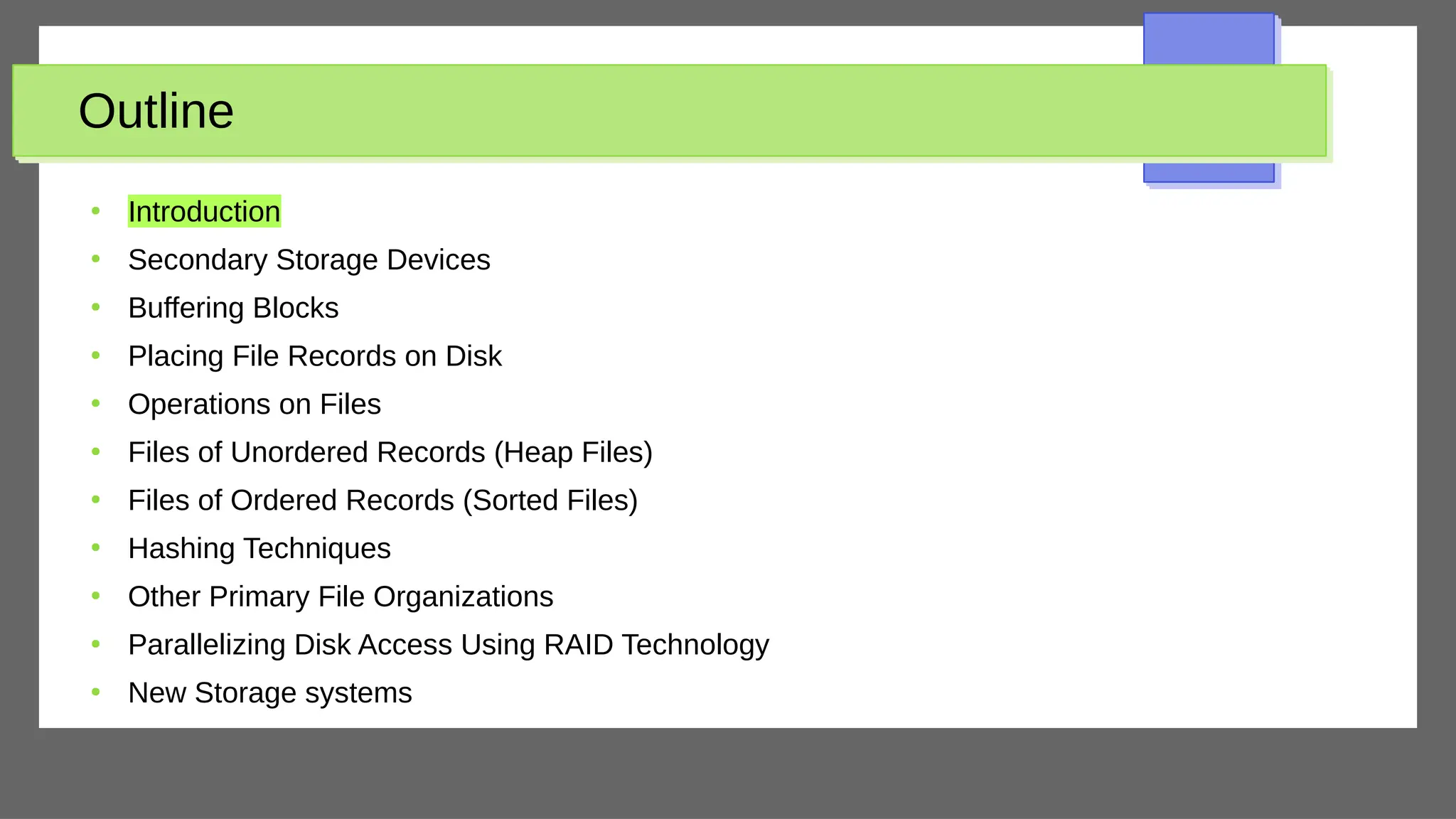
Outline
●
Introduction
●
Secondary Storage Devices
●
Buffering Blocks
●
Placing File Records on Disk
●
Operations on Files
●
Files of Unordered Records (Heap Files)
●
Files of Ordered Records (Sorted Files)
●
Hashing Techniques
●
Other Primary File Organizations
●
Parallelizing Disk Access Using RAID Technology
●
New Storage systems
Introduction
●
Databases typically stored on magnetic disks
– Accessed using physical database file structures
●
Storage hierarchy
– Primary storage
○
Storage media that can be operated directly on by the CPU
●
Main memory, cache memory
– Secondary storage
○
Magnetic disks, flash memory, solid-state drives
– Tertiary storage
○
Removable media
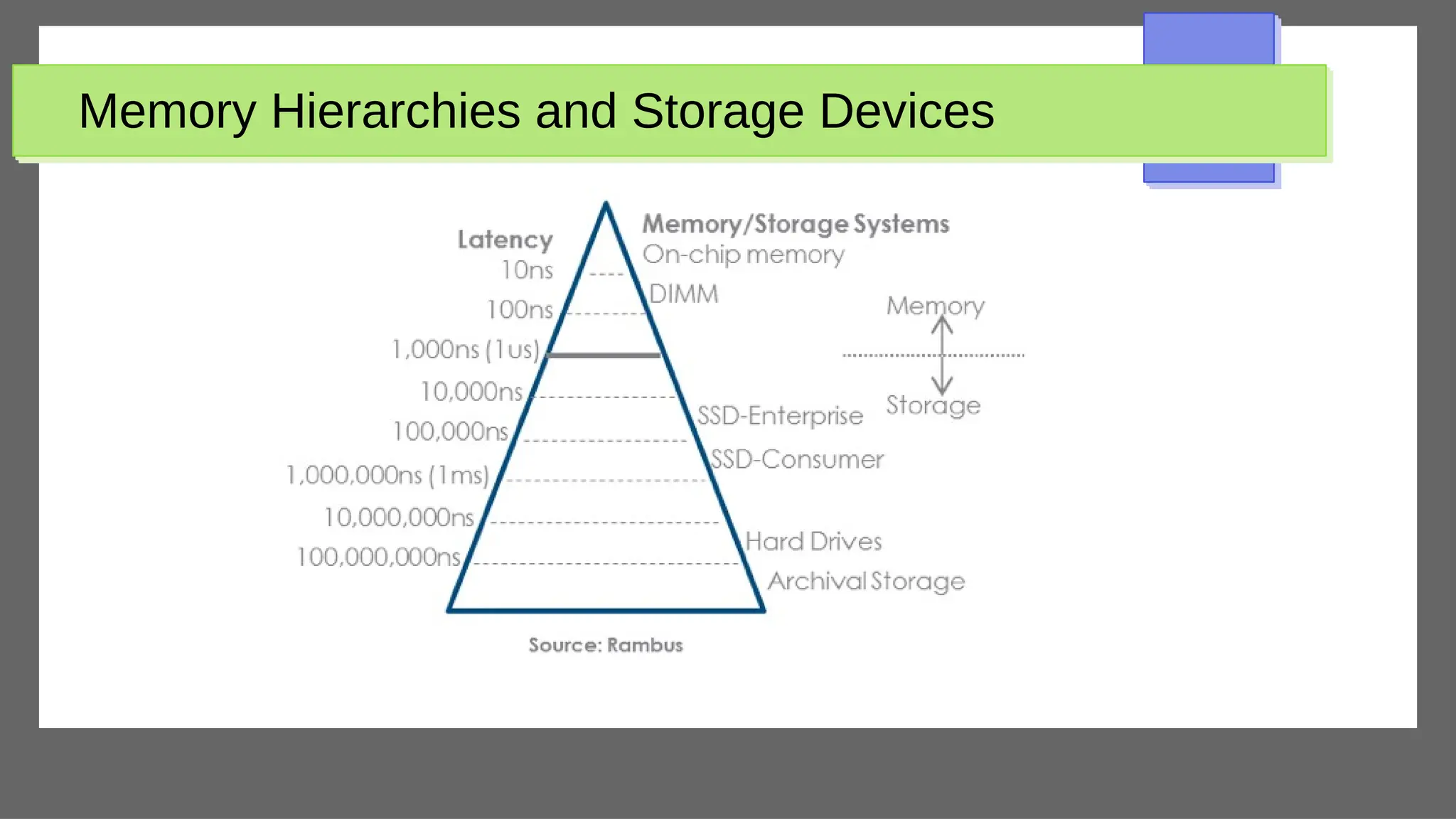
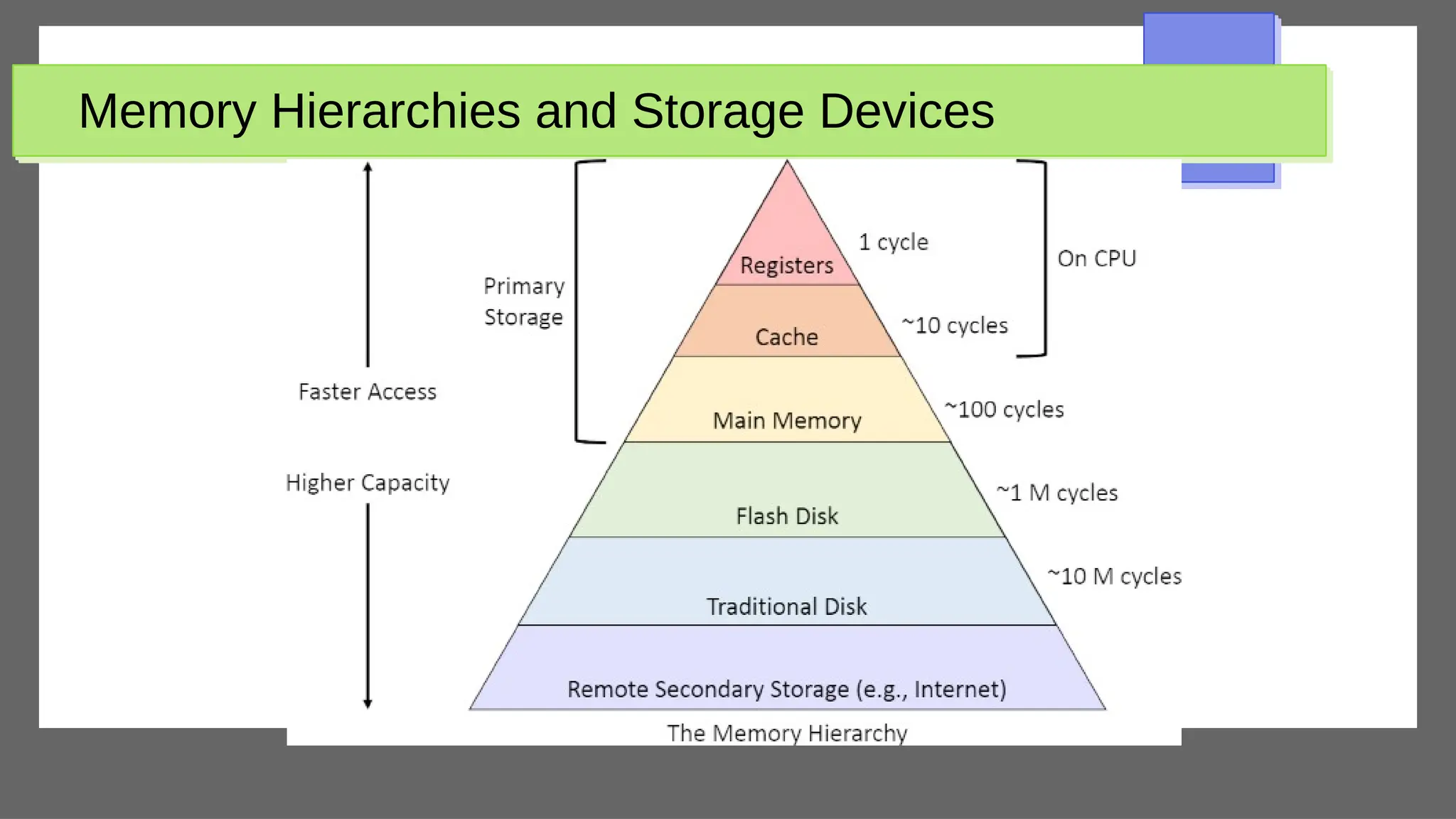
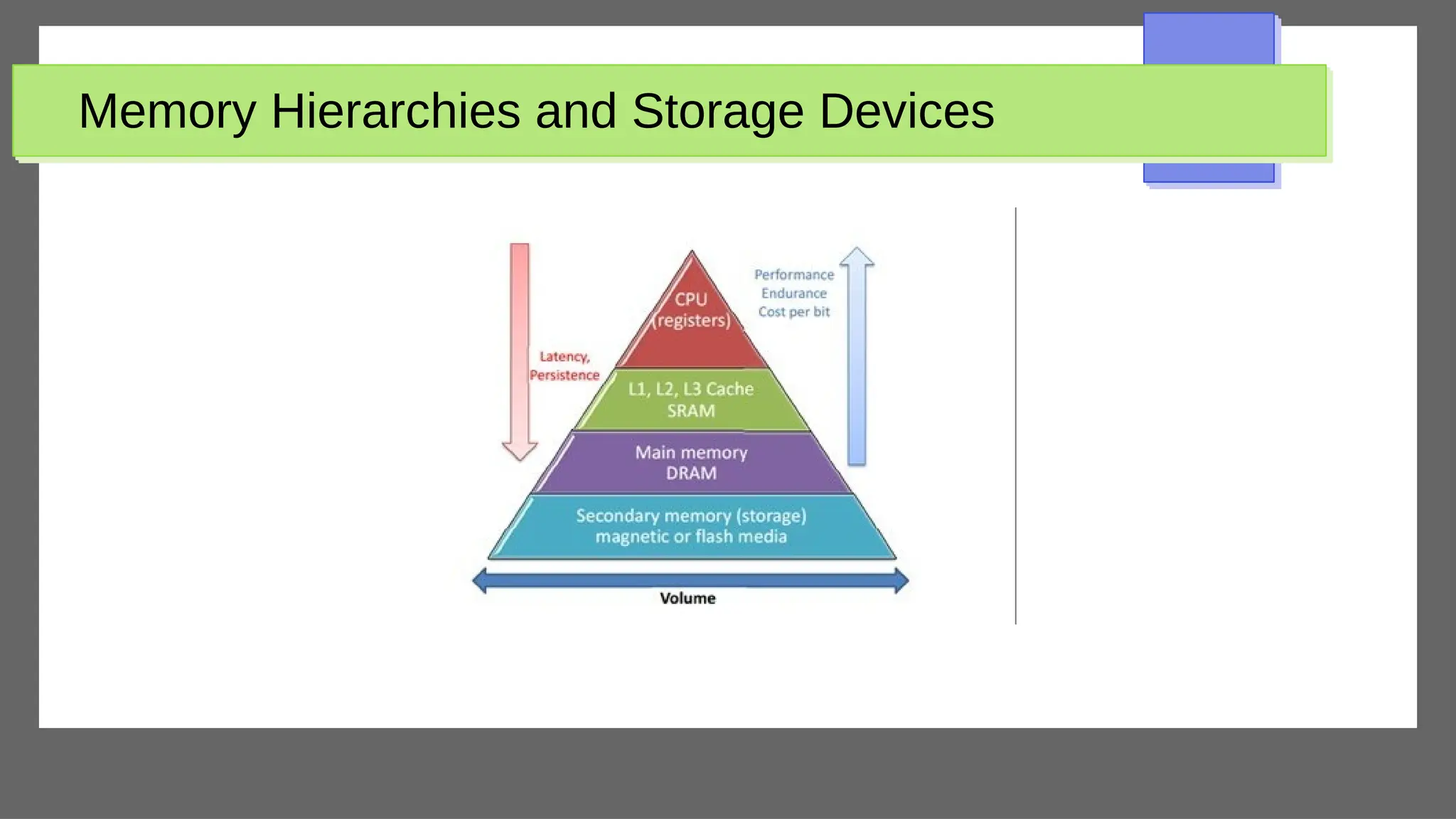
Memory Hierarchies and Storage Devices
●
Cache memory
– Static RAM
– DRAM
●
Mass storage
– Magnetic disks
●
CD-ROM, DVD, tape drives
●
Flash memory
– Nonvolatile
Storage Organization of Databases
●
Persistent data
– Most databases
●
Transient data
– Exists only during program execution
●
File organization
– Determines how records are physically placed on the
disk
– Determines how records are accessed
Outline
●
Introduction
●
Secondary Storage Devices
●
Buffering Blocks
●
Placing File Records on Disk
●
Operations on Files
●
Files of Unordered Records (Heap Files)
●
Files of Ordered Records (Sorted Files)
●
Hashing Techniques
●
Other Primary File Organizations
●
Parallelizing Disk Access Using RAID Technology
●
New Storage systems
Secondary Storage Devices
●
Hard disk drive
●
Bits (ones and zeros)
– Grouped into bytes or characters
●
Disk capacity measures storage size
●
Disks may be single or double-sided
●
Concentric circles called tracks
– Tracks divided into blocks or sectors
●
Disk packs
– Cylinder
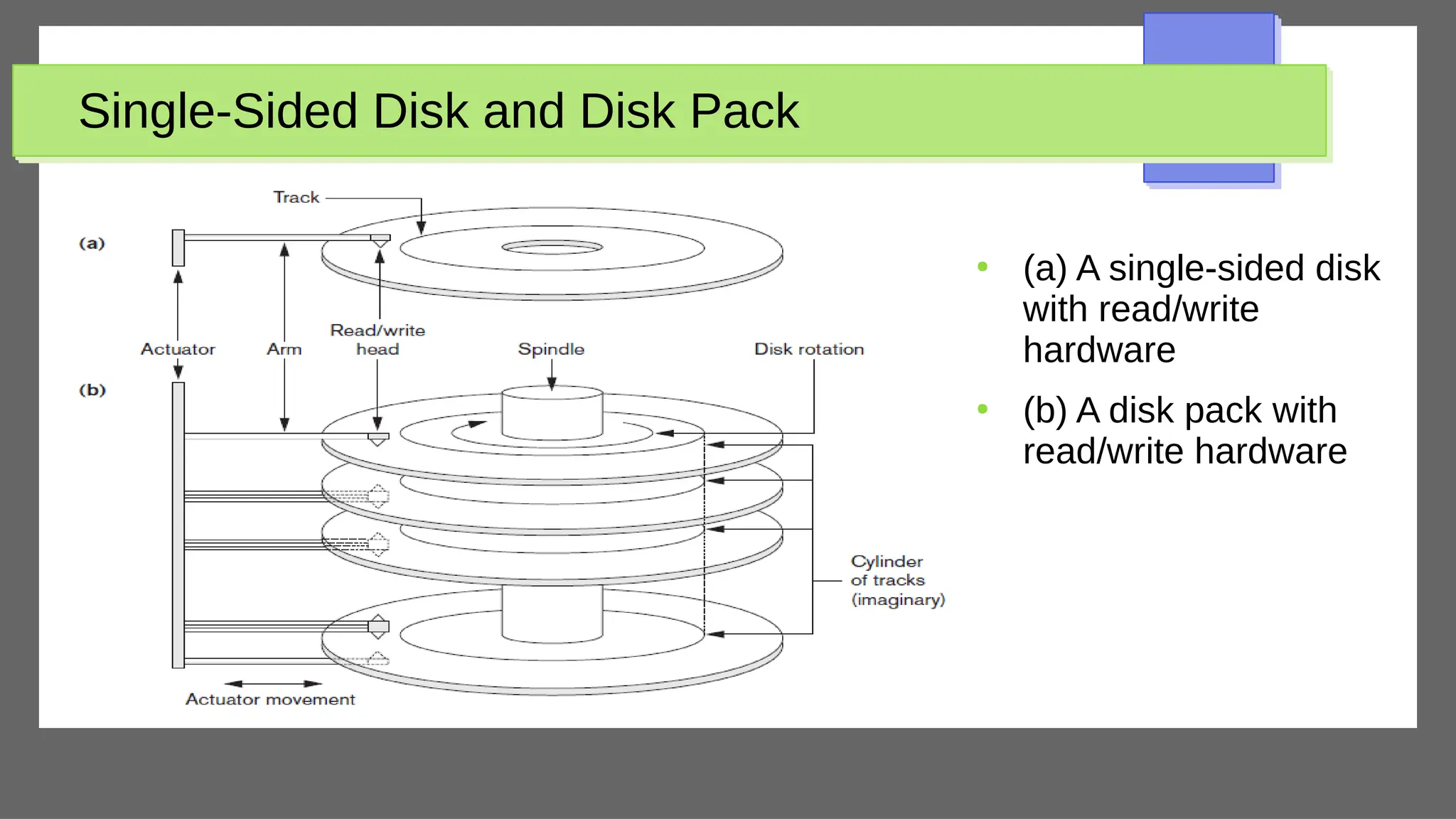
Single-Sided Disk and Disk Pack
●
(a) A single-sided disk
with read/write
hardware
●
(b) A disk pack with
read/write hardware
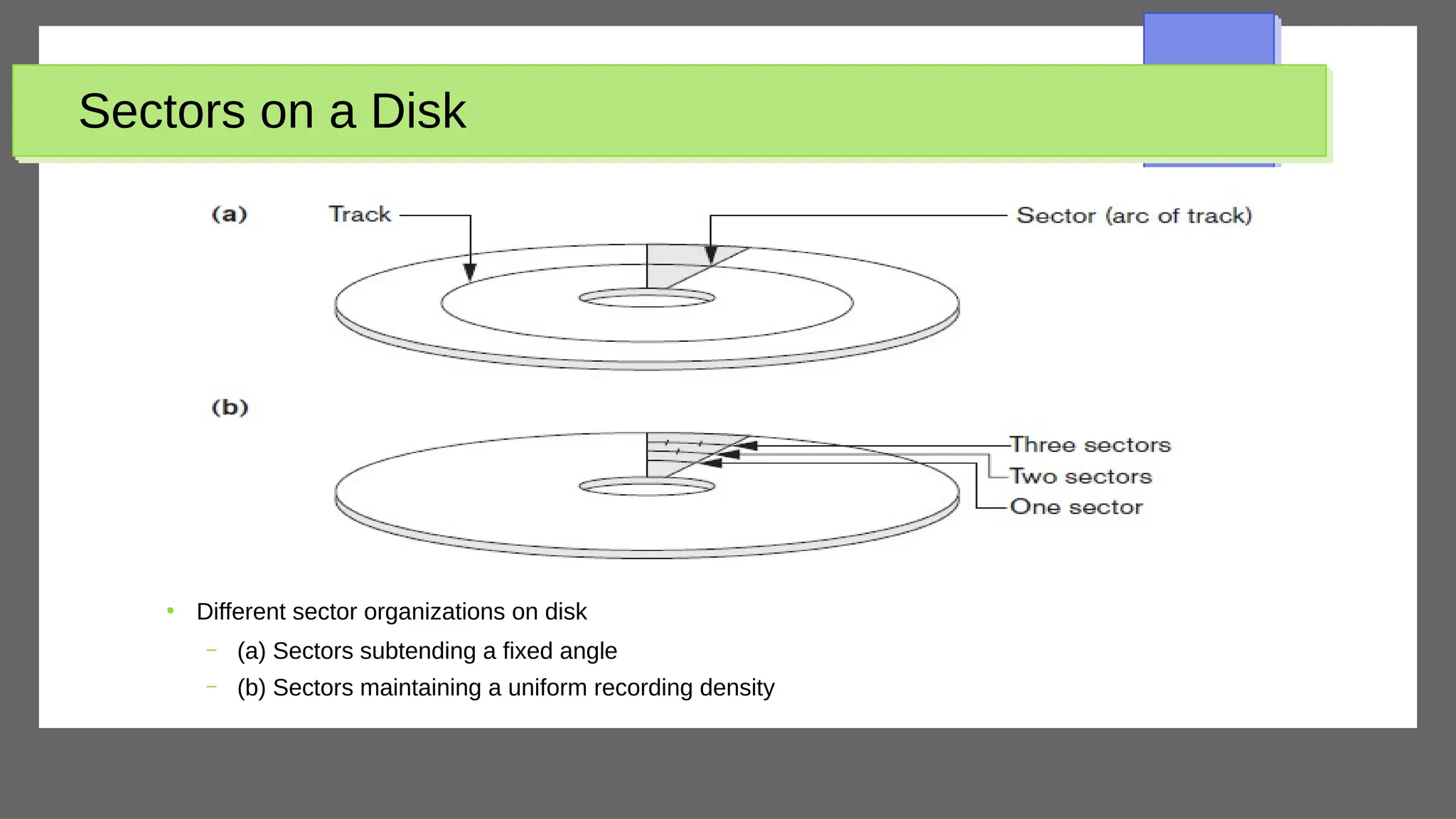
Sectors on a Disk
●
Different sector organizations on disk
– (a) Sectors subtending a fixed angle
– (b) Sectors maintaining a uniform recording density
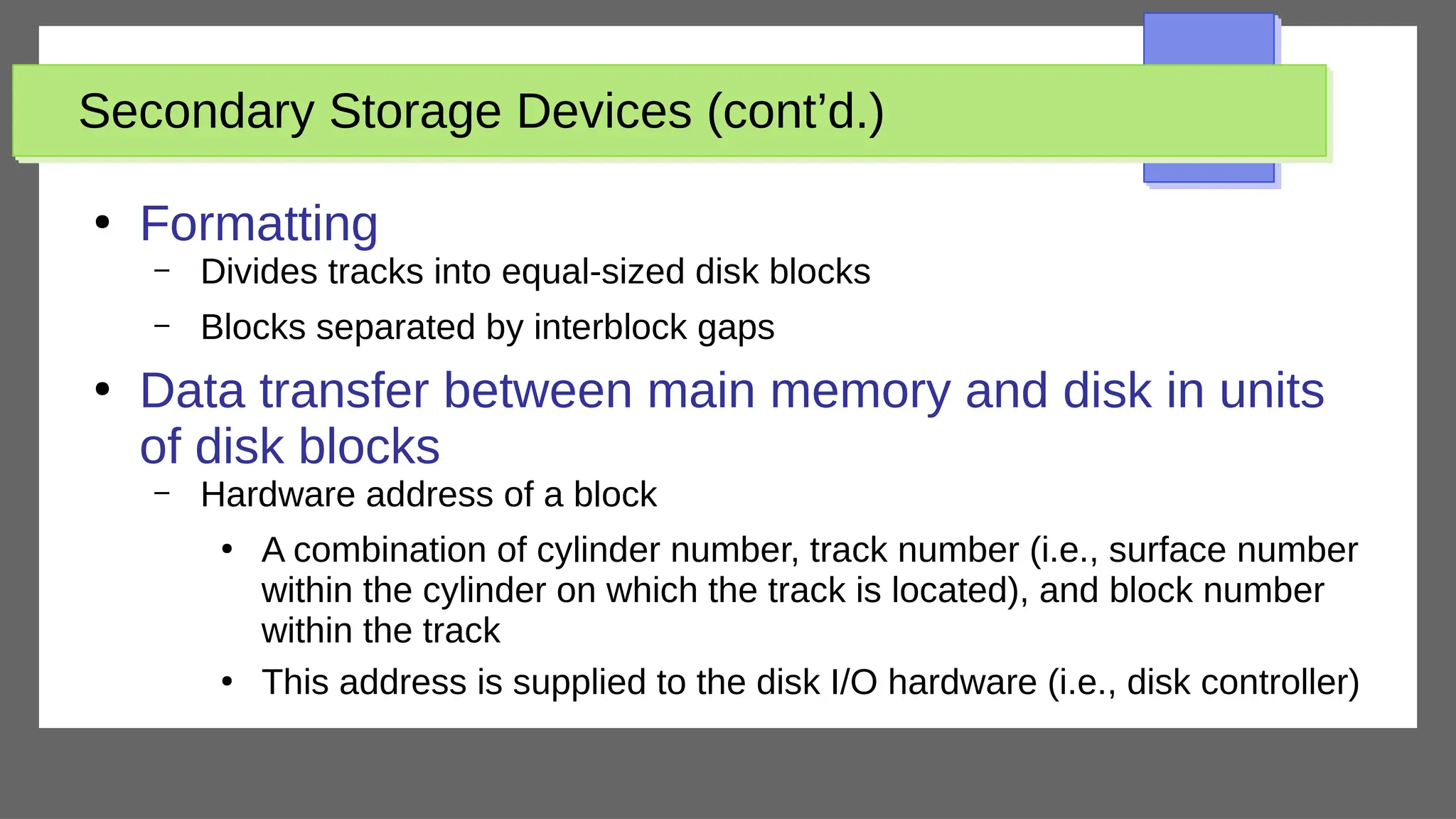
Secondary Storage Devices (cont’d.)
●
Formatting
– Divides tracks into equal-sized disk blocks
– Blocks separated by interblock gaps
●
Data transfer between main memory and disk in units
of disk blocks
– Hardware address of a block
●
A combination of cylinder number, track number (i.e., surface number
within the cylinder on which the track is located), and block number
within the track
●
This address is supplied to the disk I/O hardware (i.e., disk controller)
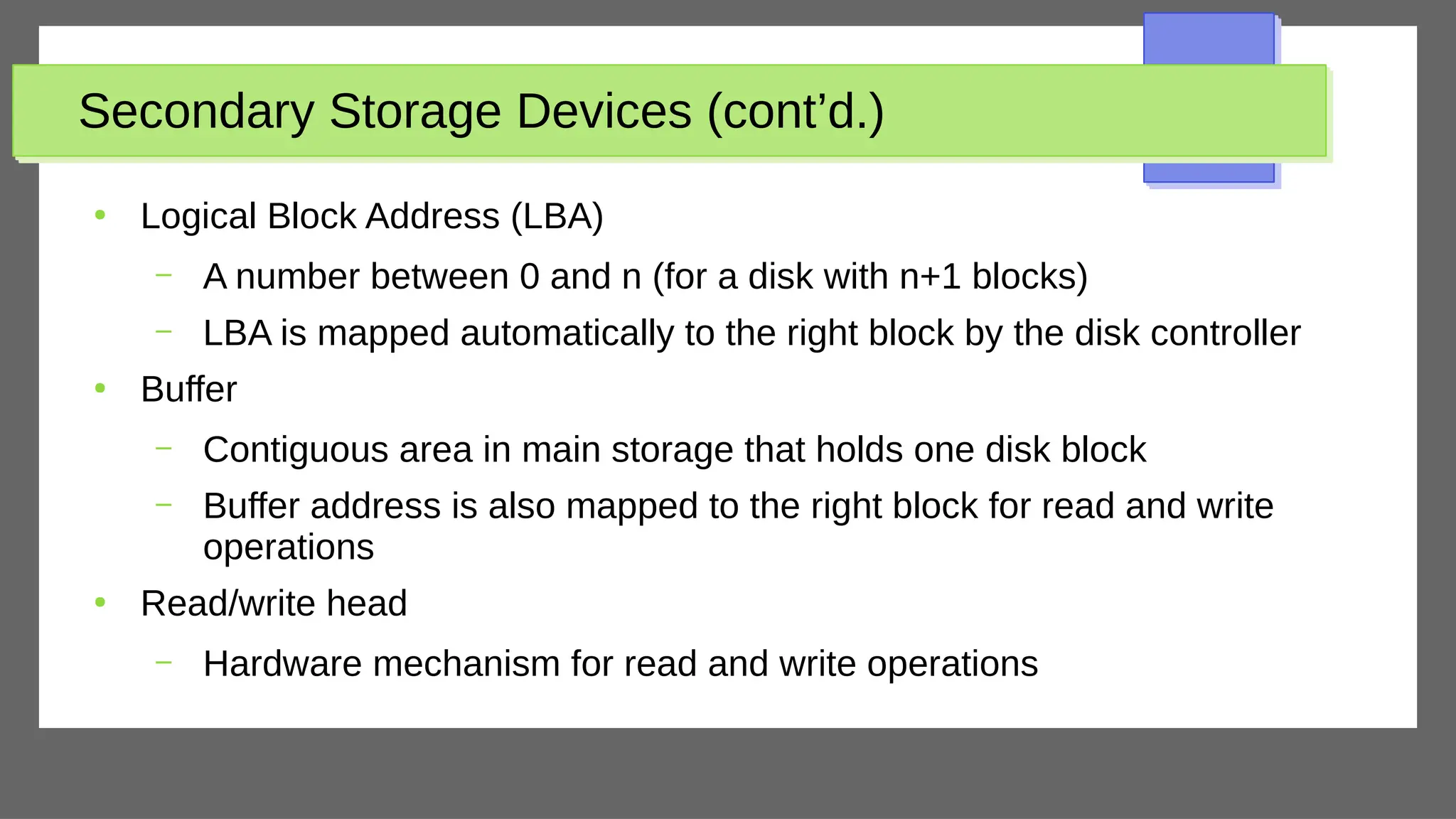
Secondary Storage Devices (cont’d.)
●
Logical Block Address (LBA)
– A number between 0 and n (for a disk with n+1 blocks)
– LBA is mapped automatically to the right block by the disk controller
●
Buffer
– Contiguous area in main storage that holds one disk block
– Buffer address is also mapped to the right block for read and write
operations
●
Read/write head
– Hardware mechanism for read and write operations
Secondary Storage Devices (cont’d.)
●
Disk controller
– Interfaces disk drive to computer system
– Standard interfaces
●
SCSI
●
SATA
●
SAS
Solid State Device Storage
●
Sometimes called flash storage
●
Main component: controller
●
Set of interconnected flash memory cards
●
No moving parts
●
Data less likely to be fragmented
●
More costly than HDDs
●
DRAM-based SSDs available
– Faster access times compared with flash
Magnetic Tape Storage Devices
●
Sequential access
– Must scan preceding blocks
●
Tape is mounted and scanned until required block is
under read/write head
●
Important functions
– Backup
– Archive
Secondary Storage Devices (cont’d.)
●
Techniques for efficient data access
– Data buffering
– Proper organization of data on disk
– Reading data ahead of request
– Proper scheduling of I/O requests
– Use of log disks to temporarily hold writes
– Use of SSDs or flash memory for recovery purposes
Buffering of Blocks
●
Buffering most useful when processes can run concurrently in parallel
●
Several blocks need to be transferred from disk to main memory and all
theblock addresses are known
●
Several buffers can be reserved in main memory to speed up the transfer
●
While one buffer is being read or written, the CPU can process data in the
other buffer
– Independent (independent from CPU) disk I/O processor can proceed to
transfer a data block between memory and disk independent of and in
parallel to CPU processing
Buffering of Blocks
●
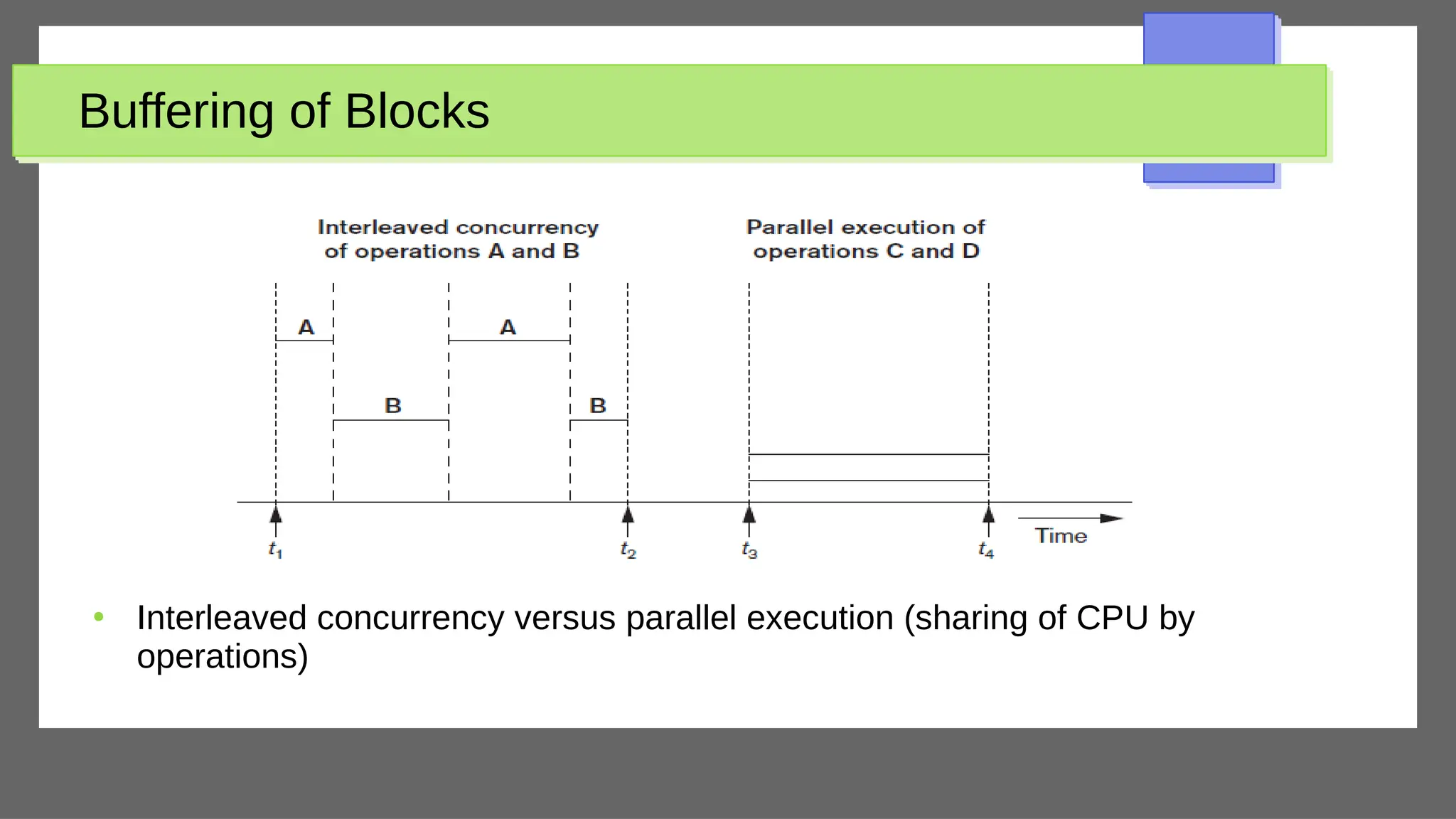
Interleaved concurrency versus parallel execution (sharing of CPU by
operations)
Buffering of Blocks
●
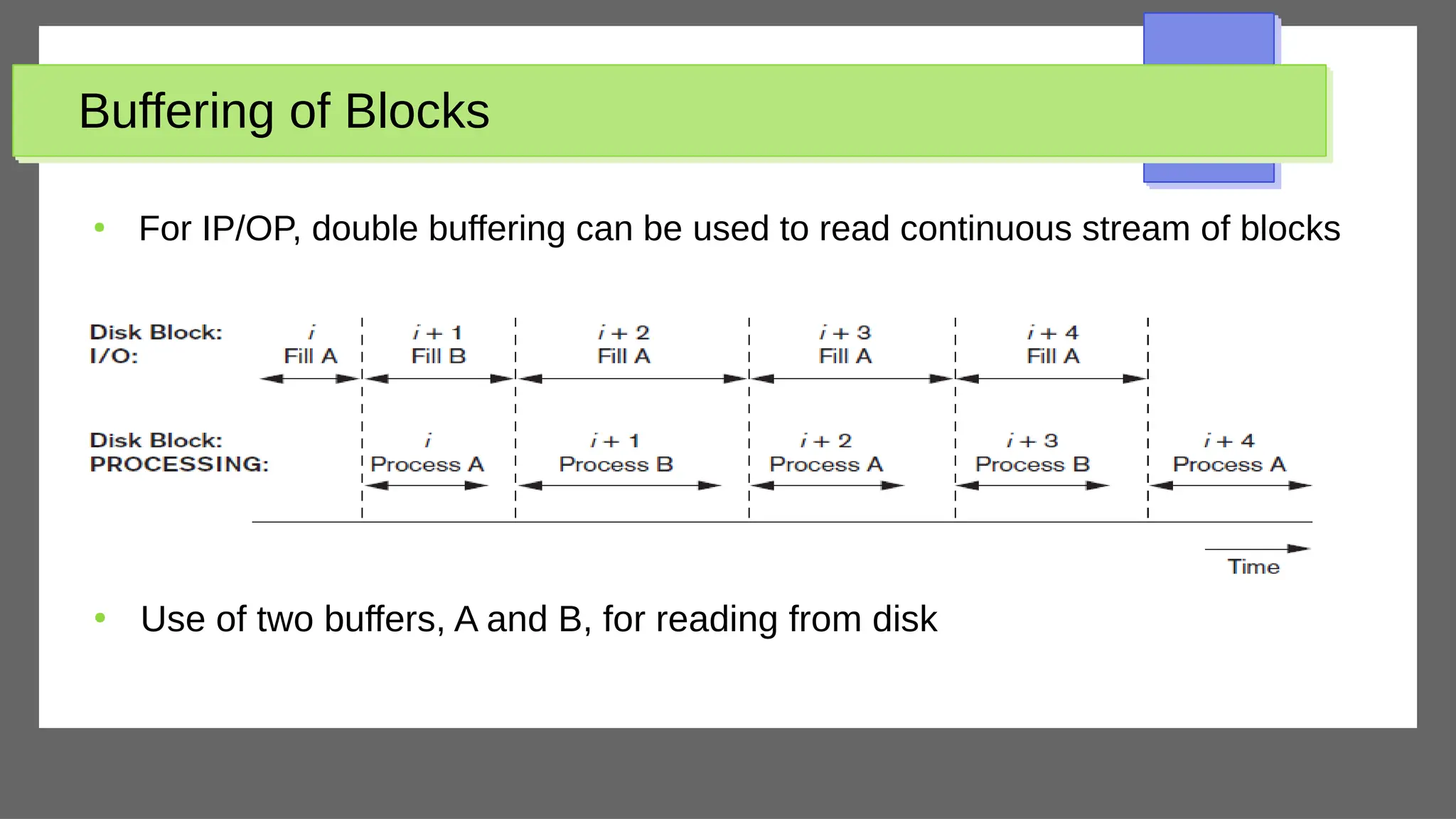
Use of two buffers, A and B, for reading from disk
●
For IP/OP, double buffering can be used to read continuous stream of blocks
Placing File Records on Disk
●
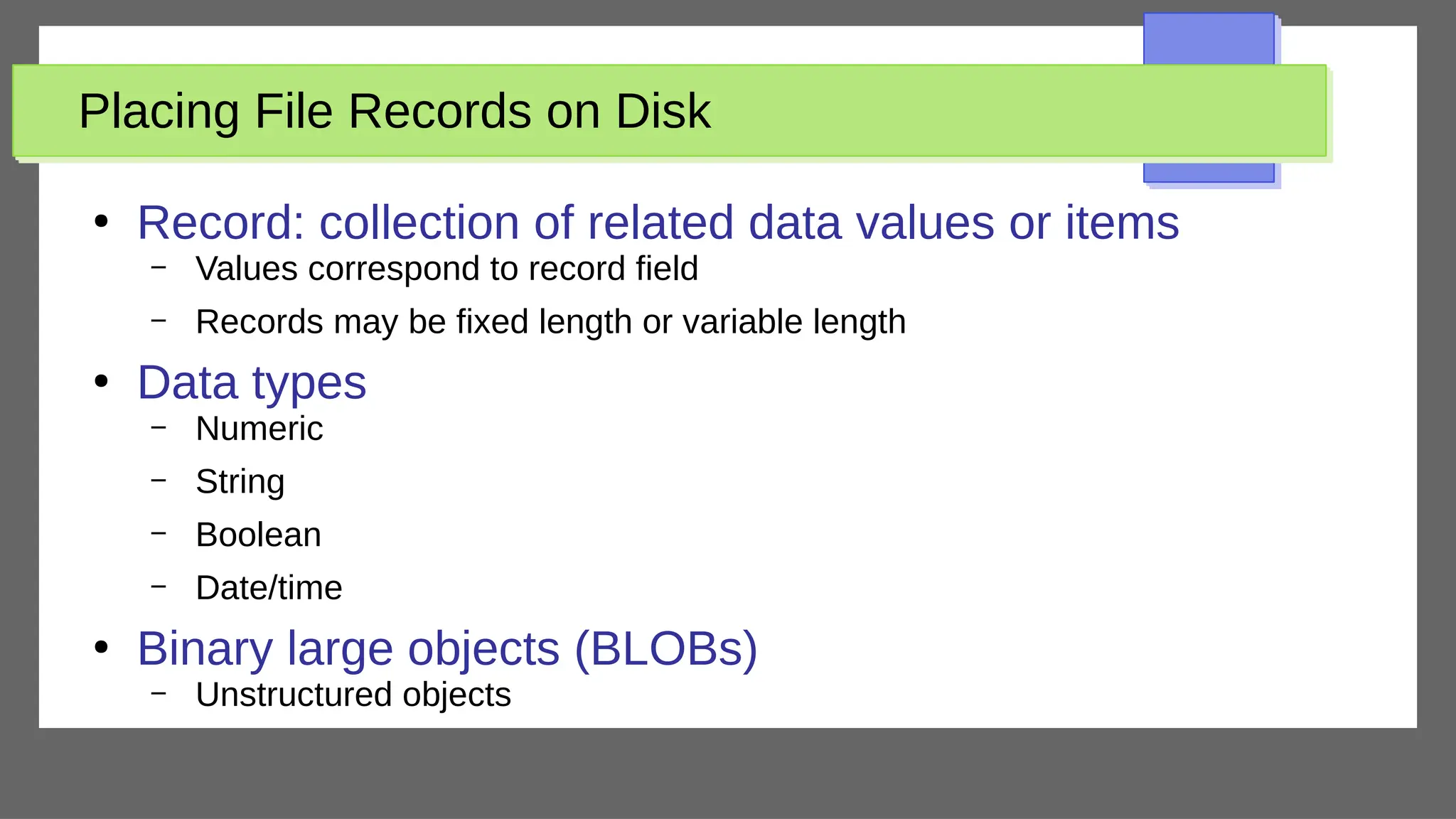
Record: collection of related data values or items
– Values correspond to record field
– Records may be fixed length or variable length
●
Data types
– Numeric
– String
– Boolean
– Date/time
●
Binary large objects (BLOBs)
– Unstructured objects
Placing File Records on Disk (cont’d.)
●
Reasons for variable-length records
– One or more fields have variable length
– One or more fields are repeating
– One or more fields are optional
– File contains records of different types
Record Blocking and Spanned Versus Unspanned
Records
●
File records allocated to disk blocks
●
Spanned records
– Larger than a single block
– Pointer at end of first block points to block containing
remainder of record
●
Unspanned
– Records not allowed to cross block boundaries
Record Blocking and Spanned Versus Unspanned
Records (cont’d.)
●
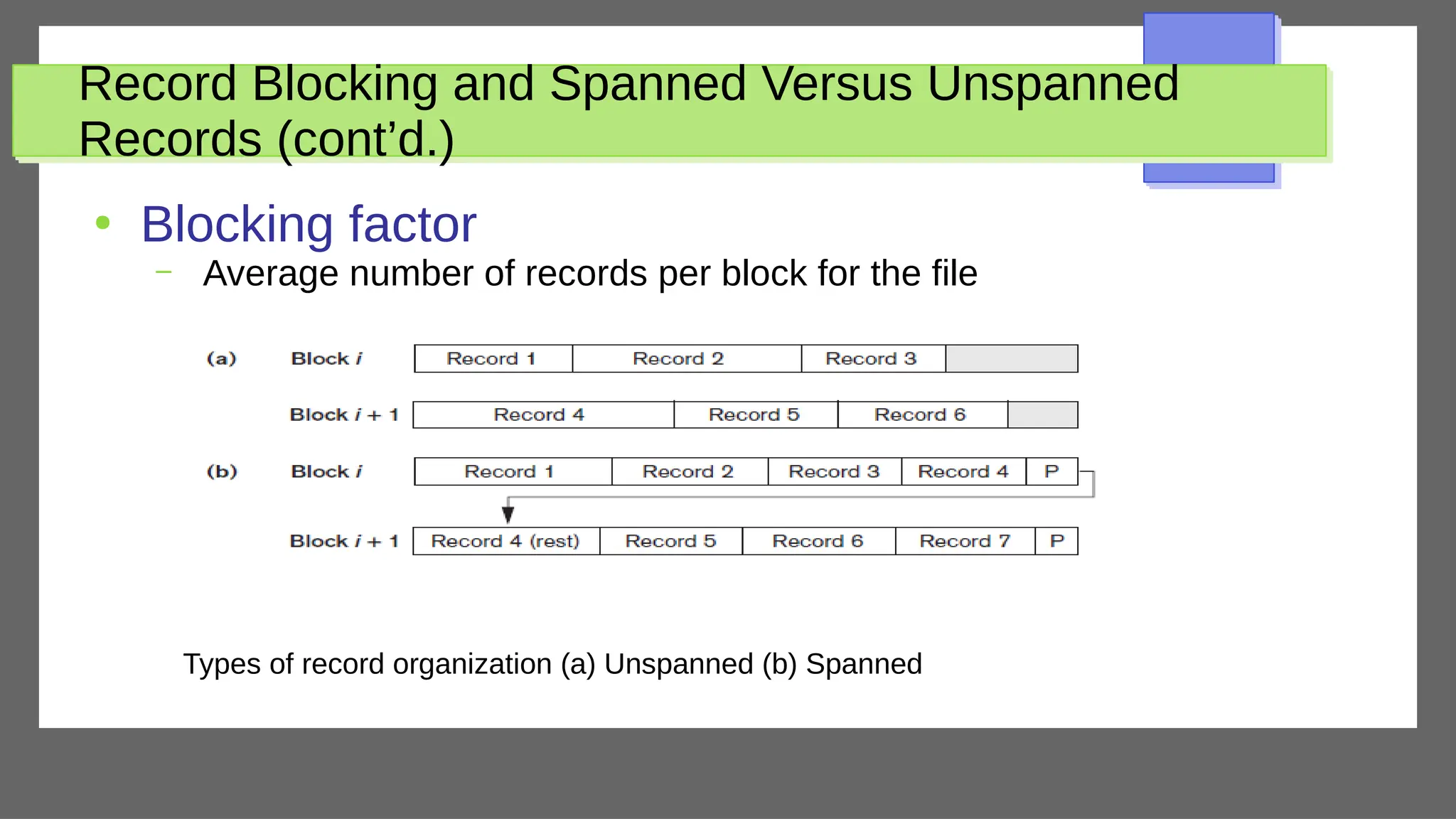
Blocking factor
– Average number of records per block for the file
Types of record organization (a) Unspanned (b) Spanned
Record Blocking and Spanned Versus Unspanned
Records (cont’d.)
●
Allocating file blocks on disk
– Contiguous allocation
●
File blocks allocated to consecutive disk blocks
– Linked allocation
●
Each file block contains a pointer to the next file block
– Indexed allocation
●
One or more index blocks contain pointers to the actual file blocks
●
File header (file descriptor)
– Contains file information needed by system programs
●
Disk addresses
●
Format descriptions
Operations on Files
●
Retrieval operations
– No change to file data
●
Update operations
– File change by insertion, deletion, or modification
●
Records selected based on selection condition
Operations on Files (cont’d)
●
Examples of operations for accessing file records
– Open
– Find
– Read
– FindNext
●
Search for the next record in the file that satisfies search condition
– Delete
– Insert
●
Insert new record in the file
– Close
– Scan
●
First record of newly opened file; otherwise, return the next record
– Others
Files of Unordered Records (Heap Files)
●
Heap (or pile) file
– Records placed in file in order of insertion
●
Inserting a new record is very efficient
●
Searching for a record requires linear search
– Very inefficient
●
Deletion techniques
– Rewrite the block
●
Find the block to be deleted, copy it into a buffer, delete the record from the buffer, and then
rewrite the block back to the disk
– Use deletion marker
●
Have an extra byte or bit (the deletion marker) stored with each record
●
Delete record by setting deletion marker to a certain value
Files of Ordered Records (Sorted Files)
●
Ordered (sequential) file
– Records sorted by ordering field
●
Called ordering key if ordering field is a key field
●
Advantages
– Reading the records in order of the ordering key values is extremely efficient
because no sorting is required
– Finding the next record from the current one in order of the ordering key usually
requires no additional block accesses because the next record is in the same
block as the current one (unless the current record is the last one in the block).
– Third, Binary search technique (though not often used for disk files) can be used
as ordered files are blocked and stored on contiguous cylinders to minimize the
seek time
Files of Ordered Records (Sorted Files)
●
Note
– Ordering does not provide any advantages for random access of
records
●
We do a linear search for random access
– Or even ordered access of the records based on values of the other
nonordering fields
●
It is necessary here to create another sorted copy – in a different
order – of the file
Files of Ordered Records (Sorted Files)
●
Inserting and deleting records are expensive operations for an ordered file
– The records must remain physically ordered
○
To insert a record, we must find its correct position in the file, based on its ordering field value, and then make space in the file
to insert the record in that position
○
Very time-consuming for a large file
●
On the average, half the records of the file must be moved to make space for the new record
●
→ Half the file blocks must be read and rewritten after records are moved among them
○
Problem is less severe for deletion, if deletion markers and periodic reorganization are used
●
Making record insertion more efficient
– Keep some unused space in each block for new records
○
But original problem resurfaces once this space is used up
– Another approach
○
Create a temporary unordered file (an overflow or transaction file)
○
New records are inserted at the end of the overflow file rather than in their correct position in the main file
○
Periodically, the overflow file is sorted and merged with the master file during file reorganization
○
Improvement in efficiency of insertion comes with a price – increased complexity of the search algorithm
●
Overflow file must be searched using a linear search if, after the binary search, the record is not found in the main file
Files of Ordered Records (Sorted Files)
●
Modifying a field value of a record depends on two factors: the search condition to
locate the record and the field to be modified
– The search condition to locate the record
○
If the search condition involves the ordering key field, we can locate the
record using a binary search; otherwise we must do a linear search
– The field to be modified
○
A nonordering field can be modified by changing the record and rewriting it in
the same physical location on disk – assuming fixed-length records
○
On the other hand, if an ordering field is modified, the record can change its
position in the file
●
Hence, deletion of the old record followed by insertion of the modified
record.
Files of Ordered Records (Sorted Files)
●
Reading the file records in order of the ordering field
– Very efficient if we ignore the records in overflow
○
Blocks can be read concurrently using double buffering
– To include the records in overflow
○
Reorganize the file by merging the overflow blocks in their correct
positions, before reading the file sequentially
○
To reorganize the file
●
First sort the records in the overflow file
●
Then merge them with the master file
●
Remove any records marked for deletion
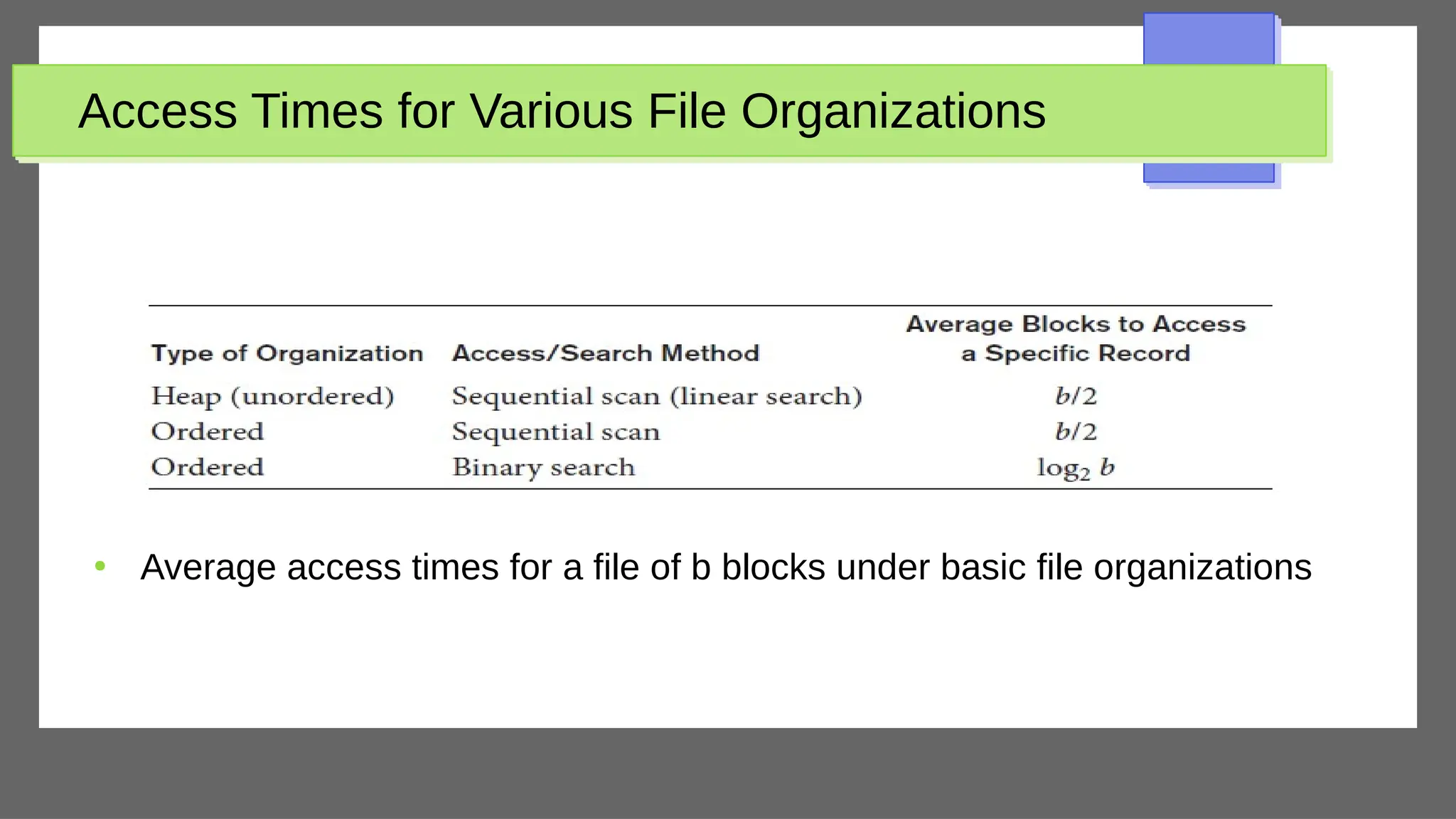
Access Times for Various File Organizations
●
Average access times for a file of b blocks under basic file organizations
Hashing Techniques
●
Provide very fast access to records under certain search conditions
●
Hash function (also called randomizing function) used
– Applied to hash field value of a record
– Yields address of the disk block of stored record
– A search for the record within the block can be carried out in a main
memory buffer (much faster than searching disk directly)
●
Hashing is also used as an internal search structure within a program
whenever a group of records is accessed exclusively by using the value of
one field
Internal Hashing
●
Makes use of a hash table
– Array of M records (indexes 0 – M-1)
– Use a hash function that transforms the hash field value into one of the array
indexes
●
Collision
– Hash field value for inserted record hashes to address already containing a
different record
●
Collision resolution
– Open addressing
– Chaining
– Multiple hashing
Hashing Techniques (cont’d.)
●
External hashing for disk files
– Target address space made of buckets
– Bucket: one disk block or contiguous blocks
●
Hashing function maps a key into relative bucket
– Table in file header converts bucket number to disk
block address
●
Collision problem less severe with buckets
●
Static hashing
– Fixed number of buckets allocated
Hashing Techniques (cont’d.)
●
Hashing techniques that allow dynamic file expansion
– Extendible hashing
●
File performance does not degrade as file grows
– Dynamic hashing
●
Maintains tree-structured directory
– Linear hashing
●
Allows hash file to expand and shrink buckets without needing a
directory
Other Primary File Organizations
●
Files of mixed records
– Relationships implemented by logical field references
– Physical clustering
●
B-tree data structure
●
Column-based data storage
Parallelizing Disk Access Using RAID Technology
●
Redundant arrays of independent disks (RAID)
– Goal: improve disk speed and access time
●
Set of RAID architectures (0 through 6)
●
Data striping
– Bit-level striping
– Block-level striping
●
Improving Performance with RAID
– Data striping achieves higher transfer rates
Parallelizing Disk Access Using RAID Technology
(cont’d.)
●
Improving reliability with RAID
– Redundancy techniques: mirroring (or shadowing)
●
Data written redundantly on two identical physical disks that are treated as one logical unit
●
One disk fails, the other is still available
●
Read rates improved – can read from multiple disks at the same time
– Store extra information that is not normally needed but that can be used to reconstruct lost
information in case of disk failure
●
RAID organizations and levels
– Level 0
●
Data striping, no redundant data
●
Spits data evenly across two or more disks
– Level 1
●
Uses mirrored disks
Parallelizing Disk Access Using RAID Technology
(cont’d.)
●
RAID organizations and levels (cont’d.)
– Level 2
●
Hamming codes for memory-style redundancy
●
Error detection and correction
– Level 3
●
Single parity disk relying on disk controller
– Levels 4 and 5
●
Block-level data striping
●
Data distribution across all disks (level 5)
Parallelizing Disk Access Using RAID Technology
(cont’d.)
●
RAID organizations and levels (cont’d.)
– Level 6
●
Applies P+Q redundancy scheme using Reed-Solomon codes
●
Protects against up to two disk failures by using just two redundant
disks
●
Rebuilding easiest for RAID level 1
– Other levels require reconstruction by reading multiple
disks
●
RAID levels 3 and 5 preferred for large volume storage
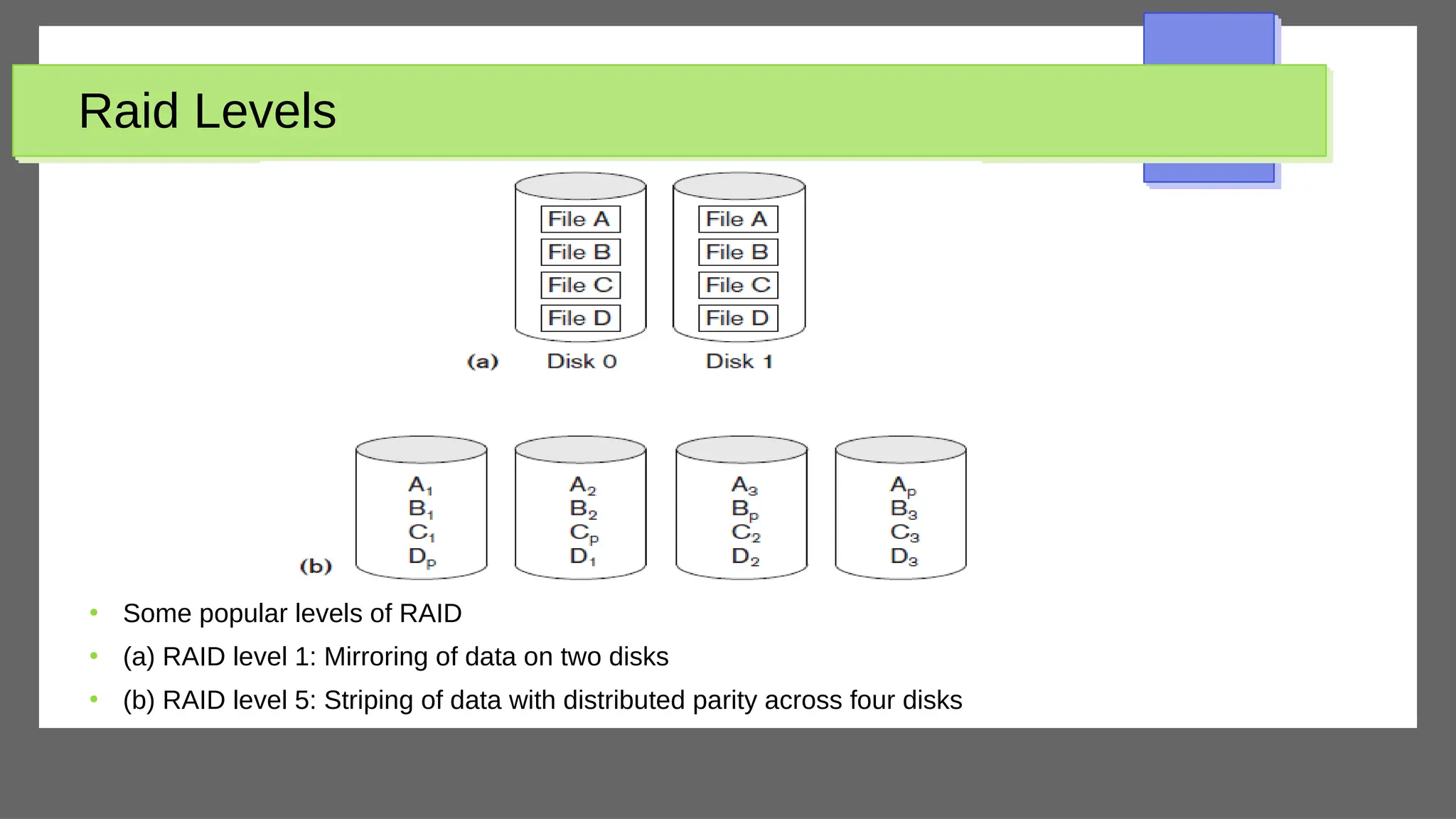
Raid Levels
●
Some popular levels of RAID
●
(a) RAID level 1: Mirroring of data on two disks
●
(b) RAID level 5: Striping of data with distributed parity across four disks
Modern Storage Architectures
●
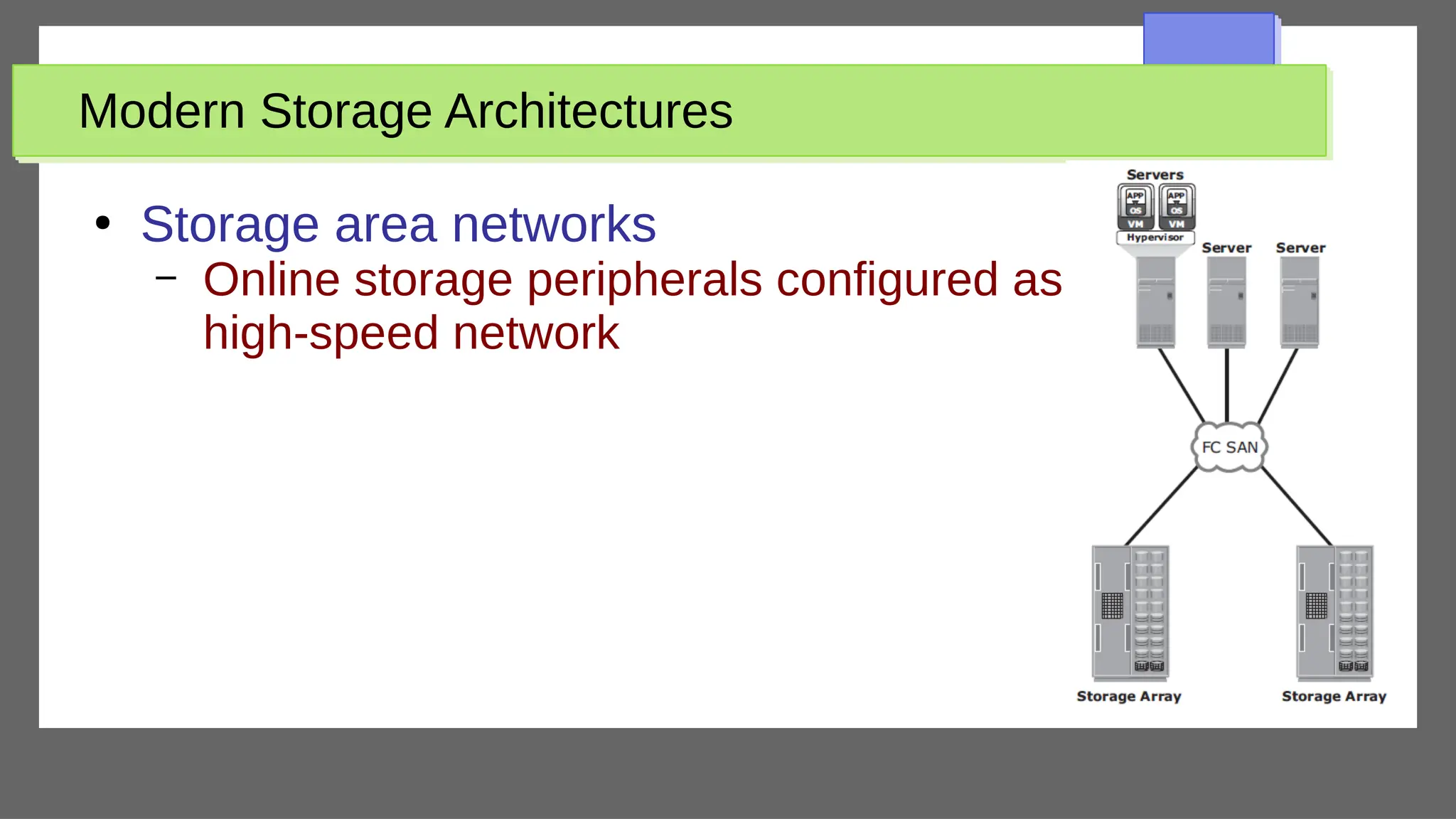
Storage area networks
– Online storage peripherals configured as nodes on
high-speed network
Modern Storage Architectures
●
Network-attached storage
– Dedicated, high-performance file sharing and storage device
– Enables its clients to share files over an IP network
– High degree of scalability, reliability, flexibility, performance
– Provides the advantages of server consolidation by eliminating the need for
multiple file servers
●
Consolidates the storage used by the clients onto a single system, making it
easier to manage the storage
– Uses network and file-sharing protocols to provide access to the file data
●
TCP/IP for data transfer
●
Common Internet File System (CIFS) and Network File System (NFS) for
network file service
Modern Storage Architectures
●
ISCSI (Internet SCSI)
– Encapsulation of SCSI I/O over IP
– Clients send SCSI commands to SCSI storage
devices on remote channels
Modern Storage Architectures (cont’d.)
●
Fibre Channel over IP (FCIP)
– Fibre Channel control codes and data translated into IP
packets
– Transmitted between geographically distant Fibre
Channel SANs
●
Fibre Channel over Ethernet (FCoE)
– Similar to iSCSI without the IP
Modern Storage Architectures (cont’d.)
●
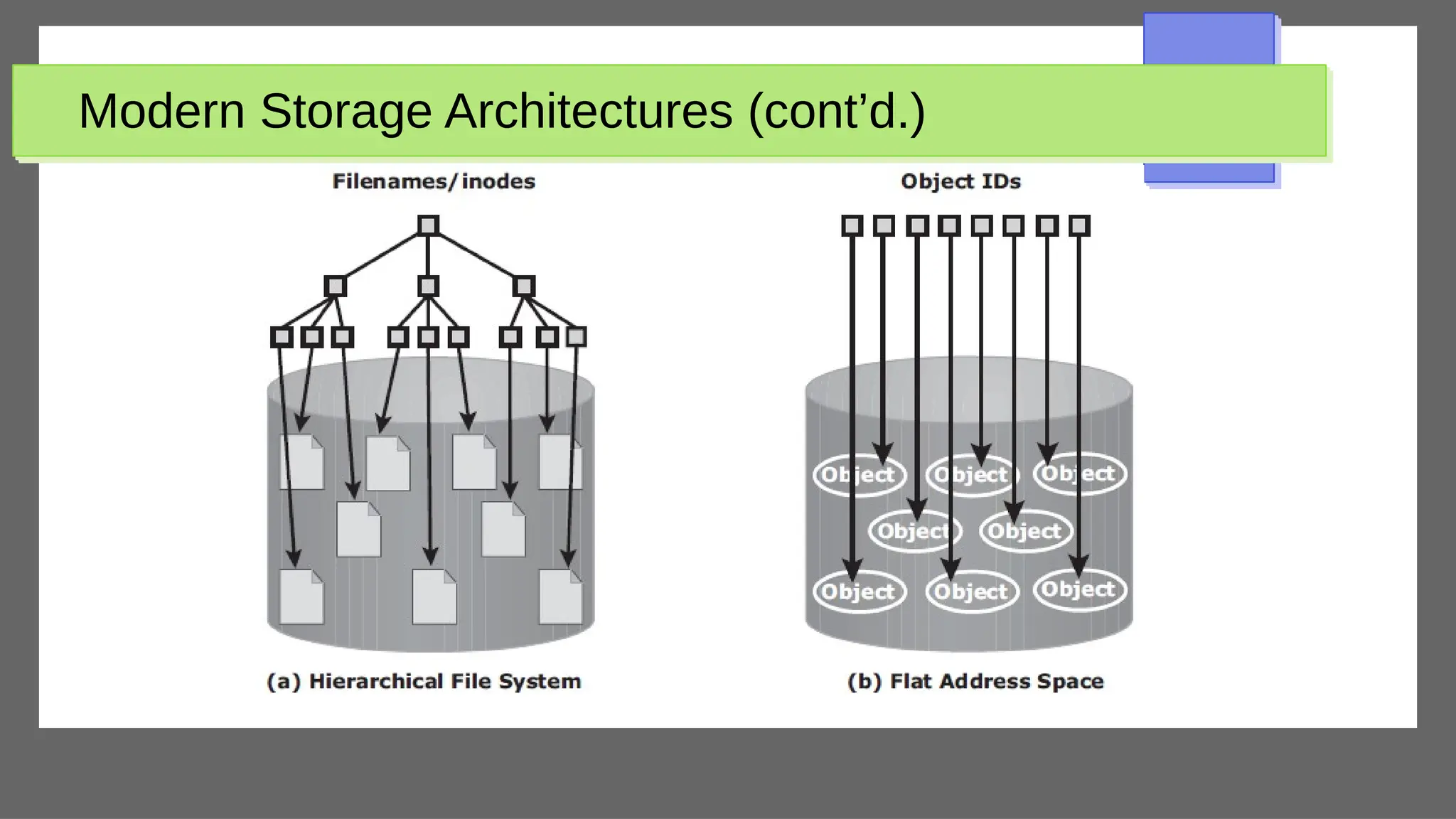
Object-based storage
– Data managed in form of objects rather than files made
of blocks
– Objects carry metadata and global identifier
– Ideally suited for scalable storage of unstructured data
Modern Storage Architectures (cont’d.)
●
Object-Based Storage Devices (OSDs)
– Organize and store unstructured data
– Provide a scalable, self-managed, protected, and
shared storage option
– Store data in the form of objects
– Use flat address space to store data
– No hierarchy of directories and files; as a result, a
large number of objects can be stored
Modern Storage Architectures (cont’d.)

Physical Database Design for database student-1.pdf

  • 1.
    Disk Storage, BasicFile Structures, Hashing, and Modern Storage Architectures Physical Database Design
  • 2.
    Disk Storage, BasicFile Structures, Hashing, and Modern Storage Architectures Physical Database Design
  • 3.
  • 4.
    Outline ● Introduction ● Secondary Storage Devices ● BufferingBlocks ● Placing File Records on Disk ● Operations on Files ● Files of Unordered Records (Heap Files) ● Files of Ordered Records (Sorted Files) ● Hashing Techniques ● Other Primary File Organizations ● Parallelizing Disk Access Using RAID Technology ● New Storage systems
  • 5.
    Introduction ● Databases typically storedon magnetic disks – Accessed using physical database file structures ● Storage hierarchy – Primary storage ○ Storage media that can be operated directly on by the CPU ● Main memory, cache memory – Secondary storage ○ Magnetic disks, flash memory, solid-state drives – Tertiary storage ○ Removable media
  • 6.
    Memory Hierarchies andStorage Devices
  • 7.
    Memory Hierarchies andStorage Devices
  • 8.
    Memory Hierarchies andStorage Devices
  • 9.
    Memory Hierarchies andStorage Devices ● Cache memory – Static RAM – DRAM ● Mass storage – Magnetic disks ● CD-ROM, DVD, tape drives ● Flash memory – Nonvolatile
  • 10.
    Storage Organization ofDatabases ● Persistent data – Most databases ● Transient data – Exists only during program execution ● File organization – Determines how records are physically placed on the disk – Determines how records are accessed
  • 11.
    Outline ● Introduction ● Secondary Storage Devices ● BufferingBlocks ● Placing File Records on Disk ● Operations on Files ● Files of Unordered Records (Heap Files) ● Files of Ordered Records (Sorted Files) ● Hashing Techniques ● Other Primary File Organizations ● Parallelizing Disk Access Using RAID Technology ● New Storage systems
  • 12.
    Secondary Storage Devices ● Harddisk drive ● Bits (ones and zeros) – Grouped into bytes or characters ● Disk capacity measures storage size ● Disks may be single or double-sided ● Concentric circles called tracks – Tracks divided into blocks or sectors ● Disk packs – Cylinder
  • 13.
    Single-Sided Disk andDisk Pack ● (a) A single-sided disk with read/write hardware ● (b) A disk pack with read/write hardware
  • 14.
    Sectors on aDisk ● Different sector organizations on disk – (a) Sectors subtending a fixed angle – (b) Sectors maintaining a uniform recording density
  • 15.
    Secondary Storage Devices(cont’d.) ● Formatting – Divides tracks into equal-sized disk blocks – Blocks separated by interblock gaps ● Data transfer between main memory and disk in units of disk blocks – Hardware address of a block ● A combination of cylinder number, track number (i.e., surface number within the cylinder on which the track is located), and block number within the track ● This address is supplied to the disk I/O hardware (i.e., disk controller)
  • 16.
    Secondary Storage Devices(cont’d.) ● Logical Block Address (LBA) – A number between 0 and n (for a disk with n+1 blocks) – LBA is mapped automatically to the right block by the disk controller ● Buffer – Contiguous area in main storage that holds one disk block – Buffer address is also mapped to the right block for read and write operations ● Read/write head – Hardware mechanism for read and write operations
  • 17.
    Secondary Storage Devices(cont’d.) ● Disk controller – Interfaces disk drive to computer system – Standard interfaces ● SCSI ● SATA ● SAS
  • 18.
    Solid State DeviceStorage ● Sometimes called flash storage ● Main component: controller ● Set of interconnected flash memory cards ● No moving parts ● Data less likely to be fragmented ● More costly than HDDs ● DRAM-based SSDs available – Faster access times compared with flash
  • 19.
    Magnetic Tape StorageDevices ● Sequential access – Must scan preceding blocks ● Tape is mounted and scanned until required block is under read/write head ● Important functions – Backup – Archive
  • 20.
    Secondary Storage Devices(cont’d.) ● Techniques for efficient data access – Data buffering – Proper organization of data on disk – Reading data ahead of request – Proper scheduling of I/O requests – Use of log disks to temporarily hold writes – Use of SSDs or flash memory for recovery purposes
  • 21.
    Buffering of Blocks ● Bufferingmost useful when processes can run concurrently in parallel ● Several blocks need to be transferred from disk to main memory and all theblock addresses are known ● Several buffers can be reserved in main memory to speed up the transfer ● While one buffer is being read or written, the CPU can process data in the other buffer – Independent (independent from CPU) disk I/O processor can proceed to transfer a data block between memory and disk independent of and in parallel to CPU processing
  • 22.
    Buffering of Blocks ● Interleavedconcurrency versus parallel execution (sharing of CPU by operations)
  • 23.
    Buffering of Blocks ● Useof two buffers, A and B, for reading from disk ● For IP/OP, double buffering can be used to read continuous stream of blocks
  • 24.
    Placing File Recordson Disk ● Record: collection of related data values or items – Values correspond to record field – Records may be fixed length or variable length ● Data types – Numeric – String – Boolean – Date/time ● Binary large objects (BLOBs) – Unstructured objects
  • 25.
    Placing File Recordson Disk (cont’d.) ● Reasons for variable-length records – One or more fields have variable length – One or more fields are repeating – One or more fields are optional – File contains records of different types
  • 26.
    Record Blocking andSpanned Versus Unspanned Records ● File records allocated to disk blocks ● Spanned records – Larger than a single block – Pointer at end of first block points to block containing remainder of record ● Unspanned – Records not allowed to cross block boundaries
  • 27.
    Record Blocking andSpanned Versus Unspanned Records (cont’d.) ● Blocking factor – Average number of records per block for the file Types of record organization (a) Unspanned (b) Spanned
  • 28.
    Record Blocking andSpanned Versus Unspanned Records (cont’d.) ● Allocating file blocks on disk – Contiguous allocation ● File blocks allocated to consecutive disk blocks – Linked allocation ● Each file block contains a pointer to the next file block – Indexed allocation ● One or more index blocks contain pointers to the actual file blocks ● File header (file descriptor) – Contains file information needed by system programs ● Disk addresses ● Format descriptions
  • 29.
    Operations on Files ● Retrievaloperations – No change to file data ● Update operations – File change by insertion, deletion, or modification ● Records selected based on selection condition
  • 30.
    Operations on Files(cont’d) ● Examples of operations for accessing file records – Open – Find – Read – FindNext ● Search for the next record in the file that satisfies search condition – Delete – Insert ● Insert new record in the file – Close – Scan ● First record of newly opened file; otherwise, return the next record – Others
  • 31.
    Files of UnorderedRecords (Heap Files) ● Heap (or pile) file – Records placed in file in order of insertion ● Inserting a new record is very efficient ● Searching for a record requires linear search – Very inefficient ● Deletion techniques – Rewrite the block ● Find the block to be deleted, copy it into a buffer, delete the record from the buffer, and then rewrite the block back to the disk – Use deletion marker ● Have an extra byte or bit (the deletion marker) stored with each record ● Delete record by setting deletion marker to a certain value
  • 32.
    Files of OrderedRecords (Sorted Files) ● Ordered (sequential) file – Records sorted by ordering field ● Called ordering key if ordering field is a key field ● Advantages – Reading the records in order of the ordering key values is extremely efficient because no sorting is required – Finding the next record from the current one in order of the ordering key usually requires no additional block accesses because the next record is in the same block as the current one (unless the current record is the last one in the block). – Third, Binary search technique (though not often used for disk files) can be used as ordered files are blocked and stored on contiguous cylinders to minimize the seek time
  • 33.
    Files of OrderedRecords (Sorted Files) ● Note – Ordering does not provide any advantages for random access of records ● We do a linear search for random access – Or even ordered access of the records based on values of the other nonordering fields ● It is necessary here to create another sorted copy – in a different order – of the file
  • 34.
    Files of OrderedRecords (Sorted Files) ● Inserting and deleting records are expensive operations for an ordered file – The records must remain physically ordered ○ To insert a record, we must find its correct position in the file, based on its ordering field value, and then make space in the file to insert the record in that position ○ Very time-consuming for a large file ● On the average, half the records of the file must be moved to make space for the new record ● → Half the file blocks must be read and rewritten after records are moved among them ○ Problem is less severe for deletion, if deletion markers and periodic reorganization are used ● Making record insertion more efficient – Keep some unused space in each block for new records ○ But original problem resurfaces once this space is used up – Another approach ○ Create a temporary unordered file (an overflow or transaction file) ○ New records are inserted at the end of the overflow file rather than in their correct position in the main file ○ Periodically, the overflow file is sorted and merged with the master file during file reorganization ○ Improvement in efficiency of insertion comes with a price – increased complexity of the search algorithm ● Overflow file must be searched using a linear search if, after the binary search, the record is not found in the main file
  • 35.
    Files of OrderedRecords (Sorted Files) ● Modifying a field value of a record depends on two factors: the search condition to locate the record and the field to be modified – The search condition to locate the record ○ If the search condition involves the ordering key field, we can locate the record using a binary search; otherwise we must do a linear search – The field to be modified ○ A nonordering field can be modified by changing the record and rewriting it in the same physical location on disk – assuming fixed-length records ○ On the other hand, if an ordering field is modified, the record can change its position in the file ● Hence, deletion of the old record followed by insertion of the modified record.
  • 36.
    Files of OrderedRecords (Sorted Files) ● Reading the file records in order of the ordering field – Very efficient if we ignore the records in overflow ○ Blocks can be read concurrently using double buffering – To include the records in overflow ○ Reorganize the file by merging the overflow blocks in their correct positions, before reading the file sequentially ○ To reorganize the file ● First sort the records in the overflow file ● Then merge them with the master file ● Remove any records marked for deletion
  • 37.
    Access Times forVarious File Organizations ● Average access times for a file of b blocks under basic file organizations
  • 38.
    Hashing Techniques ● Provide veryfast access to records under certain search conditions ● Hash function (also called randomizing function) used – Applied to hash field value of a record – Yields address of the disk block of stored record – A search for the record within the block can be carried out in a main memory buffer (much faster than searching disk directly) ● Hashing is also used as an internal search structure within a program whenever a group of records is accessed exclusively by using the value of one field
  • 39.
    Internal Hashing ● Makes useof a hash table – Array of M records (indexes 0 – M-1) – Use a hash function that transforms the hash field value into one of the array indexes ● Collision – Hash field value for inserted record hashes to address already containing a different record ● Collision resolution – Open addressing – Chaining – Multiple hashing
  • 40.
    Hashing Techniques (cont’d.) ● Externalhashing for disk files – Target address space made of buckets – Bucket: one disk block or contiguous blocks ● Hashing function maps a key into relative bucket – Table in file header converts bucket number to disk block address ● Collision problem less severe with buckets ● Static hashing – Fixed number of buckets allocated
  • 41.
    Hashing Techniques (cont’d.) ● Hashingtechniques that allow dynamic file expansion – Extendible hashing ● File performance does not degrade as file grows – Dynamic hashing ● Maintains tree-structured directory – Linear hashing ● Allows hash file to expand and shrink buckets without needing a directory
  • 42.
    Other Primary FileOrganizations ● Files of mixed records – Relationships implemented by logical field references – Physical clustering ● B-tree data structure ● Column-based data storage
  • 43.
    Parallelizing Disk AccessUsing RAID Technology ● Redundant arrays of independent disks (RAID) – Goal: improve disk speed and access time ● Set of RAID architectures (0 through 6) ● Data striping – Bit-level striping – Block-level striping ● Improving Performance with RAID – Data striping achieves higher transfer rates
  • 44.
    Parallelizing Disk AccessUsing RAID Technology (cont’d.) ● Improving reliability with RAID – Redundancy techniques: mirroring (or shadowing) ● Data written redundantly on two identical physical disks that are treated as one logical unit ● One disk fails, the other is still available ● Read rates improved – can read from multiple disks at the same time – Store extra information that is not normally needed but that can be used to reconstruct lost information in case of disk failure ● RAID organizations and levels – Level 0 ● Data striping, no redundant data ● Spits data evenly across two or more disks – Level 1 ● Uses mirrored disks
  • 45.
    Parallelizing Disk AccessUsing RAID Technology (cont’d.) ● RAID organizations and levels (cont’d.) – Level 2 ● Hamming codes for memory-style redundancy ● Error detection and correction – Level 3 ● Single parity disk relying on disk controller – Levels 4 and 5 ● Block-level data striping ● Data distribution across all disks (level 5)
  • 46.
    Parallelizing Disk AccessUsing RAID Technology (cont’d.) ● RAID organizations and levels (cont’d.) – Level 6 ● Applies P+Q redundancy scheme using Reed-Solomon codes ● Protects against up to two disk failures by using just two redundant disks ● Rebuilding easiest for RAID level 1 – Other levels require reconstruction by reading multiple disks ● RAID levels 3 and 5 preferred for large volume storage
  • 47.
    Raid Levels ● Some popularlevels of RAID ● (a) RAID level 1: Mirroring of data on two disks ● (b) RAID level 5: Striping of data with distributed parity across four disks
  • 48.
    Modern Storage Architectures ● Storagearea networks – Online storage peripherals configured as nodes on high-speed network
  • 49.
    Modern Storage Architectures ● Network-attachedstorage – Dedicated, high-performance file sharing and storage device – Enables its clients to share files over an IP network – High degree of scalability, reliability, flexibility, performance – Provides the advantages of server consolidation by eliminating the need for multiple file servers ● Consolidates the storage used by the clients onto a single system, making it easier to manage the storage – Uses network and file-sharing protocols to provide access to the file data ● TCP/IP for data transfer ● Common Internet File System (CIFS) and Network File System (NFS) for network file service
  • 50.
    Modern Storage Architectures ● ISCSI(Internet SCSI) – Encapsulation of SCSI I/O over IP – Clients send SCSI commands to SCSI storage devices on remote channels
  • 51.
    Modern Storage Architectures(cont’d.) ● Fibre Channel over IP (FCIP) – Fibre Channel control codes and data translated into IP packets – Transmitted between geographically distant Fibre Channel SANs ● Fibre Channel over Ethernet (FCoE) – Similar to iSCSI without the IP
  • 52.
    Modern Storage Architectures(cont’d.) ● Object-based storage – Data managed in form of objects rather than files made of blocks – Objects carry metadata and global identifier – Ideally suited for scalable storage of unstructured data
  • 53.
    Modern Storage Architectures(cont’d.) ● Object-Based Storage Devices (OSDs) – Organize and store unstructured data – Provide a scalable, self-managed, protected, and shared storage option – Store data in the form of objects – Use flat address space to store data – No hierarchy of directories and files; as a result, a large number of objects can be stored
  • 54.