CLICKJACKING :
A WEB PAGE STEALS YOUR SOCIAL
INTERACTIONS
Faysal Hossain Shezan
CSE,BUET
REFERENCE
CLICKJACKING : A WEB PAGE CAN HEAR and SEE YOU
 Article
 Publishing Year 2014/15
Clickjacking: Attacks and Defenses
 Presented as part of the 21st USENIX Security Symposium (USENIX Security 12)
 Publishing Year 2012
OVERVIEW
Root cause of clickjacking is identified
New variants of ClickJacking attack
Drawbacks of existing defense
Proposing a new defense mechanism
A survey on Amazon Mechanical Turk with 2064 participants
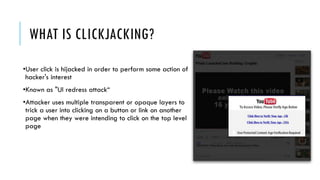
WHAT IS CLICKJACKING?
•User click is hijacked in order to perform some action of
hacker's interest
•Known as "UI redress attack“
•Attacker uses multiple transparent or opaque layers to
trick a user into clicking on a button or link on another
page when they were intending to click on the top level
page
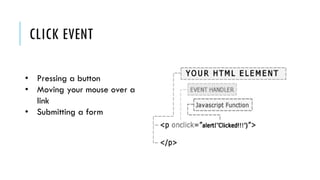
CLICK EVENT
• Pressing a button
• Moving your mouse over a
link
• Submitting a form
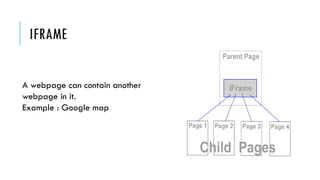
IFRAME
A webpage can contain another
webpage in it.
Example : Google map
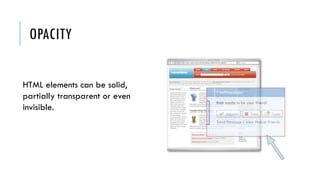
OPACITY
HTML elements can be solid,
partially transparent or even
invisible.
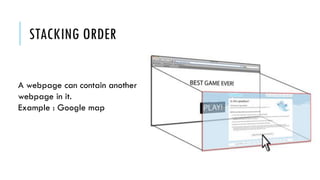
STACKING ORDER
A webpage can contain another
webpage in it.
Example : Google map
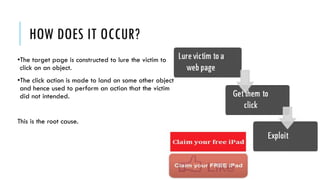
HOW DOES IT OCCUR?
•The target page is constructed to lure the victim to
click on an object.
•The click action is made to land on some other object
and hence used to perform an action that the victim
did not intended.
This is the root cause.
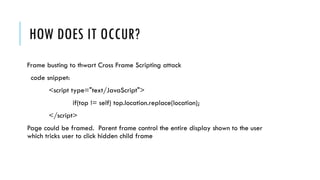
HOW DOES IT OCCUR?
Frame busting to thwart Cross Frame Scripting attack
code snippet:
<script type="text/JavaScript">
if(top != self) top.location.replace(location);
</script>
Page could be framed. Parent frame control the entire display shown to the user
which tricks user to click hidden child frame
THREAT TO USER
•Tricking users into enabling their webcam and microphone through Flash
•Tricking users into making their social networking profile information public Downloading and
running a malware (malicious software) allowing to a remote attacker to take control of
others computers Making users follow someone on Twitter
•Sharing or liking links on Facebook
•Getting likes on Facebook fan page or +1 on Google Plus
•Clicking Google AdSense ads to generate pay per click revenue
•Playing YouTube videos to gain views
•Following someone on Facebook
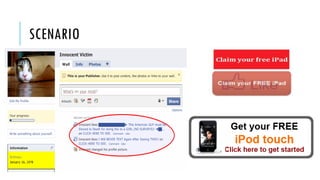
SCENARIO
STEPS TAKEN SO FAR…
X-Frame-Options gave three options:
X-Frame- Options: DENY
X-Frame- Options: SAMEORIGIN
X-Frame- Options: ALLOW-FROM www.xyz.com
Drawback of XFO
SAMEORIGIIN
CLASSIFICATION
Compromising target display integrity
 Hiding the target element
 Likejacking
 Tweet bomb
 Partial overlays
Compromising pointer integrity
 Cursorjacking
 Stroke jacking
Compromising temporal integrity
 Bait and switch
COMPROMISING TARGET DISPLAY INTEGRITY
Attacker creates an illusion for the victim
Irritating for legitimate object over a target object
Victim gets confused and clicks on the object
Actual click lands media site to gain specific information on the target
COMPROMISING TARGET DISPLAY INTEGRITY
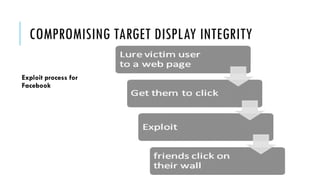
Exploit process for
Facebook
COMPROMISING TARGET DISPLAY INTEGRITY
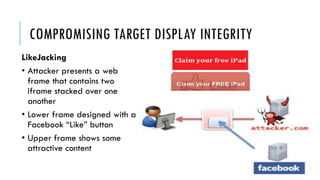
LikeJacking
• Attacker presents a web
frame that contains two
iframe stacked over one
another
• Lower frame designed with a
Facebook “Like” button
• Upper frame shows some
attractive content
COMPROMISING TARGET DISPLAY INTEGRITY
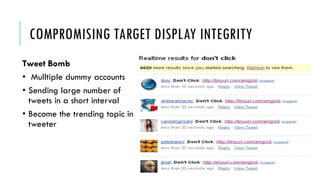
Tweet Bomb
• Mulltiple dummy accounts
• Sending large number of
tweets in a short interval
• Become the trending topic in
tweeter
COMPROMISING POINTER INTEGRITY
•Attacker displays blinking cursor in a
text field
•Victim clicks in the text field and his click
is hijacked
• Attacker displays a fake cursor
icon
• Victim gets confused and then
misinterprets the cursor
COMPROMISING POINTER INTEGRITY
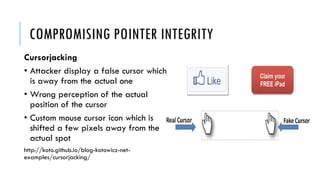
Cursorjacking
• Attacker display a false cursor which
is away from the actual one
• Wrong perception of the actual
position of the cursor
• Custom mouse cursor icon which is
shifted a few pixels away from the
actual spot
http://koto.github.io/blog-kotowicz-net-
examples/cursorjacking/
COMPROMISING POINTER INTEGRITY
Strokejacking
•Blinking cursor which asks for a keyboard input
•Attacker switch keyboard focus to the target element
•Blinking cursor confuses victims into thinking that they are typing text into the
attacker’s input field, whereas they are actually interacting with the target element.
COMPROMISING TEMPORAL INTEGRITY
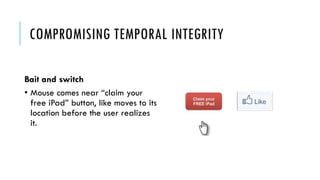
Bait and switch
• Mouse comes near “claim your
free iPad” button, like moves to its
location before the user realizes
it.
COMPROMISING TEMPORAL INTEGRITY
•Attacker captures the mouse hovering event
•When the click is just about to launch , attacker swaps the position of the target
element and the decoy element
•To increase the probability of success attacker may ask the victim to click multiple
times or double click
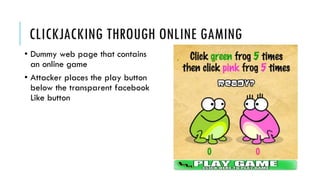
CLICKJACKING THROUGH ONLINE GAMING
• Dummy web page that contains
an online game
• Attacker places the play button
below the transparent facebook
Like button
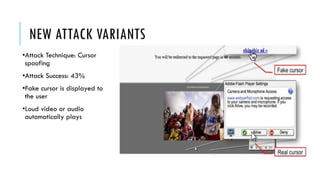
NEW ATTACK VARIANTS
•Attack Technique: Cursor
spoofing
•Attack Success: 43%
•Fake cursor is displayed to
the user
•Loud video or audio
automatically plays
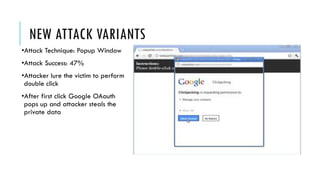
NEW ATTACK VARIANTS
•Attack Technique: Popup Window
•Attack Success: 47%
•Attacker lure the victim to perform
double click
•After first click Google OAauth
pops up and attacker steals the
private data
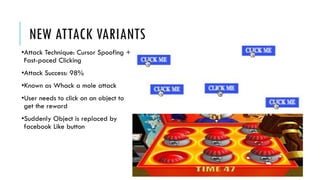
NEW ATTACK VARIANTS
•Attack Technique: Cursor Spoofing +
Fast-paced Clicking
•Attack Success: 98%
•Known as Whack a mole attack
•User needs to click on an object to
get the reward
•Suddenly Object is replaced by
facebook Like button
PRESENT SOLUTION
•CLEARCLICK
•PROCLICK
•CLICKSAFE
•NO SCRIPT ADDON
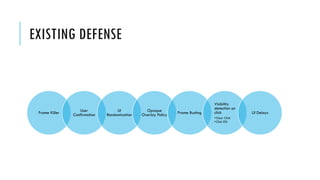
EXISTING DEFENSE
Frame Killer User
Confirmation
UI
Randomization
Opaque
Overlay Policy Frame Busting
Visibility
detection on
click
•Clear Click
•Click IDS
UI Delays
INCONTEXT DEFENSE
Goal:
•Does not require user prompts
•Provides point integrity protection
•Supports target elements that require arbitrary third-party embedding
•Does not break existing sites
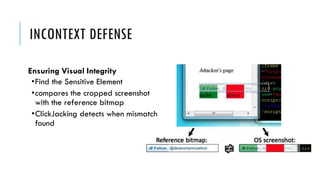
INCONTEXT DEFENSE
Ensuring Visual Integrity
•Find the Sensitive Element
•compares the cropped screenshot
with the reference bitmap
•ClickJacking detects when mismatch
found
INCONTEXT DEFENSE
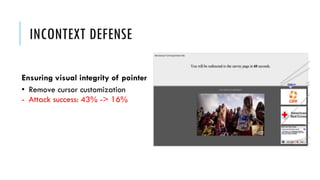
Ensuring visual integrity of pointer
• Remove cursor customization
- Attack success: 43% -> 16%
INCONTEXT DEFENSE
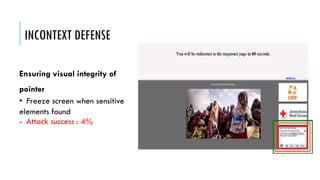
Ensuring visual integrity of
pointer
• Freeze screen when sensitive
elements found
- Attack success : 4%
• Mute the speaker when sensitive elements interacts
- Attack success: 43%
- Attack success (Mute + Freeezing): 2%
INCONTEXT DEFENSE
Ensuring visual integrity of pointer
INCONTEXT DEFENSE
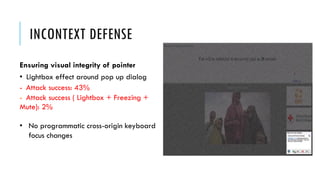
Ensuring visual integrity of pointer
• Lightbox effect around pop up dialog
- Attack success: 43%
- Attack success ( Lightbox + Freezing +
Mute): 2%
• No programmatic cross-origin keyboard
focus changes
INCONTEXT DEFENSE
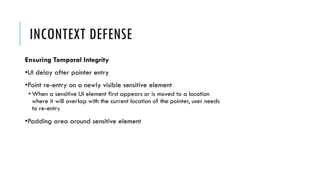
Ensuring Temporal Integrity
•UI delay after pointer entry
•Point re-entry on a newly visible sensitive element
• When a sensitive UI element first appears or is moved to a location
where it will overlap with the current location of the pointer, user needs
to re-entry
•Padding area around sensitive element
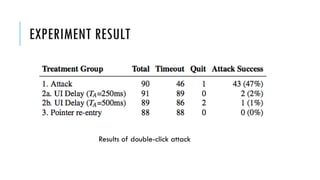
EXPERIMENT RESULT
Results of double-click attack
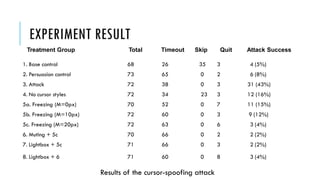
EXPERIMENT RESULT
1. Base control 68 26 35 3 4 (5%)
2. Persuasion control 73 65 0 2 6 (8%)
3. Attack 72 38 0 3 31 (43%)
4. No cursor styles 72 34 23 3 12 (16%)
5a. Freezing (M=0px) 70 52 0 7 11 (15%)
5b. Freezing (M=10px) 72 60 0 3 9 (12%)
5c. Freezing (M=20px) 72 63 0 6 3 (4%)
6. Muting + 5c 70 66 0 2 2 (2%)
7. Lightbox + 5c 71 66 0 3 2 (2%)
8. Lightbox + 6 71 60 0 8 3 (4%)
Treatment Group Total Timeout Skip Quit Attack Success
Results of the cursor-spoofing attack
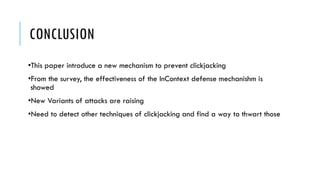
CONCLUSION
•This paper introduce a new mechanism to prevent clickjacking
•From the survey, the effectiveness of the InContext defense mechanishm is
showed
•New Variants of attacks are raising
•Need to detect other techniques of clickjacking and find a way to thwart those
Thank You :D

Click jacking

  • 1.
    CLICKJACKING : A WEBPAGE STEALS YOUR SOCIAL INTERACTIONS Faysal Hossain Shezan CSE,BUET
  • 2.
    REFERENCE CLICKJACKING : AWEB PAGE CAN HEAR and SEE YOU  Article  Publishing Year 2014/15 Clickjacking: Attacks and Defenses  Presented as part of the 21st USENIX Security Symposium (USENIX Security 12)  Publishing Year 2012
  • 3.
    OVERVIEW Root cause ofclickjacking is identified New variants of ClickJacking attack Drawbacks of existing defense Proposing a new defense mechanism A survey on Amazon Mechanical Turk with 2064 participants
  • 4.
    WHAT IS CLICKJACKING? •Userclick is hijacked in order to perform some action of hacker's interest •Known as "UI redress attack“ •Attacker uses multiple transparent or opaque layers to trick a user into clicking on a button or link on another page when they were intending to click on the top level page
  • 5.
    CLICK EVENT • Pressinga button • Moving your mouse over a link • Submitting a form
  • 6.
    IFRAME A webpage cancontain another webpage in it. Example : Google map
  • 7.
    OPACITY HTML elements canbe solid, partially transparent or even invisible.
  • 8.
    STACKING ORDER A webpagecan contain another webpage in it. Example : Google map
  • 9.
    HOW DOES ITOCCUR? •The target page is constructed to lure the victim to click on an object. •The click action is made to land on some other object and hence used to perform an action that the victim did not intended. This is the root cause.
  • 10.
    HOW DOES ITOCCUR? Frame busting to thwart Cross Frame Scripting attack code snippet: <script type="text/JavaScript"> if(top != self) top.location.replace(location); </script> Page could be framed. Parent frame control the entire display shown to the user which tricks user to click hidden child frame
  • 11.
    THREAT TO USER •Trickingusers into enabling their webcam and microphone through Flash •Tricking users into making their social networking profile information public Downloading and running a malware (malicious software) allowing to a remote attacker to take control of others computers Making users follow someone on Twitter •Sharing or liking links on Facebook •Getting likes on Facebook fan page or +1 on Google Plus •Clicking Google AdSense ads to generate pay per click revenue •Playing YouTube videos to gain views •Following someone on Facebook
  • 12.
  • 13.
    STEPS TAKEN SOFAR… X-Frame-Options gave three options: X-Frame- Options: DENY X-Frame- Options: SAMEORIGIN X-Frame- Options: ALLOW-FROM www.xyz.com Drawback of XFO SAMEORIGIIN
  • 14.
    CLASSIFICATION Compromising target displayintegrity  Hiding the target element  Likejacking  Tweet bomb  Partial overlays Compromising pointer integrity  Cursorjacking  Stroke jacking Compromising temporal integrity  Bait and switch
  • 15.
    COMPROMISING TARGET DISPLAYINTEGRITY Attacker creates an illusion for the victim Irritating for legitimate object over a target object Victim gets confused and clicks on the object Actual click lands media site to gain specific information on the target
  • 16.
    COMPROMISING TARGET DISPLAYINTEGRITY Exploit process for Facebook
  • 17.
    COMPROMISING TARGET DISPLAYINTEGRITY LikeJacking • Attacker presents a web frame that contains two iframe stacked over one another • Lower frame designed with a Facebook “Like” button • Upper frame shows some attractive content
  • 18.
    COMPROMISING TARGET DISPLAYINTEGRITY Tweet Bomb • Mulltiple dummy accounts • Sending large number of tweets in a short interval • Become the trending topic in tweeter
  • 19.
    COMPROMISING POINTER INTEGRITY •Attackerdisplays blinking cursor in a text field •Victim clicks in the text field and his click is hijacked • Attacker displays a fake cursor icon • Victim gets confused and then misinterprets the cursor
  • 20.
    COMPROMISING POINTER INTEGRITY Cursorjacking •Attacker display a false cursor which is away from the actual one • Wrong perception of the actual position of the cursor • Custom mouse cursor icon which is shifted a few pixels away from the actual spot http://koto.github.io/blog-kotowicz-net- examples/cursorjacking/
  • 21.
    COMPROMISING POINTER INTEGRITY Strokejacking •Blinkingcursor which asks for a keyboard input •Attacker switch keyboard focus to the target element •Blinking cursor confuses victims into thinking that they are typing text into the attacker’s input field, whereas they are actually interacting with the target element.
  • 22.
    COMPROMISING TEMPORAL INTEGRITY Baitand switch • Mouse comes near “claim your free iPad” button, like moves to its location before the user realizes it.
  • 23.
    COMPROMISING TEMPORAL INTEGRITY •Attackercaptures the mouse hovering event •When the click is just about to launch , attacker swaps the position of the target element and the decoy element •To increase the probability of success attacker may ask the victim to click multiple times or double click
  • 24.
    CLICKJACKING THROUGH ONLINEGAMING • Dummy web page that contains an online game • Attacker places the play button below the transparent facebook Like button
  • 25.
    NEW ATTACK VARIANTS •AttackTechnique: Cursor spoofing •Attack Success: 43% •Fake cursor is displayed to the user •Loud video or audio automatically plays
  • 26.
    NEW ATTACK VARIANTS •AttackTechnique: Popup Window •Attack Success: 47% •Attacker lure the victim to perform double click •After first click Google OAauth pops up and attacker steals the private data
  • 27.
    NEW ATTACK VARIANTS •AttackTechnique: Cursor Spoofing + Fast-paced Clicking •Attack Success: 98% •Known as Whack a mole attack •User needs to click on an object to get the reward •Suddenly Object is replaced by facebook Like button
  • 28.
  • 29.
    EXISTING DEFENSE Frame KillerUser Confirmation UI Randomization Opaque Overlay Policy Frame Busting Visibility detection on click •Clear Click •Click IDS UI Delays
  • 30.
    INCONTEXT DEFENSE Goal: •Does notrequire user prompts •Provides point integrity protection •Supports target elements that require arbitrary third-party embedding •Does not break existing sites
  • 31.
    INCONTEXT DEFENSE Ensuring VisualIntegrity •Find the Sensitive Element •compares the cropped screenshot with the reference bitmap •ClickJacking detects when mismatch found
  • 32.
    INCONTEXT DEFENSE Ensuring visualintegrity of pointer • Remove cursor customization - Attack success: 43% -> 16%
  • 33.
    INCONTEXT DEFENSE Ensuring visualintegrity of pointer • Freeze screen when sensitive elements found - Attack success : 4%
  • 34.
    • Mute thespeaker when sensitive elements interacts - Attack success: 43% - Attack success (Mute + Freeezing): 2% INCONTEXT DEFENSE Ensuring visual integrity of pointer
  • 35.
    INCONTEXT DEFENSE Ensuring visualintegrity of pointer • Lightbox effect around pop up dialog - Attack success: 43% - Attack success ( Lightbox + Freezing + Mute): 2% • No programmatic cross-origin keyboard focus changes
  • 36.
    INCONTEXT DEFENSE Ensuring TemporalIntegrity •UI delay after pointer entry •Point re-entry on a newly visible sensitive element • When a sensitive UI element first appears or is moved to a location where it will overlap with the current location of the pointer, user needs to re-entry •Padding area around sensitive element
  • 37.
    EXPERIMENT RESULT Results ofdouble-click attack
  • 38.
    EXPERIMENT RESULT 1. Basecontrol 68 26 35 3 4 (5%) 2. Persuasion control 73 65 0 2 6 (8%) 3. Attack 72 38 0 3 31 (43%) 4. No cursor styles 72 34 23 3 12 (16%) 5a. Freezing (M=0px) 70 52 0 7 11 (15%) 5b. Freezing (M=10px) 72 60 0 3 9 (12%) 5c. Freezing (M=20px) 72 63 0 6 3 (4%) 6. Muting + 5c 70 66 0 2 2 (2%) 7. Lightbox + 5c 71 66 0 3 2 (2%) 8. Lightbox + 6 71 60 0 8 3 (4%) Treatment Group Total Timeout Skip Quit Attack Success Results of the cursor-spoofing attack
  • 39.
    CONCLUSION •This paper introducea new mechanism to prevent clickjacking •From the survey, the effectiveness of the InContext defense mechanishm is showed •New Variants of attacks are raising •Need to detect other techniques of clickjacking and find a way to thwart those
  • 40.