How to use Google BigQuery
(Github_Repo)
BigQuery public datasets
• BigQuery is a service provided by Google Cloud Platform
• Google provides various public dataset (like- Github dataset, NIH
chest x-ray dataset)
• One can analyze their dataset by performing legacy SQL or standard
SQL queries
• You can learn more about BigQuery from
https://cloud.google.com/bigquery/public-data/
Step 1: Create Account
• Open a google account
• Visit: https://cloud.google.com/blog/products/gcp/github-on-
bigquery-analyze-all-the-open-source-code
• Click Free Trial
• Google provides $300 as free credit for accessing the services from
Google Cloud Platform
• For example, When you make a query, they will charge you based on
that query
• You can even purchase extra credit
• They provide you to create 9 project as a free quota
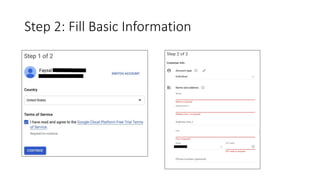
Step 2: Fill Basic Information
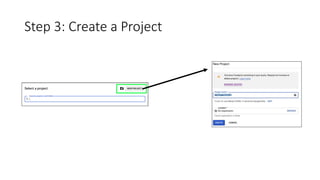
Step 3: Create a Project
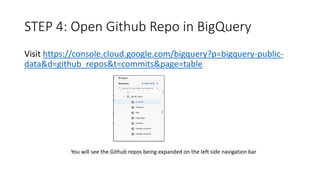
STEP 4: Open Github Repo in BigQuery
Visit https://console.cloud.google.com/bigquery?p=bigquery-public-
data&d=github_repos&t=commits&page=table
You will see the Github repos being expanded on the left side navigation bar
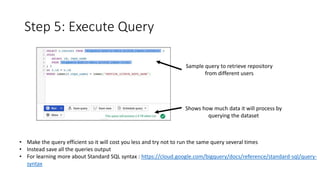
Step 5: Execute Query
Sample query to retrieve repository
from different users
Shows how much data it will process by
querying the dataset
• Make the query efficient so it will cost you less and try not to run the same query several times
• Instead save all the queries output
• For learning more about Standard SQL syntax : https://cloud.google.com/bigquery/docs/reference/standard-sql/query-
syntax
Bingo!
You have successfully installed and
learnt how to use BigQuery to
analyze data!

Gcp github-bigquery

  • 1.
    How to useGoogle BigQuery (Github_Repo)
  • 2.
    BigQuery public datasets •BigQuery is a service provided by Google Cloud Platform • Google provides various public dataset (like- Github dataset, NIH chest x-ray dataset) • One can analyze their dataset by performing legacy SQL or standard SQL queries • You can learn more about BigQuery from https://cloud.google.com/bigquery/public-data/
  • 3.
    Step 1: CreateAccount • Open a google account • Visit: https://cloud.google.com/blog/products/gcp/github-on- bigquery-analyze-all-the-open-source-code • Click Free Trial • Google provides $300 as free credit for accessing the services from Google Cloud Platform • For example, When you make a query, they will charge you based on that query • You can even purchase extra credit • They provide you to create 9 project as a free quota
  • 4.
    Step 2: FillBasic Information
  • 5.
    Step 3: Createa Project
  • 6.
    STEP 4: OpenGithub Repo in BigQuery Visit https://console.cloud.google.com/bigquery?p=bigquery-public- data&d=github_repos&t=commits&page=table You will see the Github repos being expanded on the left side navigation bar
  • 7.
    Step 5: ExecuteQuery Sample query to retrieve repository from different users Shows how much data it will process by querying the dataset • Make the query efficient so it will cost you less and try not to run the same query several times • Instead save all the queries output • For learning more about Standard SQL syntax : https://cloud.google.com/bigquery/docs/reference/standard-sql/query- syntax
  • 8.
    Bingo! You have successfullyinstalled and learnt how to use BigQuery to analyze data!